

WEB API 接口签名sign验证入门与实战
目录
- 参考
- 什么是加解密
- 加密方式分类
- 对称加密技术
- 非对称加密技术(RSA加密算法)(数字证书)
- 场景1:公钥加密,私钥解密
- 场景2:秘钥加密:数字签名,公钥解密:验证签名
- MD5(完全不考虑解密,也叫哈希算法,散列算法)
- Postman
- Jmeter
- 接口签名sign原理
- 什么是接口签名
- 为什么做接口签名
- 如何做接口签名
- 对所有参数按key按ASCⅡ码做升序排序
- 把参数名和参数值连接成字符串
- 把申请到的appKey和appSecret连接到字符串的头部
- 用时间戳连接到字符串的尾部,可以增加失效检测
- 增加随机数nonstr防止重放攻击
- 把上述字符串进行md5加密
- 常见签名算法示例
- 示例1
参考
B站讲的最好的接口加密解密以及接口签名sign原理
什么是加解密
加密:在网络上传输的原始数据(明文)经过加密算法加密后形成(密文)传输,防止被窃取
解密:将密文还原成原始数据
加密方式分类
对称式加密:对加密和解密使用同一个秘钥
非对称加密:非对称式加密需要两个秘钥(双钥),分别叫公钥和秘钥,这两把秘钥可以相互加解密。公钥公开的,不需要保密,而私钥是保密的。
对称加密技术
- DES加密算法
- AES加密算法
- Base64算法
可以在https://www.bejson.com/enc/aesdes/体验
des和aes每次加密之后密文不一样,而Base64加密之后密文固定
非对称加密技术(RSA加密算法)(数字证书)
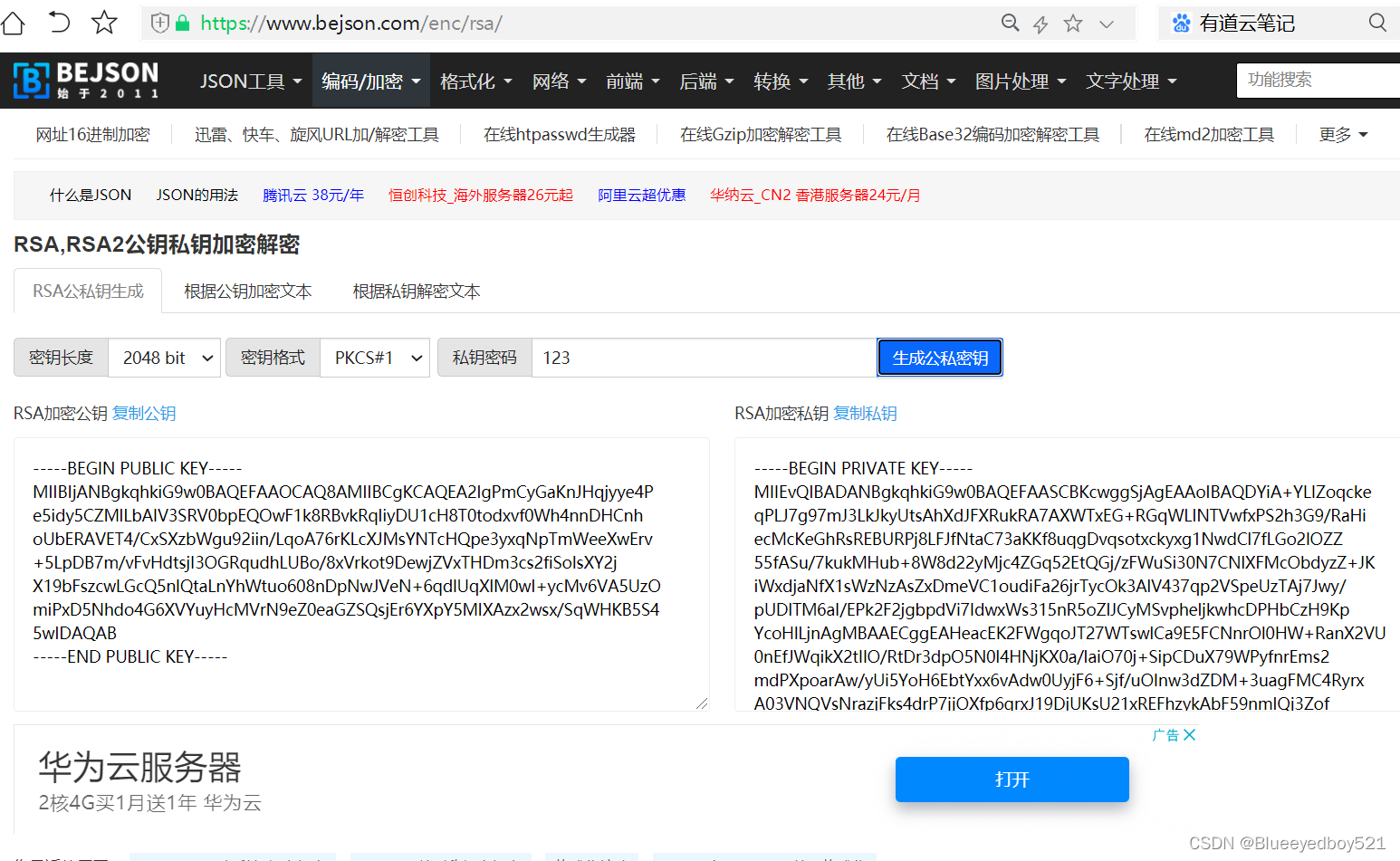
通过网站https://www.bejson.com/enc/rsa/在线生成公钥和私钥,并且可以进行公钥加密和私钥解密测试
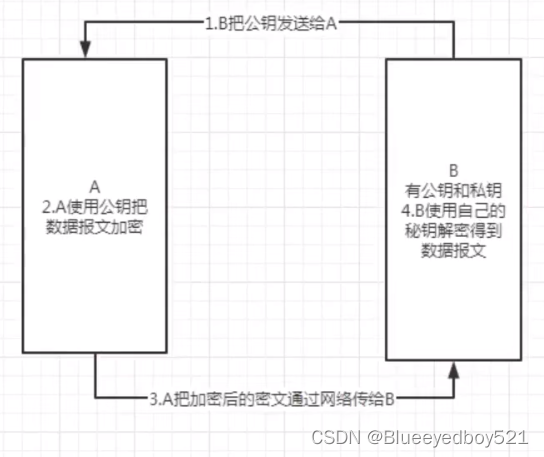
场景1:公钥加密,私钥解密
两个用户:A和B,B有双钥;A想把一个数据报文通过加密方式发给B
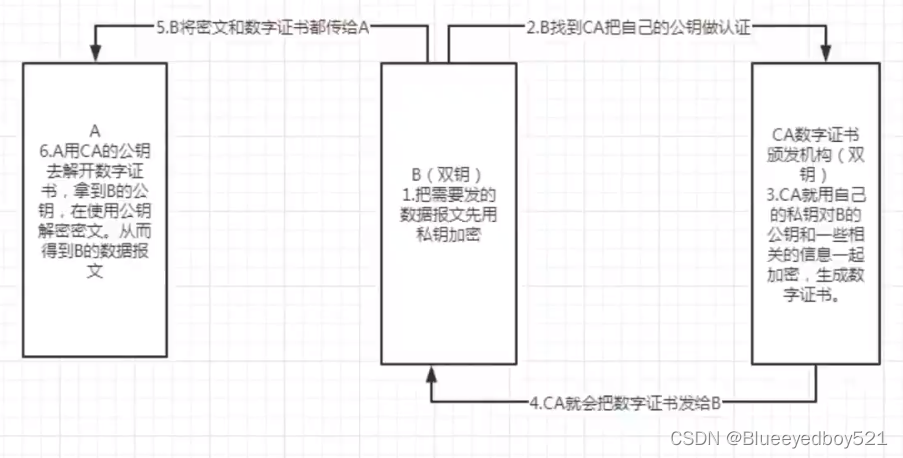
场景2:秘钥加密:数字签名,公钥解密:验证签名
数字证书由来:由于公钥是公开的不安全,所以需要第三方的CA(数字证书颁发机构),对公钥加密,加密后的东西就叫数字证书。
数字证书包括:B用户基本信息及B的公钥的信息。X509的标准
CA:双钥,通过私钥加密
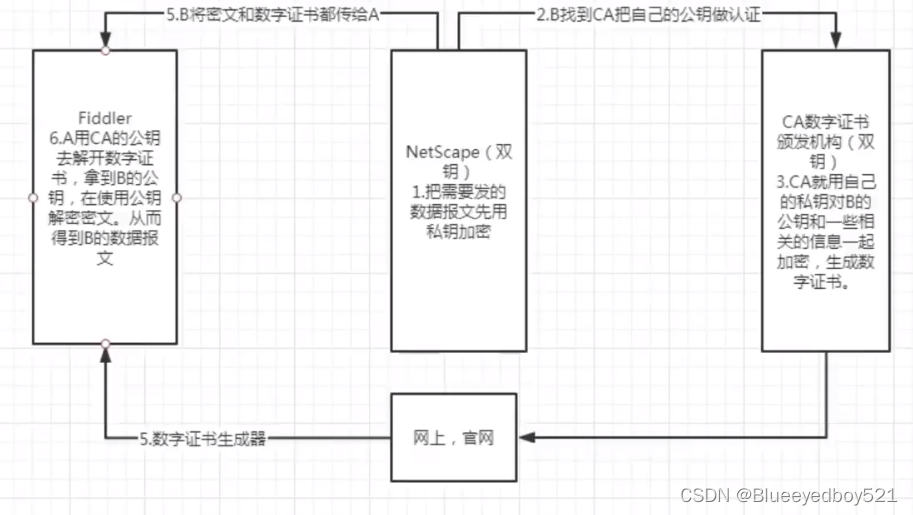
Fiddler不能直接抓取https协议的数据报文,需要安装一个数字证书
https = http + ssl安全传输协议
ssl安全传输协议:安全套接层,NetScape研发
MD5(完全不考虑解密,也叫哈希算法,散列算法)
Postman
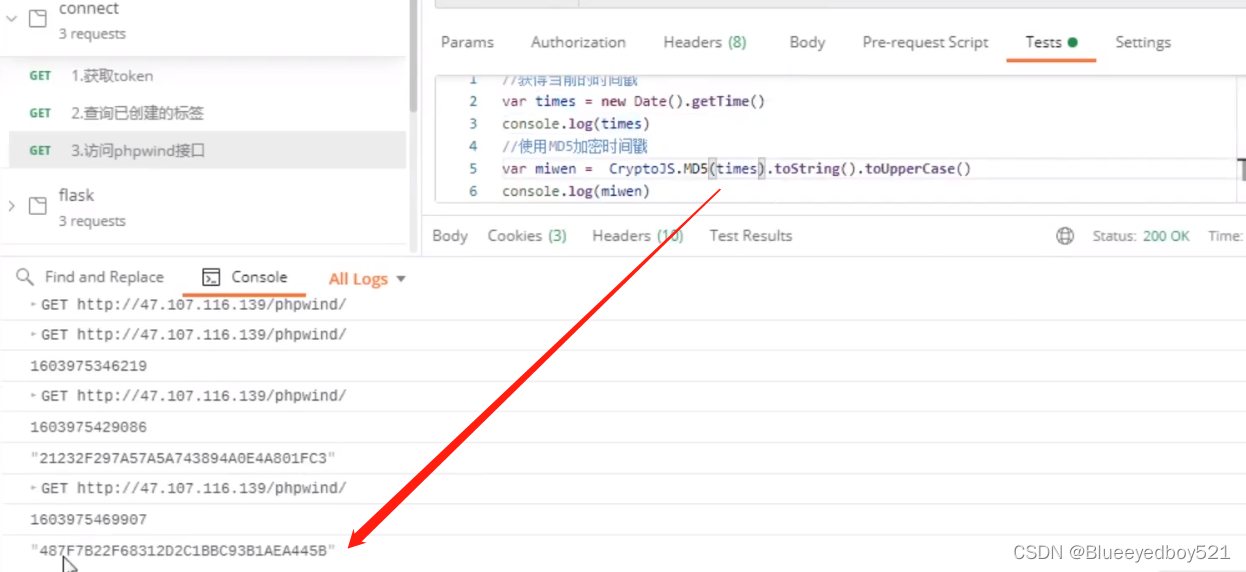
Jmeter
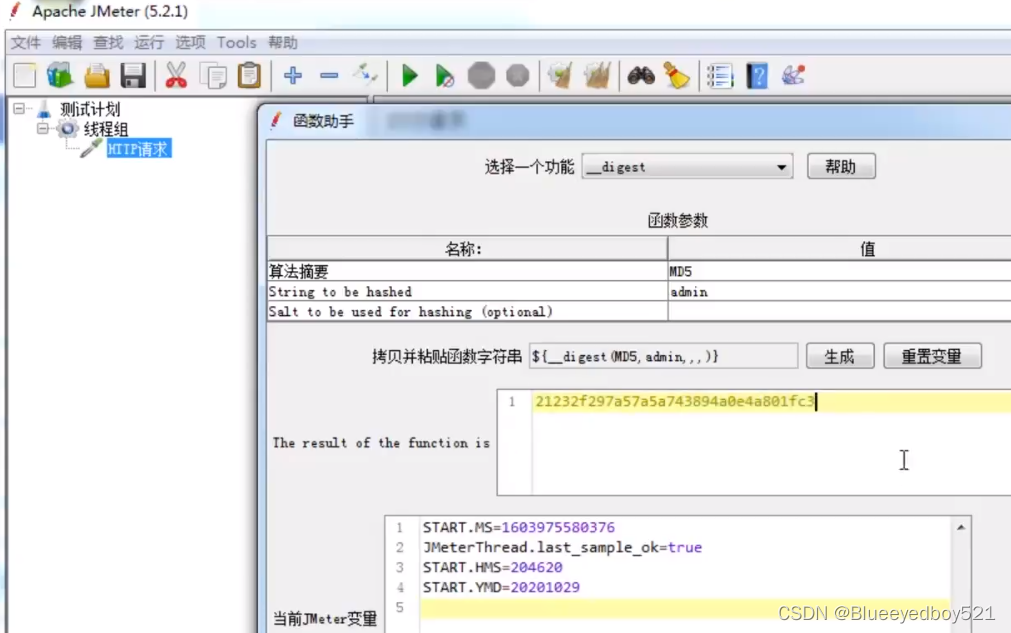
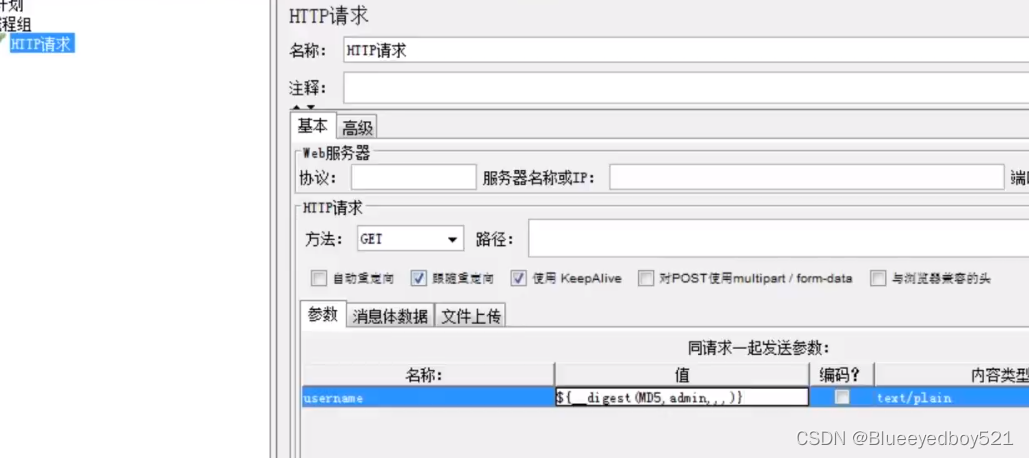
${__digest(MD5,admin,)}
接口签名sign原理
什么是接口签名
接口签名:使用用户名,密码,时间戳和所有的排过序之后的参数组合起来,再加密得到的字符串,字符串是唯一的有权访问接口的鉴权码
用户名:appKey
密码:appSecret
为什么做接口签名
- 防伪装攻击
- 防篡改攻击
- 防重放攻击
- 防数据泄露
保证访问者的合法性。保证参数不被修改,确保请求的唯一性
如何做接口签名
对所有参数按key按ASCⅡ码做升序排序
比如参数是?c=1&b=2&a=3
排序之后是a,b,c
把参数名和参数值连接成字符串
a=1&b=2&c=3
把申请到的appKey和appSecret连接到字符串的头部
appKey=admin&appSecret=123&a=1&b=2&c=3
用时间戳连接到字符串的尾部,可以增加失效检测
比如1分钟内有效
appKey=admin&appSecret=123&a=1&b=2&c=3×tamp=1666757432136
增加随机数nonstr防止重放攻击
nonstr可以是随机数,最好是uuid
appKey=admin&appSecret=123&a=1&b=2&c=3×tamp=1666757432136&nonstr=123123
把上述字符串进行md5加密
String str = "appKey=admin&appSecret=123&a=1&b=2&c=3×tamp=1666757432136&nonstr=123123";
String sign = md5(str);
常见签名算法示例
示例1
签名算法
签名算法描述如下:
1.将请求参数按参数名升序排序;
2.按请求参数名及参数值相互连接组成一个字符串:…;
3.将应用密钥分别添加到以上请求参数串的头部和尾部:<请求参数字符串>;
4.对该字符串进行MD5(全部大写),MD5后的字符串即是这些请求参数对应的签名;
5.该签名值使用sign参数一起和其它请求参数一起发送给服务开放平台。
伪代码:
Map paramsMap = new ...; // 参数Set keySet = paramsMap.keySet();
List paramNames = new ArrayList(keySet);
// 1.
Collections.sort(paramNames);StringBuilder paramNameValue = new StringBuilder();
// 2.
for (String paramName : paramNames) {paramNameValue.append(paramName).append(paramsMap.get(paramName));
}
// 3.
String source = secret + paramNameValue.toString() + secret;
// 4.
String sign = md5(source);
// 5.
paramsMap.put("sign",sign);
代码示例
import java.io.IOException;
import java.net.URLEncoder;
import java.security.MessageDigest;
import java.text.SimpleDateFormat;
import java.util.ArrayList;
import java.util.Collections;
import java.util.Date;
import java.util.HashMap;
import java.util.List;
import java.util.Map;
import java.util.Set;import org.junit.Test;import com.alibaba.fastjson.JSON;import junit.framework.TestCase;public class PostTest extends TestCase {@Testpublic void testPost() throws IOException {String appKey = "xxx";String secret = "xxx";// 业务参数Map jsonMap = new HashMap();jsonMap.put("dicCode", "terminalType");String json = JSON.toJSONString(jsonMap);json = URLEncoder.encode(json, "utf-8");// 系统参数Map param = new HashMap();param.put("name", "dictionaryItem.list");param.put("version", "1.0");param.put("app_key", appKey);param.put("data", json);param.put("timestamp", getTime());param.put("format", "json");String sign = buildSign(param, secret);param.put("sign", sign);/*// 最终请求数据{"name":"dictionaryItem.list","version":"1.0","app_key":"test","data":"%7B%22dicCode%22%3A%22terminalType%22%7D","timestamp":"2021-12-15 10:25:02","format":"json","sign":"4B291FFFFDD6F0E3FB9708AC0F7AC334"}*/System.out.println("=====请求数据=====");String postJson = JSON.toJSONString(param);System.out.println(postJson);// contentType:application/json// postJson放到请求体中// 发送请求String resp = HttpRequest.post("https://xxx.net/api").body(postJson).execute().body();System.out.println(resp);/*响应结果:{"code":"0","data":[{"dicCode":"terminalType","isplay":1,"itemId":120,"itemName":"音柱/音箱","itemValue":"1","sort":1},{"dicCode":"terminalType","isplay":1,"itemId":121,"itemName":"AIO报警箱","itemValue":"2","sort":2},{"dicCode":"terminalType","isplay":1,"itemId":122,"itemName":"融媒体客服主机","itemValue":"3","sort":3},{"dicCode":"terminalType","isplay":1,"itemId":123,"itemName":"网络调音台","itemValue":"4","sort":4},{"dicCode":"terminalType","isplay":1,"itemId":124,"itemName":"云广播适配器","itemValue":"5","sort":5},{"dicCode":"terminalType","isplay":1,"itemId":125,"itemName":"音频编码器","itemValue":"6","sort":6},{"dicCode":"terminalType","isplay":1,"itemId":126,"itemName":"村级播控主机","itemValue":"7","sort":7},{"dicCode":"terminalType","isplay":1,"itemId":127,"itemName":"云话筒","itemValue":"8"},{"dicCode":"terminalType","isplay":1,"itemId":128,"itemName":"安卓手机客户端","itemValue":"9"},{"dicCode":"terminalType","isplay":1,"itemId":129,"itemName":"收扩机","itemValue":"10","sort":8}]}*/}/*** 构建签名** @param paramsMap*            参数* @param secret*            密钥* @return* @throws IOException*/public static String buildSign(Map paramsMap, String secret) throws IOException {Set keySet = paramsMap.keySet();List paramNames = new ArrayList(keySet);Collections.sort(paramNames);StringBuilder paramNameValue = new StringBuilder();for (String paramName : paramNames) {paramNameValue.append(paramName).append(paramsMap.get(paramName));}String source = secret + paramNameValue.toString() + secret;return md5(source);}/*** 生成md5,全部大写** @param message* @return*/public static String md5(String message) {try {// 1 创建一个提供信息摘要算法的对象,初始化为md5算法对象MessageDigest md = MessageDigest.getInstance("MD5");// 2 将消息变成byte数组byte[] input = message.getBytes();// 3 计算后获得字节数组,这就是那128位了byte[] buff = md.digest(input);// 4 把数组每一字节(一个字节占八位)换成16进制连成md5字符串return byte2hex(buff);} catch (Exception e) {throw new RuntimeException(e);}}/*** 二进制转十六进制字符串** @param bytes* @return*/private static String byte2hex(byte[] bytes) {StringBuilder sign = new StringBuilder();for (int i = 0; i < bytes.length; i++) {String hex = Integer.toHexString(bytes[i] & 0xFF);if (hex.length() == 1) {sign.append("0");}sign.append(hex.toUpperCase());}return sign.toString();}/*** 十六进制字符串转二进制** @param hexString* @return*/private static byte[] hexStringToBytes(String hexString) {if (hexString == null || hexString.equals("")) {return null;}hexString = hexString.toUpperCase();int length = hexString.length() / 2;char[] hexChars = hexString.toCharArray();byte[] d = new byte[length];for (int i = 0; i < length; i++) {int pos = i * 2;d[i] = (byte) (charToByte(hexChars[pos]) << 4 | charToByte(hexChars[pos + 1]));}return d;}/*** 二进制数据生成mp3音频文件** @param data     二进制数据* @param filePath 文件目录* @return*/public static String bytesToFile(byte[] data, String filePath) throws IOException {//方法一:直接生成文件String url = filePath + ".mp3";File file = new File(filePath);if (!file.exists()) {file.createNewFile();}FileOutputStream os = new FileOutputStream(file);os.write(data);//方法二:将二进制数据上传阿里云oss,生成文件//String url = "http://" + OSSFactory.build().uploadSuffix(data, ".mp3");return url;}public String getTime() {return new SimpleDateFormat("yyyy-MM-dd HH:mm:ss").format(new Date());}
}
上一篇:卜算子片片模一清