

SpringBoot
SpringBoot
- 项目搭建方式1
- 项目搭建方式2
- SpringBoot文件配置
- application.properties
- application.yml
- SpringBoot整合Mybatis
- SpringBoot整合logback
- SpringBoot整合pageHelper
- SpringBoot整合Druid
- SpringBoot整合FreeMarker
- FreeMarker常用指令(遍历List集合)
- FreeMarker遍历Map集合
- SpringBoot整合Thymeleaf
- Thymeleaf内置对象
- SpringBoot热部署
- SpringBoot打包部署
- 将项目打成jar包
- 项目打成war包
- SpringBoot拦截器配置
- SpringBoot其他注解
- @Configuration
- @Import
- @ImportResource
- @ConfigurationProperties
- JUnit5
- JUnit5常见注解
项目搭建方式1
springboot内置了tomcat
org.springframework.boot spring-boot-starter-parent 2.4.5 org.springframework.boot spring-boot-starter-web 2.4.5 项目搭建方式2
org.springframework.boot spring-boot-dependencies 2.4.5 pom import org.springframework.boot spring-boot-starter-web 2.4.5 SpringBoot文件配置
application.properties
server.servlet.context-path=/springboot03
server.port=8090
application.yml
server:port: 8080servlet:context-path: /springboot03
上下两行隔开两个空格是一个层级。
两者都配置的话.properties的优先级更高。
SpringBoot整合Mybatis
导入依赖:
org.springframework.boot spring-boot-starter-web org.springframework.boot spring-boot-starter-test test org.mybatis.spring.boot mybatis-spring-boot-starter 2.1.4 mysql mysql-connector-java 8.0.21 org.projectlombok lombok 1.18.12 provided application.yml:
spring:datasource:url: jdbc:mysql://localhost:3306/mybatis?characterEncoding=utf8&useSSL=false&serverTimezone=UTC&rewriteBatchedStatements=trueusername: rootpassword: driver-class-name: com.mysql.cj.jdbc.Driver
server:servlet:context-path: /springboot03mybatis:type-aliases-package: com.msb.pojomapper-locations: classpath:mybatis/*.xml
其他的地方就和springmvc的一样了。
SpringBoot整合logback
logback作用: 打印日志
在resourse目录下增加logback.xml文件
%d{yyyy-MM-dd HH:mm:ss.SSS} [%thread] %-5level %logger{50} - %msg%n ${LOG_HOME}/server.%d{yyyy-MM-dd}.log 30 %d{yyyy-MM-dd HH:mm:ss.SSS} [%thread] %-5level %logger{50} - %msg%n 10MB SpringBoot整合pageHelper
导入依赖:
com.github.pagehelper pagehelper-spring-boot-starter 1.3.0 Controller层:
@RequestMapping("findByPage/{pageNum}/{pageSize}")@ResponseBodypublic List findByPage(@PathVariable("pageNum") Integer pageNum,@PathVariable("pageSize") Integer pageSize ){return empService.findByPage(pageNum,pageSize);}
Service层:
@Overridepublic List findByPage(Integer pageNum, Integer pageSize) {Page SpringBoot整合Druid
很方便的帮助我们实现对sql执行的监控
导入依赖:
com.alibaba druid-spring-boot-starter 1.1.10 application.yml配置文件:
spring:datasource:#使用阿里的Druid连接池type: com.alibaba.druid.pool.DruidDataSourcedriver-class-name: com.mysql.cj.jdbc.Driver# 填写你数据库的url、登录名、密码和数据库名url: jdbc:mysql://localhost:3306/mybatis?characterEncoding=utf8&useSSL=false&serverTimezone=UTC&rewriteBatchedStatements=trueusername: rootpassword: druid:#连接池配置信息#初始化大小,最小,最大initial-size: 5min-idle: 5maxActive: 20#配置获取连接等待超时的时间maxWait: 60000# 配置间隔多久才进行一次检测,检测需要关闭的空闲连接,单位是毫秒timeBetweenEvictionRunsMillis: 60000# 配置一个连接在池中最小生存的时间,单位是毫秒minEvictableIdleTimeMillis: 300000validationQuery: SELECT 1testWhileIdle: truetestOnBorrow: falsetestOnReturn: false# 打开PSCache,并且指定每个连接上PSCache的大小poolPreparedStatements: truemaxPoolPreparedStatementPerConnectionSize: 20# 配置监控统计拦截的filters,去掉后监控界面sql无法统计,'wall'用于防火墙filters: stat,wall,slf4j# 通过connectProperties属性来打开mergeSql功能;慢SQL记录connectionProperties: druid.stat.mergeSql\=true;druid.stat.slowSqlMillis\=5000# 配置DruidStatFilterweb-stat-filter:enabled: trueurl-pattern: "/*"exclusions: "*.js,*.gif,*.jpg,*.bmp,*.png,*.css,*.ico,/druid/*"# 配置DruidStatViewServletstat-view-servlet:url-pattern: "/druid/*"# IP白名单(没有配置或者为空,则允许所有访问)allow: 127.0.0.1,192.168.8.109# IP黑名单 (存在共同时,deny优先于allow)deny: 192.168.1.188# 禁用HTML页面上的“Reset All”功能reset-enable: false# 登录名login-username: admin# 登录密码login-password: 123456main:allow-circular-references: trueSpringBoot整合FreeMarker
导入依赖:
org.springframework.boot spring-boot-starter-freemarker Controller:
@Controller
public class FreemarkerController {@RequestMapping("/show")public String freemarger(Map map){map.put("name","漩涡刘能");return "show";}
}
show.ftlh:
Title


${name}
FreeMarker常用指令(遍历List集合)
这里使用.ftlh渲染出来的界面,属性如果为空值,则显示不出来。
需要在ftlh中引入这个指令。
<#setting classic_compatible=true>
Controller:
//查询全部员工信息,展示@RequestMapping("/showEmp")public ModelAndView testList(){ModelAndView mv=new ModelAndView();List list=empService.findAll();System.out.println(list.toString());mv.addObject("empList",list);mv.setViewName("showEmp");return mv;}
showEmp.ftlh:
Title
索引 工号 姓名 岗位 薪资 部门号
<#-- //通过_index可以得到循环的下标-->${emp_index} ${emp.ename} ${emp.job} ${emp.sal} ${emp.deptno}
FreeMarker遍历Map集合
Controller:
//查询全部员工信息,展示@RequestMapping("/showEmpMap")public ModelAndView testMap(){ModelAndView mv=new ModelAndView();List list=empService.findAll();Map empMap=new HashMap<>();for (Emp emp : list) {empMap.put(emp.getEmpno().toString(),emp);}mv.addObject("empMap",empMap);mv.setViewName("showEmpMap");return mv;}
showEmpMap.ftlh:
Title
<#setting classic_compatible=true>
<#--查看Map集合中单独一个元素-->
索引 工号 姓名 岗位 薪资 部门号 ${k_index} ${k} ${empMap[k].ename} ${empMap[k].job} ${empMap[k].sal} ${empMap[k].deptno}
FreeMarker在遍历map集合是,key必须是String
FreeMaker内置函数:
内建函数语法格式: 变量+?+函数名称
显示年月日:         ${today?date}
显示时分秒:      ${today?time}
显示日期+时间:${today?datetime}
自定义格式化:   ${today?string("yyyy年MM月")}
SpringBoot整合Thymeleaf
导入依赖:
org.springframework.boot spring-boot-starter-web org.springframework.boot spring-boot-starter-test test org.mybatis.spring.boot mybatis-spring-boot-starter 2.1.3 mysql mysql-connector-java 8.0.21 org.projectlombok lombok 1.18.12 provided com.alibaba druid-spring-boot-starter 1.1.10 com.github.pagehelper pagehelper-spring-boot-starter 1.2.12 org.springframework.boot spring-boot-starter-thymeleaf 2.4.5 showEmp.html:
Title
展示单个员工信息
工号:
姓名:
职务:
上级:
入职日期:
工号 姓名 职务 上级 入职日期 工资 补助 部门 操作 删除删除删除
Thymeleaf内置对象
Thymeleaf提供了一些内置对象,内置对象可直接在模板中使用。这些对象是以#引用的。
使用内置对象的语法
1引用内置对象需要使用#
2大部分内置对象的名称都以s结尾。如:strings、numbers、dates
3常见内置对象如下
#arrays:数组操作的工具;
#aggregates:操作数组或集合的工具;
#bools:判断boolean类型的工具;
#calendars:类似于#dates,但是是java.util.Calendar类的方法;
#ctx:上下文对象,可以从中获取所有的thymeleaf内置对象;
#dates:日期格式化内置对象,具体方法可以参照java.util.Date;
#numbers: 数字格式化;#strings:字符串格式化,具体方法可以参照String,如startsWith、contains等;
#objects:参照java.lang.Object;
#lists:列表操作的工具,参照java.util.List;
#sets:Set操作工具,参照java.util.Set;#maps:Map操作工具,参照java.util.Map;
#messages:操作消息的工具。
#httpServletRequest.getAttribute('msg')}">

#request.getAttribute('msg')}">


session:

#httpSession.getAttribute('msg')}">

#session.getAttribute('msg')}">


application:

#servletContext.getAttribute('msg')}">
SpringBoot热部署
热部署之后则不需要重启项目,当监听到内容改变后tomcat则自动的进行重启。
步骤:
添加依赖:
org.springframework.boot spring-boot-devtools 2.4.5 true 修改idea自动编译配置:
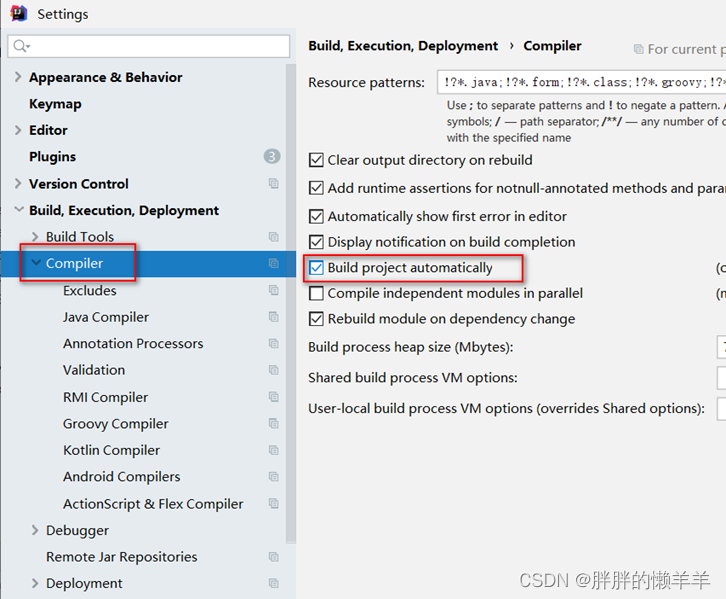
idea2022版本:
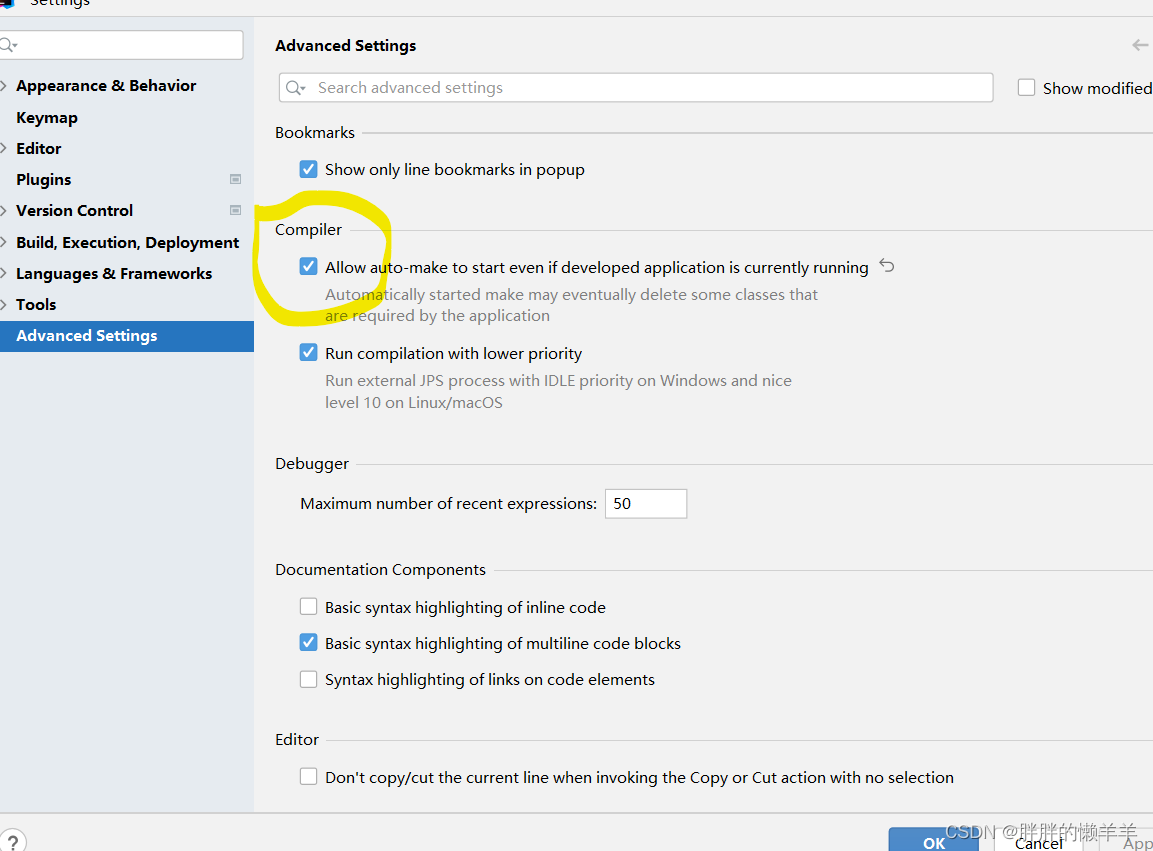
这里要打勾。
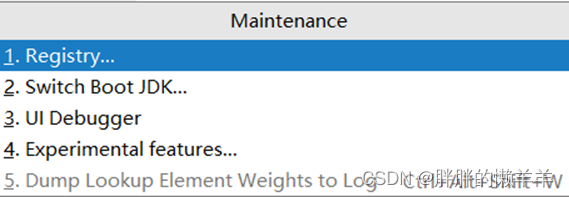
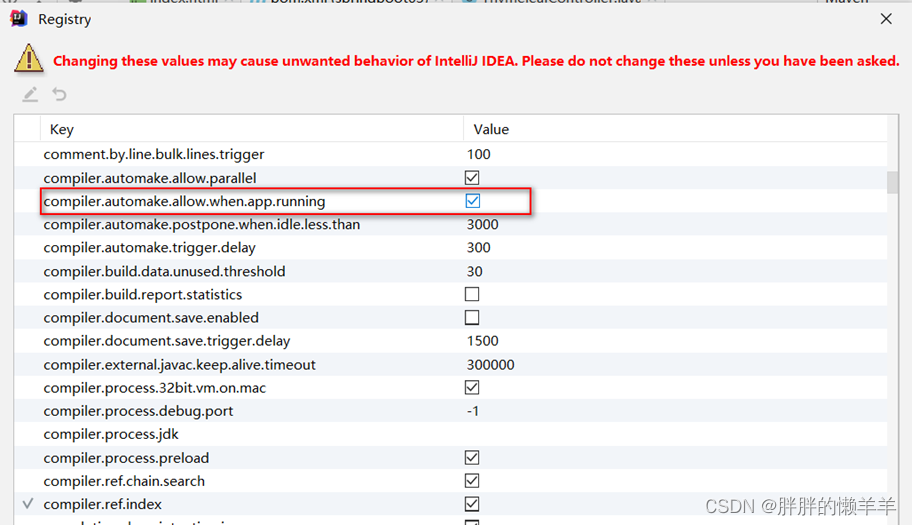
注意在2022以前的版本需要修改Reigstry
Ctrl+Shift+Alt+/ 点击弹出框中Registry…
SpringBoot打包部署
将项目打成jar包
导入依赖:
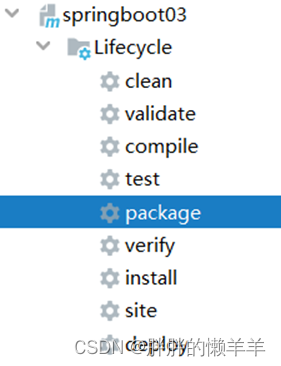
org.springframework.boot spring-boot-maven-plugin true 使用maven package代码打包就可以
项目打成war包
排除项目中自带的所有的Tomcat插件和jsp servlet 依赖,因为这里要将项目放到一个Tomcat上运行
org.springframework.boot spring-boot-starter-web org.springframework.boot spring-boot-starter-tomcat org.springframework.boot spring-boot-starter-tomcat provided SpringBoot的启动类继承SpringBootServletInitializer,并重写configure
@SpringBootApplication
public class Springboot04Application extends SpringBootServletInitializer {//重写配置方法@Overrideprotected SpringApplicationBuilder configure(SpringApplicationBuilder application) {return application.sources(Springboot04Application.class);}public static void main(String[] args) {SpringApplication.run(Springboot04Application.class, args);}}
使用install命令打包项目,并将war包放到tomcat下的webapps下,启动tomcat即可。
SpringBoot拦截器配置
自定义拦截器类:
@Component
public class MyInterceptor implements HandlerInterceptor {@Overridepublic boolean preHandle(HttpServletRequest request, HttpServletResponse response, Object handler) throws Exception {return HandlerInterceptor.super.preHandle(request, response, handler);}@Overridepublic void postHandle(HttpServletRequest request, HttpServletResponse response, Object handler, ModelAndView modelAndView) throws Exception {HandlerInterceptor.super.postHandle(request, response, handler, modelAndView);}@Overridepublic void afterCompletion(HttpServletRequest request, HttpServletResponse response, Object handler, Exception ex) throws Exception {HandlerInterceptor.super.afterCompletion(request, response, handler, ex);}
}
拦截器配置:
@Configuration
public class MyInterceptorConfig implements WebMvcConfigurer {@AutowiredMyInterceptor myInterceptor;//设置拦截器路径@Overridepublic void addInterceptors(InterceptorRegistry registry) {InterceptorRegistration interceptorRegistration = registry.addInterceptor(myInterceptor);interceptorRegistration.addPathPatterns("/**").excludePathPatterns("/login");}
}
SpringBoot其他注解
@Configuration
用来编写配置类,里面有一些bean实例,spring容器从配置类中来获取这些实例。
配置类:
@Configuration
public class MyConfig {@Bean // 向容器中添加一个Bean,以方法名作为Bean的id,返回值类型作为组件的类型public User user1(){return new User("张三","123");}
}
启动类:
@SpringBootApplication
public class Springboot04Application {public static void main(String[] args) {ConfigurableApplicationContext Context = SpringApplication.run(Springboot04Application.class, args);User user1=Context.getBean("user1",User.class);System.out.println(user1);}}
@Import
@Import(User.class)
@Configuration
public class MyConfig {@Bean // 向容器中添加一个Bean,以方法名作为Bean的id,返回值类型作为组件的类型public User user1(){return new User("张三","123");}
}
根据类型来获取bean实例,默认使用无参构造方法来创建实例对象。
@ImportResource
原生配置文件引入,允许我们自己定义xml配置文件,在文件中配置bean
@ImportResource("classpath:beans.xml")
@Configuration
public class MyConfig {@Bean // 向容器中添加一个Bean,以方法名作为Bean的id,返回值类型作为组件的类型public User user1(){return new User("张三","123");}}
@ConfigurationProperties
读取application.properties配置文件中的内容,读取进入bean
JUnit5
JUnit5常见注解
class Springboot04ApplicationTests {@DisplayName("测试方法1:")//是对类的描述@Test  //方法可以独立的运行,不需要再测试了public void test1(){}@BeforeAllpublic void beforeAll(){System.out.println("在所有的测试方法执行之前先执行一次");}@BeforeEachpublic void beforeEach(){System.out.println("在每一个测试方法之前执行该方法");}@AfterEachpublic void afterEach(){System.out.println("在每一个测试方法之后执行该方法");}@AfterAllpublic void afterAll(){System.out.println("在所有方法执行之后执行该方法");}@RepeatedTest(3)public void repeatTest(){System.out.println("重复测试3次");}
}