

Qt 集成 FFmpeg 实现颜色格式转换
目录
1. Qt 集成 FFmpeg
1.1 下载 FFmpeg
1.2 Qt 集成 FFmpeg
1.2.1 修改 .pro 文件
1.2.2 放入 dll 文件
1.2.3 代码中使用 FFmpeg
2. 图像格式转换
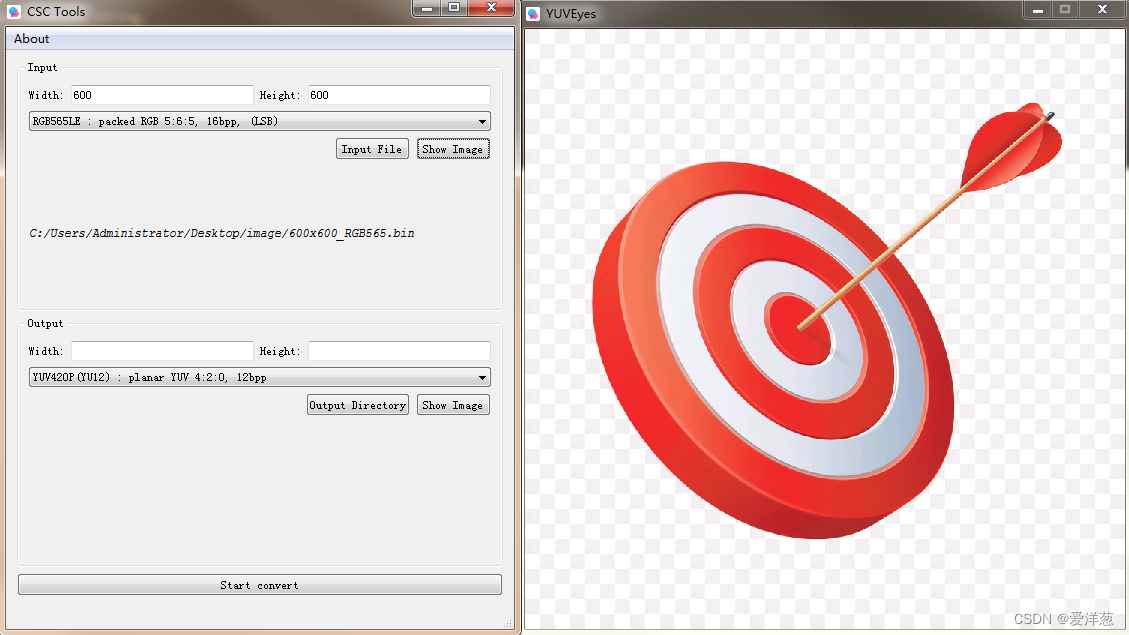
3. 预览
4. 项目地址
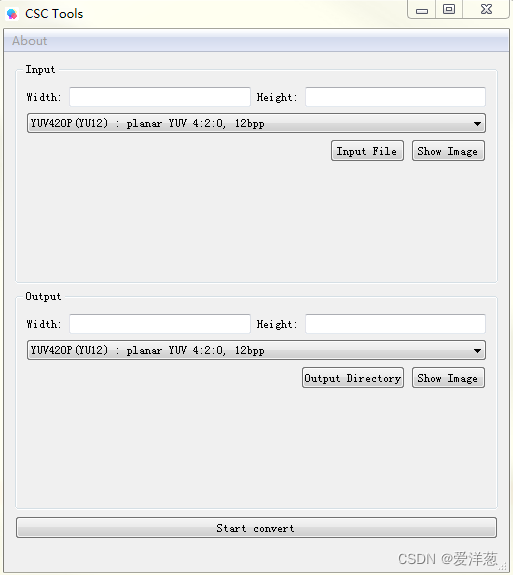
项目需要,写个小工具来实现图像颜色格式的转换,主要的 Feature 如下:
- 支持输入输出图像格式选择:
- 支持对输入图像进行缩放;
- 支持对输入输出图像预览;
支持的图像格式转换如下:
- YUV420P
- NV12
- NV21
- YUV422P
- NV16
- YUYV422
- UYVY422
- YVYU422
- RGB24
- BGR24
- ARGB
- RGBA
- RGB565BE
- RGB565LE
- RGB444BE
- RGB444LE
由于输入输出为纯图片文件,所以需要指定图像的宽高信息;
1. Qt 集成 FFmpeg
Qt 中集成 FFmpeg 的文章非常多,大家可以自行搜索,这里简单的提一下集成的过程;
Windows 上,集成 FFmpeg 的方式有 2 种:
1. 下载 FFmpeg 的库,代码中引用头文件来使用 FFmpeg;
2. 下载 FFmpeg 源码,自行构建;
这里选择第一种,下载 FFmpeg 的 DLL 来集成;
1.1 下载 FFmpeg
下载地址:Download FFmpeg
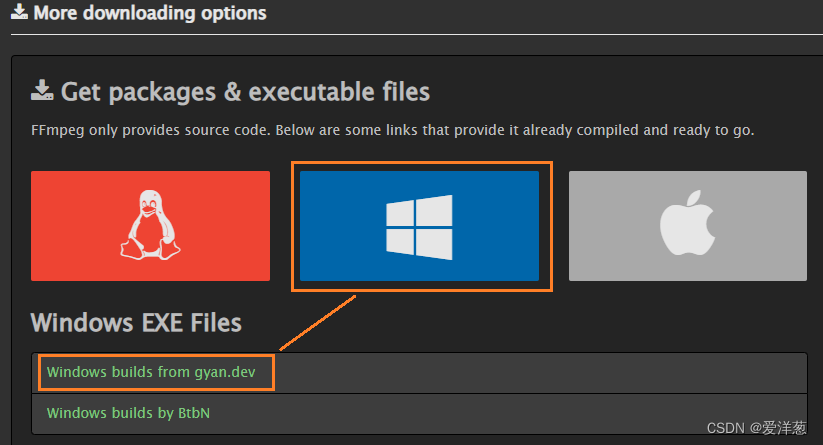
选择 Windows,下面有 2 个 build,随便选一个,我选择的是第一个;
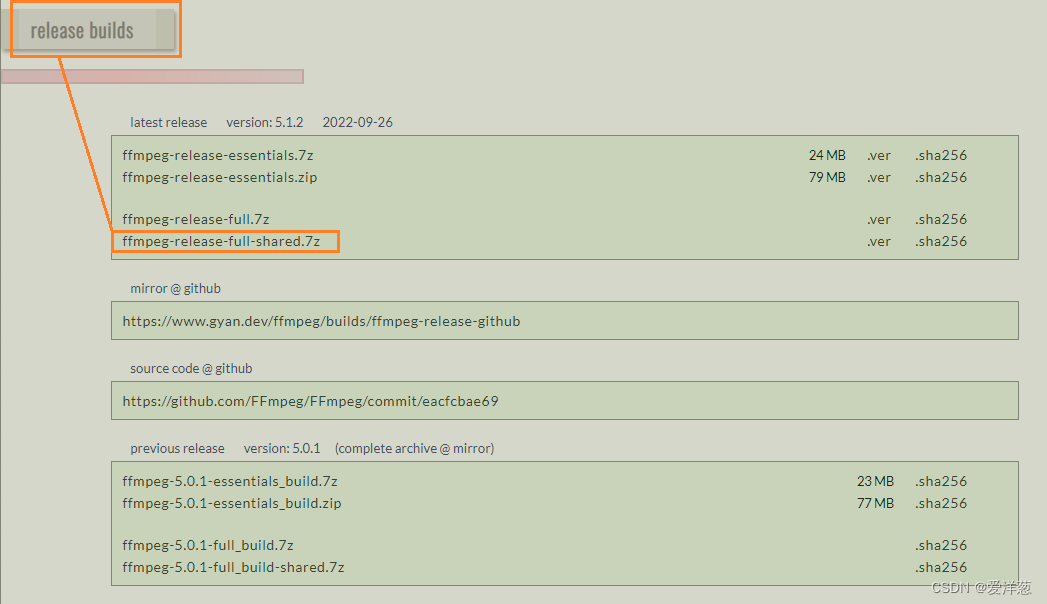
进入后,最先看到的是 master 的 build,咱们选个 Release 的稳定版的,shared 代表是动态链接库,我们选他:
解压后如下:
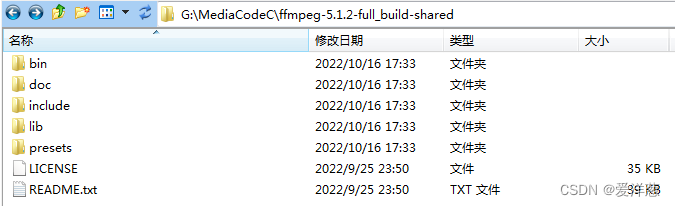
我们要 3 部分,头文件、动态库、和导入库:
动态库在:ffmpeg-5.1.2-full_build-shared\bin
头文件在:ffmpeg-5.1.2-full_build-shared\include
导入库在:ffmpeg-5.1.2-full_build-shared\include\lib
1.2 Qt 集成 FFmpeg
1.2.1 修改 .pro 文件
在 Qt 的工程文件中,指定 FFmpeg 导入的头文件以及库的地方
#-------------------------------------------------
#
# Project created by QtCreator 2022-10-16T17:35:35
#
#-------------------------------------------------QT       += core gui
RC_ICONS = logo.icogreaterThan(QT_MAJOR_VERSION, 4): QT += widgetsTARGET = YUVEyes
TEMPLATE = app# The following define makes your compiler emit warnings if you use
# any feature of Qt which has been marked as deprecated (the exact warnings
# depend on your compiler). Please consult the documentation of the
# deprecated API in order to know how to port your code away from it.
DEFINES += QT_DEPRECATED_WARNINGS
# You can also make your code fail to compile if you use deprecated APIs.
# In order to do so, uncomment the following line.
# You can also select to disable deprecated APIs only up to a certain version of Qt.
#DEFINES += QT_DISABLE_DEPRECATED_BEFORE=0x060000    # disables all the APIs deprecated before Qt 6.0.0CONFIG += c++11SOURCES += \main.cpp \mainwindow.cpp \qtffmpegutils.cppHEADERS += \mainwindow.h \qtffmpegutils.h \error_code.hFORMS += \mainwindow.ui# Default rules for deployment.
qnx: target.path = /tmp/$${TARGET}/bin
else: unix:!android: target.path = /opt/$${TARGET}/bin
!isEmpty(target.path): INSTALLS += targetwin32: {FFMPEG_HOME=G:\MediaCodeC\ffmpeg-5.1.2-full_build-shared#设置 ffmpeg 的头文件INCLUDEPATH += $$FFMPEG_HOME/include#设置导入库的目录一边程序可以找到导入库# -L :指定导入库的目录# -l :指定要导入的 库名称LIBS +=  -L$$FFMPEG_HOME/lib \-lavcodec          \-lavdevice         \-lavfilter         \-lavformat         \-lavutil           \-lpostproc         \-lswresample       \-lswscale
}RESOURCES += \src.qrc
1.2.2 放入 dll 文件
Qt 编译的时候,会生成一个编译的文件夹,将我们用到的 dll 扔进去:
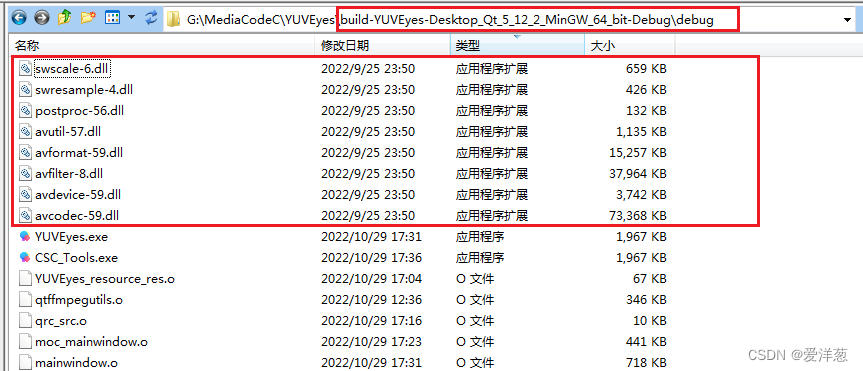
好了,基本环境准备完毕;
1.2.3 代码中使用 FFmpeg
在代码中,包含 FFmpeg 的头文件即可使用 FFmpeg 的库了:
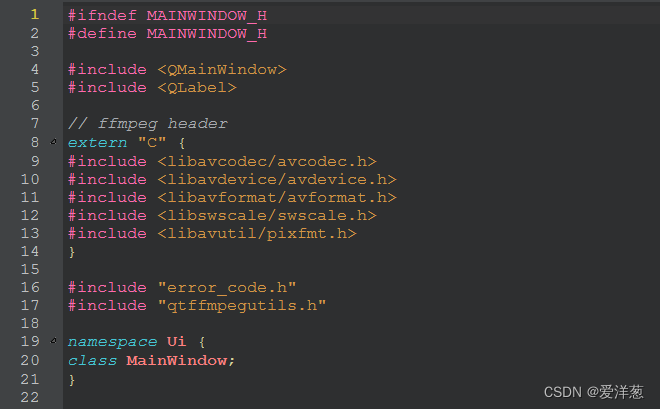
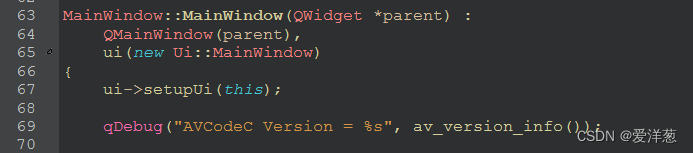
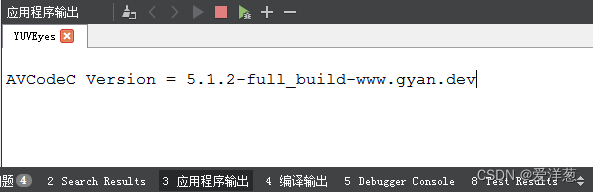
打印 FFmpeg 的 AVCodec 版本号:
2. 图像格式转换
图像格式转换可以使用 FFmpeg 的 sws_scale 函数进行,该函数的原型为:
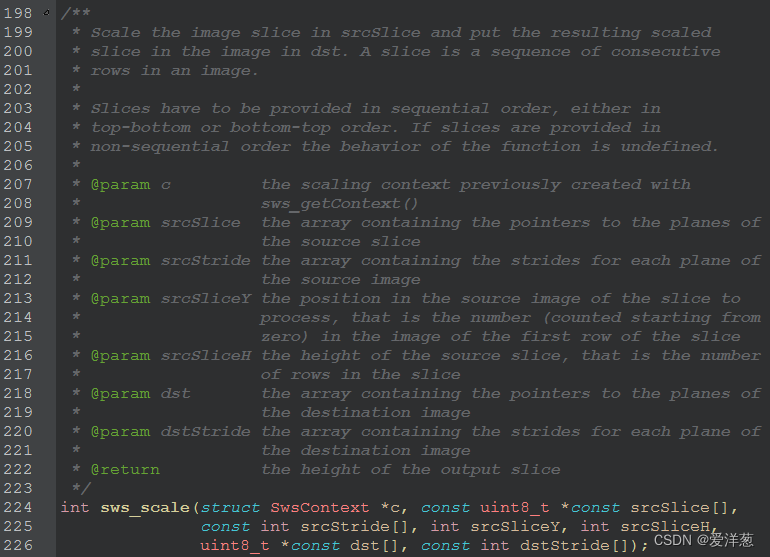
能够支持不同 AVPixelFormat 的像素格式转换,并且能够进行缩放功能;
这里定义一个专门使用的类 qtffmpegutils.h,来进行转换工作:
#ifndef QTFFMPEGUTILS_H
#define QTFFMPEGUTILS_Hextern "C"{
#include "libswscale/swscale.h"
#include "libavutil/opt.h"
#include "libavutil/imgutils.h"
}#include "error_code.h"typedef struct {const char *filename;int width;int height;AVPixelFormat format;
} RawVideoFile;typedef struct {char *pixels;int width;int height;AVPixelFormat format;
} RawVideoFrame;class QtFFmpegUtils
{
public:QtFFmpegUtils();static int convertRawVideo(RawVideoFile &in, RawVideoFile &out);static int convertToRGB888(RawVideoFile &in, uint8_t *rgb888_data);static int getBufferSize(AVPixelFormat pix_fmt, int width, int height);//static void convertRawFrame(RawVideoFrame &in, RawVideoFrame &out);
};#endif // QTFFMPEGUTILS_H
在 qtffmpegutils.cpp 中调用了 FFmpeg 的 sws_scale 逻辑:
#include "qtffmpegutils.h"
#include
#include QtFFmpegUtils::QtFFmpegUtils()
{}int QtFFmpegUtils::convertRawVideo(RawVideoFile &in, RawVideoFile &out)
{int ret = APP_SUCCESS;SwsContext *ctx = nullptr;uint8_t *inData[4], *outData[4];int inStrides[4], outStrides[4];int inFrameSize, outFrameSize;QFile inFile(in.filename);QFile outFile(out.filename);ret = av_image_alloc(inData, inStrides, in.width, in.height, in.format, 1);if(ret < 0){char errbuf[1024];av_strerror(ret,errbuf,sizeof (errbuf));qDebug() << "av_image_alloc inData error:" << errbuf;ret = APP_FFMPEG_ALLOC_FAILED;goto alloc_failed_1;}ret = av_image_alloc(outData, outStrides, out.width, out.height, out.format, 1);if (ret < 0) {char errbuf[1024];av_strerror(ret, errbuf, sizeof (errbuf));qDebug() << "av_image_alloc outData error:" << errbuf;ret = APP_FFMPEG_ALLOC_FAILED;goto alloc_failed_2;}ret = APP_SUCCESS;ctx = sws_getContext(in.width, in.height, in.format,out.width, out.height, out.format,SWS_BILINEAR, nullptr, nullptr, nullptr);if (!ctx) {qDebug() << "sws_getContext error";ret = APP_FFMPEG_SWS_GETCTX_FAILED;goto get_ctx_failed;}if (!inFile.open(QFile::ReadOnly)) {qDebug() << "open in file failure";ret = APP_OPENFILE_FAILED;goto in_file_open_falied;}if (!outFile.open(QFile::WriteOnly)) {qDebug() << "open out file failure";ret = APP_OPENFILE_FAILED;goto out_file_open_failed;}inFrameSize  = av_image_get_buffer_size(in.format, in.width, in.height, 1);outFrameSize = av_image_get_buffer_size(out.format, out.width, out.height, 1);while (inFile.read((char *)inData[0], inFrameSize) == inFrameSize) {sws_scale(ctx, inData, inStrides, 0, in.height, outData, outStrides);outFile.write((char *)outData[0], outFrameSize);}outFile.close();
out_file_open_failed:inFile.close();
in_file_open_falied:sws_freeContext(ctx);
get_ctx_failed:av_freep(&outData[0]);
alloc_failed_2:av_freep(&inData[0]);
alloc_failed_1:return ret;
}int QtFFmpegUtils::convertToRGB888(RawVideoFile &in, uint8_t *rgb888_data)
{int ret = APP_SUCCESS;SwsContext *ctx = nullptr;uint8_t *inData[4], *outData[4];int inStrides[4], outStrides[4];int inFrameSize, outFrameSize;QFile inFile(in.filename);ret = av_image_alloc(inData, inStrides, in.width, in.height, in.format, 1);if(ret < 0){char errbuf[1024];av_strerror(ret,errbuf,sizeof (errbuf));qDebug() << "av_image_alloc inData error:" << errbuf;ret = APP_FFMPEG_ALLOC_FAILED;goto alloc_failed_1;}ret = av_image_alloc(outData, outStrides, in.width, in.height, AV_PIX_FMT_RGB24, 1);if (ret < 0) {char errbuf[1024];av_strerror(ret, errbuf, sizeof (errbuf));qDebug() << "av_image_alloc outData error:" << errbuf;ret = APP_FFMPEG_ALLOC_FAILED;goto alloc_failed_2;}ret = APP_SUCCESS;ctx = sws_getContext(in.width, in.height, in.format,in.width, in.height, AV_PIX_FMT_RGB24,SWS_BILINEAR, nullptr, nullptr, nullptr);if (!ctx) {qDebug() << "sws_getContext error";ret = APP_FFMPEG_SWS_GETCTX_FAILED;goto get_ctx_failed;}if (!inFile.open(QFile::ReadOnly)) {qDebug() << "open in file failure";ret = APP_OPENFILE_FAILED;goto in_file_open_falied;}inFrameSize  = av_image_get_buffer_size(in.format, in.width, in.height, 1);outFrameSize = av_image_get_buffer_size(AV_PIX_FMT_RGB24, in.width, in.height, 1);if (inFile.read((char *)inData[0], inFrameSize) == inFrameSize) {sws_scale(ctx, inData, inStrides, 0, in.height, outData, outStrides);memcpy(rgb888_data, outData[0], outFrameSize);}else {qDebug("Read not finished");ret = APP_READ_FILE_NOT_FINISHED;}inFile.close();
in_file_open_falied:sws_freeContext(ctx);
get_ctx_failed:av_freep(&outData[0]);
alloc_failed_2:av_freep(&inData[0]);
alloc_failed_1:return ret;
}int QtFFmpegUtils::getBufferSize(AVPixelFormat pix_fmt, int width, int height)
{return av_image_get_buffer_size(pix_fmt, width, height, 1);
}
3. 预览
代码中,使用一个 QLabel 作为预览输入输出的图片,mainwindow.h 定义如下:
#ifndef MAINWINDOW_H
#define MAINWINDOW_H#include
#include // ffmpeg header
extern "C" {
#include
#include
#include
#include
#include
}#include "error_code.h"
#include "qtffmpegutils.h"namespace Ui {
class MainWindow;
}class MainWindow : public QMainWindow
{Q_OBJECTpublic:explicit MainWindow(QWidget *parent = nullptr);~MainWindow();private:Ui::MainWindow *ui;AVPixelFormat mInputFormat;AVPixelFormat mOutputFormat;QLabel *mLabel;// Format debug functionQString GetAVPixelFormatString(AVPixelFormat format);void ShowImageInRGB888(RawVideoFile in);private slots:void on_OpenInputFileBtn_Clicked();void on_SelectOutputFileBtn_Clicked();void on_StartConvertBtn_Clicked();void on_ShowInputImageBtn_Clicked();void on_ShowOutputImageBtn_Clicked();void on_InputFormatComboBox_Activated(int item_idx);void on_OutputFormatComboBox_Activated(int item_idx);void on_AboutActicon_Clicked(bool trigger);
};#endif // MAINWINDOW_H
mainwindow.cpp 逻辑如下,主要处理一些按键之类的逻辑和显示 QLabel:
#include "mainwindow.h"
#include "ui_mainwindow.h"
#include "qtffmpegutils.h"#include
#include
#include
#include
#include
#include #define WIDTH_IN_4K             3840
#define HEIGHT_IN_4K            2160#define MAX_SUPPORT_WIDTH       (WIDTH_IN_4K)
#define MAX_SUPPORT_HEIGHT      (HEIGHT_IN_4K)#define RGB888_IN_BYTE          (8)typedef struct _DebugFormatInfo {AVPixelFormat format;QString string;
} _DebugFormatInfo_t;static AVPixelFormat ComboxSupportFormatList[] = {AV_PIX_FMT_YUV420P,AV_PIX_FMT_NV12,AV_PIX_FMT_NV21,AV_PIX_FMT_YUV422P,AV_PIX_FMT_NV16,AV_PIX_FMT_YUYV422,AV_PIX_FMT_UYVY422,AV_PIX_FMT_YVYU422,AV_PIX_FMT_RGB24,AV_PIX_FMT_BGR24,AV_PIX_FMT_ARGB,AV_PIX_FMT_RGBA,AV_PIX_FMT_RGB565BE,AV_PIX_FMT_RGB565LE,AV_PIX_FMT_RGB444BE,AV_PIX_FMT_RGB444LE
};static _DebugFormatInfo_t DebugFormatInfo[] = {{AV_PIX_FMT_YUV420P,        "AV_PIX_FMT_YUV420P "},{AV_PIX_FMT_NV12,           "AV_PIX_FMT_NV12    "},{AV_PIX_FMT_NV21,           "AV_PIX_FMT_NV21    "},{AV_PIX_FMT_YUV422P,        "AV_PIX_FMT_YUV422P "},{AV_PIX_FMT_NV16,           "AV_PIX_FMT_NV16    "},{AV_PIX_FMT_YUYV422,        "AV_PIX_FMT_YUYV422 "},{AV_PIX_FMT_UYVY422,        "AV_PIX_FMT_UYVY422 "},{AV_PIX_FMT_YVYU422,        "AV_PIX_FMT_YVYU422 "},{AV_PIX_FMT_RGB24,          "AV_PIX_FMT_RGB24   "},{AV_PIX_FMT_BGR24,          "AV_PIX_FMT_BGR24   "},{AV_PIX_FMT_ARGB,           "AV_PIX_FMT_ARGB    "},{AV_PIX_FMT_RGBA,           "AV_PIX_FMT_RGBA    "},{AV_PIX_FMT_RGB565BE,       "AV_PIX_FMT_RGB565BE"},{AV_PIX_FMT_RGB565LE,       "AV_PIX_FMT_RGB565LE"},{AV_PIX_FMT_RGB444BE,       "AV_PIX_FMT_RGB444BE"},{AV_PIX_FMT_RGB444LE,       "AV_PIX_FMT_RGB444LE"}
};MainWindow::MainWindow(QWidget *parent) :QMainWindow(parent),ui(new Ui::MainWindow)
{ui->setupUi(this);qDebug("AVCodeC Version = %s", av_version_info());mInputFormat  = ComboxSupportFormatList[0];mOutputFormat = ComboxSupportFormatList[0];mLabel = new QLabel();ui->lineEdit_Input_W->setValidator(new QIntValidator(0, MAX_SUPPORT_WIDTH, this));ui->lineEdit_Input_H->setValidator(new QIntValidator(0, MAX_SUPPORT_HEIGHT, this));ui->lineEdit_Output_W->setValidator(new QIntValidator(0, MAX_SUPPORT_WIDTH, this));ui->lineEdit_Output_H->setValidator(new QIntValidator(0, MAX_SUPPORT_HEIGHT, this));connect(ui->Btn_OpenInputFile, SIGNAL(clicked()), this, SLOT(on_OpenInputFileBtn_Clicked()));connect(ui->Btn_SelectOutputFile, SIGNAL(clicked()), this, SLOT(on_SelectOutputFileBtn_Clicked()));connect(ui->Btn_ShowInputImage, SIGNAL(clicked()), this, SLOT(on_ShowInputImageBtn_Clicked()));connect(ui->Btn_ShowOutputImage, SIGNAL(clicked()), this, SLOT(on_ShowOutputImageBtn_Clicked()));connect(ui->Btn_StartConvert, SIGNAL(clicked()), this, SLOT(on_StartConvertBtn_Clicked()));connect(ui->comboBoxIn, SIGNAL(activated(int)), this, SLOT(on_InputFormatComboBox_Activated(int)));connect(ui->comboBoxOut,SIGNAL(activated(int)), this, SLOT(on_OutputFormatComboBox_Activated(int)));connect(ui->actionVersion, SIGNAL(triggered(bool)), this, SLOT(on_AboutActicon_Clicked(bool)));
}MainWindow::~MainWindow()
{delete ui;
}void MainWindow::on_OpenInputFileBtn_Clicked()
{QFileDialog *fileDialog = new QFileDialog(this);fileDialog->setWindowTitle(tr("Open File"));fileDialog->setDirectory(".");fileDialog->setViewMode(QFileDialog::Detail);if(fileDialog->exec() == QDialog::Accepted) {QString path = fileDialog->selectedFiles()[0];QFileInfo fileInfo(path);if (fileInfo.isFile()) {ui->Label_InputFilePath->setText(path);} else {QMessageBox::information(nullptr, tr("Warning"), tr("Not exist :") + path);}}
}void MainWindow::on_SelectOutputFileBtn_Clicked()
{QFileDialog *fileDialog = new QFileDialog(this);fileDialog->setWindowTitle(tr("Select Location"));fileDialog->setDirectory(".");fileDialog->setViewMode(QFileDialog::Detail);if(fileDialog->exec() == QDialog::Accepted) {QString path = fileDialog->selectedFiles()[0];QFileInfo fileInfo(path);if (fileInfo.isFile()) {QMessageBox::StandardButton rb = QMessageBox::question(nullptr,tr("Question"),tr("Output File exist, Do you want cover it?"),QMessageBox::Yes | QMessageBox::No,QMessageBox::Yes);if(rb == QMessageBox::Yes) {ui->Label_OutputFilePath->setText(path);}} else {ui->Label_OutputFilePath->setText(path);}}
}void MainWindow::on_ShowInputImageBtn_Clicked()
{bool ok = false;int input_w, input_h;QString input_file_path;RawVideoFile video_info;input_w = ui->lineEdit_Input_W->text().toInt(&ok, 10);input_h = ui->lineEdit_Input_H->text().toInt(&ok, 10);// Check if the input file not be setinput_file_path = ui->Label_InputFilePath->text();if (input_file_path.isEmpty()){QMessageBox::information(nullptr, tr("Warning"), tr("Select a input file first"));return;}std::string in_str = input_file_path.toStdString();video_info.width = input_w;video_info.height = input_h;video_info.format = mInputFormat;video_info.filename = in_str.c_str();ShowImageInRGB888(video_info);
}void MainWindow::on_ShowOutputImageBtn_Clicked()
{bool ok = false;int output_w, output_h;QString output_file_path;RawVideoFile video_info;output_w = ui->lineEdit_Output_W->text().toInt(&ok, 10);output_h = ui->lineEdit_Output_H->text().toInt(&ok, 10);// Check if the output file not be setoutput_file_path = ui->Label_OutputFilePath->text();if (output_file_path.isEmpty()){QMessageBox::information(nullptr, tr("Warning"), tr("Select a input file first"));return;}std::string in_str = output_file_path.toStdString();video_info.width = output_w;video_info.height = output_h;video_info.format = mOutputFormat;video_info.filename = in_str.c_str();ShowImageInRGB888(video_info);
}void MainWindow::on_InputFormatComboBox_Activated(int item_idx)
{mInputFormat = ComboxSupportFormatList[item_idx];qDebug("InputFormatComboBox Item=%d", item_idx);
}void MainWindow::on_OutputFormatComboBox_Activated(int item_idx)
{mOutputFormat = ComboxSupportFormatList[item_idx];qDebug("OutputFormatComboBox Item=%d", item_idx);
}void MainWindow::on_StartConvertBtn_Clicked()
{bool ok = false;int input_w, input_h, output_w, output_h;QString input_file_path, output_file_path;RawVideoFile in;RawVideoFile out;int ret;// Check if the input file is nullif (ui->lineEdit_Input_W->text().isEmpty()      ||ui->lineEdit_Input_H->text().isEmpty()  ||ui->lineEdit_Output_H->text().isEmpty() ||ui->lineEdit_Output_W->text().isEmpty()){QMessageBox::information(nullptr, tr("Warning"), tr("Please add input/output width/height info!"));return;}input_w = ui->lineEdit_Input_W->text().toInt(&ok, 10);if (ok != true){QMessageBox::information(nullptr, tr("Warning"), tr("input_w String to Int failed"));return;}input_h = ui->lineEdit_Input_H->text().toInt(&ok, 10);if (ok != true){QMessageBox::information(nullptr, tr("Warning"), tr("input_h String to Int failed"));return;}output_w = ui->lineEdit_Output_W->text().toInt(&ok, 10);if (ok != true){QMessageBox::information(nullptr, tr("Warning"), tr("output_w String to Int failed"));return;}output_h = ui->lineEdit_Output_H->text().toInt(&ok, 10);if (ok != true){QMessageBox::information(nullptr, tr("Warning"), tr("output_h String to Int failed"));return;}// Check if the input file not be setinput_file_path = ui->Label_InputFilePath->text();if (input_file_path.isEmpty()){QMessageBox::information(nullptr, tr("Warning"), tr("Select a input file first"));return;}// Check if the output file not be setoutput_file_path = ui->Label_OutputFilePath->text();if (output_file_path.isEmpty()){QMessageBox::information(nullptr, tr("Warning"), tr("Select a output file"));return;}std::string in_str = input_file_path.toStdString();std::string out_str = output_file_path.toStdString();in.width = input_w;in.height = input_h;in.format = mInputFormat;in.filename = in_str.c_str();out.width = output_w;out.height = output_h;out.format = mOutputFormat;out.filename = out_str.c_str();qDebug("StartConvert input w=%d, h=%d", input_w, input_h);qDebug("             input format=%s", GetAVPixelFormatString(mInputFormat).toStdString().data());qDebug("             output w=%d, h=%d", output_w, output_h);qDebug("             output format=%s", GetAVPixelFormatString(mOutputFormat).toStdString().data());ret = QtFFmpegUtils::convertRawVideo(in, out);if (ret == APP_SUCCESS) {QMessageBox::information(nullptr, tr("Congratulation!"), tr("Convert Successfully"),QMessageBox::Yes, QMessageBox::Yes);} else {QMessageBox::information(nullptr, tr("Oops"), tr("Convert Failed : ") + QString::number(ret, 10),QMessageBox::Yes, QMessageBox::Yes);}
}void MainWindow::ShowImageInRGB888(RawVideoFile in)
{uint8_t *rgb888_data = nullptr;int ret = APP_SUCCESS;int buffer_size = 0;buffer_size = QtFFmpegUtils::getBufferSize(AV_PIX_FMT_RGB24, in.width, in.height);//rgb888_data = (uint8_t *)malloc(in.width * in.height * RGB888_IN_BYTE);rgb888_data = (uint8_t *)malloc(buffer_size);if (rgb888_data == nullptr) {QMessageBox::information(nullptr, tr("Warning"), tr("Malloc failed"));return;}ret = QtFFmpegUtils::convertToRGB888(in, rgb888_data);if (ret == APP_SUCCESS) {qDebug("Convert to RGB888 Successful");} else {QMessageBox::information(nullptr, tr("Oops"), tr("Show Image Failed : ") + QString::number(ret, 10),QMessageBox::Yes, QMessageBox::Yes);}QImage *qimage = new QImage(rgb888_data, in.width, in.height, QImage::Format_RGB888);QPixmap pixmap = QPixmap::fromImage(*qimage);//mLabel->setGeometry(100, 100, in.width, in.height);mLabel->setMaximumSize(in.width, in.height);mLabel->resize(in.width, in.height);mLabel->setPixmap(pixmap);mLabel->show();free(rgb888_data);
}void MainWindow::on_AboutActicon_Clicked(bool trigger)
{QMessageBox MBox;MBox.setWindowTitle("CSC Tools");MBox.setText("Powered by StephenZhou\n\nSoftware Version : V1.0 Beta \n\nGenerate at 2022.10.29");MBox.setIconPixmap(QPixmap(":/logo.ico"));MBox.exec();
}QString MainWindow::GetAVPixelFormatString(AVPixelFormat format)
{QString str = "N/A";for (unsigned int i = 0; i < sizeof(DebugFormatInfo) / sizeof(_DebugFormatInfo_t); i++) {if (format == DebugFormatInfo[i].format){str = DebugFormatInfo[i].string;break;}}return str;
}
4. 项目地址
https://gitee.com/stephenzhou-tech/csc_tools