

从零到一手写迷你版Vue
创始人
2024-01-19 17:08:43
Vue响应式设计思路
Vue响应式主要包含:
- 数据响应式
- 监听数据变化,并在视图中更新
- Vue2使用
Object.defineProperty实现数据劫持 - Vu3使用
Proxy实现数据劫持 - 模板引擎
- 提供描述视图的模板语法
- 插值表达式
{{}} - 指令
v-bind,v-on,v-model,v-for,v-if - 渲染
- 将模板转换为html
- 解析模板,生成
vdom,把vdom渲染为普通dom
数据响应式原理
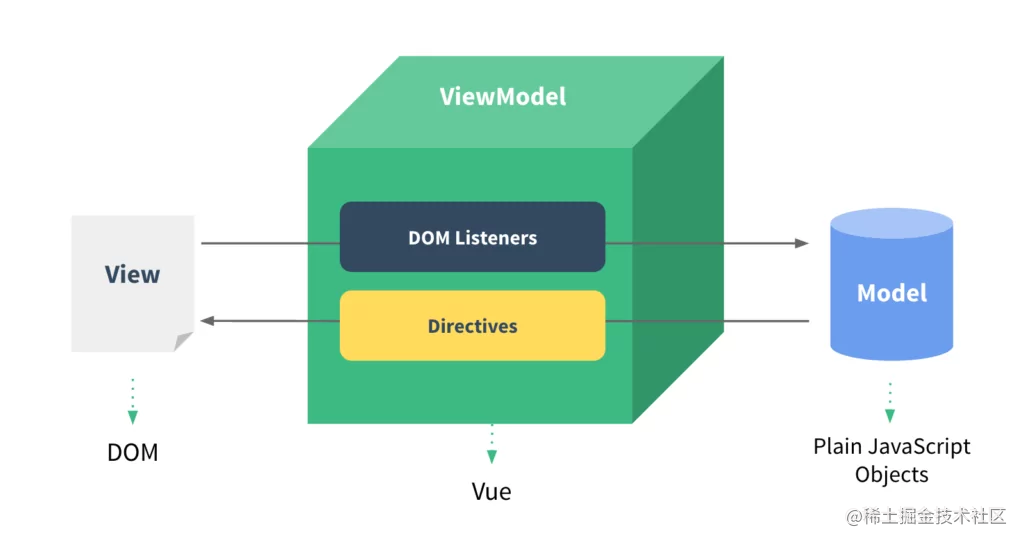
数据变化时能自动更新视图,就是数据响应式
Vue2使用Object.defineProperty实现数据变化的检测
原理解析
new Vue()⾸先执⾏初始化,对data执⾏响应化处理,这个过程发⽣在Observer中- 同时对模板执⾏编译,找到其中动态绑定的数据,从
data中获取并初始化视图,这个过程发⽣在Compile中 - 同时定义⼀个更新函数和
Watcher实例,将来对应数据变化时,Watcher会调⽤更新函数 - 由于
data的某个key在⼀个视图中可能出现多次,所以每个key都需要⼀个管家Dep来管理多个Watcher - 将来
data中数据⼀旦发⽣变化,会⾸先找到对应的Dep,通知所有Watcher执⾏更新函数
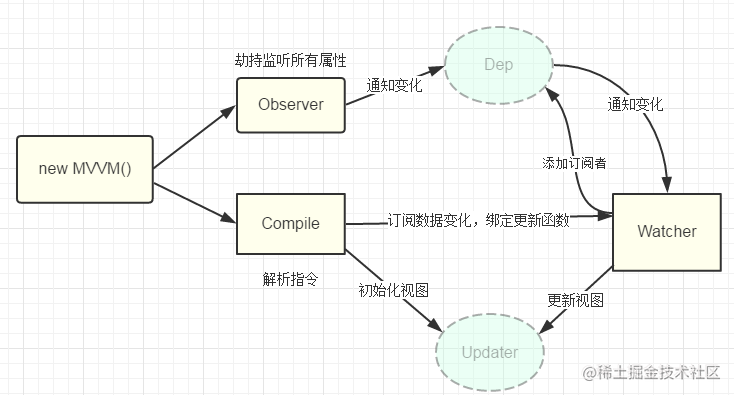
一些关键类说明
CVue:自定义Vue类 Observer:执⾏数据响应化(分辨数据是对象还是数组) Compile:编译模板,初始化视图,收集依赖(更新函数、 watcher创建) Watcher:执⾏更新函数(更新dom) Dep:管理多个Watcher实例,批量更新
参考 前端手写面试题详细解答
涉及关键方法说明
observe: 遍历vm.data的所有属性,对其所有属性做响应式,会做简易判断,创建Observer实例进行真正响应式处理
html页面
cvue
{{ count }}
CVue
- 创建基本CVue构造函数:
- 执⾏初始化,对
data执⾏响应化处理
// 自定义Vue类
class CVue {constructor(options) {this.$options = optionsthis.$data = options.data// 响应化处理observe(this.$data)}
}// 数据响应式, 修改对象的getter,setter
function defineReactive(obj, key, val) {// 递归处理,处理val是嵌套对象情况observe(val)Object.defineProperty(obj, key, {get() {return val},set(newVal) {if(val !== newVal) {console.log(`set ${key}:${newVal}, old is ${val}`)val = newVal// 继续进行响应式处理,处理newVal是对象情况observe(val)}}})
}// 遍历obj,对其所有属性做响应式
function observe(obj) {// 只处理对象类型的if(typeof obj !== 'object' || obj == null) {return}// 实例化Observe实例new Observe(obj)
}// 根据传入value的类型做相应的响应式处理
class Observe {constructor(obj) {if(Array.isArray(obj)) {// TODO} else {// 对象this.walk(obj)}}walk(obj) {// 遍历obj所有属性,调用defineReactive进行响应化Object.keys(obj).forEach(key => defineReactive(obj, key, obj[key]))}
}
为vm.$data做代理
方便实例上设置和获取数据
例如
原本应该是
vm.$data.count
vm.$data.count = 233
代理之后后,可以使用如下方式
vm.count
vm.count = 233
给vm.$data做代理
class CVue {constructor(options) {// 省略// 响应化处理observe(this.$data)// 代理data上属性到实例上proxy(this)}
}// 把CVue实例上data对象的属性到代理到实例上
function proxy(vm) {Object.keys(vm.$data).forEach(key => {Object.defineProperty(vm, key, {get() {// 实现 vm.count 取值return vm.$data[key]},set(newVal) {// 实现 vm.count = 123赋值vm.$data[key] = newVal}})})
}
编译
初始化视图
根据节点类型进行编译
class CVue {constructor(options) {// 省略。。// 2 代理data上属性到实例上proxy(this)// 3 编译new Compile(this, this.$options.el)}
}// 编译模板中vue语法,初始化视图,更新视图
class Compile {constructor(vm, el) {this.$vm = vmthis.$el = document.querySelector(el)if(this.$el) {this.complie(this.$el)}}// 编译complie(el) {// 取出所有子节点const childNodes = el.childNodes// 遍历节点,进行初始化视图Array.from(childNodes).forEach(node => {if(this.isElement(node)) {// TODOconsole.log(`编译元素 ${node.nodeName}`)} else if(this.isInterpolation(node)) {console.log(`编译插值文本 ${node.nodeName}`)}// 递归编译,处理嵌套情况if(node.childNodes) {this.complie(node)}})}// 是元素节点isElement(node) {return node.nodeType === 1}// 是插值表达式isInterpolation(node) {return node.nodeType === 3&& /\{\{(.*)\}\}/.test(node.textContent)}
}
编译插值表达式
// 编译模板中vue语法,初始化视图,更新视图
class Compile {complie(el) {Array.from(childNodes).forEach(node => {if(this.isElement(node)) {console.log(`编译元素 ${node.nodeName}`)} else if(this.isInterpolation(node)) {// console.log(`编译插值文本 ${node.textContent}`)this.complieText(node)}// 省略})}// 是插值表达式isInterpolation(node) {return node.nodeType === 3&& /\{\{(.*)\}\}/.test(node.textContent)}// 编译插值complieText(node) {// RegExp.$1是isInterpolation()中/\{\{(.*)\}\}/匹配出来的组内容// 相等于{{ count }}中的countconst exp = String(RegExp.$1).trim()node.textContent = this.$vm[exp]}
}
编译元素节点和指令
需要取出指令和指令绑定值
使用数据更新视图
// 编译模板中vue语法,初始化视图,更新视图
class Compile {complie(el) {Array.from(childNodes).forEach(node => {if(this.isElement(node)) {console.log(`编译元素 ${node.nodeName}`)this.complieElement(node)}// 省略})}// 是元素节点isElement(node) {return node.nodeType === 1}// 编译元素complieElement(node) {// 取出元素上属性const attrs = node.attributesArray.from(attrs).forEach(attr => {// c-text="count"中c-text是attr.name,count是attr.valueconst { name: attrName, value: exp } = attrif(this.isDirective(attrName)) {// 取出指令const dir = attrName.substring(2)this[dir] && this[dir](node, exp)}})}// 是指令isDirective(attrName) {return attrName.startsWith('c-')}// 处理c-text文本指令 text(node, exp) {node.textContent = this.$vm[exp]}// 处理c-html指令html(node, exp) {node.innerHTML = this.$vm[exp]}
}
以上完成初次渲染,但是数据变化后,不会触发页面更新
依赖收集
视图中会⽤到data中某key,这称为依赖。
同⼀个key可能出现多次,每次出现都需要收集(⽤⼀个Watcher来维护维护他们的关系),此过程称为依赖收集。
多个Watcher需要⼀个Dep来管理,需要更新时由Dep统⼀通知。
- data中的key和dep是一对一关系
- 视图中key出现和Watcher关系,key出现一次就对应一个Watcher
- dep和Watcher是一对多关系
实现思路
- 在
defineReactive中为每个key定义一个Dep实例 - 编译阶段,初始化视图时读取key, 会创建
Watcher实例 - 由于读取过程中会触发key的
getter方法,便可以把Watcher实例存储到key对应的Dep实例中 - 当key更新时,触发setter方法,取出对应的
Dep实例,Dep实例调用notiy方法通知所有Watcher更新
定义Watcher类
监听器,数据变化更新对应节点视图
// 创建Watcher监听器,负责更新视图
class Watcher {// vm vue实例,依赖key,updateFn更新函数(编译阶段传递进来)constructor(vm, key, updateFn) {this.$vm = vmthis.$key = keythis.$updateFn = updateFn}update() {// 调用更新函数,获取最新值传递进去this.$updateFn.call(this.$vm, this.$vm[this.$key])}
}
修改Compile类中的更新函数,创建Watcher实例
class Complie {// 省略。。。// 编译插值complieText(node) {// RegExp.$1是isInterpolation()中/\{\{(.*)\}\}/匹配出来的组内容// 相等于{{ count }}中的countconst exp = String(RegExp.$1).trim()// node.textContent = this.$vm[exp]this.update(node, exp, 'text')}// 处理c-text文本指令 text(node, exp) {// node.textContent = this.$vm[exp]this.update(node, exp, 'text')}// 处理c-html指令html(node, exp) {// node.innerHTML = this.$vm[exp]this.update(node, exp, 'html')}// 更新函数update(node, exp, dir) {const fn = this[`${dir}Updater`]fn && fn(node, this.$vm[exp])// 创建监听器new Watcher(this.$vm, exp, function(newVal) {fn && fn(node, newVal)})}// 文本更新器textUpdater(node, value) {node.textContent = value}// html更新器htmlUpdater(node, value) {node.innerHTML = value}
}
定义Dep类
- data的一个属性对应一个Dep实例
- 管理多个
Watcher实例,通知所有Watcher实例更新
// 创建订阅器,每个Dep实例对应data中的一个属性
class Dep {constructor() {this.deps = []}// 添加Watcher实例addDep(dep) {this.deps.push(dep)}notify() {// 通知所有Wather更新视图this.deps.forEach(dep => dep.update())}
}
创建Watcher时触发getter
class Watcher {// vm vue实例,依赖key,updateFn更新函数(编译阶段传递进来)constructor(vm, key, updateFn) {// 省略// 把Wather实例临时挂载在Dep.target上Dep.target = this// 获取一次属性,触发getter, 从Dep.target上获取Wather实例存放到Dep实例中this.$vm[key]// 添加后,重置Dep.targetDep.target = null}
}
defineReactive中作依赖收集,创建Dep实例
function defineReactive(obj, key, val) {// 递归处理,处理val是嵌套对象情况observe(val)const dep = new Dep()Object.defineProperty(obj, key, {get() {Dep.target && dep.addDep(Dep.target)return val},set(newVal) {if(val !== newVal) {val = newVal// 继续进行响应式处理,处理newVal是对象情况observe(val)// 更新视图dep.notify()}}})
}
监听事件指令@xxx
- 在创建vue实例时,需要缓存
methods到vue实例上 - 编译阶段取出methods挂载到Compile实例上
- 编译元素时
- 识别出
v-on指令时,进行事件的绑定 - 识别出
@属性时,进行事件绑定 - 事件绑定:通过指令或者属性获取对应的函数,给元素新增事件监听,使用
bind修改监听函数的this指向为组件实例
// 自定义Vue类
class CVue {constructor(options) {this.$methods = options.methods}
}// 编译模板中vue语法,初始化视图,更新视图
class Compile {constructor(vm, el) {this.$vm = vmthis.$el = document.querySelector(el)this.$methods = vm.$methods}// 编译元素complieElement(node) {// 取出元素上属性const attrs = node.attributesArray.from(attrs).forEach(attr => {// c-text="count"中c-text是attr.name,count是attr.valueconst { name: attrName, value: exp } = attrif(this.isDirective(attrName)) {// 省略。。。if(this.isEventListener(attrName)) {// v-on:click, subStr(5)即可截取到clickconst eventType = attrName.substring(5)this.bindEvent(eventType, node, exp)}} else if(this.isEventListener(attrName)) {// @click, subStr(1)即可截取到clickconst eventType = attrName.substring(1)this.bindEvent(eventType, node, exp)}})}// 是事件监听isEventListener(attrName) {return attrName.startsWith('@') || attrName.startsWith('c-on')}// 绑定事件bindEvent(eventType, node, exp) {// 取出表达式对应函数const method = this.$methods[exp]// 增加监听并修改this指向当前组件实例node.addEventListener(eventType, method.bind(this.$vm))}
}
v-model双向绑定
实现v-model绑定input元素时的双向绑定功能
// 编译模板中vue语法,初始化视图,更新视图
class Compile {// 省略...// 处理c-model指令model(node, exp) {// 渲染视图this.update(node, exp, 'model')// 监听input变化node.addEventListener('input', (e) => {const { value } = e.target// 更新数据,相当于this.username = 'mio'this.$vm[exp] = value})}// model更新器modelUpdater(node, value) {node.value = value}
}
数组响应式
- 获取数组原型
- 数组原型创建对象作为数组拦截器
- 重写数组的7个方法
// 数组响应式
// 获取数组原型, 后面修改7个方法
const originProto  = Array.prototype
// 创建对象做备份,修改响应式都是在备份的上进行,不影响原始数组方法
const arrayProto = Object.create(originProto)
// 拦截数组方法,在变更时发出通知
;['push', 'pop', 'shift', 'unshift', 'splice', 'sort', 'reverse'].forEach(method => {// 在备份的原型上做修改arrayProto[method] = function() {// 调用原始操作originProto[method].apply(this, arguments)// 发出变更通知console.log(`method:${method} value:${Array.from(arguments)}`)}
})class Observe {constructor(obj) {if(Array.isArray(obj)) {// 修改数组原型为自定义的obj.__proto__ = arrayProtothis.observeArray(obj)} else {// 对象this.walk(obj)}}observeArray(items) {// 如果数组内部元素时对象,继续做响应化处理items.forEach(item => observe(item))}
}
上一篇:两首古诗,第二首
下一篇:于美人灵璧县玉集墓下座
相关内容
热门资讯
埃菲尔铁塔在哪 中国仿建埃菲尔...
2019年4月26日,广西南宁市,街头惊现一座巨型山寨版埃菲尔铁塔,高约20米,白色塔身,造型逼真,...
苗族的传统节日 贵州苗族节日有...
【岜沙苗族芦笙节】岜沙,苗语叫“分送”,距从江县城7.5公里,是世界上最崇拜树木并以树为神的枪手部落...
苁蓉的食用方法 鲜苁蓉的吃法有...
肉苁蓉号称“温而不热,补而不峻,暖而不燥,滑而不泄,故有从容之名。”历来也是传统药食同源的滋补佳品。...
北京的名胜古迹 北京最著名的景...
北京从元代开始,逐渐走上帝国首都的道路,先是成为大辽朝五大首都之一的南京城,随着金灭辽,金代从海陵王...
应用未安装解决办法 平板应用未...
---IT小技术,每天Get一个小技能!一、前言描述苹果IPad2居然不能安装怎么办?与此IPad不...
脚上的穴位图 脚面经络图对应的...
人体穴位作用图解大全更清晰直观的标注了各个人体穴位的作用,包括头部穴位图、胸部穴位图、背部穴位图、胳...
长白山自助游攻略 吉林长白山游...
昨天介绍了西坡的景点详细请看链接:一个人的旅行,据说能看到长白山天池全凭运气,您的运气如何?今日介绍...
猫咪吃了塑料袋怎么办 猫咪误食...
你知道吗?塑料袋放久了会长猫哦!要说猫咪对塑料袋的喜爱程度完完全全可以媲美纸箱家里只要一有塑料袋的响...
世界上最漂亮的人 世界上最漂亮...
此前在某网上,选出了全球265万颜值姣好的女性。从这些数量庞大的女性群体中,人们投票选出了心目中最美...
埃菲尔铁塔在哪 中国仿建埃菲尔...
2019年4月26日,广西南宁市,街头惊现一座巨型山寨版埃菲尔铁塔,高约20米,白色塔身,造型逼真,...
阳澄湖在哪里哪个省的 阳澄湖是...
点击题目下方苏州生活指南有用 有趣 有态度近期的阳澄湖度很高,3月24日,央视二套《第一时间》直播连...
苗族的传统节日 贵州苗族节日有...
【岜沙苗族芦笙节】岜沙,苗语叫“分送”,距从江县城7.5公里,是世界上最崇拜树木并以树为神的枪手部落...
北京的名胜古迹 北京最著名的景...
北京从元代开始,逐渐走上帝国首都的道路,先是成为大辽朝五大首都之一的南京城,随着金灭辽,金代从海陵王...