

vue-element-admin动态菜单(后台获取)
创始人
2024-01-22 05:12:22
vue-element-admin动态菜单(后台获取),此教程面向纯小白攻略,不要嫌我啰嗦,翻到自己需要的地方即可
前提
vue-element-admin官网: vue-element-admin (gitee.io)
vue-element-admin页面展示:vue-element-adminVue Element Admin
vue-element-admin下载:PanJiaChen/vue-element-admin
安装依赖报错解决方案:vue-element-admin项目安装依赖报错
首先我们拿到项目,得了解一下目录结构
他是通过src->router->index.js,根据路由来进行页面的跳转
我们查看一下里面的文件,再对比一下项目的目录
export const asyncRoutes = [{path: '/permission',component: Layout,redirect: '/permission/page',alwaysShow: true, // will always show the root menuname: 'Permission',meta: {title: 'Permission',icon: 'lock',roles: ['admin', 'editor'] // you can set roles in root nav},children: [{path: 'page',component: () => import('@/views/permission/page'),name: 'PagePermission',meta: {title: 'Page Permission',roles: ['admin'] // or you can only set roles in sub nav}},{path: 'directive',component: () => import('@/views/permission/directive'),name: 'DirectivePermission',meta: {title: 'Directive Permission'// if do not set roles, means: this page does not require permission}},{path: 'role',component: () => import('@/views/permission/role'),name: 'RolePermission',meta: {title: 'Role Permission',roles: ['admin']}}]},{path: '/icon',component: Layout,children: [{path: 'index',component: () => import('@/views/icons/index'),name: 'Icons',meta: { title: 'Icons', icon: 'icon', noCache: true }}]},/** when your routing map is too long, you can split it into small modules **/componentsRouter,chartsRouter,nestedRouter,tableRouter,{path: '/example',component: Layout,redirect: '/example/list',name: 'Example',meta: {title: 'Example',icon: 'el-icon-s-help'},children: [{path: 'create',component: () => import('@/views/example/create'),name: 'CreateArticle',meta: { title: 'Create Article', icon: 'edit' }},{path: 'edit/:id(\\d+)',component: () => import('@/views/example/edit'),name: 'EditArticle',meta: { title: 'Edit Article', noCache: true, activeMenu: '/example/list' },hidden: true},{path: 'list',component: () => import('@/views/example/list'),name: 'ArticleList',meta: { title: 'Article List', icon: 'list' }}]},{path: '/tab',component: Layout,children: [{path: 'index',component: () => import('@/views/tab/index'),name: 'Tab',meta: { title: 'Tab', icon: 'tab' }}]},{path: '/error',component: Layout,redirect: 'noRedirect',name: 'ErrorPages',meta: {title: 'Error Pages',icon: '404'},children: [{path: '401',component: () => import('@/views/error-page/401'),name: 'Page401',meta: { title: '401', noCache: true }},{path: '404',component: () => import('@/views/error-page/404'),name: 'Page404',meta: { title: '404', noCache: true }}]},{path: '/error-log',component: Layout,children: [{path: 'log',component: () => import('@/views/error-log/index'),name: 'ErrorLog',meta: { title: 'Error Log', icon: 'bug' }}]},{path: '/excel',component: Layout,redirect: '/excel/export-excel',name: 'Excel',meta: {title: 'Excel',icon: 'excel'},children: [{path: 'export-excel',component: () => import('@/views/excel/export-excel'),name: 'ExportExcel',meta: { title: 'Export Excel' }},{path: 'export-selected-excel',component: () => import('@/views/excel/select-excel'),name: 'SelectExcel',meta: { title: 'Export Selected' }},{path: 'export-merge-header',component: () => import('@/views/excel/merge-header'),name: 'MergeHeader',meta: { title: 'Merge Header' }},{path: 'upload-excel',component: () => import('@/views/excel/upload-excel'),name: 'UploadExcel',meta: { title: 'Upload Excel' }}]},{path: '/zip',component: Layout,redirect: '/zip/download',alwaysShow: true,name: 'Zip',meta: { title: 'Zip', icon: 'zip' },children: [{path: 'download',component: () => import('@/views/zip/index'),name: 'ExportZip',meta: { title: 'Export Zip' }}]},{path: '/pdf',component: Layout,redirect: '/pdf/index',children: [{path: 'index',component: () => import('@/views/pdf/index'),name: 'PDF',meta: { title: 'PDF', icon: 'pdf' }}]},{path: '/pdf/download',component: () => import('@/views/pdf/download'),hidden: true},{path: '/theme',component: Layout,children: [{path: 'index',component: () => import('@/views/theme/index'),name: 'Theme',meta: { title: 'Theme', icon: 'theme' }}]},{path: '/clipboard',component: Layout,children: [{path: 'index',component: () => import('@/views/clipboard/index'),name: 'ClipboardDemo',meta: { title: 'Clipboard', icon: 'clipboard' }}]},{path: 'external-link',component: Layout,children: [{path: 'https://github.com/PanJiaChen/vue-element-admin',meta: { title: 'External Link', icon: 'link' }}]},// 404 page must be placed at the end !!!{ path: '*', redirect: '/404', hidden: true }
]
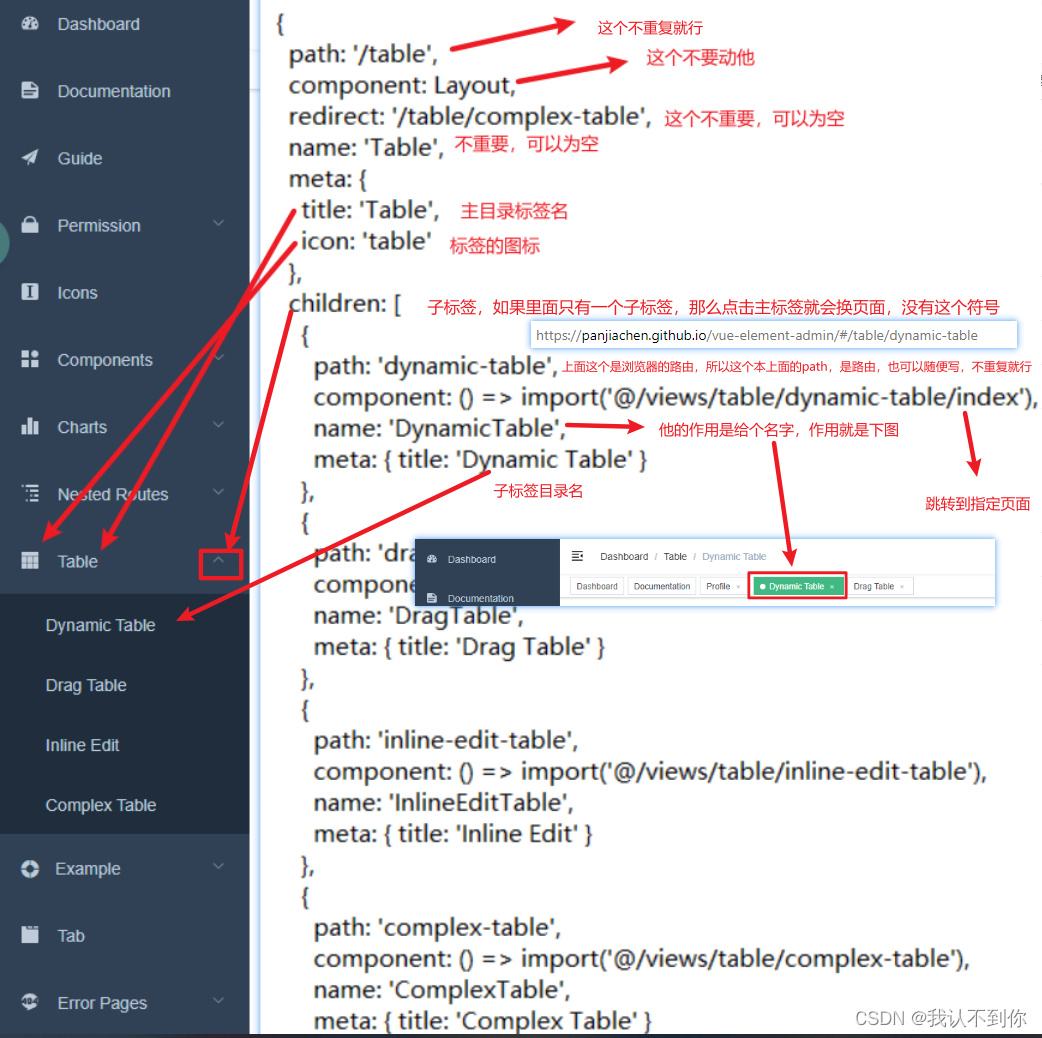
我拿一部分来跟目录做一下对比,下面我将参数讲解一下
各个参数的意思
有子目录的目录,以最常见的table举例,table在这里,ctrl+左键点进去就行

如果使用的 vscode 跳转不了,他的目录是 src\router\modules\table.js
参数与目录的对照
动态菜单思路
我们要做到的是,根据后端返回的json对象,动态的显示目录
而vue-element-admin,是写死了的菜单,所以我们调用后端接口,实现目录的拼接,最终达到实现动态菜单的目的
那么我们就要仿造router目录下index.js文件,动态的生成相似的json对象
生成动态菜单,修改文件
修改src/store/modules目录下的permission.js文件,这个文件就是用来生成菜单的(上面的index.js只是目录的结构,并不是生成的途径)
源文件
//这个asyncRoutes不眼熟吗,不就是刚才我们看的目录结构吗
import { asyncRoutes, constantRoutes } from '@/router'//不管
function hasPermission(roles, route) {if (route.meta && route.meta.roles) {return roles.some(role => route.meta.roles.includes(role))} else {return true}
}//不管
export function filterAsyncRoutes(routes, roles) {const res = []routes.forEach(route => {const tmp = { ...route }if (hasPermission(roles, tmp)) {if (tmp.children) {tmp.children = filterAsyncRoutes(tmp.children, roles)}res.push(tmp)}})return res
}
//不管
const state = {routes: [],addRoutes: []
}
//不管
const mutations = {SET_ROUTES: (state, routes) => {state.addRoutes = routesstate.routes = constantRoutes.concat(routes)}
}
//重要的是这个,这里不用看,但你要知道这里很重要,是加载目录的地方
const actions = {generateRoutes({ commit }, roles) {return new Promise(resolve => {let accessedRoutesif (roles.includes('admin')) {accessedRoutes = asyncRoutes || []} else {accessedRoutes = filterAsyncRoutes(asyncRoutes, roles)}commit('SET_ROUTES', accessedRoutes)resolve(accessedRoutes)})}
}
//不管
export default {namespaced: true,state,mutations,actions
}
我修改的permission.js文件,下面有json文件,一定要对照着看,不然看不懂
import { asyncRoutes, constantRoutes } from '@/router'import { authMenu } from '@/api/user'// 【新加入】引入请求,后面有文件,先不慌
import Layout from '@/layout'// 【新加入】引入layout// 这里是因为我之前没用动态菜单的时候报错,从网上搜的,改了点,好像也不太重要
function hasPermission(roles, route) {if (route.meta && route.meta.roles) {if (route.meta.roles.indexOf(roles) > -1) {return true} else {return false}// return roles.some(role => route.meta.roles.includes(role))} else {return true}
}//这里自己写方法,作用就是向 asyncRoutes 插入路由,达到动态路由的效果
/*** 【新加入】后台查询的菜单数据拼装成路由格式的数据* @param routes*/
export function generaMenu(routes, data) {//data挨个遍历data.forEach(item => {//path不为空的话,就新建一个对象,装数据if (item.path !== '') {//这个就仿照目录的机构,搭建const menu = {path: item.path,component: Layout, //这个不用写data里面的内容,引用就行了redirect: item.redirect,children: [],name: item.name,meta: item.meta}//遍历子标签,并加入到主目录的children中去item.children.forEach(item => {const menu2 = {path: item.path,component: (resolve) => require([`@/views${item.component}`], resolve),name: item.name,meta: item.meta}//加入到主目录的children中去menu.children.push(menu2)})//追加routes.push(menu)}})
//把404加到最后,因为作者说  // 404 page must be placed at the end !!!const menu3 = {path: '*',redirect: '/404',hidden: true}//追加routes.push(menu3)
}//不看
export function filterAsyncRoutes(routes, roles) {const res = []routes.forEach(route => {const tmp = { ...route }if (hasPermission(roles, tmp)) {if (tmp.children) {tmp.children = filterAsyncRoutes(tmp.children, roles)}res.push(tmp)}})return res
}
//不看
const state = {routes: [],addRoutes: []
}
//不看
const mutations = {SET_ROUTES: (state, routes) => {state.addRoutes = routesstate.routes = constantRoutes.concat(routes)}
}const actions = {generateRoutes({ commit }, roles) {return new Promise(resolve => {// 【新加入】开始const loadMenuData = []// 先查询后台并返回左侧菜单数据并把数据添加到路由,authMenu(state.token)后面会写authMenu(state.token).then(response => {let data = response//我的code为100200为正常if (response.code !== 100200) {this.$message({message: '菜单数据加载异常',type: 0})} else {//获取目录的jsondata = response.data//把data的数据拷贝到loadMenuData里面Object.assign(loadMenuData, data)//把asyncRoutes的数据拷贝到tempAsyncRoutes里面const tempAsyncRoutes = Object.assign([], asyncRoutes)// 最最重要的,把loadMenuData追加到tempAsyncRoutes后面generaMenu(tempAsyncRoutes, loadMenuData)//定义accessedRouteslet accessedRoutes// 把 tempAsyncRoutes 的值给 accessedRoutes ,并输出// eslint-disable-next-line prefer-constaccessedRoutes = tempAsyncRoutes || []//下面这些就是加载目录了commit('SET_ROUTES', accessedRoutes)resolve(accessedRoutes)}})}).catch(error => {console.log(error)})}
}export default {namespaced: true,state,mutations,actions
}
JSON文件,后台返回的值
{"code":100200,"msg":"返回成功","data":[{"path":"/maintenance","component":"Layout","redirect":"","name":"","meta":{"title":"","icon":"table"},"children":[{"path":"/maintenance-task-management","component":"/table/complex-table","name":"maintenance-task-management""meta":{"title":"维修任务管理"}}]},{"path":"/complete","component":"Layout","redirect":"","name":"","meta":{"title":"","icon":"table"},"children":[{"path":"/complete-maintenance-management","component":"/table/complex-table","name":"complete-maintenance-management""meta":{"title":"维修完成管理"}}]},{"path":"/plant","component":"Layout","redirect":"","name":"","meta":{"title":"","icon":"table"},"children":[{"path":"/plant-maintenance-management","component":"/table/complex-table","name":"plant-maintenance-management""meta":{"title":"送厂维修管理"}}]},{"path":"/device","component":"Layout","redirect":"","name":"","meta":{"title":"","icon":"table",},"children":[{"path":"/device-information-search","component":"/table/complex-table","name":"device-information-search""meta":{"title":"设备信息查找"}}]}]
}
添加authMenu接口
引入后台接口的方法(也就是封装好的axios,然后把接口统一写在一个js文件里,用的时候直接引入,方便后期维护)
首先在src->api>user.js,加入一个接口方法
import request from '@/utils/request'export function login(data) {return request({url: '/fix/user/login',method: 'post',data})
}export function getInfo(token) {return request({url: '/fix/user/info',method: 'get',params: { token }})
}export function logout() {return request({url: '/fix/user/logout',method: 'post'})
}
//这里加一个,根据data的不同,后台会返回不同的字符串结果,动态菜单完成
export function authMenu(data) {return request({url: '/fix/user/selectMenu',method: 'post',data})
}
修改index.js中的asyncRoutes方法,使其为空,要我们动态的加入菜单
export const asyncRoutes = [
]
上一篇:这朵花肯定更苗条
下一篇:丁正月初二没有去金陵
相关内容
热门资讯
埃菲尔铁塔在哪 中国仿建埃菲尔...
2019年4月26日,广西南宁市,街头惊现一座巨型山寨版埃菲尔铁塔,高约20米,白色塔身,造型逼真,...
ps局部放大 放大某个部位的图...
软件类学习建议:边看边练习,可以先收藏后学习。一、使用Ctrl快捷键放大:Ctrl + +缩小:Ct...
苗族的传统节日 贵州苗族节日有...
【岜沙苗族芦笙节】岜沙,苗语叫“分送”,距从江县城7.5公里,是世界上最崇拜树木并以树为神的枪手部落...
北京的名胜古迹 北京最著名的景...
北京从元代开始,逐渐走上帝国首都的道路,先是成为大辽朝五大首都之一的南京城,随着金灭辽,金代从海陵王...
应用未安装解决办法 平板应用未...
---IT小技术,每天Get一个小技能!一、前言描述苹果IPad2居然不能安装怎么办?与此IPad不...
脚上的穴位图 脚面经络图对应的...
人体穴位作用图解大全更清晰直观的标注了各个人体穴位的作用,包括头部穴位图、胸部穴位图、背部穴位图、胳...
长白山自助游攻略 吉林长白山游...
昨天介绍了西坡的景点详细请看链接:一个人的旅行,据说能看到长白山天池全凭运气,您的运气如何?今日介绍...
猫咪吃了塑料袋怎么办 猫咪误食...
你知道吗?塑料袋放久了会长猫哦!要说猫咪对塑料袋的喜爱程度完完全全可以媲美纸箱家里只要一有塑料袋的响...
世界上最漂亮的人 世界上最漂亮...
此前在某网上,选出了全球265万颜值姣好的女性。从这些数量庞大的女性群体中,人们投票选出了心目中最美...
埃菲尔铁塔在哪 中国仿建埃菲尔...
2019年4月26日,广西南宁市,街头惊现一座巨型山寨版埃菲尔铁塔,高约20米,白色塔身,造型逼真,...
ps局部放大 放大某个部位的图...
软件类学习建议:边看边练习,可以先收藏后学习。一、使用Ctrl快捷键放大:Ctrl + +缩小:Ct...
苗族的传统节日 贵州苗族节日有...
【岜沙苗族芦笙节】岜沙,苗语叫“分送”,距从江县城7.5公里,是世界上最崇拜树木并以树为神的枪手部落...
北京的名胜古迹 北京最著名的景...
北京从元代开始,逐渐走上帝国首都的道路,先是成为大辽朝五大首都之一的南京城,随着金灭辽,金代从海陵王...