

CSS实现步骤进度条——前端每日一练
创始人
2024-01-22 19:38:12
CSS实现步骤进度条
- 效果展示
- HTML布局文件
- CSS样式
- JavaScript操作逻辑
- 补充:JavaScript的this关键字
效果展示
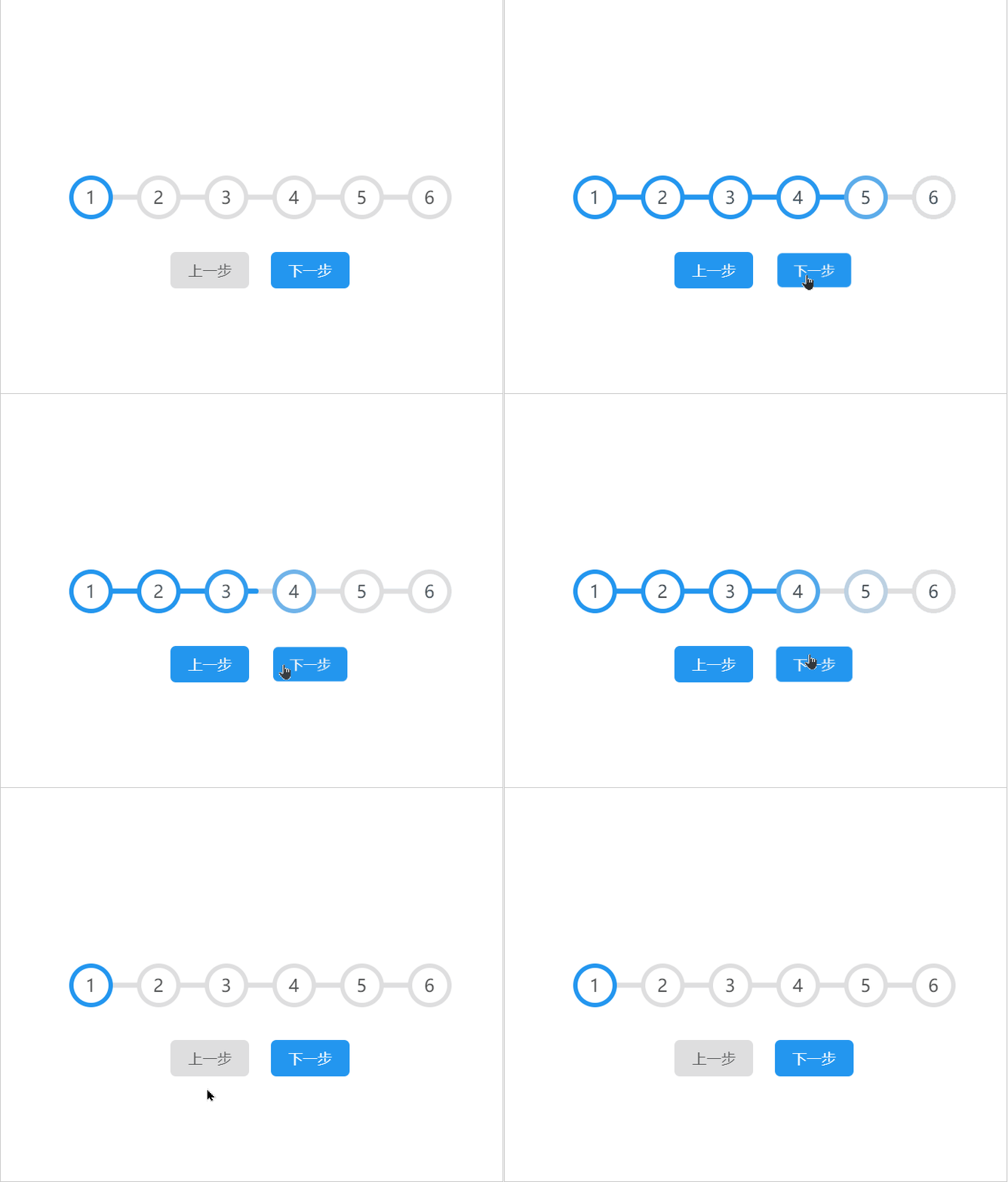
HTML布局文件
总体布局,一个大div盒子包裹所有内容,里面划分为div + button,六个⭕分别对应着六个子div;⭕下方就是两个button组件。
步骤条实现
123456
CSS样式
主要涉及内容:伪元素、flex弹性布局、:root自定义全局属性:
* {margin: 0;padding: 0;/* border-box:当定义width和height时,border和padding的参数值被包含在width和height之内。*/box-sizing: border-box;
}:root {/* 在: root选择器中定义自定义属性意味着它们可以作用于全局文档中所有元素。 */--color--: #dededf;--color_active--: #2396ef;--font_color--: #535455;--default_color--: #fff;
}body,
html {/* 给一个元素中设置overflow: hidden,那么该元素的内容若超出了给定的宽度和高度属性,那么超出的部分将会被隐藏 */overflow: hidden;display: flex;justify-content: center;/* 将弹性 元素的所有项目的居中对齐: */align-items: center;height: 100%;
}.container {width: 100%;text-align: center;
}.progress-container {width: 100%;width: 350px;display: flex;/* 均匀排列每个元素首个元素放置于起点,末尾元素放置于终点 */justify-content: space-between;position: relative;margin-bottom: 30px;
}.progress-container::before {content: '';width: 100%;background-color: var(--color--);
}.progress-container>.progress,
.progress-container::before {height: 5px;border-radius: 2px;position: absolute;left: 0;/* top: 50%——向上间隔50%的高度。由于自身的高度,单纯使用此属性并不会居中。 */top: 50%;/* transform: translateY(-50%)——向上移动自身高度的50%,与上个属性结合便可以实现垂直居中。 */transform: translateY(-50%);/* z-index 属性设置元素的堆叠顺序。拥有更高堆叠顺序的元素总是会处于堆叠顺序较低的元素的前面。 */z-index: -1;
}.progress-container>.progress {background-color: var(--color_active--);transition: all .3s cubic-bezier(0.25, 0.46, 0.45, 0.94);
}.progress-container>.circle {display: flex;justify-content: center;align-items: center;border: 4px solid var(--color--);width: 40px;height: 40px;color: var(--font_color--);border-radius: 50%;background-color: var(--default_color--);transition: all .35s cubic-bezier(0.25, 0.46, 0.45, 0.94);
}.progress-container>.circle.active {border-color: var(--color_active--);
}.prev,
.next {/* CSS outline: none; *//* 表示使outline属性无效,使绘制于元素周围的一条线无效。 */outline: none;/* 标签元素不设置边框属性或者取消边框属性 *//* 设置0浏览器依然会渲染,占用内存,设置none就不会渲染 */border: none;/* display: inline-block不设置宽度时,内容撑开宽度;不会独占一行,支持宽高,代码换行被解析成空格 */display: inline-block;background-color: var(--color--);padding: 8px 16px;border-radius: 5px;color: var(--font_color--);transition: all .3s cubic-bezier(0.25, 0.46, 0.45, 0.94);cursor: pointer;
}/* a.active 是对class=active的a标签生效 */
/* a:active 是对按下的a标签生效 */
.prev:active,
.next:active {transform: scale(.9);
}.prev.disabled,
.next.disabled {cursor: not-allowed;background-color: var(--color--);color: var(--font_color--);
}.prev.active,
.next.active {background-color: var(--color_active--);color: var(--default_color--);
}.next {margin-left: 15px;
}
relative:生成相对定位的元素,相对于其正常位置进行定位
absolute:生成绝对定位的元素,相对于static定位以外的第一个父元素进行定位
top: 50%;向上间隔50%的高度,由于存在自身的高度,到哪都使用该属性并不会显示居中。
transform: translateY(-50%);向上移动相对自身高度的50%,和上一个属性结合可以实现垂直居中显示。
JavaScript操作逻辑
const $ = v => document.querySelector(v);
const $$ = v => document.querySelectorAll(v);
const prevBtn = $("#prev");
const nextBtn = $("#next");
const progress = $("#progress");
const circleElements = $$(".circle");
const min = 0, max = circleElements.length - 1;
let currentActive = 0;nextBtn.addEventListener("click", () => {if (nextBtn.classList.contains('disabled')) return;if (currentActive >= max - 1) {// currentActive = min;handleClass(nextBtn).addClass("disabled").removeClass("active");}if (currentActive <= max - 1) {currentActive++;}if (currentActive > 0) {handleClass(prevBtn).addClass("active").removeClass("disabled");}update();
});prevBtn.addEventListener("click", () => {if (prevBtn.classList.contains('disabled')) return;if (currentActive <= 1) {// currentActive = max - 1;handleClass(prevBtn).addClass("disabled").removeClass("active");}if (currentActive > 0) {currentActive--;}if (currentActive <= max - 1) {handleClass(nextBtn).addClass("active").removeClass("disabled");}update();
});function handleClass(el) {let methods = {addClass,removeClass};function addClass(c) {el.classList.add(c);return methods;};function removeClass(c) {el.classList.remove(c);return methods;}return methods
}function update() {circleElements.forEach((item, index) => {if (index <= currentActive) {// classLIst属性返回元素的类名,作为DOMTokenList对象item.classList.add('active');} else {item.classList.remove('active');}});// toFixed() 方法可把 Number 四舍五入为指定小数位数的数字。progress.style.width = (100 / max * currentActive).toFixed(4) + '%';
}
关键点如下:
toFixed:该方法可以把Number四舍五入为指定小数数位的数字;-
语法:number.toFixed(x)
classList对象:HTML5给每一个元素新增加了一个classList对象,该对象保存有控制当前元素类名的各个方法和属性。Element.classList是一个只读属性,返回一个元素的类属性的DOMTokenList集合。
var oBtn = document.getElementById("btn");
var oCon = document.getElementById("con");
oBtn.onclick = function () {// oCon.className = "red";console.log(oCon.className); //redoCon.className = "con show red";//这个red类已经存在于元素的属性中,那么它将被忽略oCon.className += " red";console.log(oCon.classList.length); //3//在原有的类名基础上添加一个类名oCon.classList.add("red");// 在原有的类名基础上 移出某一个类名oCon.classList.remove("con");// 如果有这个类名 则删除这个类名,如果没有 则添加减去oCon.classList.toggle("blue");// 判断元素是否包含某一个类名console.log(oCon.classList.contains("con"));// 根据索引 获取类名console.log(oCon.classList.item(0)); //con
}
forEach方法:用于调用数组的每一个元素,并且把元素传递给回调函数。-
注意:forEach()对于空数组是不会执行回调函数的。
补充:JavaScript的this关键字
面向对象语言中this指的是当前对象的一个引用。
但是在JavaScript中this并不是固定不变的,而是随着执行环境的改变发生变化:
- 在方法中,
this表示这个方法所属的对象。 - 若单独使用,则
this表示全局对象。 - 在函数中,
this表示全局对象。 - 在函数中,严格模式,
this是未定义的。 - 在事件中,
this表示接收事件的元素。 - 类似
call和apply方法可以把this引用到任何对象中。
在函数的内部,this的数值取决于函数被调用的方式:
由于下面的代码并不是在严格模式,并且this的数值不是由该调用设置的,因此this的默认数值指向全局对象,浏览器就是window。
function f1(){return this;
}
//在浏览器中:
f1() === window; //在浏览器中,全局对象是 window//在 Node 中:
f1() === globalThis;
相关内容
热门资讯
埃菲尔铁塔在哪 中国仿建埃菲尔...
2019年4月26日,广西南宁市,街头惊现一座巨型山寨版埃菲尔铁塔,高约20米,白色塔身,造型逼真,...
最古之史实为方志 左传三不朽
学习时报人生的价值究竟是什么?用什么来衡量人生价值?这是一个曾被无数人问过且继续为无数人追问的话题,...
苗族的传统节日 贵州苗族节日有...
【岜沙苗族芦笙节】岜沙,苗语叫“分送”,距从江县城7.5公里,是世界上最崇拜树木并以树为神的枪手部落...
北京的名胜古迹 北京最著名的景...
北京从元代开始,逐渐走上帝国首都的道路,先是成为大辽朝五大首都之一的南京城,随着金灭辽,金代从海陵王...
应用未安装解决办法 平板应用未...
---IT小技术,每天Get一个小技能!一、前言描述苹果IPad2居然不能安装怎么办?与此IPad不...
脚上的穴位图 脚面经络图对应的...
人体穴位作用图解大全更清晰直观的标注了各个人体穴位的作用,包括头部穴位图、胸部穴位图、背部穴位图、胳...
长白山自助游攻略 吉林长白山游...
昨天介绍了西坡的景点详细请看链接:一个人的旅行,据说能看到长白山天池全凭运气,您的运气如何?今日介绍...
猫咪吃了塑料袋怎么办 猫咪误食...
你知道吗?塑料袋放久了会长猫哦!要说猫咪对塑料袋的喜爱程度完完全全可以媲美纸箱家里只要一有塑料袋的响...
世界上最漂亮的人 世界上最漂亮...
此前在某网上,选出了全球265万颜值姣好的女性。从这些数量庞大的女性群体中,人们投票选出了心目中最美...
埃菲尔铁塔在哪 中国仿建埃菲尔...
2019年4月26日,广西南宁市,街头惊现一座巨型山寨版埃菲尔铁塔,高约20米,白色塔身,造型逼真,...
开山种田打一字谜 开山创始人打...
贵阳市花果园半山小镇兰花坡森林公园——居民开山种地 公园变成菜园山林菜地从山脚一直延伸至山顶,面积近...
北京的名胜古迹 北京最著名的景...
北京从元代开始,逐渐走上帝国首都的道路,先是成为大辽朝五大首都之一的南京城,随着金灭辽,金代从海陵王...
苗族的传统节日 贵州苗族节日有...
【岜沙苗族芦笙节】岜沙,苗语叫“分送”,距从江县城7.5公里,是世界上最崇拜树木并以树为神的枪手部落...