【Linux】实验二 Makefile 的编写及应用
静态和动态库的转换可以参考这篇文章哦!!
文章目录
- 实验二 Makefile 的编写及应用
- 实验目的
- 实验内容
- 具体步骤:
- 一、进入文件夹
- 二、生成各个.c .h文件
- 1. exam.h
- 2. exam.c
- 3. mat.h
- 4. mat.c
- 5. main.c
- 三、编译建立的文件
- 1. 只编译不链接 main.o
- 2. 使用 file 查看 main.o 的格式,并尝试执行 main.o
- 3. 对 main.o 进行链接,并尝试执行
- 四、将 mat.o exam.o 做成`静态库`,并静态链接执行
- 1. 重新编译 mat.c 和 exam.c 生成静态库文件
- 1.1 重新编译 mat.c 和 exam.c 文件
- 1.2 将 mat.o 和 exam.o 打包到静态库中
- 3. 链接 main.o 和静态库文件并执行
- 4. 执行
- 五、将 mat.o exam.o 做成`动态库`,动静态链接执行
- 1. 生成对应的目标文件, 适用于动态库编译
- 2. 将 mat.o 和 exam.o 打包到动态库中
- 3. 链接 main.o 和动态库文件并执行
- 4. 执行
- 每天进步一点点 笔记仅供自学,用来回看复习,不一定适合你,如有错误请指出。
实验二 Makefile 的编写及应用
实验目的
- 掌握 GCC 编译与链接的基本使用方式、测试编译流程
- 了解 Makefile 的基本概念和基本结构.
- 初步掌握编写简单 Makefile 的方法.
- 了解递归 Make 的编译过程
- 初步掌握利用 GNU Make 编译应用程序的方法
实验内容
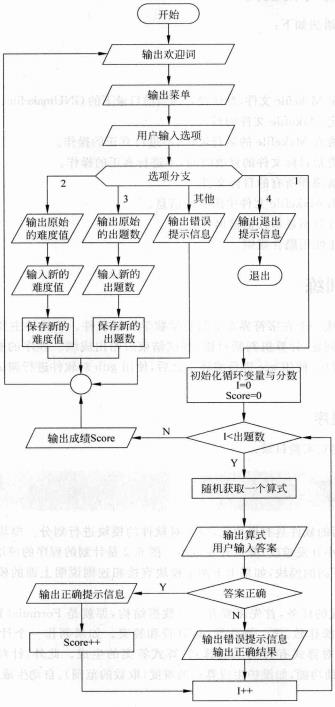
1、完成一个在字符界面下的小学数学教学软件。该软件主要实现计算机自动出题,使用者回答
问题,计算机判断对错,测试结束后给出成绩。程序的整体流程如图 3-1 所示。
2、首先用 vi 编写基本程序,
3、对代码进行编译,链接,并执行查看效果
4、编写 Makefile 实现自动化编译
具体步骤:
一、进入文件夹
切换到桌面(个人习惯)
cd ./Desktop/
生成单个文件夹
mkdir MathExam
切换到生成的文件中
cd ./MathExam/
二、生成各个.c .h文件
1. exam.h
vi exam.h
#ifndef EXAM_H
#define EXAM_H
#include "mat.h"
int GetExamNum(); //获取一次练习的题目数
void SetExamNum(int num); //设置一次练习的题目数
void PrintFormula(Formula *formula, int IsPrintAns); //显示算式
int ExamFormula(Formula *formula); //出题,并自动检查每题算式的答案是否正确
void ExamPaper(); //根据设置的题目数,调用 ExamFormula()并完成整份练习的得分统计
#endif
2. exam.c
vi exam.h
#include "exam.h"int ExamPaNum = 5; //设置出题数 //获取一次练习的题目数
int GetExamNum()
{return ExamPaNum;
}//设置一次练习的题目数
void SetExamNum(int num)
{ExamPaNum= num;
}//显示算式
void PrintFormula(Formula *formula, int IsPrintAns)
{int op1,op2,Optype;op1 = formula->Op1;op2 = formula->Op2;Optype = formula->OpType;printf("%d%c%d=%d\n",op1,Optype,op2,IsPrintAns);
}int CorrectCnt=0;
//出题,并自动检查每题算式的答案是否正确
int ExamFormula(Formula *formula)
{int youAnswer,correctAnswer;correctAnswer = formula->Answer;scanf("%d",&youAnswer);if(correctAnswer== youAnswer){CorrectCnt++;printf("回答正确!!\n");}else{printf("回答错误!!\n");printf("正确答案如下:");PrintFormula(formula,correctAnswer);}
}//根据设置的题目数,调用 ExamFormula()并完成整份练习的得分统计
void ExamPaper()
{CorrectCnt = 0;//重新考试则把得分清空 int preDiff;preDiff = GetMaxNum();printf("当前题目数量为%d\n",ExamPaNum);printf("当前的题目的难度是%d.\n", preDiff);Formula formulator;Formula *formula = &formulator;int E_cnt;for(E_cnt=0; E_cnt < ExamPaNum; E_cnt++){printf("第%d题为:",E_cnt+1);GetRandFormula(formula);SetAnswer(formula);ExamFormula(formula);printf("------------:\n");}printf("您的最终得分为:%d\n",CorrectCnt);}
3. mat.h
#include
#include
#include
#ifndef MAT_H
#define MAT_H
//定义加/减/乘/除四种运算符
#define MT_ADD 0
#define MT_SUB 1
#define MT_MUL 2
#define MT_DIV 3typedef struct _Formula
{int Op1; //操作数 1int Op2; //操作数 2char OpType; //运算符:加/减/乘/除int Answer; //结果
} Formula;
int GetMaxNum();
void SetMaxNum(int max); //设置计算的最大数
int GetRandOp(); //随机获取 4 种运算符中的一种
char OpTypeToChar(int optype); //整型的运算符转为字符型运算符
void SetAnswer(Formula *formula);//记录算式的正确答案
void GetRandFormula(Formula *formula); //生成随机算式
#endif
4. mat.c
#include "mat.h"
int maxDifficulu=1;//设置初始难度为1 //获取当前题目难度
int GetMaxNum()
{return maxDifficulu;
}//设置计算的最大数
void SetMaxNum(int max) //设置计算的最大数
{if(max>3){printf("难度最大为3,以帮您设置为最大难度\n");maxDifficulu = 3;}maxDifficulu = max;
}//随机获取 4 种运算符中的一种
int GetRandOp()
{int optype=0;srand((unsigned)time(NULL));optype=rand()%4;	 //theop就是你要的随机运算符。return optype;
}//整型的运算符转为字符型运算符
char OpTypeToChar(int optype)
{char opType;char op[4] = {'+','-','*','/'};opType=op[optype];return opType;
}//记录算式的正确答案
void SetAnswer(Formula *formula)
{int op1,op2;int result;char opType;op1 = formula->Op1;op2 = formula->Op2;opType = formula->OpType;if(opType == '+') {result = op1+op2;}else if(opType == '-') {result = op1-op2;}	else if(opType == '*') {result = op1*op2;}else if(opType == '/') {result = op1/op2;}formula->Answer = result;
}//生成随机算式
void GetRandFormula(Formula *formula)
{char opType;int temp_op1,temp_op2;Formula temp_formula;srand((unsigned)time(NULL));//按照相应的难度出题 if(maxDifficulu == 1){temp_op1 = rand()%10;temp_op2 = rand()%10+1;}if(maxDifficulu == 2){temp_op1 = rand()%30;temp_op2 = rand()%30+1;}if(maxDifficulu == 3){temp_op1 = rand()%50;temp_op2 = rand()%50+1;}opType=OpTypeToChar(GetRandOp());formula->OpType = opType;formula->Op1 = temp_op1;formula->Op2 = temp_op2;printf("%d%c%d=",formula->Op1,formula->OpType,formula->Op2);
}
5. main.c
#include "mat.h"
#include "exam.h"int PrintMenu();
void ChangeDifficulty();
void ChangeScale();
int main()
{int choice;printf(" * Maths Exam *\n");do {choice = PrintMenu();switch (choice) {case 1:ExamPaper();break;case 2:ChangeDifficulty();break;case 3:ChangeScale();break;case 4:printf ("Goodbye!\n");break;default:printf("Wrong Choice!\n");break;}} while (choice != 4);return 0;
}int PrintMenu()
{int choice;printf("Main Menu:\n");printf(" 1) Exam; 2) Set Difficulty; 3) Set Scale; 4) Quit\n");printf("Choice: ");scanf("%d", &choice);return choice;
}void ChangeDifficulty()
{int preDiff,nexDiff;preDiff = GetMaxNum();printf("当前的题目的难度是%d.\n", preDiff);printf("---------------------\n");printf("= 本程序共有以下难度 =\n");printf("= 1:10以内的计算题  =\n");printf("= 2:30以内的计算题  =\n");printf("= 3:50以内的计算题  =\n");printf("---------------------\n");printf("请选择难度: ");scanf("%d", &nexDiff);SetMaxNum(nexDiff);
}void ChangeScale()
{int examnum;printf("当前的试题数量为 %d.\n", GetExamNum());printf("---------------------\n");printf("输入设置新的试题数量: ");scanf("%d", &examnum);SetExamNum(examnum);
}
三、编译建立的文件
1. 只编译不链接 main.o
gcc -c main.c
可以发现当前文件夹下多了一个 main.o 文件
2. 使用 file 查看 main.o 的格式,并尝试执行 main.o
file main.o
会打印出 log:“main.o: ELF 64-bit LSB relocatable, x86-64, version 1 (SYSV), not stripped”
表明 main.o 实际上是一个 relocatable 文件。
修改 main.o 的文件属性(权限)为可执行:
chmod 777 main.o
再尝试执行 main.o 文件:
./main.o
此时是执行不了的

3. 对 main.o 进行链接,并尝试执行
那么怎样才能生成可执行文件呢? 可执行文件需要通过链接来生成。
使用 gcc 将 main.o 链接为 matexam 文件:
gcc –c mat.c exam.c
gcc mat.o exam.o main.o -o matexam
通过 ls 命令查看当前目录下是否生成源代码 mat.c exam.c main.c 所对应的 object 文件 mat.o ;
exam.o main.o 和可执行文件 matexam,运行可执行文件 matexam,并记录运行结果。
./matexam
四、将 mat.o exam.o 做成静态库,并静态链接执行
这一步可以再生成个文件夹,我生成了个
static
1. 重新编译 mat.c 和 exam.c 生成静态库文件
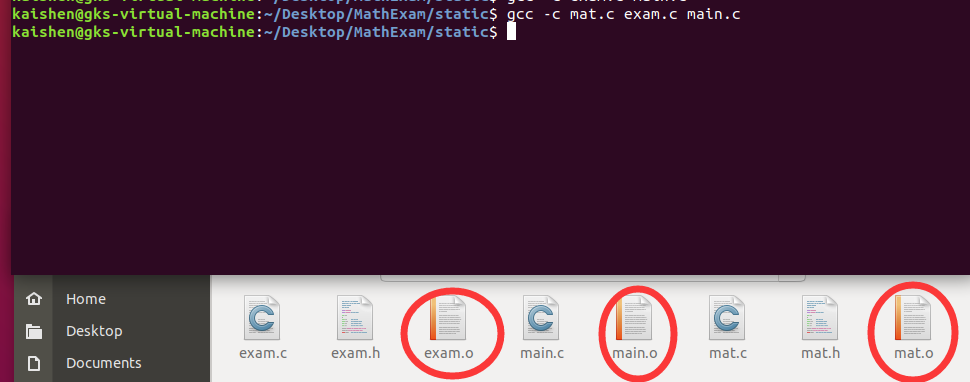
1.1 重新编译 mat.c 和 exam.c 文件
gcc –c mat.c exam.c main.c
1.2 将 mat.o 和 exam.o 打包到静态库中
ar rc libexam.a mat.o exam.o
生成 libexam.a 静态库文件

可以看到说明:“libexam.a: current ar archive”
实际上 libxxx.a 只是将指定的.o 文件打包汇集在一起,它的本质上还是 relocatable 文件集合。
3. 链接 main.o 和静态库文件并执行
gcc -o main2 main.o -L./ -lexam
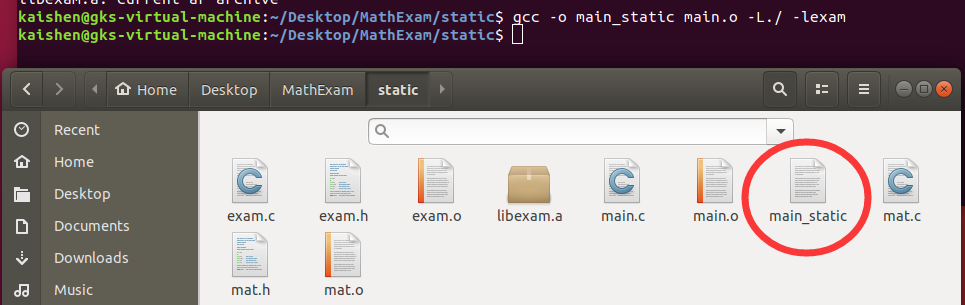
说明 1: -L./ 表明库文件位置在当前文件夹
说明 2: -lexam 表示链接 libexam.a 文件,使用“-l”参数时,前缀“lib”和后缀“.a”是需要省略
的。
4. 执行
./main_static
五、将 mat.o exam.o 做成动态库,动静态链接执行
这一步可以再生成个文件夹,我生成了个
dynamic
1. 生成对应的目标文件, 适用于动态库编译
gcc -fPIC -c exam.c mat.c main.c
必须要加
-fPIC参数,不然会有下面的报错
2. 将 mat.o 和 exam.o 打包到动态库中
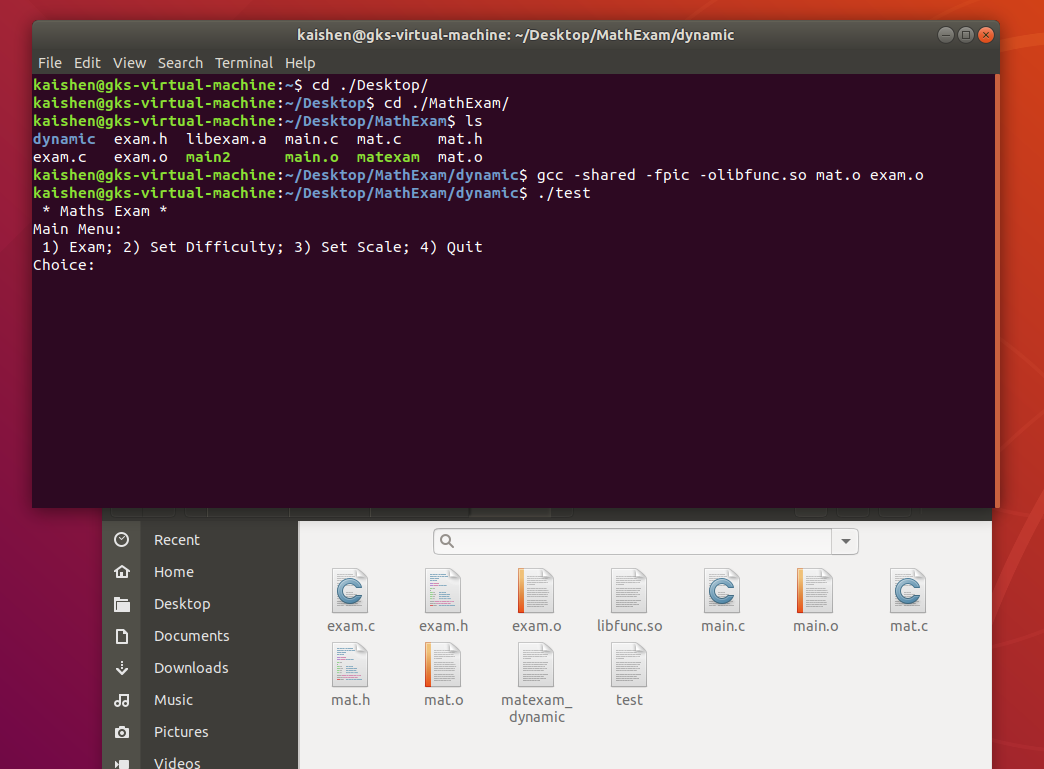
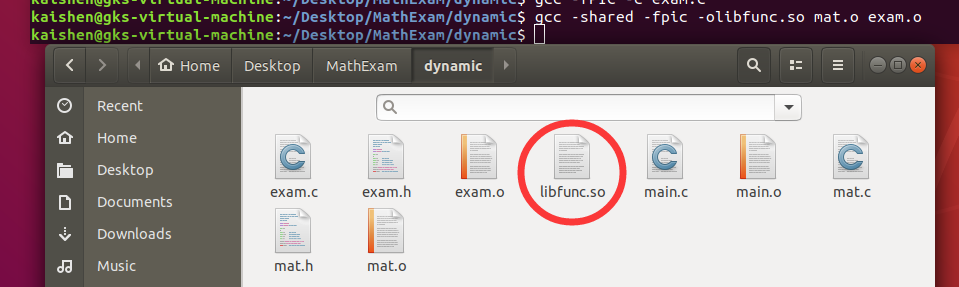
gcc -shared -fpic -olibfunc.so mat.o exam.o
动态库打包,-fPIC: 生成与位置无关的代码
3. 链接 main.o 和动态库文件并执行
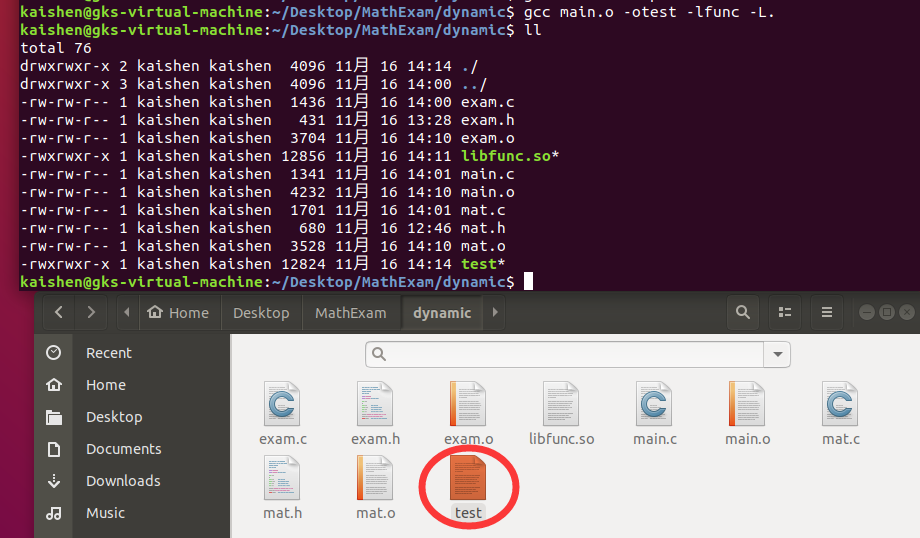
gcc main.o -o test -lfunc -L.
最终链接 -L 指出动态库路径 -o 指出动态库名称
4. 执行
./test
可能会遇到的错误:error while loading shared libraries: libxxx.so通用解决方法