

linux的基本指令(中)
文章目录
- 1.man指令
- 1.安装
- 2.用法
- 3.man+数字
- 1. printf函数的查询
- 2.cp指令
- 1.cp +文件
- 1.拷贝到当前目录
- 2.拷贝到 其他目录中
- 3. 拷贝到上一级目录
- 2.cp +目录
- 1.返回上一级目录
- 3. mv指令
- 1.剪切
- 2. 文件的重命名
- 4. cat指令
- 1.显示文件的全部内容并且不可以修改
- 2.cat -n指令
- 3. cat -s 指令
- 5. more指令
- 1-1000带有编号的hello world的创建
- more 作用
- 6.less 指令
- 查找指定行数据
- 7. head指令
- head -n +数字
- 8. tail指令
- tail -n +数字
- 9. date指令
- 1.日期
- 2.时间戳
- 3.cal +年份
- 1. cal -1
- 2. cal -3
- 10. top指令
- 1. 退出
1.man指令
1.安装
如果是云服务器 ,则需要安装配置
[root@VM-8-8-centos lesson1]# yum install -y
安装了这个可以使用基本命令,但是不能调用库里的函数
[root@VM-8-8-centos lesson1]# yum install man-pages -y安装这个后,就可以使用基本的指令了
2.用法
man +man
查询man指令的用法
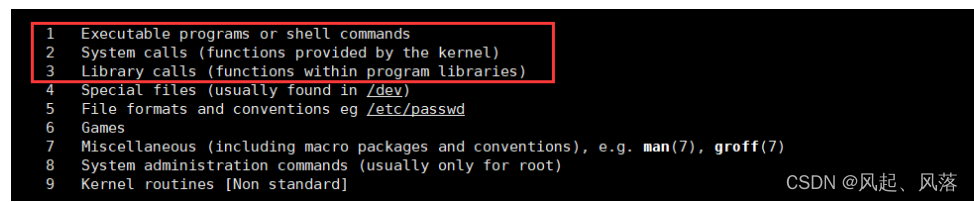
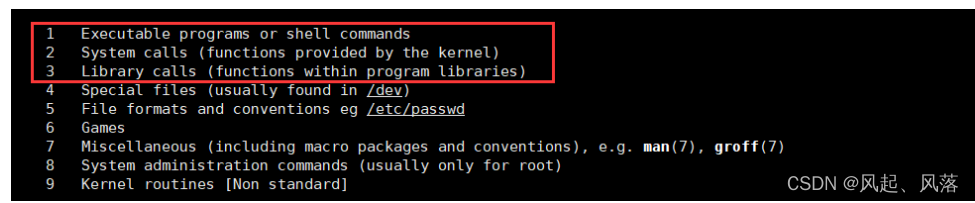
3.man+数字
一般默认1号手册——调用基本命令
2号手册为系统调用接口
3号手册为库函数
1. printf函数的查询
一般想到 printf函数想到的都是 c语言库函数
[root@VM-8-8-centos lesson1]# man printf
此时的printf是linux上的一条基本的打印语句
[root@VM-8-8-centos lesson1]#  printf  "hello linux"\n
hello linux
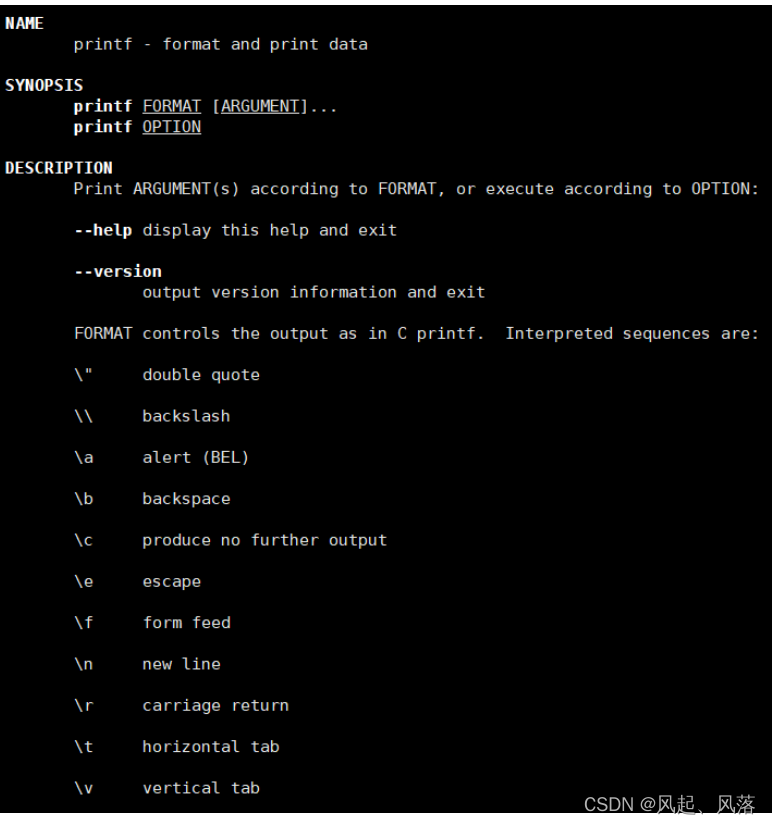
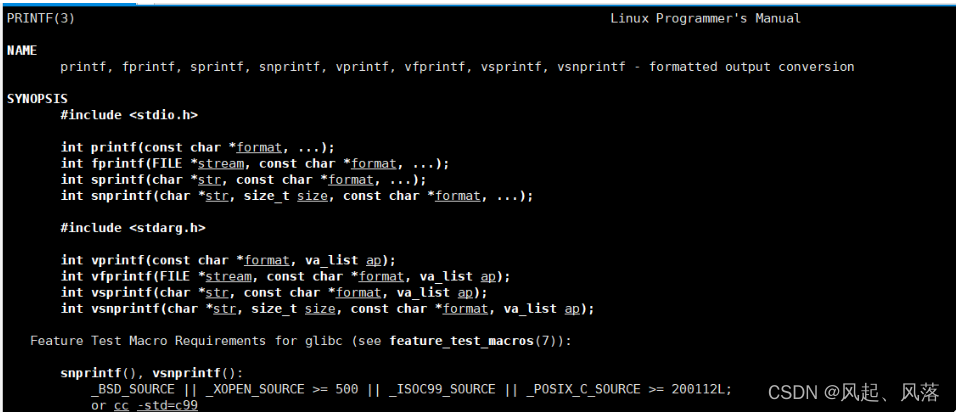
hello linuxn[root@VM-8-8-centos lesson1]# man 3 printf
man+3才为 c语言库函数
2.cp指令
1.cp +文件
1.拷贝到当前目录
[root@VM-8-8-centos 9.9]# cp file.txt file.txt.bak
[root@VM-8-8-centos 9.9]# cat file.txt
hello world
[root@VM-8-8-centos 9.9]#  cat file.txt.bak
hello world
将file.txt 文件拷贝到 file.txt.bak文件中
此时分别打印 file.txt 文件与 file.txt.bak文件发现 都可以打印出 hello world
这里的 fille.txt.bak文件不需要创建
2.拷贝到 其他目录中
[root@VM-8-8-centos lesson1]# ls -la
total 20
drwxr-xr-x 3 root root 4096 Sep 30 13:51 .
drwxr-xr-x 5 root root 4096 Sep 30 13:48 ..
-rw-r--r-- 1 root root   12 Sep 30 13:49 file.txt
-rw-r--r-- 1 root root   12 Sep 30 13:49 file.txt.bak
drwxr-xr-x 2 root root 4096 Sep 30 13:51 touch
[root@VM-8-8-centos lesson1]#  cp file.txt touch
[root@VM-8-8-centos lesson1]#  tree touch
touch
`-- file.txt
将 file.txt 文件拷贝到 touch目录中
使用 tree 以树状形式展开touch结构后,发现 touch目录下有个file.txt
3. 拷贝到上一级目录
[root@VM-8-8-centos 9.9]# ls
lesson1  lesson2
[root@VM-8-8-centos 9.9]# cd lesson1
[root@VM-8-8-centos lesson1]# ls
file.txt  file.txt.bak  touch
[root@VM-8-8-centos lesson1]#  cp file.txt ..
[root@VM-8-8-centos lesson1]# ls ..
file.txt  lesson1  lesson2
将 lesson1目录中的 file.txt 文件拷贝到 上一级目录
2.cp +目录
1.返回上一级目录
[root@VM-8-8-centos 9.9]#  ls
lesson1  lesson2
[root@VM-8-8-centos 9.9]#  cd lesson1
[root@VM-8-8-centos lesson1]#  ls
file.txt  file.txt.bak  touch
[root@VM-8-8-centos lesson1]#  cp -r touch ..
[root@VM-8-8-centos lesson1]# ls ..
lesson1  lesson2  touch
将 lesson1目录下的 touch目录 ,拷贝到 上一级目录
需要用 cp -r +目录
3. mv指令
1.剪切
[root@VM-8-8-centos lesson1]#  ls
dir  file.txt  file.txt.bak
[root@VM-8-8-centos lesson1]# mv  file.txt ..
[root@VM-8-8-centos lesson1]# ls
dir  file.txt.bak
[root@VM-8-8-centos lesson1]#  ls ..
file.txt  lesson1  lesson2  touch
将 /root/9.9/lesson1 中的 file.txt 文件移动到 /root/9.9中
[root@VM-8-8-centos lesson1]# ls
dir  file.txt.bak
[root@VM-8-8-centos lesson1]# mv dir ..
[root@VM-8-8-centos lesson1]# ls
file.txt.bak
[root@VM-8-8-centos lesson1]# ls ..
dir  file.txt  lesson1  lesson2  touch
将 dir目录移动到 上一级目录 ,只需 mv+目录 即可
2. 文件的重命名
[root@VM-8-8-centos lesson1]# ls
file.txt.bak
[root@VM-8-8-centos lesson1]# mv file.txt.bak file.c
[root@VM-8-8-centos lesson1]# ls
file.c
将 file.txt文件重命名为 file.c文件
4. cat指令
1.显示文件的全部内容并且不可以修改
[root@VM-8-8-centos lesson1]# ls
file.c
[root@VM-8-8-centos lesson1]#  cat file.c
hello world
打印出file.c的内容 hello world
2.cat -n指令
对输出的所有行的编号
[yzq@VM-8-8-centos mytest]$ cat -n 888.txt1 aaaaaaaa2 aaaaaaaa3 aaaaaaaa4 5 6 7 8 此时888.txt文本中 有多行空行的存在
3. cat -s 指令
不输出多行空行
[yzq@VM-8-8-centos mytest]$ cat -s 888.txt
aaaaaaaa
aaaaaaaa
aaaaaaaa
此时只输出一行空行
5. more指令
1-1000带有编号的hello world的创建
在使用more指令之前 ,先编辑一个 1-1000带有编号的hello world
[yzq@VM-8-8-centos mytest]$  ls
[yzq@VM-8-8-centos mytest]$  touch test.txt
[yzq@VM-8-8-centos mytest]$  cnt=0; while [ $cnt -le 1000 ] ; do echo "hello world [$cnt]"; let cnt++; done > test.txt
创建一个 test.txt的文件 ,将1-1000带有编号的hello world 重定向到 test.txt中
more 作用
默认按照屏幕大小显示文本内容
输入more test.txt,显示内容如下
hello world [0]
hello world [1]
hello world [2]
hello world [3]
hello world [4]
hello world [5]
hello world [6]
hello world [7]
hello world [8]
hello world [9]
hello world [10]
hello world [11]
hello world [12]
hello world [13]
hello world [14]
hello world [15]
hello world [16]
hello world [17]
hello world [18]
hello world [19]
hello world [20]
hello world [21]
hello world [22]
hello world [23]
hello world [24]
hello world [25]
hello world [26]
hello world [27]
hello world [28]
hello world [29]
hello world [30]
hello world [31]
--More--(2%)
此时按回车可以逐行翻阅,输入q即可退出,只能下翻
6.less 指令
默认按照屏幕大小显示文本内容——可上下翻
使用less test.txt后 ,显示内容如下
hello world [0]
hello world [1]
hello world [2]
hello world [3]
hello world [4]
hello world [5]
hello world [6]
hello world [7]
hello world [8]
hello world [9]
hello world [10]
hello world [11]
hello world [12]
hello world [13]
hello world [14]
hello world [15]
hello world [16]
hello world [17]
hello world [18]
hello world [19]
hello world [20]
hello world [21]
hello world [22]
hello world [23]
hello world [24]
hello world [25]
hello world [26]
hello world [27]
hello world [28]
hello world [29]
hello world [30]
hello world [31]
test.txt
输入q即可退出
查找指定行数据
输入
/ 行
如寻找999行的数据
hello world [25]
hello world [26]
hello world [27]
hello world [28]
hello world [29]
hello world [30]
hello world [31]
/999
1.在其下面冒号的后面加入/999
hello world [999]
hello world [1000]
2.此时即有999行的数据
7. head指令
[yzq@VM-8-8-centos mytest]$ head test.txt
hello world [0]
hello world [1]
hello world [2]
hello world [3]
hello world [4]
hello world [5]
hello world [6]
hello world [7]
hello world [8]
hello world [9]
默认将文本的前十行打印出来,若没有十行有多少打多少
head -n +数字
[yzq@VM-8-8-centos mytest]$ head -n5 test.txt
hello world [0]
hello world [1]
hello world [2]
hello world [3]
hello world [4]
显示文本的前五行数据
8. tail指令
[yzq@VM-8-8-centos mytest]$ tail test.txt
hello world [991]
hello world [992]
hello world [993]
hello world [994]
hello world [995]
hello world [996]
hello world [997]
hello world [998]
hello world [999]
hello world [1000]
将文本的后10行显示出来
tail -n +数字
[yzq@VM-8-8-centos mytest]$ tail -n3 test.txt
hello world [998]
hello world [999]
hello world [1000]
将文本的后3行数据显示出来
9. date指令
1.日期
[root@VM-8-8-centos lesson1]# date +%Y:%m:%d-%H:%M:%S
2022:09:30-15:00:37
Y代表 年,m代表月,d代表日,H代表小时,M代表分钟,S代表秒
20220年 9月30日 ——15点 37秒
2.时间戳
[root@VM-8-8-centos lesson1]# date +%s
1664521420
[root@VM-8-8-centos lesson1]# date +%s
1664521425
[root@VM-8-8-centos lesson1]# date +%s
1664521429
[root@VM-8-8-centos lesson1]# date +%s
1664521434
图中有一个很大的数在一直变化
是从1970年1月1日开始到现在累计的秒数 即时间戳
时间戳的价值: 单项递增,不重复,比较适合作为一条关键信息的索引值
将时间戳转换成普通时间:
[root@VM-8-8-centos lesson1]# date +%Y:%m:%d-%H:%M:%S -d @0
1970:01:01-08:00:00
正常来说应该为 1970.1.1 ——0点0分
但是由于我们与欧洲有8个小时的时差,所以显示为8点
3.cal +年份
查看某年的日历信息
[root@VM-8-8-centos lesson1]# cal 20222022                               January               February                 March
Su Mo Tu We Th Fr Sa   Su Mo Tu We Th Fr Sa   Su Mo Tu We Th Fr Sa1          1  2  3  4  5          1  2  3  4  52  3  4  5  6  7  8    6  7  8  9 10 11 12    6  7  8  9 10 11 129 10 11 12 13 14 15   13 14 15 16 17 18 19   13 14 15 16 17 18 19
16 17 18 19 20 21 22   20 21 22 23 24 25 26   20 21 22 23 24 25 26
23 24 25 26 27 28 29   27 28                  27 28 29 30 31
30 31April                   May                   June
Su Mo Tu We Th Fr Sa   Su Mo Tu We Th Fr Sa   Su Mo Tu We Th Fr Sa1  2    1  2  3  4  5  6  7             1  2  3  43  4  5  6  7  8  9    8  9 10 11 12 13 14    5  6  7  8  9 10 11
10 11 12 13 14 15 16   15 16 17 18 19 20 21   12 13 14 15 16 17 18
17 18 19 20 21 22 23   22 23 24 25 26 27 28   19 20 21 22 23 24 25
24 25 26 27 28 29 30   29 30 31               26 27 28 29 30July                  August                September
Su Mo Tu We Th Fr Sa   Su Mo Tu We Th Fr Sa   Su Mo Tu We Th Fr Sa1  2       1  2  3  4  5  6                1  2  33  4  5  6  7  8  9    7  8  9 10 11 12 13    4  5  6  7  8  9 10
10 11 12 13 14 15 16   14 15 16 17 18 19 20   11 12 13 14 15 16 17
17 18 19 20 21 22 23   21 22 23 24 25 26 27   18 19 20 21 22 23 24
24 25 26 27 28 29 30   28 29 30 31            25 26 27 28 29 30
31October               November               December
Su Mo Tu We Th Fr Sa   Su Mo Tu We Th Fr Sa   Su Mo Tu We Th Fr Sa1          1  2  3  4  5                1  2  32  3  4  5  6  7  8    6  7  8  9 10 11 12    4  5  6  7  8  9 109 10 11 12 13 14 15   13 14 15 16 17 18 19   11 12 13 14 15 16 17
16 17 18 19 20 21 22   20 21 22 23 24 25 26   18 19 20 21 22 23 24
23 24 25 26 27 28 29   27 28 29 30            25 26 27 28 29 30 31
30 31
1. cal -1
[root@VM-8-8-centos lesson1]# cal -1September 2022
Su Mo Tu We Th Fr Sa1  2  34  5  6  7  8  9 10
11 12 13 14 15 16 17
18 19 20 21 22 23 24
25 26 27 28 29 30
查看本月日历
2. cal -3
查看上一个月、本月、下一个月的日历
[root@VM-8-8-centos lesson1]# cal -3August 2022         September 2022         October 2022
Su Mo Tu We Th Fr Sa  Su Mo Tu We Th Fr Sa  Su Mo Tu We Th Fr Sa1  2  3  4  5  6               1  2  3                     17  8  9 10 11 12 13   4  5  6  7  8  9 10   2  3  4  5  6  7  8
14 15 16 17 18 19 20  11 12 13 14 15 16 17   9 10 11 12 13 14 15
21 22 23 24 25 26 27  18 19 20 21 22 23 24  16 17 18 19 20 21 22
28 29 30 31           25 26 27 28 29 30     23 24 25 26 27 28 2930 31
10. top指令
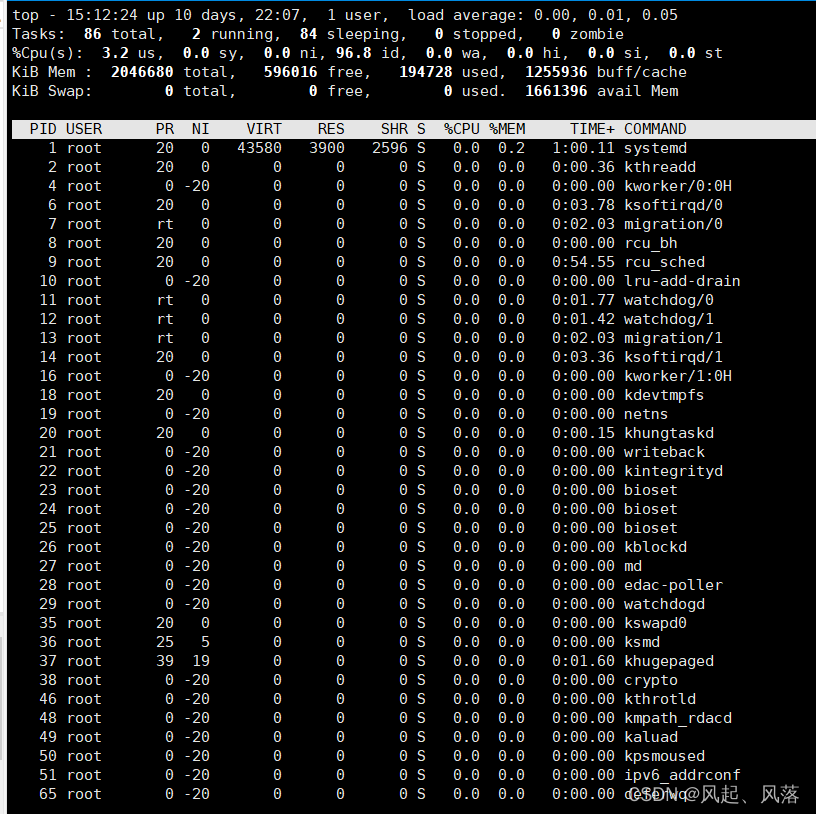
在linux中启用top相当于 windows中任务管理器
定期更新数据
输入 top 后
1. 退出
使用 q 或者 CTRL +c都可以退出top

上一篇:恶心悲伤的句子
下一篇:有哪些描写英雄的句子?