

【详解】BIO、AIO、NIO Netty 知识点和工作原理
Netty框架 基础
三大网络编程
BIO
同步阻塞:服务器实现模式一个连接一个线程,既客户端有连接请求时,服务器就需要启动一个线程进行处理,如果这个连接不任何事情会造成不必要的线程线程开销
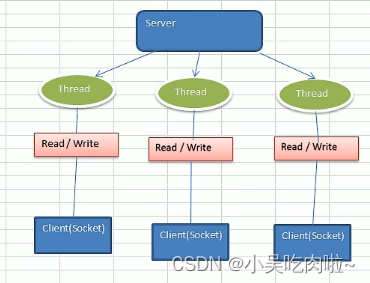
适用场景: 连接数目比较小且固定的架构,这种方式对服务器资源要求比较高,并发局限于应用中,JDK1.4以前的唯一选择,但程序简单易理解
NIO
**同步非阻塞:**服务器实现一个模式为一个线程处理多个请求(连接),即可达发送的连接请求,都会注册到多路复用器上,多路复用器轮询到连接有I/O请求就进行处理。
适用场景:连接数目多且连接比较短,eg:聊天服务器,弹幕系,服务期间通讯。
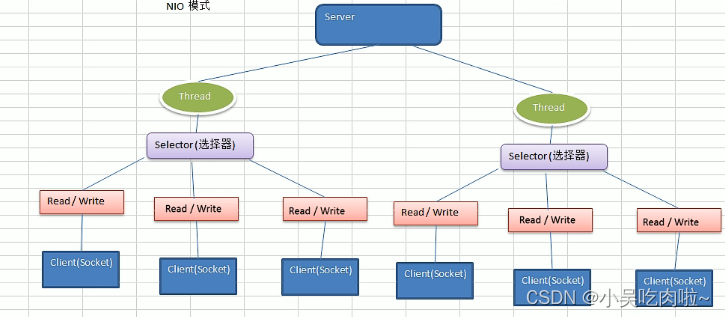
基本介绍:是哟个线程从某个通道发送请求或者读取数据,但是它仅能得到目前可用的数据,如果目前没有数据可用时,就说明都不会获取,而不是保持线程阻塞,所以直至数据变得可以读取之前,该线程可以继续做其他的事情。
AIO
异步非阻塞:AIO引入异步通道的概念,采用Proactor模式,简化了程序编写,有效的请求才其启动线程,它的特点是先由操作系统完成后才通知服务端程序去处理,一般适用于链接数较多的且连接时间较长的应用。
适用场景: 连接数目多 且 链接比较长 ,eg: 相册服务器
BIO编程简单流程
- 服务器端启动一个 ServiceSocket
- 客户端启动 Socket 对服务器进行通信,默认情况下服务器需要对每个客户 建立一个线程与之通讯
- 客户端发出请求后,先咨询服务器是否有线程响应,如果没有则还会等待,或者被拒绝
- 如果有响应,客户端线程会的等待请求结束后,在继续执行
服务器端:
package com.atguigu.bio;import java.io.IOException;
import java.io.InputStream;
import java.net.ServerSocket;
import java.net.Socket;
import java.util.concurrent.ExecutorService;
import java.util.concurrent.Executors;public class BIOService {public static void main(String[] args) throws Exception {//线程池机制//思路//1. 创建一个线程池//2   如果有客户端连接,就创建一个线程,与之通讯(单独写一个方法)//1. 创建一个线程池ExecutorService newCachedThreadPool = Executors.newCachedThreadPool();//创建一个serversocketServerSocket serverSocket = new ServerSocket(6666);System.out.println("服务器启动");while (true) {// 监听,等待客户端连接final Socket socket = serverSocket.accept();System.out.println("连接到一个客户端");//就创建一个线程,与之通讯(单独写一个方法)newCachedThreadPool.execute(new Runnable() {public void run() {handler(socket);}});}}//编写一个handler方法,和客户端通讯public static void handler(Socket socket) {try {System.out.println("线程信息 id = " + Thread.currentThread().getId() +"线程名字 =" + Thread.currentThread().getName());byte[] bytes = new byte[1024];//通过socker 获取输入流InputStream inputStream = socket.getInputStream();//循环的读取客户端的发送的数据while (true) {System.out.println("线程信息 id = " + Thread.currentThread().getId() +"线程名字 =" + Thread.currentThread().getName());int read = inputStream.read(bytes);if (read != -1) {System.out.print(new String(bytes, 0, read));//输出客户端发送的数据} else {break;}}} catch (IOException e) {e.printStackTrace();} finally {System.out.println("关闭和client连接");try {socket.close();} catch (IOException e) {e.printStackTrace();}}}
}
客户端: cmd telnet 127.0.0.1 6666
NIO核心三大核心
NIO三大核心部分 : Channnel(通道) Buffer(缓冲区) Selector(选着器)
三者关系说明
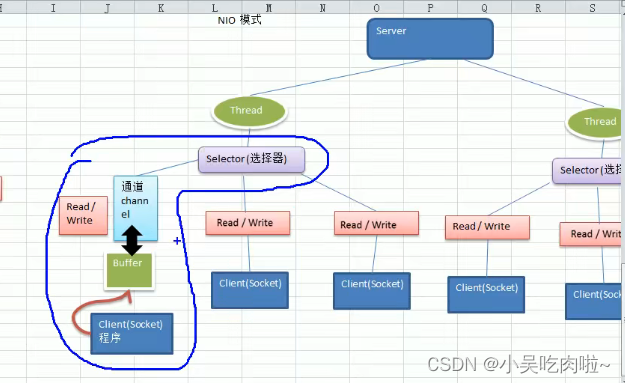
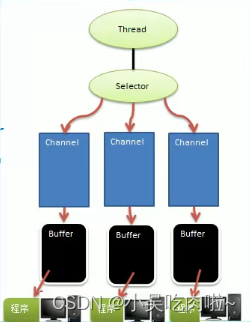
- 每个channel 都会对应一个Buffer
- Selector对对应一个线程,一个线程可以对应多个channel
- 该图反应了有三个channel注册到 该selector
- 程序切换到哪个channel是有时间决定的,Event就是一个重要的概念
- Selector会根据不同的事件,在各个通道上切换
- Buffer就是一个内存块,底层是有一个数组
- 数据的读取写入是通过Buffer,这个和BIO,BIO中要么是输入流,或者是输出流 不能双向,但是NIO的Buffer 是可以读也可以写,需要flip方法的切换
- channel是双向的,可以返回底层操作系统的情况、
Buffer(缓冲区)
buffer子类(API)
- ByteBuffer,存储字节数据到缓冲区
- ShortBuffer,存储字符串数据到缓冲区
- CharBuffer,存储字符数据到缓冲区
- IntBuffer,存储整数数据到缓冲区
- LongBuffer,存储长整型数据到缓冲区
- DoubleBuffer,存储小数到缓冲区
- FloatBuffer,存储小数到缓冲区
Buffer支持类型化的put 和 get,put放入什么数据类型,get就应该使用响应的数据类型来取出,否则可嫩硅油 BufferUnderflowException 异常
buffer属性
| 属性 | 描述 |
|---|---|
| Capacity | 容量,即可以容纳的最大数量,在缓冲区创建时被设定并且不能改变 |
| Limit | 表示缓冲区的当前终点,不能对缓冲区超过极限的位置进行读写操作。且极限是可以修改的 |
| Postion | 位置,下一个要被读写的元素的索引,每次读写缓冲区数据都会被改变数值,为下一次的读写准备 |
| Mark | 标记 |
Channel(通道)
通道可以同时进行读写,而流只能读or之后hi能写
通道可以实现异步读写数据
通道可以从缓存读数据,也可以写数据到缓存
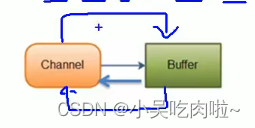
基本介绍:
- BIO 中的stream似乎单向的,例如FileInputStream对象只能进行读取数据的操作,而NIO中的通道(Channel)是双向的,可以读操作,也可以写操作
- Channel在NIO中是一个接口
- 常用的Channel 类有: FileChannel、DatagramChannel、ServerSocketChannel 和 SocketChannel
- FileChannel 用于文件数据的读写,DatagramChannel 用于UDP的数据读写,ServerSocketChannel 和SocketChannel 用于TCP的数据读写。
FileChannel类
FileChannel主要用来对本地文件进行IO操作,常见的方法有:
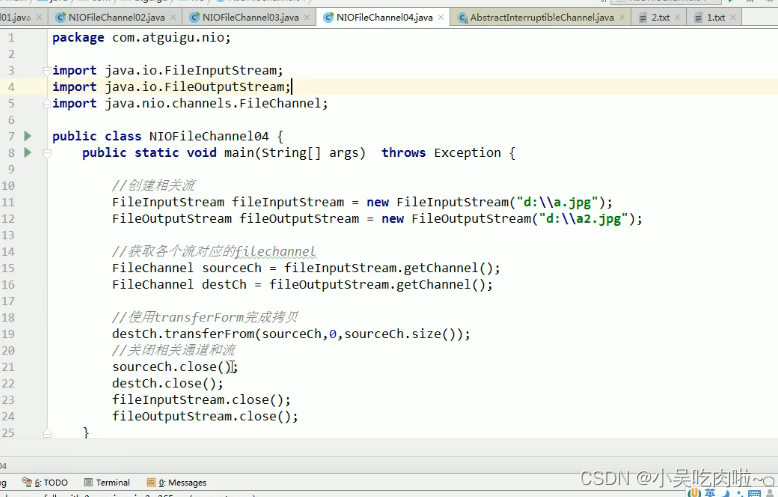
public int read(ByteBuffer dst) ,从通道读取数据并放到缓冲区public int write(ByteBuffer src),把缓冲区的数据写到通道中public long transferFrom(ReadableByteChannel src,long position,long count),从目标通道中复制数据到当前通道public long tansferTo(long postion,long count,WritableByteChannel target),吧数据从当前通道复制给目标通道
write案例
package com.atguigu.nio;import java.io.FileOutputStream;
import java.nio.ByteBuffer;
import java.nio.channels.FileChannel;public class NIOFileChannel01 {public static void main(String[] args) throws Exception{String str = "四达时代";//创建一个输出流FileOutputStream fileOutputStream = new FileOutputStream("D:\\file01.txt");//通过fileOutputStream 获取 对应FileChannel// 这个fileChannel 真实类型是 FileChannelImplFileChannel fileChannel = fileOutputStream.getChannel();//创建一个缓冲区  ByteBuffer  再分配1024空间ByteBuffer byteBuffer = ByteBuffer.allocate(1024);//将 str 放入 BufferbyteBuffer.put(str.getBytes());//对buffer ,进行flip   功能反转byteBuffer.flip();//把缓冲区的数据 写入 FileChannel中fileChannel.write(byteBuffer);//关闭流fileOutputStream.close();}
}
read案例
package com.atguigu.nio;import java.io.File;
import java.io.FileInputStream;
import java.nio.ByteBuffer;
import java.nio.channels.FileChannel;public class NIOFileChannel02 {public static void main(String[] args) throws Exception {File file = new File("D:\\file01.txt");FileInputStream fileInputStream = new FileInputStream(file);//通过fileInputStream 获取对应的ileChannelFileChannel channel = fileInputStream.getChannel();//创建缓冲区ByteBuffer byteBuffer = ByteBuffer.allocate((int) file.length());//将 通道的数据 读入到Bufferchannel.read(byteBuffer);// 将字节转出 字符串System.out.println(new String(byteBuffer.array()));fileInputStream.close();}
}
transferFrom案例
Selector(选择器)
Java的NIO,用非阻塞的IO方式,可以使用一个线程,处理多个的客户端链接,就会使用Selector(选择器)
Selector 能够检测多个组测的通道上是否有事件发生(注意:多个channel以事件的方式可以注册到同意哦个Selector),如果有事件发生,便获取事件然后针对每个事件进行响应的处理。这样就可以只用一个单线程曲棍里多个通道,也就是管理多个连接和请求。
只有在链接真正有读写事件发生时,才会进行读写,就大大地减少了系统开销,并且不必每个连接都创建一个线程
避免了多线程之间的上下文切换导致额开销。
Selector 方法说明
监控所有注册的通道,当其中有io流
| 方法 | 说明 |
|---|---|
| open() | 得到一个选择器对象 |
| selcet(long timeout) | 阻塞 xxxx时间,在xxxx毫秒后返回 |
| select | 阻塞 |
| wakeup() | 唤醒selector |
| selectorNow() | 不阻塞,立马返还 |
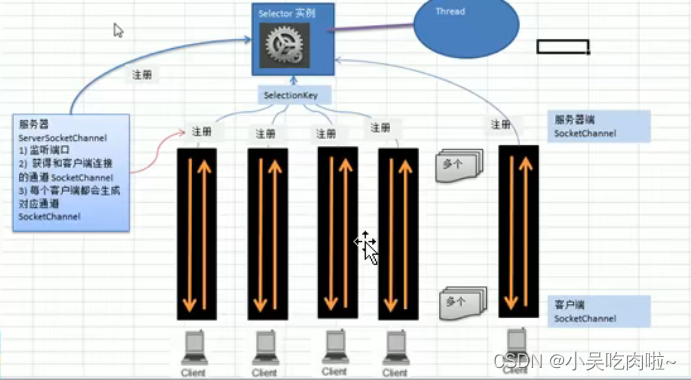
Seletor、SelectionKey、ServerScokerChannel和SocketChannle 关系图梳理
下图说明:
-
当客户端连接时,会通过ServerSocketChannel 得到SocketChannel
-
Seletor进行监听,select方法,返回有事件发生的通道个数
-
将socketChannel注册到Selector上,register(Selector sel,int ops)方法
,一个selector上可以注册多个SocketChannel
register(Selector sel,int ops) Seletor 是对应的seletor ,ops 是xxx事件
-
注册后返回一个SeletionKey,会和该Seletor 关联(集合)
-
Seletor 进行监听 select 方法,返回有事件发生的通道的个数
-
进一步得到各个SelectionKey(有事件发生)
-
在通过SelectionKey 反向获取SocketChannel,方法channel()
-
可以得到channel
Netty
Reactor
Reactor模式
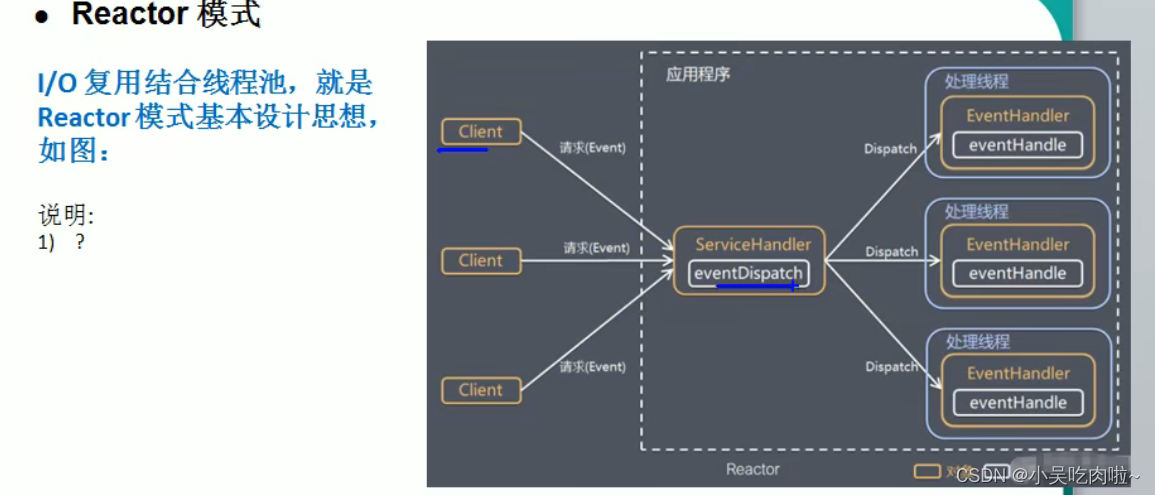
解释:
- Reator模式,通过一个或多个输入同时传递给服务处理器的模式(基于事件驱动)
- 服务器端程序处理传入的多个请求,并将他们同步分派到相应的处理线程
- Reacctor模式适用IO复用监听事件,收到事件后,分发给某个线程(进程),这个点就是网络服务器高并发处理关键
Reactor模式中核心组成:
- Reactor在一个单独的线程中运行,负责监听和分发事件,分发给适当的处理程序来对IO事件做出反应。它就向公司的电话接线员,他接听来自客户的电话并将线路转移到适当的联系人。
- Handlers:处理程序执行IO事件完成的实际事件,类似于客户想要与之交谈的公司中的实际官员。Reactor通过调度适当的处理程序响应的IO事件,处理程序执行非阻塞操作。
Reactor模式分类
- 单Reactor单线程
- 单Reactor多线程
- 主从Reactor多线程
单Reactor单线程
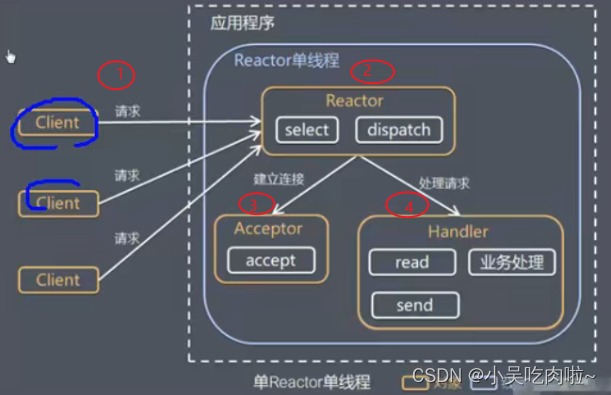
优点:模型简单、没有多线程、进程通信、竞争的问题,全部在一个线程中完成
缺点:性能问题,只有一个线程,无法完全发挥多核CPU的性能,
单Reactor多线程
说明:
- Reactor对象通过selelct监控客户端请求事件,收到事件后,通过dispatch进行分发
- 如果建立连接请求,然后创建一个Handler 对象处理完成连接后的各种事件
- 如果不是连接请求,则由reactor分发调用连接对应的handler来处理
- handler只负责响应事件,不做具体的业务处理,通过read读取数据会分发worker线程池的某个蓄电池去处理业务
- worker线程池会分配独立线程完成真正的业务,并将结果返回会给handler
- handler收到响应后,通过send将结果返回给client
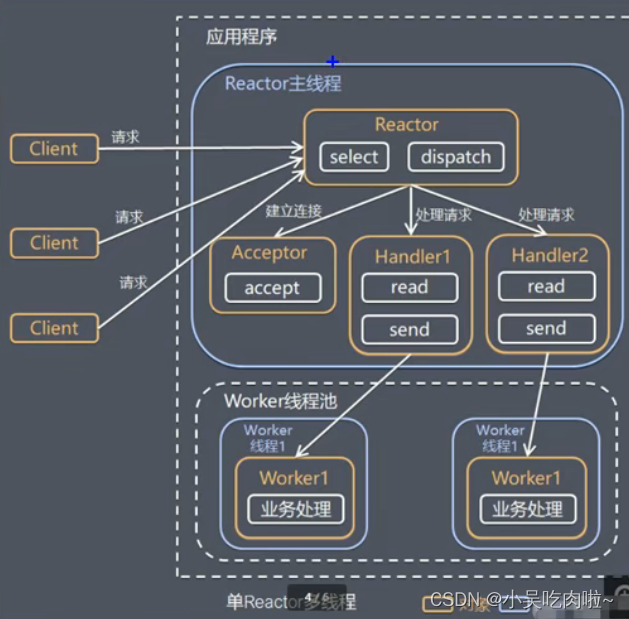
优点:充分利用多核CPU的处理
缺点:多线程数据共享,访问比较复杂,reactor处理所有事件的监听和响应,在单线程运行,在高并发场景容易出现性能瓶颈
主从Reactor多线程
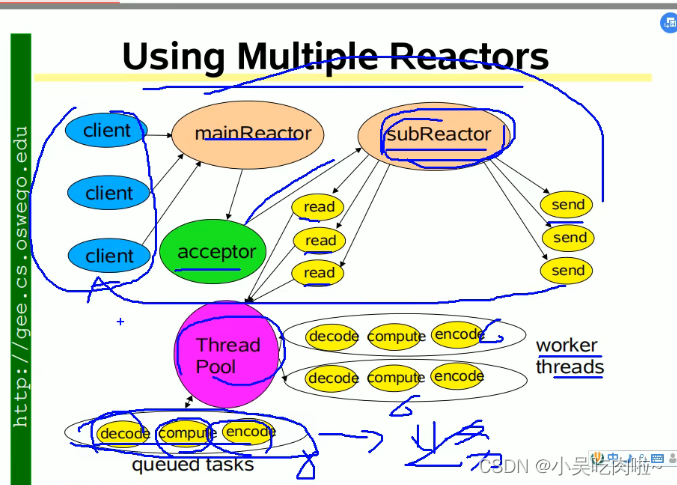
**工作原理:**针单Reactor多线程模型中,Reactor在单线程中运行,高并发场景下容易成为性能瓶颈,可以让Reactor在多线程中运行
说明:
- Reactor主线程MainReactor对象通过select监听连接事件,收到事件后,通过Acceptor处理连接事件
- 当Acceptor 处理连接事件后,MainReactor 将 连接分配给SubReactor
- subreactor 将连接加入到连接队列中进行监听,并创建handler进行各种事件处理
- 当有新的事件发生时,subreactoer 调用对应的handler处理
- handler通过read读取数据,分发给后面的worker线程处理
- worker线程池分配独立的wordler线程进行业务处理,并返回结果
- handler 收到响应的结果后,再通过send将结果返回给client
- Reactor主线程可以对应多个Reactor子线程
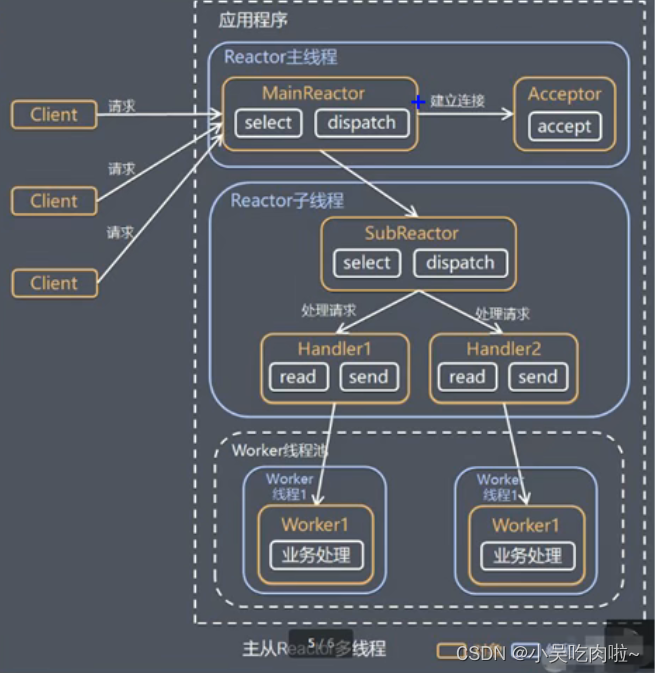
优点:父线程与子线程的数据交互简单职责明确,父线程只需要接收新连接,子线程完成后续的业务处理
父线程与子线程的数据交互简单,Reactor主线程只需要把新连接传给子线程,子线程无需返回数据
缺点:编程复杂的较高
Reactor总结
- 响应快,不必为单个同步事件所阻塞,虽然Reactor本身依然是同步的可以最大程度的避免复杂的多线程及同步问题,并且避免了多线程、进程的切换开销
- 扩张性好,可以方便的通过增加Reactor实例格式来充分利用CPU资源
- 复用性好,Reactor模型本身与具体事件处理逻辑无关,具有很高的复用性
Netty模型
简单版
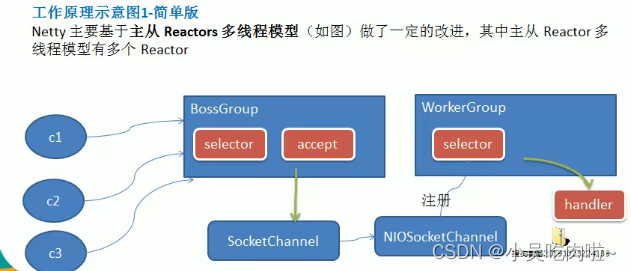
说明:
- Boss线程维护Selector,只会关注Accecpt
- 当接受到Accept事件,获取到对应的SocketChannel,封装成NIOScoketChannel并注册到Worker线程(事件循环),并进行维护
- 当Worker线程监听到selector中通道发生自己感兴趣二点事件后,就进行处理(就由handler),注意handler 已经加入到通道
进阶版
[外链图片转存失败,源站可能有防盗链机制,建议将图片保存下来直接上传(img-Y0Nb2Dap-1668606912814)(D:/Typora/%E7%AC%94%E8%AE%B0%E5%9B%BE/)]
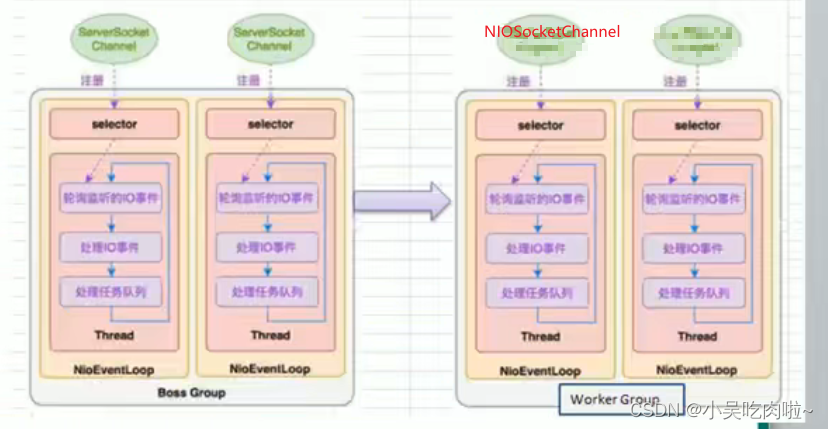
详细版
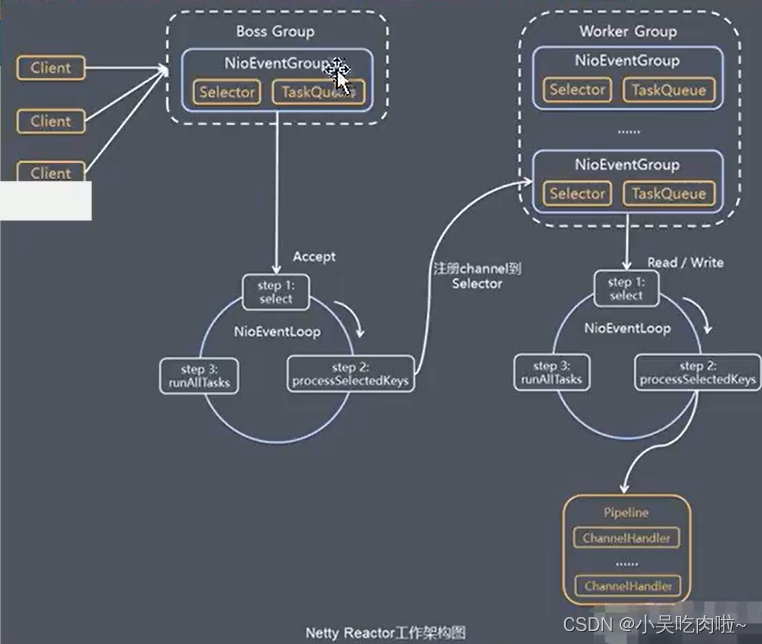
说明:
- netty抽象出俩组线程池 BossGroup 专门负责接受客户端连接、WorkerGroup 专门负责网络的读写
- BossGroup 和 WorkerGroup 类型 都是NioEventLoopGroup
- NioEventLoopGroup 相当于一个事件循环组,这个组合含有多个事件循环,每一个事件循环时NioEventLoop
- NioEventLoop表示一个不断循环的执行处理任务的线程,每个NioEventLoop都有一个selector,用于监听绑定在其上的socket的网络通信
- NioEventLoopGroup 可以有多个线程,既可以含有多个NioEventLoop
- 每个BossNioEventLoop执行的步骤有3步
- 轮询accept事件
- 处理accept事件,与client建立连接,生成NioSocketChannel,并将其注册到某个worker NioWEventLoop上的select
- 处理任务队列的任务,即runAllTasks
- 每个Worker NIOEventLoop循环执行的的步骤
- 轮询read、write 事件
- 处理io事件,即read、write事件,在对应NioSocketChannel处理
- 处理任务队列的任务,即runAllTasks
- 每个Worker NIOEventLoop 处理业务时,会使用pipeline(管道),pipeline中包含了channel,即通过pipeline可以获取到对应通道,管道中维护了很多的处理器
上述流程代码
Netty客户端,
package com.atguigu.netty.simple;import io.netty.bootstrap.Bootstrap;
import io.netty.channel.ChannelFuture;
import io.netty.channel.ChannelInitializer;
import io.netty.channel.nio.NioEventLoopGroup;
import io.netty.channel.socket.SocketChannel;
import io.netty.channel.socket.nio.NioSocketChannel;public class NettyClient {public static void main(String[] args) throws Exception {//客户端只需要一个事件循环组NioEventLoopGroup group = new NioEventLoopGroup();try {//创建客户端启动对象//注意客户端使用的不是 ServerBootSTRAP  而是 BootstrapBootstrap bootstrap = new Bootstrap();//设置相关参数bootstrap.group(group) //设置线程组.channel(NioSocketChannel.class) //设置看客户端通道的实现类(反射).handler(new ChannelInitializer() {@Overrideprotected void initChannel(SocketChannel ch) throws Exception {ch.pipeline().addLast(new NettyClientHandler()); //加入自己的处理器}});System.out.println("客户端 OK");//启动客户端 去连接服务器端//关于ChannelFuture channelFuture = bootstrap.connect("127.0.0.1", 6668).sync();//给关闭通道进行监听channelFuture.channel().closeFuture().sync();} finally {group.shutdownGracefully();}}
}
Netty客户端Handler (会被客户端调用)
package com.atguigu.netty.simple;import io.netty.buffer.ByteBuf;
import io.netty.buffer.Unpooled;
import io.netty.channel.ChannelHandlerContext;
import io.netty.channel.ChannelInboundHandlerAdapter;
import io.netty.util.CharsetUtil;public class NettyClientHandler extends ChannelInboundHandlerAdapter {//当通道就绪就会触发该方法@Overridepublic void channelActive(ChannelHandlerContext ctx) throws Exception {System.out.println("client" + ctx);ctx.writeAndFlush(Unpooled.copiedBuffer("hello,服务器", CharsetUtil.UTF_8));}//当通道有读取事件时,会触发/*** @param ctx 上下文对象,含有管道 pipeline (管道里面含有好多handler) ,通道 channel(通道注重读和写), 地址* @param msg 就是客户端发送的数据  ,默认是Object* @throws Exception*/@Overridepublic void channelRead(ChannelHandlerContext ctx, Object msg) throws Exception {System.out.println("server ctx =" + ctx);//将msg 转换ByteBuf//ByteBuf 是 Netty 提供的 , 不是NIO 的ByteBufferByteBuf buf = (ByteBuf) msg;System.out.println("服务器回复的消息:" + buf.toString(CharsetUtil.UTF_8));System.out.println("服务器端地址:" + ctx.channel().remoteAddress());}//处理异常.一般需要关闭通道@Overridepublic void exceptionCaught(ChannelHandlerContext ctx, Throwable cause) throws Exception {cause.printStackTrace();ctx.close();}
}
Netty服务器端,
package com.atguigu.netty.simple;import io.netty.bootstrap.ServerBootstrap;
import io.netty.channel.ChannelFuture;
import io.netty.channel.ChannelInitializer;
import io.netty.channel.ChannelOption;
import io.netty.channel.EventLoopGroup;
import io.netty.channel.nio.NioEventLoopGroup;
import io.netty.channel.socket.SocketChannel;
import io.netty.channel.socket.nio.NioServerSocketChannel;
import io.netty.channel.socket.nio.NioSocketChannel;
//服务端1
public class NettyServer {public static void main(String[] args) throws Exception {//创建BoosGroup 和  WorkerGroup// 说明// 1. 创建俩个线程,bossGroup 和 workerGroup// 2. bossGroup 只是处理连接请求, 真正的和客户端业务处理,会交给workerGroup完成// 3. 俩个都是无限循环EventLoopGroup bossGroup = new NioEventLoopGroup();NioEventLoopGroup workerGroup = new NioEventLoopGroup();try {//创建服务器端的启动对象,配置参数ServerBootstrap bootstrap = new ServerBootstrap();//使用链式编程来进行设置bootstrap.group(bossGroup, workerGroup)   //设置俩个线程组.channel(NioServerSocketChannel.class)  //使用NioSocketChannel 作为服务器的通道实现.option(ChannelOption.SO_BACKLOG, 128)  //设置线程队列得到的连接个数.childOption(ChannelOption.SO_KEEPALIVE, true)  //设置保持活动连接状态.childHandler(new ChannelInitializer() {  //创建一个通道测试对象(匿名对象)//给pipeline 设置处理器@Overrideprotected void initChannel(SocketChannel ch) throws Exception {ch.pipeline().addLast(new NettyServerHandler());}});  //给我们得到 workerGroup 的EventLoop 对应的管道设置处理器System.out.println("===================服务器 is ready");//绑定一个端口并且同步,生成一个channelFuture 对象//启动服务器并绑定端口ChannelFuture cf = bootstrap.bind(6668).sync();//对关闭通道进行监听cf.channel().closeFuture().sync();}finally {bossGroup.shutdownGracefully();workerGroup.shutdownGracefully();}}
}
Netty服务器端Handler (会被服务器端调用)
package com.atguigu.netty.simple;import io.netty.buffer.ByteBuf;
import io.netty.buffer.Unpooled;
import io.netty.channel.ChannelHandlerContext;
import io.netty.channel.ChannelInboundHandlerAdapter;
import io.netty.util.CharsetUtil;import java.nio.ByteBuffer;/*** 说明:* 1.我们自定义一个 Handler 需要继续netty 规定好的某个HandlerAdapter* 2.这时我们自定义一个Handler,才能称为一个handler*/
public class NettyServerHandler extends ChannelInboundHandlerAdapter {//读取数据实际(这里我们可以读取客户端发送的信息)/*** @param ctx 上下文对象,含有管道 pipeline (管道里面含有好多handler) ,通道 channel(通道注重读和写), 地址* @param msg 就是客户端发送的数据  ,默认是Object* @throws Exception*/@Overridepublic void channelRead(ChannelHandlerContext ctx, Object msg) throws Exception {System.out.println("server ctx =" + ctx);//将msg 转换ByteBuf//ByteBuf 是 Netty 提供的 , 不是NIO 的ByteBufferByteBuf buf = (ByteBuf) msg;System.out.println("客户端发送消息是:" + buf.toString(CharsetUtil.UTF_8));System.out.println("客户端地址:" + ctx.channel().remoteAddress());}//数据读取完毕@Overridepublic void channelReadComplete(ChannelHandlerContext ctx) throws Exception {//将数据写入到缓冲中,并刷新//一般讲,我们这个发送的数据进行编码ctx.writeAndFlush(Unpooled.copiedBuffer("hello,客户端", CharsetUtil.UTF_8));}//处理异常.一般需要关闭通道@Overridepublic void exceptionCaught(ChannelHandlerContext ctx, Throwable cause) throws Exception {cause.printStackTrace();ctx.close();}
}
任务队列TaskQueue
-
用户自定义的普通任务
- [外链图片转存失败,源站可能有防盗链机制,建议将图片保存下来直接上传(img-IL0aK2hK-1668606912816)(D:/Typora/%E7%AC%94%E8%AE%B0%E5%9B%BE/image-20221102234720722.png)]
-
用户自定义定时任务
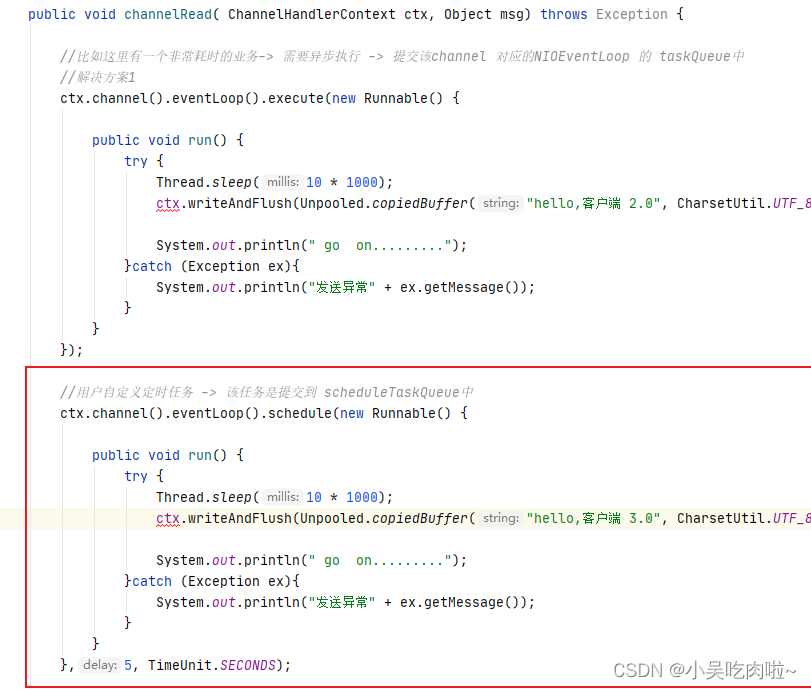
-
非当前Reactor线程调用Channel的各种方法
eg: 在推送系统的业务线程里面,根据用户的标识,找到对应的Channel引用,然后调用write类方法向该用户推送消息,就会进入这种场景,最终的Write会提交到任务队里后被异步消费
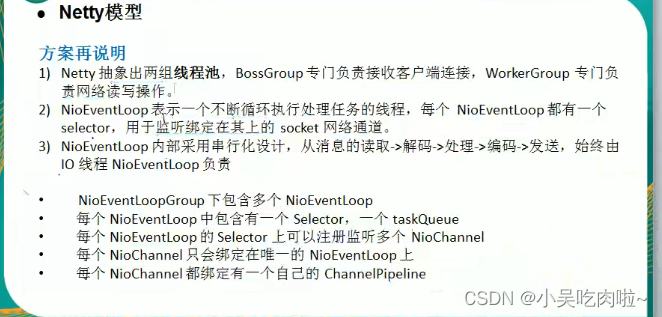
方案再说明
Netty抽象出俩组线程池,BossGroup专门负责接受客户端连接,WorkerGroup专门负责网络读写操作
NioEventLoop 表示一个不断循环执行处理任务的线程,每个NioEventKLoop 都有一个selector,用于监听绑定在其他的socket网络通道
NioEventLoop内部采用串行化设计,从消息得到读取 -> 解码 -> 处理-> 编码 ->发送,始终由IO线程NioEventLoop负责
NioEventLoopGroup 下包含多个NioEventLoop
每个NioEventLoop 中包含一个Selector,一个taskQueue
每个NioEventLoop的Selector 上可以注册监听多个 Niochannel
每个NioChannel 只会绑定在唯一的NioEventChannle
每个NioChannel 都绑定有一个自己的hannelPipeline
Netty异步模式
基本介绍
异步的概念和同步相对。当一个异步过程调用发出后,调用者不能立刻得到结果。实际处理这个调用的组件在完成后,通过状态、通知和回调来通知调用者
Netty中的I/O操作时异步的,包括Bind、Write、Connect等操作会简单的返回一个ChannelFuture
调用者并不能立刻获得结果,而是通过Future-Listener机制,用户可以方便的主动获取or通过通知机制获得IO操作的结果
Netty的异步模型是建立在future 和 callback就是回调。重点说Futture,他的核心思想是:假设一个方法fun,计算过程可能非常的耗时,等待fun返回显然不合适,那么可以调用fun的时候,立马返回一个Future,后续可以勇敢Future区监听分发fun的处理过程(eg:Future-Listener机制)
Future说明
- 表示异步的执行结果,可以通过它提供的方法来检测执行是否完成,比如检索计算等等
- ChannelFuture 是一个接口:
public interface ChannelFuture extends Future
Future常见方法

异步工作原理
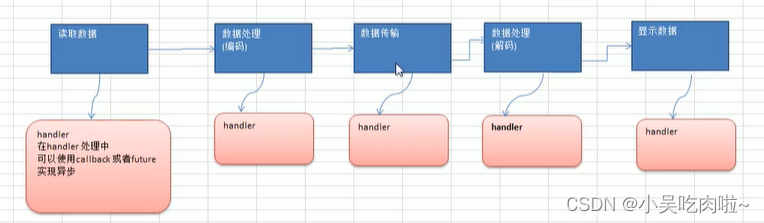
Future-Listener机制
- 通过isDone 方法来判断当前操作是否完成
- 通过isSuccess 方法来判断已完成的当前操作是否成功
- 通过 getCause 方法来获取已完成的当前操作失败的原因
- 通过 isCancelled 方法来判断已完成的当前操是否被取消
- 通过addListener 方法来注册监听器,当操作已完成 (isDone 方法返回完成),将会通知指定的监听器;如果Future对象已完成,则通知指定的监听器
我们可以添加监听器,当监听的事件发生时,就会通知到监听器
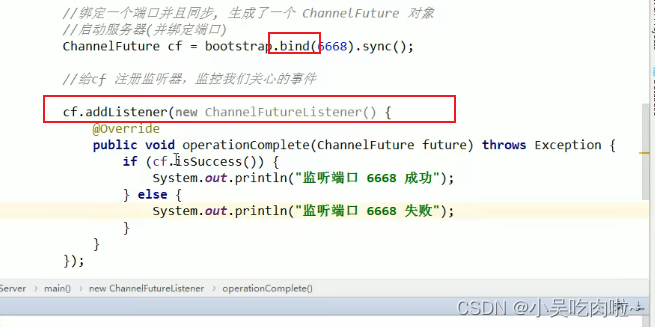
Netty核心组件
Bootstrrap、ServerBootstrap
Bootstrap 意思是 引导,一个Netty应用通常由一个Bootstrap开始,主要作用是配置整个Netty程序,串联各个组件,Netty中Bootstrap类是客户端程序的启动引导类,ServerBootstrap是服务端启动引导类
常用方法
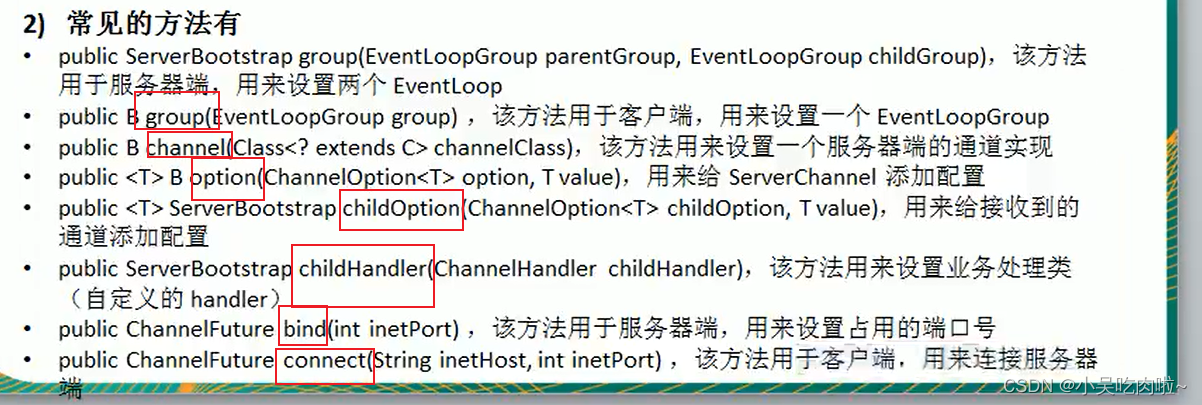
注意点:
- Handler 是给bossGroup
- ChildHandler 是给 workerGroup
Pipeline 、ChannelPipeline
ChannelPipeline是一个重点
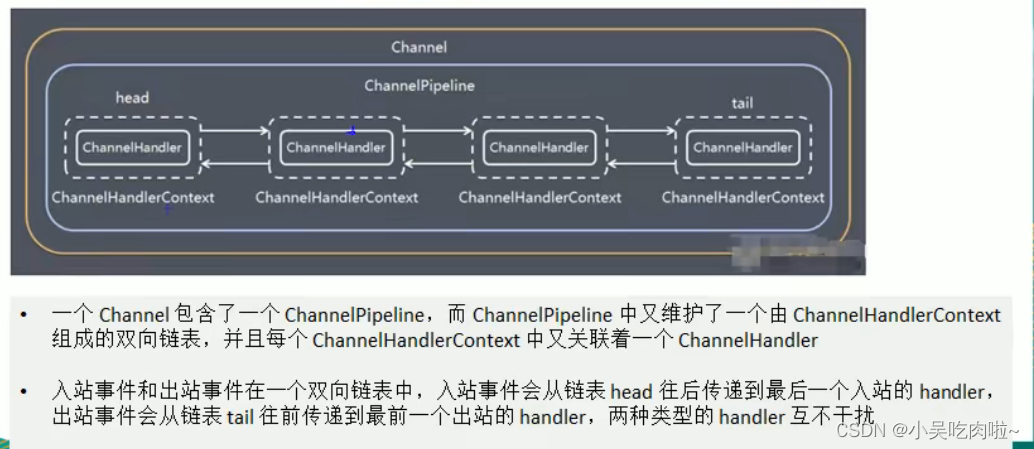
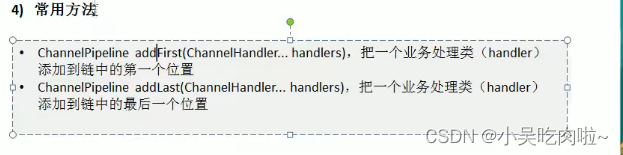
- ChannelPipeline是一个Handler的集合,它负责处理和拦截 inbound 或者outbound的事件和操作,相当于一个贯穿Netty的链 (也可理解为: -ChannelPipeline是保存 ChannelHandler的List,用于处理或拦截Channel的入栈事件和出栈事件)
- ChannelPipeline实现了一种高级形式的拦截过滤器模式,适用户可以完全控制事件处理的方式,以及Channel中各个的ChannelHandler如何相互交互
- 在Netty中每个Channel都有且仅有一个ChannelPipeline与之对应,他们的组成关系如下:
常用方法:
ChannelHandler
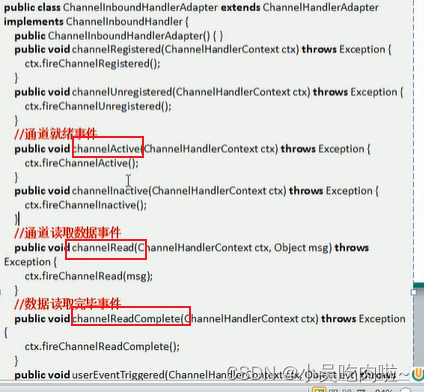
我们经常需要自定义一个Handler类去继承ChannelInboundHandlerAdapter,然后通过重写相应方法实现业务逻辑
常用方法
如下图:
ChannelHandlerContext
- 保存Channel相关的所有上下文信息,同时关联一个ChannelHandler对象
- 即ChannelHandlerContextt中包含一个具体的事件处理器ChannelHandler,同时ChannelHandlerContext中也绑定了对应的pipeline和Channel信息,方便对ChannelHandler进行调用
常用方法

ChannelOption
Netty在创建Channel实例后,一般都需要设置 ChhannelOptiion参数
ChannelOption参数如下:
ChannlOption.SO_BACKLOG对应TCP\IP协议 listen函数中的backlog参数,用来初始化服务器的可连接队列大小。服务器粗处理 客户端连接请求是顺序处理的,所以同一时间只能处理一个客户端连接。多个客户端来的时候,服务端将不能处理的客户端连接请求放在队列中等待处理,backlog参数指定了队列的大小
ChannelOption.SO_KEEPALIVE	一直保持连接活动状态
EventLoopGroup、NioEventLoopGroup
- EventLoopGroup是一组EventLoop的抽象,Netty为了更好的利用多核CPU资源,一般会有多个EventLoop同时工作,每个EventLoop维护着一个Selelctor实例
- EventLoopGroup提供next接口,可以从组里面按照一定规则职责获取其中一个EventLoop来处理任务。在Netty服务器端编程中,我们一般需要通过俩个EventLoopGroup ,例如:BossEventLoopGroup 和 WorkerEventLoopGroup。
常用方法
public NioEventLoopGroup()   构造方法
public Future shutdownGacefully()   断开连接,关闭线程
Netty 聊天机制
服务器
package com.atguigu.netty.groupchat;import io.netty.bootstrap.ServerBootstrap;
import io.netty.channel.*;
import io.netty.channel.nio.NioEventLoopGroup;
import io.netty.channel.socket.SocketChannel;
import io.netty.channel.socket.nio.NioServerSocketChannel;
import io.netty.handler.codec.string.StringDecoder;
import io.netty.handler.codec.string.StringEncoder;public class GroupChatServer {private int port; //监听端口public GroupChatServer(int port) {this.port = port;}//编写run方法,处理客户端请求public void run()  throws Exception{//创建俩俩个线程组EventLoopGroup bossGroup = new NioEventLoopGroup(1);EventLoopGroup wokerGroup = new NioEventLoopGroup();try {ServerBootstrap serverBootstrap = new ServerBootstrap();serverBootstrap.group(bossGroup, wokerGroup).channel(NioServerSocketChannel.class).option(ChannelOption.SO_BACKLOG, 128).childOption(ChannelOption.SO_KEEPALIVE, true).childHandler(new ChannelInitializer() {protected void initChannel(SocketChannel ch) throws Exception {//获取到pipelineChannelPipeline pipeline = ch.pipeline();//向pipeline加入解码器pipeline.addLast("decoder", new StringDecoder());//向pipeline加入编码器pipeline.addLast("encoder", new StringEncoder());//加入自己的业务处理handlerpipeline.addLast(new GroupChatServerHandler());}});System.out.println("Netty 服务器启动");//异步处理ChannelFuture channelFuture = serverBootstrap.bind(port).sync();//监听关闭事件channelFuture.channel().closeFuture().sync();}finally {bossGroup.shutdownGracefully();wokerGroup.shutdownGracefully();}}public static void main(String[] args) throws  Exception{new GroupChatServer(7000).run();}
}
服务器handler
package com.atguigu.netty.groupchat;import io.netty.channel.Channel;
import io.netty.channel.ChannelHandlerContext;
import io.netty.channel.SimpleChannelInboundHandler;
import io.netty.channel.group.ChannelGroup;
import io.netty.channel.group.DefaultChannelGroup;
import io.netty.util.concurrent.GlobalEventExecutor;import java.text.SimpleDateFormat;public class GroupChatServerHandler extends SimpleChannelInboundHandler {//定义一个channel组 管理所有的channelprivate static ChannelGroup channelGroup = new DefaultChannelGroup(GlobalEventExecutor.INSTANCE);SimpleDateFormat sdf = new SimpleDateFormat("yyyy-MM-dd HH:mm:ss");/*** 将该客户加入聊天的信息推送 给 其他在线的客户端该方法*///handlerAdded 表示连接建立 ,一旦连接 第一个被执行//逻辑: 将当前channel 加入到  channelGroup中@Overridepublic void handlerAdded(ChannelHandlerContext ctx) throws Exception {Channel channel = ctx.channel();// 将 channelGroup 中所有的channel 遍历 ,并发送消息. 我们不需要自己遍历channelGroup.writeAndFlush("[客户端]" + channel.remoteAddress() + "加入聊天"+sdf.format(new java.util.Date())+ "\n");channelGroup.add(channel);}/*** 断开连接,将xx客户离开后的信息推送给当前在线的客户** @param ctx* @throws Exception*/@Overridepublic void handlerRemoved(ChannelHandlerContext ctx) throws Exception {Channel channel = ctx.channel();channelGroup.writeAndFlush("[客户端]" + channel.remoteAddress() + "离开了"+sdf.format(new java.util.Date())+ "\n");System.out.println("channelGroup size = " + channelGroup.size());}/*** 表示channel 处于活动状态,提示XX上线** @param ctx* @throws Exception*/@Overridepublic void channelActive(ChannelHandlerContext ctx) throws Exception {System.out.println(ctx.channel().remoteAddress() + " 上线了");}/*** 表示channel 处于非活动状态,提示XX下线** @param ctx* @throws Exception*/@Overridepublic void channelInactive(ChannelHandlerContext ctx) throws Exception {System.out.println(ctx.channel().remoteAddress() + " 离线了");}/*** 读取数据* @param ctx* @param msg* @throws Exception*/protected void channelRead0(ChannelHandlerContext ctx, String msg) throws Exception {//获取到当前channelChannel channel = ctx.channel();//这时我们遍历channelGroupp ,根据不同的情况,回送不同的信息channelGroup.forEach(ch ->{if(channel != ch){ch.writeAndFlush("[客户]"+ channel.remoteAddress() + "  发送了信息" + msg + "\n");}else{ //回显自己发送的信息给自己ch.writeAndFlush("[自己]发送了信息" + msg + "\n");}});}@Overridepublic void exceptionCaught(ChannelHandlerContext ctx, Throwable cause) throws Exception {//关闭通道ctx.close();}
}
客户端
package com.atguigu.netty.groupchat;import io.netty.bootstrap.Bootstrap;
import io.netty.channel.*;
import io.netty.channel.nio.NioEventLoopGroup;
import io.netty.channel.socket.SocketChannel;
import io.netty.channel.socket.nio.NioSocketChannel;
import io.netty.handler.codec.string.StringDecoder;
import io.netty.handler.codec.string.StringEncoder;import java.util.Scanner;public class GroupChatClient {private final String host;private final int port;public GroupChatClient(String host, int port) {this.host = host;this.port = port;}public void run() throws Exception {EventLoopGroup group = new NioEventLoopGroup();try {Bootstrap bootstrap = new Bootstrap();bootstrap.group(group).channel(NioSocketChannel.class).handler(new ChannelInitializer() {@Overrideprotected void initChannel(SocketChannel ch) throws Exception {//得到pipelineChannelPipeline pipeline = ch.pipeline();//加入相关handler//向pipeline加入解码器pipeline.addLast("decoder", new StringDecoder());//向pipeline加入编码器pipeline.addLast("encoder", new StringEncoder());//加入自己的业务处理handlerpipeline.addLast(new GroupChatClientHandler());}});ChannelFuture future = bootstrap.connect(host, port).sync();//得到channelChannel channel = future.channel();System.out.println("--------"+channel.localAddress()+ "----------");//客户端需要输入信息,创建一个扫描器Scanner scanner = new Scanner(System.in);while (scanner.hasNextLine()){String msg = scanner.nextLine();//通过channel 发送到服务器端channel.writeAndFlush(msg+ "\r\n");}} finally {group.shutdownGracefully();}}public static void main(String[] args) throws  Exception{new GroupChatClient("127.0.0.1",7000).run();}}
客户端Handler
package com.atguigu.netty.groupchat;import io.netty.channel.ChannelHandlerContext;
import io.netty.channel.SimpleChannelInboundHandler;public class GroupChatClientHandler extends SimpleChannelInboundHandler {@Overrideprotected void channelRead0(ChannelHandlerContext ctx, String msg) throws Exception {System.out.println(msg.trim());}
}
心跳连接机制
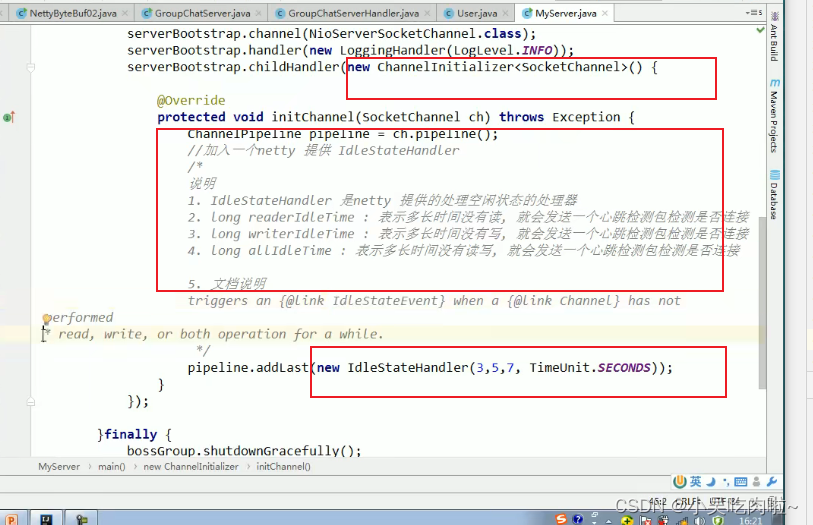
客户端每隔一段时间发送PING消息给服务端,服务端接受到后回复PONG消息。客户端如果在一定时间内没有收到PONG响应,则认为连接断开,服务端如果在一定时间内没有收到来自客户端的PING请求,则认为连接已经断开。通过这种来回的PING-PONG消息机制侦测连接的活跃性。
注意:
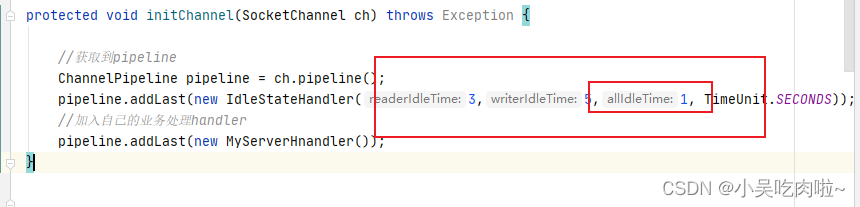
如果心跳机制这边 设置时间,谁的时间最短谁会被触发,如下图 最先触发的 读写空闲
服务器中带心跳检查代码
package com.atguigu.netty.heartbeat;import com.atguigu.netty.groupchat.GroupChatServerHandler;
import io.netty.bootstrap.ServerBootstrap;
import io.netty.channel.*;
import io.netty.channel.nio.NioEventLoopGroup;
import io.netty.channel.socket.SocketChannel;
import io.netty.channel.socket.nio.NioServerSocketChannel;
import io.netty.handler.codec.string.StringDecoder;
import io.netty.handler.codec.string.StringEncoder;
import io.netty.handler.logging.LogLevel;
import io.netty.handler.logging.LoggingHandler;
import io.netty.handler.timeout.IdleStateHandler;import java.util.concurrent.TimeUnit;public class MyServer  {public static void main(String[] args) throws Exception {//创建俩俩个线程组EventLoopGroup bossGroup = new NioEventLoopGroup(1);EventLoopGroup wokerGroup = new NioEventLoopGroup();try {ServerBootstrap serverBootstrap = new ServerBootstrap();serverBootstrap.group(bossGroup, wokerGroup).channel(NioServerSocketChannel.class).option(ChannelOption.SO_BACKLOG, 128).handler(new LoggingHandler(LogLevel.INFO))   //日志处理器.childHandler(new ChannelInitializer() {protected void initChannel(SocketChannel ch) throws Exception {//获取到pipelineChannelPipeline pipeline = ch.pipeline();pipeline.addLast(new IdleStateHandler(3,5,1, TimeUnit.SECONDS));//加入自己的业务处理handlerpipeline.addLast(new MyServerHnandler());}});System.out.println("Netty 服务器启动");//异步处理ChannelFuture channelFuture = serverBootstrap.bind(7000).sync();//监听关闭事件channelFuture.channel().closeFuture().sync();}finally {bossGroup.shutdownGracefully();wokerGroup.shutdownGracefully();}}}
心跳检查handler
package com.atguigu.netty.heartbeat;import io.netty.channel.ChannelHandlerContext;
import io.netty.channel.ChannelInboundHandlerAdapter;
import io.netty.handler.timeout.IdleStateEvent;public class MyServerHnandler extends ChannelInboundHandlerAdapter {/**** @param ctx  上下文* @param evt   事件* @throws Exception*/@Overridepublic void userEventTriggered(ChannelHandlerContext ctx, Object evt) throws Exception {if (evt instanceof IdleStateEvent){// 将 evt 向下转型IdleStateEvent event = (IdleStateEvent) evt;String eventType = null;switch (event.state()){case READER_IDLE:eventType = "读空闲";break;case WRITER_IDLE:eventType = "写空闲";break;case ALL_IDLE:eventType = "读写空闲";break;}System.out.println(ctx.channel().remoteAddress() + "--超时时间--"+ eventType);//检测到空闲 就会关闭ctx.channel().close();}}
}
编码和解码
编码和解码的基本介绍
-
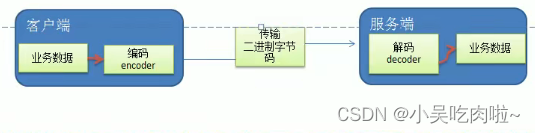
编写网络应用程序时,因为数据在网络中传输都是二进制字节码数据,在发送数据时就需要编码,接收数据是就需解码
-
codec(编解码器)对的组成部分有俩个:decoder(解码器) 和 encoder(编码器).
encoder负责把业务数据转换成字节码数据,decoder负责把字节码数据转换成业务数据
Protobuf
基本介绍 和使用意图
- Protobuf 是Google发布的开源项目,全称 : Google Protocol Buffers,是一种轻便搞笑的结构化数据存储格式,可用于结构化数据串行化, 或者说 序列化. 他很适合做数据存储 或 RPC[远程过程调用] 数据交换格式
- Protobuf 是以message 的方式来管理数据
- 高性能 , 高可靠行
- 使用 protobuf编译器能自动生成的代码,Protobuf 是将类的定义使用proto文件进行扫描.说明 在idea中编写proto文件时,会自动提示是否下载 ptotot编写插件,可以让语法高亮
- 然后通过proto.exe 编译器根据proto自动生成. java文件
Netty 入站 和 出站
基本说明
- netty的组件设计: Netty的主要组件有Channel、EventLoop、ChannelFuture、ChannelHandler、ChannelPipe等
- ChannelHandler 充当了处理入站和出站数据的应用程序逻辑的容器。例如:实现ChannelInboundHandler接口(或 ChannelInboundHandlerAdapter),你就可以接收入站事件和数据,这些数据会被业务逻辑处理。当要给看客户端发送响应时,也可以从ChannelInbounddHandler冲刷数据。业务逻辑通常写在一个或多个ChannelInboundHandler中。 ChannelOutboundHandler原理一样,只不过塔斯用来处理出战数据的。
- ChannelPipline 提供了 ChannelHandler链的容器。以客户端应用程序为例,如果事件运动的方向 是从 客户端到服务端的,那么我们称这些事件为出战,即客户端发送给服务端的数据会通过pipleine中的一系列ChannelOutboundHandler,并被这些Handler处理,反之则称为入站。
就像发快递一样,自己(C)发快递要包装(编码),别人(S)接受你的快递(数据),要拆包(解码)
RPC
基本说明
- RPC 远程过程调用,是一个计算机通信协议。该协议运训运行于一台计算机额程序调用另一台计算机的子程序,而程序员无需额外地为这个交互过程编程
- 俩个或多个应用程序都分布在不同的服务器上,它们之间的调用都像是本地方法调用一样。
PRC调用流程说明
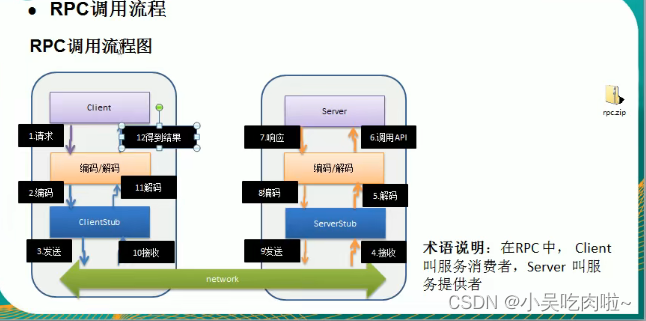
- **服务消费方(client)**以本地调用方式调用服务
- client stub 接收到调用后负责将方法、参数等封装成能够进行网络传输的消息体
- client stub 将消息进行编码并发送到服务端
- server stub 收到信息后进行解码
- server stub 根据结果码结果调用本地服务
- 本地服务执行并将结果返回给 server stub
- server stub将返回结果进行编码并发送至消费放
- client stub 接受到消息并进行解码
- 服务消费方(client)得到结果
RPC的目标 就是将2-8这些步骤都封装起来,用户无需关心这些细节,可以像调用本地方法一样即可完成远程服务调用
,Protobuf 是将类的定义使用proto文件进行扫描.说明 在idea中编写proto文件时,会自动提示是否下载 ptotot编写插件,可以让语法高亮
5. 然后通过proto.exe 编译器根据proto自动生成. java文件
Netty 入站 和 出站
基本说明
- netty的组件设计: Netty的主要组件有Channel、EventLoop、ChannelFuture、ChannelHandler、ChannelPipe等
- ChannelHandler 充当了处理入站和出站数据的应用程序逻辑的容器。例如:实现ChannelInboundHandler接口(或 ChannelInboundHandlerAdapter),你就可以接收入站事件和数据,这些数据会被业务逻辑处理。当要给看客户端发送响应时,也可以从ChannelInbounddHandler冲刷数据。业务逻辑通常写在一个或多个ChannelInboundHandler中。 ChannelOutboundHandler原理一样,只不过塔斯用来处理出战数据的。
- ChannelPipline 提供了 ChannelHandler链的容器。以客户端应用程序为例,如果事件运动的方向 是从 客户端到服务端的,那么我们称这些事件为出战,即客户端发送给服务端的数据会通过pipleine中的一系列ChannelOutboundHandler,并被这些Handler处理,反之则称为入站。
就像发快递一样,自己(C)发快递要包装(编码),别人(S)接受你的快递(数据),要拆包(解码)
RPC
基本说明
- RPC 远程过程调用,是一个计算机通信协议。该协议运训运行于一台计算机额程序调用另一台计算机的子程序,而程序员无需额外地为这个交互过程编程
- 俩个或多个应用程序都分布在不同的服务器上,它们之间的调用都像是本地方法调用一样。
PRC调用流程说明
- **服务消费方(client)**以本地调用方式调用服务
- client stub 接收到调用后负责将方法、参数等封装成能够进行网络传输的消息体
- client stub 将消息进行编码并发送到服务端
- server stub 收到信息后进行解码
- server stub 根据结果码结果调用本地服务
- 本地服务执行并将结果返回给 server stub
- server stub将返回结果进行编码并发送至消费放
- client stub 接受到消息并进行解码
- 服务消费方(client)得到结果
RPC的目标 就是将2-8这些步骤都封装起来,用户无需关心这些细节,可以像调用本地方法一样即可完成远程服务调用
下一篇:050_阵列天线方向图乘积原理