

【笑小枫的SpringBoot系列】【十六】SpringBoot生成PDF
关于笑小枫💕
Hello,我是笑小枫,欢迎来到我的世界,喜欢的朋友关注一下我呦,大伙的支持,就是我坚持写下去的动力。
笑小枫个人博客:https://www.xiaoxiaofeng.com
本文源码:https://github.com/hack-feng/maple-demo
本文简介
本文主要介绍了在SpringBoot项目下,通过代码和操作步骤,详细的介绍了如何操作PDF。希望可以帮助到准备通过JAVA操作PDF的你。
项目框架用的SpringBoot,但在JAVA中代码都是通用的。
本文涉及pdf操作,如下:
- PDF模板制作
- 基于PDF模板生成,并支持下载
- 自定义中文字体
- 完全基于代码生成,并保存到指定目录
- 合并PDF,并保存到指定目录
- 合并PDF,并支持下载
基于PDF模板生成:适用于固定格式的PDF模板,基于内容进行填空,例如:合同信息生成、固定格式表格等等
完全基于代码生成:适用于不固定的PDF,例如:动态表格、动态添加某块内容、不确定的内容大小等不确定的场景
PDF文件简介
PDF是可移植文档格式,是一种电子文件格式,具有许多其他电子文档格式无法相比的优点。PDF文件格式可以将文字、字型、格式、颜色及独立于设备和分辨率的图形图像等封装在一个文件中。该格式文件还可以包含超文本链接、声音和动态影像等电子信息,支持特长文件,集成度和安全可靠性都较高。在系统开发中通常用来生成比较正式的报告或者合同类的电子文档。
代码实现PDF操作
首先需要引入我们的依赖,这里通过maven管理依赖
在pom.xml文件添加以下依赖
com.itextpdf itextpdf 5.5.6
com.itextpdf itext-asian 5.2.0
基于PDF模板生成,并下载
PDF模板制作
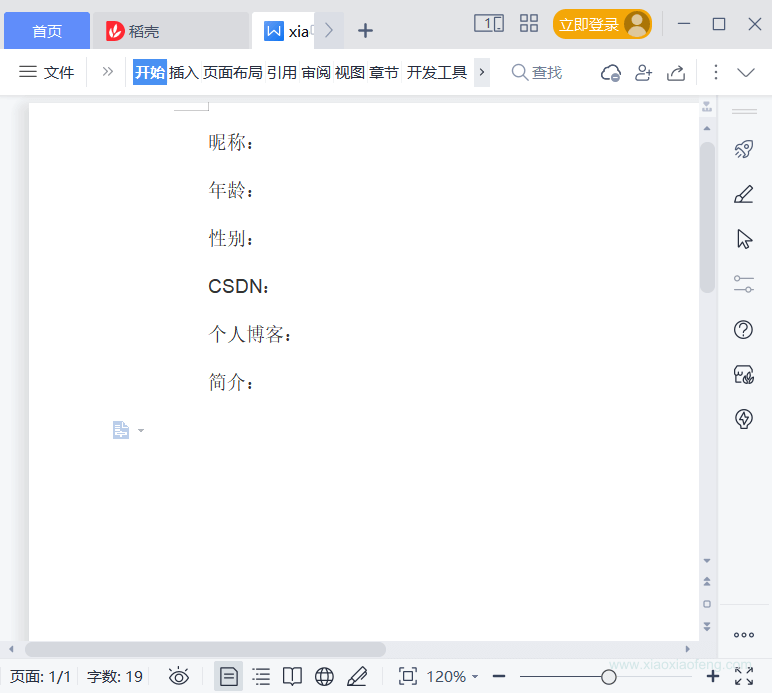
- 首先在word或者其他软件里面制作模板,挑选你熟悉的软件即可,前提是可生成pdf。
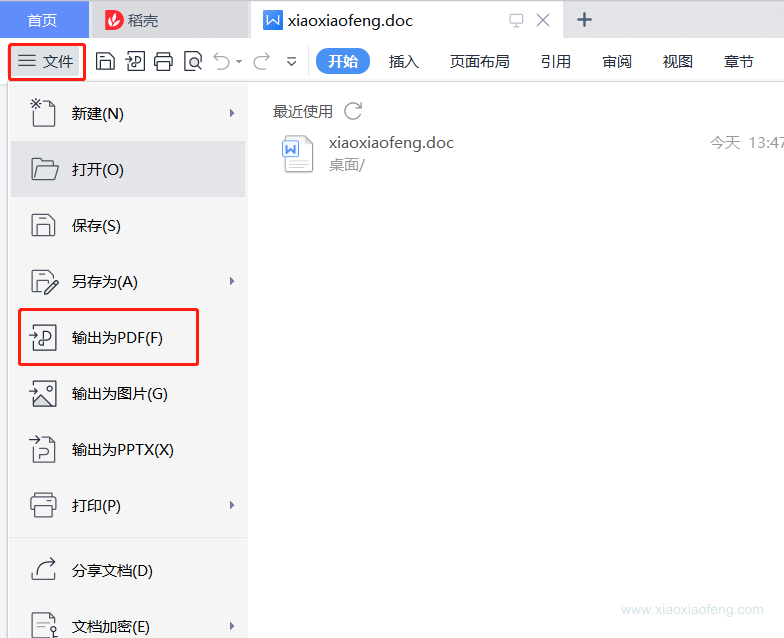
- 将word文件转为pdf文件。
-
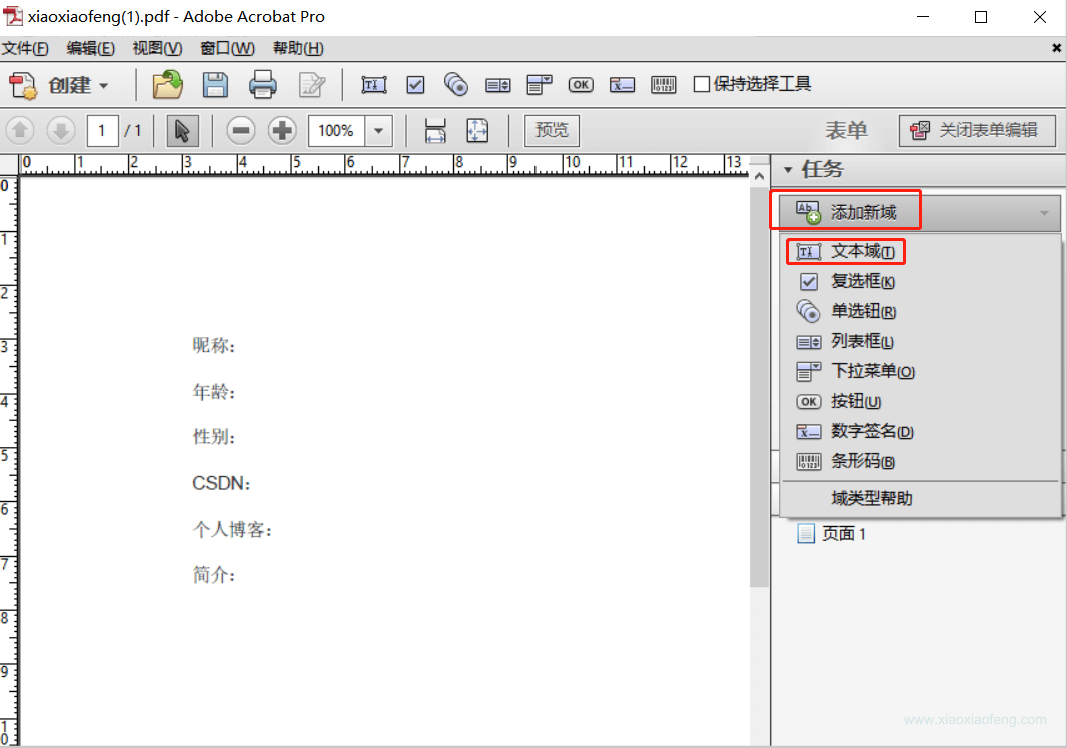
使用Adobe Acrobat软件操作pdf,这里用的是这个软件,只要能实现这个功能,其他的软件也可~
选择表单编辑哈,我们要在对应的坑上添加表单占位
-
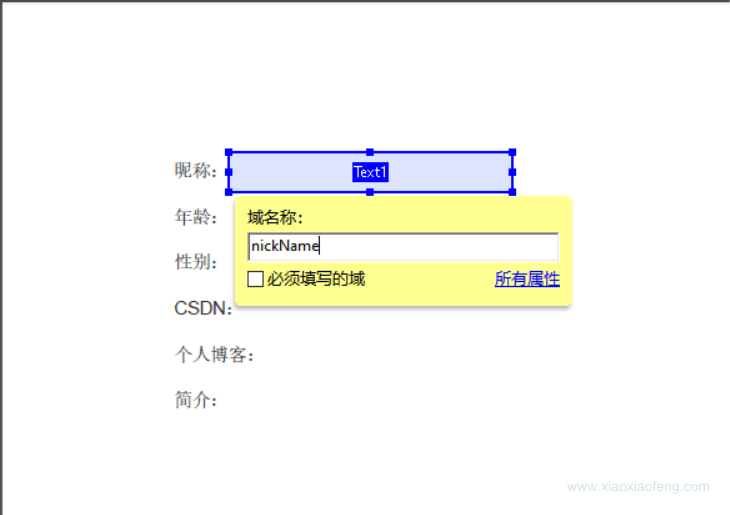
在表单上添加文本域即可,所有的格式都用文本域即可,这里只是占坑。
对应的域名称要与程序的名称对应,方便后面数据填充,不然后面需要手动处理赋值。
-
创建个简单的模板吧,要注意填充的空间要充足,不然会出现数据展示不全呦~
效果如下:
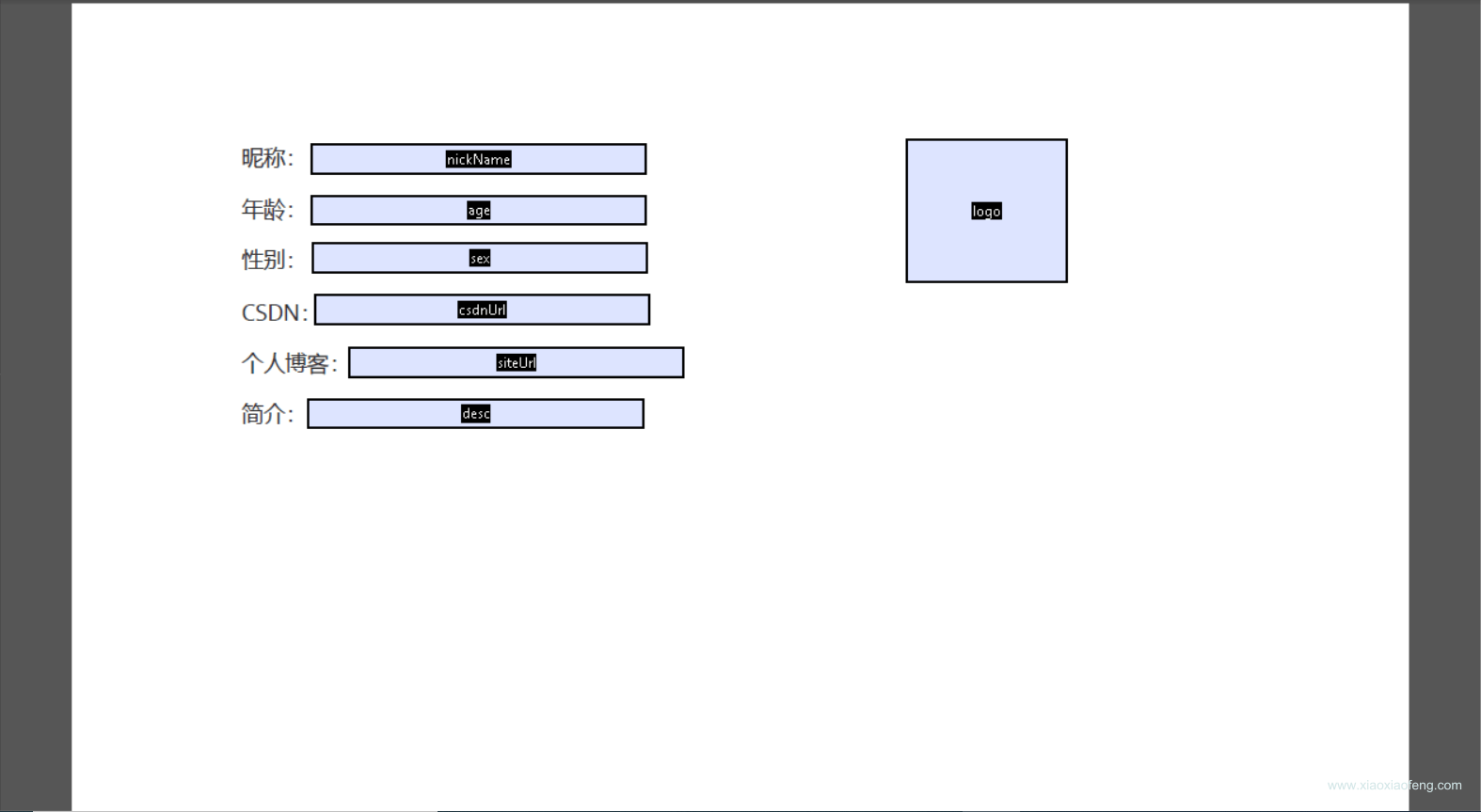
好了,到这里模板就生成好了,我们保存一下,然后放在我们的/resources/templates目录下
PDF生成代码编写
在util包下创建PdfUtil.java工具类,代码如下:
package com.maple.demo.util;import com.itextpdf.text.Document;
import com.itextpdf.text.DocumentException;
import com.itextpdf.text.Image;
import com.itextpdf.text.Rectangle;
import com.itextpdf.text.pdf.*;import javax.servlet.ServletOutputStream;
import java.io.ByteArrayOutputStream;
import java.io.IOException;
import java.util.Map;
import java.util.Objects;/*** @author 笑小枫* @date 2022/8/15* @see https://www.xiaoxiaofeng.com*/
public class PdfUtil {private PdfUtil() {}/*** 利用模板生成pdf** @param data         写入的数据* @param photoMap     图片信息* @param out          自定义保存pdf的文件流* @param templatePath pdf模板路径*/public static void fillTemplate(Map data, Map photoMap, ServletOutputStream out, String templatePath) {PdfReader reader;ByteArrayOutputStream bos;PdfStamper stamper;try {// 读取pdf模板reader = new PdfReader(templatePath);bos = new ByteArrayOutputStream();stamper = new PdfStamper(reader, bos);AcroFields acroFields = stamper.getAcroFields();// 赋值for (String name : acroFields.getFields().keySet()) {String value = data.get(name) != null ? data.get(name).toString() : null;acroFields.setField(name, value);}// 图片赋值for (Map.Entry entry : photoMap.entrySet()) {if (Objects.isNull(entry.getKey())) {continue;}String key = entry.getKey();String url = entry.getValue();// 根据地址读取需要放入pdf中的图片Image image = Image.getInstance(url);// 设置图片在哪一页PdfContentByte overContent = stamper.getOverContent(acroFields.getFieldPositions(key).get(0).page);// 获取模板中图片域的大小Rectangle signRect = acroFields.getFieldPositions(key).get(0).position;float x = signRect.getLeft();float y = signRect.getBottom();// 图片等比缩放image.scaleAbsolute(signRect.getWidth(), signRect.getHeight());// 图片位置image.setAbsolutePosition(x, y);// 在该页加入图片overContent.addImage(image);}// 如果为false那么生成的PDF文件还能编辑,一定要设为truestamper.setFormFlattening(true);stamper.close();Document doc = new Document();PdfCopy copy = new PdfCopy(doc, out);doc.open();PdfImportedPage importPage = copy.getImportedPage(new PdfReader(bos.toByteArray()), 1);copy.addPage(importPage);doc.close();bos.close();} catch (IOException | DocumentException e) {e.printStackTrace();}}
} 在controller包下创建TestPdfController.java类,并i代码如下:
package com.maple.demo.controller;import com.maple.demo.util.PdfUtil;
import io.swagger.annotations.Api;
import io.swagger.annotations.ApiOperation;
import lombok.extern.slf4j.Slf4j;
import org.springframework.web.bind.annotation.GetMapping;
import org.springframework.web.bind.annotation.RequestMapping;
import org.springframework.web.bind.annotation.RestController;import javax.servlet.ServletOutputStream;
import javax.servlet.http.HttpServletResponse;
import java.io.IOException;
import java.util.HashMap;
import java.util.Map;/*** @author 笑小枫* @date 2022/8/15* @see https://www.xiaoxiaofeng.com*/
@Slf4j
@RestController
@RequestMapping("/example")
@Api(tags = "实例演示-PDF操作接口")
public class TestPdfController {@ApiOperation(value = "根据PDF模板导出PDF")@GetMapping("/exportPdf")public void exportPdf(HttpServletResponse response) {Map dataMap = new HashMap<>(16);dataMap.put("nickName", "笑小枫");dataMap.put("age", 18);dataMap.put("sex", "男");dataMap.put("csdnUrl", "https://zhangfz.blog.csdn.net/");dataMap.put("siteUrl", "https://www.xiaoxiaofeng.com/");dataMap.put("desc", "大家好,我是笑小枫。");Map photoMap = new HashMap<>(16);photoMap.put("logo", "https://profile.csdnimg.cn/C/9/4/2_qq_34988304");// 设置response参数,可以打开下载页面response.reset();response.setCharacterEncoding("UTF-8");// 定义输出类型response.setContentType("application/PDF;charset=utf-8");// 设置名称response.setHeader("Content-Disposition", "attachment; filename=" + "xiaoxiaofeng.pdf");try {ServletOutputStream out = response.getOutputStream();// 模板路径记PdfUtil.fillTemplate(dataMap, photoMap, out, "src/main/resources/templates/xiaoxiaofeng.pdf");} catch (IOException e) {e.printStackTrace();}}
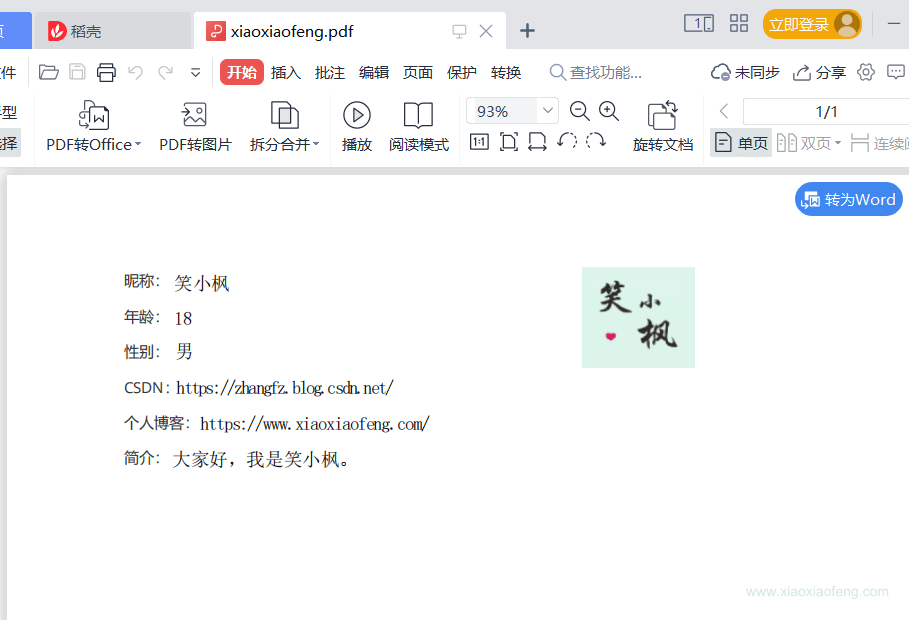
} 重启项目,在浏览器访问:http://localhost:6666/example/exportPdf
导出的文件效果如下:👇
完全基于代码生成,并保存
完全基于代码生成PDF文件,这个就比较定制化了,这里只讲常见的操作,大家可以用作参考:
自定义字体
PDF生成的时候,有没有遇到过丢失中文字体的问题呢,唉~解决一下
先下载字体,这里用黑体演示哈,下载地址:https://www.zitijia.com/downloadpage?itemid=281258939050380345
下载完会得到一个Simhei.ttf文件,对我们就是要它
先在util包下创建一个字体工具类吧,代码如下:
注意:代码中相关的绝对路径要替换成自己的
package com.maple.demo.util;import com.itextpdf.text.*;
import com.itextpdf.text.pdf.BaseFont;
import com.itextpdf.text.pdf.PdfPTable;import java.io.IOException;
import java.util.List;/*** @author 笑小枫* @date 2022/8/15* @see https://www.xiaoxiaofeng.com*/
public class PdfFontUtil {private PdfFontUtil() {}/*** 基础配置,可以放相对路径,这里演示绝对路径,因为字体文件过大,这里不传到项目里面了,需要的自己下载* 下载地址:https://www.zitijia.com/downloadpage?itemid=281258939050380345*/public static final String FONT = "D:\\font/Simhei.ttf";/*** 基础样式*/public static final Font TITLE_FONT = FontFactory.getFont(FONT, BaseFont.IDENTITY_H, 20, Font.BOLD);public static final Font NODE_FONT = FontFactory.getFont(FONT, BaseFont.IDENTITY_H, 15, Font.BOLD);public static final Font BLOCK_FONT = FontFactory.getFont(FONT, BaseFont.IDENTITY_H, 13, Font.BOLD, BaseColor.BLACK);public static final Font INFO_FONT = FontFactory.getFont(FONT, BaseFont.IDENTITY_H, 12, Font.NORMAL, BaseColor.BLACK);public static final Font CONTENT_FONT = FontFactory.getFont(FONT, BaseFont.IDENTITY_H, BaseFont.NOT_EMBEDDED);/*** 段落样式获取*/public static Paragraph getParagraph(String content, Font font, Integer alignment) {Paragraph paragraph = new Paragraph(content, font);if (alignment != null && alignment >= 0) {paragraph.setAlignment(alignment);}return paragraph;}/*** 图片样式*/public static Image getImage(String imgPath, float width, float height) throws IOException, BadElementException {Image image = Image.getInstance(imgPath);image.setAlignment(Image.MIDDLE);if (width > 0 && height > 0) {image.scaleAbsolute(width, height);}return image;}/*** 表格生成*/public static PdfPTable getPdfTable(int numColumns, float totalWidth) {// 表格处理PdfPTable table = new PdfPTable(numColumns);// 设置表格宽度比例为%100table.setWidthPercentage(100);// 设置宽度:宽度平均table.setTotalWidth(totalWidth);// 锁住宽度table.setLockedWidth(true);// 设置表格上面空白宽度table.setSpacingBefore(10f);// 设置表格下面空白宽度table.setSpacingAfter(10f);// 设置表格默认为无边框table.getDefaultCell().setBorder(0);table.setPaddingTop(50);table.setSplitLate(false);return table;}/*** 表格内容带样式*/public static void addTableCell(PdfPTable dataTable, Font font, List cellList) {for (String content : cellList) {dataTable.addCell(getParagraph(content, font, -1));}}
}
pdf生成工具类
继续在util包下的PdfUtil.java工具类里添加,因为本文涉及到的操作比较多,这里只贴相关代码,最后统一贴一个完成的文件
注意:代码中相关的绝对路径要替换成自己的
/*** 创建PDF,并保存到指定位置** @param filePath 保存路径*/public static void createPdfPage(String filePath) {// FileOutputStream 需要关闭,释放资源try (FileOutputStream outputStream = new FileOutputStream(filePath)) {// 创建文档Document document = new Document();PdfWriter writer = PdfWriter.getInstance(document, outputStream);document.open();// 报告标题document.add(PdfFontUtil.getParagraph("笑小枫的网站介绍", TITLE_FONT, 1));document.add(PdfFontUtil.getParagraph("\n网站名称:笑小枫(www.xiaoxiaofeng.com)", INFO_FONT, -1));document.add(PdfFontUtil.getParagraph("\n生成时间:2022-07-02\n\n", INFO_FONT, -1));// 报告内容// 段落标题 + 报表图document.add(PdfFontUtil.getParagraph("文章数据统计", NODE_FONT, -1));document.add(PdfFontUtil.getParagraph("\n· 网站首页图\n\n", BLOCK_FONT, -1));// 设置图片宽高float documentWidth = document.getPageSize().getWidth() - document.leftMargin() - document.rightMargin();float documentHeight = documentWidth / 580 * 320;document.add(PdfFontUtil.getImage("D:\\xiaoxiaofeng.jpg", documentWidth - 80, documentHeight - 80));// 数据表格document.add(PdfFontUtil.getParagraph("\n· 数据详情\n\n", BLOCK_FONT, -1));// 生成6列的表格PdfPTable dataTable = PdfFontUtil.getPdfTable(6, 500);// 设置表格List tableHeadList = tableHead();List> tableDataList = getTableData();PdfFontUtil.addTableCell(dataTable, CONTENT_FONT, tableHeadList);for (List tableData : tableDataList) {PdfFontUtil.addTableCell(dataTable, CONTENT_FONT, tableData);}document.add(dataTable);document.add(PdfFontUtil.getParagraph("\n· 报表描述\n\n", BLOCK_FONT, -1));document.add(PdfFontUtil.getParagraph("数据报告可以监控每天的推广情况," +"可以针对不同的数据表现进行分析,以提升推广效果。", CONTENT_FONT, -1));document.newPage();document.close();writer.close();} catch (Exception e) {e.printStackTrace();}}/*** 模拟数据*/private static List tableHead() {List tableHeadList = new ArrayList<>();tableHeadList.add("省份");tableHeadList.add("城市");tableHeadList.add("数量");tableHeadList.add("百分比1");tableHeadList.add("百分比2");tableHeadList.add("百分比3");return tableHeadList;}/*** 模拟数据*/private static List> getTableData() {List> tableDataList = new ArrayList<>();for (int i = 0; i < 3; i++) {List tableData = new ArrayList<>();tableData.add("浙江" + i);tableData.add("杭州" + i);tableData.add("276" + i);tableData.add("33.3%");tableData.add("34.3%");tableData.add("35.3%");tableDataList.add(tableData);}return tableDataList;}
在controller包下的TestPdfController.java类中添加代码,因为本文涉及到的操作比较多,这里只贴相关代码,最后统一贴一个完成的文件,相关代码如下:
注意:代码中相关的绝对路径要替换成自己的
@ApiOperation(value = "测试纯代码生成PDF到指定目录")@GetMapping("/createPdfLocal")public void create() {PdfUtil.createPdfPage("D:\\xxf.pdf");}
重启项目,在浏览器访问:http://localhost:6666/example/createPdfLocal
可以在D:\\test目录下看到xxf.pdf文件
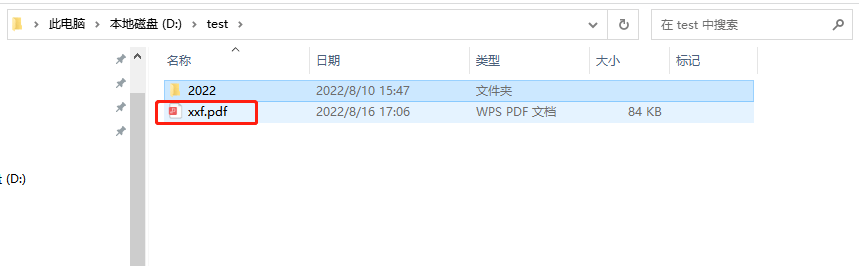
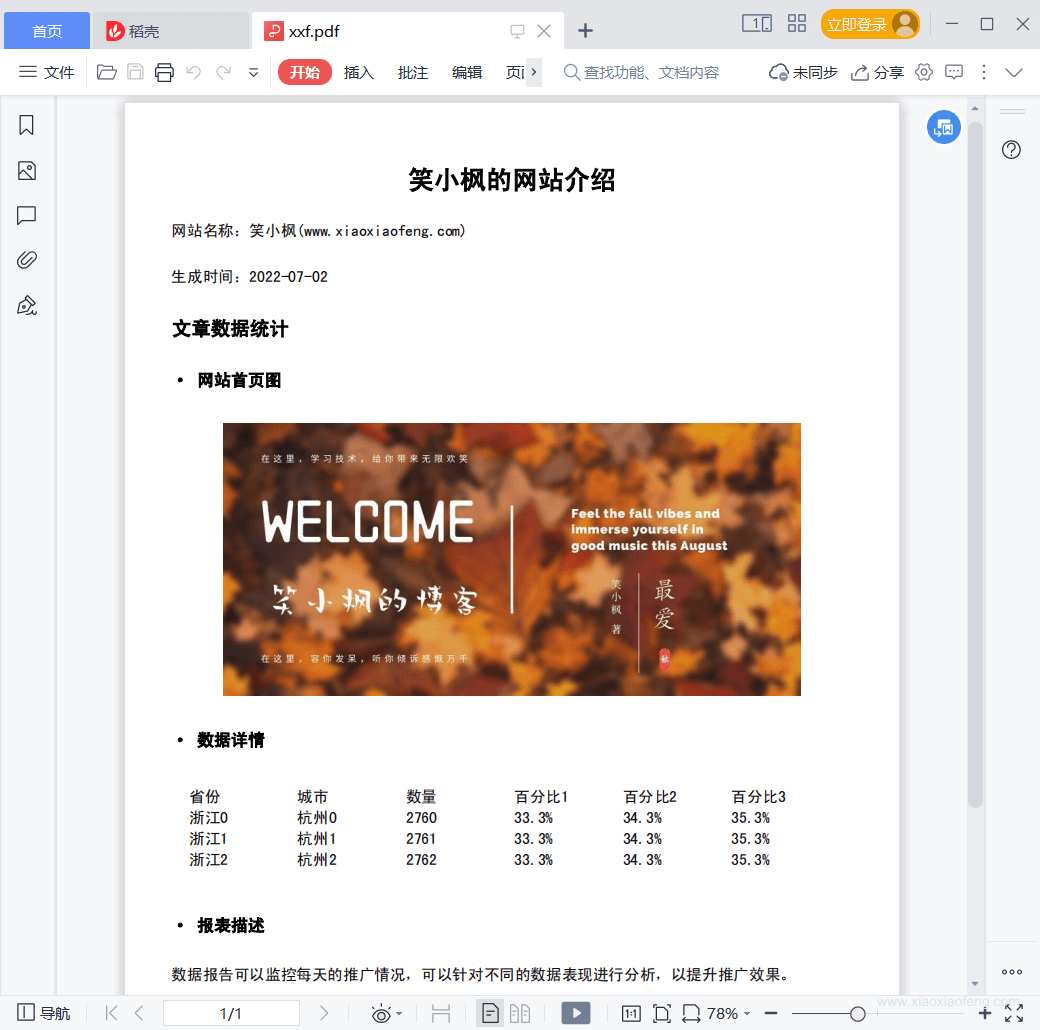
我们打开看一下效果:
合并PDF,并保存
继续在util包下的PdfUtil.java工具类里添加,因为本文涉及到的操作比较多,这里只贴相关代码,最后统一贴一个完成的文件。
/*** 合并pdf文件** @param files 要合并文件数组(绝对路径如{ "D:\\test\\1.pdf", "D:\\test\\2.pdf" , "D:\\test\\3.pdf"})* @param newFile 合并后存放的目录D:\\test\\xxf-merge.pdf* @return boolean 生成功返回true, 否則返回false*/public static boolean mergePdfFiles(String[] files, String newFile) {boolean retValue = false;Document document;try (FileOutputStream fileOutputStream = new FileOutputStream(newFile)) {document = new Document(new PdfReader(files[0]).getPageSize(1));PdfCopy copy = new PdfCopy(document, fileOutputStream);document.open();for (String file : files) {PdfReader reader = new PdfReader(file);int n = reader.getNumberOfPages();for (int j = 1; j <= n; j++) {document.newPage();PdfImportedPage page = copy.getImportedPage(reader, j);copy.addPage(page);}}retValue = true;document.close();} catch (Exception e) {e.printStackTrace();}return retValue;}
在controller包下的TestPdfController.java类中添加代码,因为本文涉及到的操作比较多,这里只贴相关代码,最后统一贴一个完成的文件,相关代码如下:
注意:代码中相关的绝对路径要替换成自己的
@ApiOperation(value = "测试合并PDF到指定目录")@GetMapping("/mergePdf")public Boolean mergePdf() {String[] files = {"D:\\test\\1.pdf", "D:\\test\\2.pdf"};String newFile = "D:\\test\\xxf-merge.pdf";return PdfUtil.mergePdfFiles(files, newFile);}
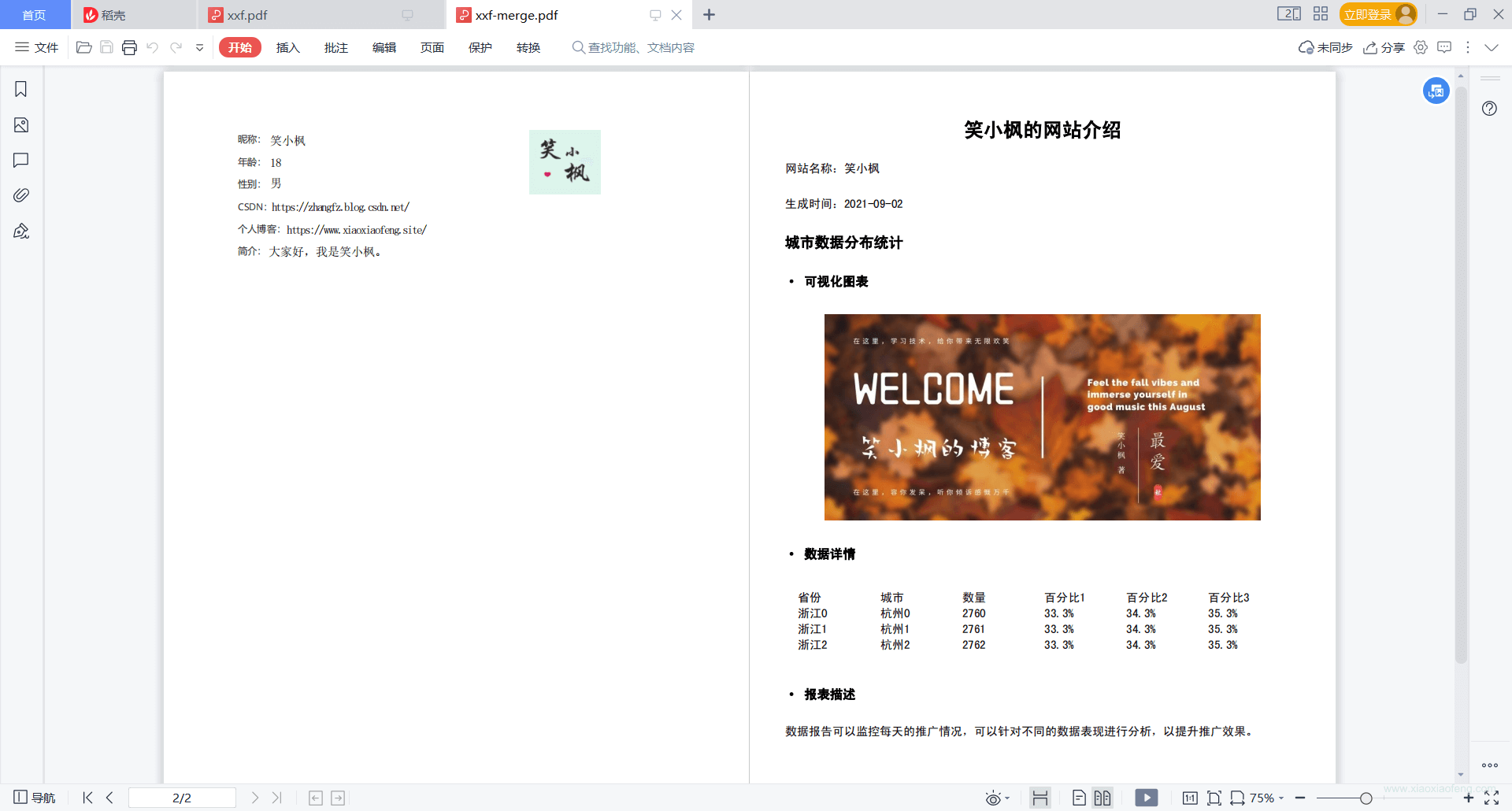
我们首先要准备两个文件D:\\test\\1.pdf,D:\\test\\2.pdf,这里可以指定文件,也可以是生成的pdf文件。
如果是处理生成的文件,这里说下思想:程序创建一个临时目录,注意要唯一命名,然后将生成PDF文件保存到这个目录,然后从这个目录下拿到pdf进行处理,最后处理完成,保存到对应的目录下,删除这个临时目录和下面的文件。这里不做演示。《合并PDF,并下载》里面略有涉及,但是处理的单个文件,稍微改造即可
重启项目,在浏览器访问:http://localhost:6666/example/mergePdf
可以在D:\\test目录下看到xxf-merge文件
打开看一下效果:
合并PDF,并下载
继续在util包下的PdfUtil.java工具类里添加,这里只贴将文件转为输出流,并删除文件的相关代码,合并相关代码见《合并PDF,并保存》的util类。
/*** 读取PDF,读取后删除PDF,适用于生成后需要导出PDF,创建临时文件*/public static void readDeletePdf(String fileName, ServletOutputStream outputStream) {File file = new File(fileName);if (!file.exists()) {System.out.println(fileName + "文件不存在");}try (InputStream in = new FileInputStream(fileName)) {IOUtils.copy(in, outputStream);} catch (Exception e) {e.printStackTrace();} finally {try {Files.delete(file.toPath());} catch (IOException e) {e.printStackTrace();}}}
在controller包下的TestPdfController.java类中添加代码,因为本文涉及到的操作比较多,这里只贴相关代码,最后统一贴一个完成的文件,相关代码如下:
注意:代码中相关的绝对路径要替换成自己的
@ApiOperation(value = "测试合并PDF后并导出")@GetMapping("/exportMergePdf")public void createPdf(HttpServletResponse response) {// 设置response参数,可以打开下载页面response.reset();response.setCharacterEncoding("UTF-8");// 定义输出类型response.setContentType("application/PDF;charset=utf-8");// 设置名称response.setHeader("Content-Disposition", "attachment; filename=" + "xiaoxiaofeng.pdf");try (ServletOutputStream out = response.getOutputStream()) {String[] files = {"D:\\test\\1.pdf", "D:\\test\\2.pdf"};// 生成为临时文件,转换为流后,再删除该文件String newFile = "src\\main\\resources\\templates\\" + UUID.randomUUID() + ".pdf";boolean isOk = PdfUtil.mergePdfFiles(files, newFile);if (isOk) {PdfUtil.readDeletePdf(newFile, out);}} catch (IOException e) {e.printStackTrace();}}
重启项目,在浏览器访问:http://localhost:6666/example/exportMergePdf会提示我们下载。
完整代码
PdfUtil.java
package com.maple.demo.util;import com.itextpdf.text.Document;
import com.itextpdf.text.DocumentException;
import com.itextpdf.text.Image;
import com.itextpdf.text.Rectangle;
import com.itextpdf.text.pdf.*;
import org.apache.commons.compress.utils.IOUtils;import javax.servlet.ServletOutputStream;
import java.io.*;
import java.nio.file.Files;
import java.util.ArrayList;
import java.util.List;
import java.util.Map;
import java.util.Objects;import static com.maple.demo.util.PdfFontUtil.*;/*** @author 笑小枫* @date 2022/8/15* @see https://www.xiaoxiaofeng.com*/
public class PdfUtil {private PdfUtil() {}/*** 利用模板生成pdf** @param data         写入的数据* @param photoMap     图片信息* @param out          自定义保存pdf的文件流* @param templatePath pdf模板路径*/public static void fillTemplate(Map data, Map photoMap, ServletOutputStream out, String templatePath) {PdfReader reader;ByteArrayOutputStream bos;PdfStamper stamper;try {// 读取pdf模板reader = new PdfReader(templatePath);bos = new ByteArrayOutputStream();stamper = new PdfStamper(reader, bos);AcroFields acroFields = stamper.getAcroFields();// 赋值for (String name : acroFields.getFields().keySet()) {String value = data.get(name) != null ? data.get(name).toString() : null;acroFields.setField(name, value);}// 图片赋值for (Map.Entry entry : photoMap.entrySet()) {if (Objects.isNull(entry.getKey())) {continue;}String key = entry.getKey();String url = entry.getValue();// 根据地址读取需要放入pdf中的图片Image image = Image.getInstance(url);// 设置图片在哪一页PdfContentByte overContent = stamper.getOverContent(acroFields.getFieldPositions(key).get(0).page);// 获取模板中图片域的大小Rectangle signRect = acroFields.getFieldPositions(key).get(0).position;float x = signRect.getLeft();float y = signRect.getBottom();// 图片等比缩放image.scaleAbsolute(signRect.getWidth(), signRect.getHeight());// 图片位置image.setAbsolutePosition(x, y);// 在该页加入图片overContent.addImage(image);}// 如果为false那么生成的PDF文件还能编辑,一定要设为truestamper.setFormFlattening(true);stamper.close();Document doc = new Document();PdfCopy copy = new PdfCopy(doc, out);doc.open();PdfImportedPage importPage = copy.getImportedPage(new PdfReader(bos.toByteArray()), 1);copy.addPage(importPage);doc.close();bos.close();} catch (IOException | DocumentException e) {e.printStackTrace();}}/*** 创建PDF,并保存到指定位置** @param filePath 保存路径*/public static void createPdfPage(String filePath) {// FileOutputStream 需要关闭,释放资源try (FileOutputStream outputStream = new FileOutputStream(filePath)) {// 创建文档Document document = new Document();PdfWriter writer = PdfWriter.getInstance(document, outputStream);document.open();// 报告标题document.add(PdfFontUtil.getParagraph("笑小枫的网站介绍", TITLE_FONT, 1));document.add(PdfFontUtil.getParagraph("\n网站名称:笑小枫(www.xiaoxiaofeng.com)", INFO_FONT, -1));document.add(PdfFontUtil.getParagraph("\n生成时间:2022-07-02\n\n", INFO_FONT, -1));// 报告内容// 段落标题 + 报表图document.add(PdfFontUtil.getParagraph("文章数据统计", NODE_FONT, -1));document.add(PdfFontUtil.getParagraph("\n· 网站首页图\n\n", BLOCK_FONT, -1));// 设置图片宽高float documentWidth = document.getPageSize().getWidth() - document.leftMargin() - document.rightMargin();float documentHeight = documentWidth / 580 * 320;document.add(PdfFontUtil.getImage("D:\\xiaoxiaofeng.jpg", documentWidth - 80, documentHeight - 80));// 数据表格document.add(PdfFontUtil.getParagraph("\n· 数据详情\n\n", BLOCK_FONT, -1));// 生成6列的表格PdfPTable dataTable = PdfFontUtil.getPdfTable(6, 500);// 设置表格List tableHeadList = tableHead();List> tableDataList = getTableData();PdfFontUtil.addTableCell(dataTable, CONTENT_FONT, tableHeadList);for (List tableData : tableDataList) {PdfFontUtil.addTableCell(dataTable, CONTENT_FONT, tableData);}document.add(dataTable);document.add(PdfFontUtil.getParagraph("\n· 报表描述\n\n", BLOCK_FONT, -1));document.add(PdfFontUtil.getParagraph("数据报告可以监控每天的推广情况," +"可以针对不同的数据表现进行分析,以提升推广效果。", CONTENT_FONT, -1));document.newPage();document.close();writer.close();} catch (Exception e) {e.printStackTrace();}}/*** 模拟数据*/private static List tableHead() {List tableHeadList = new ArrayList<>();tableHeadList.add("省份");tableHeadList.add("城市");tableHeadList.add("数量");tableHeadList.add("百分比1");tableHeadList.add("百分比2");tableHeadList.add("百分比3");return tableHeadList;}/*** 模拟数据*/private static List> getTableData() {List> tableDataList = new ArrayList<>();for (int i = 0; i < 3; i++) {List tableData = new ArrayList<>();tableData.add("浙江" + i);tableData.add("杭州" + i);tableData.add("276" + i);tableData.add("33.3%");tableData.add("34.3%");tableData.add("35.3%");tableDataList.add(tableData);}return tableDataList;}/*** 合并pdf文件** @param files   要合并文件数组(绝对路径如{ "D:\\test\\1.pdf", "D:\\test\\2.pdf" , "D:\\test\\3.pdf"})* @param newFile 合并后存放的目录D:\\test\\xxf-merge.pdf* @return boolean 生成功返回true, 否則返回false*/public static boolean mergePdfFiles(String[] files, String newFile) {boolean retValue = false;Document document;try (FileOutputStream fileOutputStream = new FileOutputStream(newFile)) {document = new Document(new PdfReader(files[0]).getPageSize(1));PdfCopy copy = new PdfCopy(document, fileOutputStream);document.open();for (String file : files) {PdfReader reader = new PdfReader(file);int n = reader.getNumberOfPages();for (int j = 1; j <= n; j++) {document.newPage();PdfImportedPage page = copy.getImportedPage(reader, j);copy.addPage(page);}}retValue = true;document.close();} catch (Exception e) {e.printStackTrace();}return retValue;}/*** 读取PDF,读取后删除PDF,适用于生成后需要导出PDF,创建临时文件*/public static void readDeletePdf(String fileName, ServletOutputStream outputStream) {File file = new File(fileName);if (!file.exists()) {System.out.println(fileName + "文件不存在");}try (InputStream in = new FileInputStream(fileName)) {IOUtils.copy(in, outputStream);} catch (Exception e) {e.printStackTrace();} finally {try {Files.delete(file.toPath());} catch (IOException e) {e.printStackTrace();}}}
}
PdfFontUtil.java
package com.maple.demo.util;import com.itextpdf.text.*;
import com.itextpdf.text.pdf.BaseFont;
import com.itextpdf.text.pdf.PdfPTable;import java.io.IOException;
import java.util.List;/*** @author 笑小枫* @date 2022/8/15* @see https://www.xiaoxiaofeng.com*/
public class PdfFontUtil {private PdfFontUtil() {}/*** 基础配置,可以放相对路径,这里演示绝对路径,因为字体文件过大,这里不传到项目里面了,需要的自己下载* 下载地址:https://www.zitijia.com/downloadpage?itemid=281258939050380345*/public static final String FONT = "D:\\font/Simhei.ttf";/*** 基础样式*/public static final Font TITLE_FONT = FontFactory.getFont(FONT, BaseFont.IDENTITY_H, 20, Font.BOLD);public static final Font NODE_FONT = FontFactory.getFont(FONT, BaseFont.IDENTITY_H, 15, Font.BOLD);public static final Font BLOCK_FONT = FontFactory.getFont(FONT, BaseFont.IDENTITY_H, 13, Font.BOLD, BaseColor.BLACK);public static final Font INFO_FONT = FontFactory.getFont(FONT, BaseFont.IDENTITY_H, 12, Font.NORMAL, BaseColor.BLACK);public static final Font CONTENT_FONT = FontFactory.getFont(FONT, BaseFont.IDENTITY_H, BaseFont.NOT_EMBEDDED);/*** 段落样式获取*/public static Paragraph getParagraph(String content, Font font, Integer alignment) {Paragraph paragraph = new Paragraph(content, font);if (alignment != null && alignment >= 0) {paragraph.setAlignment(alignment);}return paragraph;}/*** 图片样式*/public static Image getImage(String imgPath, float width, float height) throws IOException, BadElementException {Image image = Image.getInstance(imgPath);image.setAlignment(Image.MIDDLE);if (width > 0 && height > 0) {image.scaleAbsolute(width, height);}return image;}/*** 表格生成*/public static PdfPTable getPdfTable(int numColumns, float totalWidth) {// 表格处理PdfPTable table = new PdfPTable(numColumns);// 设置表格宽度比例为%100table.setWidthPercentage(100);// 设置宽度:宽度平均table.setTotalWidth(totalWidth);// 锁住宽度table.setLockedWidth(true);// 设置表格上面空白宽度table.setSpacingBefore(10f);// 设置表格下面空白宽度table.setSpacingAfter(10f);// 设置表格默认为无边框table.getDefaultCell().setBorder(0);table.setPaddingTop(50);table.setSplitLate(false);return table;}/*** 表格内容带样式*/public static void addTableCell(PdfPTable dataTable, Font font, List cellList) {for (String content : cellList) {dataTable.addCell(getParagraph(content, font, -1));}}
}
TestPdfController.java
package com.maple.demo.controller;import com.maple.demo.util.PdfUtil;
import io.swagger.annotations.Api;
import io.swagger.annotations.ApiOperation;
import lombok.extern.slf4j.Slf4j;
import org.springframework.web.bind.annotation.GetMapping;
import org.springframework.web.bind.annotation.RequestMapping;
import org.springframework.web.bind.annotation.RestController;import javax.servlet.ServletOutputStream;
import javax.servlet.http.HttpServletResponse;
import java.io.IOException;
import java.util.HashMap;
import java.util.Map;
import java.util.UUID;/*** @author 笑小枫* @date 2022/8/15* @see https://www.xiaoxiaofeng.com*/
@Slf4j
@RestController
@RequestMapping("/example")
@Api(tags = "实例演示-PDF操作接口")
public class TestPdfController {@ApiOperation(value = "根据PDF模板导出PDF")@GetMapping("/exportPdf")public void exportPdf(HttpServletResponse response) {Map dataMap = new HashMap<>(16);dataMap.put("nickName", "笑小枫");dataMap.put("age", 18);dataMap.put("sex", "男");dataMap.put("csdnUrl", "https://zhangfz.blog.csdn.net/");dataMap.put("siteUrl", "https://www.xiaoxiaofeng.com/");dataMap.put("desc", "大家好,我是笑小枫。");Map photoMap = new HashMap<>(16);photoMap.put("logo", "https://profile.csdnimg.cn/C/9/4/2_qq_34988304");// 设置response参数,可以打开下载页面response.reset();response.setCharacterEncoding("UTF-8");// 定义输出类型response.setContentType("application/PDF;charset=utf-8");// 设置名称response.setHeader("Content-Disposition", "attachment; filename=" + "xiaoxiaofeng.pdf");try {ServletOutputStream out = response.getOutputStream();// 模板路径记PdfUtil.fillTemplate(dataMap, photoMap, out, "src/main/resources/templates/xiaoxiaofeng.pdf");} catch (IOException e) {e.printStackTrace();}}@ApiOperation(value = "测试纯代码生成PDF到指定目录")@GetMapping("/createPdfLocal")public void create() {PdfUtil.createPdfPage("D:\\test\\xxf.pdf");}@ApiOperation(value = "测试合并PDF到指定目录")@GetMapping("/mergePdf")public Boolean mergePdf() {String[] files = {"D:\\test\\1.pdf", "D:\\test\\2.pdf"};String newFile = "D:\\test\\xxf-merge.pdf";return PdfUtil.mergePdfFiles(files, newFile);}@ApiOperation(value = "测试合并PDF后并导出")@GetMapping("/exportMergePdf")public void createPdf(HttpServletResponse response) {// 设置response参数,可以打开下载页面response.reset();response.setCharacterEncoding("UTF-8");// 定义输出类型response.setContentType("application/PDF;charset=utf-8");// 设置名称response.setHeader("Content-Disposition", "attachment; filename=" + "xiaoxiaofeng.pdf");try (ServletOutputStream out = response.getOutputStream()) {String[] files = {"D:\\test\\1.pdf", "D:\\test\\2.pdf"};// 生成为临时文件,转换为流后,再删除该文件String newFile = "src\\main\\resources\\templates\\" + UUID.randomUUID() + ".pdf";boolean isOk = PdfUtil.mergePdfFiles(files, newFile);if (isOk) {PdfUtil.readDeletePdf(newFile, out);}} catch (IOException e) {e.printStackTrace();}}
}