

【笔记】samba shell 脚本 离线安装 - Ubuntu 20.04
创始人
2024-01-29 00:06:07
前言
按照官网调试代码、网上各种步骤来走(还收费)都不行
结果发现是防火墙问题
公司服务器安装的ufw使用失效,导致端口号放行添加失败
换用firewall-cmd成功
现在免费放下代码,气死他们收费的
目录
├── home│ ├── katja│ │ ├── samba│ │ │ ├── install_samba.sh│ │ │ ├── smb.conf│ │ │ ├── xxxxx.deb│ │ │ ├── ...│ │ │ └──│ │ ├── localoss│ │ │ ├── test (被共享的目录)│ │ │ └──│ │ └──│ └── └──
代码
install_samba.sh
#!/bin/bash
# -*- coding: utf-8 -*-
# @Time  : 2022/11/14 14:38
# @Author: katja
# @File  : install_samba.sh
# @Desc  : samba 共享文件夹
#
path=/home/katja/samba
share_user=tps_share
share_group=sambashare
share_path=/home/katja/localoss# 安装samba
is_exist(){
package=$1
package_deb=$2
if test ! -z "$(dpkg -l | grep -w $package)";thenecho -e "$package exist "
elsedpkg -i ${path}/$package_deb
fi
}install(){is_exist python3-ldb python3-ldb_2%3a2.2.3-0ubuntu0.20.04.3_amd64.debis_exist libldb2 libldb2_2%3a2.2.3-0ubuntu0.20.04.3_amd64.debis_exist libsmbclient libsmbclient_2%3a4.13.17~dfsg-0ubuntu1.20.04.1_amd64.debis_exist libwbclient0 libwbclient0_2%3a4.13.17~dfsg-0ubuntu1.20.04.1_amd64.debis_exist samba-libs samba-libs_2%3a4.13.17~dfsg-0ubuntu1.20.04.1_amd64.debis_exist python3-dnspython python3-dnspython_1.16.0-1ubuntu1_all.debis_exist python3-crypto python3-crypto_2.6.1-13ubuntu2_amd64.debis_exist python3-tdb python3-tdb_1.4.3-0ubuntu0.20.04.1_amd64.debis_exist python3-samba python3-samba_2%3a4.13.17~dfsg-0ubuntu1.20.04.1_amd64.debis_exist samba-common samba-common_2%3a4.13.17~dfsg-0ubuntu1.20.04.1_all.debis_exist samba-common-bin samba-common-bin_2%3a4.13.17~dfsg-0ubuntu1.20.04.1_amd64.debis_exist tdb-tools tdb-tools_1.4.3-0ubuntu0.20.04.1_amd64.debis_exist samba samba_2%3a4.13.17~dfsg-0ubuntu1.20.04.1_amd64.debis_exist attr attr_1%3a2.4.48-5_amd64.debis_exist libibverbs1 libibverbs1_28.0-1ubuntu1_amd64.debis_exist ibverbs-providers ibverbs-providers_28.0-1ubuntu1_amd64.debis_exist librdmacm1 librdmacm1_28.0-1ubuntu1_amd64.debis_exist libboost-iostreams1.71.0 libboost-iostreams1.71.0_1.71.0-6ubuntu6_amd64.debis_exist librados2 librados2_15.2.16-0ubuntu0.20.04.1_amd64.debis_exist libcephfs2 libcephfs2_15.2.16-0ubuntu0.20.04.1_amd64.debis_exist python3-gpg python3-gpg_1.13.1-7ubuntu2_amd64.debis_exist python3-pyparsing python3-pyparsing_2.4.6-1_all.debis_exist python3-packaging python3-packaging_20.3-1_all.debis_exist python3-markdown python3-markdown_3.1.1-3_all.debis_exist python3-pygments python3-pygments_2.3.1+dfsg-1ubuntu2.2_all.debis_exist samba-dsdb-modules samba-dsdb-modules_2%3a4.13.17~dfsg-0ubuntu1.20.04.1_amd64.debis_exist samba-vfs-modules samba-vfs-modules_2%3a4.13.17~dfsg-0ubuntu1.20.04.1_amd64.deb# 安装完毕后会自动启动echo 'starting service'sudo systemctl status nmbd smbd
}
install# 防火墙
sudo firewall-cmd --add-service=samba
sudo firewall-cmd --add-port=137/udp
sudo firewall-cmd --add-port=138/udp
sudo firewall-cmd --add-port=139/tcp
sudo firewall-cmd --add-port=445/tcpgroup_add(){# 新建组sudo groupadd ${share_group}# 主目录sudo mkdir ${share_path}# 群组所有权sudo chgrp ${share_group} ${share_path}
}normal_add(){group_adduser_name=normal# 普通用户 (ubuntu的)无需Ubuntu登录密码sudo useradd -M -d ${share_path}/$user_name -s /usr/sbin/nologin -G ${share_group} $user_name# 主目录sudo mkdir ${share_path}/$user_name# 权限sudo chown $user_name:${share_group} ${share_path}/$user_name# 新创建文件继承所属组sudo chmod 2770 ${share_path}/$user_name# 密码设置sudo smbpasswd -a $user_name# 启用sudo smbpasswd -e $user_name
}
#normal_add  # 我的业务用不到,所以注释了admin_add(){group_adduser_name=sadmin# 管理员用户sudo useradd -M -d ${share_path}/users -s /usr/sbin/nologin -G ${share_group} $user_name# 共享目录sudo mkdir ${share_path}/users# 权限sudo chown $user_name:${share_group} ${share_path}/users# 新创建文件继承所属组sudo chmod 2770 ${share_path}/users# 密码设置sudo smbpasswd -a $user_name# 启用sudo smbpasswd -e $user_name
}
#admin_add # 同上file_add(){# 无密码用户sudo mkdir -p ${share_path}/testsudo chmod -R 777 ${share_path}/test# 创建Ubuntu的新用户sudo useradd  smbusersudo passwd  smbuser# 新用户加入smb服务器sudo smbpasswd -a smbuser
}
file_add# 配置smb.conf
mv /etc/samba/smb.conf /etc/samba/smb.conf.bak
cp smb.conf /etc/samba/smb.conf# 重启服务
echo 'starting smbd'
sudo service smbd restartecho 'starting smbd'
sudo service nmbd restart# 查看状态
sudo systemctl status smbd nmbd
smb.conf
在最末尾追加代码 share
#
# Sample configuration file for the Samba suite for Debian GNU/Linux.
#
#
# This is the main Samba configuration file. You should read the
# smb.conf(5) manual page in order to understand the options listed
# here. Samba has a huge number of configurable options most of which
# are not shown in this example
#
# Some options that are often worth tuning have been included as
# commented-out examples in this file.
#  - When such options are commented with ";", the proposed setting
#    differs from the default Samba behaviour
#  - When commented with "#", the proposed setting is the default
#    behaviour of Samba but the option is considered important
#    enough to be mentioned here
#
# NOTE: Whenever you modify this file you should run the command
# "testparm" to check that you have not made any basic syntactic
# errors. #======================= Global Settings =======================[global]## Browsing/Identification #### Change this to the workgroup/NT-domain name your Samba server will part ofworkgroup = WORKSPACE	# server string is the equivalent of the NT Description fieldserver string = %h server (Samba, Ubuntu)#### Networking ##### The specific set of interfaces / networks to bind to
# This can be either the interface name or an IP address/netmask;
# interface names are normally preferred
;   interfaces = 127.0.0.0/8 eth0# Only bind to the named interfaces and/or networks; you must use the
# 'interfaces' option above to use this.
# It is recommended that you enable this feature if your Samba machine is
# not protected by a firewall or is a firewall itself.  However, this
# option cannot handle dynamic or non-broadcast interfaces correctly.
;   bind interfaces only = yes#### Debugging/Accounting ##### This tells Samba to use a separate log file for each machine
# that connectslog file = /var/log/samba/log.%m# Cap the size of the individual log files (in KiB).max log size = 1000# We want Samba to only log to /var/log/samba/log.{smbd,nmbd}.
# Append syslog@1 if you want important messages to be sent to syslog too.logging = filelog level = 2# Do something sensible when Samba crashes: mail the admin a backtracepanic action = /usr/share/samba/panic-action %d####### Authentication ######## Server role. Defines in which mode Samba will operate. Possible
# values are "standalone server", "member server", "classic primary
# domain controller", "classic backup domain controller", "active
# directory domain controller".
#
# Most people will want "standalone server" or "member server".
# Running as "active directory domain controller" will require first
# running "samba-tool domain provision" to wipe databases and create a
# new domain.server role = standalone serverobey pam restrictions = yes# This boolean parameter controls whether Samba attempts to sync the Unix
# password with the SMB password when the encrypted SMB password in the
# passdb is changed.unix password sync = yes# For Unix password sync to work on a Debian GNU/Linux system, the following
# parameters must be set (thanks to Ian Kahan < for
# sending the correct chat script for the passwd program in Debian Sarge).passwd program = /usr/bin/passwd %upasswd chat = *Enter\snew\s*\spassword:* %n\n *Retype\snew\s*\spassword:* %n\n *password\supdated\ssuccessfully* .# This boolean controls whether PAM will be used for password changes
# when requested by an SMB client instead of the program listed in
# 'passwd program'. The default is 'no'.pam password change = yes# This option controls how unsuccessful authentication attempts are mapped
# to anonymous connectionsmap to guest = bad user########## Domains ############
# The following settings only takes effect if 'server role = primary
# classic domain controller', 'server role = backup domain controller'
# or 'domain logons' is set
## It specifies the location of the user's
# profile directory from the client point of view) The following
# required a [profiles] share to be setup on the samba server (see
# below)
;   logon path = \\%N\profiles\%U
# Another common choice is storing the profile in the user's home directory
# (this is Samba's default)
#   logon path = \\%N\%U\profile# The following setting only takes effect if 'domain logons' is set
# It specifies the location of a user's home directory (from the client
# point of view)
;   logon drive = H:
#   logon home = \\%N\%U# The following setting only takes effect if 'domain logons' is set
# It specifies the script to run during logon. The script must be stored
# in the [netlogon] share
# NOTE: Must be store in 'DOS' file format convention
;   logon script = logon.cmd# This allows Unix users to be created on the domain controller via the SAMR
# RPC pipe.  The example command creates a user account with a disabled Unix
# password; please adapt to your needs
; add user script = /usr/sbin/adduser --quiet --disabled-password --gecos "" %u# This allows machine accounts to be created on the domain controller via the
# SAMR RPC pipe.
# The following assumes a "machines" group exists on the system
; add machine script  = /usr/sbin/useradd -g machines -c "%u machine account" -d /var/lib/samba -s /bin/false %u# This allows Unix groups to be created on the domain controller via the SAMR
# RPC pipe.
; add group script = /usr/sbin/addgroup --force-badname %g############ Misc ############# Using the following line enables you to customise your configuration
# on a per machine basis. The %m gets replaced with the netbios name
# of the machine that is connecting
;   include = /home/samba/etc/smb.conf.%m# Some defaults for winbind (make sure you're not using the ranges
# for something else.)
;   idmap config * :              backend = tdb
;   idmap config * :              range   = 3000-7999
;   idmap config YOURDOMAINHERE : backend = tdb
;   idmap config YOURDOMAINHERE : range   = 100000-999999
;   template shell = /bin/bash# Setup usershare options to enable non-root users to share folders
# with the net usershare command.# Maximum number of usershare. 0 means that usershare is disabled.
#   usershare max shares = 100# Allow users who've been granted usershare privileges to create
# public shares, not just authenticated onesusershare allow guests = yes#======================= Share Definitions =======================# Un-comment the following (and tweak the other settings below to suit)
# to enable the default home directory shares. This will share each
# user's home directory as \\server\username
;[homes]
;   comment = Home Directories
;   browseable = no# By default, the home directories are exported read-only. Change the
# next parameter to 'no' if you want to be able to write to them.
;   read only = yes# File creation mask is set to 0700 for security reasons. If you want to
# create files with group=rw permissions, set next parameter to 0775.
;   create mask = 0700# Directory creation mask is set to 0700 for security reasons. If you want to
# create dirs. with group=rw permissions, set next parameter to 0775.
;   directory mask = 0700# By default, \\server\username shares can be connected to by anyone
# with access to the samba server.
# Un-comment the following parameter to make sure that only "username"
# can connect to \\server\username
# This might need tweaking when using external authentication schemes
;   valid users = %S# Un-comment the following and create the netlogon directory for Domain Logons
# (you need to configure Samba to act as a domain controller too.)
;[netlogon]
;   comment = Network Logon Service
;   path = /home/samba/netlogon
;   guest ok = yes
;   read only = yes# Un-comment the following and create the profiles directory to store
# users profiles (see the "logon path" option above)
# (you need to configure Samba to act as a domain controller too.)
# The path below should be writable by all users so that their
# profile directory may be created the first time they log on
;[profiles]
;   comment = Users profiles
;   path = /home/samba/profiles
;   guest ok = no
;   browseable = no
;   create mask = 0600
;   directory mask = 0700[printers]comment = All Printersbrowseable = nopath = /var/spool/sambaprintable = yesguest ok = noread only = yescreate mask = 0700# Windows clients look for this share name as a source of downloadable
# printer drivers
[print$]comment = Printer Driverspath = /var/lib/samba/printersbrowseable = yesread only = yesguest ok = no
# Uncomment to allow remote administration of Windows print drivers.
# You may need to replace 'lpadmin' with the name of the group your
# admin users are members of.
# Please note that you also need to set appropriate Unix permissions
# to the drivers directory for these users to have write rights in it
;   write list = root, @lpadmin
security = user
#[users]
#   comment = share folder with usrname and passwd
#   path = /home/katja/users
#   browseable = yes
#   read only = no
#   writeable = yes
#   force create mode = 0660
#   force directory mode = 2770
#   valid users = @sambashare @sadmin
#   #available = yes
#   # public = yes
#   #create mode = 0644
#   #directory mode = 0755#[normal]
#	comment = normal user
#	path = /home/katja/normal
#	browseable = no
#    read only = no
#    force create mode = 0660
#    force directory mode = 2770
#    valid users = normal @sadmin[share]comment = Ubuntu File Server Sharepublic = nopath = /home/katja/localoss/testbrowsable = yesguest ok = yesread only = nocreate mask = 0755
# testparm
deb 包
链接:https://pan.baidu.com/s/10Iy3b4jIJnZM0srPlh2HvA
提取码:pptd
使用方法
-
把deb包、bash文件、conf文件一起放到你想要放的路径下,假设这个路径是A
则,修改bash文件里path为A -
sudo bash ./install_samba.sh运行
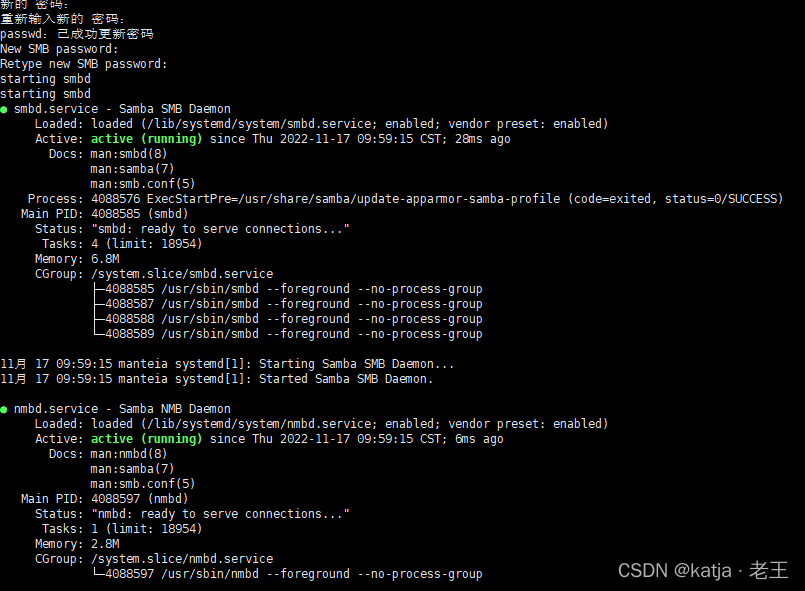
中途会停下来4次让你输入账号密码
前2次是让你输入新用户登录Ubuntu的密码
后2次是让你输入这个新用户在Samba服务器里的登录密码 -
最后显示状态,不代表一定创建成功
-
查看当前电脑ip
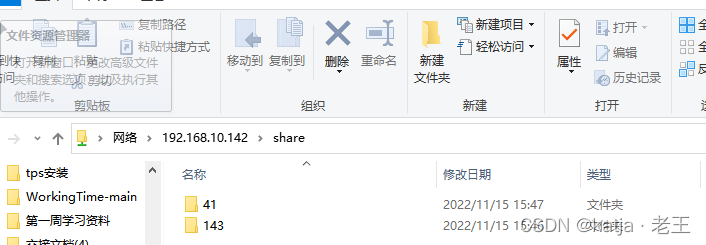
ip address: 我的是192.168.10.142 -
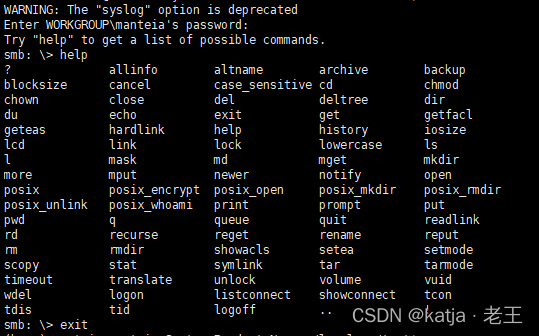
用其他电脑试试能否访问
- windows——
- linux ubuntu ——
smbclient //192.168.10.142
centos 是mbclient
如果没有就直接安装
如图就是成功了
失败
- NT_STATUS_HOST_UNREACHABLE
- 查看SMB配置文件是否正确
testparam /etc/samba/smb.conf

- 确认防火墙已经通过了samba和端口
(按照我的脚本应该没有问题)
相关内容
热门资讯
埃菲尔铁塔在哪 中国仿建埃菲尔...
2019年4月26日,广西南宁市,街头惊现一座巨型山寨版埃菲尔铁塔,高约20米,白色塔身,造型逼真,...
苗族的传统节日 贵州苗族节日有...
【岜沙苗族芦笙节】岜沙,苗语叫“分送”,距从江县城7.5公里,是世界上最崇拜树木并以树为神的枪手部落...
平遥古城在哪 平遥古城基本现状
城垣恢宏,雉堞连云市井街巷,店肆林立四合院落,青砖瓦屋这里是平遥古城历经千年沧桑而古朴宛然,风姿依旧...
北京的名胜古迹 北京最著名的景...
北京从元代开始,逐渐走上帝国首都的道路,先是成为大辽朝五大首都之一的南京城,随着金灭辽,金代从海陵王...
应用未安装解决办法 平板应用未...
---IT小技术,每天Get一个小技能!一、前言描述苹果IPad2居然不能安装怎么办?与此IPad不...
脚上的穴位图 脚面经络图对应的...
人体穴位作用图解大全更清晰直观的标注了各个人体穴位的作用,包括头部穴位图、胸部穴位图、背部穴位图、胳...
长白山自助游攻略 吉林长白山游...
昨天介绍了西坡的景点详细请看链接:一个人的旅行,据说能看到长白山天池全凭运气,您的运气如何?今日介绍...
猫咪吃了塑料袋怎么办 猫咪误食...
你知道吗?塑料袋放久了会长猫哦!要说猫咪对塑料袋的喜爱程度完完全全可以媲美纸箱家里只要一有塑料袋的响...
世界上最漂亮的人 世界上最漂亮...
此前在某网上,选出了全球265万颜值姣好的女性。从这些数量庞大的女性群体中,人们投票选出了心目中最美...
埃菲尔铁塔在哪 中国仿建埃菲尔...
2019年4月26日,广西南宁市,街头惊现一座巨型山寨版埃菲尔铁塔,高约20米,白色塔身,造型逼真,...
平遥古城在哪 平遥古城基本现状
城垣恢宏,雉堞连云市井街巷,店肆林立四合院落,青砖瓦屋这里是平遥古城历经千年沧桑而古朴宛然,风姿依旧...
苗族的传统节日 贵州苗族节日有...
【岜沙苗族芦笙节】岜沙,苗语叫“分送”,距从江县城7.5公里,是世界上最崇拜树木并以树为神的枪手部落...
北京的名胜古迹 北京最著名的景...
北京从元代开始,逐渐走上帝国首都的道路,先是成为大辽朝五大首都之一的南京城,随着金灭辽,金代从海陵王...