

Android App实战项目之实现手写签名APP功能(附源码,简单易懂 可直接实用)
创始人
2024-01-30 18:52:52
运行有问题或需要源码请点赞关注收藏后评论区留言~~~
一、跟踪滑动轨迹实现手写签名
手写签名的原理是把手机屏幕当作画板,把用户手指当作画笔,手指在屏幕上划来划去,屏幕就会显示手指的移动轨迹,就像画笔在画板上写字一样,实现手写签名需要结合绘图的路径工具Path,具体实现步骤如下
1:按下手指时 调用Path对象的moveTo方法 将路径起点移动到触摸点
2:移动手指时 调用Path对象的quadTo方法 记录本次触摸点与上次触摸点之间的路径
3:移动手指或手指提起时,调用Canvas对象的drawPath方法,将本次触摸轨迹绘制在画布上
效果如下
点击开始签名即可开始签名,模拟机就拿鼠标画就可以,真机测试效果会更好
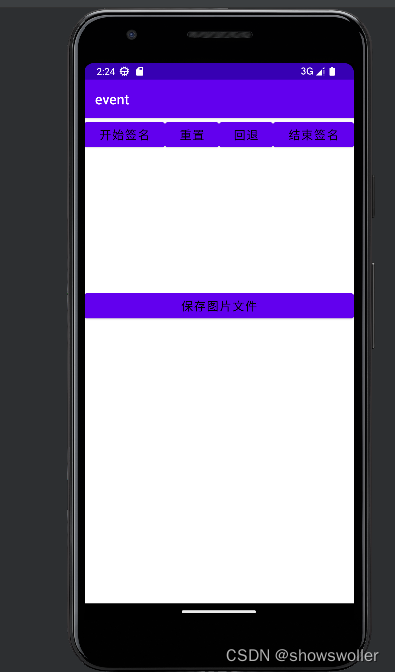
画完后点击重置则会清空
点击回退则会清空上一次的操作
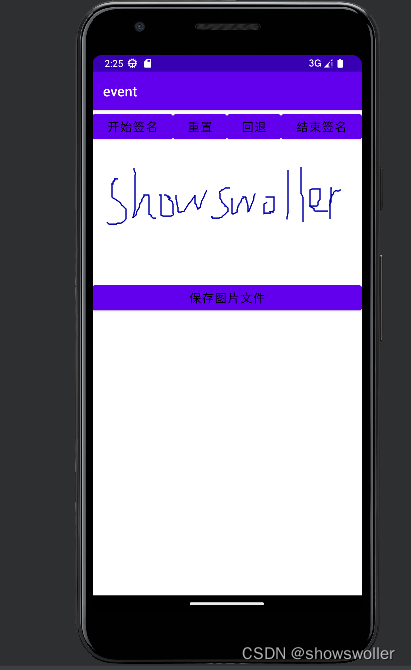
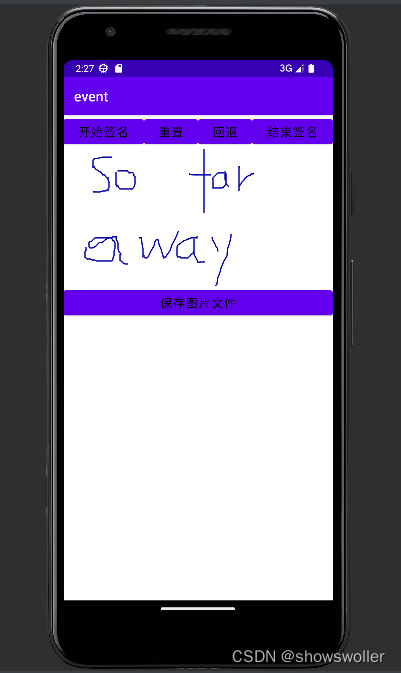
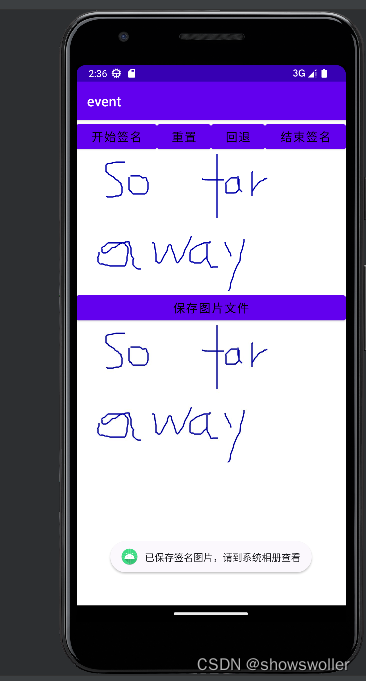
点击结束签名后下方就会出现签名的内容,点击保存图片文件就可以将图片保存至相册用于下次使用
代码如下
Java类
package com.example.event;import android.annotation.SuppressLint;
import android.os.Bundle;
import androidx.appcompat.app.AppCompatActivity;
import android.view.MotionEvent;
import android.widget.TextView;@SuppressLint("DefaultLocale")
public class TouchSingleActivity extends AppCompatActivity {private TextView tv_touch; // 声明一个文本视图对象@Overrideprotected void onCreate(Bundle savedInstanceState) {super.onCreate(savedInstanceState);setContentView(R.layout.activity_touch_single);tv_touch = findViewById(R.id.tv_touch);}// 在发生触摸事件时触发@Overridepublic boolean onTouchEvent(MotionEvent event) {// 从开机到现在的毫秒数int seconds = (int) (event.getEventTime() / 1000);String desc = String.format("动作发生时间:开机距离现在%02d:%02d:%02d",seconds / 3600, seconds % 3600 / 60, seconds % 60);desc = String.format("%s\n动作名称是:", desc);int action = event.getAction(); // 获得触摸事件的动作类型if (action == MotionEvent.ACTION_DOWN) { // 按下手指desc = String.format("%s按下", desc);} else if (action == MotionEvent.ACTION_MOVE) { // 移动手指desc = String.format("%s移动", desc);} else if (action == MotionEvent.ACTION_UP) { // 松开手指desc = String.format("%s提起", desc);} else if (action == MotionEvent.ACTION_CANCEL) { // 取消手势desc = String.format("%s取消", desc);}desc = String.format("%s\n动作发生位置是:横坐标%f,纵坐标%f,压力为%f",desc, event.getX(), event.getY(), event.getPressure());tv_touch.setText(desc);return super.onTouchEvent(event);}}
XML文件
android:layout_width="match_parent"android:layout_height="match_parent"android:orientation="vertical" >ch_parent"android:layout_height="wrap_content"android:orientation="vertical" > 创作不易 觉得有帮助请点赞关注收藏~~~
上一篇:有哪些描述「去郊游」的句子?
下一篇:用无处不在的东西造句。
相关内容
热门资讯
长白山自助游攻略 吉林长白山游...
昨天介绍了西坡的景点详细请看链接:一个人的旅行,据说能看到长白山天池全凭运气,您的运气如何?今日介绍...
猫咪吃了塑料袋怎么办 猫咪误食...
你知道吗?塑料袋放久了会长猫哦!要说猫咪对塑料袋的喜爱程度完完全全可以媲美纸箱家里只要一有塑料袋的响...
世界上最漂亮的人 世界上最漂亮...
此前在某网上,选出了全球265万颜值姣好的女性。从这些数量庞大的女性群体中,人们投票选出了心目中最美...
埃菲尔铁塔在哪 中国仿建埃菲尔...
2019年4月26日,广西南宁市,街头惊现一座巨型山寨版埃菲尔铁塔,高约20米,白色塔身,造型逼真,...
苗族的传统节日 贵州苗族节日有...
【岜沙苗族芦笙节】岜沙,苗语叫“分送”,距从江县城7.5公里,是世界上最崇拜树木并以树为神的枪手部落...
1秒多少毫秒 1秒等于多少毫秒...
长度单位换算1丈=10尺;1尺=10寸;1寸=10分;1分=10厘;1丈≈3.33米;1尺≈3.33...
北京的名胜古迹 北京最著名的景...
北京从元代开始,逐渐走上帝国首都的道路,先是成为大辽朝五大首都之一的南京城,随着金灭辽,金代从海陵王...
应用未安装解决办法 平板应用未...
---IT小技术,每天Get一个小技能!一、前言描述苹果IPad2居然不能安装怎么办?与此IPad不...
长白山自助游攻略 吉林长白山游...
昨天介绍了西坡的景点详细请看链接:一个人的旅行,据说能看到长白山天池全凭运气,您的运气如何?今日介绍...
脚上的穴位图 脚面经络图对应的...
人体穴位作用图解大全更清晰直观的标注了各个人体穴位的作用,包括头部穴位图、胸部穴位图、背部穴位图、胳...
世界上最漂亮的人 世界上最漂亮...
此前在某网上,选出了全球265万颜值姣好的女性。从这些数量庞大的女性群体中,人们投票选出了心目中最美...
猫咪吃了塑料袋怎么办 猫咪误食...
你知道吗?塑料袋放久了会长猫哦!要说猫咪对塑料袋的喜爱程度完完全全可以媲美纸箱家里只要一有塑料袋的响...
中国电信人工电话多少 中国电信...
当我们在使用中国移动、中国电信和中国联通提供的电信业务时,可能会发生争议。建议直接向服务提供商投诉,...
埃菲尔铁塔在哪 中国仿建埃菲尔...
2019年4月26日,广西南宁市,街头惊现一座巨型山寨版埃菲尔铁塔,高约20米,白色塔身,造型逼真,...