

JDBC技术
JDBC
一、jdbc的概述
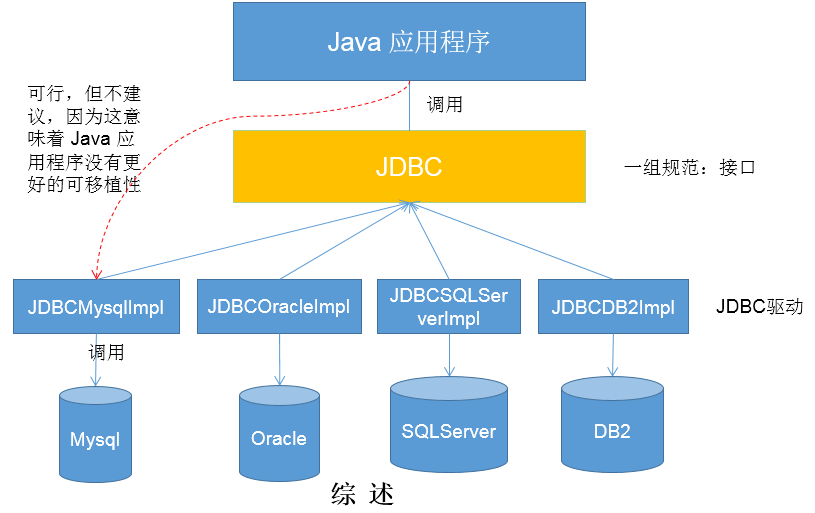
- JDBC(Java Database Connectivity)是一个独立于特定数据库管理系统、通用的SQL数据库存取和操作的公共接口(一组API),定义了用来访问数据库的标准Java类库,(java.sql,javax.sql)使用这些类库可以以一种标准的方法、方便地访问数据库资源。
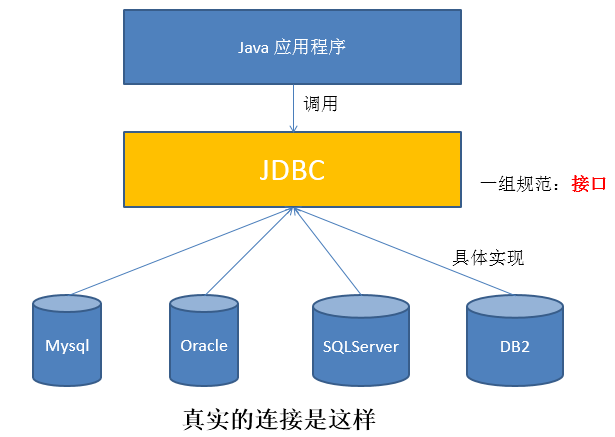
- JDBC为访问不同的数据库提供了一种统一的途径,为开发者屏蔽了一些细节问题。
- JDBC的目标是使Java程序员使用JDBC可以连接任何提供了JDBC驱动程序的数据库系统,这样就使得程序员无需对特定的数据库系统的特点有过多的了解,从而大大简化和加快了开发过程。
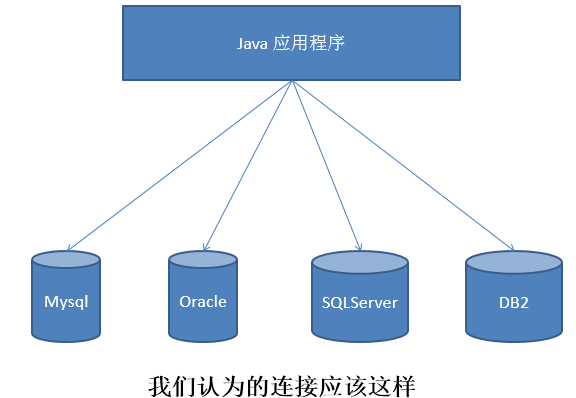
- 如果没有JDBC,那么Java程序访问数据库时是这样的:
- 有了JDBC,Java程序访问数据库时是这样的:
- 总结如下:
二、jdbc模拟实现
模拟接口
/*** @author wbx* @create 2022-11-16 14:35*/
public interface jdbcInterface
{//获得连接public Object getConnection();//crudpublic void crud();//关闭资源public void close();
}
MySQL数据库实现(驱动)
/*** @author wbx* @create 2022-11-16 14:40*/
public class mysqlJdbcImpl implements jdbcInterface
{@Overridepublic Object getConnection(){System.out.println("获得mysql连接");return null;}@Overridepublic void crud(){System.out.println("MySQL增删改查");}@Overridepublic void close(){System.out.println("MySQL关闭");}
}
Oracle数据库实现(驱动)
/*** @author wbx* @create 2022-11-16 14:44*/
public class oracleJdbcImpl implements jdbcInterface
{@Overridepublic Object getConnection(){System.out.println("获得oracle连接");return null;}@Overridepublic void crud(){System.out.println("oracle增删改查");}@Overridepublic void close(){System.out.println("oracle关闭");}
}
测试类
/*** @author wbx* @create 2022-11-16 14:42*/
public class testjdbc
{public static void main(String[] args){jdbcInterface j = new mysqlJdbcImpl();j.getConnection();j.crud();j.close();System.out.println("==========================");jdbcInterface i = new oracleJdbcImpl();i.getConnection();i.crud();i.close();}
}
思考:体会jdbc的好处,体会接口是一种规范
三、jdbc入门
JDBC API是一系列的接口,他统一和规范了应用程序与数据库的连接、执行SQL语句,并得到返回结果等各类操作,相关的类和借口在java.sql与javax.sql包中,可查看API文档
1、JDBC程序编写步骤
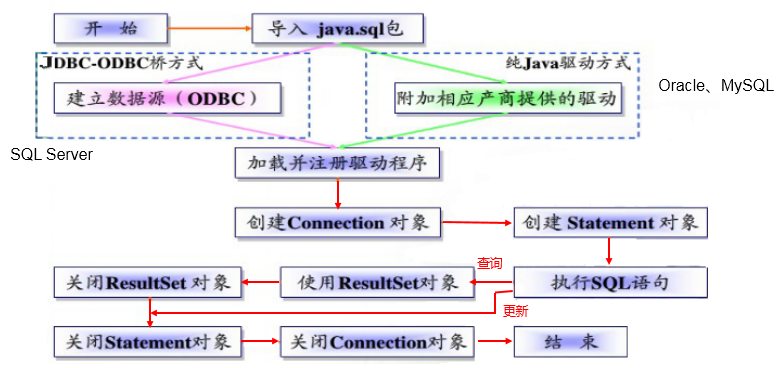
补充:ODBC(Open Database Connectivity,开放式数据库连接),是微软在Windows平台下推出的。使用者在程序中只需要调用ODBC API,由 ODBC 驱动程序将调用转换成为对特定的数据库的调用请求。
2、五种连接方式
package com.ynny.rj212.jdbcCon;import org.junit.jupiter.api.Test;import java.io.FileInputStream;
import java.io.InputStream;
import java.sql.Connection;
import java.sql.Driver;
import java.sql.DriverManager;
import java.sql.SQLException;
import java.util.Properties;/*** @author wbx* @create 2022-11-16 15:40* jdbc的五种连接方式*/
public class jdbcCon01
{@Test//代码中显式出现了第三方数据库的APIpublic void test1() throws SQLException{//1.提供java.sql.Driver接口实现类的对象Driver driver = new com.mysql.jdbc.Driver();//2.提供url,指明具体操作的数据String url = "jdbc:mysql://localhost:3306/test";//3.提供Properties的对象,指明用户名和密码Properties info = new Properties();info.setProperty("user", "root");info.setProperty("password", "root");//4.调用driver的connect(),获取连接Connection conn = driver.connect(url, info);System.out.println(conn);}@Test//相较于方式一,这里使用反射实例化Driver,不在代码中体现第三方数据库的API。体现了面向接口编程思想。public void test2() throws SQLException, ClassNotFoundException, InstantiationException, IllegalAccessException{//1.实例化DriverString className = "com.mysql.jdbc.Driver";Class clazz = Class.forName(className);Driver driver = (Driver) clazz.newInstance();//2.提供url,指明具体操作的数据String url = "jdbc:mysql://localhost:3306/test";//3.提供Properties的对象,指明用户名和密码Properties info = new Properties();info.setProperty("user", "root");info.setProperty("password", "root");//4.调用driver的connect(),获取连接Connection conn = driver.connect(url, info);System.out.println(conn);}@Test//使用DriverManager实现数据库的连接。体会获取连接必要的4个基本要素。public void test3() throws Exception{//1.数据库连接的4个基本要素:String url = "jdbc:mysql://localhost:3306/test";String user = "root";String password = "root";String driverName = "com.mysql.jdbc.Driver";//2.实例化DriverClass clazz = Class.forName(driverName);Driver driver = (Driver) clazz.newInstance();//3.注册驱动DriverManager.registerDriver(driver);//4.获取连接Connection conn = DriverManager.getConnection(url, user, password);System.out.println(conn);}@Test// 不必显式的注册驱动了。因为在DriverManager的源码中已经存在静态代码块,实现了驱动的注册。public void test4() throws Exception{//1.数据库连接的4个基本要素:String url = "jdbc:mysql://localhost:3306/test";String user = "root";String password = "abc123";String driverName = "com.mysql.jdbc.Driver";//2.加载驱动 (①实例化Driver ②注册驱动)Class.forName(driverName);//Driver driver = (Driver) clazz.newInstance();//3.注册驱动//DriverManager.registerDriver(driver);/*可以注释掉上述代码的原因,是因为在mysql的Driver类中声明有:static {try {DriverManager.registerDriver(new Driver());} catch (SQLException var1) {throw new RuntimeException("Can't register driver!");}}*///3.获取连接Connection conn = DriverManager.getConnection(url, user, password);System.out.println(conn);}@Test/*** 说明:使用配置文件的方式保存配置信息,在代码中加载配置文件** **使用配置文件的好处:**** ①实现了代码和数据的分离,如果需要修改配置信息,直接在配置文件中修改,不需要深入代码* ②如果修改了配置信息,省去重新编译的过程。*/public void test5() throws Exception{//1.加载配置文件Properties pros = new Properties();pros.load(new FileInputStream("src\\jdbc.properties"));//2.读取配置信息String user = pros.getProperty("user");String password = pros.getProperty("password");String url = pros.getProperty("url");String driverClass = pros.getProperty("driverClass");//3.加载驱动Class.forName(driverClass);//4.获取连接Connection conn = DriverManager.getConnection(url, user, password);System.out.println(conn);}
}
3、使用PreparedStatement实现CRUD操作
3.1 操作和访问数据库
-
数据库连接被用于向数据库服务器发送命令和 SQL 语句,并接受数据库服务器返回的结果。其实一个数据库连接就是一个Socket连接。
-
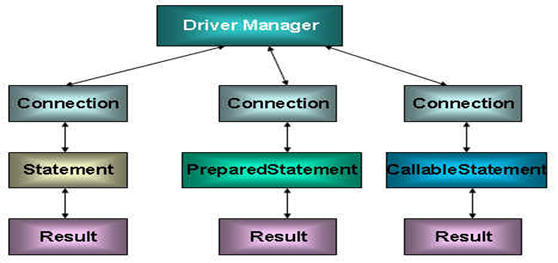
在 java.sql 包中有 3 个接口分别定义了对数据库的调用的不同方式:
- Statement:用于执行静态 SQL 语句并返回它所生成结果的对象。
- PrepatedStatement:SQL 语句被预编译并存储在此对象中,可以使用此对象多次高效地执行该语句。
- CallableStatement:用于执行 SQL 存储过程
3.2 使用Statement操作数据表的弊端
- 通过调用 Connection 对象的 createStatement() 方法创建该对象。该对象用于执行静态的 SQL 语句,并且返回执行结果。
- 但是使用Statement操作数据表存在弊端:
- 问题一:存在拼串操作,繁琐
- 问题二:存在SQL注入问题
- SQL 注入是利用某些系统没有对用户输入的数据进行充分的检查,而在用户输入数据中注入非法的 SQL 语句段或命令(如:SELECT user, password FROM user_table WHERE user=‘a’ OR 1 = ’ AND password = ’ OR ‘1’ = ‘1’) ,从而利用系统的 SQL 引擎完成恶意行为的做法。
CREATE TABLE admin(
id INT,
admin_name VARCHAR(16),
admin_pwd VARCHAR(16));
-- 添加数据
INSERT INTO admin
VALUES(1,"wbx","abc123");-- 查询数据
SELECT *
FROM admin
WHERE admin_name = 'wbx' AND admin_pwd = 'abc123';
-- SQL注入
SELECT *
FROM admin
WHERE admin_name = '1' OR' AND admin_pwd = 'OR '1'='1';
-
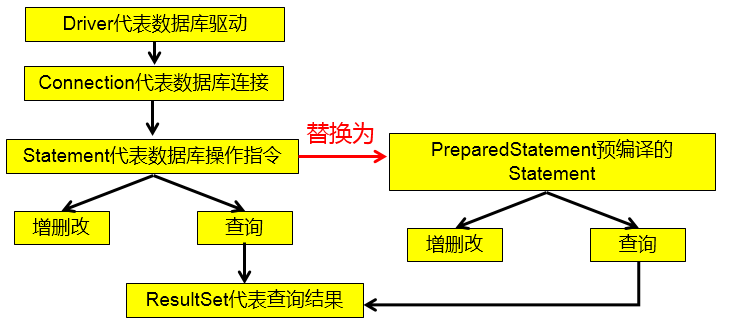
对于 Java 而言,要防范 SQL 注入,只要用 PreparedStatement(从Statement扩展而来) 取代 Statement 就可以了。
-
代码演示:
package com.ynny.rj212.crud;import org.junit.jupiter.api.Test;import java.io.FileInputStream;
import java.sql.Connection;
import java.sql.DriverManager;
import java.sql.ResultSet;
import java.sql.Statement;
import java.util.Properties;
import java.util.Scanner;/*** @author wbx* @create 2022-11-16 17:05*/
public class StatementTest2
{public static void main(String[] args) throws Exception{//让用户输入信息Scanner scanner = new Scanner(System.in);//希望看到SQL注入的效果,用nextLine(),而不用next()System.out.println("请输入姓名");String admin_name = scanner.nextLine();System.out.println("请输入密码");String admin_pwd = scanner.nextLine();//1.加载配置文件Properties pros = new Properties();pros.load(new FileInputStream("src\\jdbc.properties"));//2.读取配置信息String user = pros.getProperty("user");String password = pros.getProperty("password");String url = pros.getProperty("url");String driverClass = pros.getProperty("driverClass");//3.加载驱动Class.forName(driverClass);//4.获取连接Connection conn = DriverManager.getConnection(url, user, password);
//        System.out.println(conn);//得到StatementStatement statement = conn.createStatement();//执行SQLString sql = "SELECT * FROM admin WHERE admin_name = '"+admin_name+"' AND admin_pwd = '"+admin_pwd+"'";ResultSet resultSet = statement.executeQuery(sql);//如果查到一条数据,则证明该管理存在if(resultSet.next()){System.out.println("登录成功");}else{System.out.println("登录失败");}//关闭连接resultSet.close();statement.close();conn.close();}
}
综上:
3.3 PreparedStatement的使用
3.3.1 PreparedStatement介绍
- 可以通过调用 Connection 对象的 preparedStatement(String sql) 方法获取 PreparedStatement 对象
- PreparedStatement 接口是 Statement 的子接口,它表示一条预编译过的 SQL 语句
- PreparedStatement 对象所代表的 SQL 语句中的参数用问号(?)来表示,调用 PreparedStatement 对象的 setXxx() 方法来设置这些参数. setXxx() 方法有两个参数,第一个参数是要设置的 SQL 语句中的参数的索引(从 1 开始),第二个是设置的 SQL 语句中的参数的值
3.3.2 PreparedStatement vs Statement
-
代码的可读性和可维护性。
-
PreparedStatement 能最大可能提高性能:
- DBServer会对预编译语句提供性能优化。因为预编译语句有可能被重复调用,所以语句在被DBServer的编译器编译后的执行代码被缓存下来,那么下次调用时只要是相同的预编译语句就不需要编译,只要将参数直接传入编译过的语句执行代码中就会得到执行。
- 在statement语句中,即使是相同操作但因为数据内容不一样,所以整个语句本身不能匹配,没有缓存语句的意义.事实是没有数据库会对普通语句编译后的执行代码缓存。这样每执行一次都要对传入的语句编译一次。
- (语法检查,语义检查,翻译成二进制命令,缓存)
-
代码示例
package com.ynny.rj212.crud;import java.io.FileInputStream;
import java.io.FileNotFoundException;
import java.sql.*;
import java.util.Properties;
import java.util.Scanner;public class PreparedStatement_ {public static void main(String[] args) throws Exception {//让用户输入信息Scanner scanner = new Scanner(System.in);//希望看到SQL注入的效果,用nextLine(),而不用next()System.out.println("请输入姓名");String admin_name = scanner.nextLine();System.out.println("请输入密码");String admin_pwd = scanner.nextLine();//1.加载配置文件Properties pros = new Properties();pros.load(new FileInputStream("src\\jdbc.properties"));//2.读取配置信息String user = pros.getProperty("user");String password = pros.getProperty("password");String url = pros.getProperty("url");String driverClass = pros.getProperty("driverClass");//3.加载驱动Class.forName(driverClass);//4.获取连接Connection conn = DriverManager.getConnection(url, user, password);
//        System.out.println(conn);//5. 得到PreparedStatement//5.1 组织SqL , Sql 语句的 ? 就相当于占位符String sql = "select admin_name , admin_pwd  from admin where admin_name =? and admin_pwd = ?";//5.2 preparedStatement 对象实现了 PreparedStatement 接口的实现类的对象PreparedStatement preparedStatement = conn.prepareStatement(sql);//5.3 给 ? 赋值preparedStatement.setString(1, admin_name);preparedStatement.setString(2, admin_pwd);//6. 执行 select 语句使用  executeQuery//   如果执行的是 dml(update, insert ,delete) executeUpdate()//   这里执行 executeQuery ,不要在写 sqlResultSet resultSet = preparedStatement.executeQuery();if (resultSet.next()) { //如果查询到一条记录,则说明该管理存在System.out.println("恭喜, 登录成功");} else {System.out.println("对不起,登录失败");}//7.关闭连接resultSet.close();preparedStatement.close();conn.close();}
}
3.3.3 preparedStatement实现增删改
代码示例
package com.ynny.rj212.crud;
import java.io.FileInputStream;
import java.sql.Connection;
import java.sql.DriverManager;
import java.sql.PreparedStatement;
import java.sql.ResultSet;
import java.util.Properties;
import java.util.Scanner;
/*** @author wbx* @create 2022-11-17 8:08*/public class  PreparedStatementDML{public static void main(String[] args) throws Exception {//看 PreparedStatement类图Scanner scanner = new Scanner(System.in);System.out.print("请输管理员的id: ");  //next(): 当接收到 空格或者 '就是表示结束int id = scanner.nextInt();//让用户输入管理员名和密码System.out.print("请输管理员的名字: ");  //next(): 当接收到 空格或者 '就是表示结束String admin_name = scanner.nextLine(); // 老师说明,如果希望看到SQL注入,这里需要用nextLineSystem.out.print("请输入管理员的密码: ");String admin_pwd = scanner.nextLine();//通过Properties对象获取配置文件的信息Properties properties = new Properties();properties.load(new FileInputStream("src\\jdbc.properties"));//获取相关的值String user = properties.getProperty("user");String password = properties.getProperty("password");String driver = properties.getProperty("driverClass");String url = properties.getProperty("url");//1. 注册驱动Class.forName(driver);//建议写上//2. 得到连接Connection connection = DriverManager.getConnection(url, user, password);//3. 得到PreparedStatement//3.1 组织SqL , Sql 语句的 ? 就相当于占位符//添加记录String sql = "insert into admin values(?, ?, ?)";//String sql = "update admin set admin_pwd = ? where admin_name = ?";//String sql = "delete from  admin where admin_name = ?";//3.2 preparedStatement 对象实现了 PreparedStatement 接口的实现类的对象PreparedStatement preparedStatement = connection.prepareStatement(sql);//3.3 给 ? 赋值preparedStatement.setInt(1, id);preparedStatement.setString(2, admin_name);preparedStatement.setString(3, admin_pwd);//4. 执行 dml 语句使用  executeUpdateint rows = preparedStatement.executeUpdate();System.out.println(rows > 0 ? "执行成功" : "执行失败");//关闭连接preparedStatement.close();connection.close();}
}
3.4 ResultSet
-
查询需要调用PreparedStatement 的 executeQuery() 方法,查询结果是一个ResultSet 对象
-
ResultSet 对象以逻辑表格的形式封装了执行数据库操作的结果集,ResultSet 接口由数据库厂商提供实现
-
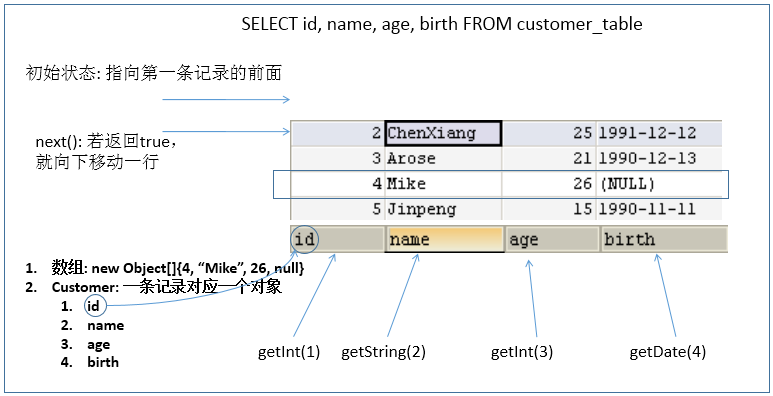
ResultSet 返回的实际上就是一张数据表。有一个指针指向数据表的第一条记录的前面。
-
ResultSet 对象维护了一个指向当前数据行的游标,初始的时候,游标在第一行之前,可以通过 ResultSet 对象的 next() 方法移动到下一行。调用 next()方法检测下一行是否有效。若有效,该方法返回 true,且指针下移。相当于Iterator对象的 hasNext() 和 next() 方法的结合体。
-
当指针指向一行时, 可以通过调用 getXxx(int index) 或 getXxx(int columnName) 获取每一列的值。
- 例如: getInt(1), getString(“name”)
- 注意:Java与数据库交互涉及到的相关Java API中的索引都从1开始。
-
ResultSet 接口的常用方法:
- boolean next()
- getString()
- …
-
可用于获取关于 ResultSet 对象中列的类型和属性信息的对象
-
ResultSetMetaData meta = rs.getMetaData();
- getColumnName(int column):获取指定列的名称
- getColumnLabel(int column):获取指定列的别名
- getColumnCount():返回当前 ResultSet 对象中的列数。
- getColumnTypeName(int column):检索指定列的数据库特定的类型名称。
- getColumnDisplaySize(int column):指示指定列的最大标准宽度,以字符为单位。
- isNullable(int column):指示指定列中的值是否可以为 null。
- isAutoIncrement(int column):指示是否自动为指定列进行编号,这样这些列仍然是只读的。
[外链图片转存失败,源站可能有防盗链机制,建议将图片保存下来直接上传(img-47iUH67M-1668777631528)(F:/%E8%83%BD%E6%BA%90%E5%AD%A6%E4%B9%A0/web/%E5%B0%9A%E7%A1%85%E8%B0%B7_%E5%AE%8B%E7%BA%A2%E5%BA%B7_JDBC%E6%A0%B8%E5%BF%83%E6%8A%80%E6%9C%AF(2019%E6%96%B0%E7%89%88)]/1-%E8%AF%BE%E4%BB%B6/%E8%AF%BE%E4%BB%B6-md/%E5%B0%9A%E7%A1%85%E8%B0%B7_%E5%AE%8B%E7%BA%A2%E5%BA%B7_JDBC.assets/1555579494691.png)
问题1:得到结果集后, 如何知道该结果集中有哪些列 ? 列名是什么?
需要使用一个描述 ResultSet 的对象, 即 ResultSetMetaData
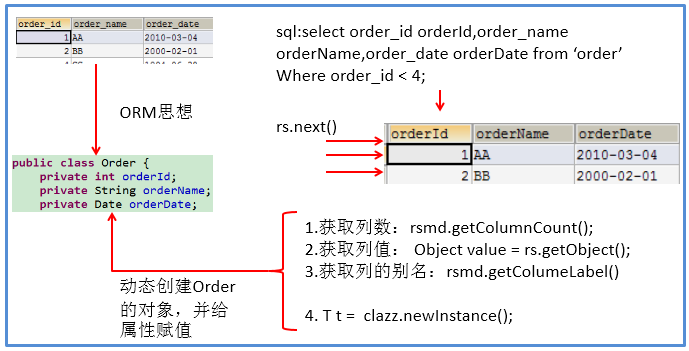
问题2:关于ResultSetMetaData
- 如何获取 ResultSetMetaData: 调用 ResultSet 的 getMetaData() 方法即可
- 获取 ResultSet 中有多少列:调用 ResultSetMetaData 的 getColumnCount() 方法
- 获取 ResultSet 每一列的列的别名是什么:调用 ResultSetMetaData 的getColumnLabel() 方法
代码示例
package com.ynny.rj212.crud;import java.io.FileInputStream;
import java.sql.*;
import java.util.Properties;
/*** @author wbx* @create 2022-11-17 8:34*/public class ResultSetTest
{public static void main(String[] args) throws Exception {//1.加载配置文件Properties pros = new Properties();pros.load(new FileInputStream("src\\jdbc.properties"));//2.读取配置信息String user = pros.getProperty("user");String password = pros.getProperty("password");String url = pros.getProperty("url");String driverClass = pros.getProperty("driverClass");//3.加载驱动Class.forName(driverClass);//4.获取连接Connection conn = DriverManager.getConnection(url, user, password);
//        System.out.println(conn);//5. 得到PreparedStatement//执行给定的SQL语句,该语句返回单个 ResultSet对象/*+----+-----------+-----+---------------------+| id | name      | sex | borndate            |+----+-----------+-----+---------------------+-------+|  4 | 刘德华    | 男  | 1970-12-12 00:00:00 ||  5 | jack      | 男  | 1990-11-11 00:00:00 |+----+-----------+-----+---------------------+-------+*///5.1 组织SqL , Sql 语句的 ? 就相当于占位符String sql = "select id , admin_name , admin_pwd  from admin where admin_name =? and admin_pwd = ?";//5.2 preparedStatement 对象实现了 PreparedStatement 接口的实现类的对象PreparedStatement preparedStatement = conn.prepareStatement(sql);//5.3 给 ? 赋值preparedStatement.setString(1, "wbx");preparedStatement.setString(2, "abc123");//6.执行SQLResultSet resultSet = preparedStatement.executeQuery();//5. 使用while取出数据while (resultSet.next()) { // 让光标向后移动,如果没有更多行,则返回falseint id  = resultSet.getInt(1); //获取该行的第1列//int id1 = resultSet.getInt("id"); 通过列名来获取值, 推荐String admin_name = resultSet.getString(2);//获取该行的第2列String admin_sex = resultSet.getString(3);System.out.println(id + "\t" + admin_name + "\t" + admin_sex + "\t" );}//6. 关闭连接resultSet.close();preparedStatement.close();conn.close();}
}
3.5课后练习
- 实现增删改查
- 实现工具类(将连接和关闭资源操作封装)
示例代码
工具类
package com.ynny.rj212.utils;import java.io.FileInputStream;
import java.io.IOException;
import java.sql.*;
import java.util.Properties;/*** @author wbx* @version 1.0* 这是一个工具类,完成 mysql的连接和关闭资源*/
public class JDBCUtils {//定义相关的属性(4个), 因为只需要一份,因此,我们做出staticprivate static String user; //用户名private static String password; //密码private static String url; //urlprivate static String driver; //驱动名//在static代码块去初始化static {try {Properties properties = new Properties();properties.load(new FileInputStream("src\\jdbc.properties"));//读取相关的属性值user = properties.getProperty("user");password = properties.getProperty("password");url = properties.getProperty("url");driver = properties.getProperty("driverClass");} catch (IOException e) {//在实际开发中,我们可以这样处理//1. 将编译异常转成 运行异常//2. 调用者,可以选择捕获该异常,也可以选择默认处理该异常,比较方便.throw new RuntimeException(e);}}//连接数据库, 返回Connectionpublic static Connection getConnection() {try {return DriverManager.getConnection(url, user, password);} catch (SQLException e) {//1. 将编译异常转成 运行异常//2. 调用者,可以选择捕获该异常,也可以选择默认处理该异常,比较方便.throw new RuntimeException(e);}}//关闭相关资源/*1. ResultSet 结果集2. Statement 或者 PreparedStatement3. Connection4. 如果需要关闭资源,就传入对象,否则传入 null*/public static void close(ResultSet set, Statement statement, Connection connection) {//判断是否为nulltry {if (set != null) {set.close();}if (statement != null) {statement.close();}if (connection != null) {connection.close();}} catch (SQLException e) {//将编译异常转成运行异常抛出throw new RuntimeException(e);}}}
测试类
public class JDBCUtils_Use {@Testpublic void testSelect() {//1. 得到连接Connection connection = null;//2. 组织一个sqlString sql = "select * from admin where id = ?";PreparedStatement preparedStatement = null;ResultSet set = null;//3. 创建PreparedStatement 对象try {connection = JDBCUtils.getConnection();System.out.println(connection.getClass()); //com.mysql.jdbc.JDBC4ConnectionpreparedStatement = connection.prepareStatement(sql);preparedStatement.setInt(1, 1);//给?号赋值//执行, 得到结果集set = preparedStatement.executeQuery();//遍历该结果集while (set.next()) {int id = set.getInt("id");String name = set.getString("admin_name");String pwd = set.getString("admin_pwd");System.out.println(id + "\t" + name + "\t" + pwd );}} catch (SQLException e) {e.printStackTrace();} finally {//关闭资源JDBCUtils.close(set, preparedStatement, connection);}}四、事务处理
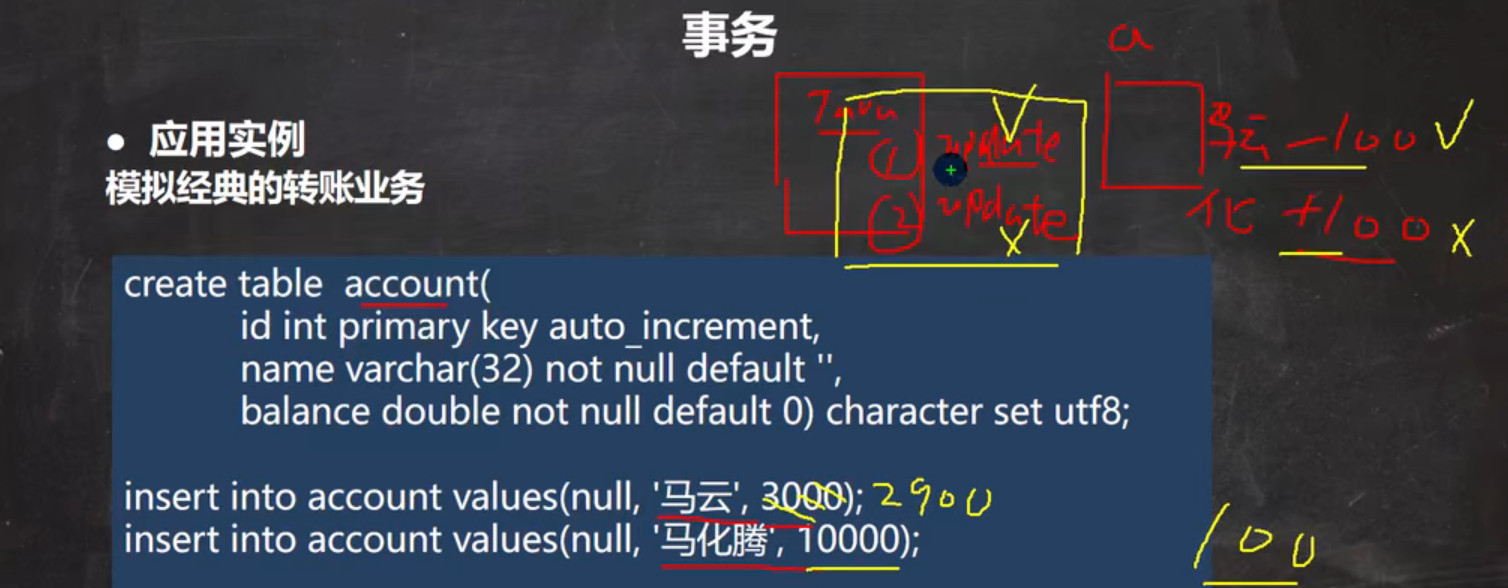
代码示例
- 创建表并添加数据
CREATE TABLE account(
id INT PRIMARY KEY AUTO_INCREMENT,
account_name VARCHAR(32) NOT NULL DEFAULT '',
balance DOUBLE NOT NULL DEFAULT 0)
CHARACTER SET utf8;INSERT INTO account VALUES (NULL,'刘德华',3000);
INSERT INTO account VALUES (NULL,'周星驰',10000);SELECT * FROM account;
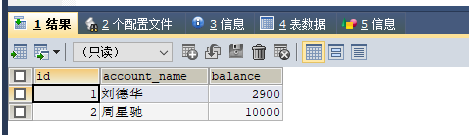
- 错误展示
//没有使用事务.@Testpublic void noTransaction() {//操作转账的业务//1. 得到连接Connection connection = null;//2. 组织一个sqlString sql = "update account set balance = balance - 100 where id = 1";String sql2 = "update account set balance = balance + 100 where id = 2";PreparedStatement preparedStatement = null;//3. 创建PreparedStatement 对象try {connection = JDBCUtils.getConnection(); // 在默认情况下,connection是默认自动提交preparedStatement = connection.prepareStatement(sql);preparedStatement.executeUpdate(); // 执行第1条sqlint i = 1 / 0; //抛出异常preparedStatement = connection.prepareStatement(sql2);preparedStatement.executeUpdate(); // 执行第3条sql} catch (SQLException e) {e.printStackTrace();} finally {//关闭资源JDBCUtils.close(null, preparedStatement, connection);}}
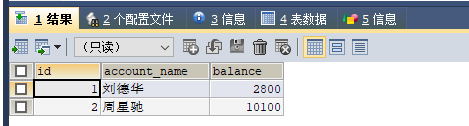
正确做法
//事务来解决@Testpublic void useTransaction() {//操作转账的业务//1. 得到连接Connection connection = null;//2. 组织一个sqlString sql = "update account set balance = balance - 100 where id = 1";String sql2 = "update account set balance = balance + 100 where id = 2";PreparedStatement preparedStatement = null;//3. 创建PreparedStatement 对象try {connection = JDBCUtils.getConnection(); // 在默认情况下,connection是默认自动提交//将 connection 设置为不自动提交connection.setAutoCommit(false); //开启了事务preparedStatement = connection.prepareStatement(sql);preparedStatement.executeUpdate(); // 执行第1条sql//int i = 1 / 0; //抛出异常preparedStatement = connection.prepareStatement(sql2);preparedStatement.executeUpdate(); // 执行第3条sql//这里提交事务connection.commit();} catch (SQLException e) {//这里我们可以进行回滚,即撤销执行的SQL//默认回滚到事务开始的状态.System.out.println("执行发生了异常,撤销执行的sql");try {connection.rollback();} catch (SQLException throwables) {throwables.printStackTrace();}e.printStackTrace();} finally {//关闭资源JDBCUtils.close(null, preparedStatement, connection);}}
五、批处理(扩展,自我提升)
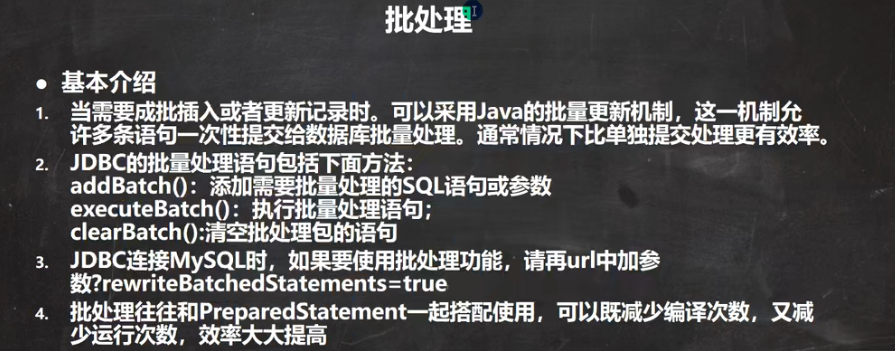
代码示例
注:一定要在url后边加上?…=true
import org.junit.jupiter.api.Test;import java.sql.Connection;
import java.sql.PreparedStatement;
import java.sql.SQLException;/*** @author wbx* @version 1.0* 演示java的批处理*/
public class Batch_ {//传统方法,添加5000条数据到admin2@Testpublic void noBatch() throws Exception {Connection connection = JDBCUtils.getConnection();String sql = "insert into admin2 values(null, ?, ?)";PreparedStatement preparedStatement = connection.prepareStatement(sql);System.out.println("开始执行");long start = System.currentTimeMillis();//开始时间for (int i = 0; i < 5000; i++) {//5000执行preparedStatement.setString(1, "jack" + i);preparedStatement.setString(2, "666");preparedStatement.executeUpdate();}long end = System.currentTimeMillis();System.out.println("传统的方式 耗时=" + (end - start));//传统的方式 耗时=10702//关闭连接JDBCUtils.close(null, preparedStatement, connection);}//使用批量方式添加数据@Testpublic void batch() throws Exception {Connection connection = JDBCUtils.getConnection();String sql = "insert into admin2 values(null, ?, ?)";PreparedStatement preparedStatement = connection.prepareStatement(sql);System.out.println("开始执行");long start = System.currentTimeMillis();//开始时间for (int i = 0; i < 5000; i++) {//5000执行preparedStatement.setString(1, "jack" + i);preparedStatement.setString(2, "666");//将sql 语句加入到批处理包中 -> 看源码/*//1. //第一就创建 ArrayList - elementData => Object[]//2. elementData => Object[] 就会存放我们预处理的sql语句//3. 当elementData满后,就按照1.5扩容//4. 当添加到指定的值后,就executeBatch//5. 批量处理会减少我们发送sql语句的网络开销,而且减少编译次数,因此效率提高public void addBatch() throws SQLException {synchronized(this.checkClosed().getConnectionMutex()) {if (this.batchedArgs == null) {this.batchedArgs = new ArrayList();}for(int i = 0; i < this.parameterValues.length; ++i) {this.checkAllParametersSet(this.parameterValues[i], this.parameterStreams[i], i);}this.batchedArgs.add(new PreparedStatement.BatchParams(this.parameterValues, this.parameterStreams, this.isStream, this.streamLengths, this.isNull));}}*/preparedStatement.addBatch();//当有1000条记录时,在批量执行if((i + 1) % 1000 == 0) {//满1000条sqlpreparedStatement.executeBatch();//清空一把preparedStatement.clearBatch();}}long end = System.currentTimeMillis();System.out.println("批量方式 耗时=" + (end - start));//批量方式 耗时=108//关闭连接JDBCUtils.close(null, preparedStatement, connection);}
}
六、数据库连接池
6.1、传统连接存在的问题(引入)

代码示例
package com.ynny.rj212.datasource;import com.ynny.rj212.utils.JDBCUtils;
import org.junit.jupiter.api.Test;import java.sql.Connection;/*** @author 韩顺平* @version 1.0*/
public class ConQuestion {//代码 连接mysql 5000次@Testpublic void testCon() {//看看连接-关闭 connection 会耗用多久long start = System.currentTimeMillis();System.out.println("开始连接.....");for (int i = 0; i < 500; i++) {//使用传统的jdbc方式,得到连接Connection connection = JDBCUtils.getConnection();//做一些工作,比如得到PreparedStatement ,发送sql//..........//关闭JDBCUtils.close(null, null, connection);}long end = System.currentTimeMillis();System.out.println("传统方式500次 耗时=" + (end - start));//传统方式5000次 耗时=7099}
}
 
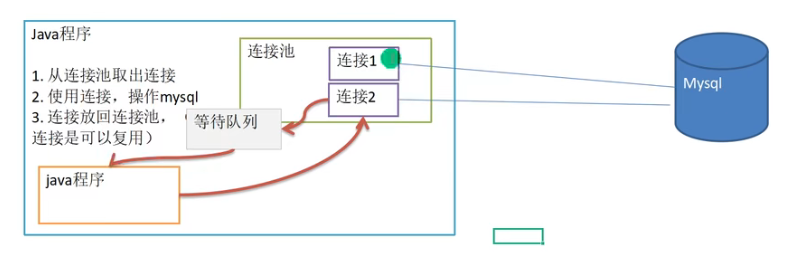
6.2、连接池原理
6.3、连接池的种类
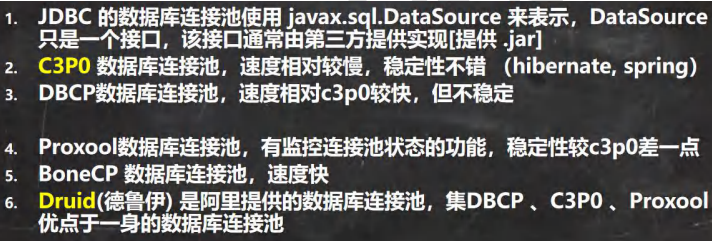
6.4、c3p0(提供jar包)
代码示例
package com.ynny.rj212.datasource;import com.mchange.v2.c3p0.ComboPooledDataSource;
import org.junit.jupiter.api.Test;
import java.io.FileInputStream;
import java.sql.Connection;
import java.sql.SQLException;
import java.util.Properties;/*** @author wbx* @version 1.0* 演示c3p0的使用*/
public class C3P0_ {//方式1: 相关参数,在程序中指定user, url , password等@Testpublic void testC3P0_01() throws Exception {//1. 创建一个数据源对象ComboPooledDataSource comboPooledDataSource = new ComboPooledDataSource();//2. 通过配置文件mysql.properties 获取相关连接的信息Properties properties = new Properties();properties.load(new FileInputStream("src\\jdbc.properties"));//读取相关的属性值String user = properties.getProperty("user");String password = properties.getProperty("password");String url = properties.getProperty("url");String driver = properties.getProperty("driverClass");//给数据源 comboPooledDataSource 设置相关的参数//注意:连接管理是由 comboPooledDataSource 来管理comboPooledDataSource.setDriverClass(driver);comboPooledDataSource.setJdbcUrl(url);comboPooledDataSource.setUser(user);comboPooledDataSource.setPassword(password);//设置初始化连接数comboPooledDataSource.setInitialPoolSize(10);//最大连接数comboPooledDataSource.setMaxPoolSize(50);//测试连接池的效率, 测试对mysql 5000次操作long start = System.currentTimeMillis();for (int i = 0; i < 500; i++) {Connection connection = comboPooledDataSource.getConnection(); //这个方法就是从 DataSource 接口实现的//System.out.println("连接OK");connection.close();}long end = System.currentTimeMillis();//c3p0 5000连接mysql 耗时=391System.out.println("c3p0 500连接mysql 耗时=" + (end - start));}//第二种方式 使用配置文件模板来完成//1. 将c3p0 提供的 c3p0.config.xml 拷贝到 src目录下//2. 该文件指定了连接数据库和连接池的相关参数@Testpublic void testC3P0_02() throws SQLException {ComboPooledDataSource comboPooledDataSource = new ComboPooledDataSource("rj212");//测试5000次连接mysqllong start = System.currentTimeMillis();System.out.println("开始执行....");for (int i = 0; i < 500; i++) {Connection connection = comboPooledDataSource.getConnection();//System.out.println("连接OK~");connection.close();}long end = System.currentTimeMillis();//c3p0的第二种方式 耗时=413System.out.println("c3p0的第二种方式(500) 耗时=" + (end - start));//1917}}
xml文件
com.mysql.jdbc.Driver jdbc:mysql://127.0.0.1:3306/test root root 5 10 5 50 5 2
6.5、德鲁伊(jar包)
配置文件
#key=value
driverClassName=com.mysql.jdbc.Driver
url=jdbc:mysql://localhost:3306/test?rewriteBatchedStatements=true
username=root
password=root
#initial connection Size
initialSize=10
#min idle connecton size
minIdle=5
#max active connection size
maxActive=50
#max wait time (5000 mil seconds)
maxWait=5000
代码示例
package com.ynny.rj212.datasource;import com.alibaba.druid.pool.DruidDataSourceFactory;
import org.junit.jupiter.api.Test;import javax.sql.DataSource;
import java.io.FileInputStream;
import java.io.FileNotFoundException;
import java.io.IOException;
import java.sql.Connection;
import java.util.Properties;/*** @author wbx* @version 1.0* 测试druid的使用*/
public class Druid_ {@Testpublic void testDruid() throws Exception {//1. 加入 Druid jar包//2. 加入 配置文件 druid.properties , 将该文件拷贝项目的src目录//3. 创建Properties对象, 读取配置文件Properties properties = new Properties();properties.load(new FileInputStream("src\\druid.properties"));//4. 创建一个指定参数的数据库连接池, Druid连接池DataSource dataSource =DruidDataSourceFactory.createDataSource(properties);long start = System.currentTimeMillis();for (int i = 0; i < 50000; i++) {Connection connection = dataSource.getConnection();System.out.println(connection.getClass());//System.out.println("连接成功!");connection.close();}long end = System.currentTimeMillis();//druid连接池 操作5000 耗时=412System.out.println("druid连接池 操作50000 耗时=" + (end - start));//539}
}
6.6、思考
上述数据库连接池查询的结果集存在哪些问题?
准备工作
CREATE TABLE actor(
id INT PRIMARY KEY AUTO_INCREMENT,
NAME VARCHAR(32) NOT NULL DEFAULT '',
sex VARCHAR(12) NOT NULL DEFAULT '女',
borndate DATETIME,
phone VARCHAR(12));INSERT INTO actor
VALUES(NULL,'wbx','男',NOW(),'12345678');INSERT INTO actor
VALUES(NULL,'刘德华','男',NOW(),'12345678');
代码示例
public class JDBCUtilsByDruid_USE {@Testpublic void testSelect() {System.out.println("使用 druid方式完成");//1. 得到连接Connection connection = null;//2. 组织一个sqlString sql = "select * from actor where id >= ?";PreparedStatement preparedStatement = null;ResultSet set = null;//3. 创建PreparedStatement 对象try {connection = JDBCUtilsByDruid.getConnection();System.out.println(connection.getClass());//运行类型 com.alibaba.druid.pool.DruidPooledConnectionpreparedStatement = connection.prepareStatement(sql);preparedStatement.setInt(1, 1);//给?号赋值//执行, 得到结果集set = preparedStatement.executeQuery();//问题演示,提前关闭连接会报错
//            connection.close();//遍历该结果集while (set.next()) {int id = set.getInt("id");String name = set.getString("name");//getName()String sex = set.getString("sex");//getSex()Date borndate = set.getDate("borndate");String phone = set.getString("phone");System.out.println(id + "\t" + name + "\t" + sex + "\t" + borndate + "\t" + phone);}} catch (SQLException e) {e.printStackTrace();} finally {//关闭资源JDBCUtilsByDruid.close(set, preparedStatement, connection);}}
[外链图片转存失败,源站可能有防盗链机制,建议将图片保存下来直接上传(img-pisH4hpH-1668777631536)(C:\Users\PC\AppData\Roaming\Typora\typora-user-images\1668668064145.png)]
6.7、映射
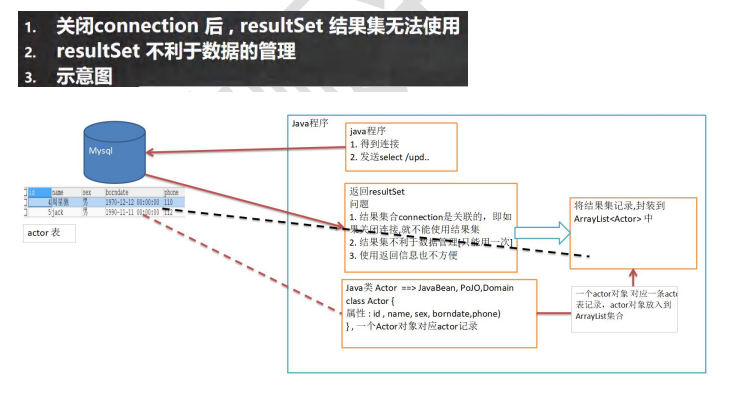
创建对应的实体类
package com.ynny.rj212.datasource;import java.util.Date;/*** @author wbx** @version 1.0* Actor 对象和 actor表的记录对应**/
public class Actor { //Javabean, POJO, Domain对象private Integer id;private String name;private String sex;private Date borndate;private String phone;public Actor() { //一定要给一个无参构造器[反射需要]}public Actor(Integer id, String name, String sex, Date borndate, String phone) {this.id = id;this.name = name;this.sex = sex;this.borndate = borndate;this.phone = phone;}public Integer getId() {return id;}public void setId(Integer id) {this.id = id;}public String getName() {return name;}public void setName(String name) {this.name = name;}public String getSex() {return sex;}public void setSex(String sex) {this.sex = sex;}public Date getBorndate() {return borndate;}public void setBorndate(Date borndate) {this.borndate = borndate;}public String getPhone() {return phone;}public void setPhone(String phone) {this.phone = phone;}@Overridepublic String toString() {return "\nActor{" +"id=" + id +", name='" + name + '\'' +", sex='" + sex + '\'' +", borndate=" + borndate +", phone='" + phone + '\'' +'}';}
}
土方法封装(因为APDBUtils(AP是阿帕奇的缩写)对我们的需求进行了封装,打成了jar包,稍后再讲)
    //使用土方法来解决ResultSet =封装=> Arraylist@Test
//    public ArrayList testSelectToArrayList() {public void testSelectToArrayList() {System.out.println("使用 druid方式完成");//1. 得到连接Connection connection = null;//2. 组织一个sqlString sql = "select * from actor where id >= ?";PreparedStatement preparedStatement = null;ResultSet set = null;ArrayList list = new ArrayList<>();//创建ArrayList对象,存放actor对象//3. 创建PreparedStatement 对象try {connection = JDBCUtilsByDruid.getConnection();System.out.println(connection.getClass());//运行类型 com.alibaba.druid.pool.DruidPooledConnectionpreparedStatement = connection.prepareStatement(sql);preparedStatement.setInt(1, 1);//给?号赋值//执行, 得到结果集set = preparedStatement.executeQuery();//遍历该结果集while (set.next()) {int id = set.getInt("id");String name = set.getString("name");//getName()String sex = set.getString("sex");//getSex()Date borndate = set.getDate("borndate");String phone = set.getString("phone");//把得到的resultset 的记录,封装到 Actor对象,放入到list集合list.add(new Actor(id, name, sex, borndate, phone));}System.out.println("list集合数据=" + list);for(Actor actor : list) {System.out.println("id=" + actor.getId() + "\t" + actor.getName());}} catch (SQLException e) {e.printStackTrace();} finally {//关闭资源JDBCUtilsByDruid.close(set, preparedStatement, connection);}//因为ArrayList 和 connection 没有任何关联,所以该集合可以复用.
//        return  list;}
[外链图片转存失败,源站可能有防盗链机制,建议将图片保存下来直接上传(img-nbkNOoIE-1668777631537)(C:\Users\PC\AppData\Roaming\Typora\typora-user-images\1668668548140.png)]
6.8、Apache-DBUtils
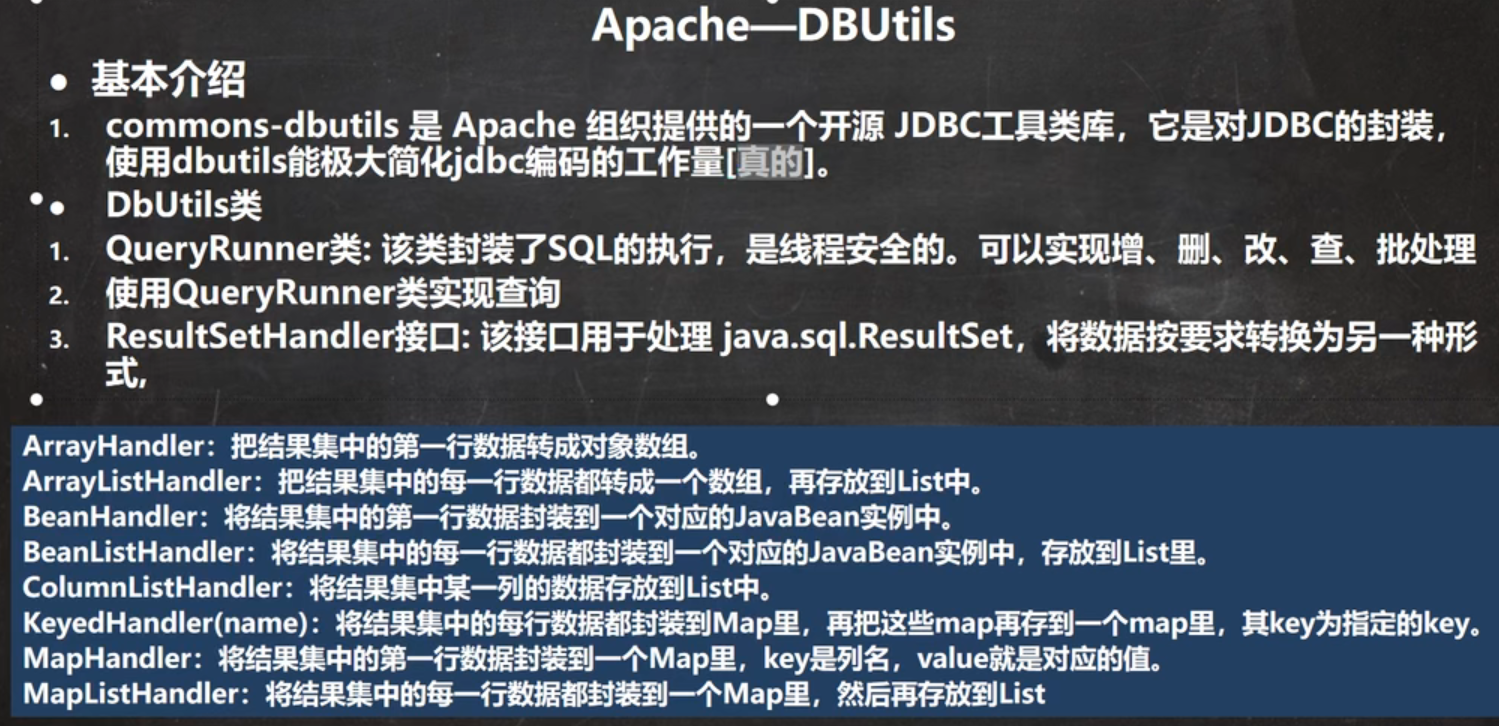
代码示例
package com.ynny.rj212.datasource;import org.apache.commons.dbutils.QueryRunner;
import org.apache.commons.dbutils.handlers.BeanHandler;
import org.apache.commons.dbutils.handlers.BeanListHandler;
import org.apache.commons.dbutils.handlers.ScalarHandler;
import org.junit.jupiter.api.Test;import java.sql.*;
import java.util.ArrayList;
import java.util.List;/*** @author wbx* @version 1.0*/
@SuppressWarnings({"all"})
public class DBUtils_USE {//使用apache-DBUtils 工具类 + druid 完成对表的crud操作@Testpublic void testQueryMany() throws SQLException { //返回结果是多行的情况//1. 得到 连接 (druid)Connection connection = JDBCUtilsByDruid.getConnection();//2. 使用 DBUtils 类和接口 , 先引入DBUtils 相关的jar , 加入到本Project//3. 创建 QueryRunnerQueryRunner queryRunner = new QueryRunner();//4. 就可以执行相关的方法,返回ArrayList 结果集//String sql = "select * from actor where id >= ?";//   注意: sql 语句也可以查询部分列String sql = "select id, name from actor where id >= ?";// 方法解读//(1) query 方法就是执行sql 语句,得到resultset ---封装到 --> ArrayList 集合中//(2) 返回集合//(3) connection: 连接//(4) sql : 执行的sql语句//(5) new BeanListHandler<>(Actor.class): 在将resultset -> Actor 对象 -> 封装到 ArrayList//    底层使用反射机制 去获取Actor 类的属性,然后进行封装//(6) 1 就是给 sql 语句中的? 赋值,可以有多个值,因为是可变参数Object... params//(7) 底层得到的resultset ,会在query 关闭, 关闭PreparedStatment/*** 分析 queryRunner.query方法:* public  T query(Connection conn, String sql, ResultSetHandler rsh, Object... params) throws SQLException {*         PreparedStatement stmt = null;//定义PreparedStatement*         ResultSet rs = null;//接收返回的 ResultSet*         Object result = null;//返回ArrayList**         try {*             stmt = this.prepareStatement(conn, sql);//创建PreparedStatement*             this.fillStatement(stmt, params);//对sql 进行 ? 赋值*             rs = this.wrap(stmt.executeQuery());//执行sql,返回resultset*             result = rsh.handle(rs);//返回的resultset --> arrayList[result] [使用到反射,对传入class对象处理]*         } catch (SQLException var33) {*             this.rethrow(var33, sql, params);*         } finally {*             try {*                 this.close(rs);//关闭resultset*             } finally {*                 this.close((Statement)stmt);//关闭preparedstatement对象*             }*         }**         return result;*     }*/List list =queryRunner.query(connection, sql, new BeanListHandler<>(Actor.class), 1);System.out.println("输出集合的信息");for (Actor actor : list) {System.out.print(actor);}//释放资源JDBCUtilsByDruid.close(null, null, connection);}//演示 apache-dbutils + druid 完成 返回的结果是单行记录(单个对象)@Testpublic void testQuerySingle() throws SQLException {//1. 得到 连接 (druid)Connection connection = JDBCUtilsByDruid.getConnection();//2. 使用 DBUtils 类和接口 , 先引入DBUtils 相关的jar , 加入到本Project//3. 创建 QueryRunnerQueryRunner queryRunner = new QueryRunner();//4. 就可以执行相关的方法,返回单个对象String sql = "select * from actor where id = ?";// 因为我们返回的单行记录<--->单个对象 , 使用的Hander 是 BeanHandlerActor actor = queryRunner.query(connection, sql, new BeanHandler<>(Actor.class), 10);System.out.println(actor);// 释放资源JDBCUtilsByDruid.close(null, null, connection);}//演示apache-dbutils + druid 完成查询结果是单行单列-返回的就是object@Testpublic void testScalar() throws SQLException {//1. 得到 连接 (druid)Connection connection = JDBCUtilsByDruid.getConnection();//2. 使用 DBUtils 类和接口 , 先引入DBUtils 相关的jar , 加入到本Project//3. 创建 QueryRunnerQueryRunner queryRunner = new QueryRunner();//4. 就可以执行相关的方法,返回单行单列 , 返回的就是ObjectString sql = "select name from actor where id = ?";//解读: 因为返回的是一个对象, 使用的handler 就是 ScalarHandlerObject obj = queryRunner.query(connection, sql, new ScalarHandler(), 4);System.out.println(obj);// 释放资源JDBCUtilsByDruid.close(null, null, connection);}//演示apache-dbutils + druid 完成 dml (update, insert ,delete)@Testpublic void testDML() throws SQLException {//1. 得到 连接 (druid)Connection connection = JDBCUtilsByDruid.getConnection();//2. 使用 DBUtils 类和接口 , 先引入DBUtils 相关的jar , 加入到本Project//3. 创建 QueryRunnerQueryRunner queryRunner = new QueryRunner();//4. 这里组织sql 完成 update, insert delete//String sql = "update actor set name = ? where id = ?";String sql = "insert into actor values(null, ?, ?, ?, ?)";
//        String sql = "delete from actor where id = ?";//(1) 执行dml 操作是 queryRunner.update()//(2) 返回的值是受影响的行数 (affected: 受影响)int affectedRow = queryRunner.update(connection, sql, "林青霞", "女", "1966-10-10", "116");
//        int affectedRow = queryRunner.update(connection, sql, 1000 );System.out.println(affectedRow > 0 ? "执行成功" : "执行没有影响到表");// 释放资源JDBCUtilsByDruid.close(null, null, connection);}
} 

表和实体类(JavaBean) 的类型映射关系
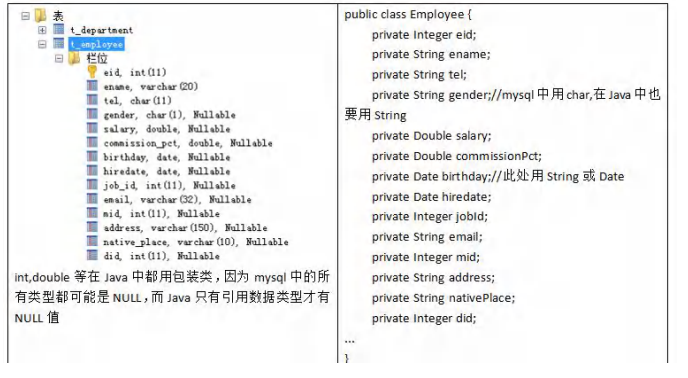
6.9、DAO 和增删改查通用方法-BasicDao(扩展提升部分,有时间就讲)
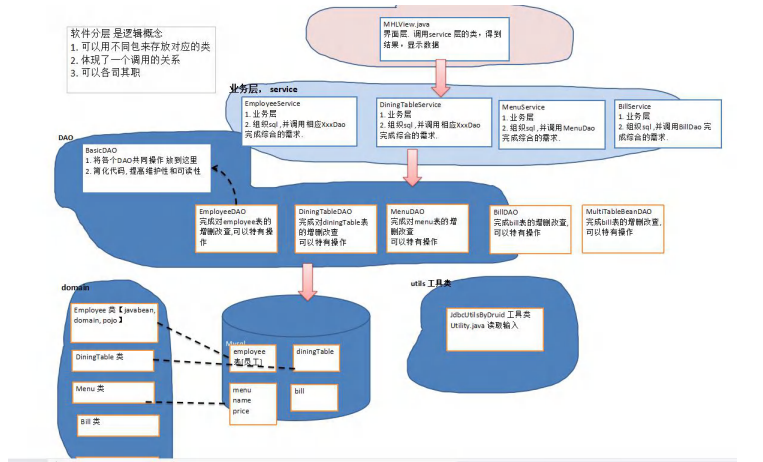
问题分析

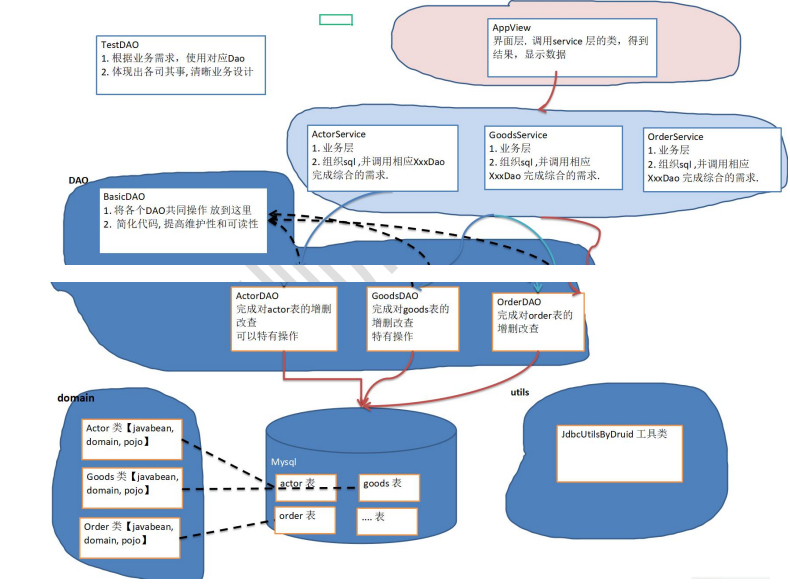

示例代码
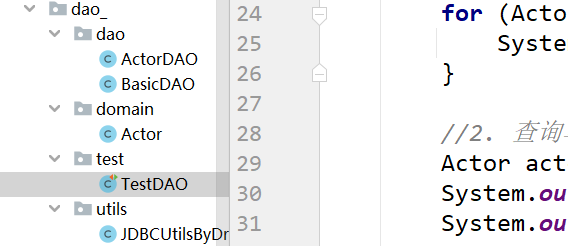
Actor
package com.ynny.rj212.dao_.domain;import java.util.Date;/*** @author wbx* @version 1.0* Actor 对象和 actor表的记录对应**/
public class Actor { //Javabean, POJO, Domain对象private Integer id;private String name;private String sex;private Date borndate;private String phone;public Actor() { //一定要给一个无参构造器[反射需要]}public Actor(Integer id, String name, String sex, Date borndate, String phone) {this.id = id;this.name = name;this.sex = sex;this.borndate = borndate;this.phone = phone;}public Integer getId() {return id;}public void setId(Integer id) {this.id = id;}public String getName() {return name;}public void setName(String name) {this.name = name;}public String getSex() {return sex;}public void setSex(String sex) {this.sex = sex;}public Date getBorndate() {return borndate;}public void setBorndate(Date borndate) {this.borndate = borndate;}public String getPhone() {return phone;}public void setPhone(String phone) {this.phone = phone;}@Overridepublic String toString() {return "\nActor{" +"id=" + id +", name='" + name + '\'' +", sex='" + sex + '\'' +", borndate=" + borndate +", phone='" + phone + '\'' +'}';}
}
BasicDAO
package com.ynny.rj212.dao_.dao;import com.ynny.rj212.dao_.utils.JDBCUtilsByDruid;
import org.apache.commons.dbutils.QueryRunner;
import org.apache.commons.dbutils.handlers.BeanHandler;
import org.apache.commons.dbutils.handlers.BeanListHandler;
import org.apache.commons.dbutils.handlers.ScalarHandler;import java.sql.Connection;
import java.sql.SQLException;
import java.util.List;/*** @author wbx* @version 1.0* 开发BasicDAO , 是其他DAO的父类*/
public class BasicDAO { //泛型指定具体类型private QueryRunner qr =  new QueryRunner();//开发通用的dml方法, 针对任意的表public int update(String sql, Object... parameters) {Connection connection = null;try {connection = JDBCUtilsByDruid.getConnection();int update = qr.update(connection, sql, parameters);return  update;} catch (SQLException e) {throw  new RuntimeException(e); //将编译异常->运行异常 ,抛出} finally {JDBCUtilsByDruid.close(null, null, connection);}}//返回多个对象(即查询的结果是多行), 针对任意表/**** @param sql sql 语句,可以有 ?* @param clazz 传入一个类的Class对象 比如 Actor.class* @param parameters 传入 ? 的具体的值,可以是多个* @return 根据Actor.class 返回对应的 ArrayList 集合*/public List queryMulti(String sql, Class clazz, Object... parameters) {Connection connection = null;try {connection = JDBCUtilsByDruid.getConnection();return qr.query(connection, sql, new BeanListHandler(clazz), parameters);} catch (SQLException e) {throw  new RuntimeException(e); //将编译异常->运行异常 ,抛出} finally {JDBCUtilsByDruid.close(null, null, connection);}}//查询单行结果 的通用方法public T querySingle(String sql, Class clazz, Object... parameters) {Connection connection = null;try {connection = JDBCUtilsByDruid.getConnection();return  qr.query(connection, sql, new BeanHandler(clazz), parameters);} catch (SQLException e) {throw  new RuntimeException(e); //将编译异常->运行异常 ,抛出} finally {JDBCUtilsByDruid.close(null, null, connection);}}//查询单行单列的方法,即返回单值的方法public Object queryScalar(String sql, Object... parameters) {Connection connection = null;try {connection = JDBCUtilsByDruid.getConnection();return  qr.query(connection, sql, new ScalarHandler(), parameters);} catch (SQLException e) {throw  new RuntimeException(e); //将编译异常->运行异常 ,抛出} finally {JDBCUtilsByDruid.close(null, null, connection);}}}
ActorDAO
package com.ynny.rj212.dao_.dao;import com.ynny.rj212.dao_.domain.Actor;/*** @author wbx* @version 1.0*/
public class ActorDAO extends BasicDAO {//1. 就有 BasicDAO 的方法//2. 根据业务需求,可以编写特有的方法.
}
JDBCUtilsByDruid
package com.ynny.rj212.dao_.utils;import com.alibaba.druid.pool.DruidDataSourceFactory;import javax.sql.DataSource;
import java.io.FileInputStream;
import java.sql.Connection;
import java.sql.ResultSet;
import java.sql.SQLException;
import java.sql.Statement;
import java.util.Properties;/*** @author wbx* @version 1.0* 基于druid数据库连接池的工具类*/
public class JDBCUtilsByDruid
{private static DataSource ds;//在静态代码块完成 ds初始化static {Properties properties = new Properties();try {properties.load(new FileInputStream("src\\druid.properties"));ds = DruidDataSourceFactory.createDataSource(properties);} catch (Exception e) {e.printStackTrace();}}//编写getConnection方法public static Connection getConnection() throws SQLException {return ds.getConnection();}//关闭连接, 再次强调: 在数据库连接池技术中,close 不是真的断掉连接//而是把使用的Connection对象放回连接池public static void close(ResultSet resultSet, Statement statement, Connection connection) {try {if (resultSet != null) {resultSet.close();}if (statement != null) {statement.close();}if (connection != null) {connection.close();}} catch (SQLException e) {throw new RuntimeException(e);}}
}
TestDAO
package com.ynny.rj212.dao_.test;import com.ynny.rj212.dao_.dao.ActorDAO;
import com.ynny.rj212.dao_.domain.Actor;
import org.junit.jupiter.api.Test;import java.util.List;/*** @author wbx* @version 1.0*/
public class TestDAO {//测试ActorDAO 对actor表crud操作@Testpublic void testActorDAO() {ActorDAO actorDAO = new ActorDAO();//1. 查询List actors = actorDAO.queryMulti("select * from actor where id >= ?", Actor.class, 1);System.out.println("===查询结果===");for (Actor actor : actors) {System.out.println(actor);}//2. 查询单行记录Actor actor = actorDAO.querySingle("select * from actor where id = ?", Actor.class, 2);System.out.println("====查询单行结果====");System.out.println(actor);//3. 查询单行单列Object o = actorDAO.queryScalar("select name from actor where id = ?", 2);System.out.println("====查询单行单列值===");System.out.println(o);//4. dml操作  insert ,update, deleteint update = actorDAO.update("insert into actor values(null, ?, ?, ?, ?)", "张无忌", "男", "2000-11-11", "999");System.out.println(update > 0 ? "执行成功" : "执行没有影响表");}
} 
public static Connection getConnection() throws SQLException {return ds.getConnection();
}//关闭连接, 再次强调: 在数据库连接池技术中,close 不是真的断掉连接
//而是把使用的Connection对象放回连接池
public static void close(ResultSet resultSet, Statement statement, Connection connection) {try {if (resultSet != null) {resultSet.close();}if (statement != null) {statement.close();}if (connection != null) {connection.close();}} catch (SQLException e) {throw new RuntimeException(e);}
}
}
TestDAO~~~java
package com.ynny.rj212.dao_.test;import com.ynny.rj212.dao_.dao.ActorDAO;
import com.ynny.rj212.dao_.domain.Actor;
import org.junit.jupiter.api.Test;import java.util.List;/*** @author wbx* @version 1.0*/
public class TestDAO {//测试ActorDAO 对actor表crud操作@Testpublic void testActorDAO() {ActorDAO actorDAO = new ActorDAO();//1. 查询List actors = actorDAO.queryMulti("select * from actor where id >= ?", Actor.class, 1);System.out.println("===查询结果===");for (Actor actor : actors) {System.out.println(actor);}//2. 查询单行记录Actor actor = actorDAO.querySingle("select * from actor where id = ?", Actor.class, 2);System.out.println("====查询单行结果====");System.out.println(actor);//3. 查询单行单列Object o = actorDAO.queryScalar("select name from actor where id = ?", 2);System.out.println("====查询单行单列值===");System.out.println(o);//4. dml操作  insert ,update, deleteint update = actorDAO.update("insert into actor values(null, ?, ?, ?, ?)", "张无忌", "男", "2000-11-11", "999");System.out.println(update > 0 ? "执行成功" : "执行没有影响表");}
}
[外链图片转存中…(img-y2odIGRm-1668777631544)]
上一篇:带“烈酒”的句子,有点感伤
下一篇:关于说服的好句子