

不科学,RocketMQ生产者在一个应用服务竟然不能向多个NameServer发送消息
前言
目前有两套RocketMQ集群,集群A包含topic名称为cluster_A_topic,集群B包含topic名称为cluster_B_topic,在应用服务OrderApp上通过RocketMQ Client创建两个DefaultMQProducer实例发送消息给集群A和集群B,架构图如下:
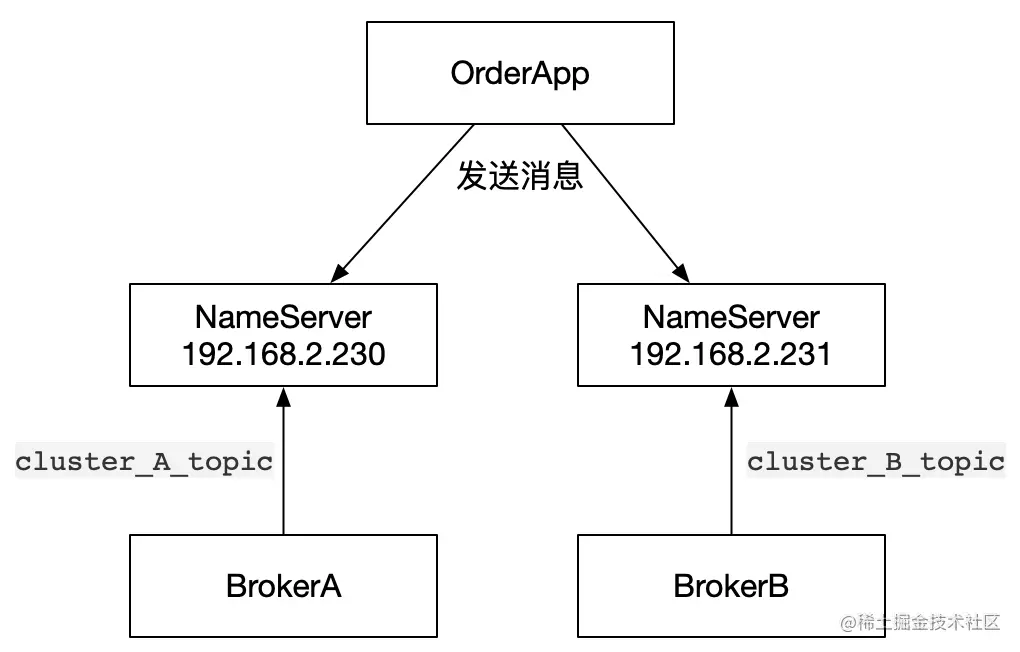
根据上述架构图,我们给出的示例代码如下:
// 创建第一个DefaultMQProducer
DefaultMQProducer producer1 = new DefaultMQProducer("producer_group_1");// 设置nameServer地址producer1.setNamesrvAddr("192.168.2.230:9876");try {producer1.start();// 发送消息SendResult result1 = producer1.send(new Message("cluster_A_topic", "ping".getBytes(StandardCharsets.UTF_8)));switch (result1.getSendStatus()) {case SEND_OK:System.out.println("cluster_A_topic 发送成功!");break;case FLUSH_DISK_TIMEOUT:System.out.println("cluster_A_topic 持久化失败!");break;case FLUSH_SLAVE_TIMEOUT:System.out.println("cluster_A_topic 同步slave失败!");break;case SLAVE_NOT_AVAILABLE:System.out.println("cluster_A_topic 副本不可用!");}} catch (Exception e) {e.printStackTrace();}// 创建第二个DefaultMQProducerDefaultMQProducer producer2 = new DefaultMQProducer("producer_group_2");// 设置nameServer地址producer2.setNamesrvAddr("192.168.2.231:9876");try {producer2.start();// 发送消息SendResult result2 = producer2.send(new Message("cluster_B_topic", "ping".getBytes(StandardCharsets.UTF_8)));switch (result2.getSendStatus()) {case SEND_OK:System.out.println("cluster_B_topic 发送成功!");break;case FLUSH_DISK_TIMEOUT:System.out.println("cluster_B_topic 持久化失败!");break;case FLUSH_SLAVE_TIMEOUT:System.out.println("cluster_B_topic 同步slave失败!");break;case SLAVE_NOT_AVAILABLE:System.out.println("cluster_B_topic 副本不可用!");}return "ok";} catch (Exception e) {e.printStackTrace();} finally {producer1.shutdown();producer2.shutdown();}
复制代码结果竟然报错了,报错内容时cluster_B_topic不存在:
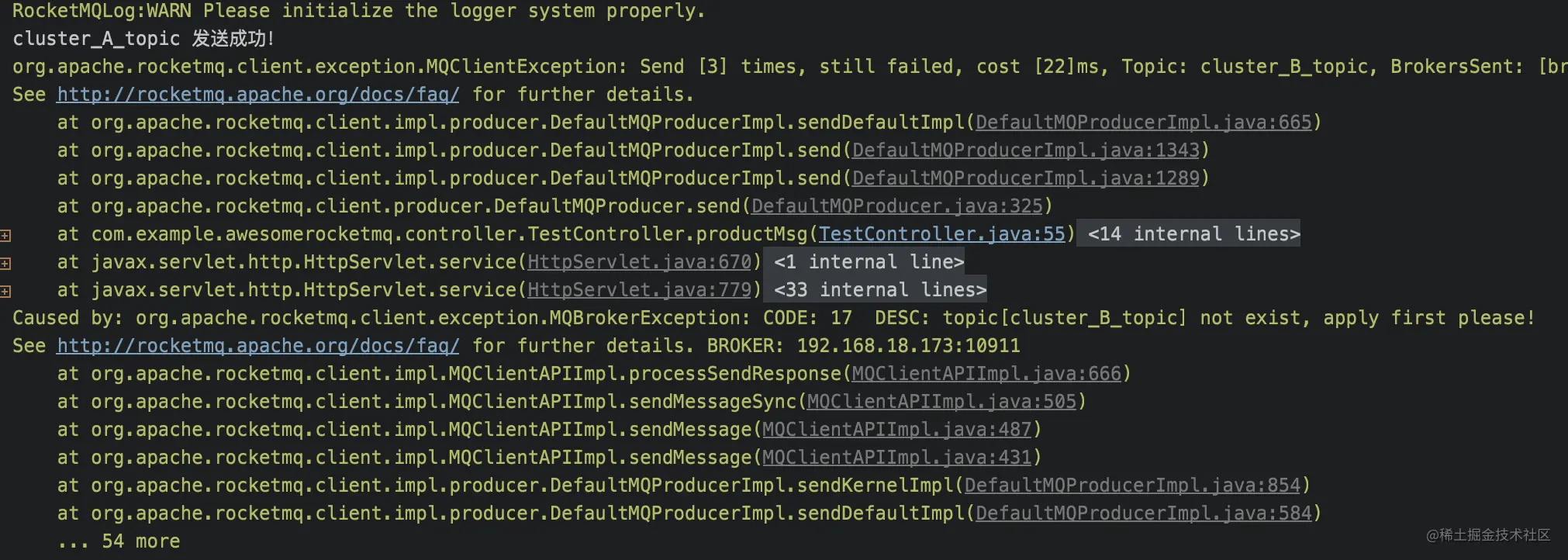
经过不断的测试,发现只有放在最前面启动的DefaultMQProducer会生效,后面启动的DefaultMQProducer发送消息就报错说对应的topic不存在,而且报错的broker竟然是前面启动的DefaultMQProducer对应的broker。这就不科学了,难道RocketMQ不允许在一个应用上创建多个生产者?
问题定位
首先说明一下,当前使用的RocketMQ Client版本是4.8.0。为了确定是哪儿出了问题,不得不对源码来一波探索[哭泣脸😢]。
我们都知道生产者是发送消息给Broker的,获取Broker信息是通过连接NameServer获取的。既然报错的Broker和目标Broker竟然不对应,肯定是后面启动的生产者获取的Broker不对。有了最基本的判断,我们先从DefaultMQProducer#start()入手,最终我们定位到这样一段代码DefaultMQProducerImpl#start(final boolean startFactory):
public void start(final boolean startFactory) throws MQClientException {switch (this.serviceState) {case CREATE_JUST:this.serviceState = ServiceState.START_FAILED;
this.checkConfig();
// 如果生产者group名称不是`CLIENT_INNER_PRODUCER`,那么修改InstanceName值if (!this.defaultMQProducer.getProducerGroup().equals(MixAll.CLIENT_INNER_PRODUCER_GROUP)) {this.defaultMQProducer.changeInstanceNameToPID();}// 创建MQClientInstance实例this.mQClientFactory = MQClientManager.getInstance().getOrCreateMQClientInstance(this.defaultMQProducer, rpcHook);// 注册生产者实例到MQClientInstance中boolean registerOK = mQClientFactory.registerProducer(this.defaultMQProducer.getProducerGroup(), this);if (!registerOK) {this.serviceState = ServiceState.CREATE_JUST;throw new MQClientException("The producer group[" + this.defaultMQProducer.getProducerGroup()+ "] has been created before, specify another name please." + FAQUrl.suggestTodo(FAQUrl.GROUP_NAME_DUPLICATE_URL),null);}// 添加TBW102对应的topic信息,broker设置autoCreateTopicEnable = true才起作用this.topicPublishInfoTable.put(this.defaultMQProducer.getCreateTopicKey(), new TopicPublishInfo());
if (startFactory) {// 启动刚刚创建的MQClientInstance实例mQClientFactory.start();}
log.info("the producer [{}] start OK. sendMessageWithVIPChannel={}", this.defaultMQProducer.getProducerGroup(),this.defaultMQProducer.isSendMessageWithVIPChannel());// 修改服务状态为RUNNINGthis.serviceState = ServiceState.RUNNING;break;case RUNNING:case START_FAILED:case SHUTDOWN_ALREADY:throw new MQClientException("The producer service state not OK, maybe started once, "+ this.serviceState+ FAQUrl.suggestTodo(FAQUrl.CLIENT_SERVICE_NOT_OK),null);default:break;}
复制代码上面的代码主要是创建了MQClientInstance实例,并且通过start()方法启动。
通过针对这两段代码的debug,我们发现创建的两个DefaultMQProducer对象是共用了一个MQClientInstance实例,并且所有针对NameServer和Broker的远程操作全部是通过MQClientInstance实例来做的。比如发送消息的时候需要找到对应的Broker下的消息队列:
private TopicPublishInfo tryToFindTopicPublishInfo(final String topic) {TopicPublishInfo topicPublishInfo = this.topicPublishInfoTable.get(topic);if (null == topicPublishInfo || !topicPublishInfo.ok()) {this.topicPublishInfoTable.putIfAbsent(topic, new TopicPublishInfo());// 从NameServer更新topic路由this.mQClientFactory.updateTopicRouteInfoFromNameServer(topic);topicPublishInfo = this.topicPublishInfoTable.get(topic);}
if (topicPublishInfo.isHaveTopicRouterInfo() || topicPublishInfo.ok()) {return topicPublishInfo;} else {this.mQClientFactory.updateTopicRouteInfoFromNameServer(topic, true, this.defaultMQProducer);topicPublishInfo = this.topicPublishInfoTable.get(topic);return topicPublishInfo;}}
复制代码最终我们发现两个DefaultMQProducer对象都是去同一个NameServer下获取对应的topic信息,这下问题就定位到了:因为使用了同一个MQClientInstance实例导致不同的DefaultMQProducer去访问了同一个NameServer,同一个集群需要同时接收两个topic的消息,也就出现了前面的报错说topic不存在的情况。
如何解决
我们来看看MQClientInstance实例是如何保证唯一性的:
public MQClientInstance getOrCreateMQClientInstance(final ClientConfig clientConfig, RPCHook rpcHook) {// 生成clientIDString clientId = clientConfig.buildMQClientId();// 从缓存中获取MQClientInstanceMQClientInstance instance = this.factoryTable.get(clientId);if (null == instance) {// 没有缓存的话就创建一个MQClientInstanceinstance =new MQClientInstance(clientConfig.cloneClientConfig(),this.factoryIndexGenerator.getAndIncrement(), clientId, rpcHook);// 新创建出来的再放进缓存MQClientInstance prev = this.factoryTable.putIfAbsent(clientId, instance);if (prev != null) {instance = prev;log.warn("Returned Previous MQClientInstance for clientId:[{}]", clientId);} else {log.info("Created new MQClientInstance for clientId:[{}]", clientId);}}// 返回MQClientInstance实例return instance;}
复制代码我们之所以拿到的MQClientInstance实例是同一个,是因为在同一个服务下创建的clientId相同:
public String buildMQClientId() {StringBuilder sb = new StringBuilder();sb.append(this.getClientIP());
sb.append("@");sb.append(this.getInstanceName());if (!UtilAll.isBlank(this.unitName)) {sb.append("@");sb.append(this.unitName);}
return sb.toString();}
复制代码两个clientId都是192.168.18.173@14933,为了防止clientId相同,我们可以在创建DefaultMQProducer实例是加上unitName值,保证两个unitName值不同来避免共享同一个MQClientInstance。
DefaultMQProducer producer1 = new DefaultMQProducer("producer_group_1");
producer1.setNamesrvAddr("192.168.2.230:9876");
producer1.setUnitName("producer1");
producer1.start();
DefaultMQProducer producer2 = new DefaultMQProducer("producer_group_1");
producer2.setNamesrvAddr("192.168.2.231:9876");
producer2.setUnitName("producer2");
producer2.start();
复制代码通过上述代码修改后,两个消息都发送成功了。
另一个办法就是升级RocketMQ Client到4.9.0,我们来看一下RocketMQ Client 4.9.0是怎么解决这个问题的:
    public void changeInstanceNameToPID() {if (this.instanceName.equals("DEFAULT")) {this.instanceName = UtilAll.getPid() + "#" + System.nanoTime();}}
复制代码
RocketMQ Client 4.9.0在后面补充了一个纳秒值,之前的代码是这样的:
    public void changeInstanceNameToPID() {if (this.instanceName.equals("DEFAULT")) {this.instanceName = String.valueOf(UtilAll.getPid());}}
复制代码也就是说,在新的版本中,一个应用服务内创建多个DefaultMQProducer就会有多个MQClientInstance实例对应,不会再出现我们前面的报错。