

Python PyInstaller 打包成 Win、Mac 应用程序(app / exe)
一、简介
-
python提供了几个用来打包的模块,主要有py2app、py2exe、pyinstaller。附:pyinstaller、py2app、py2exe、fbs 对比与爬坑。[外链图片转存失败,源站可能有防盗链机制,建议将图片保存下来直接上传(img-whT6cPog-1668880648443)(https://p1-juejin.byteimg.com/tos-cn-i-k3u1fbpfcp/e5471b09c4bf441fb3ad94e2f2b2dc7d~tplv-k3u1fbpfcp-watermark.image?)]
-
附:将 Python 代码打包成一个 app/exe。
二、使用说明
-
pyinstaller能够在Windows、Linux、Mac等操作系统下将Python源文件打包,通过对源文件打包,Python程序可以在没有安装Python的环境中运行,也可以作为一个独立文件方便传递和管理。 -
PyInstaller支持Python 2.7和Python 3.3+。可以在Windows、Mac和Linux上使用,但是并不是跨平台的,而是说要是希望打包成.exe文件,需要在Windows系统上运行PyInstaller进行打包工作;打包成Mac App,需要在Mac OS上使用 -
pyinstaller不需要自己写setup.py文件,只需要在工作目录中输入打包命令即可。最后会生成build和dist文件夹,启动文件在dist文件夹下。 -
安装
$ pip install pyinstaller安装后如果有警告
pip版本低了,升级下WARNING: You are using pip version 22.0.4; however, version 22.3.1 is available. You should consider upgrading via the '/Users/dengzemiao/.pyenv/versions/3.10.3/bin/python3.10 -m pip install --upgrade pip' command.$ python -m pip install --upgrade pip -
升级(
备用)$ pip install --upgrade pyinstaller -
切换到工作目录
$ cd xxxx/xxx -
打包命令
$ pyinstaller [项目启动文件]其他参数(按需求选择):打包完毕后在
dist文件夹下双击项目启动文件就可以了-
-F:表示在dist文件夹下只生成单个可执行文件(内部包含所有依赖),不加默认会在dist生成一大堆依赖文件 + 可执行文件。 -
-D:与-F相反用法。 -
-W:表示去掉控制台窗口,如果你的程序是有界面的,可以不写这个参数。但是测试情况下建议先加上这个参数,因为如果打包不成功,运行时报错信息会在控制台上输出,没有控制台就看不到报错信息。 -
-c:表示去掉窗框,使用控制台。 -
-p:表示自己定义需要加载的类路径,项目中包含多个自建模块的时候需要加上-p aaa.py -p bbb.py -p ccc.py。 -
-i:表示可执行文件的图标,后面跟图标的路径(例-i "icon.icns",mac中需要.icns结尾的图标)。 -
--name:设置打包后的应用名称,例--name "小程序"。 -
--hidden-import:后面跟模块名如queue,用于告诉打包程序某个模块我用不着你不用打包进去。
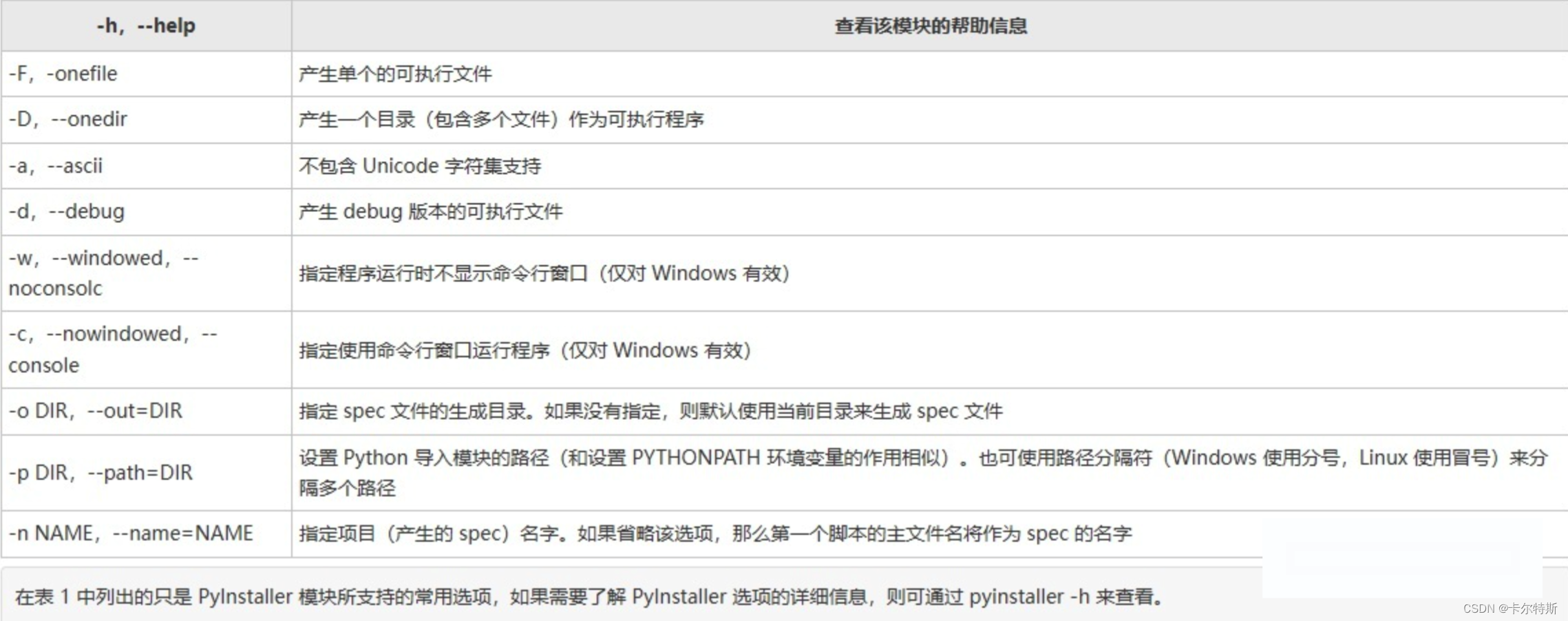
-
三、打包
-
进入到工作目录,直接打包
$ pyinstaller -F -w demo.py结果报错:附 完美解决 Python library not found: libpython3.10m.dylib, Python3, .Python, libpython3…
OSError: Python library not found: .Python, Python, Python3, libpython3.10.dylib, libpython3.10m.dylib
This means your Python installation does not come with proper shared library files.
This usually happens due to missing development package, or unsuitable build parameters of the Python installation.* On Debian/Ubuntu, you need to install Python development packages:* apt-get install python3-dev* apt-get install python-dev
* If you are building Python by yourself, rebuild with `--enable-shared` (or, `--enable-framework` on macOS).
解决后,就可以继续执行上面的打包命令了。打包成功后
app/exe会在dist文件夹中。推荐 Python virturalenv + pyinstaller 最小化打包 python 程序 !!!!