

【Java基础】第六章 | IO流
目录
| 总框架
| 文件路径相关知识
| Peoperties类与IO流、配置文件*
| 1.文件流
文件字节输入流(标准输入流) FileInputStream
文件字节输出流 FileOutputStream
文件字符输入流 FileReader
文件字符输出流 FileWriter
应用:使用字节流复制文件
应用:使用字符流复制txt文件
| 2.缓冲流、转换流
| 3.数据流
| 4.标准输出流
字节打印流(标准输出流)PrintStream
字符打印流PrintWriter
应用:制作一个打印日志 + 恢复System输出流指向控制台
| 总框架
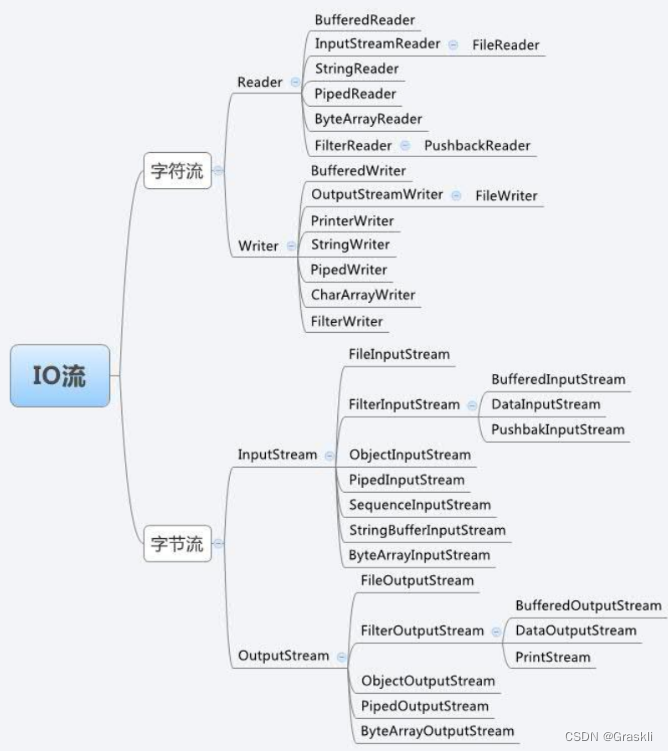
16个 重要的IO流简介(标蓝的为重点)
【文件流】
-
作用:读取文件
-
FileInputStream(字节流 | 标准输入流) FileOutputStream(字节流) FileReader(字符流) FileWriter(字符流)
【缓冲流】
-
作用:缓冲流自带缓冲区,使用的时候无需自定义char[ ]或者byte[ ]。
缓冲流也称为处理流,对文件或者其他目标频繁的操作,效率低,性能差。缓冲流目的是提高程序读取和写出的性能。
-
BufferedInputStream(字节流) BufferedOutputStream(字节流) BufferedReader(字符流) BufferedWriter(字符流)
【对象流】
-
作用:将对象序列化和反序列以保存
-
ObjectInputStream(字节流) ObjectOurputStream(字节流)
【数据流】
-
作用:可以将数据的类型如 num 是int型一并写入文件。(但是该文件不是文本文件,使用记事本打开是乱码的,有效保证了安全性)
-
DataInputStream(字节流) DataOutputStream(字节流)
【标准输出流】
-
作用:FileInputStream是标准输入流,相对的,标准输出流却不是FileOutputStream而是PrintStream
-
PrintStream(字节流 | 标准输出流) PrintWriter(字符流)
【字节流 转换 字符流】
-
字节流:按字节读取文件;字符流:按字符读取文件。
-
作用:把一个传递字节的节点流用于字符流,则我们需要使用转换流,先转化再传递
-
InputStreamReader OutputStreamWriter
Java IO体系
-
含有 Stream 的都是字节相关的流,含有 der 的都是字符相关的流
| 文件路径相关知识
-
根据测试,文件路径以【当前用户根目录的路径】为相对路径
-
下面介绍一下File类
-
File类,和下面介绍的流,没有任何关系。File是任意的文件、或者任意的目录。即:“文件和路径名”的抽象表现形式
-
我们主要需要掌握构造方法、对象方法、及其相关应用
-
语法如下
-
File file = new File ( 路径/文件路径 );  //构造方法
file . exists (  );      //判断文件或目录是否存在(存在则返回boolean):
file . isDirectory(  );  //判断是否是一个目录(是则返回boolean)
file . isFile(  );       //判断是否是一个文件(是则返回boolean)
file . getParent(  );         //返回此抽象路径名父目录的路径字符串。若不存在,则返回null
file . getParentFile(  );      //返回此抽象路径名父目录的路径的File类对象。不存在则返回null
file . getAbsolutePath(  );    //返回此抽象路径名的绝对路径字符串
file . getAbsoluteFile(  );     //返回此抽象路径名的绝对路径的File类对象
file . length(  );    //获取文件的大小,返回一个表示文件字节大小的long值
file . lastModified(  );    //获取文件的最后一次修改时间,返回1970年到现在的毫秒long值
file . listFiles(  );  //获取当前目录下所有的子文件及目录,返回一个File数组
| Peoperties类与IO流、配置文件*
Properties集合简介
-
主要用于读取Java的配置文件。
-
Properties是一个Map体系集合类,因为其继承于Hashtable,而Hashtable继承于Dictionary类,实现了Map接口,所以Properties也保留了其相关特性。
-
Properties的特点
-
(1)Properties是Hashtable
-
(2)Properties类表示了一个可持久的属性集;
-
(3)Properties可以保存在流中或从流中加载;
-
(4)Properties中每个键和对应的值都是一个字符串(String类型);
-
(5)Properties有一个特殊的作用:专门用来加载xxx.properties配置文件。
-
Properties的使用
//Properties作为map集合的使用
private static void PropertiesMap() {Properties pro = new Properties();//不需要加泛型,所有的键值都是object类型//存储元素pro.put(001, "张三");pro.put(002, "李四");pro.put(003, "王五");//遍历集合for(Object key : pro.keySet()) {System.out.println(key + ":" + pro.get(key));}
}
/*** Properties作为集合的特有方法* 0bject setProperty(String key,String value):设置类合的链和值,都是String类型,底层调用Hashtable方法put* string getProperty ( String key):使用此属性列表中指定的性搜索属性* Set stringPropert yNames():从该属性列表中返回一个不可修改的键集,其中键及其对应的值是字符串*/
private static void SpecialMethod() {Properties pro = new Properties();pro.setProperty("001", "张三");//键值都是String类型pro.setProperty("002", "李四");pro.setProperty("003", "王五");System.out.println(pro.getProperty("001"));//根据键搜索属性System.out.println(pro.getProperty("0011"));//没有时返回nullSystem.out.println(pro);Set s = pro.stringPropertyNames();//返回一个不可修改的键集,其中键及其对应的值是字符串System.out.println(s);for(String key : s) {System.out.println(key + ":" + pro.getProperty(key));}
} Peoperties 通过 IO,结合 .properties文件使用
//集合中数据保存到文件Properties pro = new Properties();pro.setProperty("001", "张三");//键值都是String类型pro.setProperty("002", "李四");pro.setProperty("003", "王五");System.out.println(pro);FileWriter fw = new FileWriter("Properties.properties");pro.store(fw,null);//不想添加描述信息就令第二个参数为null//数据保存为XML格式文件//storeToXML(OutputStream os, String comment, String encoding)使用指定的编码方式表示此表中包含的所有属性的XML文档FileOutputStream f1 = new FileOutputStream("PropertiesXML.XML");pro.storeToXML(f1, null);//文件中数据加载到集合
Properties prop = new Properties();FileReader fr = new FileReader("Properties.properties");
prop.load(fr);//将此属性列表打印到指定的输出流。此方法对于调试很有用
prop.list(System.out);
//System.out.println(prop);//从内容为XML格式的文件中读取数据加载为集合
FileInputStream f2 = new FileInputStream("PropertiesXML.XML");
prop.loadFromXML(f2);prop.list(System.out);
//System.out.println(prop);| 1.文件流
-
FileInputStream(字节流) FileOutputStream(字节流) FileReader(字符流) FileWriter(字符流)
-
字节流可以读取任意类型的文件,而字符流只能读取 文本文件 .txt
文件字节输入流(标准输入流) FileInputStream
public static void main(String[] args){try{//创建FileInputStream对象FileInputStream in = new FileInputStream(String path); //不追加读写//FileInputStream in = new FileInputStream(String path , true);  //追加读写//创建字节数组byte[] b = new byte[1024];int len = 0;//一次读取最多字节数组大小的字节长度,并把读取到的字节赋值给字节数组while((len = in.read(b)) != -1){System.out.println(new String(b , 0 , len));}//关闭IO流in.close();}catch(Exception e){e.printStackTrace();}
}
文件字节输出流 FileOutputStream
public static void main(String[] args){try{//创建FileOutputStream对象FileOutputStream out = new FileOutputStream(String path);String str = "XXX";//写入字节out.write(str.getBytes());//缓冲、关闭IO流out.flush();out.close();}catch(Exception e){e.printStackTrace();}
}
文件字符输入流 FileReader
public class FileReaderClass {public static void main(String[] args) {FileReader reader = null;try {//创建字符输入流reader = new FileReader("F:\\Java\\IOPractice\\FileReaderTXT.txt");//创建字符数组和中介数ichar[] array = new char[2];int i=0;//一次读取最多字符数组长度的字符个数,并把字符赋值给字符数组while((i=reader.read(array))!=-1){String mid = new String(array,0,i);System.out.print(mid);}} catch (IOException e) {e.printStackTrace();}finally{try {reader.close();} catch (IOException e) {e.printStackTrace();}}}
}
文件字符输出流 FileWriter
public class FileWriterClass {public static void main(String[] args) {FileWriter out = null;try {out = new FileWriter("F:\\Java\\IOPractice\\FileWriterTXT.txt",true);char[] array = {'C','S'};out.write(62);      // >out.write(array);      //可莉out.write("klee"); //kleeout.flush();//输出流要记得刷新} catch (IOException e) {e.printStackTrace();}finally{try {out.close();} catch (IOException e) {e.printStackTrace();}}}
}
应用:使用字节流复制文件
//复制文件
public class CopyFile {public static void main(String[] args) {//外部建立一个空输入流、输出流FileInputStream filein = null;FileOutputStream fileout = null;try {//创建输入流、输出流对象filein = new FileInputStream("F:\\Java\\IOPractice\\copyTXT.txt");fileout = new FileOutputStream("F:\\Java\\IOPractice\\" +"copyGoalTXT.txt",true);//追加读写//【核心】一边读,一边写//假设我们复制一个大小为1738kb的文件byte[] bytes = new byte[1024]; /*一次copy 1024k 的文件*/int readCount = 0;while((readCount = filein.read(bytes)) != -1){fileout.write(bytes,0,readCount);}//刷新输出流try {fileout.flush();} catch (IOException e) {e.printStackTrace();}} catch (IOException e) {e.printStackTrace();}finally{//关闭输入流(建议分开try..catch,不至于一个异常 都无法关闭)try {filein.close();} catch (IOException e) {e.printStackTrace();}//关闭输出流try {fileout.close();} catch (IOException e) {e.printStackTrace();}}}
}
应用:使用字符流复制txt文件
public class copyTXT {public static void main(String[] args) {FileReader in = null;FileWriter out = null;try {in = new FileReader("F:\\JAVA\\IOPractice\\copyTXT.txt");out = new FileWriter("F:\\JAVA\\IOPractice\\copyGoalTXT.txt");char[] charArr = new char[1024];int readCount = 0;while((readCount = in.read(charArr))!=-1){out.write(charArr,0,readCount);}out.flush();} catch (IOException e) {e.printStackTrace();}finally{try {in.close();} catch (IOException e) {e.printStackTrace();}try {out.close();} catch (IOException e) {e.printStackTrace();}}}
}
| 2.缓冲流、转换流
缓冲流简介
-
BufferedInputStream(字节流) BufferedOutputStream(字节流) BufferedReader(字符流) BufferedWriter(字符流)
-
缓冲流也称为处理流,对文件或者其他目标频繁的操作,效率低,性能差。缓冲流目的是提高程序读取和写出的性能。
-
缓冲流的基本原理,是创建流对象时候,会创建一个内置的默认大小的缓冲区数组,通过缓冲区书写.使得性能大大提升
因此相比于 文件流,缓冲流无需通过数组作为中介进行流的传输
缓冲流的使用
-
以 BufferedWriter 缓冲输入字节流 为例。关键在于其创建对象时的构造参数:
-
可以直接使用【文件输入字符流的对象】作为参数
-
也可以使用【文件输入字节流】通过【字节流转为字符流 的对象】作为参数
-
转换流简介
-
InputStreamReader OutputStreamWriter
-
转换流用于把【字节流转为字符流】
代码示例(下列代码演示了缓冲流+转换流的搭配使用)
package com.zhan02;import java.io.*;public class BufferedWriterTest {public static void main(String[] args) throws IOException {FileOutputStream fileOutputStream = new FileOutputStream("working.txt",true);//通过创建转换流对象,利用【文件输出字节流对象】创建了【文件输出字符流对象】OutputStreamWriter outputStreamWriter = new OutputStreamWriter(fileOutputStream);//构造参数内部传入的是FileOutputStream的对象,表示属于FileOutputStream的缓冲BufferedWriter bufferedWriter = new BufferedWriter(outputStreamWriter);//这样写也行,相当于直接传入一个【文件字符输出流】给【文件缓冲字符输出流】作为创建对象的构造函数的参数//BufferedWriter bufferedWriter = new BufferedWriter(new FileWriter(String path));bufferedWriter.write("追加成功!");bufferedWriter.flush();bufferedWriter.close();}
}-
FileOnputStream类用来指向working.txt文本,构造方法里的true表示当进行写入是以追加形式写入
-
OutputSteamWriter用于从字节流转换到字符流
-
BufferWriter就是属于字符型的缓冲流
| 3.数据流
数据流简介
-
DataInputStream(字节流) DataOutputStream(字节流)
-
作用:
-
可以将数据的类型如 num 是int型一并写入文件。(但是该文件不是文本文件,使用记事本打开是乱码的,有效保证了安全性)
-
保障数据安全性:输出的文件很可能为乱码,只有通过数据流方式读取时才能解码
-
-
因为输入时是按顺序输入的,所以读取时也需要按顺序读取,否则会报错
代码示例
public static void main(String[] args) {DataOutputStream dos = null;DataInputStream dis = null;try {//创建写出,读入流文件,构造器中放入节点流对象.dos = new DataOutputStream(new FileOutputStream("Test.txt"));dis = new DataInputStream(new FileInputStream("Test.txt"));dos.writeInt(20);dos.writeUTF("Tom");dos.writeChar('M');System.out.println(dis.readInt());System.out.println(dis.readUTF());System.out.println(dis.readChar());} catch (IOException e) {e.printStackTrace();} finally {if (dos != null) {try {dos.close();} catch (IOException e) {e.printStackTrace();}}if (dis != null){try {dis.close();} catch (IOException e) {e.printStackTrace();}}}
}
| 4.标准输出流
标准输出流简介
-
PrintStream(字节流) PrintWriter(字符流)
-
作用:FileInputStream是标准输入流,相对的,标准输出流却不是FileOutputStream而是PrintStream
-
标准输出流不需要手动 close( )关闭
如:PrintStream ps = System.out; ps.println("System本身就是一个标准输出流,其输出终点是控制台")
字节打印流(标准输出流)PrintStream
-
通过PrintStream输出内容到文件
PrintStream ps=new PrintStream("mydir\\ps.txt");
ps.write(97); //97写入ps.txt文件
通过PrintStream改变System.out的输出方向(默认是控制台,但是可以改变到文件中)
PrintStream ps = new PrintStream("mydir\\ps.txt");
System.setOut(ps); //改变System.out的输出方向(默认是控制台,但是可以改变到文件中)
System.out.println(97);   //97写入ps.txt文件
System.setOut(System.out);   //系统标准的输出流方向还可以改回控制台
字符打印流PrintWriter
//不会自动flush
PrintWriter pw=new PrintWriter("mydir\\java.txt");
pw.write("hello");//要刷新
pw.flush();
pw.write("\r\n");//换行pw.println("hello");
pw.flush();//自动flush
PrintWriter pw=new PrintWriter("mydir\\java.txt",true);
pw.write("hello");//要刷新
pw.write("\r\n");//换行
应用:制作一个打印日志 + 恢复System输出流指向控制台
-
利用标准输出流对象,结合System.setOut(new PrintStream)方法,改变System.out.println() 的输出方向,由默认的输出到控制台转变为输出到指定文件中。
-
如果要恢复System输出流指向控制台,则需要在最开始保存指向控制台的指针:PrintStream ps = System.out;
public class PrintStreamClass {public static void main(String[] args) {try {log("第一次使用日志");} catch (FileNotFoundException e) {e.printStackTrace();}}public static void log(String message) throws FileNotFoundException {//保存当前指向控制台的指针PrintStream ps = System.out;//Step1.设置一个以FileOutputStream参数为构造方法的标准输出流PrintStream printstreamString path = "log.txt";PrintStream printStream = new PrintStream(new FileOutputStream(path));System.setOut(printStream);//Step2.把printStream作为System.setOut的参数传递进来,改变输出方向为log.txt文本Date date = new Date();SimpleDateFormat sdf = new SimpleDateFormat("yyyy.MM.dd HH:mm:ss");String time = sdf.format(date);//Step3.获取当前的时间字符串,输出时间和信息 到文本文件log.txt中System.out.println(time+":"+message);//恢复System输出流的方向(需要使用原先保存的控制台指针)System.setOut(ps);System.out.println(22);}
}