

【微信开发第四章】SpringBoot实现微信H5支付
前言
在进行微信公众号业务开发的时候,微信支付可以说是非常重要的一环。该篇文章每一步都有记录,力争理解的同时各位小伙伴也能够实现功能
文章目录
- 前言
- 1、公众号配置
- 2、微信支付实现代码
- 总结
1、公众号配置
1、绑定域名
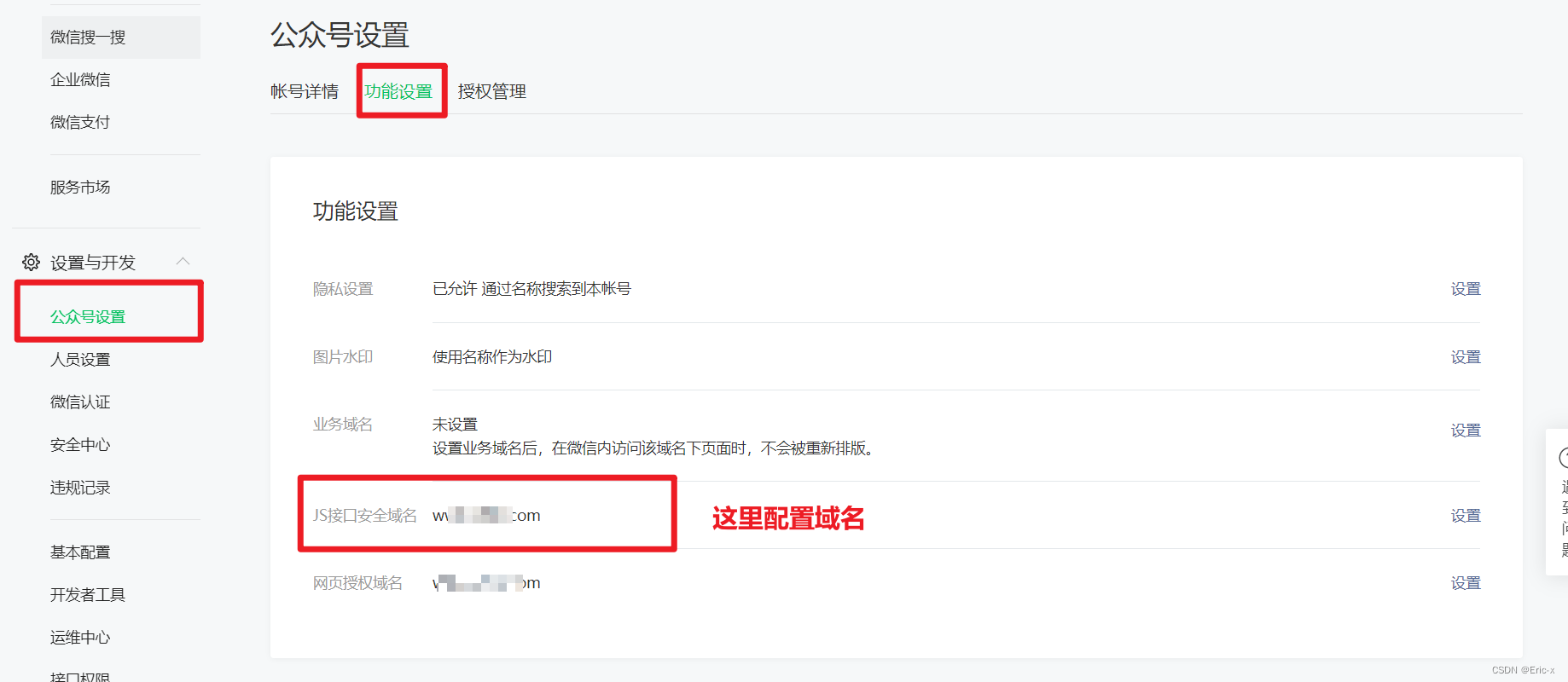
先登录微信公众平台进入“设置与开发”,“公众号设置”的“功能设置”里填写“JS接口安全域名”。
说明:测试号不支持支付功能,需要使用正式号才能进行测试。
2、商户平台配置支付目录
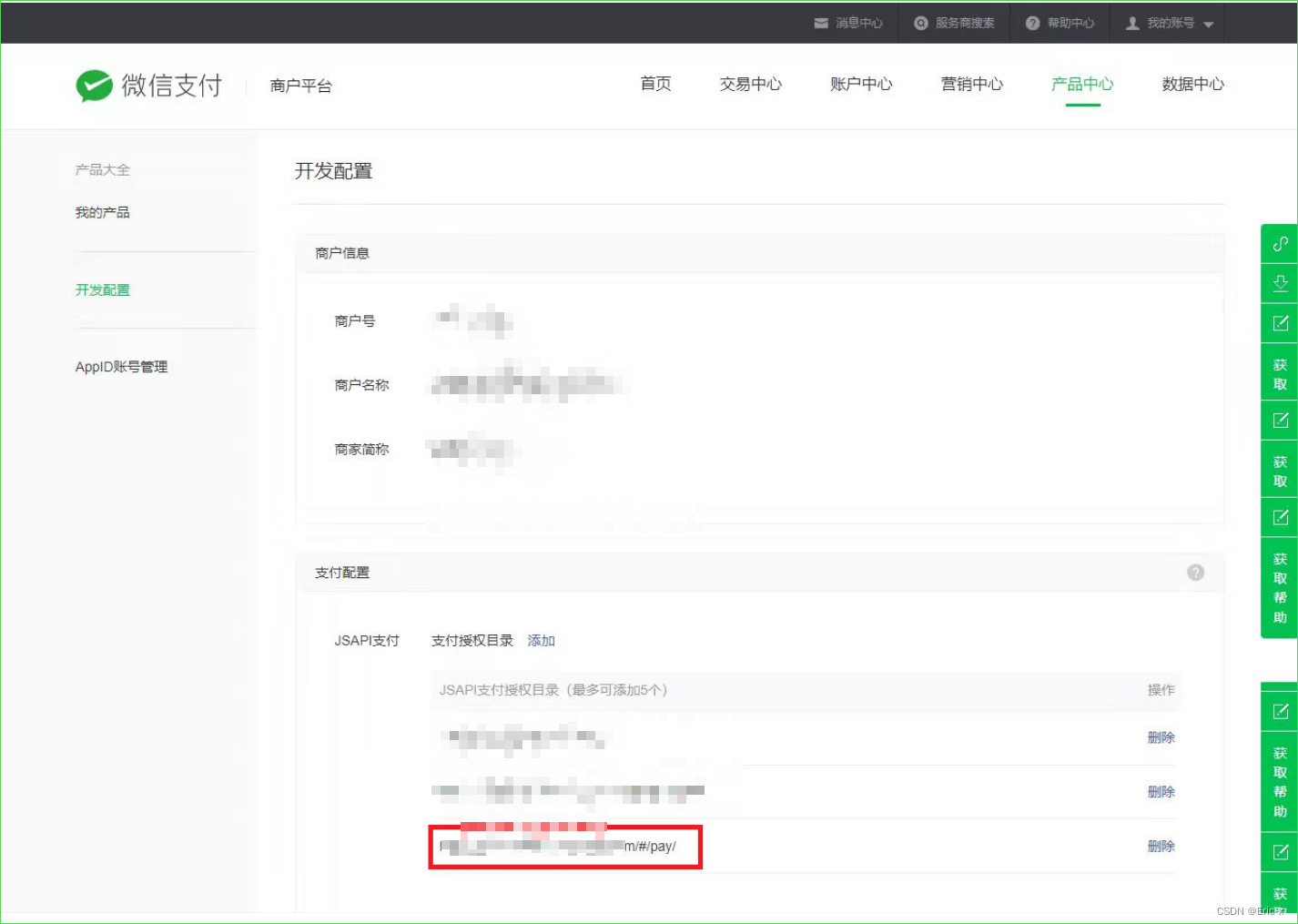
2、微信支付实现代码
1、引入依赖
com.github.wxpay wxpay-sdk 0.0.3
2、Controller
@Api(tags = "微信支付接口")
@RestController
@RequestMapping("/api/order/wxPay")
public class WXPayController {@Autowiredprivate WXPayService wxPayService;@ApiOperation(value = "下单 小程序支付")@GetMapping("/createJsapi/{orderNo}")public Result createJsapi(@ApiParam(name = "orderNo", value = "订单No", required = true)@PathVariable("orderNo") String orderNo) {return Result.ok(wxPayService.createJsapi(orderNo));}
}
3、Service接口
public interface WXPayService {Map createJsapi(String orderNo);
}
4、ServiceImpl实现类
@Service
@Slf4j
public class WXPayServiceImpl implements WXPayService {@Autowiredprivate OrderInfoService orderInfoService;@Resourceprivate UserInfoFeignClient userInfoFeignClient;@Overridepublic Map createJsapi(String orderNo) {try {//1、封装微信支付需要参数,使用map集合Map paramMap = new HashMap();//正式服务号Id(appid、mch_id这两个值是固定的,不能改变)paramMap.put("appid", "wxf913bfa3a2c7eeeb");//服务号的商户号paramMap.put("mch_id", "1481962542");//使用微信依赖生成一个随机字符串paramMap.put("nonce_str", WXPayUtil.generateNonceStr());//微信支付弹框的显示内容paramMap.put("body", "test");paramMap.put("out_trade_no", orderNo);//支付金额,为了测试,统一支付金额为0.01元paramMap.put("total_fee", "1");//单位:分//当前支付客户端的IpparamMap.put("spbill_create_ip", "127.0.0.1");//支付成功后的跳转页面路径paramMap.put("notify_url", "http://glkt.atguigu.cn/api/order/wxPay/notify");//支付类型:是弹出一个支付二维码,还是直接弹框支付paramMap.put("trade_type", "JSAPI");//弹框支付,按照固定金额支付//设置用户的openId//当前项目逻辑:1、先根据订单号获取userid,再根据userid获取openId
//			paramMap.put("openid", "o1R-t5trto9c5sdYt6l1ncGmY5Y");//UserInfo userInfo = userInfoFeignClient.getById(paymentInfo.getUserId());
//			paramMap.put("openid", "oepf36SawvvS8Rdqva-Cy4flFFg");//因为当前使用测试服务号,但测试号不支持支付功能,为了使用正式服务号进行测试使用下面固定写法,这个openId通过其他方式获取。paramMap.put("openid", "oQTXC56lAy3xMOCkKCImHtHoLL");//2、HTTPClient来根据URL访问第三方接口并且传递参数HttpClientUtils client = new HttpClientUtils("https://api.mch.weixin.qq.com/pay/unifiedorder");//client设置参数client.setXmlParam(WXPayUtil.generateSignedXml(paramMap, "MXb72b9RfshXZD4FRGV5KLqmv5bx9LT9"));client.setHttps(true);//表示支付https请求client.post();//发送post请求//3、返回第三方的数据:微信支付返回的数据String xml = client.getContent();System.out.println("微信支付返回数据-xml:" + xml);Map resultMap = WXPayUtil.xmlToMap(xml);if(null != resultMap.get("result_code")  && !"SUCCESS".equals(resultMap.get("result_code"))) {throw new GgktException(20001,"支付失败");}//4、再次封装参数Map parameterMap = new HashMap<>();String prepayId = String.valueOf(resultMap.get("prepay_id"));String packages = "prepay_id=" + prepayId;parameterMap.put("appId", "wxf913bfa3a2c7eeeb");parameterMap.put("nonceStr", resultMap.get("nonce_str"));parameterMap.put("package", packages);parameterMap.put("signType", "MD5");parameterMap.put("timeStamp", String.valueOf(new Date().getTime()));String sign = WXPayUtil.generateSignature(parameterMap, "MXb72b9RfshXZD4FRGV5KLqmv5bx9LT9");//返回结果Map result = new HashMap();result.put("appId", "wxf913bfa3a2c7eeeb");result.put("timeStamp", parameterMap.get("timeStamp"));result.put("nonceStr", parameterMap.get("nonceStr"));result.put("signType", "MD5");result.put("paySign", sign);result.put("package", packages);System.out.println(result);return result;} catch (Exception e) {e.printStackTrace();return new HashMap<>();}}
}
总结
其实微信支付实现代码并不难,需要注意的就是一些额外配置信息。
【微信开发第一章】SpringBoot实现微信公众号创建菜单,同步菜单功能:https://blog.csdn.net/weixin_47316183/article/details/127821095?spm=1001.2014.3001.5502
【微信开发第二章】SpringBoot实现微信公众号普通消息和模板消息回复:https://blog.csdn.net/weixin_47316183/article/details/127821653?spm=1001.2014.3001.5502
【微信开发第三章】SpringBoot实现微信授权登录
https://blog.csdn.net/weixin_47316183/article/details/127833802?spm=1001.2014.3001.5502
【微信开发第四章】SpringBoot实现微信H5支付
https://blog.csdn.net/weixin_47316183/article/details/127949620?spm=1001.2014.3001.5502
【微信开发第五章】SpringBoot实现微信分享
https://blog.csdn.net/weixin_47316183/article/details/127950090?spm=1001.2014.3001.5502