

两种方式实现websocket获取数据库查询进度
创始人
2024-02-03 07:56:47
两种方式实现websocket获取数据库查询进度
本文实现了两种方式用websocket连接实现前端通过API获取数据库查询进度,作为websocket初步学习的参考
内容目录概要:
- 使用额外接口获取指定数据库查询进度,查询进度的接口与获取数据的接口分开实现
- 查询数据的同时可以同时返回进度
- 使aiomysql支持pandas的read_sql_query方法
食用前提:
- sanic web服务
- pandas分块读取mysql数据库,示例中伪造了dataframe代替数据库中的数据,pandas异步查询mysql的实现方式放在最后额外的part
第一种方式,查询进度的接口和获取数据的接口分开实现
# -*- coding: utf-8 -*-
# -*- coding: utf-8 -*-
import asyncio
import jsonimport pandas as pd
from sanic import Sanic
from sanic import Websocket, Requestapp = Sanic("sanic")# 这里为了简单,将进度存储设置成了全局变量容器,合理的做法可以放到一个可共用的类、第三方存储位置等,并设置过期自动清理
query_progress = {}class MysqlDatabaseQuery:async def read_query(self):data = pd.DataFrame({"id": [3, 5, 8], "name": ["a", "b", "c"]}, index=[1, 2, 3])rowcount = len(data)for idx, row in data.iterrows():await asyncio.sleep(1)rownumber = idxyield dict(row), f"{(rownumber / rowcount): .2%}"# 方式一
# 尝试单独用一个接口来查询数据库query的进度
async def read_query_progress(requests: Request, ws: Websocket):query_id = requests.args.get("query_id")while True:progress = query_progress.get(str(query_id)) or "0%"if ws.recv_cancel:break_ = await ws.recv()await ws.send(progress)# 异步处理的任务:储存数据库查询的进度
async def dispatch_query_progress(**context):global query_progressquery_progress = context# 获取的数据接口
async def read_query(requests: Request, ws: Websocket):data_reader = MysqlDatabaseQuery().read_query()records = []query_id = "1"  # 需要提前定义好查询idasync for record, progress in data_reader:records.append(record)# sanic提供的发布信号并在后台执行任务的方法,定义事件名称,传递参数,任务会异步执行:https://sanic.dev/zh/guide/advanced/signals.html#%E6%B7%BB%E5%8A%A0%E4%BF%A1%E5%8F%B7-adding-a-signalawait requests.app.dispatch("query.read.progress", context={query_id: progress})if ws.recv_cancel:breakelse:await ws.send(json.dumps(records))app.add_websocket_route(read_query, "/query1")
app.add_websocket_route(read_query_progress, "/read_progress1")
app.add_signal(dispatch_query_progress, "query.read.progress")  # 添加接收信号后的处理方法handler到app中if __name__ == '__main__':app.run(auto_reload=True, dev=True)
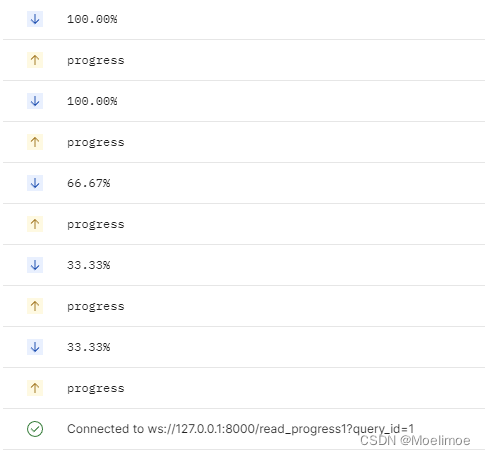
接口调用效果:
# 查询接口ws://127.0.0.1:8000/query1的返回数据:
[{"id": 3, "name": "a"}, {"id": 5, "name": "b"}, {"id": 8, "name": "c"}]
在查询接口查询的过程中,调用进度接口
第二种方式,数据边查询边返回进度
# -*- coding: utf-8 -*-
import asyncio
import jsonimport pandas as pd
from sanic import Sanic
from sanic import Websocket, Requestapp = Sanic("sanic")# 这里为了简单,将进度存储设置成了全局变量容器,合理的做法可以放到一个可共用的类、第三方存储位置等,并设置过期自动清理
query_progress = {}class MysqlDatabaseQuery:async def read_query(self):data = pd.DataFrame({"id": [3, 5, 8], "name": ["a", "b", "c"]}, index=[1, 2, 3])rowcount = len(data)for idx, row in data.iterrows():await asyncio.sleep(1)rownumber = idx# 这里将row转成了dataframe,模拟了pd.read_sql_query(sql, chunksize=...)传递了chunksize参数时得到生成器(不是异步生成器,但是文章最后会介绍将pd.read_sql_query(sql, chunksize=...)修改成异步生成器的方式)yield row.to_frame().T, f"{(rownumber / rowcount): .2%}"# 方式二:
# 边读取数据边返回进度,不需要额外维护进度的存储,也不需要定义query_id,这种方式感觉更优雅
async def read_query(requests, ws: Websocket):data_reader = MysqlDatabaseQuery().read_query()df = pd.DataFrame()progress = ''async for frame_part, progress in data_reader:df = pd.concat([df, frame_part], ignore_index=True)data = await ws.recv(0.0001)  # 只等待一小会儿,如果没有接收到progress的请求就继续下一轮循环,等了但没完全等(bushiif data == "progress":await ws.send(progress)if ws.recv_cancel:breakelse:await ws.send(progress)     # 如果必须保证最后100%要送给前端,可以加上这一句,虽然可能会重复,但在前端展示时不会有啥影响await ws.send(df.to_json(orient="records"))app.add_websocket_route(read_query, "/query2")if __name__ == '__main__':app.run(auto_reload=True, dev=True)
接口调用效果:
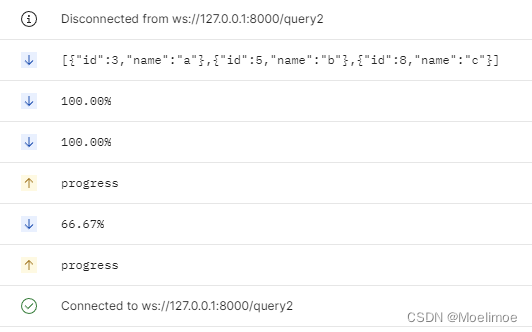
有可能会多返回1个100%,不过在前端展示时应该没什么变化
对比两种实现方式,第二种显然更简便优雅一下,不过如果想要在当前查询之外还能随时查询某个数据库查询的进度时,就必须用第一种实现方式了
此外需要注意的是:如果使用第一种实现方式,还需要考虑query_id的定义以及储存的查询进度应该设置一定的过期时间,过期之后就删除,否则可能会导致数据一直增长而占用内存过多的情况
既然是使用异步框架,查询就应该支持异步查询
因此顺便介绍一种实现了可使用aiomysql连接的pandas read_query方式:
aiomysql_pool
# -*- coding:utf-8 -*-
from __future__ import annotationsimport asyncio
import logging
from abc import ABC
from asyncio import AbstractEventLoopimport aiomysql
import pandas as pd
from pandas._typing import DtypeArg
from pypika.queries import QueryBuilderfrom aio_pandas_database import AIOPandasSQLDatabaseloop_ = asyncio.get_event_loop()class AIOMysqlPool(aiomysql.Pool, ABC):def __init__(self, minsize=1, maxsize=10, echo=False, pool_recycle=-1, loop=None,host="localhost", port=3306, user="root", password="root", db="services",	# 改成自己数据库的信息cursorclass=aiomysql.DictCursor,**kwargs) -> None:"""Parameters----------minsizemaxsizeechopool_recycle: int值应该>=-1,-1表示不会回收代表一个连接多久未被使用了之后就回收,如果此时再获取连接会返回一个新的连接loophostportuserpassworddatabasekwargs"""super().__init__(minsize, maxsize, echo, pool_recycle, loop,host=host, port=int(port), user=user, password=password, db=db, cursorclass=cursorclass,**kwargs)self._loop = loop or asyncio.get_event_loop()async def execute(self, sql, query_params=None, is_fetchone=False):await asyncio.sleep(1)if isinstance(sql, QueryBuilder):sql = sql.get_sql()query_params = query_params or ()async with self.acquire() as conn:async with conn.cursor() as cursor:try:row = await cursor.execute(sql, query_params)res = await cursor.fetchall()await conn.commit()  # update时需要更新,但其他类型查询例如select时commit也无妨if is_fetchone:assert row <= 1return res[0] if row else Nonereturn row, resexcept Exception as e:logging.error(f"SQL execution met an unexpected error, "f"hint:\n {e}\n, "f"the error query sql is: \n{sql}\n")await conn.rollback()raise edef get_loop(self) -> AbstractEventLoop:return self._loopasync def fetchone(self, sql):res = await self.execute(sql, is_fetchone=True)return resasync def fetchall(self, sql):row, res = await self.execute(sql)return row, resasync def update(self, sql):row, res = await self.execute(sql)return row, resasync def delete(self, sql):row, res = await self.execute(sql)return row, resasync def async_read_query(self,sql,ws=None,index_col=None,coerce_float: bool = True,params=None,parse_dates=None,chunksize: int | None = None,dtype: DtypeArg | None = None,):conn = await self.acquire()aiodb = AIOPandasSQLDatabase(conn)frame_or_async_generator = await aiodb.async_read_query(sql,None,index_col,coerce_float,params,parse_dates,chunksize,dtype)if chunksize and ws is not None:frames = [pd.DataFrame()]progress = ''async for frame_part in frame_or_async_generator:progress = conn.progressframes.append(frame_part)data = await ws.recv(0.0001)  # 只等待一小会儿,如果没有接收到progress的请求就继续下一轮循环,等了但没完全等(bushiif data == "progress":await ws.send(progress)if ws.recv_cancel:breakelse:await ws.send(progress)  # 如果必须保证最后100%要送给前端,可以加上这一句,虽然可能会重复,但在前端展示时不会有啥影响df = pd.concat(frames, ignore_index=True)return dfreturn frame_or_async_generatorasync def async_read_query2(self,sql,app=None,index_col=None,coerce_float: bool = True,params=None,parse_dates=None,chunksize: int | None = None,dtype: DtypeArg | None = None,):conn = await self.acquire()aiodb = AIOPandasSQLDatabase(conn)frame_or_async_generator = await aiodb.async_read_query(sql,app,index_col,coerce_float,params,parse_dates,chunksize,dtype)return frame_or_async_generatorp = AIOMysqlPool()async def run_test():# res = await p.fetchone("select 1;")# print(res)row, res = await p.execute("select 2 as a, 3 as b union all select 1 as a, 2 as b;")print(row, res)try:row, res = await p.execute("select 2 as a, 3 as b union all select 1 as a, 2 as b;", is_fetchone=True)print(row, res)except AssertionError as e:print(f"查询的结果超过1行")async def run_test2():sql = """select * from test_table"""tasks = []for i in range(3):tasks.append(p.execute(sql))results = await asyncio.gather(*tasks)for result in results:print(result)async def run_update():u_sql = """update test_table set `name` = 'abc' where id = 1"""row, res = await p.execute(u_sql)print(row, res)s_sql = """select * from test_table where `name` = 'abc'"""row, res = await p.execute(s_sql)print(row, res)async def rsq_t():sql = """select * from test_table"""tasks = []for i in range(3):tasks.append(p.async_read_query(sql))results = await asyncio.gather(*tasks)for result in results:print(result)async def run_async_stream_query():sql = """select * from test_table"""df = await p.async_read_query(sql, chunksize=1)print(df)async def run_async_stream_query2():sql = """select * from test_table"""ag = await p.async_read_query2(sql, chunksize=1)while True:try:r = await ag.__anext__()print(r)except StopAsyncIteration:print("break")breakasync def run_async_stream_query3():sql = """select * from test_table"""async for f in await p.async_read_query(sql, chunksize=1):print(f)if __name__ == '__main__':loop_.run_until_complete(run_test())loop_.run_until_complete(run_test2())loop_.run_until_complete(run_update())loop_.run_until_complete(rsq_t())loop_.run_until_complete(run_async_stream_query())loop_.run_until_complete(run_async_stream_query2())loop_.run_until_complete(run_async_stream_query3())
async pandas read_query,实现了将pandas的read_sql_query支持aiomysql:
# aio_pandas_database.py
# -*- coding: utf-8 -*-
from __future__ import annotationsimport asynciofrom pandas._typing import DtypeArg
from pandas.io.sql import _convert_params, _wrap_result, DatabaseErrorclass AIOPandasSQLDatabase:def __init__(self, con):self.con = conself.con.progress = Noneasync def _fetchall_as_list(self, cur):result = await cur.fetchall()if not isinstance(result, list):result = list(result)return resultasync def async_read_query(self,sql,app,index_col=None,coerce_float: bool = True,params=None,parse_dates=None,chunksize: int | None = None,dtype: DtypeArg | None = None,):try:async with self.con as conn:async with conn.cursor() as cursor:args = _convert_params(sql, params)await cursor.execute(*args)columns = [col_desc[0] for col_desc in cursor.description]if chunksize is not None:return self._query_iterator(cursor,app,chunksize,columns,index_col=index_col,coerce_float=coerce_float,parse_dates=parse_dates,dtype=dtype,)else:data = await self._fetchall_as_list(cursor)frame = _wrap_result(data,columns,index_col=index_col,coerce_float=coerce_float,parse_dates=parse_dates,dtype=dtype,)return frameexcept Exception as exc:try:await conn.rollback()except Exception as inner_exc: # pragma: no coverex = DatabaseError(f"Execution failed on sql: {args[0]}\n{exc}\nunable to rollback")raise ex from inner_excex = DatabaseError(f"Execution failed on sql '{args[0]}': {exc}")raise ex from excasync_read_sql = async_read_query# @staticmethodasync def _query_iterator(self,result,app,chunksize: int,columns,index_col=None,coerce_float=True,parse_dates=None,dtype: DtypeArg | None = None,):"""Return generator through chunked result set"""has_read_data = Falsequery_id = "1"while True:# 本地读取太快了,sleep来方便调试data = await result.fetchmany(chunksize)# 这种进度的方式设定存在一个问题:一个connection中多个查询开了事务分布执行语句会导致进度(大概会,没验证过)progress = f"{(result.rownumber/result.rowcount): .2%}"self.con.progress = progressif app is not None:await app.dispatch("query.read.progress", context={query_id: progress})await asyncio.sleep(1)if not data:if not has_read_data:yield _wrap_result([],columns,index_col=index_col,coerce_float=coerce_float,parse_dates=parse_dates,)breakelse:has_read_data = Trueyield _wrap_result(data,columns,index_col=index_col,coerce_float=coerce_float,parse_dates=parse_dates,dtype=dtype,)相关内容
热门资讯
埃菲尔铁塔在哪 中国仿建埃菲尔...
2019年4月26日,广西南宁市,街头惊现一座巨型山寨版埃菲尔铁塔,高约20米,白色塔身,造型逼真,...
苗族的传统节日 贵州苗族节日有...
【岜沙苗族芦笙节】岜沙,苗语叫“分送”,距从江县城7.5公里,是世界上最崇拜树木并以树为神的枪手部落...
北京的名胜古迹 北京最著名的景...
北京从元代开始,逐渐走上帝国首都的道路,先是成为大辽朝五大首都之一的南京城,随着金灭辽,金代从海陵王...
应用未安装解决办法 平板应用未...
---IT小技术,每天Get一个小技能!一、前言描述苹果IPad2居然不能安装怎么办?与此IPad不...
脚上的穴位图 脚面经络图对应的...
人体穴位作用图解大全更清晰直观的标注了各个人体穴位的作用,包括头部穴位图、胸部穴位图、背部穴位图、胳...
长白山自助游攻略 吉林长白山游...
昨天介绍了西坡的景点详细请看链接:一个人的旅行,据说能看到长白山天池全凭运气,您的运气如何?今日介绍...
世界上最漂亮的人 世界上最漂亮...
此前在某网上,选出了全球265万颜值姣好的女性。从这些数量庞大的女性群体中,人们投票选出了心目中最美...
demo什么意思 demo版本...
618快到了,各位的小金库大概也在准备开闸放水了吧。没有小金库的,也该向老婆撒娇卖萌服个软了,一切只...
猫咪吃了塑料袋怎么办 猫咪误食...
你知道吗?塑料袋放久了会长猫哦!要说猫咪对塑料袋的喜爱程度完完全全可以媲美纸箱家里只要一有塑料袋的响...
埃菲尔铁塔在哪 中国仿建埃菲尔...
2019年4月26日,广西南宁市,街头惊现一座巨型山寨版埃菲尔铁塔,高约20米,白色塔身,造型逼真,...
北京的名胜古迹 北京最著名的景...
北京从元代开始,逐渐走上帝国首都的道路,先是成为大辽朝五大首都之一的南京城,随着金灭辽,金代从海陵王...
苗族的传统节日 贵州苗族节日有...
【岜沙苗族芦笙节】岜沙,苗语叫“分送”,距从江县城7.5公里,是世界上最崇拜树木并以树为神的枪手部落...
应用未安装解决办法 平板应用未...
---IT小技术,每天Get一个小技能!一、前言描述苹果IPad2居然不能安装怎么办?与此IPad不...