

Word控件Spire.Doc 【图像形状】教程(1) ;如何在 Word 中插入图像(C#/VB.NET)
Spire.Doc for .NET是一款专门对 Word 文档进行操作的 .NET 类库。在于帮助开发人员无需安装 Microsoft Word情况下,轻松快捷高效地创建、编辑、转换和打印 Microsoft Word 文档。拥有近10年专业开发经验Spire系列办公文档开发工具,专注于创建、编辑、转换和打印Word/PDF/Excel等格式文件处理,小巧便捷。下面我们将给您介绍如何在 Word 中插入图像。
Spire.Doc for.NET 最新下载 https://www.evget.com/product/3368/download
Word 文档中的图像通常与文本内容密切相关。与充满文字的文档相比,带有图像的文档更具说明性和吸引力。在本文中,您将学习如何使用Spire.Doc for .NET以编程方式在 Word 文档中插入图像。通过这个专业的 Word 库,您还可以设置图像大小、位置以及环绕样式。
为 .NET 安装 Spire.Doc
首先,您需要添加 Spire.Doc for .NET 包中包含的 DLL 文件作为 .NET 项目中的引用。DLL 文件可以从此链接下载或通过NuGet安装。
PM> Install-Package Spire.Doc
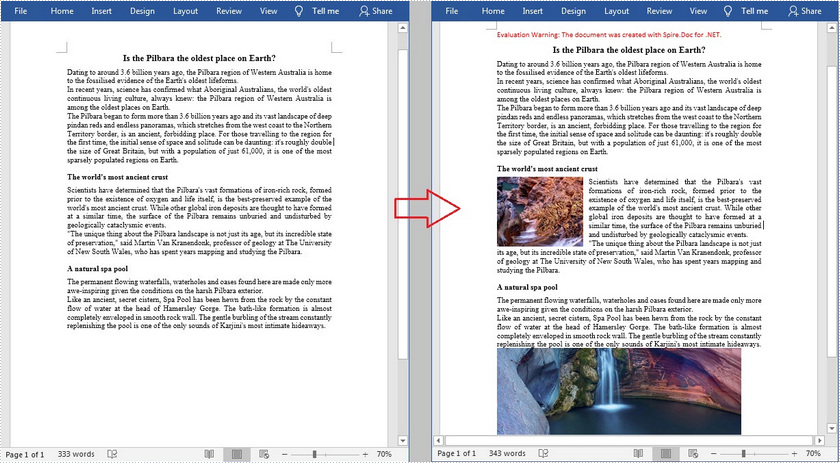
在 Word 文档中插入图像并设置其环绕样式
Spire.Doc for .NET 支持常见的环绕样式,例如 In Line with Text、Square、Tight、Through、Top 和 Bottom、Behind the Text 以及 In Front of Text。以下是插入图像然后设置其环绕样式的详细步骤。
- 创建一个文档实例。
- 使用Document.LoadFromFile()方法加载示例 Word 文档。
- 使用Document.Sections[]属性获取 Word 文档的第一部分。
- 使用Section.Paragraphs[]属性获取该部分的指定段落。
- 使用Paragraph.AppendPicture()方法加载图像并在指定段落中插入图像。
- 使用DocPicture.TextWrappingType属性设置图像的环绕样式。
- 使用Document.SaveToFile()方法将文档保存到另一个文件。
【C#】
using System.Drawing;
using Spire.Doc;
using Spire.Doc.Documents;
using Spire.Doc.Fields;namespace WordImage
{
class ImageinWord
{
static void Main(string[] args)
{
//Create a Document instance
Document document = new Document();//Load a sample Word document
document.LoadFromFile("input.docx");//Get the first section
Section section = document.Sections[0];//Get two specified paragraphs
Paragraph para1 = section.Paragraphs[5];
Paragraph para2 = section.Paragraphs[9];//Insert images in the specified paragraphs
DocPicture Pic1 = para1.AppendPicture(Image.FromFile(@"C:\Users\Administrator\Desktop\pic1.jpg"));
DocPicture Pic2 = para2.AppendPicture(Image.FromFile(@"C:\Users\Administrator\Desktop\pic2.png"));//Set wrapping styles to Square and Inline respectively
Pic1.TextWrappingStyle = TextWrappingStyle.Square;
Pic2.TextWrappingStyle = TextWrappingStyle.Inline;//Save the document to file
document.SaveToFile("InsertImage.docx", FileFormat.Docx);
}
}
}
【VB.NET】
Imports System.Drawing
Imports Spire.Doc
Imports Spire.Doc.Documents
Imports Spire.Doc.FieldsNamespace WordImage
Class ImageinWord
Private Shared Sub Main(ByVal args As String())'Create a Document instance
Dim document As Document = New Document()'Load a sample Word document
document.LoadFromFile("sample.docx")'Get the first section
Dim section As Section = document.Sections(0)'Get two specified paragraphs
Dim para1 As Paragraph = section.Paragraphs(5)
Dim para2 As Paragraph = section.Paragraphs(9)'Insert images in the specified paragraphs
Dim Pic1 As DocPicture = para1.AppendPicture(Image.FromFile("C:\Users\Administrator\Desktop\pic1.jpg"))
Dim Pic2 As DocPicture = para2.AppendPicture(Image.FromFile("C:\Users\Administrator\Desktop\pic2.png"))‘Set wrapping styles to Square and Inline respectively
Pic1.TextWrappingStyle = TextWrappingStyle.Square
Pic2.TextWrappingStyle = TextWrappingStyle.Inline'Save the document to file
document.SaveToFile("InsertImage.docx", FileFormat.Docx)
End Sub
End Class
End Namespace
在 Word 文档的指定位置插入图像
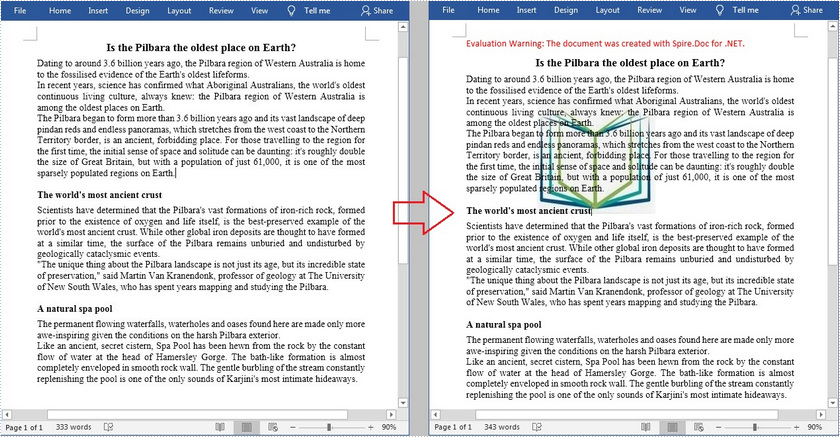
Spire.Doc for .NET 提供的DocPicture.Horizo ntalPosition和DocPicture.VerticalPosition属性允许您在指定位置插入图像。详细步骤如下。
- 创建一个文档实例。
- 使用Document.LoadFromFile()方法加载示例 Word 文档。
- 使用Document.Sections[]属性获取 Word 文档的第一部分。
- 使用Section.Paragraphs[]属性获取该部分的指定段落。
- 使用Paragraph.AppendPicture()方法加载图像并将图像插入到文档中。
- 使用DocPicture.HorizontalPosition和DocPicture.VerticalPosition属性设置图像的水平和垂直位置。
- 使用DocPicture.Width和DocPicture.Height属性设置图像的高度和宽度。
- 使用DocPicture.TextWrappingType属性设置图像的环绕样式。
- 使用Document.SaveToFile()方法将文档保存到另一个文件。
【C#】
using Spire.Doc;
using Spire.Doc.Documents;
using Spire.Doc.Fields;
using System.Drawing;namespace InsertImage
{
class Program
{
static void Main(string[] args)
{
//Create a Document instance
Document document = new Document();//Load a sample Word document
document.LoadFromFile("input.docx");//Get the first section
Section section = document.Sections[0];//Load an image and insert it to the document
DocPicture picture = section.Paragraphs[0].AppendPicture(Image.FromFile(@"C:\Users\Administrator\Desktop\pic.jpg"));//Set the position of the image
picture.HorizontalPosition = 90.0F;
picture.VerticalPosition = 50.0F;//Set the size of the image
picture.Width = 150;
picture.Height = 150;//Set the wrapping style to Behind
picture.TextWrappingStyle = TextWrappingStyle.Behind;// Save the document to file
document.SaveToFile("Insert.docx", FileFormat.Docx);
}
}
}
【VB.NET】
Imports Spire.Doc
Imports Spire.Doc.Documents
Imports Spire.Doc.FieldsNamespace InsertImage
Class Program
Private Shared Sub Main(ByVal args As String())'Create a Document instance
Dim document As Document = New Document()'Load a sample Word document
document.LoadFromFile("input.docx")'Get the first section
Dim section As Section = document.Sections(0)'Load an image and insert it to the document
Dim picture As DocPicture = section.Paragraphs(0).AppendPicture(Image.FromFile("C:\Users\Administrator\Desktop\pic.jpg"))'Set the position of the image
picture.HorizontalPosition = 90.0F
picture.VerticalPosition = 50.0F'Set the size of the image
picture.Width = 150
picture.Height = 150' Set the wrapping style to Behind
picture.TextWrappingStyle = TextWrappingStyle.Behind' Save the document to file
document.SaveToFile("Insert.docx", FileFormat.Docx)
End Sub
End Class
End Namespace
以上便是如何在 Word 中插入图像(C#/VB.NET),如果您有其他问题也可以继续浏览本系列文章,获取相关教程,你还可以给我留言或者加入我们的官方技术交流群。
上一篇:跟“电”有关的词语有哪些