

数据库:Centos7安装解压版mysql5.7图文教程,亲测成功
创始人
2024-02-07 23:32:11

目录
1、卸载Centos7默认自带的mariadb数据库,避免冲突
2、下载解压版mysql并安装
3、配置mysql
4、mysql客户端访问
Centos7安装mysql5.7解压版完整教程避免踩坑,可以把数据目录和系统目录分开设置。
1、卸载Centos7默认自带的mariadb数据库,避免冲突
#先查询是否安装,找到已安装的对应mariadb,
yum list installed |grep mariadb
#列表展示的是mariadb-libs.x86_64 ,执行如下命令进行安装
yum remove mariadb-libs.x86_64
2、下载解压版mysql并安装
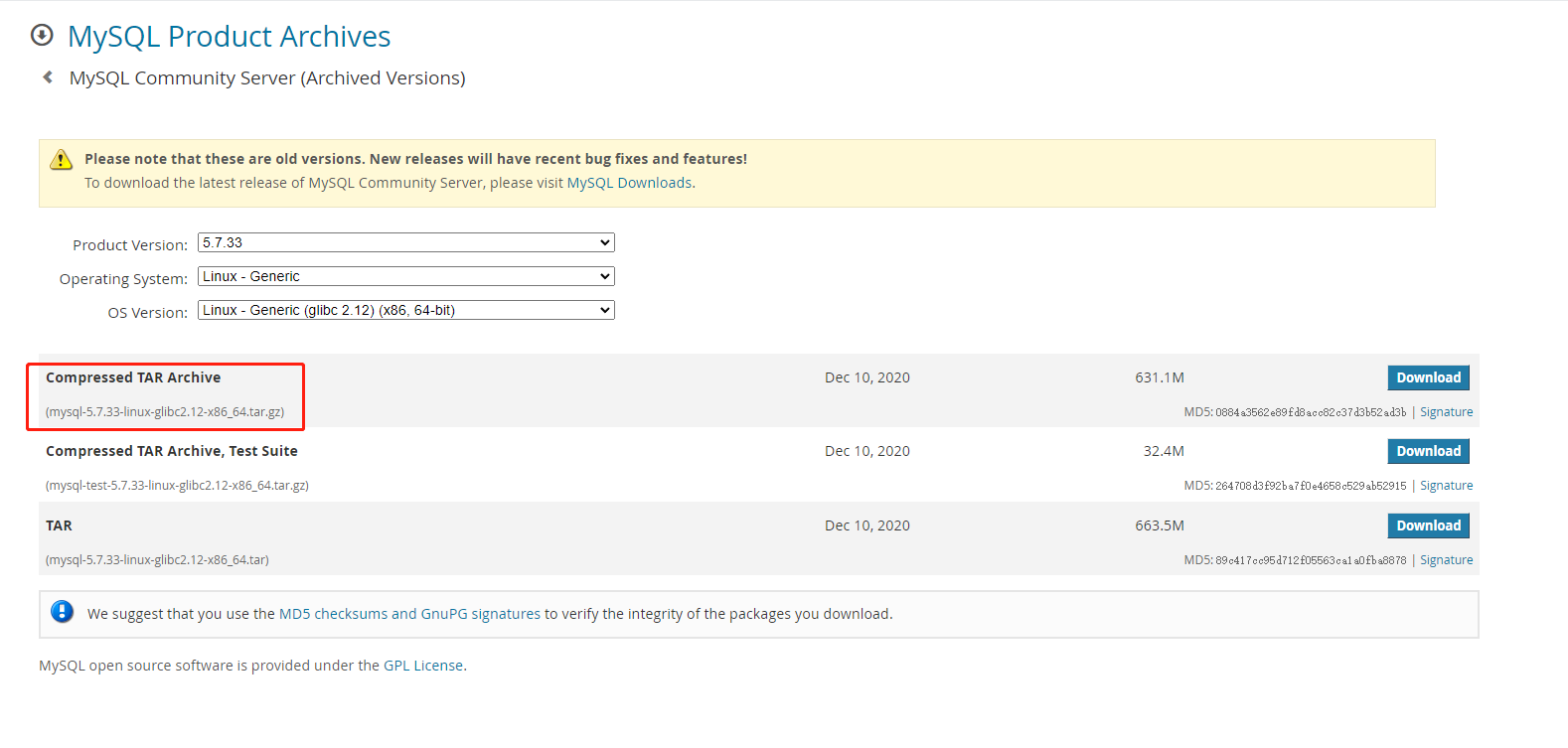
下载mysql5.7解压版,我下载的版本mysql-5.7.33-linux-glibc2.12-x86_64.tar.gz
MySQL :: Download MySQL Community Server (Archived Versions)
#创建MySQL上传目录
mkdir /opt/tools
#然后登录Linux服务器,将下载好的安装包上传到服务器的/opt/tools目录。执行解压命令
cd /opt/tools
tar -zxf /data/tools/mysql-5.7.33-linux-glibc2.12-x86_64.tar.gz
#解压后的目录改名
mv mysql-5.7.27-linux-glibc2.12-x86_64 mysql
#移动mysql到 /usr/local/mysql
mv mysql-5.7.27-linux-glibc2.12-x86_64 /usr/local/mysql
cd /usr/local/mysql
#创建用户组和用户 mysql
groupadd mysql
useradd -r -g mysql mysql
#目录授权
chgrp -R mysql .
chown -R mysql .
#创建MySQL存储数据的目录
mkdir /data/mysql/data
mkdir /data/mysql/share
进入bin目录执行初始化
cd /usr/local/mysql/bin
./mysqld --initialize --user=mysql --basedir=/usr/local/mysql/ --datadir=/data/mysql/data/ --lc_messages_dir=/data/mysql/share --lc_messages=en_US
注意:执行完成后输出的内容最后一行是数据库root的密码,一定要先保存下来

进入support-files,修改mysql.server
cd /usr/local/mysql/support-files
#!/bin/sh
# Copyright Abandoned 1996 TCX DataKonsult AB & Monty Program KB & Detron HB
# This file is public domain and comes with NO WARRANTY of any kind# MySQL daemon start/stop script.# Usually this is put in /etc/init.d (at least on machines SYSV R4 based
# systems) and linked to /etc/rc3.d/S99mysql and /etc/rc0.d/K01mysql.
# When this is done the mysql server will be started when the machine is
# started and shut down when the systems goes down.# Comments to support chkconfig on RedHat Linux
# chkconfig: 2345 64 36
# description: A very fast and reliable SQL database engine.# Comments to support LSB init script conventions
### BEGIN INIT INFO
# Provides: mysql
# Required-Start: $local_fs $network $remote_fs
# Should-Start: ypbind nscd ldap ntpd xntpd
# Required-Stop: $local_fs $network $remote_fs
# Default-Start:  2 3 4 5
# Default-Stop: 0 1 6
# Short-Description: start and stop MySQL
# Description: MySQL is a very fast and reliable SQL database engine.
### END INIT INFO# If you install MySQL on some other places than /usr/local/mysql, then you
# have to do one of the following things for this script to work:
#
# - Run this script from within the MySQL installation directory
# - Create a /etc/my.cnf file with the following information:
#   [mysqld]
#   basedir=
# - Add the above to any other configuration file (for example ~/.my.ini)
#   and copy my_print_defaults to /usr/bin
# - Add the path to the mysql-installation-directory to the basedir variable
#   below.
#
# If you want to affect other MySQL variables, you should make your changes
# in the /etc/my.cnf, ~/.my.cnf or other MySQL configuration files.# If you change base dir, you must also change datadir. These may get
# overwritten by settings in the MySQL configuration files.basedir=
datadir=/data/mysql/data# Default value, in seconds, afterwhich the script should timeout waiting
# for server start.
# Value here is overriden by value in my.cnf.
# 0 means don't wait at all
# Negative numbers mean to wait indefinitely
service_startup_timeout=900# Lock directory for RedHat / SuSE.
lockdir='/var/lock/subsys'
lock_file_path="$lockdir/mysql"# The following variables are only set for letting mysql.server find things.# Set some defaults
mysqld_pid_file_path=
if test -z "$basedir"
thenbasedir=/usr/local/mysqlbindir=/usr/local/mysql/binif test -z "$datadir"thendatadir=/data/mysql/datafisbindir=/usr/local/mysql/binlibexecdir=/usr/local/mysql/bin
elsebindir="$basedir/bin"if test -z "$datadir"thendatadir="/data/mysql/data"fisbindir="$basedir/sbin"libexecdir="$basedir/libexec"
fi# datadir_set is used to determine if datadir was set (and so should be
# *not* set inside of the --basedir= handler.)
datadir_set=#
# Use LSB init script functions for printing messages, if possible
#
lsb_functions="/lib/lsb/init-functions"
if test -f $lsb_functions ; then. $lsb_functions
elselog_success_msg(){echo " SUCCESS! $@"}log_failure_msg(){echo " ERROR! $@"}
fiPATH="/sbin:/usr/sbin:/bin:/usr/bin:$basedir/bin"
export PATHmode=$1    # start or stop[ $# -ge 1 ] && shiftother_args="$*"   # uncommon, but needed when called from an RPM upgrade action# Expected: "--skip-networking --skip-grant-tables"# They are not checked here, intentionally, as it is the resposibility# of the "spec" file author to give correct arguments only.case `echo "testing\c"`,`echo -n testing` in
    *c*,-n*) echo_n=   echo_c=     ;;
    *c*,*)   echo_n=-n echo_c=     ;;
    *)       echo_n=   echo_c='\c' ;;
esacparse_server_arguments() {for arg docase "$arg" in
      --basedir=*)  basedir=`echo "$arg" | sed -e 's/^[^=]*=//'`bindir="$basedir/bin"if test -z "$datadir_set"; thendatadir="$basedir/data"fisbindir="$basedir/sbin"libexecdir="$basedir/libexec";;
      --datadir=*)  datadir=`echo "$arg" | sed -e 's/^[^=]*=//'`datadir_set=1
;;
      --pid-file=*) mysqld_pid_file_path=`echo "$arg" | sed -e 's/^[^=]*=//'` ;;
      --service-startup-timeout=*) service_startup_timeout=`echo "$arg" | sed -e 's/^[^=]*=//'` ;;esacdone
}wait_for_pid () {verb="$1"           # created | removedpid="$2"            # process ID of the program operating on the pid-filepid_file_path="$3" # path to the PID file.i=0avoid_race_condition="by checking again"while test $i -ne $service_startup_timeout ; docase "$verb" in'created')# wait for a PID-file to pop into existence.test -s "$pid_file_path" && i='' && break;;'removed')# wait for this PID-file to disappeartest ! -s "$pid_file_path" && i='' && break;;
      *)echo "wait_for_pid () usage: wait_for_pid created|removed pid pid_file_path"exit 1;;esac# if server isn't running, then pid-file will never be updatedif test -n "$pid"; thenif kill -0 "$pid" 2>/dev/null; then:  # the server still runselse# The server may have exited between the last pid-file check and now.  if test -n "$avoid_race_condition"; thenavoid_race_condition=""continue  # Check again.fi# there's nothing that will affect the file.
        log_failure_msg "555555The server quit without updating PID file ($pid_file_path)."return 1  # not waiting any more.fifiecho $echo_n ".$echo_c"i=`expr $i + 1`sleep 1doneif test -z "$i" ; then
    log_success_msgreturn 0else
    log_failure_msgreturn 1fi
}# Get arguments from the my.cnf file,
# the only group, which is read from now on is [mysqld]
if test -x "$bindir/my_print_defaults";  thenprint_defaults="$bindir/my_print_defaults"
else# Try to find basedir in /etc/my.cnfconf=/etc/my.cnfprint_defaults=if test -r $confthensubpat='^[^=]*basedir[^=]*=\(.*\)$'dirs=`sed -e "/$subpat/!d" -e 's//\1/' $conf`for d in $dirsdod=`echo $d | sed -e 's/[ ]//g'`if test -x "$d/bin/my_print_defaults"thenprint_defaults="$d/bin/my_print_defaults"breakfidonefi# Hope it's in the PATH ... but I doubt ittest -z "$print_defaults" && print_defaults="my_print_defaults"
fi#
# Read defaults file from 'basedir'.   If there is no defaults file there
# check if it's in the old (depricated) place (datadir) and read it from there
#extra_args=""
if test -r "$basedir/my.cnf"
thenextra_args="-e $basedir/my.cnf"
fiparse_server_arguments `$print_defaults $extra_args mysqld server mysql_server mysql.server`#
# Set pid file if not given
#
if test -z "$mysqld_pid_file_path"
thenmysqld_pid_file_path=$datadir/`hostname`.pid
elsecase "$mysqld_pid_file_path" in
    /* ) ;;
    * )  mysqld_pid_file_path="$datadir/$mysqld_pid_file_path" ;;esac
ficase "$mode" in'start')# Start daemon# Safeguard (relative paths, core dumps..)cd $basedir# 重启sqlecho $echo_n "Starting MySQL"if test -x $bindir/mysqld_safethen# Give extra arguments to mysqld with the my.cnf file. This script# may be overwritten at next upgrade.$bindir/mysqld_safe --datadir="$datadir" --pid-file="$mysqld_pid_file_path" $other_args >/dev/null &
      wait_for_pid created "$!" "$mysqld_pid_file_path"; return_value=$?# Make lock for RedHat / SuSEif test -w "$lockdir"thentouch "$lock_file_path"fiexit $return_valueelse
      log_failure_msg "Couldn't find MySQL server ($bindir/mysqld_safe)"fi;;'stop')# Stop daemon. We use a signal here to avoid having to know the# root password.if test -s "$mysqld_pid_file_path"then# signal mysqld_safe that it needs to stoptouch "$mysqld_pid_file_path.shutdown"mysqld_pid=`cat "$mysqld_pid_file_path"`if (kill -0 $mysqld_pid 2>/dev/null)thenecho $echo_n "Shutting down MySQL"kill $mysqld_pid# mysqld should remove the pid file when it exits, so wait for it.
        wait_for_pid removed "$mysqld_pid" "$mysqld_pid_file_path"; return_value=$?else
        log_failure_msg "MySQL server process #$mysqld_pid is not running!"rm "$mysqld_pid_file_path"fi# Delete lock for RedHat / SuSEif test -f "$lock_file_path"thenrm -f "$lock_file_path"fiexit $return_valueelse
      log_failure_msg "MySQL server PID file could not be found!"fi;;'restart')# Stop the service and regardless of whether it was# running or not, start it again.if $0 stop  $other_args; then$0 start $other_argselse
      log_failure_msg "Failed to stop running server, so refusing to try to start."exit 1fi;;'reload'|'force-reload')if test -s "$mysqld_pid_file_path" ; thenread mysqld_pid <  "$mysqld_pid_file_path"kill -HUP $mysqld_pid && log_success_msg "Reloading service MySQL"touch "$mysqld_pid_file_path"else
      log_failure_msg "MySQL PID file could not be found!"exit 1fi;;'status')# First, check to see if pid file existsif test -s "$mysqld_pid_file_path" ; then read mysqld_pid < "$mysqld_pid_file_path"if kill -0 $mysqld_pid 2>/dev/null ; then
        log_success_msg "MySQL running ($mysqld_pid)"exit 0else
        log_failure_msg "MySQL is not running, but PID file exists"exit 1fielse# Try to find appropriate mysqld processmysqld_pid=`pidof $libexecdir/mysqld`# test if multiple pids existpid_count=`echo $mysqld_pid | wc -w`if test $pid_count -gt 1 ; then
        log_failure_msg "Multiple MySQL running but PID file could not be found ($mysqld_pid)"exit 5elif test -z $mysqld_pid ; then if test -f "$lock_file_path" ; then
          log_failure_msg "MySQL is not running, but lock file ($lock_file_path) exists"exit 2fi
        log_failure_msg "MySQL is not running"exit 3else
        log_failure_msg "MySQL is running but PID file could not be found"exit 4fifi;;
    *)# usagebasename=`basename "$0"`echo "Usage: $basename  {start|stop|restart|reload|force-reload|status}  [ MySQL server options ]"exit 1;;
esacexit 0
注意:修改mysql.server 文件里面数据目录为 /data/mysql/data/ 一定要正确设置
#复制mysql启动文件到服务文件夹
cp mysql.server /etc/init.d/mysql
#通过服务命令启动mysql
service mysql start
#输出 success 表示启动成功
#设置开机自启
/sbin/chkconfig mysql on
systemctl enable mysql
#查看自启动配置
/sbin/chkconfig --list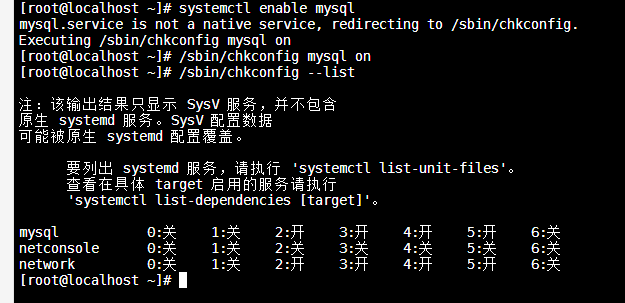
技巧:添加 mysql 软连接,方面在任何目录执行MySQL命令
ln -s /usr/local/mysql/bin/mysql /usr/bin/mysql说明:如果需要额外配置参数,默认没有/etc/my.cnf 文件内容如下
vim /etc/my.cnf
比如需要新增大小写不敏感配置,其余配置可根据业务需要进行配置
[mysqld]
lower_case_table_names = 1
然后保存后重启mysql服务
service mysql stop
service mysql start
3、配置mysql
mysql -u root -p
#输入初始化的密码
#修改密码
set password=password(“12345678”);
#设置任意IP都能通过root用户访问该数据库
GRANT ALL PRIVILEGES ON *.* TO 'root'@'%' IDENTIFIED BY '12345678' WITH GRANT OPTION;
#刷新权限
flush privileges;
#重启mysql
service mysql restart
#设置防火墙
firewall-cmd --zone=public --add-port=3306/tcp --permanent
systemctl restart firewalld
4、mysql客户端访问
然后使用本地MySQL客户端访问,确认是否可以正常登录。
相关内容
热门资讯
埃菲尔铁塔在哪 中国仿建埃菲尔...
2019年4月26日,广西南宁市,街头惊现一座巨型山寨版埃菲尔铁塔,高约20米,白色塔身,造型逼真,...
苗族的传统节日 贵州苗族节日有...
【岜沙苗族芦笙节】岜沙,苗语叫“分送”,距从江县城7.5公里,是世界上最崇拜树木并以树为神的枪手部落...
北京的名胜古迹 北京最著名的景...
北京从元代开始,逐渐走上帝国首都的道路,先是成为大辽朝五大首都之一的南京城,随着金灭辽,金代从海陵王...
应用未安装解决办法 平板应用未...
---IT小技术,每天Get一个小技能!一、前言描述苹果IPad2居然不能安装怎么办?与此IPad不...
脚上的穴位图 脚面经络图对应的...
人体穴位作用图解大全更清晰直观的标注了各个人体穴位的作用,包括头部穴位图、胸部穴位图、背部穴位图、胳...
长白山自助游攻略 吉林长白山游...
昨天介绍了西坡的景点详细请看链接:一个人的旅行,据说能看到长白山天池全凭运气,您的运气如何?今日介绍...
猫咪吃了塑料袋怎么办 猫咪误食...
你知道吗?塑料袋放久了会长猫哦!要说猫咪对塑料袋的喜爱程度完完全全可以媲美纸箱家里只要一有塑料袋的响...
demo什么意思 demo版本...
618快到了,各位的小金库大概也在准备开闸放水了吧。没有小金库的,也该向老婆撒娇卖萌服个软了,一切只...
世界上最漂亮的人 世界上最漂亮...
此前在某网上,选出了全球265万颜值姣好的女性。从这些数量庞大的女性群体中,人们投票选出了心目中最美...
埃菲尔铁塔在哪 中国仿建埃菲尔...
2019年4月26日,广西南宁市,街头惊现一座巨型山寨版埃菲尔铁塔,高约20米,白色塔身,造型逼真,...
苗族的传统节日 贵州苗族节日有...
【岜沙苗族芦笙节】岜沙,苗语叫“分送”,距从江县城7.5公里,是世界上最崇拜树木并以树为神的枪手部落...
北京的名胜古迹 北京最著名的景...
北京从元代开始,逐渐走上帝国首都的道路,先是成为大辽朝五大首都之一的南京城,随着金灭辽,金代从海陵王...
应用未安装解决办法 平板应用未...
---IT小技术,每天Get一个小技能!一、前言描述苹果IPad2居然不能安装怎么办?与此IPad不...