

把Mybatis Generator生成的代码加上想要的注释
作者:王建乐
1 前言
在日常开发工作中,我们经常用Mybatis Generator根据表结构生成对应的实体类和Mapper文件。但是Mybatis Generator默认生成的代码中,注释并不是我们想要的,所以一般在Generator配置文件中,会设置不自动生成注释。带来的问题就是自动生成代码之后,我们还要自己去类文件中把注释加上,如果生成的类较少还好,如果有生成很多类文件,自己加注释是一件繁琐的工作。
通过重写Mybatis Generator的CommentGenerator接口,可以方便地生成自己想要的注释,减少重复工作。
2 使用Java方式执行Mybatis Generator
2.1 IDEA中新建Maven项目
pom.xml中引入jar包
4.0.0 org.example MyGenerator 1.0-SNAPSHOT 8 8 mysql mysql-connector-java 8.0.16 org.mybatis.generator mybatis-generator-core 1.3.7 2.2 创建generatorConfig.xml
随便找个目录放,我放在src/main/resources目录下
2.3 创建main方法,运行Generator
public class Generator {public static void main(String[] args) throws Exception {List warnings = new ArrayList<>(2);ConfigurationParser cp = new ConfigurationParser(warnings);File configFile = new File("src/main/resources/generatorConfig.xml");Configuration config = cp.parseConfiguration(configFile);DefaultShellCallback callback = new DefaultShellCallback(true);MyBatisGenerator = new MyBatisGenerator(config, callback, warnings);myBatisGenerator.generate(null);}
}
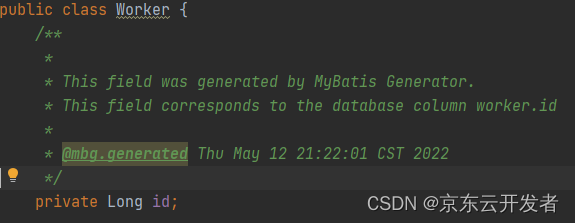
运行main方法,生成默认注释如下,并不是我们想要的注释,所以一般会配置为注释不生成:
2.4 实现CommentGenerator接口
重写以下方法,自定义注释
public class MySQLCommentGenerator implements CommentGenerator {private final Properties properties;public MySQLCommentGenerator() {properties = new Properties();}@Overridepublic void addConfigurationProperties(Properties properties) {// 获取自定义的 propertiesthis.properties.putAll(properties);}/*** 重写给实体类加的注释*/@Overridepublic void addModelClassComment(TopLevelClass topLevelClass, IntrospectedTable introspectedTable) {String author = properties.getProperty("author");String dateFormat = properties.getProperty("dateFormat", "yyyy-MM-dd");SimpleDateFormat dateFormatter = new SimpleDateFormat(dateFormat);// 获取表注释String remarks = introspectedTable.getRemarks();topLevelClass.addJavaDocLine("/**");topLevelClass.addJavaDocLine(" * " + remarks);topLevelClass.addJavaDocLine(" *");topLevelClass.addJavaDocLine(" * @author " + author);topLevelClass.addJavaDocLine(" * @date " + dateFormatter.format(new Date()));topLevelClass.addJavaDocLine(" */");}/*** 重写给实体类字段加的注释*/@Overridepublic void addFieldComment(Field field, IntrospectedTable introspectedTable, IntrospectedColumn introspectedColumn) {// 获取列注释String remarks = introspectedColumn.getRemarks();field.addJavaDocLine("/**");field.addJavaDocLine(" * " + remarks);field.addJavaDocLine(" */");}/*** 重写给实体类get方法加的注释*/@Overridepublic void addGetterComment(Method method, IntrospectedTable introspectedTable, IntrospectedColumn introspectedColumn) {// 获取表注释String remarks = introspectedColumn.getRemarks();method.addJavaDocLine("/**");method.addJavaDocLine(" * " + method.getName());method.addJavaDocLine(" */");}
2.5 修改generatorConfig.xml配置
将generatorConfig.xml文件中的commentGenerator做如下修改,type属性选择自己的实现类
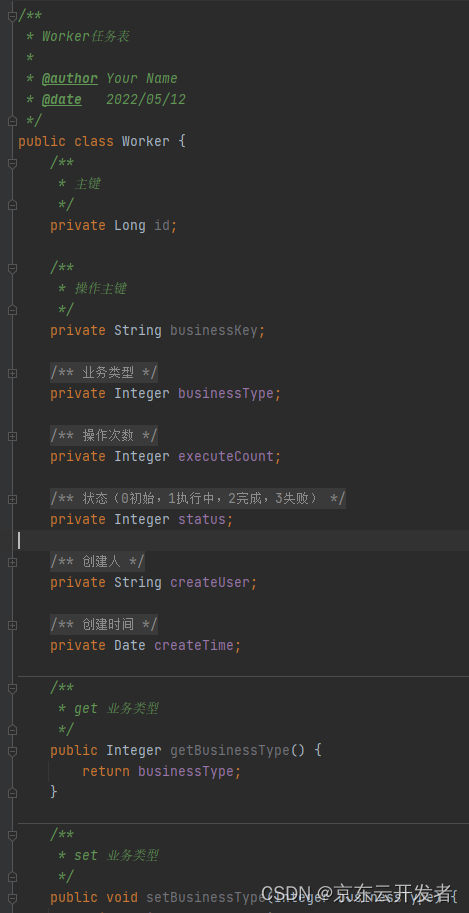
运行main方法,生成注释如下:
3 使用Maven方式执行Mybatis Generator
Pom.xml文件中增加以下配置,需要引入generator插件时,依赖实现CommentGenerator接口的jar包,要先把自己的jar包install到本地仓库。
否则会报com.generator.MySQLCommentGenerator找不到,其他配置同上。
compile org.mybatis.generator mybatis-generator-maven-plugin 1.4.0 src/main/resources/generatorConfig.xml true true mysql mysql-connector-java 8.0.16 org.example MyGenerator 1.0-SNAPSHOT 4 源码分析
查看执行Mybatis Generator的main方法,主要分为两部分,解析指定的配置文件与调用生成java文件和Mapper文件的方法
![[外链图片转存失败,源站可能有防盗链机制,建议将图片保存下来直接上传(img-T73pImTv-1669100514285)(https://p3-juejin.byteimg.com/tos-cn-i-k3u1fbpfcp/160df2ea4d98419fb661b1023219ce81~tplv-k3u1fbpfcp-zoom-1.image)]](/uploadfile/202402/51c11e5b3302192.png)
4.1 解析指定的xml配置文件
跟踪解析xml文件的方法cp.parseConfiguration(configFile)发现,底层以Document形式读取xml文件,根据标签名解析各标签属性,保存到Configuration实例中。
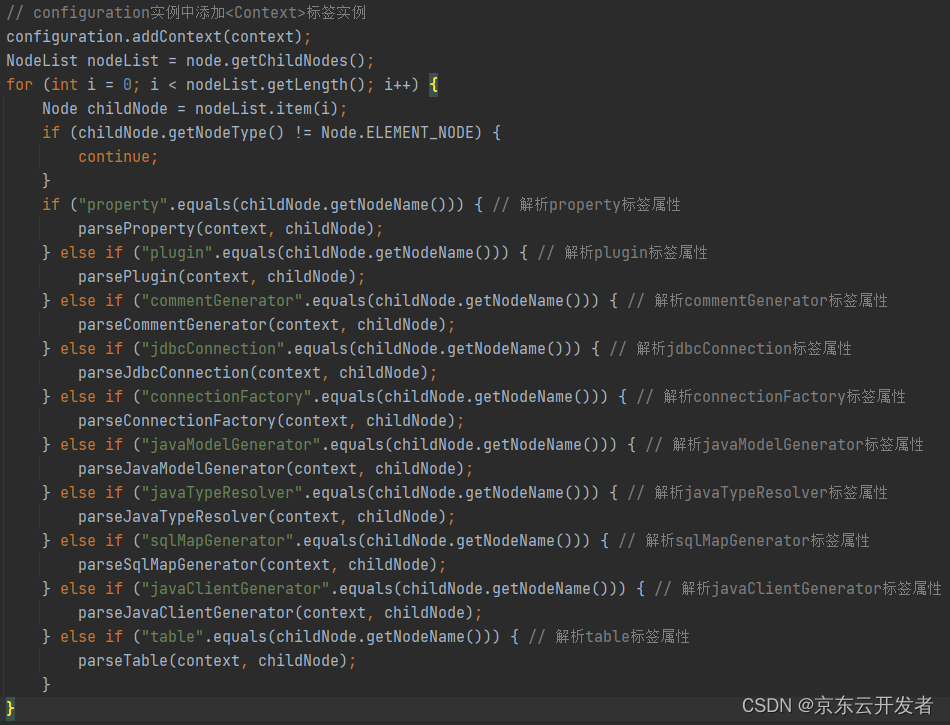
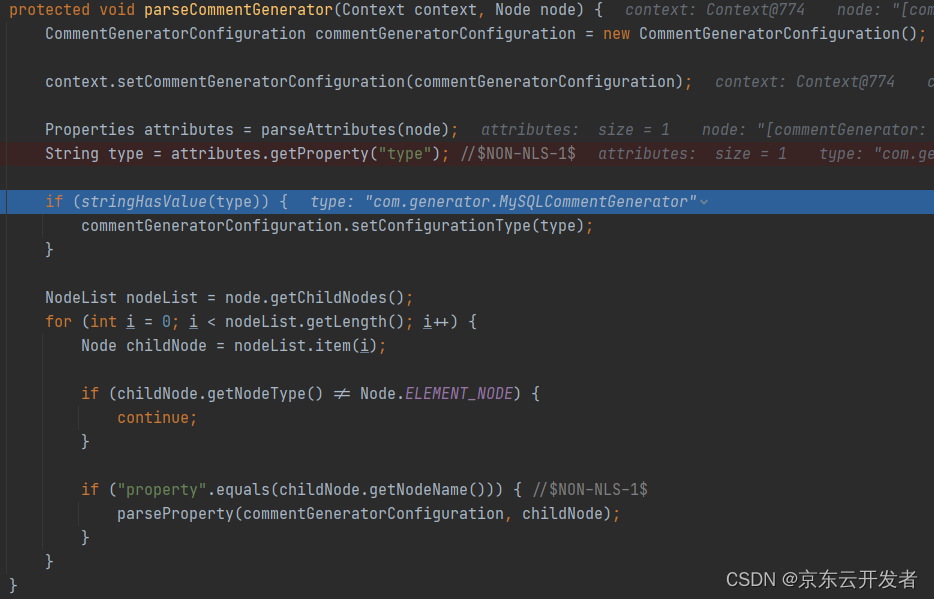
其中解析commentGenerator标签的方法parseCommentGenerator(context, childNode)中,会获取commentGenerator标签的type属性值,也就是自定义的”com.generator.MySQLCommentGenerator”类,放到Context实例中。
4.2 调用生成java文件和Mapper文件的方法
xml配置文件解析完成,得到Configuration实例,后面生成文件的工作都会从Configuration实例中获取所需数据。生成文件的方法主要步骤为:1.连接数据库,查询表信息与列信息,2.生成文件内容,3.写入生成文件。
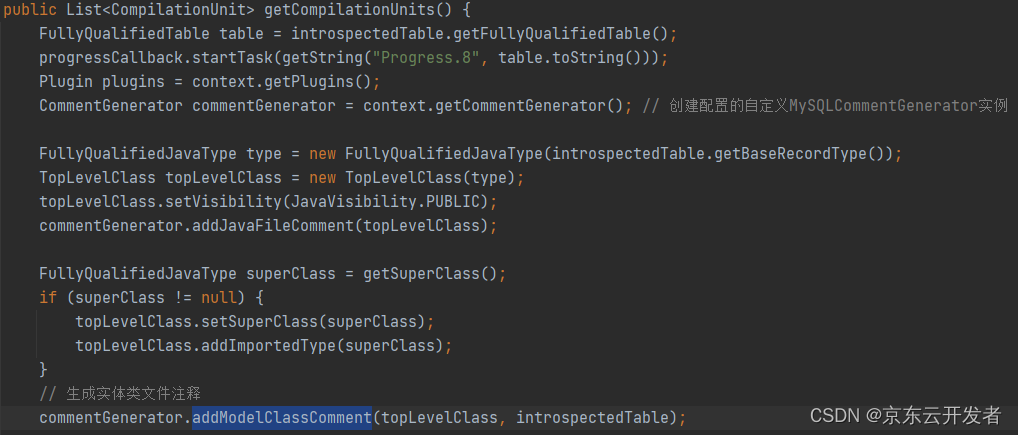
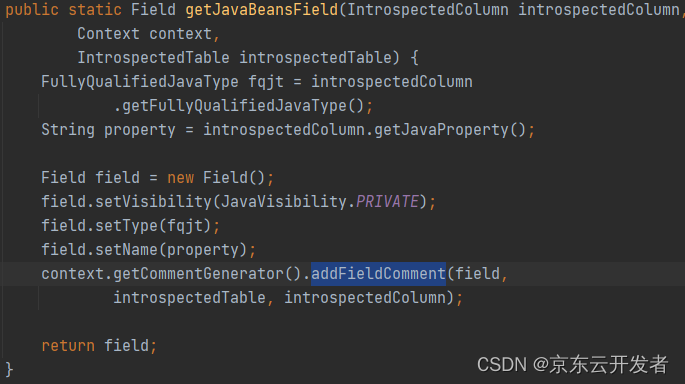
其中生成文件内容时,会根据Context的type属性反射创建MySQLCommentGenerator实例,然后调用自定义的生成注释方法。
如:生成实体类文件的注释,调用addModelClassComment方法
生成字段注释,调用addFieldComment方法
生成Get方法注释,调用addGetterComment方法
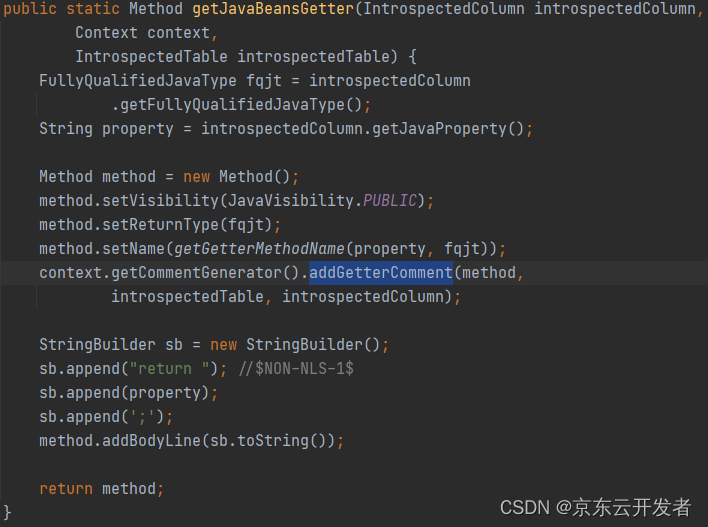
在调用addModelClassComment,addFieldComment,addGetterComment等生成注释的方法时,执行的都是MySQLCommentGenerator类的方法,这样就实现了生成自定义注释的功能。
5 总结
通过使用自定义实现CommentGenerator接口,让自动生成的代码加上我们想要的注释,可以省去自己加注释的麻烦。
与一般使用Mybatis Generator生成代码的方式一样,多实现个接口即可。
使用Maven方式运行时,需要在pom.xml引入插件时,依赖自己jar包。
上一篇:求800字团课总结