

正点原子 核心板IMX6ULL IIC RTC驱动 PCF8563
目录
- 前言
- IIC RTC PCF8563硬件使用
- IIC设备地址
- 配置 menuconfig 自带PCF8563驱动
- 修改设备树dtb
- 编写应用App
- 测试
前言
此篇基于学完【正点原子】I.MX6U嵌入式Linux驱动开发指南V1.6 后,使用核心板进行自行设置。
IIC RTC PCF8563硬件使用
Imx6ul内部的RTC时钟不是很准, 而且特别耗电,纽扣电池撑不住,于是外置RTC芯片PCF8563
PCF8563的规格书可以在立创商城上下载。这里截取需要的部分。
IIC设备地址
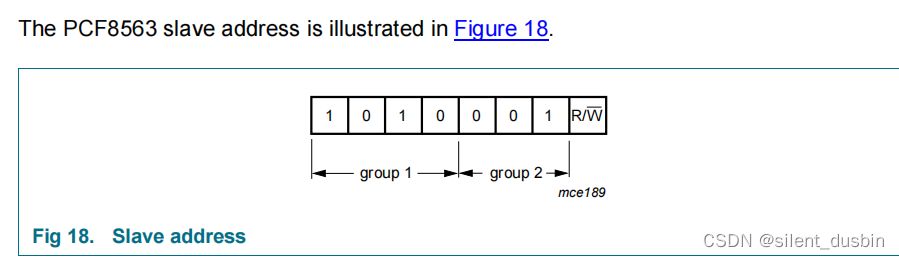
说明了IIC地址是1010001b = 0x51
配置 menuconfig 自带PCF8563驱动
Device Drivers —>
[*] Real Time Clock --->[*] Set system time from RTC on startup and resume (自动同步时间)<*> Philips PCF8563/Epson RTC8564 (CONFIG_RTC_DRV_PCF8563)
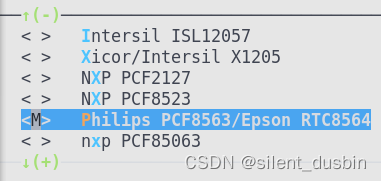
我这里配置成模块,选择M,不配置成Y,也就是不编译进内核,编译成模块。
在内核代码里只编译模块,命令make ARCH=arm CROSS_COMPILE=arm-linux-gnueabihf- modules
编译完成后会有一行提示生成了 rtc-pcf8563.ko 这个目录下:

把.ko 放到/lib/modules/4.1.15/目录下,这里正当原子手册上教过怎么操作模块文件的。
修改设备树dtb
比如连接的I2C1,把原来的ap3216注释掉,改成新的pcf8563,设备地址是0x51(前面说过的)
&i2c1 {clock-frequency = <100000>;pinctrl-names = "default";pinctrl-0 = <&pinctrl_i2c1>;status = "okay";pcf8563@51 {compatible = "nxp,pcf8563";reg = <0x51>;#clock-cells = <0>;};/* ap3216c@1e {compatible = "alientek,ap3216c";reg = <0x1e>;};*/
然后把compatible 改成 “nxp,pcf8563”
因为在menuconfig里配置pcf8563就是启用了rtc-pcf8563.c,这个文件又会被编译成.ko,这里面提到了device id pcf8563 of match, 要求compatible为"nxp,pcf8563"。
#ifdef CONFIG_OF
static const struct of_device_id pcf8563_of_match[] = {{ .compatible = "nxp,pcf8563" },{}
};
MODULE_DEVICE_TABLE(of, pcf8563_of_match);
#endif
编写应用App
正点原子的操作是编写个App来操作RTC,不编写用linux 自带的hwclock 命令也可以。
#include "stdio.h"
#include "unistd.h"
#include "sys/types.h"
#include "sys/stat.h"
#include "sys/ioctl.h"
#include "fcntl.h"
#include "stdlib.h"
#include "string.h"
#include
#include
#include
#include
#include
#include int main(int argc, char** argv)
{int pcf8563, ret;struct rtc_time rtc_tm;int fd, retvalue;char *filename;if(argc != 2){printf("Error Usage!\r\n");return -1;}filename = argv[1];pcf8563 = open(filename, O_RDWR);if(fd < 0){printf("file %s open failed!\r\n", argv[1]);return -1;}ret = ioctl(pcf8563, RTC_RD_TIME, &rtc_tm);printf("ret:%d\r\n",ret);if(ret == 0){printf("Time: %04d-%02d-%02d %02d:%02d:%02d\n", rtc_tm.tm_year+1900, rtc_tm.tm_mon+1,rtc_tm.tm_mday, rtc_tm.tm_hour, rtc_tm.tm_min, rtc_tm.tm_sec);}else{printf("pcf8563 error\n");}return 0;
}
按正点原子教的编译成PCF8563App 放到 /lib/modules/4.1.15下
测试
/lib/modules/4.1.15+ # depmod
random: nonblocking pool is initialized
/lib/modules/4.1.15+ # modprobe rtc-pcf8563.ko
rtc-pcf8563 0-0051: chip found, driver version 0.4.3
rtc rtc1: invalid alarm value: 1970-1-10 28:0:0
rtc-pcf8563 0-0051: rtc core: registered rtc-pcf8563 as rtc1
出现这段话就是成功了。
然后要先将系统时间写进硬件RTC,hwclock -f /dev/rtc1 -w
就可以直接读取了
/lib/modules/4.1.15+ # ./PCF8563App /dev/rtc1
ret:0
Time: 2022-11-22 12:15:40
/lib/modules/4.1.15+ #
上一篇:李宁的名言是什么
下一篇:免杀Veil-evasion