

百度paddle框架 目标检测
创始人
2024-02-08 17:43:01
random recording 随心记录
What seems to us as bitter trials are often blessings in disguise.
看起来对我们痛苦的试炼,常常是伪装起来的好运。
数据集准备
2183张图片,训练集1693张,验证集245,测试集245张。
包含7种昆虫,分别是Boerner、Leconte、Linnaeus、acuminatus、armandi、coleoptera和linnaeus。
目录结构
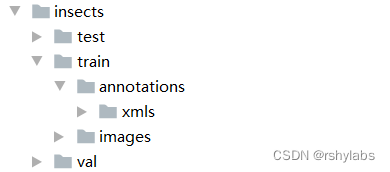
train/annotations/xmls目录下存放着图片的标注。每个xml文件是对一张图片的说明,包括图片尺寸、包含的昆虫名称、在图片上出现的位置等信息。
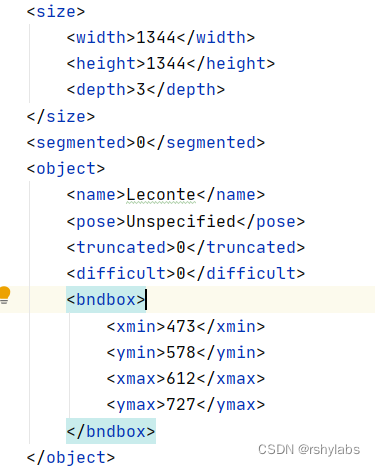
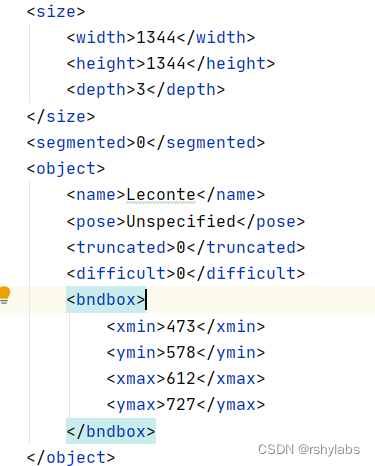
主要参数
size:图片尺寸。
object:图片中包含的物体,一张图片可能中包含多个物体。
– name:昆虫名称;
– bndbox:物体真实框;
– difficult:识别是否困难。
from PIL import Image, ImageEnhance
INSECT_NAMES = ['Boerner', 'Leconte', 'Linnaeus','acuminatus', 'armandi', 'coleoptera', 'linnaeus']
# 昆虫名字符串到数值映射
def get_insect_names():"""return a dict, as following,{'Boerner': 0,'Leconte': 1,'Linnaeus': 2,'acuminatus': 3,'armandi': 4,'coleoptera': 5,'linnaeus': 6}It can map the insect name into an integer label."""insect_category2id = {}for i, item in enumerate(INSECT_NAMES):insect_category2id[item] = ireturn insect_category2id
# print(get_insect_names())
# 读取数据,存放到records列表中
import os
import numpy as np
import xml.etree.ElementTree as ETdef get_annotations(cname2cid, datadir):filenames = os.listdir(os.path.join(datadir, 'annotations', 'xmls')) # 读取目录文件 datadir/annotations/xmlsrecords = []ct = 0for fname in filenames:fid = fname.split('.')[0]fpath = os.path.join(datadir, 'annotations', 'xmls', fname) # datadir/annotations/xmls/fname 具体xml文件img_file = os.path.join(datadir, 'images', fid + '.jpeg') # datadir/images/fid.jepg 图片文件tree = ET.parse(fpath) # 解析每一个xml文件if tree.find('id') is None:im_id = np.array([ct])else:im_id = np.array([int(tree.find('id').text)])objs = tree.findall('object')im_w = float(tree.find('size').find('width').text)im_h = float(tree.find('size').find('height').text)gt_bbox = np.zeros((len(objs), 4), dtype=np.float32)gt_class = np.zeros((len(objs), ), dtype=np.int32)is_crowd = np.zeros((len(objs), ), dtype=np.int32)difficult = np.zeros((len(objs), ), dtype=np.int32)for i, obj in enumerate(objs):cname = obj.find('name').textgt_class[i] = cname2cid[cname]_difficult = int(obj.find('difficult').text)x1 = float(obj.find('bndbox').find('xmin').text)y1 = float(obj.find('bndbox').find('ymin').text)x2 = float(obj.find('bndbox').find('xmax').text)y2 = float(obj.find('bndbox').find('ymax').text)x1 = max(0, x1)y1 = max(0, y1)x2 = min(im_w - 1, x2)y2 = min(im_h - 1, y2)# 这里使用xywh格式来表示目标物体真实框gt_bbox[i] = [(x1+x2)/2.0 , (y1+y2)/2.0, x2-x1+1., y2-y1+1.] # 锚点坐标is_crowd[i] = 0difficult[i] = _difficultvoc_rec = {'im_file': img_file,'im_id': im_id,'h': im_h,'w': im_w,'is_crowd': is_crowd,'gt_class': gt_class,'gt_bbox': gt_bbox,'gt_poly': [],'difficult': difficult}if len(objs) != 0:records.append(voc_rec)ct += 1return records
TRAINDIR = './data/insects/train'
TESTDIR = './data/insects/test'
VALIDDIR = './data/insects/val'
cname2cid = get_insect_names()
records = get_annotations(cname2cid, TRAINDIR)
# print(records[0])# 数据处理
import cv2def get_bbox(gt_bbox, gt_class):# 对于一般的检测任务来说,一张图片上往往会有多个目标物体# 设置参数MAX_NUM = 50, 即一张图片最多取50个真实框;如果真实# 框的数目少于50个,则将不足部分的gt_bbox, gt_class和gt_score的各项数值全设置为0MAX_NUM = 50gt_bbox2 = np.zeros((MAX_NUM, 4))gt_class2 = np.zeros((MAX_NUM,))for i in range(len(gt_bbox)):gt_bbox2[i, :] = gt_bbox[i, :]gt_class2[i] = gt_class[i]if i >= MAX_NUM:breakreturn gt_bbox2, gt_class2def get_img_data_from_file(record):"""record is a dict as following,record = {'im_file': img_file,'im_id': im_id,'h': im_h,'w': im_w,'is_crowd': is_crowd,'gt_class': gt_class,'gt_bbox': gt_bbox,'gt_poly': [],'difficult': difficult}"""im_file = record['im_file']h = record['h']w = record['w']is_crowd = record['is_crowd']gt_class = record['gt_class']gt_bbox = record['gt_bbox']difficult = record['difficult']img = cv2.imread(im_file)img = cv2.cvtColor(img, cv2.COLOR_BGR2RGB) # h,w,c# check if h and w in record equals that read from img# 断言,校验图片宽高assert img.shape[0] == int(h), \"image height of {} inconsistent in record({}) and img file({})".format(im_file, h, img.shape[0])assert img.shape[1] == int(w), \"image width of {} inconsistent in record({}) and img file({})".format(im_file, w, img.shape[1])gt_boxes, gt_labels = get_bbox(gt_bbox, gt_class)# gt_bbox 用相对值gt_boxes[:, 0] = gt_boxes[:, 0] / float(w)gt_boxes[:, 1] = gt_boxes[:, 1] / float(h)gt_boxes[:, 2] = gt_boxes[:, 2] / float(w)gt_boxes[:, 3] = gt_boxes[:, 3] / float(h)return img, gt_boxes, gt_labels, (h, w)
record = records[0]
img, gt_boxes, gt_labels, scales = get_img_data_from_file(record)
# # print(img.shape)# #数据预处理
# from PIL import Image, ImageEnhance
# import random
#
# # 随机改变亮暗、对比度和颜色等
# def random_distort(img):
#     # 随机改变亮度
#     def random_brightness(img, lower=0.5, upper=1.5):
#         e = np.random.uniform(lower, upper)
#         return ImageEnhance.Brightness(img).enhance(e)
#     # 随机改变对比度
#     def random_contrast(img, lower=0.5, upper=1.5):
#         e = np.random.uniform(lower, upper)
#         return ImageEnhance.Contrast(img).enhance(e)
#     # 随机改变颜色
#     def random_color(img, lower=0.5, upper=1.5):
#         e = np.random.uniform(lower, upper)
#         return ImageEnhance.Color(img).enhance(e)
#
#     ops = [random_brightness, random_contrast, random_color]
#     np.random.shuffle(ops)
#
#     img = Image.fromarray(img)
#     img = ops[0](img)
#     img = ops[1](img)
#     img = ops[2](img)
#     img = np.asarray(img)
#
#     return img
#
# # 定义可视化函数,用于对比原图和图像增强的效果
import matplotlib.pyplot as plt
def visualize(srcimg, img_enhance):# 图像可视化plt.figure(num=2, figsize=(6,12))plt.subplot(1,2,1)plt.title('Src Image', color='#0000FF')plt.axis('off') # 不显示坐标轴plt.imshow(srcimg) # 显示原图片# 对原图做 随机改变亮暗、对比度和颜色等 数据增强srcimg_gtbox = records[0]['gt_bbox']srcimg_label = records[0]['gt_class']plt.subplot(1,2,2)plt.title('Enhance Image', color='#0000FF')plt.axis('off') # 不显示坐标轴plt.imshow(img_enhance)
#
#
#
# image_path = records[0]['im_file']
# print("read image from file {}".format(image_path))
# srcimg = Image.open(image_path)
# # 将PIL读取的图像转换成array类型
# srcimg = np.array(srcimg)
#
# # 对原图做 随机改变亮暗、对比度和颜色等 数据增强
# img_enhance = random_distort(srcimg)
# # visualize(srcimg, img_enhance)
#
# # 随机填充
# def random_expand(img,
#                   gtboxes,
#                   max_ratio=4.,
#                   fill=None,
#                   keep_ratio=True,
#                   thresh=0.5):
#     if random.random() > thresh:
#         return img, gtboxes
#
#     if max_ratio < 1.0:
#         return img, gtboxes
#
#     h, w, c = img.shape
#     ratio_x = random.uniform(1, max_ratio)
#     if keep_ratio:
#         ratio_y = ratio_x
#     else:
#         ratio_y = random.uniform(1, max_ratio)
#     oh = int(h * ratio_y)
#     ow = int(w * ratio_x)
#     off_x = random.randint(0, ow - w)
#     off_y = random.randint(0, oh - h)
#
#     out_img = np.zeros((oh, ow, c))
#     if fill and len(fill) == c:
#         for i in range(c):
#             out_img[:, :, i] = fill[i] * 255.0
#
#     out_img[off_y:off_y + h, off_x:off_x + w, :] = img
#     gtboxes[:, 0] = ((gtboxes[:, 0] * w) + off_x) / float(ow)
#     gtboxes[:, 1] = ((gtboxes[:, 1] * h) + off_y) / float(oh)
#     gtboxes[:, 2] = gtboxes[:, 2] / ratio_x
#     gtboxes[:, 3] = gtboxes[:, 3] / ratio_y
#
#     return out_img.astype('uint8'), gtboxes
#
#
# # 对原图做 随机改变亮暗、对比度和颜色等 数据增强
# srcimg_gtbox = records[0]['gt_bbox']
# img_enhance, new_gtbox = random_expand(srcimg, srcimg_gtbox)
# # visualize(srcimg, img_enhance)
#
# #
# def multi_box_iou_xywh(box1, box2):
#     """
#     In this case, box1 or box2 can contain multi boxes.
#     Only two cases can be processed in this method:
#        1, box1 and box2 have the same shape, box1.shape == box2.shape
#        2, either box1 or box2 contains only one box, len(box1) == 1 or len(box2) == 1
#     If the shape of box1 and box2 does not match, and both of them contain multi boxes, it will be wrong.
#     """
#     assert box1.shape[-1] == 4, "Box1 shape[-1] should be 4."
#     assert box2.shape[-1] == 4, "Box2 shape[-1] should be 4."
#
#
#     b1_x1, b1_x2 = box1[:, 0] - box1[:, 2] / 2, box1[:, 0] + box1[:, 2] / 2
#     b1_y1, b1_y2 = box1[:, 1] - box1[:, 3] / 2, box1[:, 1] + box1[:, 3] / 2
#     b2_x1, b2_x2 = box2[:, 0] - box2[:, 2] / 2, box2[:, 0] + box2[:, 2] / 2
#     b2_y1, b2_y2 = box2[:, 1] - box2[:, 3] / 2, box2[:, 1] + box2[:, 3] / 2
#
#     inter_x1 = np.maximum(b1_x1, b2_x1)
#     inter_x2 = np.minimum(b1_x2, b2_x2)
#     inter_y1 = np.maximum(b1_y1, b2_y1)
#     inter_y2 = np.minimum(b1_y2, b2_y2)
#     inter_w = inter_x2 - inter_x1
#     inter_h = inter_y2 - inter_y1
#     inter_w = np.clip(inter_w, a_min=0., a_max=None)
#     inter_h = np.clip(inter_h, a_min=0., a_max=None)
#
#     inter_area = inter_w * inter_h
#     b1_area = (b1_x2 - b1_x1) * (b1_y2 - b1_y1)
#     b2_area = (b2_x2 - b2_x1) * (b2_y2 - b2_y1)
#
#     return inter_area / (b1_area + b2_area - inter_area)
#
# def box_crop(boxes, labels, crop, img_shape):
#     x, y, w, h = map(float, crop)
#     im_w, im_h = map(float, img_shape)
#
#     boxes = boxes.copy()
#     boxes[:, 0], boxes[:, 2] = (boxes[:, 0] - boxes[:, 2] / 2) * im_w, (
#         boxes[:, 0] + boxes[:, 2] / 2) * im_w
#     boxes[:, 1], boxes[:, 3] = (boxes[:, 1] - boxes[:, 3] / 2) * im_h, (
#         boxes[:, 1] + boxes[:, 3] / 2) * im_h
#
#     crop_box = np.array([x, y, x + w, y + h])
#     centers = (boxes[:, :2] + boxes[:, 2:]) / 2.0
#     mask = np.logical_and(crop_box[:2] <= centers, centers <= crop_box[2:]).all(
#         axis=1)
#
#     boxes[:, :2] = np.maximum(boxes[:, :2], crop_box[:2])
#     boxes[:, 2:] = np.minimum(boxes[:, 2:], crop_box[2:])
#     boxes[:, :2] -= crop_box[:2]
#     boxes[:, 2:] -= crop_box[:2]
#
#     mask = np.logical_and(mask, (boxes[:, :2] < boxes[:, 2:]).all(axis=1))
#     boxes = boxes * np.expand_dims(mask.astype('float32'), axis=1)
#     labels = labels * mask.astype('float32')
#     boxes[:, 0], boxes[:, 2] = (boxes[:, 0] + boxes[:, 2]) / 2 / w, (
#         boxes[:, 2] - boxes[:, 0]) / w
#     boxes[:, 1], boxes[:, 3] = (boxes[:, 1] + boxes[:, 3]) / 2 / h, (
#         boxes[:, 3] - boxes[:, 1]) / h
#
#     return boxes, labels, mask.sum()
#
# # 随机裁剪
# def random_crop(img,
#                 boxes,
#                 labels,
#                 scales=[0.3, 1.0],
#                 max_ratio=2.0,
#                 constraints=None,
#                 max_trial=50):
#     if len(boxes) == 0:
#         return img, boxes
#
#     if not constraints:
#         constraints = [(0.1, 1.0), (0.3, 1.0), (0.5, 1.0), (0.7, 1.0),
#                        (0.9, 1.0), (0.0, 1.0)]
#
#     img = Image.fromarray(img)
#     w, h = img.size
#     crops = [(0, 0, w, h)]
#     for min_iou, max_iou in constraints:
#         for _ in range(max_trial):
#             scale = random.uniform(scales[0], scales[1])
#             aspect_ratio = random.uniform(max(1 / max_ratio, scale * scale), \
#                                           min(max_ratio, 1 / scale / scale))
#             crop_h = int(h * scale / np.sqrt(aspect_ratio))
#             crop_w = int(w * scale * np.sqrt(aspect_ratio))
#             crop_x = random.randrange(w - crop_w)
#             crop_y = random.randrange(h - crop_h)
#             crop_box = np.array([[(crop_x + crop_w / 2.0) / w,
#                                   (crop_y + crop_h / 2.0) / h,
#                                   crop_w / float(w), crop_h / float(h)]])
#
#             iou = multi_box_iou_xywh(crop_box, boxes)
#             if min_iou <= iou.min() and max_iou >= iou.max():
#                 crops.append((crop_x, crop_y, crop_w, crop_h))
#                 break
#
#     while crops:
#         crop = crops.pop(np.random.randint(0, len(crops)))
#         crop_boxes, crop_labels, box_num = box_crop(boxes, labels, crop, (w, h))
#         if box_num < 1:
#             continue
#         img = img.crop((crop[0], crop[1], crop[0] + crop[2],
#                         crop[1] + crop[3])).resize(img.size, Image.LANCZOS)
#         img = np.asarray(img)
#         return img, crop_boxes, crop_labels
#     img = np.asarray(img)
#     return img, boxes, labels
#
#
# # 对原图做 随机改变亮暗、对比度和颜色等 数据增强
# srcimg_gtbox = records[0]['gt_bbox']
# srcimg_label = records[0]['gt_class']
#
# img_enhance, new_labels, mask = random_crop(srcimg, srcimg_gtbox, srcimg_label)
# # visualize(srcimg, img_enhance)
#
# # 随机缩放
# def random_interp(img, size, interp=None):
#     interp_method = [
#         cv2.INTER_NEAREST,
#         cv2.INTER_LINEAR,
#         cv2.INTER_AREA,
#         cv2.INTER_CUBIC,
#         cv2.INTER_LANCZOS4,
#     ]
#     if not interp or interp not in interp_method:
#         interp = interp_method[random.randint(0, len(interp_method) - 1)]
#     h, w, _ = img.shape
#     im_scale_x = size / float(w)
#     im_scale_y = size / float(h)
#     img = cv2.resize(
#         img, None, None, fx=im_scale_x, fy=im_scale_y, interpolation=interp)
#     return img
#
# # 对原图做 随机改变亮暗、对比度和颜色等 数据增强
# img_enhance = random_interp(srcimg, 640)
# # visualize(srcimg, img_enhance)
#
# # 随机翻转
# def random_flip(img, gtboxes, thresh=0.5):
#     if random.random() > thresh:
#         img = img[:, ::-1, :]
#         gtboxes[:, 0] = 1.0 - gtboxes[:, 0]
#     return img, gtboxes
#
#
# # 对原图做 随机改变亮暗、对比度和颜色等 数据增强
# img_enhance, box_enhance = random_flip(srcimg, srcimg_gtbox)
# # visualize(srcimg, img_enhance)
#
# # 随机打乱真实框排列顺序
# def shuffle_gtbox(gtbox, gtlabel):
#     gt = np.concatenate(
#         [gtbox, gtlabel[:, np.newaxis]], axis=1)
#     idx = np.arange(gt.shape[0])
#     np.random.shuffle(idx)
#     gt = gt[idx, :]
#     return gt[:, :4], gt[:, 4]
#
# # 图像增广方法汇总
# def image_augment(img, gtboxes, gtlabels, size, means=None):
#     # 随机改变亮暗、对比度和颜色等
#     img = random_distort(img)
#     # 随机填充
#     img, gtboxes = random_expand(img, gtboxes, fill=means)
#     # 随机裁剪
#     img, gtboxes, gtlabels, = random_crop(img, gtboxes, gtlabels)
#     # 随机缩放
#     img = random_interp(img, size)
#     # 随机翻转
#     img, gtboxes = random_flip(img, gtboxes)
#     # 随机打乱真实框排列顺序
#     gtboxes, gtlabels = shuffle_gtbox(gtboxes, gtlabels)
#
#     return img.astype('float32'), gtboxes.astype('float32'), gtlabels.astype('int32')
#
# img_enhance, img_box, img_label = image_augment(srcimg, srcimg_gtbox, srcimg_label, size=320)
# visualize(srcimg, img_enhance)
#
# img, gt_boxes, gt_labels, scales = get_img_data_from_file(record)
# size = 512
# img, gt_boxes, gt_labels = image_augment(img, gt_boxes, gt_labels, size)
# # print(img.shape)
#
# # img数据数值需要调整,需要除以255,并且减去均值和方差,再将维度从[H, W, C]调整为[C, H, W]
# # img, gt_boxes, gt_labels, scales = get_img_data_from_file(record)
# # size = 512
# # img, gt_boxes, gt_labels = image_augment(img, gt_boxes, gt_labels, size)
# # mean = [0.485, 0.456, 0.406]
# # std = [0.229, 0.224, 0.225]
# # mean = np.array(mean).reshape((1, 1, -1))
# # std = np.array(std).reshape((1, 1, -1))
# # img = (img / 255.0 - mean) / std
# # img = img.astype('float32').transpose((2, 0, 1))
#
# # 将上面的过程整理成一个get_img_data函数
# def get_img_data(record, size=640):
#     img, gt_boxes, gt_labels, scales = get_img_data_from_file(record)
#     img, gt_boxes, gt_labels = image_augment(img, gt_boxes, gt_labels, size)
#     mean = [0.485, 0.456, 0.406]
#     std = [0.229, 0.224, 0.225]
#     mean = np.array(mean).reshape((1, 1, -1))
#     std = np.array(std).reshape((1, 1, -1))
#     img = (img / 255.0 - mean) / std
#     img = img.astype('float32').transpose((2, 0, 1))
#     return img, gt_boxes, gt_labels, scales
# record = records[0]
# img, gt_boxes, gt_labels, scales = get_img_data(record, size=480)
# print(img.shape)# 使用飞桨高层API快速实现数据增强 paddle.vision.transforms模块
image_path = records[0]['im_file']
print("read image from file {}".format(image_path))
srcimg = Image.open(image_path)
# 将PIL读取的图像转换成array类型
srcimg = np.array(srcimg)
#对图像随机裁剪
# 从paddle.vision.transforms模块中import随机剪切的API RandomCrop
from paddle.vision.transforms import RandomCrop# RandomCrop是一个python类,需要事先声明
# BrightnessTransform是一个python类,需要事先声明
# transform = BrightnessTransform(0.4)
#RandomCrop还需要传入剪切的形状,这里设置为640
transform = RandomCrop(640)
# 将图像转换为PIL.Image格式
srcimg = Image.fromarray(np.array(srcimg))
# 调用声明好的API实现随机剪切
img_res = transform(srcimg)
# 可视化结果
visualize(srcimg, np.array(img_res))# 批量数据读取与加速
# 获取一个批次内样本随机缩放的尺寸
def get_img_size(mode):if (mode == 'train') or (mode == 'valid'):inds = np.array([0,1,2,3,4,5,6,7,8,9])ii = np.random.choice(inds)img_size = 320 + ii * 32else:img_size = 608return img_size# 将 list形式的batch数据 转化成多个array构成的tuple
def make_array(batch_data):img_array = np.array([item[0] for item in batch_data], dtype = 'float32')gt_box_array = np.array([item[1] for item in batch_data], dtype = 'float32')gt_labels_array = np.array([item[2] for item in batch_data], dtype = 'int32')img_scale = np.array([item[3] for item in batch_data], dtype='int32')return img_array, gt_box_array, gt_labels_array, img_scaleimport paddle# 定义数据读取类,继承Paddle.io.Dataset
class TrainDataset(paddle.io.Dataset):def  __init__(self, datadir, mode='train'):self.datadir = datadircname2cid = get_insect_names()self.records = get_annotations(cname2cid, datadir)self.img_size = 640  #get_img_size(mode)def __getitem__(self, idx):record = self.records[idx]# print("print: ", record)img, gt_bbox, gt_labels, im_shape = get_img_data(record, size=self.img_size)return img, gt_bbox, gt_labels, np.array(im_shape)def __len__(self):return len(self.records)# 创建数据读取类
train_dataset = TrainDataset(TRAINDIR, mode='train')# 使用paddle.io.DataLoader创建数据读取器,并设置batchsize,进程数量num_workers等参数
train_loader = paddle.io.DataLoader(train_dataset, batch_size=2, shuffle=True, num_workers=2, drop_last=True)# 读取测试数据
# 将 list形式的batch数据 转化成多个array构成的tuple
def make_test_array(batch_data):img_name_array = np.array([item[0] for item in batch_data])img_data_array = np.array([item[1] for item in batch_data], dtype = 'float32')img_scale_array = np.array([item[2] for item in batch_data], dtype='int32')return img_name_array, img_data_array, img_scale_array# 测试数据读取
def test_data_loader(datadir, batch_size= 10, test_image_size=608, mode='test'):"""加载测试用的图片,测试数据没有groundtruth标签"""image_names = os.listdir(datadir)def reader():batch_data = []img_size = test_image_sizefor image_name in image_names:file_path = os.path.join(datadir, image_name)img = cv2.imread(file_path)img = cv2.cvtColor(img, cv2.COLOR_BGR2RGB)H = img.shape[0]W = img.shape[1]img = cv2.resize(img, (img_size, img_size))mean = [0.485, 0.456, 0.406]std = [0.229, 0.224, 0.225]mean = np.array(mean).reshape((1, 1, -1))std = np.array(std).reshape((1, 1, -1))out_img = (img / 255.0 - mean) / stdout_img = out_img.astype('float32').transpose((2, 0, 1))img = out_img #np.transpose(out_img, (2,0,1))im_shape = [H, W]batch_data.append((image_name.split('.')[0], img, im_shape))if len(batch_data) == batch_size:yield make_test_array(batch_data)batch_data = []if len(batch_data) > 0:yield make_test_array(batch_data)return reader# YOLOv3
# 标注预测框的objectness
def get_objectness_label(img, gt_boxes, gt_labels, iou_threshold = 0.7,anchors = [116, 90, 156, 198, 373, 326],num_classes=7, downsample=32):"""img 是输入的图像数据,形状是[N, C, H, W]gt_boxes,真实框,维度是[N, 50, 4],其中50是真实框数目的上限,当图片中真实框不足50个时,不足部分的坐标全为0真实框坐标格式是xywh,这里使用相对值gt_labels,真实框所属类别,维度是[N, 50]iou_threshold,当预测框与真实框的iou大于iou_threshold时不将其看作是负样本anchors,锚框可选的尺寸anchor_masks,通过与anchors一起确定本层级的特征图应该选用多大尺寸的锚框num_classes,类别数目downsample,特征图相对于输入网络的图片尺寸变化的比例"""img_shape = img.shapebatchsize = img_shape[0]num_anchors = len(anchors) // 2input_h = img_shape[2]input_w = img_shape[3]# 将输入图片划分成num_rows x num_cols个小方块区域,每个小方块的边长是 downsample# 计算一共有多少行小方块num_rows = input_h // downsample# 计算一共有多少列小方块num_cols = input_w // downsamplelabel_objectness = np.zeros([batchsize, num_anchors, num_rows, num_cols])label_classification = np.zeros([batchsize, num_anchors, num_classes, num_rows, num_cols])label_location = np.zeros([batchsize, num_anchors, 4, num_rows, num_cols])scale_location = np.ones([batchsize, num_anchors, num_rows, num_cols])# 对batchsize进行循环,依次处理每张图片for n in range(batchsize):# 对图片上的真实框进行循环,依次找出跟真实框形状最匹配的锚框for n_gt in range(len(gt_boxes[n])):gt = gt_boxes[n][n_gt]gt_cls = gt_labels[n][n_gt]gt_center_x = gt[0]gt_center_y = gt[1]gt_width = gt[2]gt_height = gt[3]if (gt_width < 1e-3) or (gt_height < 1e-3):continuei = int(gt_center_y * num_rows)j = int(gt_center_x * num_cols)ious = []for ka in range(num_anchors):bbox1 = [0., 0., float(gt_width), float(gt_height)]anchor_w = anchors[ka * 2]anchor_h = anchors[ka * 2 + 1]bbox2 = [0., 0., anchor_w/float(input_w), anchor_h/float(input_h)]# 计算iouiou = box_iou_xywh(bbox1, bbox2)ious.append(iou)ious = np.array(ious)inds = np.argsort(ious)k = inds[-1]label_objectness[n, k, i, j] = 1c = gt_clslabel_classification[n, k, c, i, j] = 1.# for those prediction bbox with objectness =1, set label of locationdx_label = gt_center_x * num_cols - jdy_label = gt_center_y * num_rows - idw_label = np.log(gt_width * input_w / anchors[k*2])dh_label = np.log(gt_height * input_h / anchors[k*2 + 1])label_location[n, k, 0, i, j] = dx_labellabel_location[n, k, 1, i, j] = dy_labellabel_location[n, k, 2, i, j] = dw_labellabel_location[n, k, 3, i, j] = dh_label# scale_location用来调节不同尺寸的锚框对损失函数的贡献,作为加权系数和位置损失函数相乘scale_location[n, k, i, j] = 2.0 - gt_width * gt_height# 目前根据每张图片上所有出现过的gt box,都标注出了objectness为正的预测框,剩下的预测框则默认objectness为0# 对于objectness为1的预测框,标出了他们所包含的物体类别,以及位置回归的目标return label_objectness.astype('float32'), label_location.astype('float32'), label_classification.astype('float32'), \scale_location.astype('float32')# 计算IoU,矩形框的坐标形式为xywh
def box_iou_xywh(box1, box2):x1min, y1min = box1[0] - box1[2]/2.0, box1[1] - box1[3]/2.0x1max, y1max = box1[0] + box1[2]/2.0, box1[1] + box1[3]/2.0s1 = box1[2] * box1[3]x2min, y2min = box2[0] - box2[2]/2.0, box2[1] - box2[3]/2.0x2max, y2max = box2[0] + box2[2]/2.0, box2[1] + box2[3]/2.0s2 = box2[2] * box2[3]xmin = np.maximum(x1min, x2min)ymin = np.maximum(y1min, y2min)xmax = np.minimum(x1max, x2max)ymax = np.minimum(y1max, y2max)inter_h = np.maximum(ymax - ymin, 0.)inter_w = np.maximum(xmax - xmin, 0.)intersection = inter_h * inter_wunion = s1 + s2 - intersectioniou = intersection / unionreturn iou# 读取数据
import paddle
reader = paddle.io.DataLoader(train_dataset, batch_size=2, shuffle=True, num_workers=1, drop_last=True)
img, gt_boxes, gt_labels, im_shape = next(reader())
img, gt_boxes, gt_labels, im_shape = img.numpy(), gt_boxes.numpy(), gt_labels.numpy(), im_shape.numpy()# 计算出锚框对应的标签
label_objectness, label_location, label_classification, scale_location = get_objectness_label(img,gt_boxes, gt_labels,iou_threshold = 0.7,anchors = [116, 90, 156, 198, 373, 326],num_classes=7, downsample=32)# 组网
import paddle.nn.functional as F
class ConvBNLayer(paddle.nn.Layer):def __init__(self, ch_in, ch_out,kernel_size=3, stride=1, groups=1,padding=0, act="leaky"):super(ConvBNLayer, self).__init__()self.conv = paddle.nn.Conv2D(in_channels=ch_in,out_channels=ch_out,kernel_size=kernel_size,stride=stride,padding=padding,groups=groups,weight_attr=paddle.ParamAttr(initializer=paddle.nn.initializer.Normal(0., 0.02)),bias_attr=False)self.batch_norm = paddle.nn.BatchNorm2D(num_features=ch_out,weight_attr=paddle.ParamAttr(initializer=paddle.nn.initializer.Normal(0., 0.02),regularizer=paddle.regularizer.L2Decay(0.)),bias_attr=paddle.ParamAttr(initializer=paddle.nn.initializer.Constant(0.0),regularizer=paddle.regularizer.L2Decay(0.)))self.act = actdef forward(self, inputs):out = self.conv(inputs)out = self.batch_norm(out)if self.act == 'leaky':out = F.leaky_relu(x=out, negative_slope=0.1)return outclass DownSample(paddle.nn.Layer):# 下采样,图片尺寸减半,具体实现方式是使用stirde=2的卷积def __init__(self,ch_in,ch_out,kernel_size=3,stride=2,padding=1):super(DownSample, self).__init__()self.conv_bn_layer = ConvBNLayer(ch_in=ch_in,ch_out=ch_out,kernel_size=kernel_size,stride=stride,padding=padding)self.ch_out = ch_outdef forward(self, inputs):out = self.conv_bn_layer(inputs)return outclass BasicBlock(paddle.nn.Layer):"""基本残差块的定义,输入x经过两层卷积,然后接第二层卷积的输出和输入x相加"""def __init__(self, ch_in, ch_out):super(BasicBlock, self).__init__()self.conv1 = ConvBNLayer(ch_in=ch_in,ch_out=ch_out,kernel_size=1,stride=1,padding=0)self.conv2 = ConvBNLayer(ch_in=ch_out,ch_out=ch_out * 2,kernel_size=3,stride=1,padding=1)def forward(self, inputs):conv1 = self.conv1(inputs)conv2 = self.conv2(conv1)out = paddle.add(x=inputs, y=conv2)return outclass LayerWarp(paddle.nn.Layer):"""添加多层残差块,组成Darknet53网络的一个层级"""def __init__(self, ch_in, ch_out, count, is_test=True):super(LayerWarp, self).__init__()self.basicblock0 = BasicBlock(ch_in,ch_out)self.res_out_list = []for i in range(1, count):res_out = self.add_sublayer("basic_block_%d" % (i),  # 使用add_sublayer添加子层BasicBlock(ch_out * 2,ch_out))self.res_out_list.append(res_out)def forward(self, inputs):y = self.basicblock0(inputs)for basic_block_i in self.res_out_list:y = basic_block_i(y)return y# DarkNet 每组残差块的个数,来自DarkNet的网络结构图
DarkNet_cfg = {53: ([1, 2, 8, 8, 4])}class DarkNet53_conv_body(paddle.nn.Layer):def __init__(self):super(DarkNet53_conv_body, self).__init__()self.stages = DarkNet_cfg[53]self.stages = self.stages[0:5]# 第一层卷积self.conv0 = ConvBNLayer(ch_in=3,ch_out=32,kernel_size=3,stride=1,padding=1)# 下采样,使用stride=2的卷积来实现self.downsample0 = DownSample(ch_in=32,ch_out=32 * 2)# 添加各个层级的实现self.darknet53_conv_block_list = []self.downsample_list = []for i, stage in enumerate(self.stages):conv_block = self.add_sublayer("stage_%d" % (i),LayerWarp(32 * (2 ** (i + 1)),32 * (2 ** i),stage))self.darknet53_conv_block_list.append(conv_block)# 两个层级之间使用DownSample将尺寸减半for i in range(len(self.stages) - 1):downsample = self.add_sublayer("stage_%d_downsample" % i,DownSample(ch_in=32 * (2 ** (i + 1)),ch_out=32 * (2 ** (i + 2))))self.downsample_list.append(downsample)def forward(self, inputs):out = self.conv0(inputs)# print("conv1:",out.numpy())out = self.downsample0(out)# print("dy:",out.numpy())blocks = []for i, conv_block_i in enumerate(self.darknet53_conv_block_list):  # 依次将各个层级作用在输入上面out = conv_block_i(out)blocks.append(out)if i < len(self.stages) - 1:out = self.downsample_list[i](out)return blocks[-1:-4:-1]  # 将C0, C1, C2作为返回值# 查看Darknet53网络输出特征图
backbone = DarkNet53_conv_body()
x = np.random.randn(1, 3, 640, 640).astype('float32')
x = paddle.to_tensor(x)
C0, C1, C2 = backbone(x)
print(C0.shape, C1.shape, C2.shape)class YoloDetectionBlock(paddle.nn.Layer):# define YOLOv3 detection head# 使用多层卷积和BN提取特征def __init__(self,ch_in,ch_out,is_test=True):super(YoloDetectionBlock, self).__init__()assert ch_out % 2 == 0, \"channel {} cannot be divided by 2".format(ch_out)self.conv0 = ConvBNLayer(ch_in=ch_in,ch_out=ch_out,kernel_size=1,stride=1,padding=0)self.conv1 = ConvBNLayer(ch_in=ch_out,ch_out=ch_out*2,kernel_size=3,stride=1,padding=1)self.conv2 = ConvBNLayer(ch_in=ch_out*2,ch_out=ch_out,kernel_size=1,stride=1,padding=0)self.conv3 = ConvBNLayer(ch_in=ch_out,ch_out=ch_out*2,kernel_size=3,stride=1,padding=1)self.route = ConvBNLayer(ch_in=ch_out*2,ch_out=ch_out,kernel_size=1,stride=1,padding=0)self.tip = ConvBNLayer(ch_in=ch_out,ch_out=ch_out*2,kernel_size=3,stride=1,padding=1)def forward(self, inputs):out = self.conv0(inputs)out = self.conv1(out)out = self.conv2(out)out = self.conv3(out)route = self.route(out)tip = self.tip(route)return route, tipNUM_ANCHORS = 3
NUM_CLASSES = 7
num_filters=NUM_ANCHORS * (NUM_CLASSES + 5)backbone = DarkNet53_conv_body()
detection = YoloDetectionBlock(ch_in=1024, ch_out=512)
conv2d_pred = paddle.nn.Conv2D(in_channels=1024, out_channels=num_filters, kernel_size=1)x = np.random.randn(1, 3, 640, 640).astype('float32')
x = paddle.to_tensor(x)
C0, C1, C2 = backbone(x)
route, tip = detection(C0)
P0 = conv2d_pred(tip)print(P0.shape)NUM_ANCHORS = 3
NUM_CLASSES = 7
num_filters=NUM_ANCHORS * (NUM_CLASSES + 5)backbone = DarkNet53_conv_body()
detection = YoloDetectionBlock(ch_in=1024, ch_out=512)
conv2d_pred = paddle.nn.Conv2D(in_channels=1024, out_channels=num_filters,  kernel_size=1)x = np.random.randn(1, 3, 640, 640).astype('float32')
x = paddle.to_tensor(x)
C0, C1, C2 = backbone(x)
route, tip = detection(C0)
P0 = conv2d_pred(tip)reshaped_p0 = paddle.reshape(P0, [-1, NUM_ANCHORS, NUM_CLASSES + 5, P0.shape[2], P0.shape[3]])
pred_objectness = reshaped_p0[:, :, 4, :, :]
pred_objectness_probability = F.sigmoid(pred_objectness)
print(pred_objectness.shape, pred_objectness_probability.shape)NUM_ANCHORS = 3
NUM_CLASSES = 7
num_filters=NUM_ANCHORS * (NUM_CLASSES + 5)backbone = DarkNet53_conv_body()
detection = YoloDetectionBlock(ch_in=1024, ch_out=512)
conv2d_pred =  paddle.nn.Conv2D(in_channels=1024, out_channels=num_filters,  kernel_size=1)x = np.random.randn(1, 3, 640, 640).astype('float32')
x = paddle.to_tensor(x)
C0, C1, C2 = backbone(x)
route, tip = detection(C0)
P0 = conv2d_pred(tip)reshaped_p0 = paddle.reshape(P0, [-1, NUM_ANCHORS, NUM_CLASSES + 5, P0.shape[2], P0.shape[3]])
pred_objectness = reshaped_p0[:, :, 4, :, :]
pred_objectness_probability = F.sigmoid(pred_objectness)pred_location = reshaped_p0[:, :, 0:4, :, :]
print(pred_location.shape)# 定义Sigmoid函数
def sigmoid(x):return 1. / (1.0 + np.exp(-x))# 将网络特征图输出的[tx, ty, th, tw]转化成预测框的坐标[x1, y1, x2, y2]
def get_yolo_box_xxyy(pred, anchors, num_classes, downsample):"""pred是网络输出特征图转化成的numpy.ndarrayanchors 是一个list。表示锚框的大小,例如 anchors = [116, 90, 156, 198, 373, 326],表示有三个锚框,第一个锚框大小[w, h]是[116, 90],第二个锚框大小是[156, 198],第三个锚框大小是[373, 326]"""batchsize = pred.shape[0]num_rows = pred.shape[-2]num_cols = pred.shape[-1]input_h = num_rows * downsampleinput_w = num_cols * downsamplenum_anchors = len(anchors) // 2# pred的形状是[N, C, H, W],其中C = NUM_ANCHORS * (5 + NUM_CLASSES)# 对pred进行reshapepred = pred.reshape([-1, num_anchors, 5 + num_classes, num_rows, num_cols])pred_location = pred[:, :, 0:4, :, :]pred_location = np.transpose(pred_location, (0, 3, 4, 1, 2))anchors_this = []for ind in range(num_anchors):anchors_this.append([anchors[ind * 2], anchors[ind * 2 + 1]])anchors_this = np.array(anchors_this).astype('float32')# 最终输出数据保存在pred_box中,其形状是[N, H, W, NUM_ANCHORS, 4],# 其中最后一个维度4代表位置的4个坐标pred_box = np.zeros(pred_location.shape)for n in range(batchsize):for i in range(num_rows):for j in range(num_cols):for k in range(num_anchors):pred_box[n, i, j, k, 0] = jpred_box[n, i, j, k, 1] = ipred_box[n, i, j, k, 2] = anchors_this[k][0]pred_box[n, i, j, k, 3] = anchors_this[k][1]# 这里使用相对坐标,pred_box的输出元素数值在0.~1.0之间pred_box[:, :, :, :, 0] = (sigmoid(pred_location[:, :, :, :, 0]) + pred_box[:, :, :, :, 0]) / num_colspred_box[:, :, :, :, 1] = (sigmoid(pred_location[:, :, :, :, 1]) + pred_box[:, :, :, :, 1]) / num_rowspred_box[:, :, :, :, 2] = np.exp(pred_location[:, :, :, :, 2]) * pred_box[:, :, :, :, 2] / input_wpred_box[:, :, :, :, 3] = np.exp(pred_location[:, :, :, :, 3]) * pred_box[:, :, :, :, 3] / input_h# 将坐标从xywh转化成xyxypred_box[:, :, :, :, 0] = pred_box[:, :, :, :, 0] - pred_box[:, :, :, :, 2] / 2.pred_box[:, :, :, :, 1] = pred_box[:, :, :, :, 1] - pred_box[:, :, :, :, 3] / 2.pred_box[:, :, :, :, 2] = pred_box[:, :, :, :, 0] + pred_box[:, :, :, :, 2]pred_box[:, :, :, :, 3] = pred_box[:, :, :, :, 1] + pred_box[:, :, :, :, 3]pred_box = np.clip(pred_box, 0., 1.0)return pred_boxNUM_ANCHORS = 3
NUM_CLASSES = 7
num_filters=NUM_ANCHORS * (NUM_CLASSES + 5)backbone = DarkNet53_conv_body()
detection = YoloDetectionBlock(ch_in=1024, ch_out=512)
conv2d_pred = paddle.nn.Conv2D(in_channels=1024, out_channels=num_filters,  kernel_size=1)x = np.random.randn(1, 3, 640, 640).astype('float32')
x = paddle.to_tensor(x)
C0, C1, C2 = backbone(x)
route, tip = detection(C0)
P0 = conv2d_pred(tip)reshaped_p0 = paddle.reshape(P0, [-1, NUM_ANCHORS, NUM_CLASSES + 5, P0.shape[2], P0.shape[3]])
pred_objectness = reshaped_p0[:, :, 4, :, :]
pred_objectness_probability = F.sigmoid(pred_objectness)pred_location = reshaped_p0[:, :, 0:4, :, :]# anchors包含了预先设定好的锚框尺寸
anchors = [116, 90, 156, 198, 373, 326]
# downsample是特征图P0的步幅
pred_boxes = get_yolo_box_xxyy(P0.numpy(), anchors, num_classes=7, downsample=32) # 由输出特征图P0计算预测框位置坐标
print(pred_boxes.shape)NUM_ANCHORS = 3
NUM_CLASSES = 7
num_filters=NUM_ANCHORS * (NUM_CLASSES + 5)backbone = DarkNet53_conv_body()
detection = YoloDetectionBlock(ch_in=1024, ch_out=512)
conv2d_pred = paddle.nn.Conv2D(in_channels=1024, out_channels=num_filters,  kernel_size=1)x = np.random.randn(1, 3, 640, 640).astype('float32')
x = paddle.to_tensor(x)
C0, C1, C2 = backbone(x)
route, tip = detection(C0)
P0 = conv2d_pred(tip)reshaped_p0 = paddle.reshape(P0, [-1, NUM_ANCHORS, NUM_CLASSES + 5, P0.shape[2], P0.shape[3]])
# 取出与objectness相关的预测值
pred_objectness = reshaped_p0[:, :, 4, :, :]
pred_objectness_probability = F.sigmoid(pred_objectness)
# 取出与位置相关的预测值
pred_location = reshaped_p0[:, :, 0:4, :, :]
# 取出与类别相关的预测值
pred_classification = reshaped_p0[:, :, 5:5+NUM_CLASSES, :, :]
pred_classification_probability = F.sigmoid(pred_classification)
print(pred_classification.shape)# 挑选出跟真实框IoU大于阈值的预测框
def get_iou_above_thresh_inds(pred_box, gt_boxes, iou_threshold):batchsize = pred_box.shape[0]num_rows = pred_box.shape[1]num_cols = pred_box.shape[2]num_anchors = pred_box.shape[3]ret_inds = np.zeros([batchsize, num_rows, num_cols, num_anchors])for i in range(batchsize):pred_box_i = pred_box[i]gt_boxes_i = gt_boxes[i]for k in range(len(gt_boxes_i)): #gt in gt_boxes_i:gt = gt_boxes_i[k]gtx_min = gt[0] - gt[2] / 2.gty_min = gt[1] - gt[3] / 2.gtx_max = gt[0] + gt[2] / 2.gty_max = gt[1] + gt[3] / 2.if (gtx_max - gtx_min < 1e-3) or (gty_max - gty_min < 1e-3):continuex1 = np.maximum(pred_box_i[:, :, :, 0], gtx_min)y1 = np.maximum(pred_box_i[:, :, :, 1], gty_min)x2 = np.minimum(pred_box_i[:, :, :, 2], gtx_max)y2 = np.minimum(pred_box_i[:, :, :, 3], gty_max)intersection = np.maximum(x2 - x1, 0.) * np.maximum(y2 - y1, 0.)s1 = (gty_max - gty_min) * (gtx_max - gtx_min)s2 = (pred_box_i[:, :, :, 2] - pred_box_i[:, :, :, 0]) * (pred_box_i[:, :, :, 3] - pred_box_i[:, :, :, 1])union = s2 + s1 - intersectioniou = intersection / unionabove_inds = np.where(iou > iou_threshold)ret_inds[i][above_inds] = 1ret_inds = np.transpose(ret_inds, (0,3,1,2))return ret_inds.astype('bool')def label_objectness_ignore(label_objectness, iou_above_thresh_indices):# 注意:这里不能简单的使用 label_objectness[iou_above_thresh_indices] = -1,#         这样可能会造成label_objectness为1的点被设置为-1了#         只有将那些被标注为0,且与真实框IoU超过阈值的预测框才被标注为-1negative_indices = (label_objectness < 0.5)ignore_indices = negative_indices * iou_above_thresh_indiceslabel_objectness[ignore_indices] = -1return label_objectness# 读取数据
reader = paddle.io.DataLoader(train_dataset, batch_size=2, shuffle=True, num_workers=0, drop_last=True)
img, gt_boxes, gt_labels, im_shape = next(reader())
img, gt_boxes, gt_labels, im_shape = img.numpy(), gt_boxes.numpy(), gt_labels.numpy(), im_shape.numpy()
# 计算出锚框对应的标签
label_objectness, label_location, label_classification, scale_location = get_objectness_label(img,gt_boxes, gt_labels,iou_threshold=0.7,anchors=[116, 90, 156,198, 373, 326],num_classes=7,downsample=32)NUM_ANCHORS = 3
NUM_CLASSES = 7
num_filters = NUM_ANCHORS * (NUM_CLASSES + 5)backbone = DarkNet53_conv_body()
detection = YoloDetectionBlock(ch_in=1024, ch_out=512)
conv2d_pred = paddle.nn.Conv2D(in_channels=1024, out_channels=num_filters, kernel_size=1)x = paddle.to_tensor(img)
C0, C1, C2 = backbone(x)
route, tip = detection(C0)
P0 = conv2d_pred(tip)# anchors包含了预先设定好的锚框尺寸
anchors = [116, 90, 156, 198, 373, 326]
# downsample是特征图P0的步幅
pred_boxes = get_yolo_box_xxyy(P0.numpy(), anchors, num_classes=7, downsample=32)
iou_above_thresh_indices = get_iou_above_thresh_inds(pred_boxes, gt_boxes, iou_threshold=0.7)
label_objectness = label_objectness_ignore(label_objectness, iou_above_thresh_indices)def get_loss(output, label_objectness, label_location, label_classification, scales, num_anchors=3, num_classes=7):# 将output从[N, C, H, W]变形为[N, NUM_ANCHORS, NUM_CLASSES + 5, H, W]reshaped_output = paddle.reshape(output, [-1, num_anchors, num_classes + 5, output.shape[2], output.shape[3]])# 从output中取出跟objectness相关的预测值pred_objectness = reshaped_output[:, :, 4, :, :]loss_objectness = F.binary_cross_entropy_with_logits(pred_objectness, label_objectness, reduction="none")# pos_samples 只有在正样本的地方取值为1.,其它地方取值全为0.pos_objectness = label_objectness > 0pos_samples = paddle.cast(pos_objectness, 'float32')pos_samples.stop_gradient = True# 从output中取出所有跟位置相关的预测值tx = reshaped_output[:, :, 0, :, :]ty = reshaped_output[:, :, 1, :, :]tw = reshaped_output[:, :, 2, :, :]th = reshaped_output[:, :, 3, :, :]# 从label_location中取出各个位置坐标的标签dx_label = label_location[:, :, 0, :, :]dy_label = label_location[:, :, 1, :, :]tw_label = label_location[:, :, 2, :, :]th_label = label_location[:, :, 3, :, :]# 构建损失函数loss_location_x = F.binary_cross_entropy_with_logits(tx, dx_label, reduction="none")loss_location_y = F.binary_cross_entropy_with_logits(ty, dy_label, reduction="none")loss_location_w = paddle.abs(tw - tw_label)loss_location_h = paddle.abs(th - th_label)# 计算总的位置损失函数loss_location = loss_location_x + loss_location_y + loss_location_h + loss_location_w# 乘以scalesloss_location = loss_location * scales# 只计算正样本的位置损失函数loss_location = loss_location * pos_samples# 从output取出所有跟物体类别相关的像素点pred_classification = reshaped_output[:, :, 5:5 + num_classes, :, :]# 计算分类相关的损失函数loss_classification = F.binary_cross_entropy_with_logits(pred_classification, label_classification,reduction="none")# 将第2维求和loss_classification = paddle.sum(loss_classification, axis=2)# 只计算objectness为正的样本的分类损失函数loss_classification = loss_classification * pos_samplestotal_loss = loss_objectness + loss_location + loss_classification# 对所有预测框的loss进行求和total_loss = paddle.sum(total_loss, axis=[1, 2, 3])# 对所有样本求平均total_loss = paddle.mean(total_loss)return total_lossfrom paddle.nn import Conv2D# 计算出锚框对应的标签
label_objectness, label_location, label_classification, scale_location = get_objectness_label(img,gt_boxes, gt_labels,iou_threshold = 0.7,anchors = [116, 90, 156, 198, 373, 326],num_classes=7, downsample=32)NUM_ANCHORS = 3
NUM_CLASSES = 7
num_filters=NUM_ANCHORS * (NUM_CLASSES + 5)backbone = DarkNet53_conv_body()
detection = YoloDetectionBlock(ch_in=1024, ch_out=512)
conv2d_pred = Conv2D(in_channels=1024, out_channels=num_filters,  kernel_size=1)x = paddle.to_tensor(img)
C0, C1, C2 = backbone(x)
route, tip = detection(C0)
P0 = conv2d_pred(tip)
# anchors包含了预先设定好的锚框尺寸
anchors = [116, 90, 156, 198, 373, 326]
# downsample是特征图P0的步幅
pred_boxes = get_yolo_box_xxyy(P0.numpy(), anchors, num_classes=7, downsample=32)
iou_above_thresh_indices = get_iou_above_thresh_inds(pred_boxes, gt_boxes, iou_threshold=0.7)
label_objectness = label_objectness_ignore(label_objectness, iou_above_thresh_indices)label_objectness = paddle.to_tensor(label_objectness)
label_location = paddle.to_tensor(label_location)
label_classification = paddle.to_tensor(label_classification)
scales = paddle.to_tensor(scale_location)
label_objectness.stop_gradient=True
label_location.stop_gradient=True
label_classification.stop_gradient=True
scales.stop_gradient=Truetotal_loss = get_loss(P0, label_objectness, label_location, label_classification, scales,num_anchors=NUM_ANCHORS, num_classes=NUM_CLASSES)
total_loss_data = total_loss.numpy()
print(total_loss_data)# 定义上采样模块
class Upsample(paddle.nn.Layer):def __init__(self, scale=2):super(Upsample,self).__init__()self.scale = scaledef forward(self, inputs):# get dynamic upsample output shapeshape_nchw = paddle.shape(inputs)shape_hw = paddle.slice(shape_nchw, axes=[0], starts=[2], ends=[4])shape_hw.stop_gradient = Truein_shape = paddle.cast(shape_hw, dtype='int32')out_shape = in_shape * self.scaleout_shape.stop_gradient = True# reisze by actual_shapeout = paddle.nn.functional.interpolate(x=inputs, scale_factor=self.scale, mode="NEAREST")return outclass YOLOv3(paddle.nn.Layer):def __init__(self, num_classes=7):super(YOLOv3,self).__init__()self.num_classes = num_classes# 提取图像特征的骨干代码self.block = DarkNet53_conv_body()self.block_outputs = []self.yolo_blocks = []self.route_blocks_2 = []# 生成3个层级的特征图P0, P1, P2for i in range(3):# 添加从ci生成ri和ti的模块yolo_block = self.add_sublayer("yolo_detecton_block_%d" % (i),YoloDetectionBlock(ch_in=512//(2**i)*2 if i==0 else 512//(2**i)*2 + 512//(2**i),ch_out = 512//(2**i)))self.yolo_blocks.append(yolo_block)num_filters = 3 * (self.num_classes + 5)# 添加从ti生成pi的模块,这是一个Conv2D操作,输出通道数为3 * (num_classes + 5)block_out = self.add_sublayer("block_out_%d" % (i),paddle.nn.Conv2D(in_channels=512//(2**i)*2,out_channels=num_filters,kernel_size=1,stride=1,padding=0,weight_attr=paddle.ParamAttr(initializer=paddle.nn.initializer.Normal(0., 0.02)),bias_attr=paddle.ParamAttr(initializer=paddle.nn.initializer.Constant(0.0),regularizer=paddle.regularizer.L2Decay(0.))))self.block_outputs.append(block_out)if i < 2:# 对ri进行卷积route = self.add_sublayer("route2_%d"%i,ConvBNLayer(ch_in=512//(2**i),ch_out=256//(2**i),kernel_size=1,stride=1,padding=0))self.route_blocks_2.append(route)# 将ri放大以便跟c_{i+1}保持同样的尺寸self.upsample = Upsample()def forward(self, inputs):outputs = []blocks = self.block(inputs)for i, block in enumerate(blocks):if i > 0:# 将r_{i-1}经过卷积和上采样之后得到特征图,与这一级的ci进行拼接block = paddle.concat([route, block], axis=1)# 从ci生成ti和riroute, tip = self.yolo_blocks[i](block)# 从ti生成piblock_out = self.block_outputs[i](tip)# 将pi放入列表outputs.append(block_out)if i < 2:# 对ri进行卷积调整通道数route = self.route_blocks_2[i](route)# 对ri进行放大,使其尺寸和c_{i+1}保持一致route = self.upsample(route)return outputsdef get_loss(self, outputs, gtbox, gtlabel, gtscore=None,anchors = [10, 13, 16, 30, 33, 23, 30, 61, 62, 45, 59, 119, 116, 90, 156, 198, 373, 326],anchor_masks = [[6, 7, 8], [3, 4, 5], [0, 1, 2]],ignore_thresh=0.7,use_label_smooth=False):"""使用paddle.vision.ops.yolo_loss,直接计算损失函数,过程更简洁,速度也更快"""self.losses = []downsample = 32for i, out in enumerate(outputs): # 对三个层级分别求损失函数anchor_mask_i = anchor_masks[i]loss = paddle.vision.ops.yolo_loss(x=out,  # out是P0, P1, P2中的一个gt_box=gtbox,  # 真实框坐标gt_label=gtlabel,  # 真实框类别gt_score=gtscore,  # 真实框得分,使用mixup训练技巧时需要,不使用该技巧时直接设置为1,形状与gtlabel相同anchors=anchors,   # 锚框尺寸,包含[w0, h0, w1, h1, ..., w8, h8]共9个锚框的尺寸anchor_mask=anchor_mask_i, # 筛选锚框的mask,例如anchor_mask_i=[3, 4, 5],将anchors中第3、4、5个锚框挑选出来给该层级使用class_num=self.num_classes, # 分类类别数ignore_thresh=ignore_thresh, # 当预测框与真实框IoU > ignore_thresh,标注objectness = -1downsample_ratio=downsample, # 特征图相对于原图缩小的倍数,例如P0是32, P1是16,P2是8use_label_smooth=False)      # 使用label_smooth训练技巧时会用到,这里没用此技巧,直接设置为Falseself.losses.append(paddle.mean(loss))  #mean对每张图片求和downsample = downsample // 2 # 下一级特征图的缩放倍数会减半return sum(self.losses) # 对每个层级求和############# 这段代码在本地机器上运行请慎重,容易造成死机#######################import time
import os
import paddleANCHORS = [10, 13, 16, 30, 33, 23, 30, 61, 62, 45, 59, 119, 116, 90, 156, 198, 373, 326]ANCHOR_MASKS = [[6, 7, 8], [3, 4, 5], [0, 1, 2]]IGNORE_THRESH = .7
NUM_CLASSES = 7def get_lr(base_lr = 0.0001, lr_decay = 0.1):bd = [10000, 20000]lr = [base_lr, base_lr * lr_decay, base_lr * lr_decay * lr_decay]learning_rate = paddle.optimizer.lr.PiecewiseDecay(boundaries=bd, values=lr)return learning_rateif __name__ == '__main__':TRAINDIR = '/home/aistudio/work/insects/train'TESTDIR = '/home/aistudio/work/insects/test'VALIDDIR = '/home/aistudio/work/insects/val'paddle.device.set_device("gpu:0")# 创建数据读取类train_dataset = TrainDataset(TRAINDIR, mode='train')valid_dataset = TrainDataset(VALIDDIR, mode='valid')test_dataset = TrainDataset(VALIDDIR, mode='valid')# 使用paddle.io.DataLoader创建数据读取器,并设置batchsize,进程数量num_workers等参数train_loader = paddle.io.DataLoader(train_dataset, batch_size=10, shuffle=True, num_workers=0, drop_last=True, use_shared_memory=False)valid_loader = paddle.io.DataLoader(valid_dataset, batch_size=10, shuffle=False, num_workers=0, drop_last=False, use_shared_memory=False)model = YOLOv3(num_classes = NUM_CLASSES)  #创建模型learning_rate = get_lr()opt = paddle.optimizer.Momentum(learning_rate=learning_rate,momentum=0.9,weight_decay=paddle.regularizer.L2Decay(0.0005),parameters=model.parameters())  #创建优化器# opt = paddle.optimizer.Adam(learning_rate=learning_rate, weight_decay=paddle.regularizer.L2Decay(0.0005), parameters=model.parameters())MAX_EPOCH = 200for epoch in range(MAX_EPOCH):for i, data in enumerate(train_loader()):img, gt_boxes, gt_labels, img_scale = datagt_scores = np.ones(gt_labels.shape).astype('float32')gt_scores = paddle.to_tensor(gt_scores)img = paddle.to_tensor(img)gt_boxes = paddle.to_tensor(gt_boxes)gt_labels = paddle.to_tensor(gt_labels)outputs = model(img)  #前向传播,输出[P0, P1, P2]loss = model.get_loss(outputs, gt_boxes, gt_labels, gtscore=gt_scores,anchors = ANCHORS,anchor_masks = ANCHOR_MASKS,ignore_thresh=IGNORE_THRESH,use_label_smooth=False)        # 计算损失函数loss.backward()    # 反向传播计算梯度opt.step()  # 更新参数opt.clear_grad()if i % 10 == 0:timestring = time.strftime("%Y-%m-%d %H:%M:%S",time.localtime(time.time()))print('{}[TRAIN]epoch {}, iter {}, output loss: {}'.format(timestring, epoch, i, loss.numpy()))# save params of modelif (epoch % 5 == 0) or (epoch == MAX_EPOCH -1):paddle.save(model.state_dict(), 'yolo_epoch{}'.format(epoch))# 每个epoch结束之后在验证集上进行测试model.eval()for i, data in enumerate(valid_loader()):img, gt_boxes, gt_labels, img_scale = datagt_scores = np.ones(gt_labels.shape).astype('float32')gt_scores = paddle.to_tensor(gt_scores)img = paddle.to_tensor(img)gt_boxes = paddle.to_tensor(gt_boxes)gt_labels = paddle.to_tensor(gt_labels)outputs = model(img)loss = model.get_loss(outputs, gt_boxes, gt_labels, gtscore=gt_scores,anchors = ANCHORS,anchor_masks = ANCHOR_MASKS,ignore_thresh=IGNORE_THRESH,use_label_smooth=False)if i % 1 == 0:timestring = time.strftime("%Y-%m-%d %H:%M:%S",time.localtime(time.time()))print('{}[VALID]epoch {}, iter {}, output loss: {}'.format(timestring, epoch, i, loss.numpy()))model.train()# 定义YOLOv3模型
class YOLOv3(paddle.nn.Layer):def __init__(self, num_classes=7):super(YOLOv3,self).__init__()self.num_classes = num_classes# 提取图像特征的骨干代码self.block = DarkNet53_conv_body()self.block_outputs = []self.yolo_blocks = []self.route_blocks_2 = []# 生成3个层级的特征图P0, P1, P2for i in range(3):# 添加从ci生成ri和ti的模块yolo_block = self.add_sublayer("yolo_detecton_block_%d" % (i),YoloDetectionBlock(ch_in=512//(2**i)*2 if i==0 else 512//(2**i)*2 + 512//(2**i),ch_out = 512//(2**i)))self.yolo_blocks.append(yolo_block)num_filters = 3 * (self.num_classes + 5)# 添加从ti生成pi的模块,这是一个Conv2D操作,输出通道数为3 * (num_classes + 5)block_out = self.add_sublayer("block_out_%d" % (i),paddle.nn.Conv2D(in_channels=512//(2**i)*2,out_channels=num_filters,kernel_size=1,stride=1,padding=0,weight_attr=paddle.ParamAttr(initializer=paddle.nn.initializer.Normal(0., 0.02)),bias_attr=paddle.ParamAttr(initializer=paddle.nn.initializer.Constant(0.0),regularizer=paddle.regularizer.L2Decay(0.))))self.block_outputs.append(block_out)if i < 2:# 对ri进行卷积route = self.add_sublayer("route2_%d"%i,ConvBNLayer(ch_in=512//(2**i),ch_out=256//(2**i),kernel_size=1,stride=1,padding=0))self.route_blocks_2.append(route)# 将ri放大以便跟c_{i+1}保持同样的尺寸self.upsample = Upsample()def forward(self, inputs):outputs = []blocks = self.block(inputs)for i, block in enumerate(blocks):if i > 0:# 将r_{i-1}经过卷积和上采样之后得到特征图,与这一级的ci进行拼接block = paddle.concat([route, block], axis=1)# 从ci生成ti和riroute, tip = self.yolo_blocks[i](block)# 从ti生成piblock_out = self.block_outputs[i](tip)# 将pi放入列表outputs.append(block_out)if i < 2:# 对ri进行卷积调整通道数route = self.route_blocks_2[i](route)# 对ri进行放大,使其尺寸和c_{i+1}保持一致route = self.upsample(route)return outputsdef get_loss(self, outputs, gtbox, gtlabel, gtscore=None,anchors = [10, 13, 16, 30, 33, 23, 30, 61, 62, 45, 59, 119, 116, 90, 156, 198, 373, 326],anchor_masks = [[6, 7, 8], [3, 4, 5], [0, 1, 2]],ignore_thresh=0.7,use_label_smooth=False):"""使用paddle.vision.ops.yolo_loss,直接计算损失函数,过程更简洁,速度也更快"""self.losses = []downsample = 32for i, out in enumerate(outputs): # 对三个层级分别求损失函数anchor_mask_i = anchor_masks[i]loss = paddle.vision.ops.yolo_loss(x=out,  # out是P0, P1, P2中的一个gt_box=gtbox,  # 真实框坐标gt_label=gtlabel,  # 真实框类别gt_score=gtscore,  # 真实框得分,使用mixup训练技巧时需要,不使用该技巧时直接设置为1,形状与gtlabel相同anchors=anchors,   # 锚框尺寸,包含[w0, h0, w1, h1, ..., w8, h8]共9个锚框的尺寸anchor_mask=anchor_mask_i, # 筛选锚框的mask,例如anchor_mask_i=[3, 4, 5],将anchors中第3、4、5个锚框挑选出来给该层级使用class_num=self.num_classes, # 分类类别数ignore_thresh=ignore_thresh, # 当预测框与真实框IoU > ignore_thresh,标注objectness = -1downsample_ratio=downsample, # 特征图相对于原图缩小的倍数,例如P0是32, P1是16,P2是8use_label_smooth=False)      # 使用label_smooth训练技巧时会用到,这里没用此技巧,直接设置为Falseself.losses.append(paddle.mean(loss))  #mean对每张图片求和downsample = downsample // 2 # 下一级特征图的缩放倍数会减半return sum(self.losses) # 对每个层级求和def get_pred(self,outputs,im_shape=None,anchors = [10, 13, 16, 30, 33, 23, 30, 61, 62, 45, 59, 119, 116, 90, 156, 198, 373, 326],anchor_masks = [[6, 7, 8], [3, 4, 5], [0, 1, 2]],valid_thresh = 0.01):downsample = 32total_boxes = []total_scores = []for i, out in enumerate(outputs):anchor_mask = anchor_masks[i]anchors_this_level = []for m in anchor_mask:anchors_this_level.append(anchors[2 * m])anchors_this_level.append(anchors[2 * m + 1])boxes, scores = paddle.vision.ops.yolo_box(x=out,img_size=im_shape,anchors=anchors_this_level,class_num=self.num_classes,conf_thresh=valid_thresh,downsample_ratio=downsample,name="yolo_box" + str(i))total_boxes.append(boxes)total_scores.append(paddle.transpose(scores, perm=[0, 2, 1]))downsample = downsample // 2yolo_boxes = paddle.concat(total_boxes, axis=1)yolo_scores = paddle.concat(total_scores, axis=2)return yolo_boxes, yolo_scores# 画图展示目标物体边界框
import numpy as np
import matplotlib.pyplot as plt
import matplotlib.patches as patches
from matplotlib.image import imread
import math# 定义画矩形框的程序
def draw_rectangle(currentAxis, bbox, edgecolor='k', facecolor='y', fill=False, linestyle='-'):# currentAxis,坐标轴,通过plt.gca()获取# bbox,边界框,包含四个数值的list, [x1, y1, x2, y2]# edgecolor,边框线条颜色# facecolor,填充颜色# fill, 是否填充# linestype,边框线型# patches.Rectangle需要传入左上角坐标、矩形区域的宽度、高度等参数rect = patches.Rectangle((bbox[0], bbox[1]), bbox[2] - bbox[0] + 1, bbox[3] - bbox[1] + 1, linewidth=1,edgecolor=edgecolor, facecolor=facecolor, fill=fill, linestyle=linestyle)currentAxis.add_patch(rect)plt.figure(figsize=(10, 10))filename = '/home/aistudio/work/images/section3/000000086956.jpg'
im = imread(filename)
plt.imshow(im)currentAxis = plt.gca()# 预测框位置
boxes = np.array([[4.21716537e+01, 1.28230896e+02, 2.26547668e+02, 6.00434631e+02],[3.18562988e+02, 1.23168472e+02, 4.79000000e+02, 6.05688416e+02],[2.62704697e+01, 1.39430557e+02, 2.20587097e+02, 6.38959656e+02],[4.24965363e+01, 1.42706665e+02, 2.25955185e+02, 6.35671204e+02],[2.37462646e+02, 1.35731537e+02, 4.79000000e+02, 6.31451294e+02],[3.19390472e+02, 1.29295090e+02, 4.79000000e+02, 6.33003845e+02],[3.28933838e+02, 1.22736115e+02, 4.79000000e+02, 6.39000000e+02],[4.44292603e+01, 1.70438187e+02, 2.26841858e+02, 6.39000000e+02],[2.17988785e+02, 3.02472412e+02, 4.06062927e+02, 6.29106628e+02],[2.00241089e+02, 3.23755096e+02, 3.96929321e+02, 6.36386108e+02],[2.14310303e+02, 3.23443665e+02, 4.06732849e+02, 6.35775269e+02]])# 预测框得分
scores = np.array([0.5247661, 0.51759845, 0.86075854, 0.9910175, 0.39170712,0.9297706, 0.5115228, 0.270992, 0.19087596, 0.64201415, 0.879036])# 画出所有预测框
for box in boxes:draw_rectangle(currentAxis, box)# 画图展示目标物体边界框
import numpy as np
import matplotlib.pyplot as plt
import matplotlib.patches as patches
from matplotlib.image import imread
import math# 定义画矩形框的程序
def draw_rectangle(currentAxis, bbox, edgecolor='k', facecolor='y', fill=False, linestyle='-'):# currentAxis,坐标轴,通过plt.gca()获取# bbox,边界框,包含四个数值的list, [x1, y1, x2, y2]# edgecolor,边框线条颜色# facecolor,填充颜色# fill, 是否填充# linestype,边框线型# patches.Rectangle需要传入左上角坐标、矩形区域的宽度、高度等参数rect = patches.Rectangle((bbox[0], bbox[1]), bbox[2] - bbox[0] + 1, bbox[3] - bbox[1] + 1, linewidth=1,edgecolor=edgecolor, facecolor=facecolor, fill=fill, linestyle=linestyle)currentAxis.add_patch(rect)plt.figure(figsize=(10, 10))filename = '/home/aistudio/work/images/section3/000000086956.jpg'
im = imread(filename)
plt.imshow(im)currentAxis = plt.gca()boxes = np.array([[4.21716537e+01, 1.28230896e+02, 2.26547668e+02, 6.00434631e+02],[3.18562988e+02, 1.23168472e+02, 4.79000000e+02, 6.05688416e+02],[2.62704697e+01, 1.39430557e+02, 2.20587097e+02, 6.38959656e+02],[4.24965363e+01, 1.42706665e+02, 2.25955185e+02, 6.35671204e+02],[2.37462646e+02, 1.35731537e+02, 4.79000000e+02, 6.31451294e+02],[3.19390472e+02, 1.29295090e+02, 4.79000000e+02, 6.33003845e+02],[3.28933838e+02, 1.22736115e+02, 4.79000000e+02, 6.39000000e+02],[4.44292603e+01, 1.70438187e+02, 2.26841858e+02, 6.39000000e+02],[2.17988785e+02, 3.02472412e+02, 4.06062927e+02, 6.29106628e+02],[2.00241089e+02, 3.23755096e+02, 3.96929321e+02, 6.36386108e+02],[2.14310303e+02, 3.23443665e+02, 4.06732849e+02, 6.35775269e+02]])scores = np.array([0.5247661, 0.51759845, 0.86075854, 0.9910175, 0.39170712,0.9297706, 0.5115228, 0.270992, 0.19087596, 0.64201415, 0.879036])left_ind = np.where((boxes[:, 0] < 60) * (boxes[:, 0] > 20))
left_boxes = boxes[left_ind]
left_scores = scores[left_ind]colors = ['r', 'g', 'b', 'k']# 画出最终保留的预测框
inds = [3, 5, 10]
for i in range(3):box = boxes[inds[i]]draw_rectangle(currentAxis, box, edgecolor=colors[i])# 非极大值抑制
def nms(bboxes, scores, score_thresh, nms_thresh, pre_nms_topk, i=0, c=0):"""nms"""inds = np.argsort(scores)inds = inds[::-1]keep_inds = []while(len(inds) > 0):cur_ind = inds[0]cur_score = scores[cur_ind]# if score of the box is less than score_thresh, just drop itif cur_score < score_thresh:breakkeep = Truefor ind in keep_inds:current_box = bboxes[cur_ind]remain_box = bboxes[ind]iou = box_iou_xyxy(current_box, remain_box)if iou > nms_thresh:keep = Falsebreakif i == 0 and c == 4 and cur_ind == 951:print('suppressed, ', keep, i, c, cur_ind, ind, iou)if keep:keep_inds.append(cur_ind)inds = inds[1:]return np.array(keep_inds)# 多分类非极大值抑制
def multiclass_nms(bboxes, scores, score_thresh=0.01, nms_thresh=0.45, pre_nms_topk=1000, pos_nms_topk=100):"""This is for multiclass_nms"""batch_size = bboxes.shape[0]class_num = scores.shape[1]rets = []for i in range(batch_size):bboxes_i = bboxes[i]scores_i = scores[i]ret = []for c in range(class_num):scores_i_c = scores_i[c]keep_inds = nms(bboxes_i, scores_i_c, score_thresh, nms_thresh, pre_nms_topk, i=i, c=c)if len(keep_inds) < 1:continuekeep_bboxes = bboxes_i[keep_inds]keep_scores = scores_i_c[keep_inds]keep_results = np.zeros([keep_scores.shape[0], 6])keep_results[:, 0] = ckeep_results[:, 1] = keep_scores[:]keep_results[:, 2:6] = keep_bboxes[:, :]ret.append(keep_results)if len(ret) < 1:rets.append(ret)continueret_i = np.concatenate(ret, axis=0)scores_i = ret_i[:, 1]if len(scores_i) > pos_nms_topk:inds = np.argsort(scores_i)[::-1]inds = inds[:pos_nms_topk]ret_i = ret_i[inds]rets.append(ret_i)return rets# 计算IoU,矩形框的坐标形式为xyxy,这个函数会被保存在box_utils.py文件中
def box_iou_xyxy(box1, box2):# 获取box1左上角和右下角的坐标x1min, y1min, x1max, y1max = box1[0], box1[1], box1[2], box1[3]# 计算box1的面积s1 = (y1max - y1min + 1.) * (x1max - x1min + 1.)# 获取box2左上角和右下角的坐标x2min, y2min, x2max, y2max = box2[0], box2[1], box2[2], box2[3]# 计算box2的面积s2 = (y2max - y2min + 1.) * (x2max - x2min + 1.)# 计算相交矩形框的坐标xmin = np.maximum(x1min, x2min)ymin = np.maximum(y1min, y2min)xmax = np.minimum(x1max, x2max)ymax = np.minimum(y1max, y2max)# 计算相交矩形行的高度、宽度、面积inter_h = np.maximum(ymax - ymin + 1., 0.)inter_w = np.maximum(xmax - xmin + 1., 0.)intersection = inter_h * inter_w# 计算相并面积union = s1 + s2 - intersection# 计算交并比iou = intersection / unionreturn iouimport json
import os
ANCHORS = [10, 13, 16, 30, 33, 23, 30, 61, 62, 45, 59, 119, 116, 90, 156, 198, 373, 326]
ANCHOR_MASKS = [[6, 7, 8], [3, 4, 5], [0, 1, 2]]
VALID_THRESH = 0.01
NMS_TOPK = 400
NMS_POSK = 100
NMS_THRESH = 0.45
NUM_CLASSES = 7if __name__ == '__main__':TRAINDIR = '/home/aistudio/work/insects/train/images'TESTDIR = '/home/aistudio/work/insects/test/images'VALIDDIR = '/home/aistudio/work/insects/val'model = YOLOv3(num_classes=NUM_CLASSES)params_file_path = '/home/aistudio/yolo_epoch50.pdparams'model_state_dict = paddle.load(params_file_path)model.load_dict(model_state_dict)model.eval()total_results = []test_loader = test_data_loader(TESTDIR, batch_size= 1, mode='test')for i, data in enumerate(test_loader()):img_name, img_data, img_scale_data = dataimg = paddle.to_tensor(img_data)img_scale = paddle.to_tensor(img_scale_data)outputs = model.forward(img)bboxes, scores = model.get_pred(outputs,im_shape=img_scale,anchors=ANCHORS,anchor_masks=ANCHOR_MASKS,valid_thresh = VALID_THRESH)bboxes_data = bboxes.numpy()scores_data = scores.numpy()result = multiclass_nms(bboxes_data, scores_data,score_thresh=VALID_THRESH,nms_thresh=NMS_THRESH,pre_nms_topk=NMS_TOPK,pos_nms_topk=NMS_POSK)for j in range(len(result)):result_j = result[j]img_name_j = img_name[j]total_results.append([img_name_j, result_j.tolist()])print('processed {} pictures'.format(len(total_results)))print('')json.dump(total_results, open('pred_results.json', 'w'))# 读取单张测试图片
def single_image_data_loader(filename, test_image_size=608, mode='test'):"""加载测试用的图片,测试数据没有groundtruth标签"""batch_size= 1def reader():batch_data = []img_size = test_image_sizefile_path = os.path.join(filename)img = cv2.imread(file_path)img = cv2.cvtColor(img, cv2.COLOR_BGR2RGB)H = img.shape[0]W = img.shape[1]img = cv2.resize(img, (img_size, img_size))mean = [0.485, 0.456, 0.406]std = [0.229, 0.224, 0.225]mean = np.array(mean).reshape((1, 1, -1))std = np.array(std).reshape((1, 1, -1))out_img = (img / 255.0 - mean) / stdout_img = out_img.astype('float32').transpose((2, 0, 1))img = out_img #np.transpose(out_img, (2,0,1))im_shape = [H, W]batch_data.append((image_name.split('.')[0], img, im_shape))if len(batch_data) == batch_size:yield make_test_array(batch_data)batch_data = []return reader# 定义画图函数
INSECT_NAMES = ['Boerner', 'Leconte', 'Linnaeus','acuminatus', 'armandi', 'coleoptera', 'linnaeus']# 定义画矩形框的函数
def draw_rectangle(currentAxis, bbox, edgecolor = 'k', facecolor = 'y', fill=False, linestyle='-'):# currentAxis,坐标轴,通过plt.gca()获取# bbox,边界框,包含四个数值的list, [x1, y1, x2, y2]# edgecolor,边框线条颜色# facecolor,填充颜色# fill, 是否填充# linestype,边框线型# patches.Rectangle需要传入左上角坐标、矩形区域的宽度、高度等参数rect=patches.Rectangle((bbox[0], bbox[1]), bbox[2]-bbox[0]+1, bbox[3]-bbox[1]+1, linewidth=1,edgecolor=edgecolor,facecolor=facecolor,fill=fill, linestyle=linestyle)currentAxis.add_patch(rect)# 定义绘制预测结果的函数
def draw_results(result, filename, draw_thresh=0.5):plt.figure(figsize=(10, 10))im = imread(filename)plt.imshow(im)currentAxis=plt.gca()colors = ['r', 'g', 'b', 'k', 'y', 'c', 'purple']for item in result:box = item[2:6]label = int(item[0])name = INSECT_NAMES[label]if item[1] > draw_thresh:draw_rectangle(currentAxis, box, edgecolor = colors[label])plt.text(box[0], box[1], name, fontsize=12, color=colors[label])import jsonimport paddleANCHORS = [10, 13, 16, 30, 33, 23, 30, 61, 62, 45, 59, 119, 116, 90, 156, 198, 373, 326]
ANCHOR_MASKS = [[6, 7, 8], [3, 4, 5], [0, 1, 2]]
VALID_THRESH = 0.01
NMS_TOPK = 400
NMS_POSK = 100
NMS_THRESH = 0.45NUM_CLASSES = 7
if __name__ == '__main__':image_name = '/home/aistudio/work/insects/test/images/2599.jpeg'params_file_path = '/home/aistudio/yolo_epoch50.pdparams'model = YOLOv3(num_classes=NUM_CLASSES)model_state_dict = paddle.load(params_file_path)model.load_dict(model_state_dict)model.eval()total_results = []test_loader = single_image_data_loader(image_name, mode='test')for i, data in enumerate(test_loader()):img_name, img_data, img_scale_data = dataimg = paddle.to_tensor(img_data)img_scale = paddle.to_tensor(img_scale_data)outputs = model.forward(img)bboxes, scores = model.get_pred(outputs,im_shape=img_scale,anchors=ANCHORS,anchor_masks=ANCHOR_MASKS,valid_thresh = VALID_THRESH)bboxes_data = bboxes.numpy()scores_data = scores.numpy()results = multiclass_nms(bboxes_data, scores_data,score_thresh=VALID_THRESH, nms_thresh=NMS_THRESH, pre_nms_topk=NMS_TOPK, pos_nms_topk=NMS_POSK)result = results[0]
draw_results(result, image_name, draw_thresh=0.5)
上一篇:了开头的歌词
下一篇:清华大学学生会的历任主席
相关内容
热门资讯
埃菲尔铁塔在哪 中国仿建埃菲尔...
2019年4月26日,广西南宁市,街头惊现一座巨型山寨版埃菲尔铁塔,高约20米,白色塔身,造型逼真,...
苗族的传统节日 贵州苗族节日有...
【岜沙苗族芦笙节】岜沙,苗语叫“分送”,距从江县城7.5公里,是世界上最崇拜树木并以树为神的枪手部落...
北京的名胜古迹 北京最著名的景...
北京从元代开始,逐渐走上帝国首都的道路,先是成为大辽朝五大首都之一的南京城,随着金灭辽,金代从海陵王...
应用未安装解决办法 平板应用未...
---IT小技术,每天Get一个小技能!一、前言描述苹果IPad2居然不能安装怎么办?与此IPad不...
脚上的穴位图 脚面经络图对应的...
人体穴位作用图解大全更清晰直观的标注了各个人体穴位的作用,包括头部穴位图、胸部穴位图、背部穴位图、胳...
长白山自助游攻略 吉林长白山游...
昨天介绍了西坡的景点详细请看链接:一个人的旅行,据说能看到长白山天池全凭运气,您的运气如何?今日介绍...
猫咪吃了塑料袋怎么办 猫咪误食...
你知道吗?塑料袋放久了会长猫哦!要说猫咪对塑料袋的喜爱程度完完全全可以媲美纸箱家里只要一有塑料袋的响...
demo什么意思 demo版本...
618快到了,各位的小金库大概也在准备开闸放水了吧。没有小金库的,也该向老婆撒娇卖萌服个软了,一切只...
世界上最漂亮的人 世界上最漂亮...
此前在某网上,选出了全球265万颜值姣好的女性。从这些数量庞大的女性群体中,人们投票选出了心目中最美...
埃菲尔铁塔在哪 中国仿建埃菲尔...
2019年4月26日,广西南宁市,街头惊现一座巨型山寨版埃菲尔铁塔,高约20米,白色塔身,造型逼真,...
苗族的传统节日 贵州苗族节日有...
【岜沙苗族芦笙节】岜沙,苗语叫“分送”,距从江县城7.5公里,是世界上最崇拜树木并以树为神的枪手部落...
北京的名胜古迹 北京最著名的景...
北京从元代开始,逐渐走上帝国首都的道路,先是成为大辽朝五大首都之一的南京城,随着金灭辽,金代从海陵王...
应用未安装解决办法 平板应用未...
---IT小技术,每天Get一个小技能!一、前言描述苹果IPad2居然不能安装怎么办?与此IPad不...