

win10系统下使用onnxruntime部署yolov5模型
创始人
2024-02-09 03:46:25
文章目录
- 前言
- 一、环境
- 1、硬件
- 2、软件
- 二、YOLO模型
- 三、新建Qt项目
- 1、pro文件
- 2、mainwindow.h
- 3、mainwindow.cpp
- 四、YOLO 类封装
- 1、yolov5.h
- 2、yolov5.cpp
- 3、class.names
- 五、效果
前言
上一篇介绍过使用opencv-dnn模块实现模型推理部署,但视频效果较差,本篇介绍使用onnxruntime完成模型推理部署。
一、环境
1、硬件
Intel® Core i5-7400 CPU @ 3.00GHZ
Intel® HD Graphics 630 内存4G 核显
内存 8G
win10 64位系统
2、软件
opencv4.2.0
yolov5 6.2版本
qt5.6.2
onnxruntime-win-x86-1.11.1
二、YOLO模型
我使用的是onnx模型,如果没有训练过自己的模型,可以使用官方的yolov5s.pt模型,将其转化为yolov5s.onnx模型,转化方法如下:
python export.py
在yolov5-master目录下,可以看到yolov5s.onnx模型已生成。
三、新建Qt项目
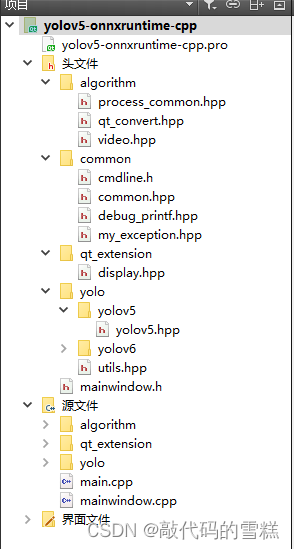
Qt项目文件结构如下:
1、pro文件
在pro文件中,添加opencv相关配置,内容如下:
#-------------------------------------------------
#
# Project created by QtCreator 2022-10-17T11:16:52
#
#-------------------------------------------------QT       += core guigreaterThan(QT_MAJOR_VERSION, 4): QT += widgetsTARGET = yolov5-onnxruntime-cpp
TEMPLATE = appSOURCES += main.cpp\mainwindow.cpp \algorithm/process_common.cpp \algorithm/qt_convert.cpp \algorithm/video.cpp \qt_extension/display.cpp \yolo/utils.cpp \yolo/yolov5/yolov5.cpp \yolo/yolov6/yolov6.cppHEADERS  += mainwindow.h \algorithm/process_common.hpp \algorithm/qt_convert.hpp \algorithm/video.hpp \common/cmdline.h \common/common.hpp \common/debug_printf.hpp \common/my_exception.hpp \qt_extension/display.hpp \yolo/utils.hpp \yolo/yolov5/yolov5.hpp \yolo/yolov6/yolov6.hppFORMS    += mainwindow.ui#INCLUDEPATH += C:/opencv4.6.0/build/include
#               C:/opencv4.6.0/build/include/opencv2
#LIBS += -LC:/opencv4.6.0/build/x64/vc14/lib/ -lopencv_world460#INCLUDEPATH += C:/onnxruntime-win-x64-gpu-1.11.1/include
#LIBS += -LC:/onnxruntime-win-x64-gpu-1.11.1/lib/ -lonnxruntime
#LIBS += -LC:/onnxruntime-win-x64-gpu-1.11.1/lib/ -lonnxruntime_providers_cuda
#LIBS += -LC:/onnxruntime-win-x64-gpu-1.11.1/lib/ -lonnxruntime_providers_shared
#LIBS += -LC:/onnxruntime-win-x64-gpu-1.11.1/lib/ -lonnxruntime_providers_tensorrt#INCLUDEPATH += C:/onnxruntime-win-x64-1.11.1/include
#LIBS += -LC:/onnxruntime-win-x64-1.11.1/lib/ -lonnxruntimeINCLUDEPATH +=  C:/opencv4.2.0_build/install/includeC:/opencv4.2.0_build/install/include/opencv2LIBS += -LC:/opencv4.2.0_build/install/x86/vc14/lib/ -lopencv_core420
LIBS += -LC:/opencv4.2.0_build/install/x86/vc14/lib/ -lopencv_highgui420
LIBS += -LC:/opencv4.2.0_build/install/x86/vc14/lib/ -lopencv_imgproc420
LIBS += -LC:/opencv4.2.0_build/install/x86/vc14/lib/ -lopencv_calib3d420
LIBS += -LC:/opencv4.2.0_build/install/x86/vc14/lib/ -lopencv_imgcodecs420
LIBS += -LC:/opencv4.2.0_build/install/x86/vc14/lib/ -lopencv_objdetect420
LIBS += -LC:/opencv4.2.0_build/install/x86/vc14/lib/ -lopencv_shape420
LIBS += -LC:/opencv4.2.0_build/install/x86/vc14/lib/ -lopencv_dnn_objdetect420
LIBS += -LC:/opencv4.2.0_build/install/x86/vc14/lib/ -lopencv_dnn420
LIBS += -LC:/opencv4.2.0_build/install/x86/vc14/lib/ -lopencv_video420
LIBS += -LC:/opencv4.2.0_build/install/x86/vc14/lib/ -lopencv_videoio420
LIBS += -LC:/opencv4.2.0_build/install/x86/vc14/lib/ -lopencv_videostab420INCLUDEPATH += C:/onnxruntime-win-x86-1.11.1/include
LIBS += -LC:/onnxruntime-win-x86-1.11.1/lib/ -lonnxruntime
2、mainwindow.h
#ifndef MAINWINDOW_H
#define MAINWINDOW_H#include #include
#include
#include
#include
#include
#include #include "opencv2/opencv.hpp"
#include "common/my_exception.hpp"
#include "algorithm/process_common.hpp"
#include "algorithm/qt_convert.hpp"
#include "algorithm/video.hpp"
#include "qt_extension/display.hpp"
#include "yolo/yolov5/yolov5.hpp"
#include "yolo/yolov6/yolov6.hpp"namespace Ui {
class MainWindow;
}class MainWindow : public QMainWindow
{Q_OBJECTpublic:explicit MainWindow(QWidget *parent = 0);~MainWindow();private slots:void on_class_names_choice_clicked();void on_yolov5_6_choice_clicked();void on_open_picture_clicked();void on_open_camera_clicked();void on_close_camera_clicked();void read_frame();void on_test_button_clicked();void on_save_picture_clicked();void on_video_choice_clicked();void on_play_video_clicked();void on_pause_video_clicked();void on_end_video_clicked();private:Ui::MainWindow *ui;//QImage  img;QTimer  *capture_timer = nullptr;Video   my_video;YOLO    my_yolo;clock_t start_name = 0;clock_t end_time = 0;bool    initialization();  // TODO 待完善
};#endif // MAINWINDOW_H
3、mainwindow.cpp
#include "mainwindow.h"
#include "ui_mainwindow.h"MainWindow::MainWindow(QWidget *parent) :QMainWindow(parent),ui(new Ui::MainWindow)
{ui->setupUi(this);
}MainWindow::~MainWindow()
{delete ui;
}void MainWindow::on_open_picture_clicked()
{QString curDir = QDir::currentPath(); // 获取程序的当前路径QString filename = QFileDialog::getOpenFileName(this, "select Image", curDir,"Images (*.png *.bmp *.jpg *.tif *.GIF )");if (filename.isEmpty()){QMessageBox::warning(this, u8"警告", u8"未选中图像。");return;}//TODO 暂未判空if (!(img.load(filename))) //加载图像{QMessageBox::warning(this, u8"警告", u8"打开图像失败");}qDebug() << u8"打开图像" + filename;img = img.convertToFormat(QImage::Format_RGB32);if (ui->yolov5_6->isChecked()){std::string model_path = ui->yolov5_6_path->text().toStdString();bool is_gpu = ui->ort_gpu->isChecked();auto size = cv::Size(640, 640);if (ui->size_320->isChecked()){size = cv::Size(320, 320);}my_yolo = YOLO(model_path, is_gpu, size);float confThreshold = ui->conf->value();float iouThreshold = ui->iou->value();std::vector class_names = yolo_utils::loadNames(ui->class_names_path->text().toStdString());auto src_img = QImage_2_cvMat(img);auto result = my_yolo.detect(src_img, confThreshold, iouThreshold);  //TODO 待完善结果显示yolo_utils::visualizeDetection(src_img, result, class_names,ui->Box_dispaly->isChecked(), ui->class_dispaly->isChecked());img = cvMat_2_QImage(src_img);}align_center(img, ui->display);
}void MainWindow::on_open_camera_clicked()
{try{my_video = Video();my_video.open_video();capture_timer = new QTimer(this);connect(capture_timer, SIGNAL(timeout()), this, SLOT(read_frame())); // 时间到,读取当前摄像头信息if (ui->yolov5_6->isChecked()){std::string model_path = ui->yolov5_6_path->text().toStdString();bool is_gpu = ui->ort_gpu->isChecked();auto size = cv::Size(640, 640);if (ui->size_320->isChecked()){size = cv::Size(320, 320);}my_yolo = YOLO(model_path, is_gpu, size);}capture_timer->start(1); // 开始计时,超时则发出timeout()信号}catch (MyException ex){QMessageBox::warning(this, u8"警告", ex.what());}
}void MainWindow::read_frame()
{start_name = clock();auto src_img = my_video.read_frame(); // 结果图转换为QImageif (ui->yolov5_6->isChecked()){float confThreshold = ui->conf->value(); //TODO 需要明确含义float iouThreshold = ui->iou->value();std::vector class_names = yolo_utils::loadNames(ui->class_names_path->text().toStdString());auto result = my_yolo.detect(src_img, confThreshold, iouThreshold);yolo_utils::visualizeDetection(src_img, result, class_names,ui->Box_dispaly->isChecked(), ui->class_dispaly->isChecked());}end_time = clock();if (ui->FPS_dispaly->isChecked()){auto text = "FPS: " + std::to_string(1 / ((double)(end_time - start_name) / CLOCKS_PER_SEC));qDebug() << "Frame time: " << (double)(end_time - start_name) / CLOCKS_PER_SEC;cv::putText(src_img, text, cv::Point(3, 25), cv::FONT_ITALIC, 0.8, cv::Scalar(0, 0, 255), 2);}align_center(cvMat_2_QImage(src_img), ui->display);
}void MainWindow::on_close_camera_clicked()
{capture_timer->stop();delete capture_timer;my_video.close_video();ui->display->clear();
}void MainWindow::on_test_button_clicked()
{// debug_printf("print.\n");// qDebug() << "QDEBUG";// QMessageBox::warning(this, "警告", "除数不能为0");// //线程释放// quit();        // 告诉线程的事件循环以return 0(成功)退出// wait();        // 阻塞线程,直到线程已经完成执行// deletelater(); // 等于delete
}void MainWindow::on_yolov5_6_choice_clicked()
{QString curDir = QDir::currentPath(); // 获取程序的当前路径QString filename = QFileDialog::getOpenFileName(this, "select model", curDir,"model (*.onnx )");if (filename.isEmpty()){QMessageBox::warning(this, u8"警告", u8"未选中 yolov5 model 。");return;}qDebug()<< QFileInfo(filename).filePath();  // 获取文件路径ui->yolov5_6_path->setText(QFileInfo(filename).filePath());
}void MainWindow::on_class_names_choice_clicked()
{QString curDir = QDir::currentPath();QString filename = QFileDialog::getOpenFileName(this, "select class names", curDir,"");if (filename.isEmpty()){QMessageBox::warning(this, u8"警告", u8"未选中类别名称。");return;}ui->class_names_path->setText(QFileInfo(filename).filePath());
}void MainWindow::on_save_picture_clicked()
{cv::imwrite("./save_picture.png", QImage_2_cvMat(img));//QMessageBox::information(this, "提示", "图像保存成功。");
}void MainWindow::on_video_choice_clicked()
{QString curDir = QDir::currentPath();QString filename = QFileDialog::getOpenFileName(this, "select class names", curDir,"video (*.mp4 *.avi )");if (filename.isEmpty()){QMessageBox::warning(this, u8"警告", u8"未选中视频。");return;}ui->video_path->setText(QFileInfo(filename).filePath());
}void MainWindow::on_play_video_clicked()
{my_video = Video();my_video.open_video(ui->video_path->text().toStdString());if (ui->yolov5_6->isChecked()){std::string model_path = ui->yolov5_6_path->text().toStdString();bool is_gpu = ui->ort_gpu->isChecked();auto size = cv::Size(640, 640);if (ui->size_320->isChecked()){size = cv::Size(320, 320);}my_yolo = YOLO(model_path, is_gpu, size);}while (1){start_name = clock();auto frame = my_video.read_frame();if (frame.empty() || ui->end_video->isDown()){my_video.close_video();ui->display->clear();break;}if (ui->yolov5_6->isChecked()){float confThreshold = ui->conf->value();float iouThreshold = ui->iou->value();std::vector class_names = yolo_utils::loadNames(ui->class_names_path->text().toStdString());auto result = my_yolo.detect(frame, confThreshold, iouThreshold);yolo_utils::visualizeDetection(frame, result, class_names,ui->Box_dispaly->isChecked(), ui->class_dispaly->isChecked());}end_time=clock();//msif (ui->FPS_dispaly->isChecked()){auto text = "FPS: " + std::to_string(1 / ((double)(end_time - start_name) / CLOCKS_PER_SEC));qDebug() << "Frame time(ms): " << (double)(end_time - start_name) /*/ CLOCKS_PER_SEC*/;cv::putText(frame, text, cv::Point(3, 25), cv::FONT_ITALIC, 0.8, cv::Scalar(0, 0, 255), 2);}align_center(cvMat_2_QImage(frame), ui->display);cv::waitKey(1);}
}void MainWindow::on_pause_video_clicked()
{}void MainWindow::on_end_video_clicked()
{}
四、YOLO 类封装
1、yolov5.h
/** @Author: sun_liqiang* @Date: 2022-07-01 19:32:05* @LastEditors: sun_liqiang* @LastEditTime: 2022-07-05 00:54:51* @Description: */#pragma once#include
#include
#include #include "../utils.hpp"class YOLO
{
public:YOLO();explicit YOLO(std::nullptr_t){};YOLO(const std::string &modelPath,const bool &isGPU,const cv::Size &inputSize);std::vector detect(cv::Mat& image, const float& confThreshold,const float& iouThreshold);private:Ort::Env env{nullptr};Ort::SessionOptions sessionOptions{nullptr};Ort::Session session{nullptr};void preprocessing(cv::Mat &image, float *&blob, std::vector &inputTensorShape);std::vector postprocessing(const cv::Size &resizedImageShape,const cv::Size &originalImageShape,std::vector &outputTensors,const float &confThreshold, const float &iouThreshold);static void getBestClassInfo(std::vector::iterator it, const int &numClasses,float &bestConf, int &bestClassId);std::vector inputNames;std::vector outputNames;bool isDynamicInputShape{};cv::Size2f inputImageShape;
};
2、yolov5.cpp
#include "yolov5.hpp"
#include YOLO::YOLO()
{}YOLO::YOLO(const std::string &modelPath,const bool &isGPU = true,const cv::Size &inputSize = cv::Size(640, 640))
{env = Ort::Env(OrtLoggingLevel::ORT_LOGGING_LEVEL_WARNING, "ONNX_DETECTION");sessionOptions = Ort::SessionOptions();std::vector availableProviders = Ort::GetAvailableProviders();qDebug()<<"availableProviders 111111111111111111111111 ="<//"TensorrtExecutionProvider"//"CUDAExecutionProvider"//"CPUExecutionProvider"qDebug()<<"availableProviders 111111111111111111111111 ="<std::cout << "GPU is not supported by your ONNXRuntime build. Fallback to CPU." << std::endl;std::cout << "Inference device: CPU" << std::endl;}else if (isGPU && (cudaAvailable != availableProviders.end())){std::cout << "Inference device: GPU" << std::endl;sessionOptions.AppendExecutionProvider_CUDA(cudaOption);}else{std::cout << "Inference device: CPU" << std::endl;}#ifdef __linuxsession = Ort::Session(env, modelPath.c_str(), sessionOptions);
#elif _WIN32std::wstring w_modelPath = yolo_utils::charToWstring(modelPath.c_str());session = Ort::Session(env, w_modelPath.c_str(), sessionOptions);
#elsestd::cout << "未知的平台类型!" << std::endl;
#endifOrt::AllocatorWithDefaultOptions allocator;Ort::TypeInfo inputTypeInfo = session.GetInputTypeInfo(0);std::vector inputTensorShape = inputTypeInfo.GetTensorTypeAndShapeInfo().GetShape();this->isDynamicInputShape = false;// checking if width and height are dynamicif (inputTensorShape[2] == -1 && inputTensorShape[3] == -1){std::cout << "Dynamic input shape" << std::endl;this->isDynamicInputShape = true;}for (auto shape : inputTensorShape)std::cout << "Input shape: " << shape << std::endl;inputNames.push_back(session.GetInputName(0, allocator));outputNames.push_back(session.GetOutputName(0, allocator));std::cout << "Input name: " << inputNames[0] << std::endl;std::cout << "Output name: " << outputNames[0] << std::endl;this->inputImageShape = cv::Size2f(inputSize);
}void YOLO::getBestClassInfo(std::vector::iterator it, const int &numClasses,float &bestConf, int &bestClassId)
{// first 5 element are box and obj confidencebestClassId = 5;bestConf = 0;for (int i = 5; i < numClasses + 5; i++){if (it[i] > bestConf){bestConf = it[i];bestClassId = i - 5;}}
}void YOLO::preprocessing(cv::Mat &image, float *&blob, std::vector &inputTensorShape)
{cv::Mat resizedImage, floatImage;cv::cvtColor(image, resizedImage, cv::COLOR_BGR2RGB);yolo_utils::letterbox(resizedImage, resizedImage, this->inputImageShape,cv::Scalar(114, 114, 114), this->isDynamicInputShape,false, true, 32);inputTensorShape[2] = resizedImage.rows;inputTensorShape[3] = resizedImage.cols;resizedImage.convertTo(floatImage, CV_32FC3, 1 / 255.0);blob = new float[floatImage.cols * floatImage.rows * floatImage.channels()];cv::Size floatImageSize{floatImage.cols, floatImage.rows};// hwc -> chwstd::vector chw(floatImage.channels());for (int i = 0; i < floatImage.channels(); ++i){chw[i] = cv::Mat(floatImageSize, CV_32FC1, blob + i * floatImageSize.width * floatImageSize.height);}cv::split(floatImage, chw);
}std::vector YOLO::postprocessing(const cv::Size &resizedImageShape,const cv::Size &originalImageShape,std::vector &outputTensors,const float &confThreshold, const float &iouThreshold)
{std::vector boxes;std::vector confs;std::vector classIds;auto *rawOutput = outputTensors[0].GetTensorData();std::vector outputShape = outputTensors[0].GetTensorTypeAndShapeInfo().GetShape();size_t count = outputTensors[0].GetTensorTypeAndShapeInfo().GetElementCount();std::vector output(rawOutput, rawOutput + count);// for (const int64_t& shape : outputShape)//     std::cout << "Output Shape: " << shape << std::endl;// first 5 elements are box[4] and obj confidenceint numClasses = (int)outputShape[2] - 5;int elementsInBatch = (int)(outputShape[1] * outputShape[2]);// only for batch size = 1for (auto it = output.begin(); it != output.begin() + elementsInBatch; it += outputShape[2]){float clsConf = it[4];if (clsConf > confThreshold){int centerX = (int)(it[0]);int centerY = (int)(it[1]);int width = (int)(it[2]);int height = (int)(it[3]);int left = centerX - width / 2;int top = centerY - height / 2;float objConf;int classId;this->getBestClassInfo(it, numClasses, objConf, classId);float confidence = clsConf * objConf;boxes.emplace_back(left, top, width, height);confs.emplace_back(confidence);classIds.emplace_back(classId);}}std::vector indices;cv::dnn::NMSBoxes(boxes, confs, confThreshold, iouThreshold, indices);// std::cout << "amount of NMS indices: " << indices.size() << std::endl;std::vector detections;for (int idx : indices){Detection det;det.box = cv::Rect(boxes[idx]);yolo_utils::scaleCoords(resizedImageShape, det.box, originalImageShape);det.conf = confs[idx];det.classId = classIds[idx];detections.emplace_back(det);}return detections;
}std::vector YOLO::detect(cv::Mat& image, const float& confThreshold,const float& iouThreshold)
{float *blob = nullptr;std::vector inputTensorShape{1, 3, -1, -1};this->preprocessing(image, blob, inputTensorShape);size_t inputTensorSize = yolo_utils::vectorProduct(inputTensorShape);std::vector inputTensorValues(blob, blob + inputTensorSize);std::vector inputTensors;Ort::MemoryInfo memoryInfo = Ort::MemoryInfo::CreateCpu(OrtAllocatorType::OrtArenaAllocator, OrtMemType::OrtMemTypeDefault);inputTensors.push_back(Ort::Value::CreateTensor(memoryInfo, inputTensorValues.data(), inputTensorSize,inputTensorShape.data(), inputTensorShape.size()));std::vector outputTensors = this->session.Run(Ort::RunOptions{nullptr},inputNames.data(),inputTensors.data(),1,outputNames.data(),1);cv::Size resizedShape = cv::Size((int)inputTensorShape[3], (int)inputTensorShape[2]);std::vector result = this->postprocessing(resizedShape,image.size(),outputTensors,confThreshold, iouThreshold);delete[] blob;return result;
}
3、class.names
官方yolov5s.pt模型,能够识别80种物体,classes.names文件记录的就是这80种物体类别名,如下:
person
bicycle
car
motorcycle
airplane
bus
train
truck
boat
traffic light
fire hydrant
stop sign
parking meter
bench
bird
cat
dog
horse
sheep
cow
elephant
bear
zebra
giraffe
backpack
umbrella
handbag
tie
suitcase
frisbee
skis
snowboard
sports ball
kite
baseball bat
baseball glove
skateboard
surfboard
tennis racket
bottle
wine glass
cup
fork
knife
spoon
bowl
banana
apple
sandwich
orange
broccoli
carrot
hot dog
pizza
donut
cake
chair
couch
potted plant
bed
dining table
toilet
tv
laptop
mouse
remote
keyboard
cell phone
microwave
oven
toaster
sink
refrigerator
book
clock
vase
scissors
teddy bear
hair drier
toothbrush
五、效果
以本地视频文件1.mp4为例,效果如下:
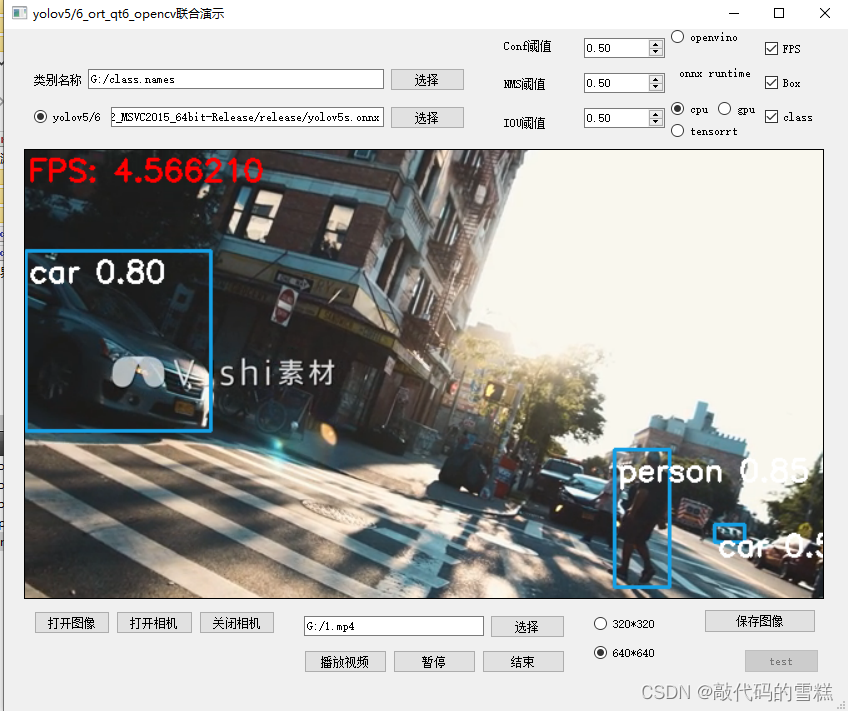
可以看到,在我的机器上,编译32位的程序后,视频卡顿现象非常严重,与opencv-dnn模块的推理部署效果差不多。
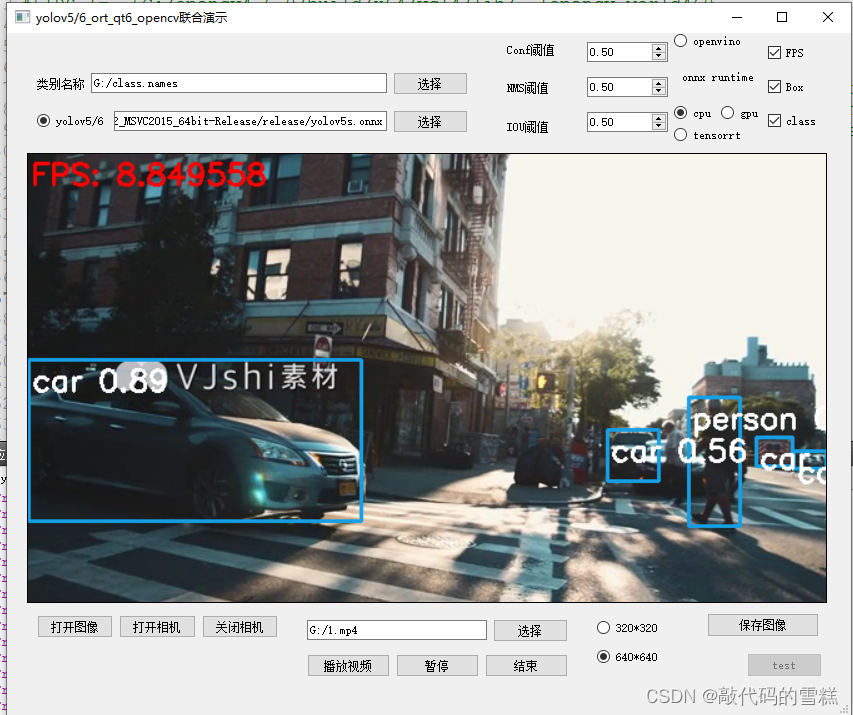
在我尝试编译64位的程序后,效果得到明显改善,FPS约为上面的两倍,效果如下:
相关内容
热门资讯
埃菲尔铁塔在哪 中国仿建埃菲尔...
2019年4月26日,广西南宁市,街头惊现一座巨型山寨版埃菲尔铁塔,高约20米,白色塔身,造型逼真,...
苗族的传统节日 贵州苗族节日有...
【岜沙苗族芦笙节】岜沙,苗语叫“分送”,距从江县城7.5公里,是世界上最崇拜树木并以树为神的枪手部落...
北京的名胜古迹 北京最著名的景...
北京从元代开始,逐渐走上帝国首都的道路,先是成为大辽朝五大首都之一的南京城,随着金灭辽,金代从海陵王...
长白山自助游攻略 吉林长白山游...
昨天介绍了西坡的景点详细请看链接:一个人的旅行,据说能看到长白山天池全凭运气,您的运气如何?今日介绍...
应用未安装解决办法 平板应用未...
---IT小技术,每天Get一个小技能!一、前言描述苹果IPad2居然不能安装怎么办?与此IPad不...
脚上的穴位图 脚面经络图对应的...
人体穴位作用图解大全更清晰直观的标注了各个人体穴位的作用,包括头部穴位图、胸部穴位图、背部穴位图、胳...
demo什么意思 demo版本...
618快到了,各位的小金库大概也在准备开闸放水了吧。没有小金库的,也该向老婆撒娇卖萌服个软了,一切只...
猫咪吃了塑料袋怎么办 猫咪误食...
你知道吗?塑料袋放久了会长猫哦!要说猫咪对塑料袋的喜爱程度完完全全可以媲美纸箱家里只要一有塑料袋的响...
世界上最漂亮的人 世界上最漂亮...
此前在某网上,选出了全球265万颜值姣好的女性。从这些数量庞大的女性群体中,人们投票选出了心目中最美...
埃菲尔铁塔在哪 中国仿建埃菲尔...
2019年4月26日,广西南宁市,街头惊现一座巨型山寨版埃菲尔铁塔,高约20米,白色塔身,造型逼真,...
苗族的传统节日 贵州苗族节日有...
【岜沙苗族芦笙节】岜沙,苗语叫“分送”,距从江县城7.5公里,是世界上最崇拜树木并以树为神的枪手部落...
北京的名胜古迹 北京最著名的景...
北京从元代开始,逐渐走上帝国首都的道路,先是成为大辽朝五大首都之一的南京城,随着金灭辽,金代从海陵王...
脚上的穴位图 脚面经络图对应的...
人体穴位作用图解大全更清晰直观的标注了各个人体穴位的作用,包括头部穴位图、胸部穴位图、背部穴位图、胳...