

itk配准整理(1)
创始人
2024-02-09 07:29:01
示例地址:
itk\ITK\Examples\RegistrationITKv4\ImageRegistration7.cxx
说明:itk二维图像的配准:平移+旋转+缩放
效果图:
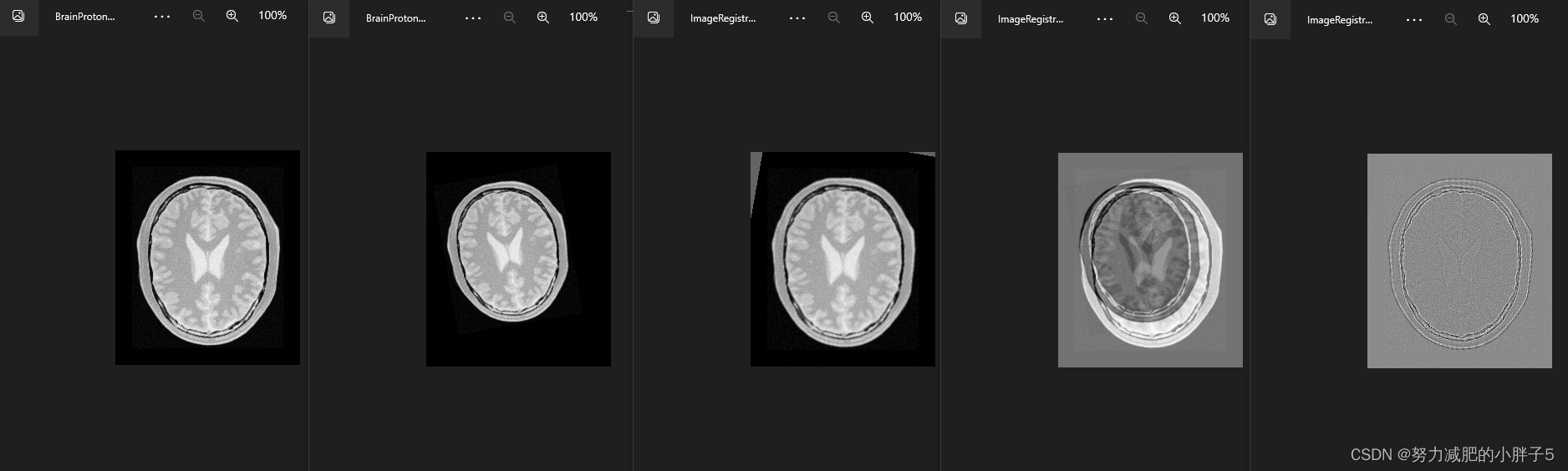
运行结果:
52 53.6213 [0.8333298229719548, -0.17450270771316403, -12.806452097490313, -12.724475494918924]
53 53.5935 [0.8332372921962161, -0.17451072912054427, -12.80648932249624, -12.724405572299606]
Optimizer stop condition: RegularStepGradientDescentOptimizerv4: Step too small after 54 iterations. Current step (6.10352e-005) is less than minimum step (0.0001).
Result =
Scale = 0.833237
Angle (radians) = -0.174511
Angle (degrees) = -9.99873
Translation X = -12.8065
Translation Y = -12.7244
Fixed Center X = 111.204
Fixed Center Y = 131.591
Iterations = 55
Metric value = 53.6171
代码整理:
#include "mainwindow.h"#include #include "vtkAutoInit.h"
VTK_MODULE_INIT(vtkRenderingOpenGL2)
VTK_MODULE_INIT(vtkRenderingVolumeOpenGL2)
VTK_MODULE_INIT(vtkRenderingFreeType)
VTK_MODULE_INIT(vtkRenderingContextOpenGL2)#include "itkImageRegistrationMethodv4.h"
#include "itkMeanSquaresImageToImageMetricv4.h"
#include "itkRegularStepGradientDescentOptimizerv4.h"
#include "itkCenteredTransformInitializer.h"#include "itkSimilarity2DTransform.h"
#include "itkImageFileReader.h"
#include "itkImageFileWriter.h"
#include "itkResampleImageFilter.h"
#include "itkCastImageFilter.h"
#include "itkSubtractImageFilter.h"
#include "itkRescaleIntensityImageFilter.h"
#include "itkIdentityTransform.h"#include "itkCommand.h"
class CommandIterationUpdate : public itk::Command
{
public:using Self = CommandIterationUpdate;using Superclass = itk::Command;using Pointer = itk::SmartPointer;itkNewMacro(Self);protected:CommandIterationUpdate() = default;public:using OptimizerType = itk::RegularStepGradientDescentOptimizerv4;using OptimizerPointer = const OptimizerType *;voidExecute(itk::Object * caller, const itk::EventObject & event) override{Execute((const itk::Object *)caller, event);}voidExecute(const itk::Object * object, const itk::EventObject & event) override{auto optimizer = static_cast(object);if (!itk::IterationEvent().CheckEvent(&event)){return;}std::cout << optimizer->GetCurrentIteration() << "   ";std::cout << optimizer->GetValue() << "   ";std::cout << optimizer->GetCurrentPosition() << std::endl;}
};#include "itkPNGImageIOFactory.h"
int main(int argc, char *argv[])
{itk::PNGImageIOFactory::RegisterOneFactory();constexpr unsigned int Dimension = 2;using PixelType = float;using FixedImageType = itk::Image;using MovingImageType = itk::Image;using TransformType = itk::Similarity2DTransform;using OptimizerType = itk::RegularStepGradientDescentOptimizerv4;using MetricType = itk::MeanSquaresImageToImageMetricv4;using RegistrationType = itk::ImageRegistrationMethodv4;MetricType::Pointer       metric = MetricType::New();OptimizerType::Pointer    optimizer = OptimizerType::New();RegistrationType::Pointer registration = RegistrationType::New();registration->SetMetric(metric);registration->SetOptimizer(optimizer);TransformType::Pointer transform = TransformType::New();using FixedImageReaderType = itk::ImageFileReader;using MovingImageReaderType = itk::ImageFileReader;QString baseDir = "D:/learn/itk/ITK/Examples/Data/";FixedImageReaderType::Pointer fixedImageReader =FixedImageReaderType::New();MovingImageReaderType::Pointer movingImageReader =MovingImageReaderType::New();fixedImageReader->SetFileName((baseDir+"BrainProtonDensitySliceBorder20.png").toStdString());movingImageReader->SetFileName((baseDir+"BrainProtonDensitySliceR10X13Y17S12.png").toStdString());registration->SetFixedImage(fixedImageReader->GetOutput());registration->SetMovingImage(movingImageReader->GetOutput());//  In this example, we again use the helper class//  \doxygen{CenteredTransformInitializer} to compute a reasonable//  value for the initial center of rotation and scaling along with//  an initial translation.//使用CenteredTransformInitializer计算初始旋转和缩放中心的合理值以及初始平移。using TransformInitializerType =itk::CenteredTransformInitializer;TransformInitializerType::Pointer initializer = TransformInitializerType::New();initializer->SetTransform(transform);initializer->SetFixedImage(fixedImageReader->GetOutput());initializer->SetMovingImage(movingImageReader->GetOutput());initializer->MomentsOn();initializer->InitializeTransform();// The remaining parameters of the transform are initialized below.// 转换的其余参数在下面初始化。double initialScale = 1.0;double initialAngle = 0.0;transform->SetScale(initialScale);transform->SetAngle(initialAngle);//  Now the initialized transform object will be set to the registration//  method, and its initial parameters are used to initialize the//  registration process.////  Also, by calling the \code{InPlaceOn()} method, this initialized//  transform will be the output transform//  object or ``grafted'' to the output of the registration process.//现在,将初始化的转换对象设置为注册方法,并使用其初始参数初始化注册过程。//此外,通过调用InPlaceOn()方法,这个初始化的转换将是输出转换对象或“嫁接”到注册过程的输出。registration->SetInitialTransform(transform);registration->InPlaceOn();//  Keeping in mind that the scale of units in scaling, rotation and//  translation are quite different, we take advantage of the scaling//  functionality provided by the optimizers. We know that the first element//  of the parameters array corresponds to the scale factor, the second//  corresponds to the angle, third and fourth are the remaining//  translation. We use henceforth small factors in the scales//  associated with translations.//请记住,缩放、旋转和平移的单位规模是非常不同的,我们利用优化器提供的缩放功能。我们知道参数数组的//第一个元素对应比例因子,第二个对应角度,第三和第四个是剩余的平移。今后,我们在与翻译相关的量表中使用小的因素。using OptimizerScalesType = OptimizerType::ScalesType;OptimizerScalesType optimizerScales(transform->GetNumberOfParameters());const double        translationScale = 1.0 / 100.0;optimizerScales[0] = 10.0;optimizerScales[1] = 1.0;optimizerScales[2] = translationScale;optimizerScales[3] = translationScale;optimizer->SetScales(optimizerScales);//  We also set the ordinary parameters of the optimization method. In this//  case we are using a//  \doxygen{RegularStepGradientDescentOptimizerv4}. Below we define the//  optimization parameters, i.e. initial learning rate (step length),//  minimal step length and number of iterations. The last two act as//  stopping criteria for the optimization.//我们还设置了优化方法的普通参数。 在这种情况下,我们使用 {RegularStepGradientDescentOptimizerv4}。//下面我们定义优化参数,即初始学习率(步长)、最小步长和迭代次数。 最后两个作为优化的停止标准。double steplength = 1.0;optimizer->SetLearningRate(steplength);optimizer->SetMinimumStepLength(0.0001);optimizer->SetNumberOfIterations(200);// Create the Command observer and register it with the optimizer.CommandIterationUpdate::Pointer observer = CommandIterationUpdate::New();optimizer->AddObserver(itk::IterationEvent(), observer);// One level registration process without shrinking and smoothing.constexpr unsigned int numberOfLevels = 1;RegistrationType::ShrinkFactorsArrayType shrinkFactorsPerLevel;shrinkFactorsPerLevel.SetSize(1);shrinkFactorsPerLevel[0] = 1;RegistrationType::SmoothingSigmasArrayType smoothingSigmasPerLevel;smoothingSigmasPerLevel.SetSize(1);smoothingSigmasPerLevel[0] = 0;registration->SetNumberOfLevels(numberOfLevels);registration->SetSmoothingSigmasPerLevel(smoothingSigmasPerLevel);registration->SetShrinkFactorsPerLevel(shrinkFactorsPerLevel);try{registration->Update();std::cout << "Optimizer stop condition: "<< registration->GetOptimizer()->GetStopConditionDescription()<< std::endl;}catch (const itk::ExceptionObject & err){std::cerr << "ExceptionObject caught !" << std::endl;std::cerr << err << std::endl;return EXIT_FAILURE;}TransformType::ParametersType finalParameters = transform->GetParameters();const double finalScale = finalParameters[0];const double finalAngle = finalParameters[1];const double finalTranslationX = finalParameters[2];const double finalTranslationY = finalParameters[3];const double rotationCenterX =registration->GetOutput()->Get()->GetFixedParameters()[0];const double rotationCenterY =registration->GetOutput()->Get()->GetFixedParameters()[1];const unsigned int numberOfIterations = optimizer->GetCurrentIteration();const double bestValue = optimizer->GetValue();const double finalAngleInDegrees = finalAngle * 180.0 / itk::Math::pi;std::cout << std::endl;std::cout << "Result = " << std::endl;std::cout << " Scale           = " << finalScale << std::endl;std::cout << " Angle (radians) = " << finalAngle << std::endl;std::cout << " Angle (degrees) =  " << finalAngleInDegrees << std::endl;std::cout << " Translation X   = " << finalTranslationX << std::endl;std::cout << " Translation Y   = " << finalTranslationY << std::endl;std::cout << " Fixed Center X  = " << rotationCenterX << std::endl;std::cout << " Fixed Center Y  = " << rotationCenterY << std::endl;std::cout << " Iterations      = " << numberOfIterations << std::endl;std::cout << " Metric value    = " << bestValue << std::endl;//  The second image is the result of intentionally rotating the first image//  by $10$ degrees, scaling by $1/1.2$ and then translating by $(-13,-17)$.//  Both images have unit-spacing and are shown in Figure//  \ref{fig:FixedMovingImageRegistration7}. The registration takes $53$//  iterations and produces://  [0.833237, -0.174511, -12.8065, -12.7244 ]//  That are interpreted as//  \item Scale factor  =       $0.833237$//  \item Angle         =       $-0.174511$   radians//  \item Translation   = $( -12.8065, -12.7244 )$ millimeters//  These values approximate the misalignment intentionally introduced into//  the moving image. Since $10$ degrees is about $0.174532$ radians.//// Figure \ref{fig:ImageRegistration7Outputs} shows the output of the// registration. The right image shows the squared magnitude of pixel// differences between the fixed image and the resampled moving image.// \includegraphics[height=0.32\textwidth]{ImageRegistration7TraceMetric}// \includegraphics[height=0.32\textwidth]{ImageRegistration7TraceAngle}// \includegraphics[height=0.32\textwidth]{ImageRegistration7TraceScale}// \includegraphics[height=0.32\textwidth]{ImageRegistration7TraceTranslations}// \itkcaption[Simularity2DTransform registration plots]{Plots of the// Metric, rotation angle, scale factor, and translations during the// registration using Similarity2D transform.}//  Figure \ref{fig:ImageRegistration7Plots} shows the plots of the main//  output parameters of the registration process. The metric values at//  every iteration are shown on the left. The rotation angle and scale//  factor values are shown in the two center plots while the translation//  components of the registration are presented in the plot on the right.////  Software Guide : EndLatexusing ResampleFilterType =itk::ResampleImageFilter;ResampleFilterType::Pointer resampler = ResampleFilterType::New();resampler->SetTransform(transform);resampler->SetInput(movingImageReader->GetOutput());FixedImageType::Pointer fixedImage = fixedImageReader->GetOutput();resampler->SetSize(fixedImage->GetLargestPossibleRegion().GetSize());resampler->SetOutputOrigin(fixedImage->GetOrigin());resampler->SetOutputSpacing(fixedImage->GetSpacing());resampler->SetOutputDirection(fixedImage->GetDirection());resampler->SetDefaultPixelValue(100);using OutputPixelType = unsigned char;using OutputImageType = itk::Image;using CastFilterType =itk::CastImageFilter;using WriterType = itk::ImageFileWriter;WriterType::Pointer     writer = WriterType::New();CastFilterType::Pointer caster = CastFilterType::New();writer->SetFileName("./ImageRegistration7Output.png");caster->SetInput(resampler->GetOutput());writer->SetInput(caster->GetOutput());writer->Update();using DifferenceFilterType =itk::SubtractImageFilter;DifferenceFilterType::Pointer difference = DifferenceFilterType::New();using RescalerType =itk::RescaleIntensityImageFilter;RescalerType::Pointer intensityRescaler = RescalerType::New();intensityRescaler->SetInput(difference->GetOutput());intensityRescaler->SetOutputMinimum(0);intensityRescaler->SetOutputMaximum(255);difference->SetInput1(fixedImageReader->GetOutput());difference->SetInput2(resampler->GetOutput());resampler->SetDefaultPixelValue(1);WriterType::Pointer writer2 = WriterType::New();writer2->SetInput(intensityRescaler->GetOutput());// Compute the difference image between the fixed and resampled moving image.{writer2->SetFileName("./ImageRegistration7DifferenceAfter.png");writer2->Update();}using IdentityTransformType = itk::IdentityTransform;IdentityTransformType::Pointer identity = IdentityTransformType::New();// Compute the difference image between the fixed and moving image before registration.{resampler->SetTransform(identity);writer2->SetFileName("./ImageRegistration7DifferenceBefore.png");writer2->Update();}return EXIT_SUCCESS;
}
上一篇:带曾字的成语有哪些成语有哪些
下一篇:求古人经典情诗
相关内容
热门资讯
埃菲尔铁塔在哪 中国仿建埃菲尔...
2019年4月26日,广西南宁市,街头惊现一座巨型山寨版埃菲尔铁塔,高约20米,白色塔身,造型逼真,...
苗族的传统节日 贵州苗族节日有...
【岜沙苗族芦笙节】岜沙,苗语叫“分送”,距从江县城7.5公里,是世界上最崇拜树木并以树为神的枪手部落...
北京的名胜古迹 北京最著名的景...
北京从元代开始,逐渐走上帝国首都的道路,先是成为大辽朝五大首都之一的南京城,随着金灭辽,金代从海陵王...
长白山自助游攻略 吉林长白山游...
昨天介绍了西坡的景点详细请看链接:一个人的旅行,据说能看到长白山天池全凭运气,您的运气如何?今日介绍...
应用未安装解决办法 平板应用未...
---IT小技术,每天Get一个小技能!一、前言描述苹果IPad2居然不能安装怎么办?与此IPad不...
脚上的穴位图 脚面经络图对应的...
人体穴位作用图解大全更清晰直观的标注了各个人体穴位的作用,包括头部穴位图、胸部穴位图、背部穴位图、胳...
demo什么意思 demo版本...
618快到了,各位的小金库大概也在准备开闸放水了吧。没有小金库的,也该向老婆撒娇卖萌服个软了,一切只...
猫咪吃了塑料袋怎么办 猫咪误食...
你知道吗?塑料袋放久了会长猫哦!要说猫咪对塑料袋的喜爱程度完完全全可以媲美纸箱家里只要一有塑料袋的响...
世界上最漂亮的人 世界上最漂亮...
此前在某网上,选出了全球265万颜值姣好的女性。从这些数量庞大的女性群体中,人们投票选出了心目中最美...
埃菲尔铁塔在哪 中国仿建埃菲尔...
2019年4月26日,广西南宁市,街头惊现一座巨型山寨版埃菲尔铁塔,高约20米,白色塔身,造型逼真,...
苗族的传统节日 贵州苗族节日有...
【岜沙苗族芦笙节】岜沙,苗语叫“分送”,距从江县城7.5公里,是世界上最崇拜树木并以树为神的枪手部落...
北京的名胜古迹 北京最著名的景...
北京从元代开始,逐渐走上帝国首都的道路,先是成为大辽朝五大首都之一的南京城,随着金灭辽,金代从海陵王...
脚上的穴位图 脚面经络图对应的...
人体穴位作用图解大全更清晰直观的标注了各个人体穴位的作用,包括头部穴位图、胸部穴位图、背部穴位图、胳...