

IE高级配置中支持的SSL/TLS协议对应注册表值
一、手动勾选"Internet选项->高级->安全->使用TLS 1.2"
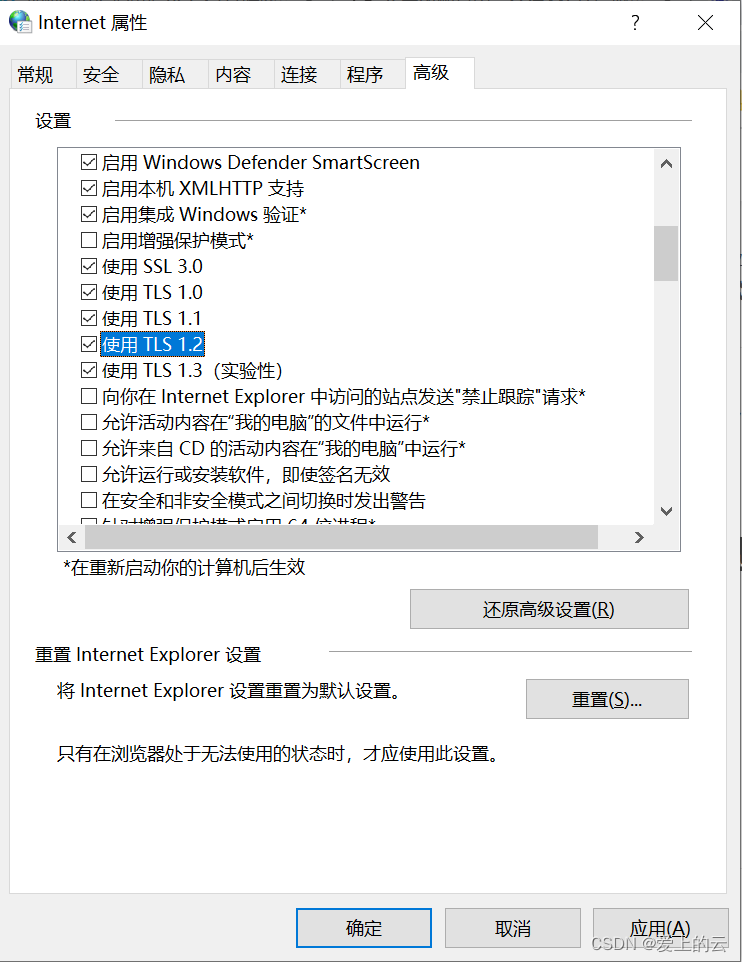
二、以编程方式勾选"Internet选项->高级->安全->使用TLS 1.2"
1.注册表值SecureProtocols对应的含义
注册表的路径为:HKEY_CURRENT_USER\Software\Microsoft\Windows\CurrentVersion\Internet Settings
Key: SecureProtocols
配置选项及对应10进制几个组合为:
SSL2.0 00000008(8)
SSL3.0 00000020(32)
TLS1.0 00000080(128)
TLS1.1 00000200(512)
TLS1.2 00000800(2048)TLS1.3 00002000(8192)
TLS1.1 TLS1.2 00000a00(2560)
SSL3.0 TLS1.0 000000a0(160) //32+128=160
SSL3.0 TLS1.0 TLS1.1 000002a0(672)
SSL3.0 TLS1.0 TLS1.2 000008a0(2208)
SSL3.0 TLS1.0 TLS1.1 TLS1.2 00000aa0(2720)
SSL2.0 SSL3.0 TLS1.0 TLS1.1 TLS1.2 00000aa8(2728)
2.批处理修正IE SSL协议
REG ADD "HKCU\Software\Microsoft\Windows\CurrentVersion\Internet Settings" /v SecureProtocols /t REG_DWORD /d 2720 /f
3.代码修改注册表值(C#示例)
需要添加“使用Microsoft.Win32;”引用
static void Main(string[] args)
{// The name of the key must include a valid root.const string userRoot = @"HKEY_CURRENT_USER\Software\Microsoft\Windows\CurrentVersion\Internet Settings";const string subkey = "SecureProtocols";//get the registry value.string result = (Registry.GetValue(userRoot, subkey, "Return this default if NoSuchName does not exist")).ToString();Console.WriteLine(result);//Enable TLS 1.0 and TLS 1.2 Registry.SetValue(userRoot, subkey, 2176);Console.WriteLine("OK");Console.ReadKey();
}
上一篇:OVIS数据集代码解析
下一篇:很曲折的事情,变不曲折的句子