

Android AIDL跨进程通信基础(多端情况)
简介
AIDL建议在来自不同的客户端访问你的服务并且需要处理多线程问题时你才必须使用AIDL,其他情况下你都可以选择其他方法,如使用 Messenger,也能跨进程通信。可见 AIDL 是处理多线程、多客户端并发访问的,而 Messenger 是单线程处理。
下面介绍 AIDL 的使用方法。
AIDL 文件可以分为两类。一类用来声明实现了 Parcelable 接口的数据类型,以供其他 AIDL 文件使用那些非默认支持的数据类型。还有一类是用来定义接口方法,声明要暴露哪些接口给客户端调用。在 AIDL 文件中需要明确标明引用到的数据类型所在的包名,即使两个文件处在同个包名下。
默认情况下,AIDL 支持下列数据类型:
-
八种基本数据类型:byte、char、short、int、long、float、double、boolean
String,CharSequence -
List类型。List承载的数据必须是AIDL支持的类型,或者是其它声明的AIDL对象
-
Map类型。Map承载的数据必须是AIDL支持的类型,或者是其它声明的AIDL对象
服务端目录结构与相关代码
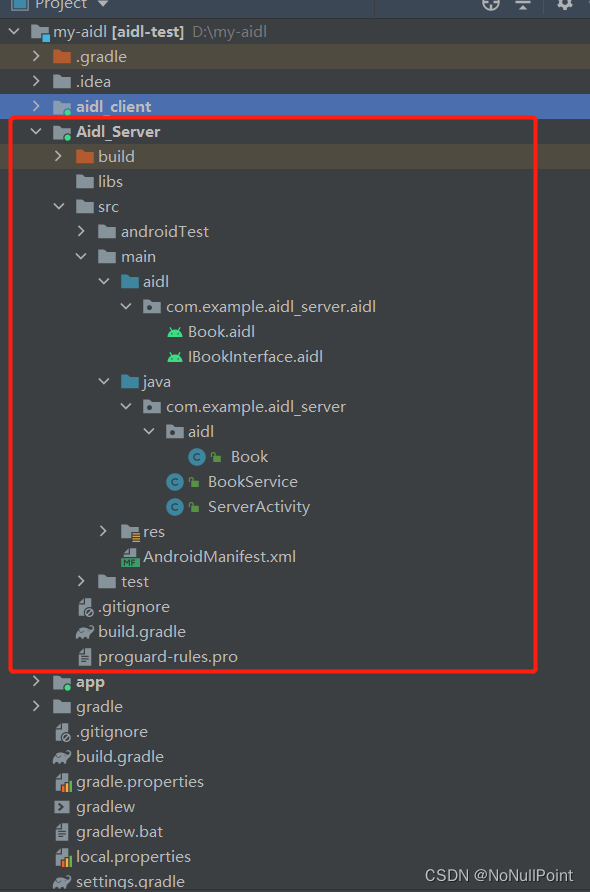
- 创建Book数据类,跨进程传递对象需将对象序列化处理
package com.example.aidl_server.aidl;import android.os.Parcel;
import android.os.Parcelable;public class Book implements Parcelable {private String name;protected Book(Parcel in) {name = in.readString();}public static final Creator CREATOR = new Creator() {@Overridepublic Book createFromParcel(Parcel in) {return new Book(in);}@Overridepublic Book[] newArray(int size) {return new Book[size];}};@Overridepublic int describeContents() {return 0;}@Overridepublic void writeToParcel(Parcel dest, int flags) {dest.writeString(name);}@Overridepublic String toString() {return "Book{" +"name='" + name + '\'' +'}';}
} - Book对应的AIDL文件代码内容
package com.example.aidl_server.aidl;parcelable Book;
注意,这里Book.java与Book.aidl里package一定要一致,不然后面build时会报错,无法生成相关接口代码。
- 对客户端提供接口方法的aidl代码,此文件与Book.aidl在同一路径下
// IBookInterface.aidl
package com.example.aidl_server.aidl;import com.example.aidl_server.aidl.Book;// Declare any non-default types here with import statementsinterface IBookInterface {void addBook(in Book book);List getBooks();/*** Demonstrates some basic types that you can use as parameters* and return values in AIDL.*/void basicTypes(int anInt, long aLong, boolean aBoolean, float aFloat,double aDouble, String aString);
}
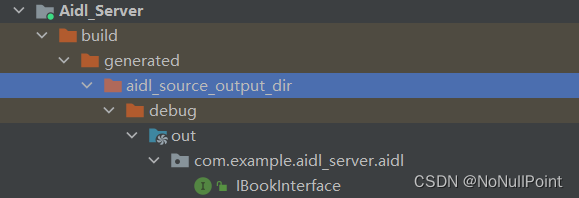
创建完成后build一下代码,build成功的话可以在此路径下看见生成的java代码
- 创建服务BookService
package com.example.aidl_server;import android.app.Service;
import android.content.Intent;
import android.os.IBinder;
import android.os.RemoteException;
import android.util.Log;import androidx.annotation.Nullable;import com.example.aidl_server.aidl.Book;
import com.example.aidl_server.aidl.IBookInterface;import java.util.ArrayList;
import java.util.List;public class BookService extends Service {private IBookInterface.Stub binder = new IBookInterface.Stub() {private List books = new ArrayList<>();@Overridepublic void addBook(Book book) throws RemoteException {if (book != null) {books.add(book);Log.e("BookService", "添加书籍成功 ++++ " + book.toString());}}@Overridepublic List getBooks() throws RemoteException {Log.e("BookService", "获取书籍,数目为 = " + books.size());return books;}@Overridepublic void basicTypes(int anInt, long aLong, boolean aBoolean, float aFloat, double aDouble, String aString) throws RemoteException {}};@Nullable@Overridepublic IBinder onBind(Intent intent) {return binder;}
} - 服务端清单文件内注册此服务
服务端准备工作完成,接下来看一下客户端如何操作
客户端连接服务并且进行数据交互
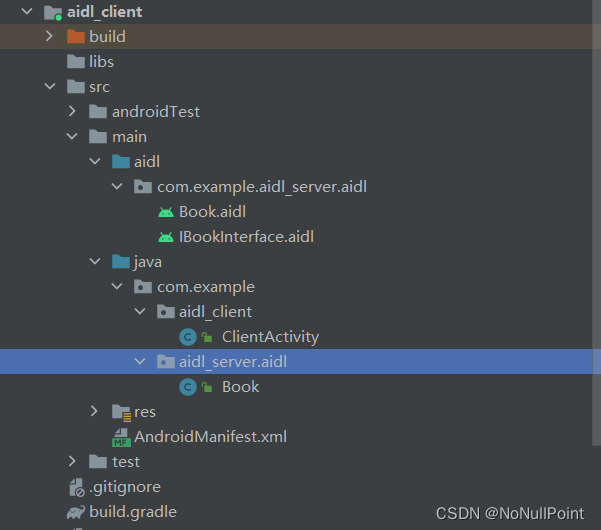
1. 先将服务端aidl文件夹完整的复制过来,包名要与服务端保持一致
2. 将服务端Book文件复制到客户端,包名要与服务端一致
3. build代码
客户端目录结果如下图
- 创建连接并且绑定服务
package com.example.aidl_client;import androidx.appcompat.app.AppCompatActivity;import android.content.ComponentName;
import android.content.Context;
import android.content.Intent;
import android.content.ServiceConnection;
import android.os.Bundle;
import android.os.IBinder;
import android.os.RemoteException;
import android.view.View;
import android.widget.TextView;
import android.widget.Toast;import com.example.aidl_server.aidl.Book;
import com.example.aidl_server.aidl.IBookInterface;import java.util.List;public class ClientActivity extends AppCompatActivity {private IBookInterface iBookInterface;private ServiceConnection connection = new ServiceConnection() {@Overridepublic void onServiceConnected(ComponentName name, IBinder service) {iBookInterface = IBookInterface.Stub.asInterface(service);}@Overridepublic void onServiceDisconnected(ComponentName name) {}};@Overrideprotected void onCreate(Bundle savedInstanceState) {super.onCreate(savedInstanceState);setContentView(R.layout.activity_client);// 绑定服务Intent intent = new Intent();intent.setAction("com.example.aidl_server.jiao");intent.setPackage("com.example.aidl_server");bindService(intent, connection, Context.BIND_AUTO_CREATE);TextView bookShow = findViewById(R.id.show_book_name);// 点击添加书籍findViewById(R.id.add_book).setOnClickListener(v -> {long millis = System.currentTimeMillis();Book book = new Book("书籍" + millis);try {iBookInterface.addBook(book);Toast.makeText(getApplicationContext(), "添加成功", Toast.LENGTH_LONG).show();} catch (Exception e) {e.printStackTrace();Toast.makeText(getApplicationContext(), "添加失败", Toast.LENGTH_LONG).show();}});// 点击显示书籍findViewById(R.id.get_book).setOnClickListener(v -> {try {List books = iBookInterface.getBooks();if (books != null) {if (books.size() == 0) {bookShow.setText("书记数目为0");} else {bookShow.setText(books.toString());}}} catch (Exception e) {e.printStackTrace();}});}@Overrideprotected void onDestroy() {super.onDestroy();unbindService(connection);}
}
客户端布局相关代码
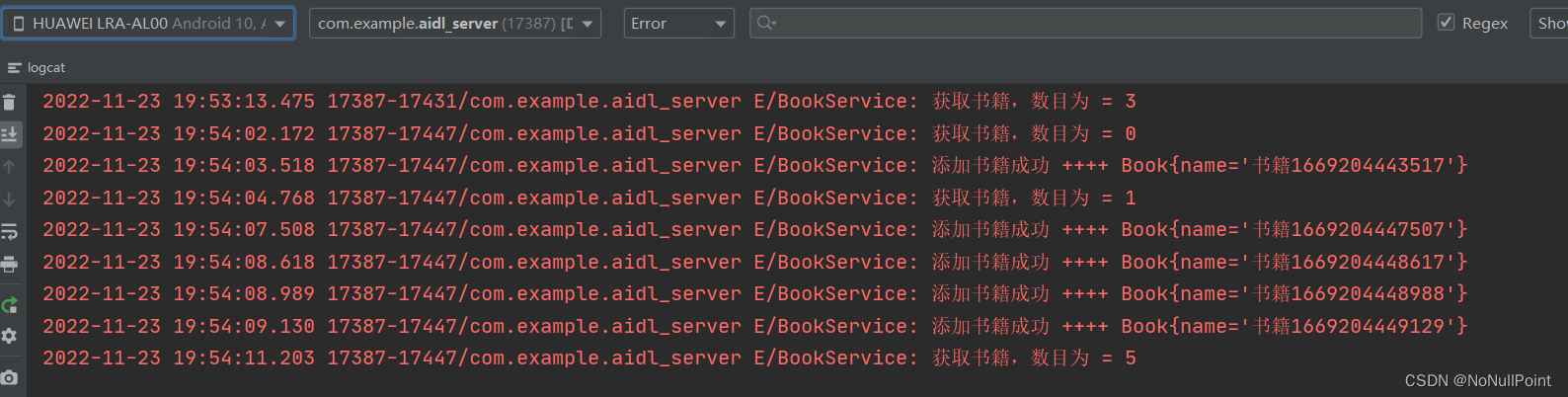
- 点击按钮进行操作服务端结果打印如下
end
上一篇:百度Q3财报显AI技术厚度,“慢生意”稳步驶入“快车道”
下一篇:愧怍的拼音是什么