

pdf生成:wkhtmltopdf
创始人
2024-02-13 23:20:49
wkhtmltopdf是开源(LGPLv3)命令行工具,使用Qt WebKit渲染引擎将HTML渲染为PDF和各种图像格式。这些完全以“headless”模式运行,不需要显示或显示服务wkhtmltoimage。
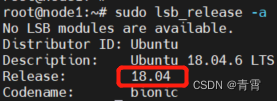 2、sudo dpkg -i *.deb,如果报依赖错误执行下面语句再试sudo apt-get -f --fix-missing install 3、使用which wkhtmltopdf检查是否安装成功,输出结果为:/usr/local/bin/wkhtmltopdf
  4、安装pdfkit库 pip install pdfkit
 法3:百度了一天没结果。以为wkhtmltopdf不支持echarts,但是看到不少人能用,看来还是自己的问题 。一开始怀疑wkhtmltopdf 不支持canvas,后来排除。 问题很简单: 1、echarts 写在jquery的onload里,jquery的$(function(){});方法没有执行,也没多研究,把echarts 放到页面最下方,去掉onload方法。 2、显示echarts的div要设置一个高度和宽度,注意都要设置,浏览器不设置宽度能看到图,但是生成pdf不行。 3、加上参数 --javascript-delay 3000。 4、echarts 设置 animation:false,如果延迟时间够长应该不设置也可以。
建议:
- 不要将wkhtmltopdf与任何不受信任的HTML一起使用 - 请确保对用户提供的HTML/JS进行清理,否则可能会完全接管其运行的服务器!请考虑使用强制访问控制系统,如AppArmor或SELinux,请参阅建议的 AppArmor 策略。
- 如果您正在使用它生成报告(即使用您控制的HTML),也可以考虑使用WeasyPrint或商业工具Prince– 请注意–请注意,我不属于这两个项目,请尽您的努力。
- 如果您使用它来转换使用动态JS的网站,请考虑 使用 puppeteer 或它拥有的众多wrappers之一。
一、Ubuntu安装Python pdfkit:
1、下载对应版本的wkhtmltopdf deb包wkhtmltopdf 查看系统版本 2、sudo dpkg -i *.deb,如果报依赖错误执行下面语句再试sudo apt-get -f --fix-missing install 3、使用which wkhtmltopdf检查是否安装成功,输出结果为:/usr/local/bin/wkhtmltopdf 4、安装pdfkit库 pip install pdfkit
二、wkhtmltopdf参数
General Options:--collate Collate when printing multiple copies 打印多份时进行校对--copies Number of copies to print into the pdf file (default 1) 要打印到pdf的副本数--extended-help Display more extensive help, detailing less common command switches-h, --help Display help-O, --orientation Set orientation to Landscape or Portrait 将方向设置为横向或纵向 -s, --page-size Set paper size to: A4, Letter, etc. 将纸张大小设置为:A4、Letter等。--password HTTP Authentication password HTTP身份验证密码-p, --proxy Use a proxy 使用代理-q, --quiet Be less verbose--username HTTP Authentication username HTTP身份验证用户名-V, --version Output version information an exit 将版本信息输出到出口 三、pdfkit使用
给它一个url,它会自动获取url里的内容,帮你保存为pdf;给它一个html文件或者字符串,也可以保存为pdf文件。import pdfkitconfg = pdfkit.configuration(wkhtmltopdf="/usr/local/bin/wkhtmltopdf") # wkhtmltopdf的安装路径
options = {'page-size': 'A4','encoding':"UTF-8",'enable-local-file-access': True # 是否允许wkhtmltopdf访问本地资源,默认值为False。不加这行会报错 Exit with code 1 due to network error: ProtocolUnknownError'margin-top':'0.75in','margin-right':'0.75in','margin-bottom':'0.75in','margin-left':'0.75in','no-outline':None, # 为None时表示确定,则不生成目录'header-line':None, # 为None时表示确定,生成页眉下的线'header-spacing':'3', # 设置页眉与正文之间的距离,单位是毫米'header-right':'Quality Report', # 设置页眉右侧数据'header-font-size':10, # 设置页眉字体大小# 'header-html': HEADER_PATH, # 设置页眉数据,作为页眉的html页面必须有# 'footer-html': FOOTER_PATH,'footer-font-size':10, # 设置页脚字体大小# 'allow': ACESS_PATH,'animation':False, # 导出PDF一定要设置,否则显示不全(关闭图表动画)
}# 这个函数是从url里面获取内容, 这有3个参数,第一个是url或url列表,第二个是文件名,第三个就是khtmltopdf的路径, 返回值:成功返回True
url_list = ["https://www.cnblogs.com/mianbaoshu/p/13366074.html", "https://www.bbsmax.com/A/KE5Qj4G4dL/"]
pdfkit.from_url(url_list, 'url.pdf', options=options, configuration=confg)# from_file这个函数是从文件里面获取内容,这有3个参数,第一个是一个html文件或html文件列表,第二个是文生成的pdf的名字,第三个就是khtmltopdf的路径。可以使用参数cover来设置pdf封面
pdfkit.from_file(['my.html', ], 'html.pdf', options=options, configuration=confg,cover='http://localhost:8080/static/data/pdfHeader.html')# from_string这个函数是从一个字符串里面获取内容,这有3个参数,第一个是一个字符串,第二个是文生成的pdf的名字,第三个就是khtmltopdf的路径
html='''title
content
'''
pdfkit.from_string(html,'string.pdf', options=options, configuration=confg)import pdfkitfile = "固件详情.html"confg = pdfkit.configuration(wkhtmltopdf="/usr/local/bin/wkhtmltopdf")
wkhtmltopdf_options = {'enable-local-file-access': True # 是否允许wkhtmltopdf.exe访问本地资源,默认值为False。不加这行会报错 Exit with code 1 due to network error: ProtocolUnknownError
}
pdfkit.from_file(file, 'html.pdf', configuration=confg, options=wkhtmltopdf_options)四、使用中的问题
4.1、IOError: wkhtmltopdf reported an error:Exit with code 1 due to network error: ContentNotFoundError
原因: 由于html中含有相对路径的资源时,会保如上错误。 解决:把html中的相对路径改成绝对路径就可以解决这个问题。4.2、python 使用pdfkit生成pdf图表不显示
法1:图表我用的百度的echarts,文档健全,配置灵活,可惜不支持3D图,如果有3D图的需求可以用highcharts html写的很顺利,图很快就出来了,可是当生成PDF的问题图表竟然显示不全 最后发现是因为图片默认有个动画,而pdf生成的时候动画还未加载完成 这个有两种解决办法: 1. 程序加延时 2. 关闭图表动画 我用的第二种方法,设置如下 animation: false, //导出PDF一定要设置,否则显示不全 法2:因为加载的js什么的特别多 然后还要做一大堆的数据处理 所以页面要完全渲染完毕要非常久,所以我运行时加了 --no-stop-slow-scripts 法3:百度了一天没结果。以为wkhtmltopdf不支持echarts,但是看到不少人能用,看来还是自己的问题 。一开始怀疑wkhtmltopdf 不支持canvas,后来排除。 问题很简单: 1、echarts 写在jquery的onload里,jquery的$(function(){});方法没有执行,也没多研究,把echarts 放到页面最下方,去掉onload方法。 2、显示echarts的div要设置一个高度和宽度,注意都要设置,浏览器不设置宽度能看到图,但是生成pdf不行。 3、加上参数 --javascript-delay 3000。 4、echarts 设置 animation:false,如果延迟时间够长应该不设置也可以。 五、参考
wkhtmltopdf 使用 wkhtmltopdf python html转pdf_mtl1994的博客-CSDN博客_python wkhtmltopdf wkhtmltopdf转换html页面中包含的pdf文件无效显示空白-CSDN社区 python 使用pdfkit.from_url生成PDF时问题汇总 - 简书 (jianshu.com) wkhtmltopdf生成pdf echarts 不显示_dadao2003的博客-CSDN博客相关内容
热门资讯
埃菲尔铁塔在哪 中国仿建埃菲尔...
2019年4月26日,广西南宁市,街头惊现一座巨型山寨版埃菲尔铁塔,高约20米,白色塔身,造型逼真,...
北京的名胜古迹 北京最著名的景...
北京从元代开始,逐渐走上帝国首都的道路,先是成为大辽朝五大首都之一的南京城,随着金灭辽,金代从海陵王...
苗族的传统节日 贵州苗族节日有...
【岜沙苗族芦笙节】岜沙,苗语叫“分送”,距从江县城7.5公里,是世界上最崇拜树木并以树为神的枪手部落...
应用未安装解决办法 平板应用未...
---IT小技术,每天Get一个小技能!一、前言描述苹果IPad2居然不能安装怎么办?与此IPad不...
脚上的穴位图 脚面经络图对应的...
人体穴位作用图解大全更清晰直观的标注了各个人体穴位的作用,包括头部穴位图、胸部穴位图、背部穴位图、胳...
长白山自助游攻略 吉林长白山游...
昨天介绍了西坡的景点详细请看链接:一个人的旅行,据说能看到长白山天池全凭运气,您的运气如何?今日介绍...
猫咪吃了塑料袋怎么办 猫咪误食...
你知道吗?塑料袋放久了会长猫哦!要说猫咪对塑料袋的喜爱程度完完全全可以媲美纸箱家里只要一有塑料袋的响...
demo什么意思 demo版本...
618快到了,各位的小金库大概也在准备开闸放水了吧。没有小金库的,也该向老婆撒娇卖萌服个软了,一切只...
世界上最漂亮的人 世界上最漂亮...
此前在某网上,选出了全球265万颜值姣好的女性。从这些数量庞大的女性群体中,人们投票选出了心目中最美...
埃菲尔铁塔在哪 中国仿建埃菲尔...
2019年4月26日,广西南宁市,街头惊现一座巨型山寨版埃菲尔铁塔,高约20米,白色塔身,造型逼真,...
苗族的传统节日 贵州苗族节日有...
【岜沙苗族芦笙节】岜沙,苗语叫“分送”,距从江县城7.5公里,是世界上最崇拜树木并以树为神的枪手部落...
北京的名胜古迹 北京最著名的景...
北京从元代开始,逐渐走上帝国首都的道路,先是成为大辽朝五大首都之一的南京城,随着金灭辽,金代从海陵王...
应用未安装解决办法 平板应用未...
---IT小技术,每天Get一个小技能!一、前言描述苹果IPad2居然不能安装怎么办?与此IPad不...