

elasticsearch 之 histogram 直方图聚合
1. 简介
直方图聚合是一种基于多桶值聚合,可从文档中提取的数值或数值范围值来进行聚合。它可以对参与聚合的值来动态的生成固定大小的桶。
2. bucket_key如何计算
假设我们有一个值是32,并且桶的大小是5,那么32四舍五入后变成30,因此文档将落入与键30关联的存储桶中。下面的算式可以精确的确定每个文档的归属桶
bucket_key = Math.floor((value - offset) / interval) * interval + offset
offset:的值默认是从0开始。并且offset的值必须在[0, interval)之间。且需要是一个正数。value:值的参与计算的值,比如某个文档中的价格字段等。
3. 有一组数据,如何确定是落入到那个桶中
此处是我自己的一个理解,如果错误欢迎指出。
存在的数据: [3, 8, 15]
offset = 0
interval = 5
那么可能会分成如下几个桶 [0,5) [5,10) [10, 15) [15,+∞)
- 数字3落入的桶 buket_key=
Math.floor((3 - 0) / 5) * 5 + 0 = 0,即落入[0,5)这个桶中 - 数字8落入的桶 buket_key=
Math.floor((8 - 0) / 5) * 5 + 0 = 5,即落入[5,10)这个桶中 - 数字15落入的桶 buket_key=
Math.floor((15 - 0) / 5) * 5 + 0 = 15,即落入[15,+∞)这个桶中
4、需求
我们有一组api响应时间数据,根据这组数据进行histogram聚合统计
4.1 准备mapping
PUT /index_api_response_time
{"settings": {"number_of_shards": 1},"mappings": {"properties": {"id": {"type": "long"},"api": {"type": "keyword"},"response_time": {"type": "integer"}}}
}
此处的mapping比较简单,就3个字段id,api和response_time。
4.2 准备数据
PUT /index_api_response_time/_bulk
{"index":{"_id":1}}
{"api":"/user/infos","response_time": 3}
{"index":{"_id":2}}
{"api":"/user/add"}
{"index":{"_id":3}}
{"api":"/user/update","response_time": 8}
{"index":{"_id":4}}
{"api":"/user/list","response_time": 15}
{"index":{"_id":5}}
{"api":"/user/export","response_time": 30}
{"index":{"_id":6}}
{"api":"/user/detail","response_time": 32}
此处先记录 id=2的数据,这个是没有response_time的,后期聚合时额外处理。
5、histogram聚合操作
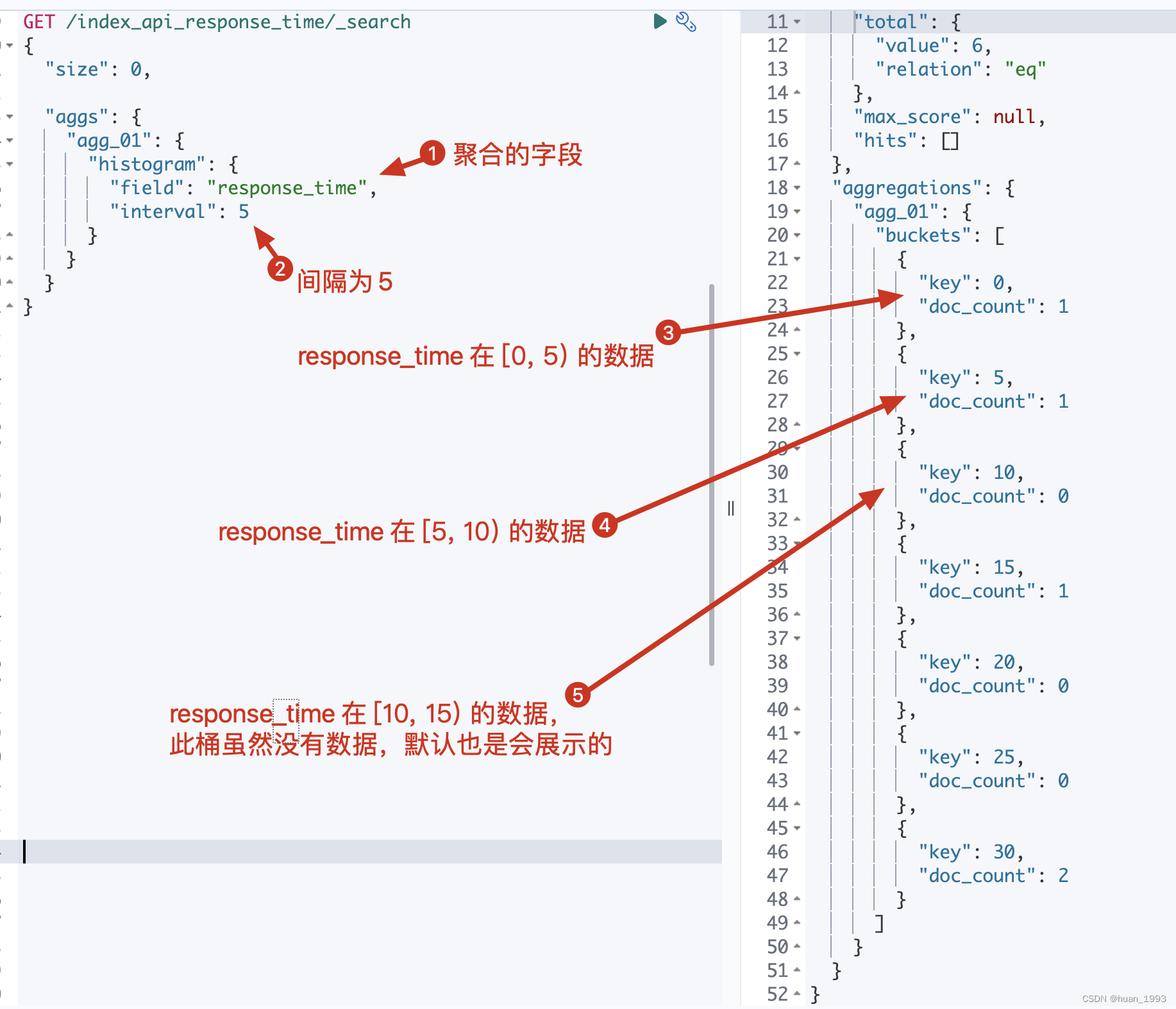
5.1、根据response_time聚合,间隔为5
5.1.1 dsl
GET /index_api_response_time/_search
{"size": 0,"aggs": {"agg_01": {"histogram": {"field": "response_time","interval": 5}}}
}
5.1.2 java代码
@Test
@DisplayName("根据response_time聚合,间隔为5")
public void test01() throws IOException {SearchRequest request = SearchRequest.of(search ->search.index("index_api_response_time").size(0).aggregations("agg_01", agg -> agg.histogram(histogram -> histogram.field("response_time").interval(5D))));System.out.println("request: " + request);SearchResponse response = client.search(request, String.class);System.out.println("response: " + response);
}
5.1.3 运行结果
5.2 在5.1基础上聚合出每个桶总的响应时间
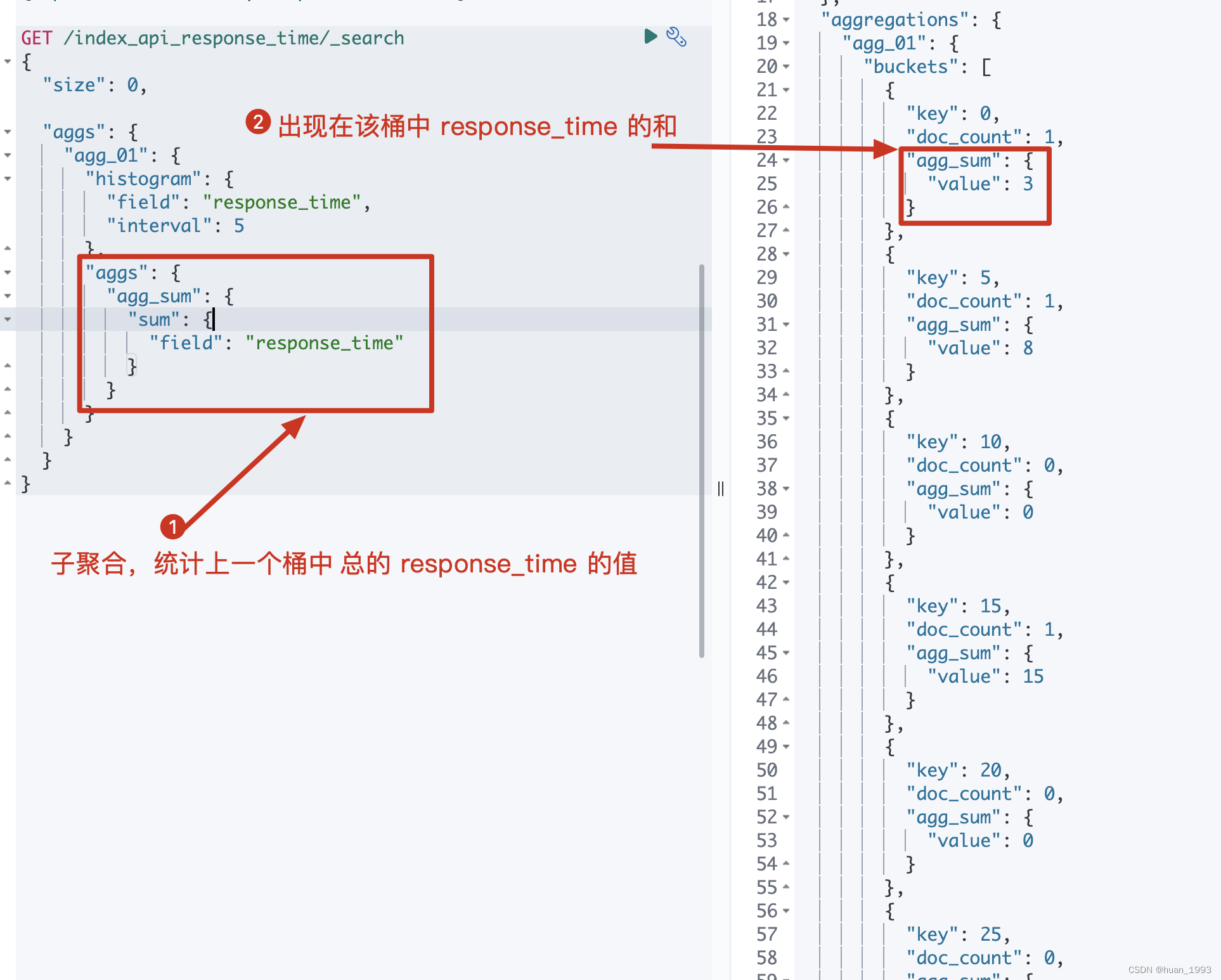
此处聚合一下是为了结合已有的数据,看看每个数据是否落入到了相应的桶中
5.2.1 dsl
GET /index_api_response_time/_search
{"size": 0,"aggs": {"agg_01": {"histogram": {"field": "response_time","interval": 5},"aggs": {"agg_sum": {"sum": {"field": "response_time"}}}}}
}
5.2.2 java代码
@Test
@DisplayName("在test01基础上聚合出每个桶总的响应时间")
public void test02() throws IOException {SearchRequest request = SearchRequest.of(search ->search.index("index_api_response_time").size(0).aggregations("agg_01", agg ->agg.histogram(histogram -> histogram.field("response_time").interval(5D)).aggregations("agg_sum", aggSum -> aggSum.sum(sum -> sum.field("response_time")))));System.out.println("request: " + request);SearchResponse response = client.search(request, String.class);System.out.println("response: " + response);
}
5.2.3 运行结果
5.3 每个桶中必须存在1个文档的结果才返回-min_doc_count
从5.1中的结果我们可以知道,不管桶中是否存在数据,我们都返回了,即返回了很多空桶。 简单理解就是返回的 桶中存在 doc_count=0 的数据,此处我们需要将这个数据不返回
5.3.1 dsl
GET /index_api_response_time/_search
{"size": 0,"aggs": {"agg_01": {"histogram": {"field": "response_time","interval": 5,"min_doc_count": 1}}}
}
5.3.2 java代码
@Test
@DisplayName("每个桶中必须存在1个文档的结果才返回-min_doc_count")
public void test03() throws IOException {SearchRequest request = SearchRequest.of(search ->search.index("index_api_response_time").size(0).aggregations("agg_01", agg -> agg.histogram(histogram -> histogram.field("response_time").interval(5D).minDocCount(1))));System.out.println("request: " + request);SearchResponse response = client.search(request, String.class);System.out.println("response: " + response);
}
5.3.3 运行结果
5.4 补充空桶数据-extended_bounds
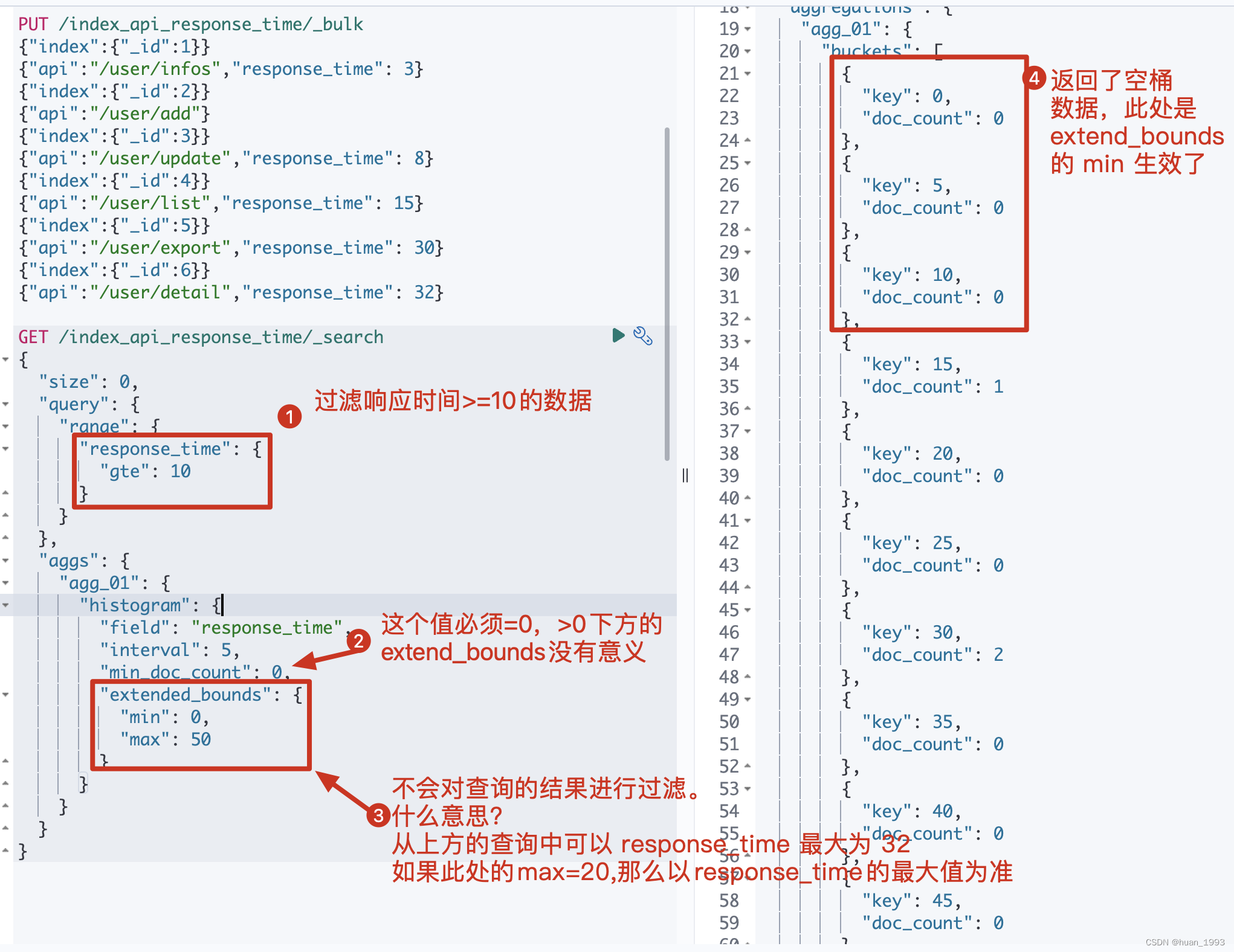
这个是什么意思?假设我们通过 response_time >= 10 进行过滤,并且 interval=5 那么es默认情况下就不会返回 bucket_key =0,5,10的桶,那么如果我想返回那么该如何处理呢?可以通过 extended_bounds 来实现。
使用extended_bounds时,min_doc_count=0时才有意义。 extended_bounds不会过滤桶。
5.4.1 dsl
GET /index_api_response_time/_search
{"size": 0,"query": {"range": {"response_time": {"gte": 10}}}, "aggs": {"agg_01": {"histogram": {"field": "response_time","interval": 5,"min_doc_count": 0,"extended_bounds": {"min": 0,"max": 50}}}}
}
5.4.2 java代码
@Test
@DisplayName("补充空桶数据-extended_bounds")
public void test04() throws IOException {SearchRequest request = SearchRequest.of(search ->search.index("index_api_response_time").size(0).query(query-> query.range(range -> range.field("response_time").gte(JsonData.of(10)))).aggregations("agg_01", agg -> agg.histogram(histogram -> histogram.field("response_time").interval(5D).minDocCount(0).extendedBounds(bounds -> bounds.min(1D).max(50D)))));System.out.println("request: " + request);SearchResponse response = client.search(request, String.class);System.out.println("response: " + response);
}
5.4.3 运行结果
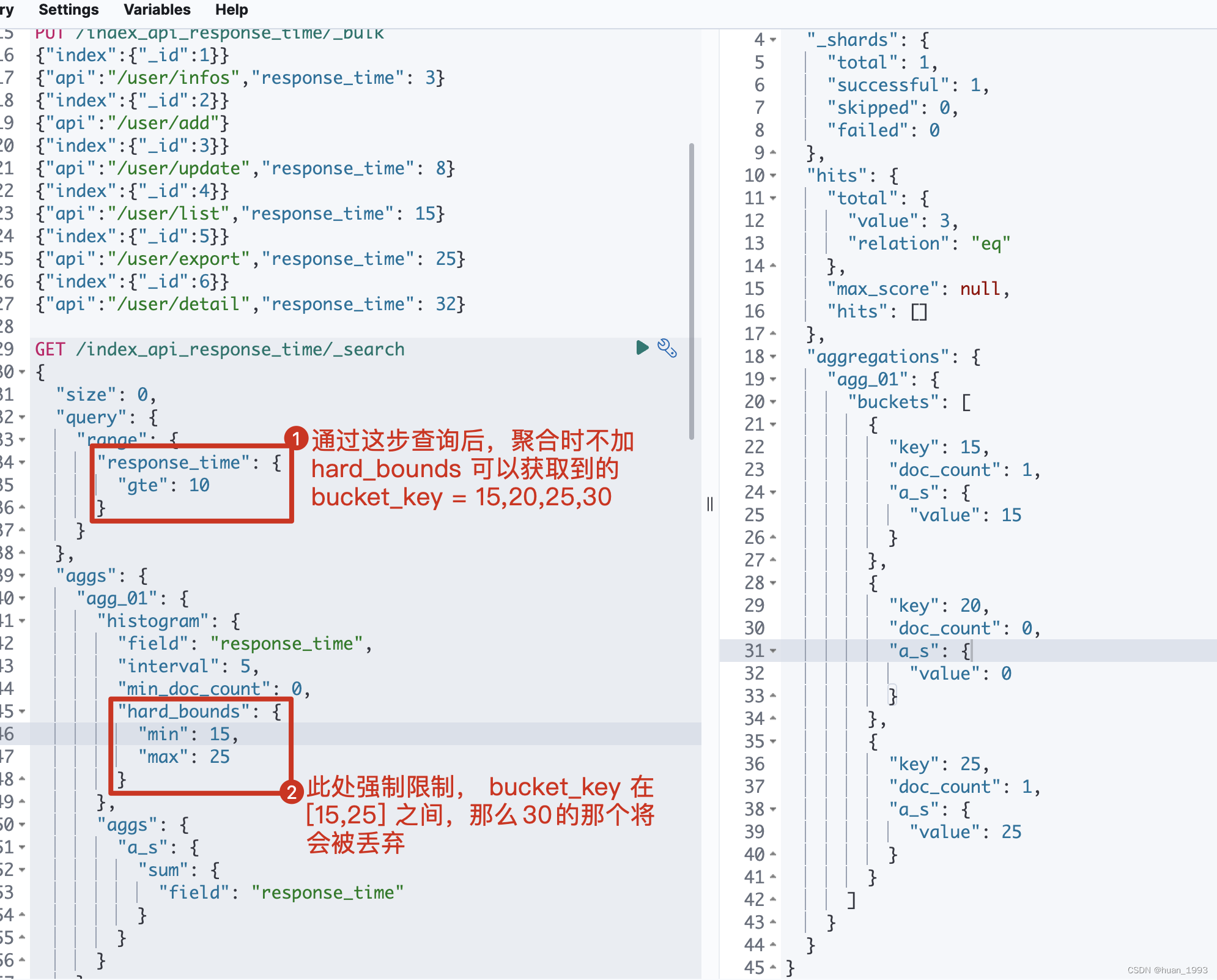
5.5 只展示min-max之间的桶-hard_bounds
此处的数据:
PUT /index_api_response_time/_bulk
{"index":{"_id":1}}
{"api":"/user/infos","response_time": 3}
{"index":{"_id":2}}
{"api":"/user/add"}
{"index":{"_id":3}}
{"api":"/user/update","response_time": 8}
{"index":{"_id":4}}
{"api":"/user/list","response_time": 15}
{"index":{"_id":5}}
{"api":"/user/export","response_time": 25}
{"index":{"_id":6}}
{"api":"/user/detail","response_time": 32}
5.5.1 dsl
GET /index_api_response_time/_search
{"size": 0,"query": {"range": {"response_time": {"gte": 10}}}, "aggs": {"agg_01": {"histogram": {"field": "response_time","interval": 5,"min_doc_count": 0,"hard_bounds": {"min": 15,"max": 25}},"aggs": {"a_s": {"sum": {"field": "response_time"}}}}}
}
5.5.2 java代码
@Test
@DisplayName("只展示min-max之间的桶-hard_bounds")
public void test05() throws IOException {SearchRequest request = SearchRequest.of(search ->search.index("index_api_response_time").size(0).query(query-> query.range(range -> range.field("response_time").gte(JsonData.of(10)))).aggregations("agg_01", agg ->agg.histogram(histogram -> histogram.field("response_time").interval(5D).minDocCount(0).hardBounds(bounds -> bounds.min(1D).max(50D))).aggregations("a_s", sumAgg -> sumAgg.sum(sum -> sum.field("response_time")))));System.out.println("request: " + request);SearchResponse response = client.search(request, String.class);System.out.println("response: " + response);
}
5.5.3 运行结果
5.6 排序-order
By default the returned buckets are sorted by their key ascending, though the order behaviour can be controlled using the order setting. Supports the same order functionality as the Terms Aggregation.
5.6.1 dsl
GET /index_api_response_time/_search
{"size": 0,"query": {"range": {"response_time": {"gte": 10}}}, "aggs": {"agg_01": {"histogram": {"field": "response_time","interval": 5,"order": {"_count": "desc"}}}}
}
5.6.2 java代码
@Test
@DisplayName("排序order")
public void test06() throws IOException {SearchRequest request = SearchRequest.of(search ->search.index("index_api_response_time").size(0).query(query-> query.range(range -> range.field("response_time").gte(JsonData.of(10)))).aggregations("agg_01", agg ->agg.histogram(histogram -> histogram.field("response_time").interval(5D).order(NamedValue.of("_count", SortOrder.Desc)))));System.out.println("request: " + request);SearchResponse response = client.search(request, String.class);System.out.println("response: " + response);
}
5.6.3 运行结果
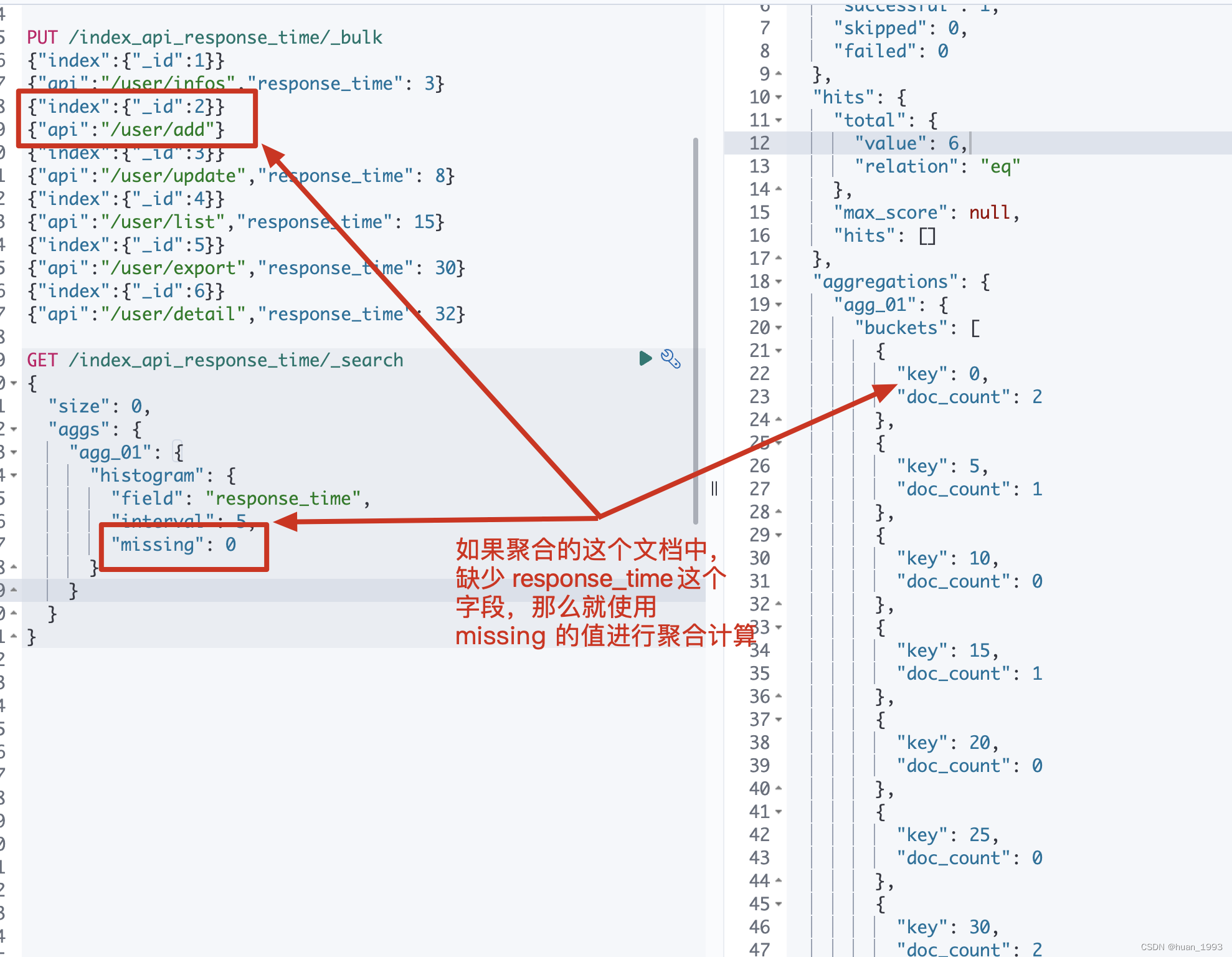
5.7 文档中缺失聚合字段时如何处理-missing
5.7.1 dsl
GET /index_api_response_time/_search
{"size": 0,"aggs": {"agg_01": {"histogram": {"field": "response_time","interval": 5,"missing": 0}}}
}
5.7.2 java代码
@Test
@DisplayName("文档中缺失聚合字段时如何处理-missing")
public void test07() throws IOException {SearchRequest request = SearchRequest.of(search ->search.index("index_api_response_time").size(0).query(query-> query.range(range -> range.field("response_time").gte(JsonData.of(10)))).aggregations("agg_01", agg ->agg.histogram(histogram -> histogram.field("response_time").interval(5D) .missing(0D))));System.out.println("request: " + request);SearchResponse response = client.search(request, String.class);System.out.println("response: " + response);
}
5.7.3 运行结果
6、完整代码
https://gitee.com/huan1993/spring-cloud-parent/blob/master/es/es8-api/src/main/java/com/huan/es8/aggregations/bucket/HistogramAggs.java
7、参考文档
- https://www.elastic.co/guide/en/elasticsearch/reference/current/search-aggregations-bucket-histogram-aggregation.html
上一篇:调侃母亲节微信朋友圈的段子
下一篇:一见钟情的表白语句