

poi导入数据工具类,直接复制使用,有详细注释
创始人
2024-02-14 18:22:52
poi导入工具类,直接复制使用,有详细的注释
- 前言
- 一、引入依赖
- 二、封装的工具类以及注解类直接copy使用
- 首先是工具类无需做操作
- 然后是封装的两个注解类,也是直接复制使用
- 测试工具类功能
- 测试实体类
- Controller层调用
- 执行结果
- 如果ifNull 设置为true执行结果
- 仰天大笑出门去,我辈岂是蓬蒿人
前言
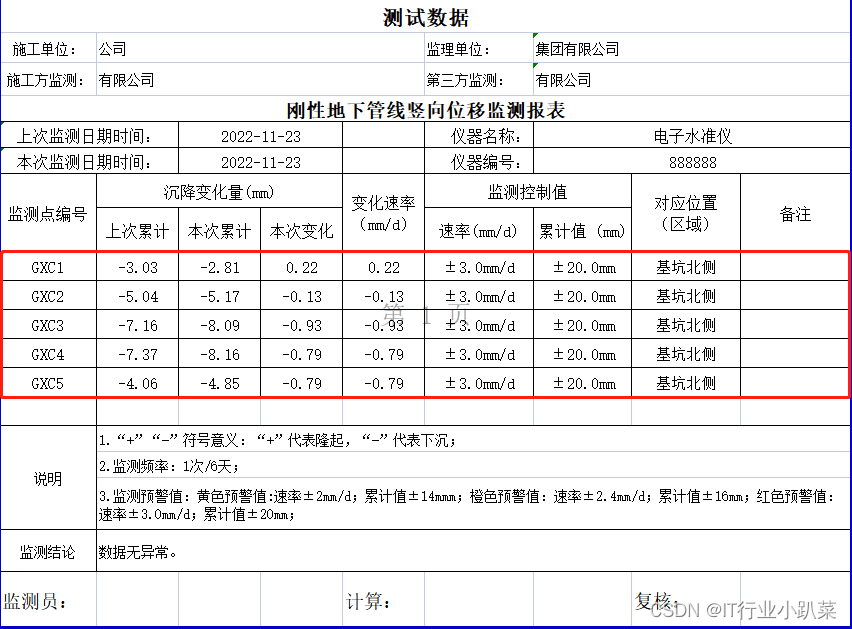
本文基于poi、注解类加反射实现自定义文件表头的导入功能、只需要将表头名写入到实体类的注解类上,就可以实现自定义文件的万能导入功能工具类;
这是导入的文件数据格式,只读取并导入红色区域的内容
一、引入依赖
使用到的依赖
org.apache.poi poi 3.13 org.apache.poi poi-ooxml 3.13 cn.hutool hutool-all 5.7.3 org.projectlombok lombok 1.18.12 org.apache.commons commons-lang3 commons-io commons-io 2.11.0 commons-fileupload commons-fileupload 1.4 二、封装的工具类以及注解类直接copy使用
一共需要三个java文件,工具类和两个注解类
首先是工具类无需做操作
import cn.hutool.core.date.DateUtil;
import cn.hutool.core.util.ObjectUtil;
import cn.hutool.core.util.StrUtil;
import com.study.test.util.note.Description;
import com.study.test.util.note.Excel;
import lombok.extern.slf4j.Slf4j;
import org.apache.commons.lang3.BooleanUtils;
import org.apache.commons.lang3.CharUtils;
import org.apache.commons.lang3.StringUtils;
import org.apache.commons.lang3.math.NumberUtils;
import org.apache.poi.hssf.usermodel.HSSFDateUtil;
import org.apache.poi.hssf.usermodel.HSSFWorkbook;
import org.apache.poi.ss.usermodel.Cell;
import org.apache.poi.ss.usermodel.Row;
import org.apache.poi.ss.usermodel.Sheet;
import org.apache.poi.ss.usermodel.Workbook;
import org.apache.poi.xssf.usermodel.XSSFWorkbook;
import org.springframework.web.multipart.MultipartFile;import java.io.InputStream;
import java.lang.reflect.Constructor;
import java.lang.reflect.Field;
import java.math.BigDecimal;
import java.text.DecimalFormat;
import java.util.*;
import java.util.stream.Collectors;
import java.util.stream.Stream;/*** 注释: excel工具类** @author yangyongzhuo 2022/11/17 19:59*/
@Slf4j
public class ExcelUtils {private final static String EXCEL2003 = "xls";private final static String EXCEL2007 = "xlsx";/*** 通过clsss,读取excel里面的数据,只要表头与Excel里面的notes一致就可以,不要关注顺序** @param file  文件* @param clsss vo* @return vo集合* @return java.util.List* @author yangyongzhuo 2022/11/17 19:59*/public static  List readExcel(MultipartFile file, Class clsss) {//开始执行时间long start = System.currentTimeMillis();Workbook workbook = null;//返回数据对象List dataList = null;//先判断文件命名是否正确,再判断文件是哪种类型String fileName = file.getName();if (!fileName.matches("^.+\\.(?i)(xls)$") && !fileName.matches("^.+\\.(?i)(xlsx)$")) {log.error("上传文件格式不正确");throw new RuntimeException("Excel命名格式不正确!");}try {InputStream is = file.getInputStream();if (fileName.endsWith(EXCEL2007)) {workbook = new XSSFWorkbook(is);}if (fileName.endsWith(EXCEL2003)) {workbook = new HSSFWorkbook(is);}if (ObjectUtil.isEmpty(workbook)) {throw new RuntimeException("Excel格式不正确,未获取工作空间!");}dataList = new ArrayList<>();//通过反射获取注释类上的数据下标值Description annotation = clsss.getAnnotation(Description.class);//数据位置因为poi读取下标是从0开始,所以要减1int dataIndex = annotation.dataIndex() - 1;//是否忽略空行boolean ifNull = annotation.ifNull();// 类映射 注解,拿到文件字段名称Map> classMap = new HashMap<>();List fields = Stream.of(clsss.getDeclaredFields()).collect(Collectors.toList());fields.forEach(field -> {//Excel excel = field.getAnnotation(Excel.class);if (ObjectUtil.isEmpty(excel)) {return;}String notes = excel.notes();if (StrUtil.isEmpty(notes)) {return;}if (!classMap.containsKey(notes)) {classMap.put(notes, new ArrayList<>());}field.setAccessible(true);classMap.get(notes).add(field);});// 获取字段对应的列号Map> reflectionMap = new HashMap<>(16);// 默认读取第一个sheetSheet sheet = workbook.getSheetAt(0);//boolean firstRow = true;for (int i = sheet.getFirstRowNum(); i <= sheet.getLastRowNum(); i++) {Row row = sheet.getRow(i);// 表头区域获取字段对应的列if (i < dataIndex) {for (int j = row.getFirstCellNum(); j <= row.getLastCellNum(); j++) {Cell cell = row.getCell(j);String cellValue = getCellValue(cell);if (classMap.containsKey(cellValue)) {reflectionMap.put(j, classMap.get(cellValue));}}firstRow = false;} else {// 忽略空白行if (row == null) {continue;}try {T t = clsss.newInstance();// 判断是否为空白行boolean allBlank = true;for (int j = row.getFirstCellNum(); j <= row.getLastCellNum(); j++) {if (reflectionMap.containsKey(j)) {Cell cell = row.getCell(j);String cellValue = getCellValue(cell);if (StringUtils.isNotBlank(cellValue)) {allBlank = false;}List fieldList = reflectionMap.get(j);fieldList.forEach(x -> {try {handleField(t, cellValue, x);} catch (Exception e) {log.error(String.format("reflect field:%s value:%s exception!", x.getName(),cellValue), e);}});}}if (!allBlank) {dataList.add(t);} else {//if is null return this import code blockif (ifNull) {return dataList;}log.warn(String.format("row:%s is blank ignore!", i));}} catch (Exception e) {log.error(String.format("parse row:%s exception!", i), e);}}}} catch (Exception e) {log.error(String.format("parse excel exception!"), e);} finally {if (workbook != null) {try {workbook.close();} catch (Exception e) {log.error(String.format("parse excel exception!"), e);}}}long end = System.currentTimeMillis();log.info("read excel cost {}s", (end - start) / 1000);return dataList;}/*** 注释: 获取数据原始类型** @param t* @param value* @param field* @return void* @author yangyongzhuo 2022/11/25 13:25*/private static  void handleField(T t, String value, Field field) throws Exception {Class type = field.getType();if (type == null || type == void.class || StringUtils.isBlank(value)) {return;}if (type == Object.class) {field.set(t, value);// 数字类型} else if (type.getSuperclass() == null || type.getSuperclass() == Number.class) {if (type == int.class || type == Integer.class) {field.set(t, NumberUtils.toInt(value));} else if (type == long.class || type == Long.class) {field.set(t, NumberUtils.toLong(value));} else if (type == byte.class || type == Byte.class) {field.set(t, NumberUtils.toByte(value));} else if (type == short.class || type == Short.class) {field.set(t, NumberUtils.toShort(value));} else if (type == double.class || type == Double.class) {field.set(t, NumberUtils.toDouble(value));} else if (type == float.class || type == Float.class) {field.set(t, NumberUtils.toFloat(value));} else if (type == char.class || type == Character.class) {field.set(t, CharUtils.toChar(value));} else if (type == boolean.class) {field.set(t, BooleanUtils.toBoolean(value));} else if (type == BigDecimal.class) {field.set(t, new BigDecimal(value));}} else if (type == Boolean.class) {field.set(t, BooleanUtils.toBoolean(value));} else if (type == Date.class) {field.set(t, value);} else if (type == String.class) {field.set(t, value);} else {Constructor constructor = type.getConstructor(String.class);field.set(t, constructor.newInstance(value));}}/*** 注释:  获取数据类型** @param cell* @return java.lang.String* @author yangyongzhuo 2022/11/25 13:26*/private static String getCellValue(Cell cell) {if (cell == null) {return "";}int cellType = cell.getCellType();if (cellType == Cell.CELL_TYPE_FORMULA) { // 表达式类型cellType = cell.getCachedFormulaResultType();}if (cellType == Cell.CELL_TYPE_NUMERIC) {if (HSSFDateUtil.isCellDateFormatted(cell)) {Date date = HSSFDateUtil.getJavaDate(cell.getNumericCellValue());return DateUtil.format(date, "yyyy-MM-dd");} else {return new DecimalFormat("#.######").format(cell.getNumericCellValue());}} else if (cellType == Cell.CELL_TYPE_STRING) {return StringUtils.trimToEmpty(cell.getRichStringCellValue() + "");} else if (cellType == Cell.CELL_TYPE_BLANK) {return "";} else if (cellType == Cell.CELL_TYPE_BOOLEAN) {return String.valueOf(cell.getBooleanCellValue());} else if (cellType == Cell.CELL_TYPE_ERROR) {return "ERROR";} else {return cell.toString().trim();}}}
然后是封装的两个注解类,也是直接复制使用
import java.lang.annotation.ElementType;
import java.lang.annotation.Retention;
import java.lang.annotation.RetentionPolicy;
import java.lang.annotation.Target;/*** 注释: 读取信息** @author yangyongzhuo 2022/11/17 15:41*/
@Target({ElementType.TYPE})
@Retention(RetentionPolicy.RUNTIME)
public @interface Description {String description() default "";/** 读到空白行处理方式 true 结束此sheet页导入,false继续导入 */boolean ifNull() default true;/** 表头的位置 */int headerIndex() default 0;/** 数据行的下表位置 */int dataIndex() default 1;/** 起始sheet页的下标 */int startSheetIndex() default 0;
}
import java.lang.annotation.ElementType;
import java.lang.annotation.Retention;
import java.lang.annotation.RetentionPolicy;
import java.lang.annotation.Target;/*** 注释: 备注注解** @author yangyongzhuo 2022/11/18 10:56*/
@Target({ElementType.METHOD, ElementType.FIELD})
@Retention(RetentionPolicy.RUNTIME)
public @interface Excel {String value() default "";String notes() default "";}
测试工具类功能
测试实体类
需要注意注解里面的notes是你要导入的字段名称,可以参考我的写法,
/*** 注释: 导入对象* @Description: dataIndex 数据的行号, * ifNull默认是true 如果有空行就终止导入,false就是忽略空行继续导入** @author yangyongzhuo 2022/11/17 15:42*/
@Description(dataIndex = 9,ifNull = false)
@Data
public class ReadExcelVo {@Excel(notes = "监测点编号")private String param1;@Excel(notes = "上次累计")private String param2;@Excel(notes = "本次累计")private String param3;@Excel(notes = "本次变化")private String param4;@Excel(notes = "变化速率(mm/d)")private String param5;@Excel(notes = "速率(mm/d)")private String param6;@Excel(notes = "累计值 (mm)")private String param7;@Excel(notes = "对应位置\n" +"(区域)")private String param8;@Excel(notes = "备注")private String param9;
}
Controller层调用
/*** 注释: 文件测试** @author yangyongzhuo 2022/11/17 20:01*/
@RestController
@RequestMapping("/test/controller")
public class TestController {@PostMapping("/testImport")public void testImport(@RequestParam("file") MultipartFile file) {List readExcelVos = ExcelUtils.readExcel(file, ReadExcelVo.class);//打印导入数据readExcelVos.forEach(System.err::println);}}
执行结果

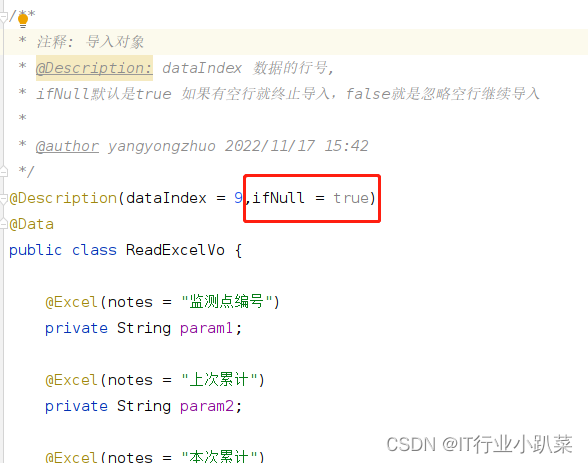
如果ifNull 设置为true执行结果

仰天大笑出门去,我辈岂是蓬蒿人
相关内容
热门资讯
埃菲尔铁塔在哪 中国仿建埃菲尔...
2019年4月26日,广西南宁市,街头惊现一座巨型山寨版埃菲尔铁塔,高约20米,白色塔身,造型逼真,...
苗族的传统节日 贵州苗族节日有...
【岜沙苗族芦笙节】岜沙,苗语叫“分送”,距从江县城7.5公里,是世界上最崇拜树木并以树为神的枪手部落...
北京的名胜古迹 北京最著名的景...
北京从元代开始,逐渐走上帝国首都的道路,先是成为大辽朝五大首都之一的南京城,随着金灭辽,金代从海陵王...
应用未安装解决办法 平板应用未...
---IT小技术,每天Get一个小技能!一、前言描述苹果IPad2居然不能安装怎么办?与此IPad不...
脚上的穴位图 脚面经络图对应的...
人体穴位作用图解大全更清晰直观的标注了各个人体穴位的作用,包括头部穴位图、胸部穴位图、背部穴位图、胳...
长白山自助游攻略 吉林长白山游...
昨天介绍了西坡的景点详细请看链接:一个人的旅行,据说能看到长白山天池全凭运气,您的运气如何?今日介绍...
demo什么意思 demo版本...
618快到了,各位的小金库大概也在准备开闸放水了吧。没有小金库的,也该向老婆撒娇卖萌服个软了,一切只...
世界上最漂亮的人 世界上最漂亮...
此前在某网上,选出了全球265万颜值姣好的女性。从这些数量庞大的女性群体中,人们投票选出了心目中最美...
埃菲尔铁塔在哪 中国仿建埃菲尔...
2019年4月26日,广西南宁市,街头惊现一座巨型山寨版埃菲尔铁塔,高约20米,白色塔身,造型逼真,...
苗族的传统节日 贵州苗族节日有...
【岜沙苗族芦笙节】岜沙,苗语叫“分送”,距从江县城7.5公里,是世界上最崇拜树木并以树为神的枪手部落...
北京的名胜古迹 北京最著名的景...
北京从元代开始,逐渐走上帝国首都的道路,先是成为大辽朝五大首都之一的南京城,随着金灭辽,金代从海陵王...
应用未安装解决办法 平板应用未...
---IT小技术,每天Get一个小技能!一、前言描述苹果IPad2居然不能安装怎么办?与此IPad不...
脚上的穴位图 脚面经络图对应的...
人体穴位作用图解大全更清晰直观的标注了各个人体穴位的作用,包括头部穴位图、胸部穴位图、背部穴位图、胳...