

Terraform 初始化慢~配置本地离线源
解决Terraform初始化慢~配置本地离线源 - 知乎
这里不再介绍Terraform是啥了,可以参考最近上线的课程。直奔主题,配置一个离线的源。
需要手动或者terraform init一次下载, 然后缓存。后续直接使用缓存。
本次实践使用的是Linux/Mac 系统,如果是windows系统有两点不同的配置。
- CLI配置文件的名称为
terraform.rc - plugin_cache_dir:
D:/xxx/xxx
这个你在windows下面是哪个目录下载的provider,那么在Linux上面也是对应的目录。
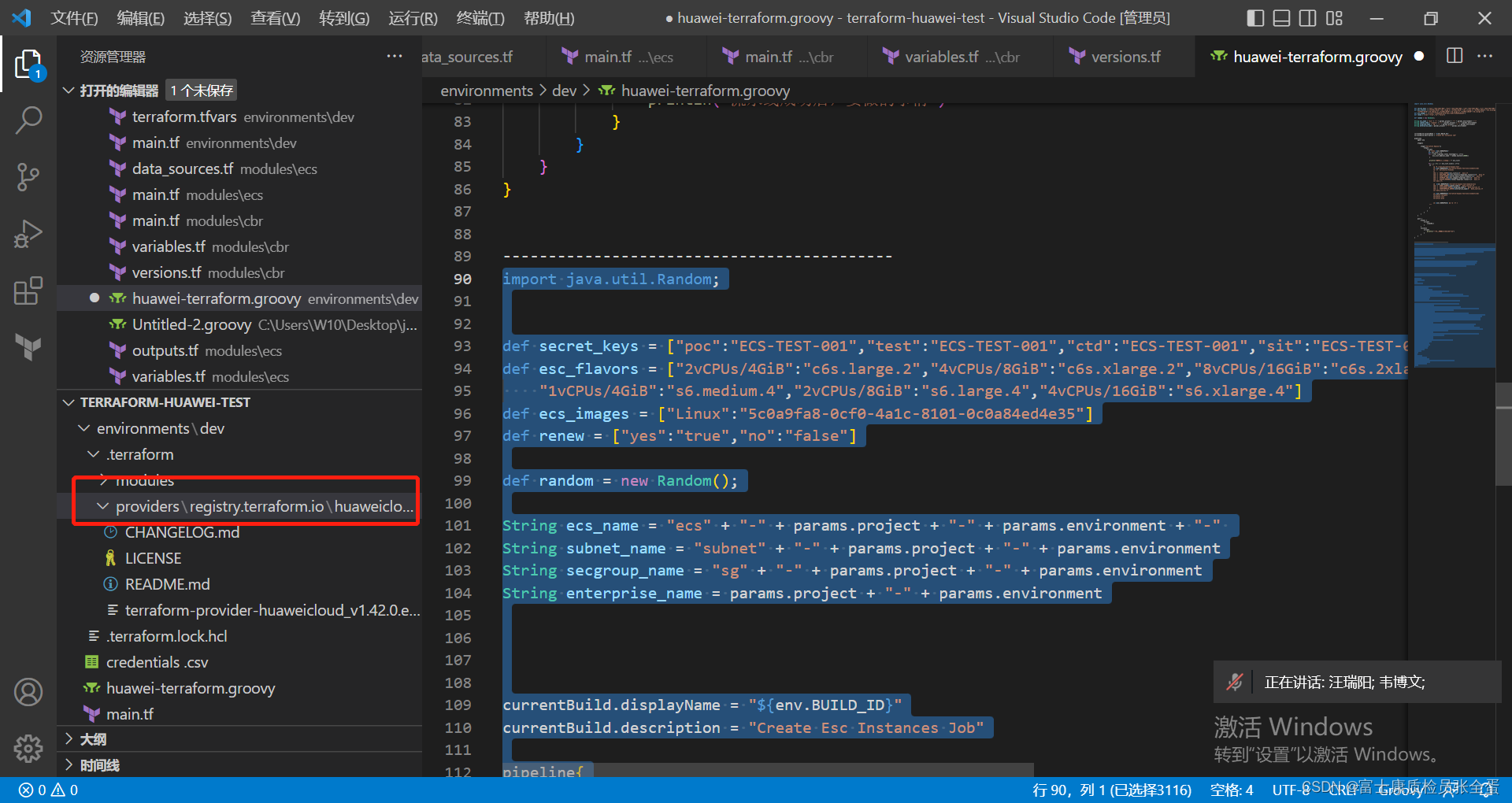
这个registry.terraform.io目录就是provider下载目录,将这个目录拷贝到你的terraform-plugin-cache目录下,那么就可以使用缓存了。
[root@jenkins terraform-plugin-cache]# pwd
/root/.terraform.d/terraform-plugin-cache
[root@jenkins terraform-plugin-cache]# ls
registry.terraform.io
[root@jenkins dev]# pwd
/root/terraform-huawei-test/environments/dev
[root@jenkins dev]# ls -a
. huawei-terraform.groovy providers.tf terraform.tfstate variables.tf
.. main.tf .terraform terraform.tfstate.backup versions.tf
credentials .csv params .terraform.lock.hcl terraform.tfvars
[root@jenkins dev]# ls .terraform/
modules/ plugin_path providers/
[root@jenkins dev]# ls .terraform/providers/
registry.terraform.io
Terraform配置缓存
【摘要】 Terraform配置缓存 一 背景需要手动或者terraform init一次下载, 然后缓存。后续直接使用缓存。本次实践使用的是Linux/Mac 系统,如果是windows系统有两点不同的配置。Terraform使用预填充插件(防止通过init命令从web下载)。配置文件使用与 .tf 文件相同的 HCL 语法,但具有不同的属性和块。以下示例说明了一般语法;有关每个设置的含义的信息,...
Terraform配置缓存
一 背景
需要手动或者terraform init一次下载, 然后缓存。后续直接使用缓存。
本次实践使用的是Linux/Mac 系统,如果是windows系统有两点不同的配置。
Terraform使用预填充插件(防止通过init命令从web下载)。
配置文件使用与 .tf 文件相同的 HCL 语法,但具有不同的属性和块。以下示例说明了一般语法;有关每个设置的含义的信息,请参阅以下部分:
credentials:配置用于 Terraform Cloud 或 Terraform Enterprise 的凭据。有关详细信息,请参阅下面的凭据Credentials。credentials_helper:为 Terraform Cloud 或 Terraform Enterprise 配置用于存储和检索凭据的外部帮助程序。有关详细信息,请参阅下面的凭据助手。disable_checkpoint:设置为 true 时,禁用需要联系 HashiCorp 提供的网络服务的升级和安全公告检查。disable_checkpoint_signature:当设置为 true 时,允许上述升级和安全公告检查,但禁止使用匿名 id 来删除重复警告消息。plugin_cache_dir:启用插件缓存并以字符串形式指定插件缓存目录的位置。provider_installation:自定义 terraform init 在安装提供程序插件时使用的安装方法。有关详细信息,请参阅下面的提供程序安装。
二 配置
# 创建缓存目录
mkdir -pv $HOME/.terraform.d/terraform-plugin-cache # 写入配置文件
cat > $HOME/.terraform.d/.terraformrc <
---------------------------------------------------------------------------------------------------------------------------------
1. 创建配置文件
.terraformrc是Terraform CLI的配置文件
plugin_cache_dir  = "$HOME/.terraform.d/terraform-plugin-cache"
disable_checkpoint = true
- plugin_cache_dir 是插件的缓存目录(此目录需要提前创建不然init报错)
- disable_checkpoint 禁用 需要连接HashiCorp 提供的网络服务的升级和安全公告检查
mkdir -p $HOME/.terraform.d/terraform-plugin-cache
文件创建好了之后, 要通过配置TF_CLI_CONFIG_FILE变量,让TerraformCLI可以加载到配置文件。这个变量的值没有固定配置,而是取决于.terraformrc文件路径。
export TF_CLI_CONFIG_FILE=$HOME/Desktop/terraform/terraform-module-example/.terrafo
rmrc
--------------------------------------------------------------------------------------------------------------------------------
2. 进行初始化
插件下载方式有两种:
- 通过
terraform init自动下载provider 插件; - 登入
registry.terraform.io手动到GitHub下载,并按照目录结构存放到plugin_cache_dir;
本次演示先使用terraform init进行操作, 如果手动到registry下载,需要按照目录结构存放;
terraform init
Initializing modules...
- mydns in ../../modules/dns
- myecs in ../../modules/ecs
- myssecgroup in ../../modules/secgroup
- myvpc in ../../modules/vpcInitializing the backend...Initializing provider plugins...
- Finding hashicorp/alicloud versions matching "1.164.0"...
- Installing hashicorp/alicloud v1.164.0...
- Installed hashicorp/alicloud v1.164.0 (signed by HashiCorp)Terraform has created a lock file .terraform.lock.hcl to record the provider
selections it made above. Include this file in your version control repository
so that Terraform can guarantee to make the same selections by default when
you run "terraform init" in the future.
初始化之后, 查看plugin_cache_dir中的内容:$HOME/.terraform.d/terraform-plugin-cache/registry.terraform.io/hashicorp/alicloud/1.164.0/darwin_arm64
➜  .terraform.d pwd
/Users/lizeyang/.terraform.d➜  .terraform.d tree
.
|____checkpoint_cache
|____checkpoint_signature
|____terraform-plugin-cache
| |____registry.terraform.io
| | |____hashicorp
| | | |____alicloud
| | | | |____1.164.0
| | | | | |____darwin_arm64
| | | | | | |____terraform-provider-alicloud_v1.164.0
三 初始化
terraform init进行联网下载,或者可以进入到registry.terraform.io 手动通过github下载
可以看到在缓存目录下已经成功缓存
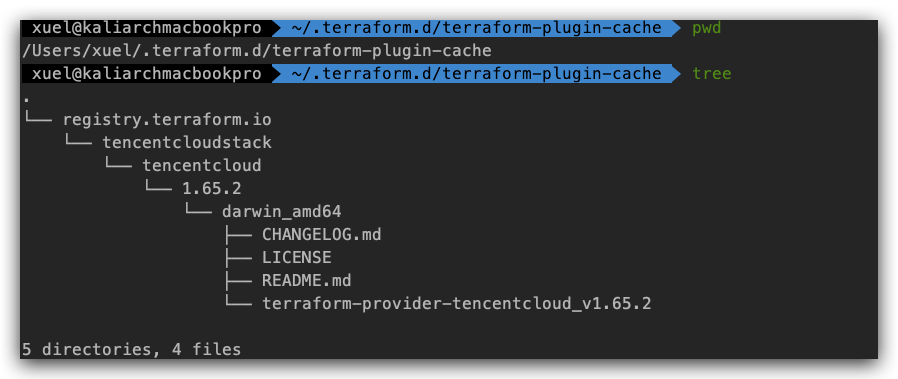
3. 模拟断网,离线初始化
方法1:初始化时指定plugin-dirterraform init --plugin-dir $HOME/.terraform.d/terraform-plugin-cache/
terraform init  --plugin-dir $HOME/.terraform.d/terraform-plugin-cache/
Initializing modules...
- mydns in ../../modules/dns
- myecs in ../../modules/ecs
- myssecgroup in ../../modules/secgroup
- myvpc in ../../modules/vpcInitializing the backend...Initializing provider plugins...
- Finding hashicorp/alicloud versions matching "1.164.0"...
- Using hashicorp/alicloud v1.164.0 from the shared cache directoryTerraform has created a lock file .terraform.lock.hcl to record the provider
selections it made above. Include this file in your version control repository
so that Terraform can guarantee to make the same selections by default when
you run "terraform init" in the future.Terraform has been successfully initialized!
方法2:定义Terraform插件使用本地mirror
provider_installation {filesystem_mirror {path    = "/Users/lizeyang/.terraform.d/terraform-plugin-cache"include = ["registry.terraform.io/*/*"]}
}➜  dev terraform init
Initializing modules...Initializing the backend...Initializing provider plugins...
- Finding hashicorp/alicloud versions matching "1.164.0"...
- Using hashicorp/alicloud v1.164.0 from the shared cache directoryTerraform has created a lock file .terraform.lock.hcl to record the provider
selections it made above. Include this file in your version control repository
so that Terraform can guarantee to make the same selections by default when
you run "terraform init" in the future.Terraform has been successfully initialized!
到此就完成了terraform离线本地源的配置了, 除了这种方式外其实也可以基于terraform开放的HTTP API协议,使用Python Flask写一个registry server。
四 离线测试
4.1 制定plugin-dir
terraform init --plugin-dir $HOME/.terraform.d/terraform-plugin-cache/
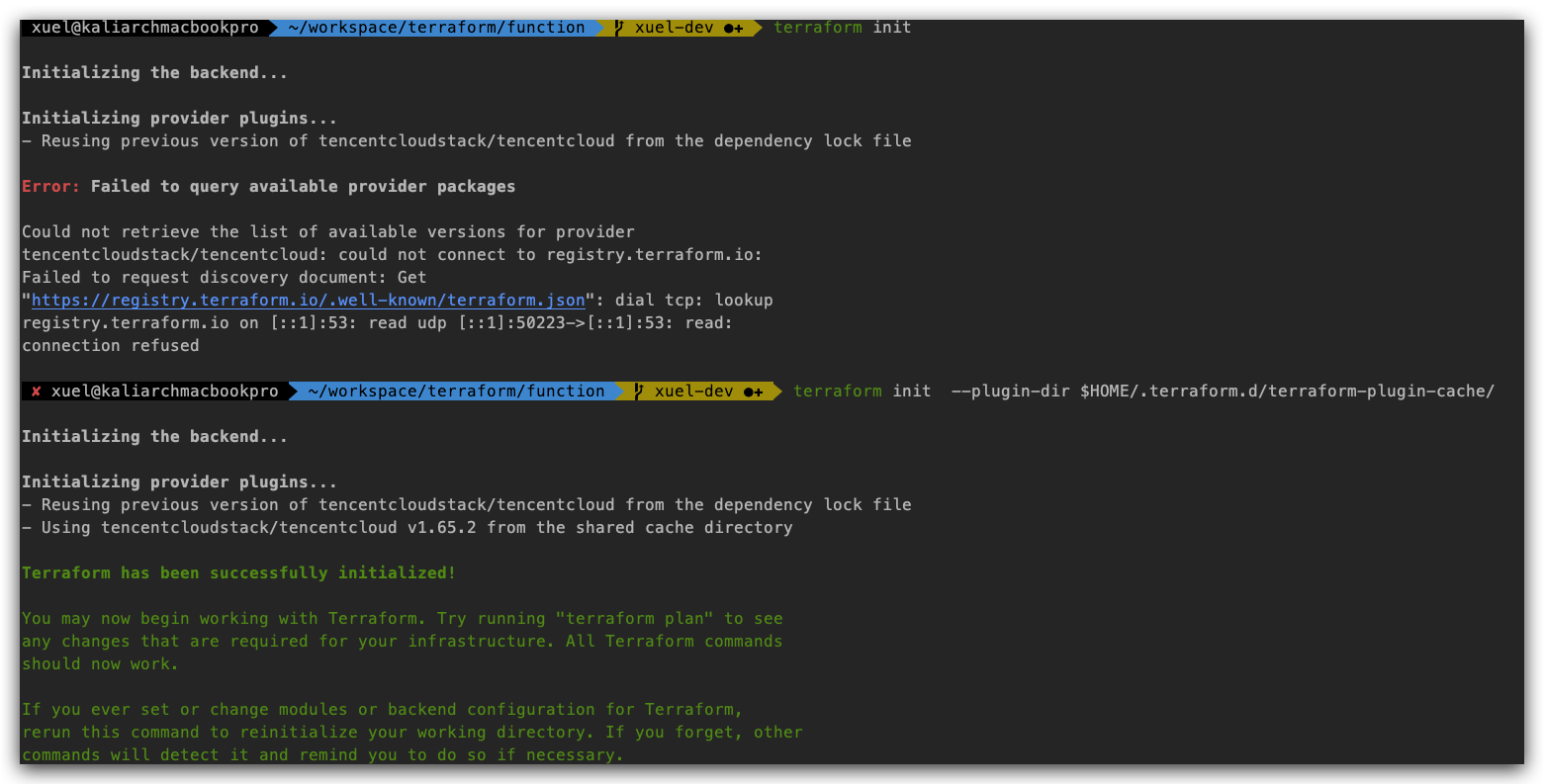
4.2 定义Terraform插件使用本地mirror
在.terraformrc 中添加filesystem_mirror
provider_installation {filesystem_mirror {path    = "/Users/xuel/.terraform.d/terraform-plugin-cache"include = ["registry.terraform.io/*/*"]}
}
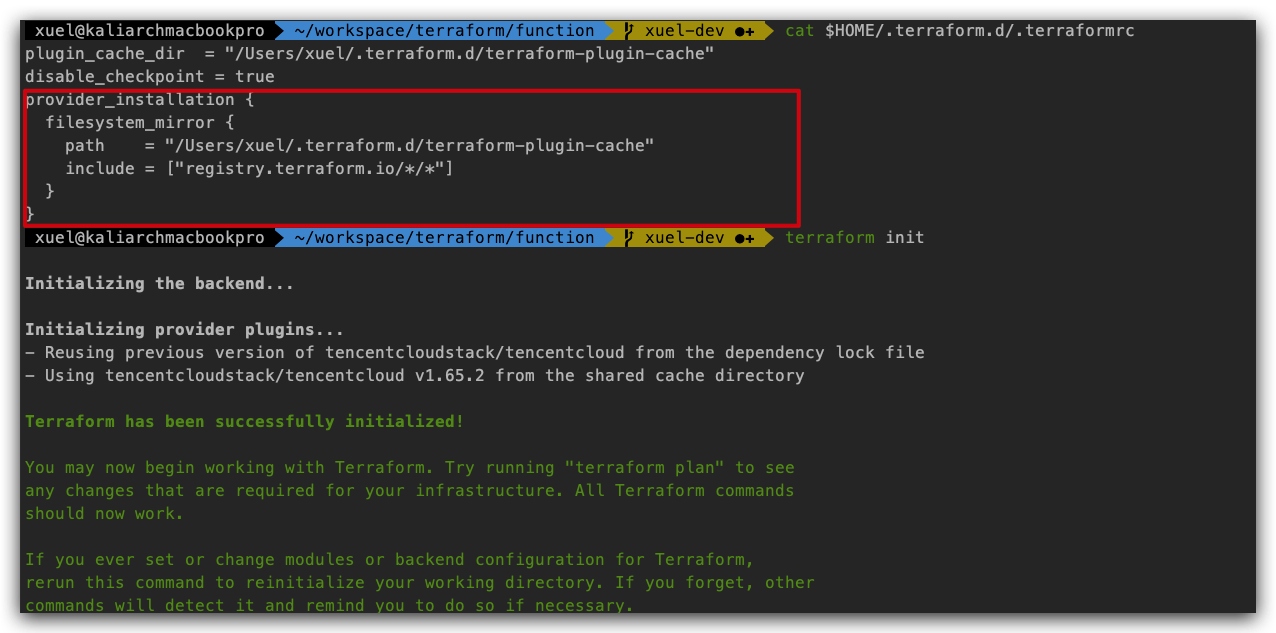
$ terraform providers mirror /Users/larry/Software/terraform/plugins
terraform init -plugin-dir=/Users/larry/Software/terraform/plugins
4.3 两者的练习与区别
4.3.1 联系
前两个是相互联系的,因为它们都共享相同的底层机制:“文件系统镜像”插件安装方法。
4.3.2 区别
- 使用
terraform init -plugin-dir使Terraform实际上构造了一个one-offprovider_installation块,其中只包含一个引用给定目录的filesystem_mirror块。它允许您仅在一次安装操作中获得这种效果,而不是在中心位置为将来的所有命令配置它。具体而言,如果运行terraform init -plugin-dir=/example,则在功能上等同于以下CLI配置:
provider_installation {filesystem_mirror {path    = "/Users/xuel/.terraform.d/terraform-plugin-cache"include = ["registry.terraform.io/*/*"]}
}
-
插件缓存目录不同,因为Terraform仍将访问配置的安装方法(默认情况下,每个提供商的原始注册表),但如果插件包文件已经在缓存中,则将跳过下载插件包文件(该文件实际上包含插件代码,而不是关于发布的元数据)。同样,它会将下载的任何新插件包保存到缓存中,以备将来使用。
因此,这不会阻止Terraform尝试通过网络访问原始注册表来安装任何新插件。这只是一个避免重复使用re-downloading相同包的优化。
注意事项
- 注意环境变量TF_CLI_CONFIG_FILE,全局生效添加之.bashrc中。
- 到此就完成了terraform离线本地源的配置了, 除了这种方式外其实也可以基于terraform开放的HTTP API协议,使用Python Flask写一个registry server。
- 如果想要自己手动下载,可以到这个网址:https://releases.hashicorp.com/