

第三章:CompletableFuture
- Future接口复习
- FutureTask 实现类
- Future 编码的优缺点
- 优点
- 缺点
- get() 方法导致阻塞
- isDone() 轮询
- 总结
- CompletableFuture
- CompletableFuture 为什么会出现?
- CompletableFuture 架构图
- CompletionStage
- CompletableFuture 四个静态方法
- CompletableFuture 减少阻塞和轮询
- ==注意事项==
- 总结
- CompletableFuture 案例
- 第一种方案
- 第二种方案
- CompletableFuture 常用的方法
- 获得结果和触发计算
- 对计算结果进行处理
- 对计算结果进行消费
- CompletableFuture 对线程池的选择
- 对计算速度进行选用
- 对计算结果进行合并
Future接口复习
Future接口(FutureTask实现类)定义了操作异步任务的一些方法,如获取异步任务的执行结果、取消任务的执行、判断任务是否被取消、判断任务执行是否完毕等。(异步:可以被叫停,可以被取消)
一句话:Future接口可以为主线程开一个分支任务,专门为主线程处理耗时和费力的复杂业务。
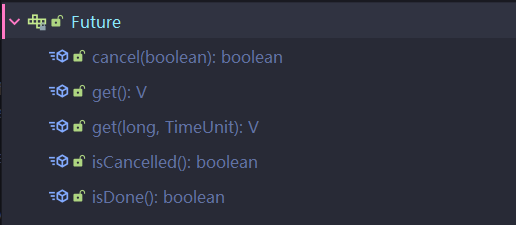
比如主线程让一个子线程去执行任务,子线程可能比较耗时,启动子线程开始执行任务后,主线程就去做其他事情了,过了一会才去获取子任务的执行结果。
FutureTask 实现类
在我们学多线程时,创建多线程一共有四种方式:
- 继承 Thread类
- 实现 Runnable 接口
- 实现 Callable 接口
- 使用线程池
而我们要使用多线程实现 异步任务 , 就需要具有以下三个特点:多线程/有返回/异步任务
在以上的集中创建方式中,只有 实现Callable 接口,重写 call 方法才具有返回值,但是问题又来了,Thread 构造器中并没有提供带有 Callable 类型的参数;只支持传入 Runnable 接口以及实现类
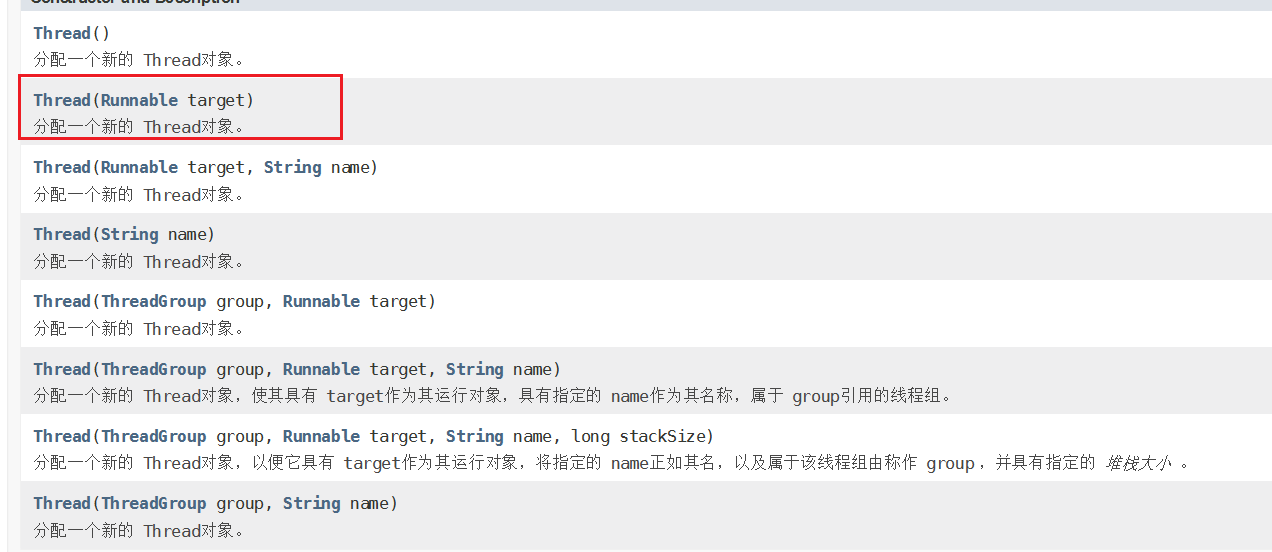
因此我们就考虑有没有一个类,能够通过 Callable 来创建线程,并且又实现了 Runnable 、 Future 接口。
而 FutureTask 就是一个这样的类,FutureTask 的继承关系图:
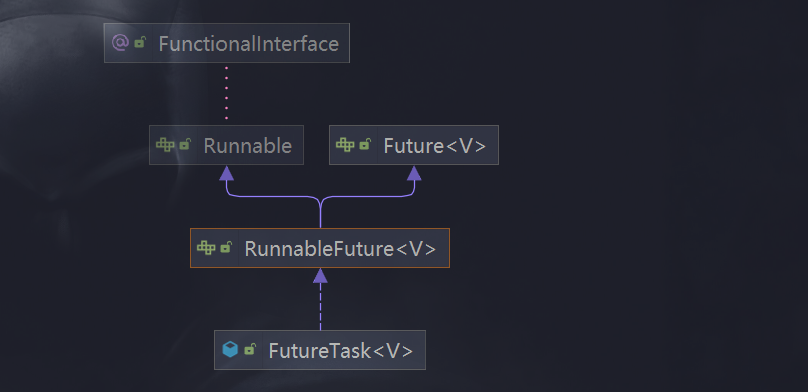
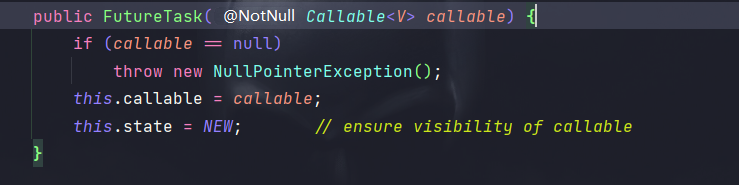
FutureTask 不仅实现了 Runnable、Future 接口,并且还支持通过 Callable 创建实例:
代码演示:
public class FutureTaskTest {public static void main(String[] args) throws ExecutionException, InterruptedException {FutureTask futureTask = new FutureTask<>(new MyThread());Thread t1 = new Thread(futureTask);t1.start();// 获取返回值System.out.println(futureTask.get());}
}class  MyThread implements Callable {@Overridepublic String call() throws Exception {return "hello, callable";}
}
Future 编码的优缺点
优点
Future + 线程池 异步多线程任务配合,能显著提高程序的执行效率。
案例:
不使用 Future 的情况:
public class FutureTaskTest02 {public static void main(String[] args) {long begin = System.currentTimeMillis();// 任务一耗时try {Thread.sleep(500);} catch (InterruptedException e) {e.printStackTrace();}// 任务二耗时try {Thread.sleep(300);} catch (InterruptedException e) {e.printStackTrace();}// 任务三耗时try {Thread.sleep(700);} catch (InterruptedException e) {e.printStackTrace();}long end = System.currentTimeMillis();System.out.println(" 程序耗时: " + (end - begin) + "毫秒");}
}
输出结果:程序耗时: 1512毫秒
使用 Future + ThreadPool 的情况:
线程池用完一定要记着关闭!!!!
public class FutureTaskTest02 {public static void main(String[] args) throws ExecutionException, InterruptedException {long begin = System.currentTimeMillis();// 创建线程池ExecutorService threadPool = Executors.newFixedThreadPool(3);FutureTask futureTask1 = new FutureTask(() -> {try {Thread.sleep(500);} catch (InterruptedException e) {e.printStackTrace();}return "任务一";});FutureTask futureTask2 = new FutureTask(() -> {try {Thread.sleep(300);} catch (InterruptedException e) {e.printStackTrace();}return "任务二";});FutureTask futureTask3 = new FutureTask(() -> {try {Thread.sleep(300);} catch (InterruptedException e) {e.printStackTrace();}return "任务三";});// 提交任务threadPool.submit(futureTask1);threadPool.submit(futureTask2);threadPool.submit(futureTask3);// 获取返回值System.out.println(futureTask1.get());System.out.println(futureTask2.get());System.out.println(futureTask3.get());long end = System.currentTimeMillis();System.out.println(" 程序耗时: " + (end - begin) + "毫秒");}// public static  void m1 () {//     // 任务一耗时//     try {Thread.sleep(500);} catch (InterruptedException e) {e.printStackTrace();}//     // 任务二耗时//     try {Thread.sleep(300);} catch (InterruptedException e) {e.printStackTrace();}//     // 任务三耗时//     try {Thread.sleep(700);} catch (InterruptedException e) {e.printStackTrace();}// }
}
输出结果:
任务一
任务二
任务三
程序耗时: 587毫秒
通过测试可以看出,Future+ ThreadPool 异步任务的方式确实提高了效率
缺点
get() 方法导致阻塞
一旦调用get()方法,不管是否计算完成,都会导致阻塞(所以一般get方法放到最后)
代码演示:
public class FutureTaskTest03 {public static void main(String[] args) throws ExecutionException, InterruptedException {FutureTask futureTask = new FutureTask(() -> {System.out.println("异步任务开始计算.....");try {Thread.sleep(5000);} catch (InterruptedException e) {e.printStackTrace();}return "异步任务计算结束.....";});new Thread(futureTask).start();// get() 方法会阻塞线程的执行System.out.println(futureTask.get());System.out.println("main线程正在执行其他操作.....");}
} 输出结果:
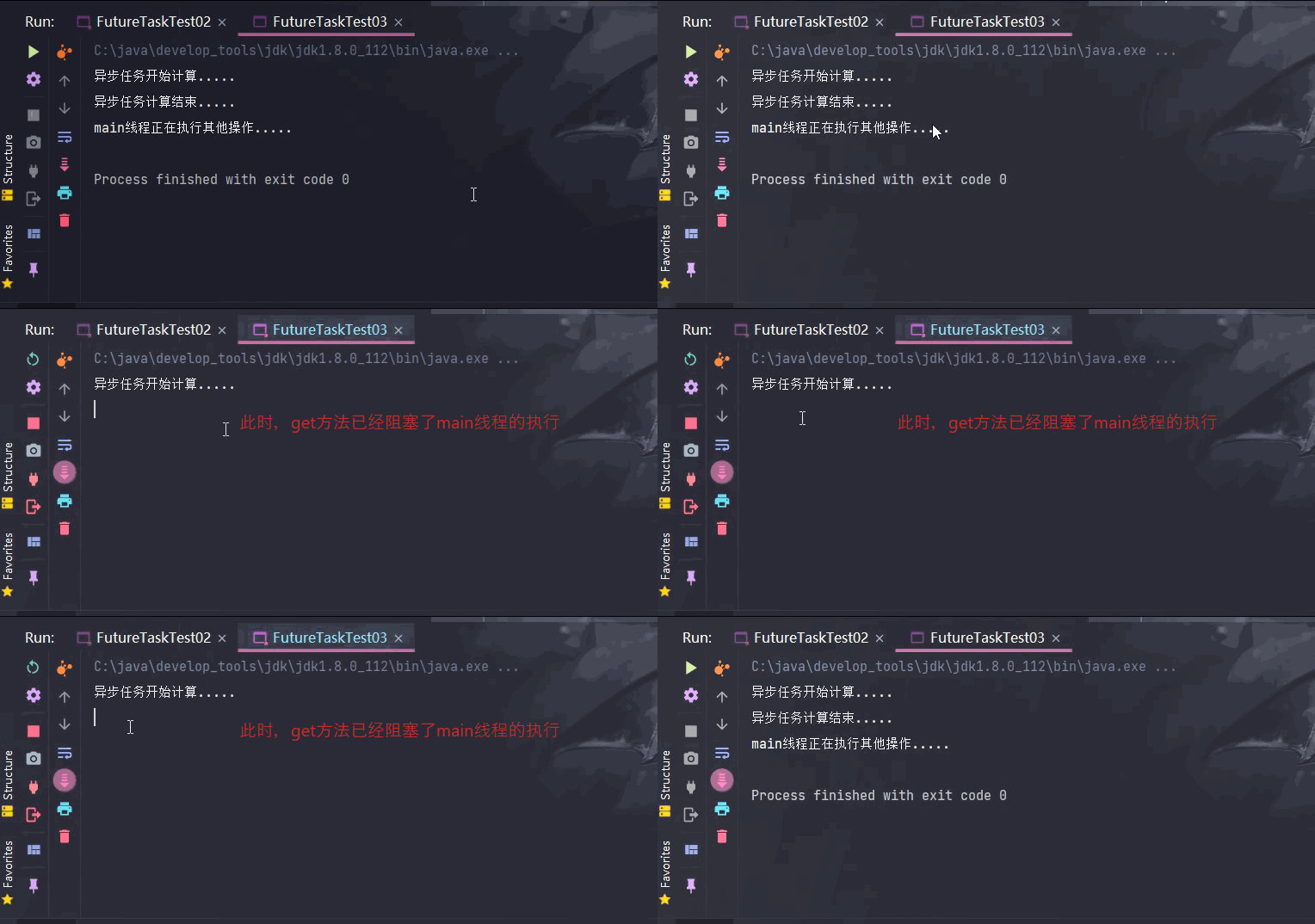
从输出情况中可以看出,get方法确实有阻塞线程的缺点,因此一般建议放在代码的最后执行。
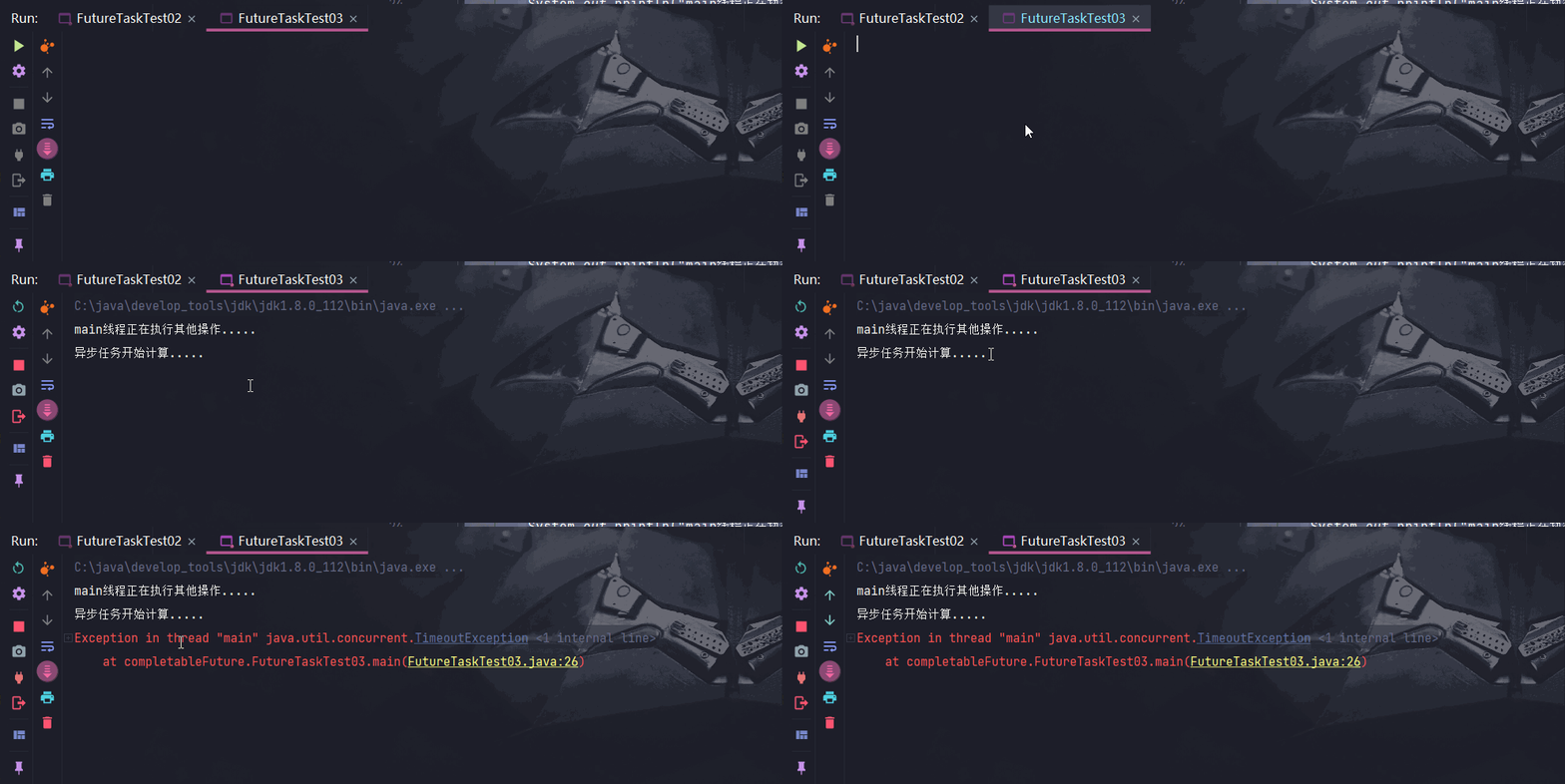
get() 方法中还可以传入时间参数,超过指定的时间未完成计算,会抛出异常:TimeoutException
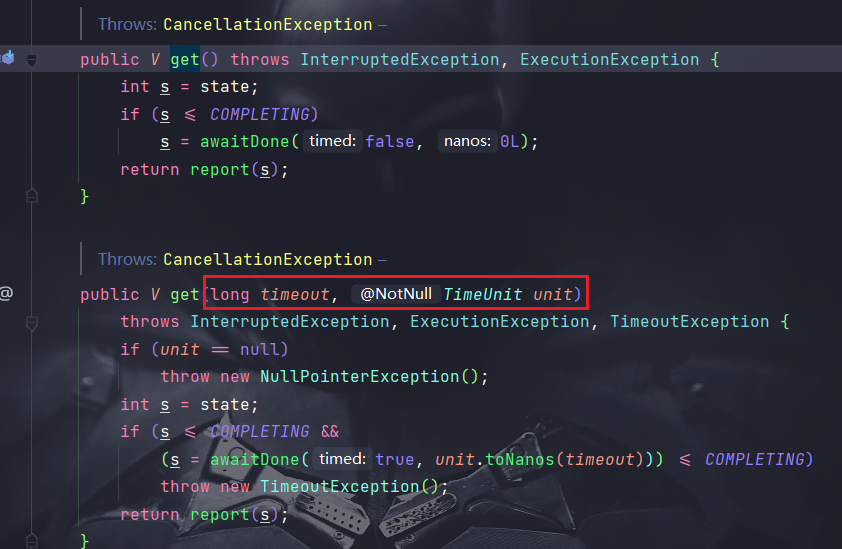
代码演示:
public class FutureTaskTest03 {public static void main(String[] args) throws ExecutionException, InterruptedException, TimeoutException {FutureTask futureTask = new FutureTask(() -> {System.out.println("异步任务开始计算.....");try {Thread.sleep(5000);} catch (InterruptedException e) {e.printStackTrace();}return "异步任务计算结束.....";});new Thread(futureTask).start();System.out.println("main线程正在执行其他操作.....");// get() 方法会阻塞线程的执行System.out.println(futureTask.get(3, TimeUnit.SECONDS));}
} 输出结果:
isDone() 轮询
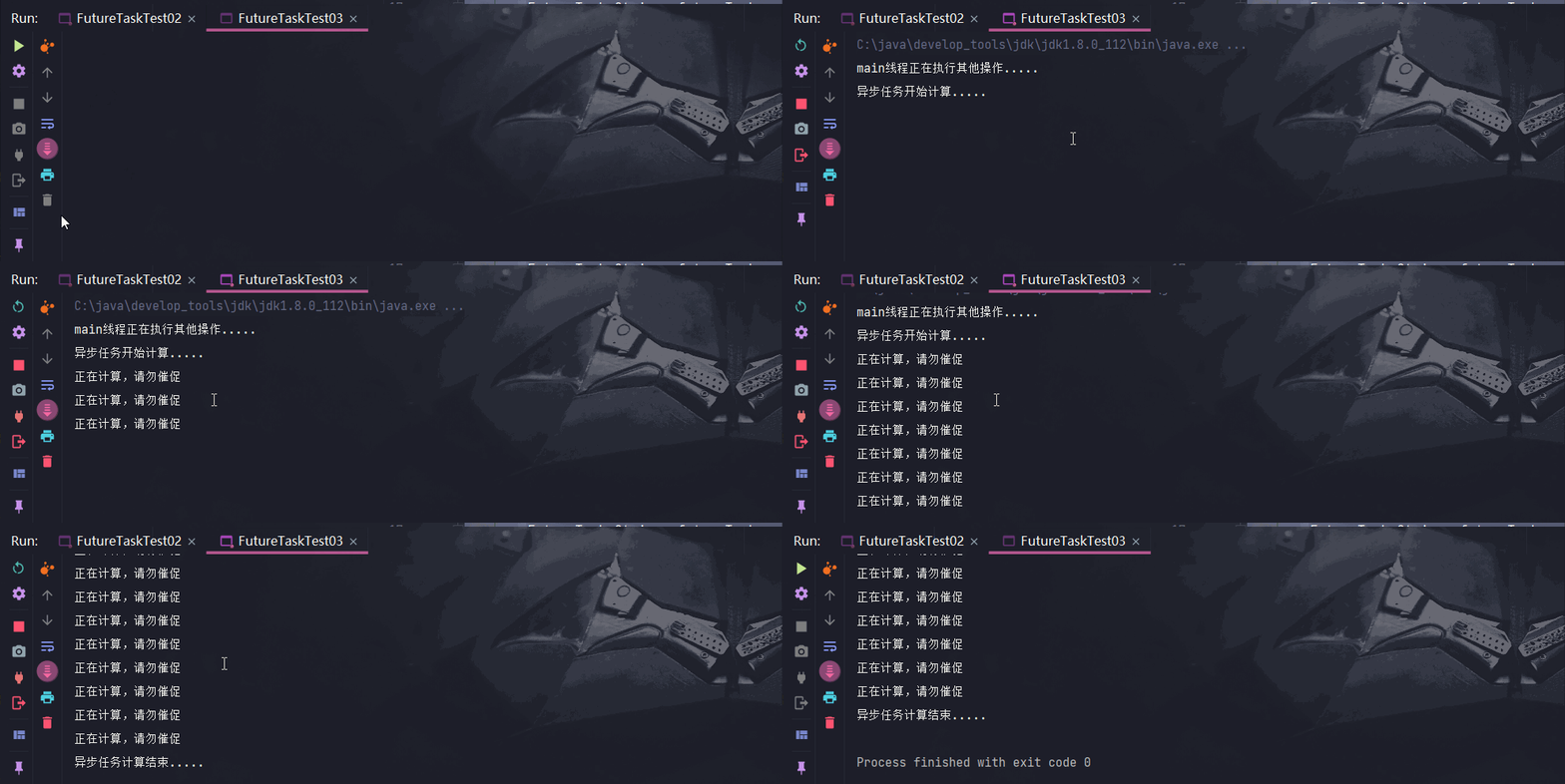
轮询的方式会耗费无谓的CPU资源,而且也不见得能及时地得到计算结果.
如果想要异步获取结果,通常都会以轮询的方式去获取结果.尽量不要阻塞
代码演示:
public class FutureTaskTest03 {public static void main(String[] args) throws ExecutionException, InterruptedException, TimeoutException {FutureTask futureTask = new FutureTask(() -> {System.out.println("异步任务开始计算.....");try {Thread.sleep(5000);} catch (InterruptedException e) {e.printStackTrace();}return "异步任务计算结束.....";});new Thread(futureTask).start();System.out.println("main线程正在执行其他操作.....");// get() 方法会阻塞线程的执行// System.out.println(futureTask.get());// 设置规定时间内完成计算,否则会报异常,一般不会使用这种方式,有异常始终是不好的// System.out.println(futureTask.get(3, TimeUnit.SECONDS));// isDone 轮询:判断异步任务是否计算完成,会消耗CPU资源while(true) {if (futureTask.isDone()) {System.out.println(futureTask.get());break;}else{try {Thread.sleep(500);} catch (InterruptedException e) {e.printStackTrace();}System.out.println("正在计算,请勿催促");}}}
} 输出结果:
总结
Future 对于结果的获取不是很友好,只能通过阻塞或者轮询的方式获取结果
CompletableFuture
CompletableFuture 为什么会出现?
Future 对于一些简单的业务场景应用起来还是比较OK的,但是相对于一些复杂的任务或者需求,Future就显得无能为力了,比如:
- 回调通知
- Future通过阻塞或者轮询的方式极大的消耗CPU资源,对于真正的异步处理我们希望是可以通过传入回调函数,在Future 结束时自动调用该回调函数,这样,我们就不用等待结果。
- 多个任务前后依赖可以组合处理
- 我们使用 Future 创建异步任务时,几个任务之间是没有关系的。
- 如果我们想将多个异步任务的计算结果组合起来,后一个异步任务的计算结果需要前一个异步任务的值,这时 Future 就无能为力了。
- 对计算速度选最快完成的(并返回结果)
- 当异步任务中某个任务最快结束时,返回结果,返回第一名处理结果。
- …
阻塞的方式和异步编程的设计理念相违背,而轮询的方式会耗费无谓的CPU资源。因此在 jdk1.8 引入了 CompletableFuture, Future能干的它都能干,Future不能干的,它也能干,O(∩_∩)O哈哈~
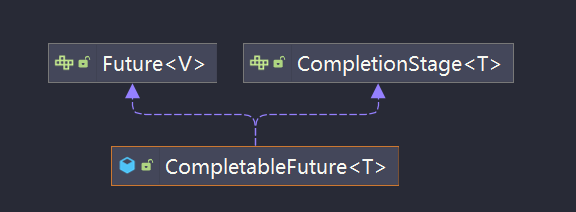
CompletableFuture 架构图
public class CompletableFuture implements Future, CompletionStage {}
CompletionStage
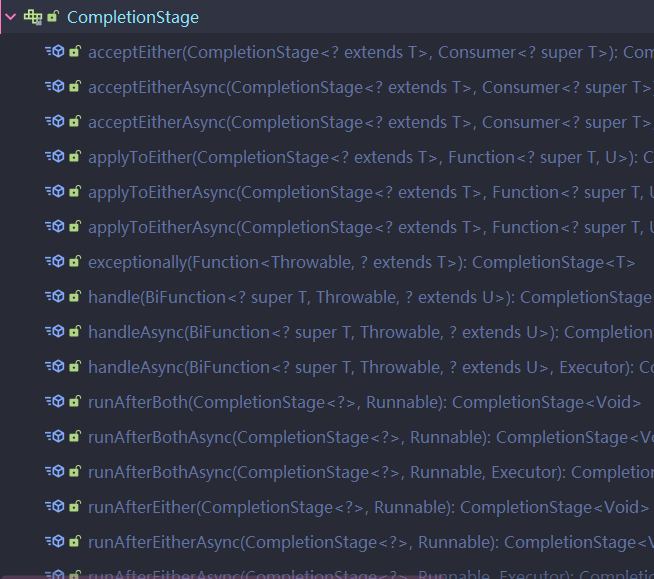
- Completion Stage代表异步计算过程中的某一个阶段, 一个阶段完成以后可能会触发另外一个阶段
- 一个阶段的计算执行可以是一个Function, Consumer或者Runnable。
- 比如:stage.then Apply(x->square(x) ) .then Accept(x->System.out.print(x) ) .then Run() ->System.out.print In() ),一个阶段的执行可能是被单个阶段的完成触发,也可能是由多个阶段一起触发。
CompletionStage 中提供了大量的操作方法,这也是比 Future 功能强大的原因:
CompletableFuture 四个静态方法
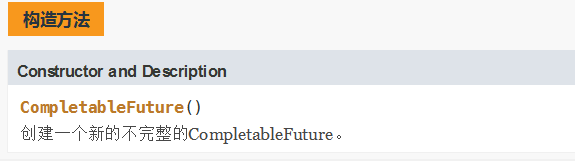
不推荐使用 new 的方式创建 CompletableFuture 对象,在 jdk 帮助文档中也明确说明了: 是一个不完整的 CompletableFuture
推荐使用 CompletableFuture 中的四个静态方法 创建异常任务:
runAsync 无返回值
public static CompletableFuturerunAsync(Runnable runnable) public static CompletableFuturerunAsync(Runnable runnable, Executor executor)
supplyAsync 有返回值
public static CompletableFuture supplyAsync(Supplier supplier)public static CompletableFuture supplyAsync(Supplier supplier, Executor executor)
关于 Executor 参数说明:
- 没有指定Executor的方法,直接使用默认的
ForkJoinPool.commPool()作为它的线程池执行异步代码。 - 如果指定线程池,则使用我们定义的或者特别指定的线程池执行异步代码。
代码演示 runAsync :
public class CompletableFutureTest01 {public static void main(String[] args) throws ExecutionException, InterruptedException {// Void 表示没有返回值CompletableFuture completableFuture = CompletableFuture.runAsync(() -> {System.out.println("异步任务开始执行。。。。");});System.out.println(completableFuture.get());}
}
runAsync + 线程池:
public class CompletableFutureTest01 {public static void main(String[] args) throws ExecutionException, InterruptedException {// 创建线程池ExecutorService threadPool = Executors.newFixedThreadPool(3);// Void 表示没有返回值CompletableFuture completableFuture = CompletableFuture.runAsync(() -> {System.out.println(Thread.currentThread().getName() + "异步任务开始执行。。。。");},threadPool);System.out.println(completableFuture.get());}
}
supplyAsync :
CompletableFuture uCompletableFuture = CompletableFuture.supplyAsync(() -> {System.out.println(Thread.currentThread().getName() + "异步任务开始执行。。。。");return " hello, supplyAsync";});System.out.println(uCompletableFuture.get());
supplyAsync+ 线程池;
ExecutorService threadPool = Executors.newFixedThreadPool(3);CompletableFuture uCompletableFuture = CompletableFuture.supplyAsync(() -> {System.out.println(Thread.currentThread().getName() + "异步任务开始执行。。。。");return " hello, supplyAsync";},threadPool);System.out.println(uCompletableFuture.get());}
CompletableFuture 减少阻塞和轮询
在上面的演示中,CompletableFuture 不仅可以完成 Future 的功能,并且能够通过 whenComplete来减少阻塞和轮询(自动回调)
whenComplete() 方法演示:
public CompletableFuturewhenComplete(BiConsumer action) 参数是一个消费类型参数,其中有俩个参数:v 和 e。
v 表示 异步任务返回的值,就是计算结果
e 表示 异步任务出现的异常信息
public class CompletableFutureTest02 {public static void main(String[] args) throws ExecutionException, InterruptedException {CompletableFuture.supplyAsync(() -> {System.out.println(Thread.currentThread().getName() + " 异步任务正在计算.....");try {Thread.sleep(1000);} catch (InterruptedException e) {e.printStackTrace();}int result = new Random().nextInt();return  result;}).whenComplete((v,e)-> { // 回调函数if (e == null) {System.out.println("计算后的结果为: " + v);}}).exceptionally((e) -> { // 打印异常信息System.out.println(e.getCause() + "\t" + e.getMessage());return null;});System.out.println(Thread.currentThread().getName() + " 正在执行其他任务.....");}
}
注意事项
由于我们使用的是默认的 ForkJoinPool 线程池, 该线程池就像一个守护线程,主线程结束,该线程池就会关闭,因此主线程结束太快,获取不到异步任务的返回值。针对此情况,俩种解决方案:
- 使用自定义的线程池
- 在 main 方法末尾,使用 sleep
使用自定义线程池:
public class CompletableFutureTest02 {public static void main(String[] args) throws ExecutionException, InterruptedException {// 创建线程池ExecutorService threadPool = Executors.newFixedThreadPool(3);CompletableFuture.supplyAsync(() -> {System.out.println(Thread.currentThread().getName() + " 异步任务正在计算.....");try {Thread.sleep(1000);} catch (InterruptedException e) {e.printStackTrace();}int result = new Random().nextInt();return  result;},threadPool).whenComplete((v,e)-> { // 回调函数if (e == null) {System.out.println("计算后的结果为: " + v);}}).exceptionally((e) -> { // 打印异常信息System.out.println(e.getCause() + "\t" + e.getMessage());return null;});System.out.println(Thread.currentThread().getName() + " 正在执行其他任务.....");// 睡眠一会,避免由于main线程执行太快,获取不到异步任务的计算结果// try {Thread.sleep(2000);} catch (InterruptedException e) {e.printStackTrace();}threadPool.shutdown();}
}
演示异常发生的情况:
public class CompletableFutureTest02 {public static void main(String[] args) throws ExecutionException, InterruptedException {// 创建线程池ExecutorService threadPool = Executors.newFixedThreadPool(3);CompletableFuture.supplyAsync(() -> {System.out.println(Thread.currentThread().getName() + " 异步任务正在计算.....");try {Thread.sleep(1000);} catch (InterruptedException e) {e.printStackTrace();}// 异常int i = 10/0 ;int result = new Random().nextInt();return result;},threadPool).whenComplete((v,e)-> { // 回调函数if (e == null) {System.out.println("计算后的结果为: " + v);}}).exceptionally((e) -> { // 打印异常信息System.out.println("异常信息: " + e.getCause() + "\t" + e.getMessage());return null;});System.out.println(Thread.currentThread().getName() + " 正在执行其他任务.....");// 睡眠一会,避免由于main线程执行太快,获取不到异步任务的计算结果// try {Thread.sleep(2000);} catch (InterruptedException e) {e.printStackTrace();}threadPool.shutdown();}
输出结果:

总结
- 异步任务结束时,会自动回调某个对象的方法 whenComplete;
- 主线程设置好毁掉后,不再关心异步任务的执行,异步任务之间可以顺序执行
- 异步任务出错时,会自动回调某个对象的方法。 exceptionally
CompletableFuture 案例
讲解案例之前,需要的知识点:
- jdk8新特性:Lambda、Stream、函数式接口编程…
- 在我另一篇博客中有讲解:https://blog.csdn.net/aetawt/article/details/127949647
- 链式编程
- join 和 get 的区别
- get 会抛出
ExecutionException, InterruptedException异常, join 不会抛出异常。
- get 会抛出
链式编程:将多个方法用链子 “串起来”
public class ChainTest {public static void main(String[] args) {// 普通写法Student student = new Student();student.setAge(1);student.setId(1);student.setName("aa");// 链式编程student.setName("aa").setAge(1).setId(2);}
}@Data
@Accessors(chain = true) // 开启链式编程
class Student {private String name;private int age;private int id;
}
电商网站比价需求分析
1需求说明
1.1同一款产品,同时搜索出同款产品在各大电商平台的售价;
1.2同一款产品,同时搜索出本产品在同一个电商平台下,各个入驻卖家售价是多少
2输出返回
出来结果希望是同款产品的在不同地方的价格清单列表, 返回一个List
《mysql》in jd price is 88.05
《mysql》in dang dang price is 86.11
《mysql》in tao bao price is 90.43
3解决方案
比对同一个商品在各个平台上的价格,要求获得一个清单列表
1 stepbystep , 按部就班, 查完京东查淘宝, 查完淘宝查天猫…
2 all in ,万箭齐发,一口气多线程异步任务同时查询。。。
第一种方案
/**** Author: YZG* Date: 2022/11/20 16:06* Description: */
public class NetMallCase {// 平台集合static List list = Arrays.asList(new NetMall("jd"),new NetMall("dangdang"),new NetMall("taobao"));/*** step to step* @description 在不同平台中搜索商品的价格* @date 2022/11/20 16:16* @param list 平台集合* @param productName 商品名字* @return java.lang.String* 返回格式:* 《mysql》in jd price is 88.05* 《mysql》in dang dang price is 86.11* 《mysql》in tao bao price is 90.43*/public static List getPrice(List list, String productName) {// % 占位符,相当于 jdbc里面的 ?return list.stream().map(netMall -> String.format(productName + " in %s is %.2f",netMall.getNetName(),netMall.calcPrice(productName))).collect(Collectors.toList());}public static void main(String[] args) {long begin = System.currentTimeMillis();List mysqlList = getPrice(list, "mysql");for (String s : mysqlList) {System.out.println(s);}long end = System.currentTimeMillis();System.out.println("程序耗时: " + (end - begin) + "毫秒");}
}// 平台类
@Data
class NetMall {private String netName;public NetMall(String netName) {this.netName = netName;}// 根据商品名搜索价格public Double calcPrice(String productName) {try {Thread.sleep(1000);} catch (InterruptedException e) {e.printStackTrace();}return new Random().nextDouble() * 2 + productName.charAt(0);}
} 输出结果:
mysql in jd is 109.22
mysql in dangdang is 109.67
mysql in taobao is 110.81程序耗时: 3085毫秒
第二种方案
使用 异步任务
public class NetMallCase {// 平台集合static List list = Arrays.asList(new NetMall("jd"),new NetMall("dangdang"),new NetMall("taobao"));/*** step to step* @description 在不同平台中搜索商品的价格* @date 2022/11/20 16:16* @param list 平台集合* @param productName 商品名字* @return* 返回格式:* 《mysql》in jd price is 88.05* 《mysql》in dang dang price is 86.11* 《mysql》in tao bao price is 90.43*/public static List getPrice(List list, String productName) {// % 占位符,相当于 jdbc里面的 ?return list.stream().map(netMall -> String.format(productName + " in %s is %.2f",netMall.getNetName(),netMall.calcPrice(productName))).collect(Collectors.toList());}// 异步任务处理public static List getPriceByCompletableFuture(List list, String productName) {// map 映射:会将异步任务的处理应用到 流中的每一个元素上return list.stream().map(netMall -> CompletableFuture.supplyAsync(() -> {return String.format(productName + " in %s is %.2f",netMall.getNetName(),netMall.calcPrice(productName));})) //Stream>.collect(Collectors.toList()) //List>.stream() //Stream>.map(CompletableFuture::join) //Stream.collect(Collectors.toList()); // List}public static void main(String[] args) {long begin = System.currentTimeMillis();List mysqlList = getPrice(list, "mysql");for (String s : mysqlList) {System.out.println(s);}long end = System.currentTimeMillis();System.out.println("程序耗时: " + (end - begin) + "毫秒");System.out.println("---------------异步任务处理-------------");long begin1 = System.currentTimeMillis();List mysqlList1 = getPriceByCompletableFuture(list, "mysql");for (String s : mysqlList1) {System.out.println(s);}long end1 = System.currentTimeMillis();System.out.println("程序耗时: " + (end1 - begin1) + "毫秒");}
}// 平台类
@Data
class NetMall {private String netName;public NetMall(String netName) {this.netName = netName;}// 根据商品名搜索价格public Double calcPrice(String productName) {try {Thread.sleep(1000);} catch (InterruptedException e) {e.printStackTrace();}return new Random().nextDouble() * 2 + productName.charAt(0);}
} 输出结果:
mysql in jd is 109.93
mysql in dangdang is 109.78
mysql in taobao is 109.48
程序耗时: 3109毫秒
---------------异步任务处理-------------
mysql in jd is 110.42
mysql in dangdang is 109.43
mysql in taobao is 110.04
程序耗时: 1012毫秒Process finished with exit code 0
CompletableFuture 常用的方法
获得结果和触发计算
获取结果
public T get()不见不散,容易阻塞public T get(long timeout,TimeUnit unit)过时不候,超过时间会爆异常public T join() 类似于get(),区别在于是否需要抛出异常public T getNow(T valueIfAbsent)- 获取计算结果时,如果异步任务没有完成计算,返回指定的 valueIfAbsent。
主动触发计算
public boolean complete(T value)是否立即打断异步任务的计算- true:打断异步任务的计算,并将 value 作为返回值
- false: 没有打断异步任务计算,将计算结果返回
public class CompletableFutureAPITest {public static void main(String[] args) throws Exception {CompletableFuture completableFuture = CompletableFuture.supplyAsync(() -> {try {Thread.sleep(2000);} catch (InterruptedException e) {e.printStackTrace();}return "abc";});// System.out.println(completableFuture.get());// 超过 1s 没有获取到计算结果,就会抛出异常: TimeoutException// System.out.println(completableFuture.get(1, TimeUnit.SECONDS));// 和 get() 方法一样,唯一区别就是该方法不需要抛异常// System.out.println(completableFuture.join());// 如果获取时没有计算完成,将返回指定的值// System.out.println(completableFuture.getNow("new Value") );// complete 返回 boolean类型,是否打断了 异步任务的计算。// true:打断了计算,并将指定的值作为返回结果返回// false :没有打断计算,返回计算好的结果// 等待 3s 计算需要 2s,没有打断,返回 abctry {Thread.sleep(3000);} catch (InterruptedException e) {e.printStackTrace();}System.out.println(completableFuture.complete("newValue") + "\t" + completableFuture.join());}
}
对计算结果进行处理
thenApply计算结果存在在依赖关系,使得线程串行化。- 出现异常不会继续往下执行。
handle计算结果存在在依赖关系,使得线程串行化。- 出现异常,也会继续执行。根据异常参数进行调整
俩个方法的区别就是对异常的处理不同
thenApply 演示:
/**** Author: YZG* Date: 2022/11/20 17:17* Description: */
public class CompletableFutureAPI2Test {public static void main(String[] args) throws Exception {CompletableFuture.supplyAsync(() -> {System.out.println("第一步");return 1;}).thenApply(f -> {System.out.println("第二步");// 出现异常// 由于出现异常,不会继续执行第三步int i = 10/0;return f + 2;}).thenApply(f -> {System.out.println("第三步");return f + 3;}).whenComplete((v, e) -> {System.out.println("最终的计算结果: " + v);}).exceptionally(e -> {System.out.println(e.getCause() + "\t" + e.getMessage());return null;});}
}
输出结果:

handle 方法演示:
/**** Author: YZG* Date: 2022/11/20 17:17* Description: */
public class CompletableFutureAPI2Test {public static void main(String[] args) throws Exception {// handle方法演示CompletableFuture.supplyAsync(() -> {System.out.println("第一步");return 1;}).handle((f, e) -> {System.out.println("第二步");// 出现异常// 即使出现异常,也会继续执行第三步int i = 10 / 0;return f + 2;}).handle((f, e) -> {System.out.println("第三步");return f + 3;}).whenComplete((f, e) -> {System.out.println("最终的计算结果: " + f);}).exceptionally(e -> {System.out.println(e.getCause() + "\t" + e.getMessage());return null;});}
}输出结果:
第一步
第二步
第三步
最终的计算结果: null
java.lang.NullPointerException	java.lang.NullPointerExceptionProcess finished with exit code 0
对计算结果进行消费
- thenAccept 接收任务的处理结果,并消费处理,无返回结果|消费型函数式接口,之前的是Function
演示:
public class CompletableFutureAPI3Test {public static void main(String[] args) throws Exception {CompletableFuture.supplyAsync(() -> {System.out.println("第一步");return 1;}).thenApply(f -> {System.out.println("第二步");return f + 2;}).thenApply(f -> {System.out.println("第三步");return f + 3;}).thenAccept(System.out::println); }
}
多个任务之间的顺序执行:
-
thenRun(Runnable runnable)
- 任务A执行完执行B,并且B不需要A的结果,没有返回值
-
thenAccept(Consumer action)
- 任务A执行完执行B,B需要A的结果,但是任务B无返回值
-
thenApply(Function fn)
- 任务A执行完执行B,B需要A的结果,同时任务B有返回值
// 多个任务间的执行顺序
System.out.println(CompletableFuture.supplyAsync(() -> 1).thenRun(() -> {}).join());
// null
System.out.println(CompletableFuture.supplyAsync(() -> 1).thenApply(f -> f + 2).join()); // 3
System.out.println(CompletableFuture.supplyAsync(() -> 1).thenAccept(f -> {}).join());
// null
CompletableFuture 对线程池的选择
以上的几个方法:thenApply、thenRun、thenAccept 都有另外一个版本,就是后面加 Async 这俩种有什么区别呢?
以 thenRun 和 thenRunAsync 为例:
- 没有传入自定义线程池,都用默认线程池ForkJoinPool
- 传入了一个自定义线程池如果你执行第一个任务的时候,传入了一个自定义线程池
- 调用
thenRun方法执行第二个任务的时候,则第二个任务和第一个任务是用同一个线程池 - 调用
thenRunAsync执行第二个任务的时候,则第一个任务使用的是你自己传入的线程池,第二个任务使用的是ForkJoin线程池
- 调用
- 也有可能处理太快,系统优化切换原则,直接使用main线程处理(把sleep去掉)
**代码演示 1 **:
public class CompletableFutureThreadPoolTest {public static void main(String[] args) throws Exception {CompletableFuture.supplyAsync(() -> {try {Thread.sleep(30);} catch (InterruptedException e) {e.printStackTrace();}System.out.println(Thread.currentThread().getName() + " 任务1");return 1;}).thenRun(() -> {try {Thread.sleep(20);} catch (InterruptedException e) {e.printStackTrace();}System.out.println(Thread.currentThread().getName() + " 任务2");}).thenRun(() -> {try {Thread.sleep(10);} catch (InterruptedException e) {e.printStackTrace();}System.out.println(Thread.currentThread().getName() + " 任务3");}).thenRun(() -> {try {Thread.sleep(30);} catch (InterruptedException e) {e.printStackTrace();}System.out.println(Thread.currentThread().getName() + " 任务4");});// 避免主线程结束太快而导致 关闭 ForkJoinPooltry {Thread.sleep(2000);} catch (InterruptedException e) {e.printStackTrace();}}
}
输出结果:
ForkJoinPool.commonPool-worker-1 任务1
ForkJoinPool.commonPool-worker-1 任务2
ForkJoinPool.commonPool-worker-1 任务3
ForkJoinPool.commonPool-worker-1 任务4
代码演示 2.1 :
public class CompletableFutureThreadPoolTest {public static void main(String[] args) throws Exception {// 创建线程池ExecutorService threadPool = Executors.newFixedThreadPool(5);try {CompletableFuture.supplyAsync(() -> {try {Thread.sleep(30);} catch (InterruptedException e) {e.printStackTrace();}System.out.println(Thread.currentThread().getName() + " 任务1");return 1;},threadPool).thenRun(() -> {try {Thread.sleep(20);} catch (InterruptedException e) {e.printStackTrace();}System.out.println(Thread.currentThread().getName() + " 任务2");}).thenRun(() -> {try {Thread.sleep(10);} catch (InterruptedException e) {e.printStackTrace();}System.out.println(Thread.currentThread().getName() + " 任务3");}).thenRun(() -> {try {Thread.sleep(30);} catch (InterruptedException e) {e.printStackTrace();}System.out.println(Thread.currentThread().getName() + " 任务4");});} finally {threadPool.shutdown();}// 避免主线程结束太快而导致 关闭 ForkJoinPool// try {Thread.sleep(2000);} catch (InterruptedException e) {e.printStackTrace();}}
}
输出结果:
pool-1-thread-1 任务1
pool-1-thread-1 任务2
pool-1-thread-1 任务3
pool-1-thread-1 任务4
代码演示 2.2 :
public class CompletableFutureThreadPoolTest {public static void main(String[] args) throws Exception {// 创建线程池ExecutorService threadPool = Executors.newFixedThreadPool(5);try {CompletableFuture.supplyAsync(() -> {try {Thread.sleep(30);} catch (InterruptedException e) {e.printStackTrace();}System.out.println(Thread.currentThread().getName() + " 任务1");return 1;},threadPool).thenRunAsync(() -> {try {Thread.sleep(20);} catch (InterruptedException e) {e.printStackTrace();}System.out.println(Thread.currentThread().getName() + " 任务2");}).thenRun(() -> {try {Thread.sleep(10);} catch (InterruptedException e) {e.printStackTrace();}System.out.println(Thread.currentThread().getName() + " 任务3");}).thenRun(() -> {try {Thread.sleep(30);} catch (InterruptedException e) {e.printStackTrace();}System.out.println(Thread.currentThread().getName() + " 任务4");});} finally {threadPool.shutdown();}// 避免主线程结束太快而导致 关闭 ForkJoinPooltry {Thread.sleep(2000);} catch (InterruptedException e) {e.printStackTrace();}}
输出结果:
pool-1-thread-1 任务1
ForkJoinPool.commonPool-worker-1 任务2
ForkJoinPool.commonPool-worker-1 任务3
ForkJoinPool.commonPool-worker-1 任务4
代码演示 3 :
public class CompletableFutureThreadPoolTest {public static void main(String[] args) throws Exception {// 创建线程池ExecutorService threadPool = Executors.newFixedThreadPool(5);try {CompletableFuture.supplyAsync(() -> {// try {Thread.sleep(30);} catch (InterruptedException e) {e.printStackTrace();}System.out.println(Thread.currentThread().getName() + " 任务1");return 1;},threadPool).thenRunAsync(() -> {// try {Thread.sleep(20);} catch (InterruptedException e) {e.printStackTrace();}System.out.println(Thread.currentThread().getName() + " 任务2");}).thenRun(() -> {// try {Thread.sleep(10);} catch (InterruptedException e) {e.printStackTrace();}System.out.println(Thread.currentThread().getName() + " 任务3");}).thenRun(() -> {// try {Thread.sleep(30);} catch (InterruptedException e) {e.printStackTrace();}System.out.println(Thread.currentThread().getName() + " 任务4");});} finally {threadPool.shutdown();}// 避免主线程结束太快而导致 关闭 ForkJoinPooltry {Thread.sleep(2000);} catch (InterruptedException e) {e.printStackTrace();}}
}
输出结果:
pool-1-thread-1 任务1
ForkJoinPool.commonPool-worker-1 任务2
main 任务3
main 任务4
对计算速度进行选用
public CompletableFuture applyToEither方法,快的那个掌权
public class CompletableFutureAPI4Test {public static void main(String[] args) throws Exception {CompletableFuture playerA = CompletableFuture.supplyAsync(() -> {System.out.println("Player A come in");try {Thread.sleep(2000);} catch (InterruptedException e) {e.printStackTrace();}return "Player A";});CompletableFuture playerB =  CompletableFuture.supplyAsync(() -> {System.out.println("Player B come in");try {Thread.sleep(1000);} catch (InterruptedException e) {e.printStackTrace();}return "Player B";});// 哪个异步任务先完成,就先返回哪个异步任务的计算结果CompletableFuture future = playerA.applyToEither(playerB, f -> {return f + " is win";});System.out.println(Thread.currentThread().getName() + "   " +future.join());}
}
输出结果:
Player A come in
Player B come in
main   Player B is win
对计算结果进行合并
thenCombine 合并
- 两个CompletionStage任务都完成后,最终能把两个任务的结果一起交给thenCOmbine来处理
- 先完成的先等着,等待其它分支任务
拆分版:
public class CompletableFutureAPI5Test {public static void main(String[] args) throws Exception {CompletableFuture futureA = CompletableFuture.supplyAsync(() -> {System.out.println(Thread.currentThread().getName() + " 开始计算...");try {Thread.sleep(2000);} catch (InterruptedException e) {e.printStackTrace();}return 10;});CompletableFuture futureB =  CompletableFuture.supplyAsync(() -> {System.out.println(Thread.currentThread().getName() + " 开始计算...");try {Thread.sleep(1000);} catch (InterruptedException e) {e.printStackTrace();}return 20;});// 对俩个异步任务的计算结果进行合并CompletableFuture future = futureA.thenCombine(futureB, Integer::sum);System.out.println(Thread.currentThread().getName() + " 开始进行合并,结果为: " + future.join());}
}
合并版:
public class CompletableFutureAPI5Test {public static void main(String[] args) throws Exception {// 合并版CompletableFuture integerCompletableFuture = CompletableFuture.supplyAsync(() -> {System.out.println(Thread.currentThread().getName() + " 开始计算...");try {Thread.sleep(1000);} catch (InterruptedException e) {e.printStackTrace();}return 10;}).thenCombine(CompletableFuture.supplyAsync(() -> {System.out.println(Thread.currentThread().getName() + " 开始计算...");try {Thread.sleep(2000);} catch (InterruptedException e) {e.printStackTrace();}return 20;}), (x, y) -> {System.out.println(Thread.currentThread().getName() + " 第一次开始合并...");try {Thread.sleep(1000);} catch (InterruptedException e) {e.printStackTrace();}return x + y;}).thenCombine(CompletableFuture.supplyAsync(() -> {return 30;}), (x, y) -> {System.out.println(Thread.currentThread().getName() + " 第二次开始合并...");try {Thread.sleep(1000);} catch (InterruptedException e) {e.printStackTrace();}return x + y;});System.out.println(Thread.currentThread().getName() + " 合并结果: " + integerCompletableFuture.join());}
}
输出结果:
ForkJoinPool.commonPool-worker-1 开始计算...
ForkJoinPool.commonPool-worker-2 开始计算...
ForkJoinPool.commonPool-worker-2 第一次开始合并...
ForkJoinPool.commonPool-worker-2 第二次开始合并...
main 合并结果: 60Process finished with exit code 0各位彭于晏,如有收获点个赞不过分吧…✌✌✌

扫码关注公众号 【我不是秃神】 回复 JUC 可下载 MarkDown 笔记