

Netty学习笔记
文章目录
- 二、Netty 入门
- 2.1、概述
- 2.1.1、Netty 是什么?
- 2.1.2、Netty 的作者
- 2.1.3、Netty 的地位
- 2.1.4、Netty 的优势
- 2.2、Hello World
- 2.2.1、目标
- 2.2.2、服务器端
- 2.2.3、客户端
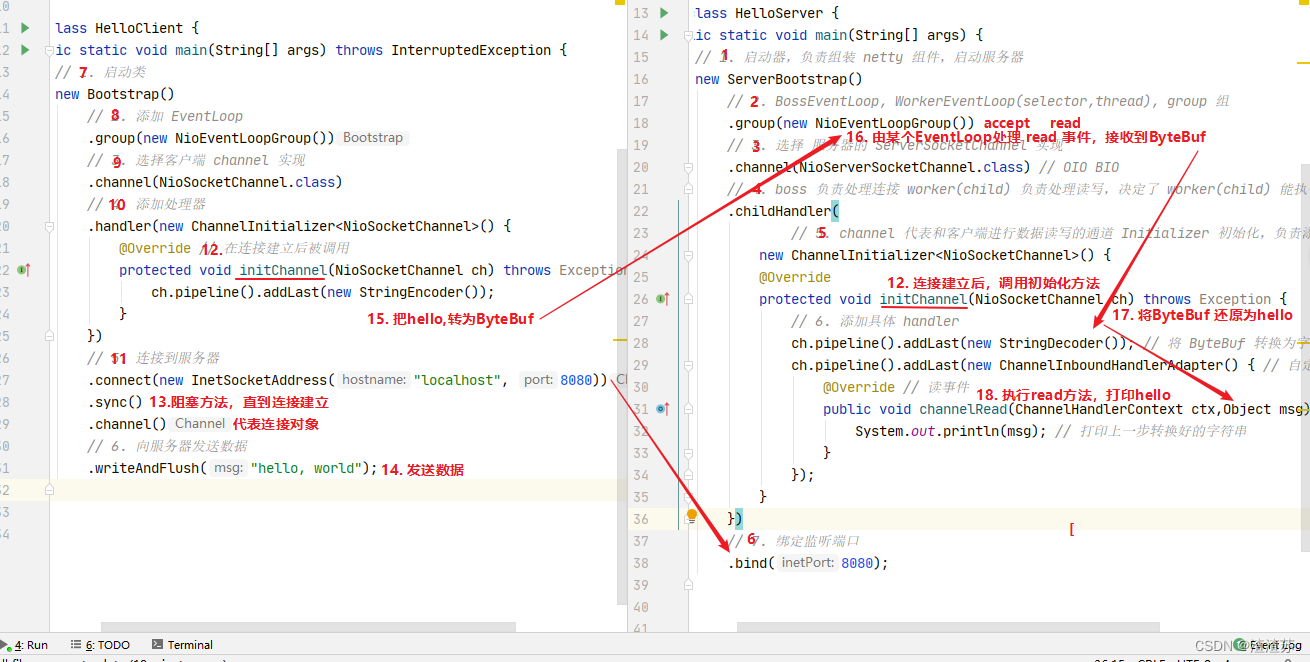
- 2.2.4、流程梳理
- 💡 提示
- 2.3、组件
- 2.3.1、EventLoop
- 💡 优雅关闭
- 演示 NioEventLoop 处理 io 事件
- 💡 handler 执行中如何换人?
- 演示 NioEventLoop 处理普通任务
- 演示 NioEventLoop 处理定时任务
- 2.3.2、Channel
- ChannelFuture
- CloseFuture
- 💡 异步提升的是什么
- 2.3.3、Future & Promise
- 例1-同步处理任务成功
- 例2-异步处理任务成功
- 例3-同步处理任务失败 - sync & get
- 例4-同步处理任务失败 - await
- 例5-异步处理任务失败
- 例6-await 死锁检查
- 2.3.4、Handler & Pipeline
- 2.3.5、ByteBuf
- 1)创建
- 2)直接内存 vs 堆内存
- 3)池化 vs 非池化
- 4)组成
- 5)写入
- 6)扩容
- 7)读取
- 8)retain & release
- 9)slice
- 10)duplicate
- 11)copy
- 12)CompositeByteBuf
- 13)Unpooled
- 💡 ByteBuf 优势
- 2.4、双向通信
- 2.4.1、练习
- 💡 读和写的误解
- 三、Netty 进阶
- 3.1、粘包与半包
- 3.1.1、粘包现象
- 3.1.2、半包现象
- 3.1.3、现象分析
- 粘包
- 半包
- 滑动窗口
- Mss限制
- Nagle 算法
- 3.1.4、解决方案
- 短链接
- 固定长度
- 固定分隔符
- 预设长度
- 3.2、协议设计与解析
- 3.2.1、为什么需要协议?
- 3.2.2、redis 协议举例
- 3.2.3、http 协议举例
- 3.2.4、自定义协议要素
- 编解码器
- 💡 什么时候可以加 @Sharable
- 3.3、聊天室案例
- 3.3.1、聊天室业务介绍
- 3.3.2、聊天室业务-登录
- 3.3.3、聊天室业务-单聊
- 3.3.4、聊天室业务-群聊
- 3.3.5、聊天室业务-退出
- 3.3.6、聊天室业务-空闲检测
- 连接假死
二、Netty 入门
2.1、概述
2.1.1、Netty 是什么?
Netty is an asynchronous event-driven network application framework
for rapid development of maintainable high performance protocol servers & clients.
Netty 是一个异步的、基于事件驱动的网络应用框架,用于快速开发可维护、高性能的网络服务器和客户端
2.1.2、Netty 的作者
他还是另一个著名网络应用框架 Mina 的重要贡献者
2.1.3、Netty 的地位
Netty 在 Java 网络应用框架中的地位就好比:Spring 框架在 JavaEE 开发中的地位
以下的框架都使用了 Netty,因为它们有网络通信需求!
- Cassandra - nosql 数据库
- Spark - 大数据分布式计算框架
- Hadoop - 大数据分布式存储框架
- RocketMQ - ali 开源的消息队列
- ElasticSearch - 搜索引擎
- gRPC - rpc 框架
- Dubbo - rpc 框架
- Spring 5.x - flux api 完全抛弃了 tomcat ,使用 netty 作为服务器端
- Zookeeper - 分布式协调框架
2.1.4、Netty 的优势
- Netty vs NIO,工作量大,bug 多
- 需要自己构建协议
- 解决 TCP 传输问题,如粘包、半包
- epoll 空轮询导致 CPU 100%
- 对 API 进行增强,使之更易用,如 FastThreadLocal => ThreadLocal,ByteBuf => ByteBuffer
- Netty vs 其它网络应用框架
- Mina 由 apache 维护,将来 3.x 版本可能会有较大重构,破坏 API 向下兼容性,Netty 的开发迭代更迅速,API 更简洁、文档更优秀
- 久经考验,16年,Netty 版本
- 2.x 2004
- 3.x 2008
- 4.x 2013
- 5.x 已废弃(没有明显的性能提升,维护成本高)
2.2、Hello World
2.2.1、目标
开发一个简单的服务器端和客户端
- 客户端向服务器端发送 hello, world
- 服务器仅接收,不返回
加入依赖
io.netty netty-all 4.1.39.Final
2.2.2、服务器端
public class HelloServer {public static void main(String[] args) {// 1. 启动器,负责组装 netty 组件,启动服务器new ServerBootstrap()// 2. BossEventLoop, WorkerEventLoop(selector, thread), group 组.group(new NioEventLoopGroup())// 3. 选择服务器的 ServerSocketChannel 实现.channel(NioServerSocketChannel.class)// 4. boss 负责处理连接 worker(child)负责处理读写,决定了 worker(child)能执行哪些操作(handler).childHandler(// 5. channel 代表和客户端进行数据读写的通道 Initializer 初始化,负责添加到别的handlenew ChannelInitializer() {@Overrideprotected void initChannel(NioSocketChannel ch) throws Exception {// 6. 添加具体 handlerch.pipeline().addLast(new StringDecoder());  // 将 ByteBuf 转换为字符串ch.pipeline().addLast(new ChannelInboundHandlerAdapter() {  // 自定义 handler@Override  // 读事件public void channelRead(ChannelHandlerContext ctx, Object msg) throws Exception {// 打印上一步转换好的字符串System.out.println(msg);}});}})// 7. 绑定监听端口.bind(8080);}
}
代码解读
-
2处,创建 NioEventLoopGroup,可以简单理解为
线程池 + Selector后面会详细展开 -
3 处,选择服务 Scoket 实现类,其中 NioServerSocketChannel 表示基于 NIO 的服务器端实现,其它实现还有

-
4 处,为啥方法叫 childHandler,是接下来添加的处理器都是给 SocketChannel 用的,而不是给 ServerSocketChannel。ChannelInitializer 处理器(仅执行一次),它的作用是待客户端 SocketChannel 建立连接后,执行 initChannel 以便添加更多的处理器
-
7 处,ServerSocketChannel 绑定的监听端口
-
6 处,SocketChannel 的处理器,解码 ByteBuf => String
-
6 处,SocketChannel 的业务处理器,使用上一个处理器的处理结果
2.2.3、客户端
public class HelloClient {public static void main(String[] args) throws InterruptedException {// 1. 启动类new Bootstrap()// 2. 添加EventLoop.group(new NioEventLoopGroup())// 3. 选择客户端 channel 实现.channel(NioSocketChannel.class)// 4. 添加处理器.handler(new ChannelInitializer() {@Override  // 在连接建立后被调用protected void initChannel(NioSocketChannel ch) throws Exception {ch.pipeline().addLast(new StringEncoder());}})// 5. 连接到服务器.connect(new InetSocketAddress("localhost", 8080))// 6. 异步.sync()// 7. .channel()// 8.  向服务器发送数据.writeAndFlush("hello, world");}
}
代码解读
-
2 处,创建 NioEventLoopGroup,同 Server
-
3 处,选择客户 Socket 实现类,NioSocketChannel 表示基于 NIO 的客户端实现,其它实现还有

-
4 处,添加 SocketChannel 的处理器,ChannelInitializer 处理器(仅执行一次),它的作用是待客户端 SocketChannel 建立连接后,执行 initChannel 以便添加更多的处理器
-
5 处,指定要连接的服务器和端口
-
6 处,Netty 中很多方法都是异步的,如 connect,这时需要使用 sync 方法等待 connect 建立连接完毕
-
7 处,获取 channel 对象,它即为通道抽象,可以进行数据读写操作
-
8 处,写入消息并清空缓冲区
-
9 处,消息会经过通道 handler 处理,这里是将 String => ByteBuf 发出
-
数据经过网络传输,到达服务器端,服务器端 6 处的 handler 先后被触发,走完一个流程
2.2.4、流程梳理
💡 提示
一开始需要树立正确的观念
- 把 channel 理解为数据的通道
- 把 msg 理解为流动的数据,最开始输入是 ByteBuf,但经过 pipeline 的加工,会变成其它类型对象,最后输出又变成 ByteBuf
- 把 handler 理解为数据的处理工序
- 工序有多道,合在一起就是 pipeline,pipeline 负责发布事件(读、读取完成…)传播给每个 handler, handler 对自己感兴趣的事件进行处理(重写了相应事件处理方法)
- handler 分 Inbound 和 Outbound 两类
- 把 eventLoop 理解为处理数据的工人
- 工人可以管理多个 channel 的 io 操作,并且一旦工人负责了某个 channel,就要负责到底(绑定)
- 工人既可以执行 io 操作,也可以进行任务处理,每位工人有任务队列,队列里可以堆放多个 channel 的待处理任务,任务分为普通任务、定时任务
- 工人按照 pipeline 顺序,依次按照 handler 的规划(代码)处理数据,可以为每道工序指定不同的工人
2.3、组件
2.3.1、EventLoop
事件循环对象
EventLoop 本质是一个单线程执行器(同时维护了一个 Selector),里面有 run 方法处理 Channel 上源源不断的 io 事件。
它的继承关系比较复杂
- 一条线是继承自 j.u.c.ScheduledExecutorService 因此包含了线程池中所有的方法
- 另一条线是继承自 netty 自己的 OrderedEventExecutor,
- 提供了 boolean inEventLoop(Thread thread) 方法判断一个线程是否属于此 EventLoop
- 提供了 parent 方法来看看自己属于哪个 EventLoopGroup
事件循环组
EventLoopGroup 是一组 EventLoop,Channel 一般会调用 EventLoopGroup 的 register 方法来绑定其中一个 EventLoop,后续这个 Channel 上的 io 事件都由此 EventLoop 来处理(保证了 io 事件处理时的线程安全)
- 继承自 netty 自己的 EventExecutorGroup
- 实现了 Iterable 接口提供遍历 EventLoop 的能力
- 另有 next 方法获取集合中下一个 EventLoop
以一个简单的实现为例:
// 内部创建了两个 EventLoop, 每个 EventLoop 维护一个线程
DefaultEventLoopGroup group = new DefaultEventLoopGroup(2);
System.out.println(group.next());
System.out.println(group.next());
System.out.println(group.next());
输出
io.netty.channel.DefaultEventLoop@60f82f98
io.netty.channel.DefaultEventLoop@35f983a6
io.netty.channel.DefaultEventLoop@60f82f98
也可以使用 for 循环
DefaultEventLoopGroup group = new DefaultEventLoopGroup(2);
for (EventExecutor eventLoop : group) {System.out.println(eventLoop);
}
输出
io.netty.channel.DefaultEventLoop@60f82f98
io.netty.channel.DefaultEventLoop@35f983a6
💡 优雅关闭
优雅关闭 shutdownGracefully 方法。该方法会首先切换 EventLoopGroup 到关闭状态从而拒绝新的任务的加入,然后在任务队列的任务都处理完成后,停止线程的运行。从而确保整体应用是在正常有序的状态下退出的
演示 NioEventLoop 处理 io 事件
服务器端两个 nio worker 工人
new ServerBootstrap()// boss he worker// boss 只负责 ServerSocketChannel 上 accept 事件, worker只负责socketChannel上的读写.group(new NioEventLoopGroup(1), new NioEventLoopGroup(2)).channel(NioServerSocketChannel.class).childHandler(new ChannelInitializer() {@Overrideprotected void initChannel(NioSocketChannel ch) {ch.pipeline().addLast(new ChannelInboundHandlerAdapter() {@Overridepublic void channelRead(ChannelHandlerContext ctx, Object msg) {ByteBuf byteBuf = msg instanceof ByteBuf ? ((ByteBuf) msg) : null;if (byteBuf != null) {byte[] buf = new byte[16];ByteBuf len = byteBuf.readBytes(buf, 0, byteBuf.readableBytes());log.debug(new String(buf));}}});}}).bind(8080).sync();
客户端,启动三次,分别修改发送字符串为 zhangsan(第一次),lisi(第二次),wangwu(第三次)
public static void main(String[] args) throws InterruptedException {Channel channel = new Bootstrap().group(new NioEventLoopGroup(1)).handler(new ChannelInitializer() {@Overrideprotected void initChannel(NioSocketChannel ch) throws Exception {System.out.println("init...");ch.pipeline().addLast(new LoggingHandler(LogLevel.DEBUG));}}).channel(NioSocketChannel.class).connect("localhost", 8080).sync().channel();channel.writeAndFlush(ByteBufAllocator.DEFAULT.buffer().writeBytes("wangwu".getBytes()));Thread.sleep(2000);channel.writeAndFlush(ByteBufAllocator.DEFAULT.buffer().writeBytes("wangwu".getBytes()));
}
最后输出
22:03:34 [DEBUG] [nioEventLoopGroup-3-1] c.i.o.EventLoopTest - zhangsan
22:03:36 [DEBUG] [nioEventLoopGroup-3-1] c.i.o.EventLoopTest - zhangsan
22:05:36 [DEBUG] [nioEventLoopGroup-3-2] c.i.o.EventLoopTest - lisi
22:05:38 [DEBUG] [nioEventLoopGroup-3-2] c.i.o.EventLoopTest - lisi
22:06:09 [DEBUG] [nioEventLoopGroup-3-1] c.i.o.EventLoopTest - wangwu
22:06:11 [DEBUG] [nioEventLoopGroup-3-1] c.i.o.EventLoopTest - wangwu
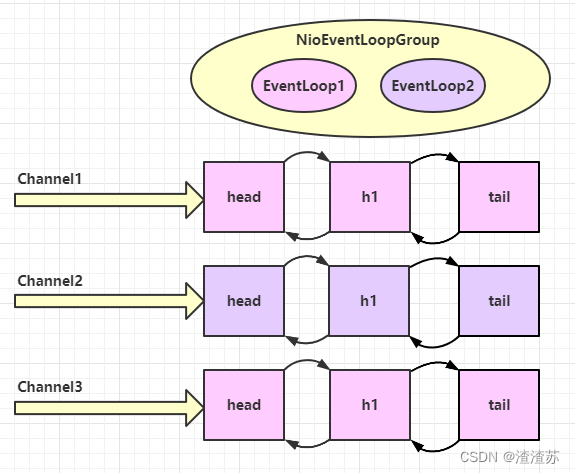
可以看到两个工人轮流处理 channel,但工人与 channel 之间进行了绑定
再增加两个非 nio 工人
DefaultEventLoopGroup normalWorkers = new DefaultEventLoopGroup(2);
new ServerBootstrap().group(new NioEventLoopGroup(1), new NioEventLoopGroup(2)).channel(NioServerSocketChannel.class).childHandler(new ChannelInitializer() {@Overrideprotected void initChannel(NioSocketChannel ch)  {ch.pipeline().addLast(new LoggingHandler(LogLevel.DEBUG));ch.pipeline().addLast(normalWorkers,"myhandler",new ChannelInboundHandlerAdapter() {@Overridepublic void channelRead(ChannelHandlerContext ctx, Object msg) {ByteBuf byteBuf = msg instanceof ByteBuf ? ((ByteBuf) msg) : null;if (byteBuf != null) {byte[] buf = new byte[16];ByteBuf len = byteBuf.readBytes(buf, 0, byteBuf.readableBytes());log.debug(new String(buf));}}});}}).bind(8080).sync();
客户端代码不变,启动三次,分别修改发送字符串为 zhangsan(第一次),lisi(第二次),wangwu(第三次)
输出
22:19:48 [DEBUG] [nioEventLoopGroup-4-1] i.n.h.l.LoggingHandler - [id: 0x251562d5, L:/127.0.0.1:8080 - R:/127.0.0.1:52588] REGISTERED
22:19:48 [DEBUG] [nioEventLoopGroup-4-1] i.n.h.l.LoggingHandler - [id: 0x251562d5, L:/127.0.0.1:8080 - R:/127.0.0.1:52588] ACTIVE
22:19:48 [DEBUG] [nioEventLoopGroup-4-1] i.n.h.l.LoggingHandler - [id: 0x251562d5, L:/127.0.0.1:8080 - R:/127.0.0.1:52588] READ: 8B+-------------------------------------------------+|  0  1  2  3  4  5  6  7  8  9  a  b  c  d  e  f |
+--------+-------------------------------------------------+----------------+
|00000000| 7a 68 61 6e 67 73 61 6e                         |zhangsan        |
+--------+-------------------------------------------------+----------------+
22:19:48 [DEBUG] [nioEventLoopGroup-4-1] i.n.h.l.LoggingHandler - [id: 0x251562d5, L:/127.0.0.1:8080 - R:/127.0.0.1:52588] READ COMPLETE
22:19:48 [DEBUG] [defaultEventLoopGroup-2-1] c.i.o.EventLoopTest - zhangsan
22:19:50 [DEBUG] [nioEventLoopGroup-4-1] i.n.h.l.LoggingHandler - [id: 0x251562d5, L:/127.0.0.1:8080 - R:/127.0.0.1:52588] READ: 8B+-------------------------------------------------+|  0  1  2  3  4  5  6  7  8  9  a  b  c  d  e  f |
+--------+-------------------------------------------------+----------------+
|00000000| 7a 68 61 6e 67 73 61 6e                         |zhangsan        |
+--------+-------------------------------------------------+----------------+
22:19:50 [DEBUG] [nioEventLoopGroup-4-1] i.n.h.l.LoggingHandler - [id: 0x251562d5, L:/127.0.0.1:8080 - R:/127.0.0.1:52588] READ COMPLETE
22:19:50 [DEBUG] [defaultEventLoopGroup-2-1] c.i.o.EventLoopTest - zhangsan
22:20:24 [DEBUG] [nioEventLoopGroup-4-2] i.n.h.l.LoggingHandler - [id: 0x94b2a840, L:/127.0.0.1:8080 - R:/127.0.0.1:52612] REGISTERED
22:20:24 [DEBUG] [nioEventLoopGroup-4-2] i.n.h.l.LoggingHandler - [id: 0x94b2a840, L:/127.0.0.1:8080 - R:/127.0.0.1:52612] ACTIVE
22:20:25 [DEBUG] [nioEventLoopGroup-4-2] i.n.h.l.LoggingHandler - [id: 0x94b2a840, L:/127.0.0.1:8080 - R:/127.0.0.1:52612] READ: 4B+-------------------------------------------------+|  0  1  2  3  4  5  6  7  8  9  a  b  c  d  e  f |
+--------+-------------------------------------------------+----------------+
|00000000| 6c 69 73 69                                     |lisi            |
+--------+-------------------------------------------------+----------------+
22:20:25 [DEBUG] [nioEventLoopGroup-4-2] i.n.h.l.LoggingHandler - [id: 0x94b2a840, L:/127.0.0.1:8080 - R:/127.0.0.1:52612] READ COMPLETE
22:20:25 [DEBUG] [defaultEventLoopGroup-2-2] c.i.o.EventLoopTest - lisi
22:20:27 [DEBUG] [nioEventLoopGroup-4-2] i.n.h.l.LoggingHandler - [id: 0x94b2a840, L:/127.0.0.1:8080 - R:/127.0.0.1:52612] READ: 4B+-------------------------------------------------+|  0  1  2  3  4  5  6  7  8  9  a  b  c  d  e  f |
+--------+-------------------------------------------------+----------------+
|00000000| 6c 69 73 69                                     |lisi            |
+--------+-------------------------------------------------+----------------+
22:20:27 [DEBUG] [nioEventLoopGroup-4-2] i.n.h.l.LoggingHandler - [id: 0x94b2a840, L:/127.0.0.1:8080 - R:/127.0.0.1:52612] READ COMPLETE
22:20:27 [DEBUG] [defaultEventLoopGroup-2-2] c.i.o.EventLoopTest - lisi
22:20:38 [DEBUG] [nioEventLoopGroup-4-1] i.n.h.l.LoggingHandler - [id: 0x79a26af9, L:/127.0.0.1:8080 - R:/127.0.0.1:52625] REGISTERED
22:20:38 [DEBUG] [nioEventLoopGroup-4-1] i.n.h.l.LoggingHandler - [id: 0x79a26af9, L:/127.0.0.1:8080 - R:/127.0.0.1:52625] ACTIVE
22:20:38 [DEBUG] [nioEventLoopGroup-4-1] i.n.h.l.LoggingHandler - [id: 0x79a26af9, L:/127.0.0.1:8080 - R:/127.0.0.1:52625] READ: 6B+-------------------------------------------------+|  0  1  2  3  4  5  6  7  8  9  a  b  c  d  e  f |
+--------+-------------------------------------------------+----------------+
|00000000| 77 61 6e 67 77 75                               |wangwu          |
+--------+-------------------------------------------------+----------------+
22:20:38 [DEBUG] [nioEventLoopGroup-4-1] i.n.h.l.LoggingHandler - [id: 0x79a26af9, L:/127.0.0.1:8080 - R:/127.0.0.1:52625] READ COMPLETE
22:20:38 [DEBUG] [defaultEventLoopGroup-2-1] c.i.o.EventLoopTest - wangwu
22:20:40 [DEBUG] [nioEventLoopGroup-4-1] i.n.h.l.LoggingHandler - [id: 0x79a26af9, L:/127.0.0.1:8080 - R:/127.0.0.1:52625] READ: 6B+-------------------------------------------------+|  0  1  2  3  4  5  6  7  8  9  a  b  c  d  e  f |
+--------+-------------------------------------------------+----------------+
|00000000| 77 61 6e 67 77 75                               |wangwu          |
+--------+-------------------------------------------------+----------------+
22:20:40 [DEBUG] [nioEventLoopGroup-4-1] i.n.h.l.LoggingHandler - [id: 0x79a26af9, L:/127.0.0.1:8080 - R:/127.0.0.1:52625] READ COMPLETE
22:20:40 [DEBUG] [defaultEventLoopGroup-2-1] c.i.o.EventLoopTest - wangwu
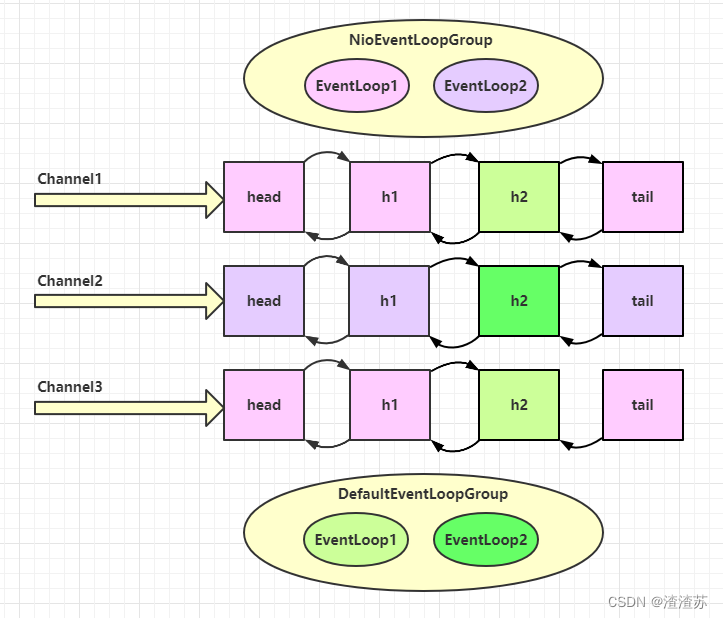
可以看到,nio 工人和 非 nio 工人也分别绑定了 channel(LoggingHandler 由 nio 工人执行,而我们自己的 handler 由非 nio 工人执行)
💡 handler 执行中如何换人?
关键代码 io.netty.channel.AbstractChannelHandlerContext#invokeChannelRead()
static void invokeChannelRead(final AbstractChannelHandlerContext next, Object msg) {final Object m = next.pipeline.touch(ObjectUtil.checkNotNull(msg, "msg"), next);// 下一个 handler 的事件循环是否与当前的事件循环是同一个线程EventExecutor executor = next.executor();// 是,直接调用if (executor.inEventLoop()) {next.invokeChannelRead(m);} // 不是,将要执行的代码作为任务提交给下一个事件循环处理(换人)else {executor.execute(new Runnable() {@Overridepublic void run() {next.invokeChannelRead(m);}});}
}
- 如果两个 handler 绑定的是同一个线程,那么就直接调用
- 否则,把要调用的代码封装为一个任务对象,由下一个 handler 的线程来调用
演示 NioEventLoop 处理普通任务
NioEventLoop 除了可以处理 io 事件,同样可以向它提交普通任务
NioEventLoopGroup nioWorkers = new NioEventLoopGroup(2);log.debug("server start...");
Thread.sleep(2000);
nioWorkers.execute(()->{log.debug("normal task...");
});
输出
22:30:36 [DEBUG] [main] c.i.o.EventLoopTest2 - server start...
22:30:38 [DEBUG] [nioEventLoopGroup-2-1] c.i.o.EventLoopTest2 - normal task...
可以用来执行耗时较长的任务
演示 NioEventLoop 处理定时任务
NioEventLoopGroup nioWorkers = new NioEventLoopGroup(2);log.debug("server start...");
Thread.sleep(2000);
nioWorkers.scheduleAtFixedRate(() -> {log.debug("running...");
}, 0, 1, TimeUnit.SECONDS);
输出
22:35:15 [DEBUG] [main] c.i.o.EventLoopTest2 - server start...
22:35:17 [DEBUG] [nioEventLoopGroup-2-1] c.i.o.EventLoopTest2 - running...
22:35:18 [DEBUG] [nioEventLoopGroup-2-1] c.i.o.EventLoopTest2 - running...
22:35:19 [DEBUG] [nioEventLoopGroup-2-1] c.i.o.EventLoopTest2 - running...
22:35:20 [DEBUG] [nioEventLoopGroup-2-1] c.i.o.EventLoopTest2 - running...
...
可以用来执行定时任务
2.3.2、Channel
channel 的主要作用
- close() 可以用来关闭 channel
- closeFuture() 用来处理 channel 的关闭
- sync 方法作用是同步等待 channel 关闭
- 而 addListener 方法是异步等待 channel 关闭
- pipeline() 方法添加处理器
- write() 方法将数据写入
- writeAndFlush() 方法将数据写入并刷出
ChannelFuture
这是刚才的客户端代码
new Bootstrap().group(new NioEventLoopGroup()).channel(NioSocketChannel.class).handler(new ChannelInitializer() {@Overrideprotected void initChannel(Channel ch) {ch.pipeline().addLast(new StringEncoder());}}).connect("127.0.0.1", 8080).sync().channel().writeAndFlush(new Date() + ": hello world!");
现在把它拆开来看
ChannelFuture channelFuture = new Bootstrap().group(new NioEventLoopGroup()).channel(NioSocketChannel.class).handler(new ChannelInitializer() {@Overrideprotected void initChannel(Channel ch) {ch.pipeline().addLast(new StringEncoder());}}).connect("127.0.0.1", 8080); // 1channelFuture.sync().channel().writeAndFlush(new Date() + ": hello world!");
- 1 处返回的是 ChannelFuture 对象,它的作用是利用 channel() 方法来获取 Channel 对象
注意 connect 方法是异步的,意味着不等连接建立,方法执行就返回了。因此 channelFuture 对象中不能【立刻】获得到正确的 Channel 对象
实验如下:
ChannelFuture channelFuture = new Bootstrap().group(new NioEventLoopGroup()).channel(NioSocketChannel.class).handler(new ChannelInitializer() {@Overrideprotected void initChannel(Channel ch) {ch.pipeline().addLast(new StringEncoder());}}).connect("127.0.0.1", 8080);System.out.println(channelFuture.channel()); // 1
channelFuture.sync(); // 2
System.out.println(channelFuture.channel()); // 3
- 执行到 1 时,连接未建立,打印
[id: 0x2e1884dd] - 执行到 2 时,sync 方法是同步等待连接建立完成
- 执行到 3 时,连接肯定建立了,打印
[id: 0x2e1884dd, L:/127.0.0.1:57191 - R:/127.0.0.1:8080]
除了用 sync 方法可以让异步操作同步以外,还可以使用回调的方式:
ChannelFuture channelFuture = new Bootstrap().group(new NioEventLoopGroup()).channel(NioSocketChannel.class).handler(new ChannelInitializer() {@Overrideprotected void initChannel(Channel ch) {ch.pipeline().addLast(new StringEncoder());}}).connect("127.0.0.1", 8080);
System.out.println(channelFuture.channel()); // 1
channelFuture.addListener((ChannelFutureListener) future -> {System.out.println(future.channel()); // 2
});
- 执行到 1 时,连接未建立,打印
[id: 0x749124ba] - ChannelFutureListener 会在连接建立时被调用(其中 operationComplete 方法),因此执行到 2 时,连接肯定建立了,打印
[id: 0x749124ba, L:/127.0.0.1:57351 - R:/127.0.0.1:8080]
CloseFuture
@Slf4j
public class CloseFutureClient {public static void main(String[] args) throws InterruptedException {NioEventLoopGroup group = new NioEventLoopGroup();ChannelFuture channelFuture = new Bootstrap().group(group).channel(NioSocketChannel.class).handler(new ChannelInitializer() {@Override // 在连接建立后被调用protected void initChannel(NioSocketChannel ch) throws Exception {ch.pipeline().addLast(new LoggingHandler(LogLevel.DEBUG));ch.pipeline().addLast(new StringEncoder());}}).connect(new InetSocketAddress("localhost", 8080));Channel channel = channelFuture.sync().channel();log.debug("{}", channel);new Thread(()->{Scanner scanner = new Scanner(System.in);while (true) {String line = scanner.nextLine();if ("q".equals(line)) {channel.close(); // close 异步操作 1s 之后
//                    log.debug("处理关闭之后的操作"); // 不能在这里善后break;}channel.writeAndFlush(line);}}, "input").start();// 获取 CloseFuture 对象, 1) 同步处理关闭, 2) 异步处理关闭ChannelFuture closeFuture = channel.closeFuture();/*log.debug("waiting close...");closeFuture.sync();log.debug("处理关闭之后的操作");*/closeFuture.addListener(new ChannelFutureListener() {@Overridepublic void operationComplete(ChannelFuture future) throws Exception {log.debug("处理关闭之后的操作");group.shutdownGracefully();}});}
}
💡 异步提升的是什么
-
有些同学看到这里会有疑问:为什么不在一个线程中去执行建立连接、去执行关闭 channel,那样不是也可以吗?非要用这么复杂的异步方式:比如一个线程发起建立连接,另一个线程去真正建立连接
-
还有同学会笼统地回答,因为 netty 异步方式用了多线程、多线程就效率高。其实这些认识都比较片面,多线程和异步所提升的效率并不是所认为的
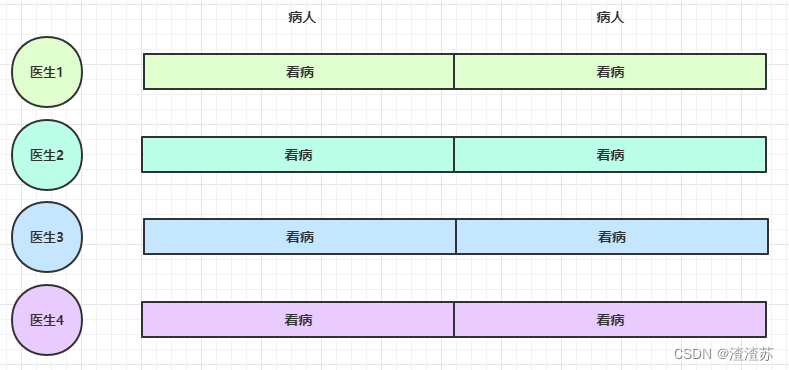
思考下面的场景,4 个医生给人看病,每个病人花费 20 分钟,而且医生看病的过程中是以病人为单位的,一个病人看完了,才能看下一个病人。假设病人源源不断地来,可以计算一下 4 个医生一天工作 8 小时,处理的病人总数是:4 * 8 * 3 = 96
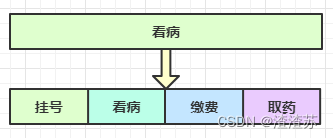
经研究发现,看病可以细分为四个步骤,经拆分后每个步骤需要 5 分钟,如下
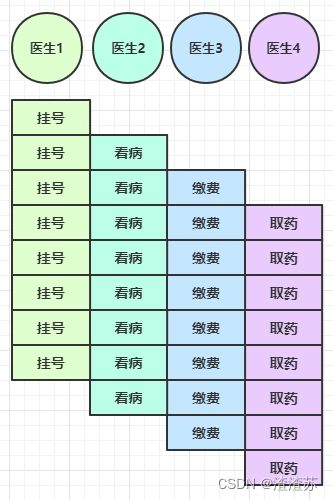
因此可以做如下优化,只有一开始,医生 2、3、4 分别要等待 5、10、15 分钟才能执行工作,但只要后续病人源源不断地来,他们就能够满负荷工作,并且处理病人的能力提高到了 4 * 8 * 12 效率几乎是原来的四倍
要点
- 单线程没法异步提高效率,必须配合多线程、多核 cpu 才能发挥异步的优势
- 异步并没有缩短响应时间,反而有所增加
- 合理进行任务拆分,也是利用异步的关键
2.3.3、Future & Promise
在异步处理时,经常用到这两个接口
首先要说明 netty 中的 Future 与 jdk 中的 Future 同名,但是是两个接口,netty 的 Future 继承自 jdk 的 Future,而 Promise 又对 netty Future 进行了扩展
- jdk Future 只能同步等待任务结束(或成功、或失败)才能得到结果
- netty Future 可以同步等待任务结束得到结果,也可以异步方式得到结果,但都是要等任务结束
- netty Promise 不仅有 netty Future 的功能,而且脱离了任务独立存在,只作为两个线程间传递结果的容器
| 功能/名称 | jdk Future | netty Future | Promise |
|---|---|---|---|
| cancel | 取消任务 | - | - |
| isCanceled | 任务是否取消 | - | - |
| isDone | 任务是否完成,不能区分成功失败 | - | - |
| get | 获取任务结果,阻塞等待 | - | - |
| getNow | - | 获取任务结果,非阻塞,还未产生结果时返回 null | - |
| await | - | 等待任务结束,如果任务失败,不会抛异常,而是通过 isSuccess 判断 | - |
| sync | - | 等待任务结束,如果任务失败,抛出异常 | - |
| isSuccess | - | 判断任务是否成功 | - |
| cause | - | 获取失败信息,非阻塞,如果没有失败,返回null | - |
| addLinstener | - | 添加回调,异步接收结果 | - |
| setSuccess | - | - | 设置成功结果 |
| setFailure | - | - | 设置失败结果 |
测试
@Slf4j
public class TestJdkFuture {public static void main(String[] args) throws ExecutionException, InterruptedException {// 1. 线程池ExecutorService service = Executors.newFixedThreadPool(2);// 2. 提交任务Future future = service.submit(new Callable() {@Overridepublic Integer call() throws Exception {log.debug("执行计算");Thread.sleep(1000);return 50;}});// 3. 主线程通过future来获取结果log.debug("等待结果");log.debug("结果是:{}", future.get());}
}
@Slf4j
public class TestNettyFuture {public static void main(String[] args) throws ExecutionException, InterruptedException {NioEventLoopGroup group = new NioEventLoopGroup();EventLoop eventLoop = group.next();Future future = eventLoop.submit(new Callable() {@Overridepublic Integer call() throws Exception {log.debug("执行计算");Thread.sleep(1000);return 70;}});log.debug("等待结果");
//        log.debug("结果是:{}", future.get());  // 同步// 执行线程异步回调future.addListener(new GenericFutureListener>() {@Overridepublic void operationComplete(Future future) throws Exception {log.debug("结果是:{}", future.getNow());}});}
}
@Slf4j
public class TestNettyPromise {public static void main(String[] args) throws ExecutionException, InterruptedException {// 1. 准备EventLoop 对象EventLoop eventLoop = new NioEventLoopGroup().next();// 2. 可以主动创建 promise,结果容器DefaultPromise promise = new DefaultPromise<>(eventLoop);new Thread(() -> {// 3. 任意一个线程执行计算,计算完毕后想 promise 填充结果log.debug("开始计算。。。");try {Thread.sleep(1000);} catch (InterruptedException e) {e.printStackTrace();}promise.setSuccess(80);}).start();// 4. 接收结果的线程log.debug("等待结果");log.debug("结果是:{}", promise.get());}
}
例1-同步处理任务成功
DefaultEventLoop eventExecutors = new DefaultEventLoop();
DefaultPromise promise = new DefaultPromise<>(eventExecutors);eventExecutors.execute(()->{try {Thread.sleep(1000);} catch (InterruptedException e) {e.printStackTrace();}log.debug("set success, {}",10);promise.setSuccess(10);
});log.debug("start...");
log.debug("{}",promise.getNow()); // 还没有结果
log.debug("{}",promise.get());
输出
11:51:53 [DEBUG] [main] c.i.o.DefaultPromiseTest2 - start...
11:51:53 [DEBUG] [main] c.i.o.DefaultPromiseTest2 - null
11:51:54 [DEBUG] [defaultEventLoop-1-1] c.i.o.DefaultPromiseTest2 - set success, 10
11:51:54 [DEBUG] [main] c.i.o.DefaultPromiseTest2 - 10
例2-异步处理任务成功
DefaultEventLoop eventExecutors = new DefaultEventLoop();
DefaultPromise promise = new DefaultPromise<>(eventExecutors);// 设置回调,异步接收结果
promise.addListener(future -> {// 这里的 future 就是上面的 promiselog.debug("{}",future.getNow());
});// 等待 1000 后设置成功结果
eventExecutors.execute(()->{try {Thread.sleep(1000);} catch (InterruptedException e) {e.printStackTrace();}log.debug("set success, {}",10);promise.setSuccess(10);
});log.debug("start...");
输出
11:49:30 [DEBUG] [main] c.i.o.DefaultPromiseTest2 - start...
11:49:31 [DEBUG] [defaultEventLoop-1-1] c.i.o.DefaultPromiseTest2 - set success, 10
11:49:31 [DEBUG] [defaultEventLoop-1-1] c.i.o.DefaultPromiseTest2 - 10
例3-同步处理任务失败 - sync & get
DefaultEventLoop eventExecutors = new DefaultEventLoop();
DefaultPromise promise = new DefaultPromise<>(eventExecutors);eventExecutors.execute(() -> {try {Thread.sleep(1000);} catch (InterruptedException e) {e.printStackTrace();}RuntimeException e = new RuntimeException("error...");log.debug("set failure, {}", e.toString());promise.setFailure(e);
});log.debug("start...");
log.debug("{}", promise.getNow());
promise.get(); // sync() 也会出现异常,只是 get 会再用 ExecutionException 包一层异常
输出
12:11:07 [DEBUG] [main] c.i.o.DefaultPromiseTest2 - start...
12:11:07 [DEBUG] [main] c.i.o.DefaultPromiseTest2 - null
12:11:08 [DEBUG] [defaultEventLoop-1-1] c.i.o.DefaultPromiseTest2 - set failure, java.lang.RuntimeException: error...
Exception in thread "main" java.util.concurrent.ExecutionException: java.lang.RuntimeException: error...at io.netty.util.concurrent.AbstractFuture.get(AbstractFuture.java:41)at com.itcast.oio.DefaultPromiseTest2.main(DefaultPromiseTest2.java:34)
Caused by: java.lang.RuntimeException: error...at com.itcast.oio.DefaultPromiseTest2.lambda$main$0(DefaultPromiseTest2.java:27)at io.netty.channel.DefaultEventLoop.run(DefaultEventLoop.java:54)at io.netty.util.concurrent.SingleThreadEventExecutor$5.run(SingleThreadEventExecutor.java:918)at io.netty.util.internal.ThreadExecutorMap$2.run(ThreadExecutorMap.java:74)at io.netty.util.concurrent.FastThreadLocalRunnable.run(FastThreadLocalRunnable.java:30)at java.lang.Thread.run(Thread.java:745)
例4-同步处理任务失败 - await
DefaultEventLoop eventExecutors = new DefaultEventLoop();
DefaultPromise promise = new DefaultPromise<>(eventExecutors);eventExecutors.execute(() -> {try {Thread.sleep(1000);} catch (InterruptedException e) {e.printStackTrace();}RuntimeException e = new RuntimeException("error...");log.debug("set failure, {}", e.toString());promise.setFailure(e);
});log.debug("start...");
log.debug("{}", promise.getNow());
promise.await(); // 与 sync 和 get 区别在于,不会抛异常
log.debug("result {}", (promise.isSuccess() ? promise.getNow() : promise.cause()).toString());
输出
12:18:53 [DEBUG] [main] c.i.o.DefaultPromiseTest2 - start...
12:18:53 [DEBUG] [main] c.i.o.DefaultPromiseTest2 - null
12:18:54 [DEBUG] [defaultEventLoop-1-1] c.i.o.DefaultPromiseTest2 - set failure, java.lang.RuntimeException: error...
12:18:54 [DEBUG] [main] c.i.o.DefaultPromiseTest2 - result java.lang.RuntimeException: error...
例5-异步处理任务失败
DefaultEventLoop eventExecutors = new DefaultEventLoop();
DefaultPromise promise = new DefaultPromise<>(eventExecutors);promise.addListener(future -> {log.debug("result {}", (promise.isSuccess() ? promise.getNow() : promise.cause()).toString());
});eventExecutors.execute(() -> {try {Thread.sleep(1000);} catch (InterruptedException e) {e.printStackTrace();}RuntimeException e = new RuntimeException("error...");log.debug("set failure, {}", e.toString());promise.setFailure(e);
});log.debug("start...");
输出
12:04:57 [DEBUG] [main] c.i.o.DefaultPromiseTest2 - start...
12:04:58 [DEBUG] [defaultEventLoop-1-1] c.i.o.DefaultPromiseTest2 - set failure, java.lang.RuntimeException: error...
12:04:58 [DEBUG] [defaultEventLoop-1-1] c.i.o.DefaultPromiseTest2 - result java.lang.RuntimeException: error...
例6-await 死锁检查
DefaultEventLoop eventExecutors = new DefaultEventLoop();
DefaultPromise promise = new DefaultPromise<>(eventExecutors);eventExecutors.submit(()->{System.out.println("1");try {promise.await();// 注意不能仅捕获 InterruptedException 异常// 否则 死锁检查抛出的 BlockingOperationException 会继续向上传播// 而提交的任务会被包装为 PromiseTask,它的 run 方法中会 catch 所有异常然后设置为 Promise 的失败结果而不会抛出} catch (Exception e) { e.printStackTrace();}System.out.println("2");
});
eventExecutors.submit(()->{System.out.println("3");try {promise.await();} catch (Exception e) {e.printStackTrace();}System.out.println("4");
});
输出
1
2
3
4
io.netty.util.concurrent.BlockingOperationException: DefaultPromise@47499c2a(incomplete)at io.netty.util.concurrent.DefaultPromise.checkDeadLock(DefaultPromise.java:384)at io.netty.util.concurrent.DefaultPromise.await(DefaultPromise.java:212)at com.itcast.oio.DefaultPromiseTest.lambda$main$0(DefaultPromiseTest.java:27)at io.netty.util.concurrent.PromiseTask$RunnableAdapter.call(PromiseTask.java:38)at io.netty.util.concurrent.PromiseTask.run(PromiseTask.java:73)at io.netty.channel.DefaultEventLoop.run(DefaultEventLoop.java:54)at io.netty.util.concurrent.SingleThreadEventExecutor$5.run(SingleThreadEventExecutor.java:918)at io.netty.util.internal.ThreadExecutorMap$2.run(ThreadExecutorMap.java:74)at io.netty.util.concurrent.FastThreadLocalRunnable.run(FastThreadLocalRunnable.java:30)at java.lang.Thread.run(Thread.java:745)
io.netty.util.concurrent.BlockingOperationException: DefaultPromise@47499c2a(incomplete)at io.netty.util.concurrent.DefaultPromise.checkDeadLock(DefaultPromise.java:384)at io.netty.util.concurrent.DefaultPromise.await(DefaultPromise.java:212)at com.itcast.oio.DefaultPromiseTest.lambda$main$1(DefaultPromiseTest.java:36)at io.netty.util.concurrent.PromiseTask$RunnableAdapter.call(PromiseTask.java:38)at io.netty.util.concurrent.PromiseTask.run(PromiseTask.java:73)at io.netty.channel.DefaultEventLoop.run(DefaultEventLoop.java:54)at io.netty.util.concurrent.SingleThreadEventExecutor$5.run(SingleThreadEventExecutor.java:918)at io.netty.util.internal.ThreadExecutorMap$2.run(ThreadExecutorMap.java:74)at io.netty.util.concurrent.FastThreadLocalRunnable.run(FastThreadLocalRunnable.java:30)at java.lang.Thread.run(Thread.java:745)
2.3.4、Handler & Pipeline
ChannelHandler 用来处理 Channel 上的各种事件,分为入站、出站两种。所有 ChannelHandler 被连成一串,就是 Pipeline
- 入站处理器通常是 ChannelInboundHandlerAdapter 的子类,主要用来读取客户端数据,写回结果
- 出站处理器通常是 ChannelOutboundHandlerAdapter 的子类,主要对写回结果进行加工
打个比喻,每个 Channel 是一个产品的加工车间,Pipeline 是车间中的流水线,ChannelHandler 就是流水线上的各道工序,而后面要讲的 ByteBuf 是原材料,经过很多工序的加工:先经过一道道入站工序,再经过一道道出站工序最终变成产品
先搞清楚顺序,服务端
new ServerBootstrap().group(new NioEventLoopGroup()).channel(NioServerSocketChannel.class).childHandler(new ChannelInitializer() {protected void initChannel(NioSocketChannel ch) {ch.pipeline().addLast(new ChannelInboundHandlerAdapter(){@Overridepublic void channelRead(ChannelHandlerContext ctx, Object msg) {System.out.println(1);ctx.fireChannelRead(msg); // 1}});ch.pipeline().addLast(new ChannelInboundHandlerAdapter(){@Overridepublic void channelRead(ChannelHandlerContext ctx, Object msg) {System.out.println(2);ctx.fireChannelRead(msg); // 2}});ch.pipeline().addLast(new ChannelInboundHandlerAdapter(){@Overridepublic void channelRead(ChannelHandlerContext ctx, Object msg) {System.out.println(3);ctx.channel().write(msg); // 3}});ch.pipeline().addLast(new ChannelOutboundHandlerAdapter(){@Overridepublic void write(ChannelHandlerContext ctx, Object msg, ChannelPromise promise) {System.out.println(4);ctx.write(msg, promise); // 4}});ch.pipeline().addLast(new ChannelOutboundHandlerAdapter(){@Overridepublic void write(ChannelHandlerContext ctx, Object msg, ChannelPromise promise) {System.out.println(5);ctx.write(msg, promise); // 5}});ch.pipeline().addLast(new ChannelOutboundHandlerAdapter(){@Overridepublic void write(ChannelHandlerContext ctx, Object msg, ChannelPromise promise) {System.out.println(6);ctx.write(msg, promise); // 6}});}}).bind(8080);
客户端
new Bootstrap().group(new NioEventLoopGroup()).channel(NioSocketChannel.class).handler(new ChannelInitializer() {@Overrideprotected void initChannel(Channel ch) {ch.pipeline().addLast(new StringEncoder());}}).connect("127.0.0.1", 8080).addListener((ChannelFutureListener) future -> {future.channel().writeAndFlush("hello,world");});
服务器端打印:
1
2
3
6
5
4
可以看到,ChannelInboundHandlerAdapter 是按照 addLast 的顺序执行的,而 ChannelOutboundHandlerAdapter 是按照 addLast 的逆序执行的。ChannelPipeline 的实现是一个 ChannelHandlerContext(包装了 ChannelHandler) 组成的双向链表

- 入站处理器中,ctx.fireChannelRead(msg) 是 调用下一个入站处理器
- 如果注释掉 1 处代码,则仅会打印 1
- 如果注释掉 2 处代码,则仅会打印 1 2
- 3 处的 ctx.channel().write(msg) 会 从尾部开始触发 后续出站处理器的执行
- 如果注释掉 3 处代码,则仅会打印 1 2 3
- 类似的,出站处理器中,ctx.write(msg, promise) 的调用也会 触发上一个出站处理器
- 如果注释掉 6 处代码,则仅会打印 1 2 3 6
- ctx.channel().write(msg) vs ctx.write(msg)
- 都是触发出站处理器的执行
- ctx.channel().write(msg) 从尾部开始查找出站处理器
- ctx.write(msg) 是从当前节点找上一个出站处理器
- 3 处的 ctx.channel().write(msg) 如果改为 ctx.write(msg) 仅会打印 1 2 3,因为节点3 之前没有其它出站处理器了
- 6 处的 ctx.write(msg, promise) 如果改为 ctx.channel().write(msg) 会打印 1 2 3 6 6 6… 因为 ctx.channel().write() 是从尾部开始查找,结果又是节点6 自己
图1 - 服务端 pipeline 触发的原始流程,图中数字代表了处理步骤的先后次序
[外链图片转存失败,源站可能有防盗链机制,建议将图片保存下来直接上传(img-Nr8BD3Tk-1669443364882)(G:/AAA学习2333/Netty网络编程/讲义/img/0009.png)]
2.3.5、ByteBuf
是对字节数据的封装
1)创建
ByteBuf buffer = ByteBufAllocator.DEFAULT.buffer(10);
log(buffer);
上面代码创建了一个默认的 ByteBuf(池化基于直接内存的 ByteBuf),初始容量是 10
输出
read index:0 write index:0 capacity:10
其中 log 方法参考如下
private static void log(ByteBuf buffer) {int length = buffer.readableBytes();int rows = length / 16 + (length % 15 == 0 ? 0 : 1) + 4;StringBuilder buf = new StringBuilder(rows * 80 * 2).append("read index:").append(buffer.readerIndex()).append(" write index:").append(buffer.writerIndex()).append(" capacity:").append(buffer.capacity()).append(NEWLINE);appendPrettyHexDump(buf, buffer);System.out.println(buf.toString());
}
2)直接内存 vs 堆内存
可以使用下面的代码来创建池化基于堆的 ByteBuf
ByteBuf buffer = ByteBufAllocator.DEFAULT.heapBuffer(10);
也可以使用下面的代码来创建池化基于直接内存的 ByteBuf
ByteBuf buffer = ByteBufAllocator.DEFAULT.directBuffer(10);
- 直接内存创建和销毁的代价昂贵,但读写性能高(少一次内存复制),适合配合池化功能一起用
- 直接内存对 GC 压力小,因为这部分内存不受 JVM 垃圾回收的管理,但也要注意及时主动释放
3)池化 vs 非池化
池化的最大意义在于可以重用 ByteBuf,优点有
- 没有池化,则每次都得创建新的 ByteBuf 实例,这个操作对直接内存代价昂贵,就算是堆内存,也会增加 GC 压力
- 有了池化,则可以重用池中 ByteBuf 实例,并且采用了与 jemalloc 类似的内存分配算法提升分配效率
- 高并发时,池化功能更节约内存,减少内存溢出的可能
池化功能是否开启,可以通过下面的系统环境变量来设置
-Dio.netty.allocator.type={unpooled|pooled}
- 4.1 以后,非 Android 平台默认启用池化实现,Android 平台启用非池化实现
- 4.1 之前,池化功能还不成熟,默认是非池化实现
4)组成
ByteBuf 由四部分组成
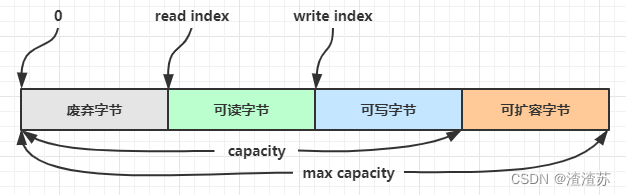
最开始读写指针都在 0 位置
5)写入
方法列表,省略一些不重要的方法
| 方法签名 | 含义 | 备注 |
|---|---|---|
| writeBoolean(boolean value) | 写入 boolean 值 | 用一字节 01|00 代表 true|false |
| writeByte(int value) | 写入 byte 值 | |
| writeShort(int value) | 写入 short 值 | |
| writeInt(int value) | 写入 int 值 | Big Endian,即 0x250,写入后 00 00 02 50 |
| writeIntLE(int value) | 写入 int 值 | Little Endian,即 0x250,写入后 50 02 00 00 |
| writeLong(long value) | 写入 long 值 | |
| writeChar(int value) | 写入 char 值 | |
| writeFloat(float value) | 写入 float 值 | |
| writeDouble(double value) | 写入 double 值 | |
| writeBytes(ByteBuf src) | 写入 netty 的 ByteBuf | |
| writeBytes(byte[] src) | 写入 byte[] | |
| writeBytes(ByteBuffer src) | 写入 nio 的 ByteBuffer | |
| int writeCharSequence(CharSequence sequence, Charset charset) | 写入字符串 |
注意
- 这些方法的未指明返回值的,其返回值都是 ByteBuf,意味着可以链式调用
- 网络传输,默认习惯是 Big Endian
先写入 4 个字节
buffer.writeBytes(new byte[]{1, 2, 3, 4});
log(buffer);
结果是
read index:0 write index:4 capacity:10+-------------------------------------------------+|  0  1  2  3  4  5  6  7  8  9  a  b  c  d  e  f |
+--------+-------------------------------------------------+----------------+
|00000000| 01 02 03 04                                     |....            |
+--------+-------------------------------------------------+----------------+
再写入一个 int 整数,也是 4 个字节
buffer.writeInt(5);
log(buffer);
结果是
read index:0 write index:8 capacity:10+-------------------------------------------------+|  0  1  2  3  4  5  6  7  8  9  a  b  c  d  e  f |
+--------+-------------------------------------------------+----------------+
|00000000| 01 02 03 04 00 00 00 05                         |........        |
+--------+-------------------------------------------------+----------------+
还有一类方法是 set 开头的一系列方法,也可以写入数据,但不会改变写指针位置
6)扩容
再写入一个 int 整数时,容量不够了(初始容量是 10),这时会引发扩容
buffer.writeInt(6);
log(buffer);
扩容规则是
- 如何写入后数据大小未超过 512,则选择下一个 16 的整数倍,例如写入后大小为 12 ,则扩容后 capacity 是 16
- 如果写入后数据大小超过 512,则选择下一个 2^n,例如写入后大小为 513,则扩容后 capacity 是 210=1024(29=512 已经不够了)
- 扩容不能超过 max capacity 会报错
结果是
read index:0 write index:12 capacity:16+-------------------------------------------------+|  0  1  2  3  4  5  6  7  8  9  a  b  c  d  e  f |
+--------+-------------------------------------------------+----------------+
|00000000| 01 02 03 04 00 00 00 05 00 00 00 06             |............    |
+--------+-------------------------------------------------+----------------+
7)读取
例如读了 4 次,每次一个字节
System.out.println(buffer.readByte());
System.out.println(buffer.readByte());
System.out.println(buffer.readByte());
System.out.println(buffer.readByte());
log(buffer);
读过的内容,就属于废弃部分了,再读只能读那些尚未读取的部分
1
2
3
4
read index:4 write index:12 capacity:16+-------------------------------------------------+|  0  1  2  3  4  5  6  7  8  9  a  b  c  d  e  f |
+--------+-------------------------------------------------+----------------+
|00000000| 00 00 00 05 00 00 00 06                         |........        |
+--------+-------------------------------------------------+----------------+
如果需要重复读取 int 整数 5,怎么办?
可以在 read 前先做个标记 mark
buffer.markReaderIndex();
System.out.println(buffer.readInt());
log(buffer);
结果
5
read index:8 write index:12 capacity:16+-------------------------------------------------+|  0  1  2  3  4  5  6  7  8  9  a  b  c  d  e  f |
+--------+-------------------------------------------------+----------------+
|00000000| 00 00 00 06                                     |....            |
+--------+-------------------------------------------------+----------------+
这时要重复读取的话,重置到标记位置 reset
buffer.resetReaderIndex();
log(buffer);
这时
read index:4 write index:12 capacity:16+-------------------------------------------------+|  0  1  2  3  4  5  6  7  8  9  a  b  c  d  e  f |
+--------+-------------------------------------------------+----------------+
|00000000| 00 00 00 05 00 00 00 06                         |........        |
+--------+-------------------------------------------------+----------------+
还有种办法是采用 get 开头的一系列方法,这些方法不会改变 read index
8)retain & release
由于 Netty 中有堆外内存的 ByteBuf 实现,堆外内存最好是手动来释放,而不是等 GC 垃圾回收。
- UnpooledHeapByteBuf 使用的是 JVM 内存,只需等 GC 回收内存即可
- UnpooledDirectByteBuf 使用的就是直接内存了,需要特殊的方法来回收内存
- PooledByteBuf 和它的子类使用了池化机制,需要更复杂的规则来回收内存
回收内存的源码实现,请关注下面方法的不同实现
protected abstract void deallocate()
Netty 这里采用了引用计数法来控制回收内存,每个 ByteBuf 都实现了 ReferenceCounted 接口
- 每个 ByteBuf 对象的初始计数为 1
- 调用 release 方法计数减 1,如果计数为 0,ByteBuf 内存被回收
- 调用 retain 方法计数加 1,表示调用者没用完之前,其它 handler 即使调用了 release 也不会造成回收
- 当计数为 0 时,底层内存会被回收,这时即使 ByteBuf 对象还在,其各个方法均无法正常使用
谁来负责 release 呢?
不是我们想象的(一般情况下)
ByteBuf buf = ...
try {...
} finally {buf.release();
}
请思考,因为 pipeline 的存在,一般需要将 ByteBuf 传递给下一个 ChannelHandler,如果在 finally 中 release 了,就失去了传递性(当然,如果在这个 ChannelHandler 内这个 ByteBuf 已完成了它的使命,那么便无须再传递)
基本规则是,谁是最后使用者,谁负责 release,详细分析如下
- 起点,对于 NIO 实现来讲,在 io.netty.channel.nio.AbstractNioByteChannel.NioByteUnsafe#read 方法中首次创建 ByteBuf 放入 pipeline(line 163 pipeline.fireChannelRead(byteBuf))
- 入站 ByteBuf 处理原则
- 对原始 ByteBuf 不做处理,调用 ctx.fireChannelRead(msg) 向后传递,这时无须 release
- 将原始 ByteBuf 转换为其它类型的 Java 对象,这时 ByteBuf 就没用了,必须 release
- 如果不调用 ctx.fireChannelRead(msg) 向后传递,那么也必须 release
- 注意各种异常,如果 ByteBuf 没有成功传递到下一个 ChannelHandler,必须 release
- 假设消息一直向后传,那么 TailContext 会负责释放未处理消息(原始的 ByteBuf)
- 出站 ByteBuf 处理原则
- 出站消息最终都会转为 ByteBuf 输出,一直向前传,由 HeadContext flush 后 release
- 异常处理原则
- 有时候不清楚 ByteBuf 被引用了多少次,但又必须彻底释放,可以循环调用 release 直到返回 true
TailContext 释放未处理消息逻辑
// io.netty.channel.DefaultChannelPipeline#onUnhandledInboundMessage(java.lang.Object)
protected void onUnhandledInboundMessage(Object msg) {try {logger.debug("Discarded inbound message {} that reached at the tail of the pipeline. " +"Please check your pipeline configuration.", msg);} finally {ReferenceCountUtil.release(msg);}
}
具体代码
// io.netty.util.ReferenceCountUtil#release(java.lang.Object)
public static boolean release(Object msg) {if (msg instanceof ReferenceCounted) {return ((ReferenceCounted) msg).release();}return false;
}
9)slice
【零拷贝】的体现之一,对原始 ByteBuf 进行切片成多个 ByteBuf,切片后的 ByteBuf 并没有发生内存复制,还是使用原始 ByteBuf 的内存,切片后的 ByteBuf 维护独立的 read,write 指针
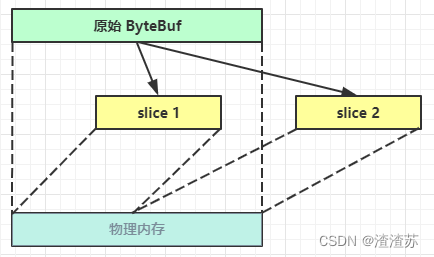
例,原始 ByteBuf 进行一些初始操作
ByteBuf origin = ByteBufAllocator.DEFAULT.buffer(10);
writeBytes(new byte[]{1, 2, 3, 4});
readByte();
System.out.println(ByteBufUtil.prettyHexDump(origin));
输出
         +-------------------------------------------------+|  0  1  2  3  4  5  6  7  8  9  a  b  c  d  e  f |
+--------+-------------------------------------------------+----------------+
|00000000| 02 03 04                                        |...             |
+--------+-------------------------------------------------+----------------+
这时调用 slice 进行切片,无参 slice 是从原始 ByteBuf 的 read index 到 write index 之间的内容进行切片,切片后的 max capacity 被固定为这个区间的大小,因此不能追加 write
ByteBuf slice = slice();
System.out.println(ByteBufUtil.prettyHexDump(slice));
// slice.writeByte(5); 如果执行,会报 IndexOutOfBoundsException 异常
输出
         +-------------------------------------------------+|  0  1  2  3  4  5  6  7  8  9  a  b  c  d  e  f |
+--------+-------------------------------------------------+----------------+
|00000000| 02 03 04                                        |...             |
+--------+-------------------------------------------------+----------------+
如果原始 ByteBuf 再次读操作(又读了一个字节)
readByte();
System.out.println(ByteBufUtil.prettyHexDump(origin));
输出
         +-------------------------------------------------+|  0  1  2  3  4  5  6  7  8  9  a  b  c  d  e  f |
+--------+-------------------------------------------------+----------------+
|00000000| 03 04                                           |..              |
+--------+-------------------------------------------------+----------------+
这时的 slice 不受影响,因为它有独立的读写指针
System.out.println(ByteBufUtil.prettyHexDump(slice));
输出
         +-------------------------------------------------+|  0  1  2  3  4  5  6  7  8  9  a  b  c  d  e  f |
+--------+-------------------------------------------------+----------------+
|00000000| 02 03 04                                        |...             |
+--------+-------------------------------------------------+----------------+
如果 slice 的内容发生了更改
slice.setByte(2, 5);
System.out.println(ByteBufUtil.prettyHexDump(slice));
输出
         +-------------------------------------------------+|  0  1  2  3  4  5  6  7  8  9  a  b  c  d  e  f |
+--------+-------------------------------------------------+----------------+
|00000000| 02 03 05                                        |...             |
+--------+-------------------------------------------------+----------------+
这时,原始 ByteBuf 也会受影响,因为底层都是同一块内存
System.out.println(ByteBufUtil.prettyHexDump(origin));
输出
         +-------------------------------------------------+|  0  1  2  3  4  5  6  7  8  9  a  b  c  d  e  f |
+--------+-------------------------------------------------+----------------+
|00000000| 03 05                                           |..              |
+--------+-------------------------------------------------+----------------+
10)duplicate
【零拷贝】的体现之一,就好比截取了原始 ByteBuf 所有内容,并且没有 max capacity 的限制,也是与原始 ByteBuf 使用同一块底层内存,只是读写指针是独立的
[外链图片转存失败,源站可能有防盗链机制,建议将图片保存下来直接上传(img-9qJf6j51-1669443364883)(G:/AAA学习2333/Netty网络编程/讲义/img/0012.png)]
11)copy
会将底层内存数据进行深拷贝,因此无论读写,都与原始 ByteBuf 无关
12)CompositeByteBuf
【零拷贝】的体现之一,可以将多个 ByteBuf 合并为一个逻辑上的 ByteBuf,避免拷贝
有两个 ByteBuf 如下
ByteBuf buf1 = ByteBufAllocator.DEFAULT.buffer(5);
buf1.writeBytes(new byte[]{1, 2, 3, 4, 5});
ByteBuf buf2 = ByteBufAllocator.DEFAULT.buffer(5);
buf2.writeBytes(new byte[]{6, 7, 8, 9, 10});
System.out.println(ByteBufUtil.prettyHexDump(buf1));
System.out.println(ByteBufUtil.prettyHexDump(buf2));
输出
         +-------------------------------------------------+|  0  1  2  3  4  5  6  7  8  9  a  b  c  d  e  f |
+--------+-------------------------------------------------+----------------+
|00000000| 01 02 03 04 05                                  |.....           |
+--------+-------------------------------------------------+----------------++-------------------------------------------------+|  0  1  2  3  4  5  6  7  8  9  a  b  c  d  e  f |
+--------+-------------------------------------------------+----------------+
|00000000| 06 07 08 09 0a                                  |.....           |
+--------+-------------------------------------------------+----------------+
现在需要一个新的 ByteBuf,内容来自于刚才的 buf1 和 buf2,如何实现?
方法1:
ByteBuf buf3 = ByteBufAllocator.DEFAULT.buffer(buf1.readableBytes()+buf2.readableBytes());
buf3.writeBytes(buf1);
buf3.writeBytes(buf2);
System.out.println(ByteBufUtil.prettyHexDump(buf3));
结果
         +-------------------------------------------------+|  0  1  2  3  4  5  6  7  8  9  a  b  c  d  e  f |
+--------+-------------------------------------------------+----------------+
|00000000| 01 02 03 04 05 06 07 08 09 0a                   |..........      |
+--------+-------------------------------------------------+----------------+
这种方法好不好?回答是不太好,因为进行了数据的内存复制操作
方法2:
CompositeByteBuf buf3 = ByteBufAllocator.DEFAULT.compositeBuffer();
// true 表示增加新的 ByteBuf 自动递增 write index, 否则 write index 会始终为 0
buf3.addComponents(true, buf1, buf2);
结果是一样的
         +-------------------------------------------------+|  0  1  2  3  4  5  6  7  8  9  a  b  c  d  e  f |
+--------+-------------------------------------------------+----------------+
|00000000| 01 02 03 04 05 06 07 08 09 0a                   |..........      |
+--------+-------------------------------------------------+----------------+
CompositeByteBuf 是一个组合的 ByteBuf,它内部维护了一个 Component 数组,每个 Component 管理一个 ByteBuf,记录了这个 ByteBuf 相对于整体偏移量等信息,代表着整体中某一段的数据。
- 优点,对外是一个虚拟视图,组合这些 ByteBuf 不会产生内存复制
- 缺点,复杂了很多,多次操作会带来性能的损耗
13)Unpooled
Unpooled 是一个工具类,类如其名,提供了非池化的 ByteBuf 创建、组合、复制等操作
这里仅介绍其跟【零拷贝】相关的 wrappedBuffer 方法,可以用来包装 ByteBuf
ByteBuf buf1 = ByteBufAllocator.DEFAULT.buffer(5);
buf1.writeBytes(new byte[]{1, 2, 3, 4, 5});
ByteBuf buf2 = ByteBufAllocator.DEFAULT.buffer(5);
buf2.writeBytes(new byte[]{6, 7, 8, 9, 10});// 当包装 ByteBuf 个数超过一个时, 底层使用了 CompositeByteBuf
ByteBuf buf3 = Unpooled.wrappedBuffer(buf1, buf2);
System.out.println(ByteBufUtil.prettyHexDump(buf3));
输出
         +-------------------------------------------------+|  0  1  2  3  4  5  6  7  8  9  a  b  c  d  e  f |
+--------+-------------------------------------------------+----------------+
|00000000| 01 02 03 04 05 06 07 08 09 0a                   |..........      |
+--------+-------------------------------------------------+----------------+
也可以用来包装普通字节数组,底层也不会有拷贝操作
ByteBuf buf4 = Unpooled.wrappedBuffer(new byte[]{1, 2, 3}, new byte[]{4, 5, 6});
System.out.println(buf4.getClass());
System.out.println(ByteBufUtil.prettyHexDump(buf4));
输出
class io.netty.buffer.CompositeByteBuf+-------------------------------------------------+|  0  1  2  3  4  5  6  7  8  9  a  b  c  d  e  f |
+--------+-------------------------------------------------+----------------+
|00000000| 01 02 03 04 05 06                               |......          |
+--------+-------------------------------------------------+----------------+
💡 ByteBuf 优势
- 池化 - 可以重用池中 ByteBuf 实例,更节约内存,减少内存溢出的可能
- 读写指针分离,不需要像 ByteBuffer 一样切换读写模式
- 可以自动扩容
- 支持链式调用,使用更流畅
- 很多地方体现零拷贝,例如 slice、duplicate、CompositeByteBuf
2.4、双向通信
2.4.1、练习
实现一个 echo server
编写 server
new ServerBootstrap().group(new NioEventLoopGroup()).channel(NioServerSocketChannel.class).childHandler(new ChannelInitializer() {@Overrideprotected void initChannel(NioSocketChannel ch) {ch.pipeline().addLast(new ChannelInboundHandlerAdapter(){@Overridepublic void channelRead(ChannelHandlerContext ctx, Object msg) {ByteBuf buffer = (ByteBuf) msg;System.out.println(buffer.toString(Charset.defaultCharset()));// 建议使用 ctx.alloc() 创建 ByteBufByteBuf response = ctx.alloc().buffer();response.writeBytes(buffer);ctx.writeAndFlush(response);// 思考:需要释放 buffer 吗// 思考:需要释放 response 吗}});}}).bind(8080);
编写 client
NioEventLoopGroup group = new NioEventLoopGroup();
Channel channel = new Bootstrap().group(group).channel(NioSocketChannel.class).handler(new ChannelInitializer() {@Overrideprotected void initChannel(NioSocketChannel ch) throws Exception {ch.pipeline().addLast(new StringEncoder());ch.pipeline().addLast(new ChannelInboundHandlerAdapter() {@Overridepublic void channelRead(ChannelHandlerContext ctx, Object msg) {ByteBuf buffer = (ByteBuf) msg;System.out.println(buffer.toString(Charset.defaultCharset()));// 思考:需要释放 buffer 吗}});}}).connect("127.0.0.1", 8080).sync().channel();channel.closeFuture().addListener(future -> {group.shutdownGracefully();
});new Thread(() -> {Scanner scanner = new Scanner(System.in);while (true) {String line = scanner.nextLine();if ("q".equals(line)) {channel.close();break;}channel.writeAndFlush(line);}
}).start();
💡 读和写的误解
最初在认识上有这样的误区,认为只有在 netty,nio 这样的多路复用 IO 模型时,读写才不会相互阻塞,才可以实现高效的双向通信,但实际上,Java Socket 是全双工的:在任意时刻,线路上存在A 到 B 和 B 到 A 的双向信号传输。即使是阻塞 IO,读和写是可以同时进行的,只要分别采用读线程和写线程即可,读不会阻塞写、写也不会阻塞读
例如
public class TestServer {public static void main(String[] args) throws IOException {ServerSocket ss = new ServerSocket(8888);Socket s = ss.accept();new Thread(() -> {try {BufferedReader reader = new BufferedReader(new InputStreamReader(s.getInputStream()));while (true) {System.out.println(reader.readLine());}} catch (IOException e) {e.printStackTrace();}}).start();new Thread(() -> {try {BufferedWriter writer = new BufferedWriter(new OutputStreamWriter(s.getOutputStream()));// 例如在这个位置加入 thread 级别断点,可以发现即使不写入数据,也不妨碍前面线程读取客户端数据for (int i = 0; i < 100; i++) {writer.write(String.valueOf(i));writer.newLine();writer.flush();}} catch (IOException e) {e.printStackTrace();}}).start();}
}
客户端
public class TestClient {public static void main(String[] args) throws IOException {Socket s = new Socket("localhost", 8888);new Thread(() -> {try {BufferedReader reader = new BufferedReader(new InputStreamReader(s.getInputStream()));while (true) {System.out.println(reader.readLine());}} catch (IOException e) {e.printStackTrace();}}).start();new Thread(() -> {try {BufferedWriter writer = new BufferedWriter(new OutputStreamWriter(s.getOutputStream()));for (int i = 0; i < 100; i++) {writer.write(String.valueOf(i));writer.newLine();writer.flush();}} catch (IOException e) {e.printStackTrace();}}).start();}
}
三、Netty 进阶
3.1、粘包与半包
3.1.1、粘包现象
服务端代码
public class HelloWorldServer {static final Logger log = LoggerFactory.getLogger(HelloWorldServer.class);void start() {NioEventLoopGroup boss = new NioEventLoopGroup(1);NioEventLoopGroup worker = new NioEventLoopGroup();try {ServerBootstrap serverBootstrap = new ServerBootstrap();serverBootstrap.channel(NioServerSocketChannel.class);serverBootstrap.group(boss, worker);serverBootstrap.childHandler(new ChannelInitializer() {@Overrideprotected void initChannel(SocketChannel ch) throws Exception {ch.pipeline().addLast(new LoggingHandler(LogLevel.DEBUG));ch.pipeline().addLast(new ChannelInboundHandlerAdapter() {@Overridepublic void channelActive(ChannelHandlerContext ctx) throws Exception {log.debug("connected {}", ctx.channel());super.channelActive(ctx);}@Overridepublic void channelInactive(ChannelHandlerContext ctx) throws Exception {log.debug("disconnect {}", ctx.channel());super.channelInactive(ctx);}});}});ChannelFuture channelFuture = serverBootstrap.bind(8080);log.debug("{} binding...", channelFuture.channel());channelFuture.sync();log.debug("{} bound...", channelFuture.channel());channelFuture.channel().closeFuture().sync();} catch (InterruptedException e) {log.error("server error", e);} finally {boss.shutdownGracefully();worker.shutdownGracefully();log.debug("stoped");}}public static void main(String[] args) {new HelloWorldServer().start();}
}
客户端代码希望发送 10 个消息,每个消息是 16 字节
public class HelloWorldClient {static final Logger log = LoggerFactory.getLogger(HelloWorldClient.class);public static void main(String[] args) {NioEventLoopGroup worker = new NioEventLoopGroup();try {Bootstrap bootstrap = new Bootstrap();bootstrap.channel(NioSocketChannel.class);bootstrap.group(worker);bootstrap.handler(new ChannelInitializer() {@Overrideprotected void initChannel(SocketChannel ch) throws Exception {log.debug("connetted...");ch.pipeline().addLast(new ChannelInboundHandlerAdapter() {@Overridepublic void channelActive(ChannelHandlerContext ctx) throws Exception {log.debug("sending...");Random r = new Random();char c = 'a';for (int i = 0; i < 10; i++) {ByteBuf buffer = ctx.alloc().buffer();buffer.writeBytes(new byte[]{0, 1, 2, 3, 4, 5, 6, 7, 8, 9, 10, 11, 12, 13, 14, 15});ctx.writeAndFlush(buffer);}}});}});ChannelFuture channelFuture = bootstrap.connect("127.0.0.1", 8080).sync();channelFuture.channel().closeFuture().sync();} catch (InterruptedException e) {log.error("client error", e);} finally {worker.shutdownGracefully();}}
}
服务器端的某次输出,可以看到一次就接收了 160 个字节,而非分 10 次接收
08:24:46 [DEBUG] [main] c.i.n.HelloWorldServer - [id: 0x81e0fda5] binding...
08:24:46 [DEBUG] [main] c.i.n.HelloWorldServer - [id: 0x81e0fda5, L:/0:0:0:0:0:0:0:0:8080] bound...
08:24:55 [DEBUG] [nioEventLoopGroup-3-1] i.n.h.l.LoggingHandler - [id: 0x94132411, L:/127.0.0.1:8080 - R:/127.0.0.1:58177] REGISTERED
08:24:55 [DEBUG] [nioEventLoopGroup-3-1] i.n.h.l.LoggingHandler - [id: 0x94132411, L:/127.0.0.1:8080 - R:/127.0.0.1:58177] ACTIVE
08:24:55 [DEBUG] [nioEventLoopGroup-3-1] c.i.n.HelloWorldServer - connected [id: 0x94132411, L:/127.0.0.1:8080 - R:/127.0.0.1:58177]
08:24:55 [DEBUG] [nioEventLoopGroup-3-1] i.n.h.l.LoggingHandler - [id: 0x94132411, L:/127.0.0.1:8080 - R:/127.0.0.1:58177] READ: 160B+-------------------------------------------------+|  0  1  2  3  4  5  6  7  8  9  a  b  c  d  e  f |
+--------+-------------------------------------------------+----------------+
|00000000| 00 01 02 03 04 05 06 07 08 09 0a 0b 0c 0d 0e 0f |................|
|00000010| 00 01 02 03 04 05 06 07 08 09 0a 0b 0c 0d 0e 0f |................|
|00000020| 00 01 02 03 04 05 06 07 08 09 0a 0b 0c 0d 0e 0f |................|
|00000030| 00 01 02 03 04 05 06 07 08 09 0a 0b 0c 0d 0e 0f |................|
|00000040| 00 01 02 03 04 05 06 07 08 09 0a 0b 0c 0d 0e 0f |................|
|00000050| 00 01 02 03 04 05 06 07 08 09 0a 0b 0c 0d 0e 0f |................|
|00000060| 00 01 02 03 04 05 06 07 08 09 0a 0b 0c 0d 0e 0f |................|
|00000070| 00 01 02 03 04 05 06 07 08 09 0a 0b 0c 0d 0e 0f |................|
|00000080| 00 01 02 03 04 05 06 07 08 09 0a 0b 0c 0d 0e 0f |................|
|00000090| 00 01 02 03 04 05 06 07 08 09 0a 0b 0c 0d 0e 0f |................|
+--------+-------------------------------------------------+----------------+
08:24:55 [DEBUG] [nioEventLoopGroup-3-1] i.n.h.l.LoggingHandler - [id: 0x94132411, L:/127.0.0.1:8080 - R:/127.0.0.1:58177] READ COMPLETE
3.1.2、半包现象
客户端代码希望发送 1 个消息,这个消息是 160 字节,代码改为
ByteBuf buffer = ctx.alloc().buffer();
for (int i = 0; i < 10; i++) {buffer.writeBytes(new byte[]{0, 1, 2, 3, 4, 5, 6, 7, 8, 9, 10, 11, 12, 13, 14, 15});
}
ctx.writeAndFlush(buffer);
为现象明显,服务端修改一下接收缓冲区,其它代码不变
serverBootstrap.option(ChannelOption.SO_RCVBUF, 10);
服务器端的某次输出,可以看到接收的消息被分为两节,第一次 20 字节,第二次 140 字节
08:43:49 [DEBUG] [main] c.i.n.HelloWorldServer - [id: 0x4d6c6a84] binding...
08:43:49 [DEBUG] [main] c.i.n.HelloWorldServer - [id: 0x4d6c6a84, L:/0:0:0:0:0:0:0:0:8080] bound...
08:44:23 [DEBUG] [nioEventLoopGroup-3-1] i.n.h.l.LoggingHandler - [id: 0x1719abf7, L:/127.0.0.1:8080 - R:/127.0.0.1:59221] REGISTERED
08:44:23 [DEBUG] [nioEventLoopGroup-3-1] i.n.h.l.LoggingHandler - [id: 0x1719abf7, L:/127.0.0.1:8080 - R:/127.0.0.1:59221] ACTIVE
08:44:23 [DEBUG] [nioEventLoopGroup-3-1] c.i.n.HelloWorldServer - connected [id: 0x1719abf7, L:/127.0.0.1:8080 - R:/127.0.0.1:59221]
08:44:24 [DEBUG] [nioEventLoopGroup-3-1] i.n.h.l.LoggingHandler - [id: 0x1719abf7, L:/127.0.0.1:8080 - R:/127.0.0.1:59221] READ: 20B+-------------------------------------------------+|  0  1  2  3  4  5  6  7  8  9  a  b  c  d  e  f |
+--------+-------------------------------------------------+----------------+
|00000000| 00 01 02 03 04 05 06 07 08 09 0a 0b 0c 0d 0e 0f |................|
|00000010| 00 01 02 03                                     |....            |
+--------+-------------------------------------------------+----------------+
08:44:24 [DEBUG] [nioEventLoopGroup-3-1] i.n.h.l.LoggingHandler - [id: 0x1719abf7, L:/127.0.0.1:8080 - R:/127.0.0.1:59221] READ COMPLETE
08:44:24 [DEBUG] [nioEventLoopGroup-3-1] i.n.h.l.LoggingHandler - [id: 0x1719abf7, L:/127.0.0.1:8080 - R:/127.0.0.1:59221] READ: 140B+-------------------------------------------------+|  0  1  2  3  4  5  6  7  8  9  a  b  c  d  e  f |
+--------+-------------------------------------------------+----------------+
|00000000| 04 05 06 07 08 09 0a 0b 0c 0d 0e 0f 00 01 02 03 |................|
|00000010| 04 05 06 07 08 09 0a 0b 0c 0d 0e 0f 00 01 02 03 |................|
|00000020| 04 05 06 07 08 09 0a 0b 0c 0d 0e 0f 00 01 02 03 |................|
|00000030| 04 05 06 07 08 09 0a 0b 0c 0d 0e 0f 00 01 02 03 |................|
|00000040| 04 05 06 07 08 09 0a 0b 0c 0d 0e 0f 00 01 02 03 |................|
|00000050| 04 05 06 07 08 09 0a 0b 0c 0d 0e 0f 00 01 02 03 |................|
|00000060| 04 05 06 07 08 09 0a 0b 0c 0d 0e 0f 00 01 02 03 |................|
|00000070| 04 05 06 07 08 09 0a 0b 0c 0d 0e 0f 00 01 02 03 |................|
|00000080| 04 05 06 07 08 09 0a 0b 0c 0d 0e 0f             |............    |
+--------+-------------------------------------------------+----------------+
08:44:24 [DEBUG] [nioEventLoopGroup-3-1] i.n.h.l.LoggingHandler - [id: 0x1719abf7, L:/127.0.0.1:8080 - R:/127.0.0.1:59221] READ COMPLETE
注意
serverBootstrap.option(ChannelOption.SO_RCVBUF, 10) 影响的底层接收缓冲区(即滑动窗口)大小,仅决定了 netty 读取的最小单位,netty 实际每次读取的一般是它的整数倍
3.1.3、现象分析
粘包
- 现象,发送 abc def,接收 abcdef
- 原因
- 应用层:接收方 ByteBuf 设置太大(Netty 默认 1024)
- 滑动窗口:假设发送方 256 bytes 表示一个完整报文,但由于接收方处理不及时且窗口大小足够大,这 256 bytes 字节就会缓冲在接收方的滑动窗口中,当滑动窗口中缓冲了多个报文就会粘包
- Nagle 算法:会造成粘包
半包
- 现象,发送 abcdef,接收 abc def
- 原因
- 应用层:接收方 ByteBuf 小于实际发送数据量
- 滑动窗口:假设接收方的窗口只剩了 128 bytes,发送方的报文大小是 256 bytes,这时放不下了,只能先发送前 128 bytes,等待 ack 后才能发送剩余部分,这就造成了半包
- MSS 限制:当发送的数据超过 MSS 限制后,会将数据切分发送,就会造成半包
本质是因为 TCP 是流式协议,消息无边界
滑动窗口
-
TCP 以一个段(segment)为单位,每发送一个段就需要进行一次确认应答(ack)处理,但如果这么做,缺点是包的往返时间越长性能就越差
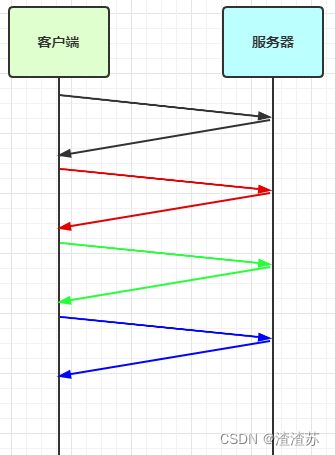
-
为了解决此问题,引入了窗口概念,窗口大小即决定了无需等待应答而可以继续发送的数据最大值
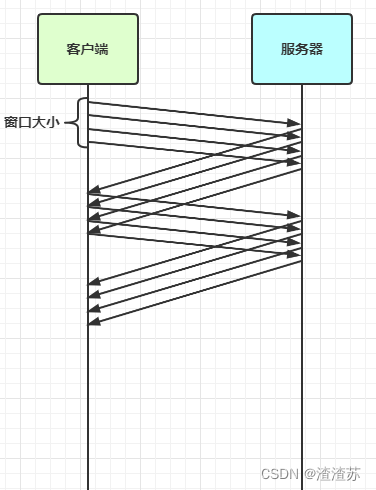
-
窗口实际就起到一个缓冲区的作用,同时也能起到流量控制的作用
- 图中深色的部分即要发送的数据,高亮的部分即窗口
- 窗口内的数据才允许被发送,当应答未到达前,窗口必须停止滑动
- 如果 1001~2000 这个段的数据 ack 回来了,窗口就可以向前滑动
- 接收方也会维护一个窗口,只有落在窗口内的数据才能允许接收
Mss限制
-
链路层对一次能够发送的最大数据有限制,这个限制称之为 MTU(maximum transmission unit),不同的链路设备的 MTU 值也有所不同,例如
-
以太网的 MTU 是 1500
-
FDDI(光纤分布式数据接口)的 MTU 是 4352
-
本地回环地址的 MTU 是 65535 - 本地测试不走网卡
-
MSS 是最大段长度(maximum segment size),它是 MTU 刨去 tcp 头和 ip 头后剩余能够作为数据传输的字节数
-
ipv4 tcp 头占用 20 bytes,ip 头占用 20 bytes,因此以太网 MSS 的值为 1500 - 40 = 1460
-
TCP 在传递大量数据时,会按照 MSS 大小将数据进行分割发送
-
MSS 的值在三次握手时通知对方自己 MSS 的值,然后在两者之间选择一个小值作为 MSS
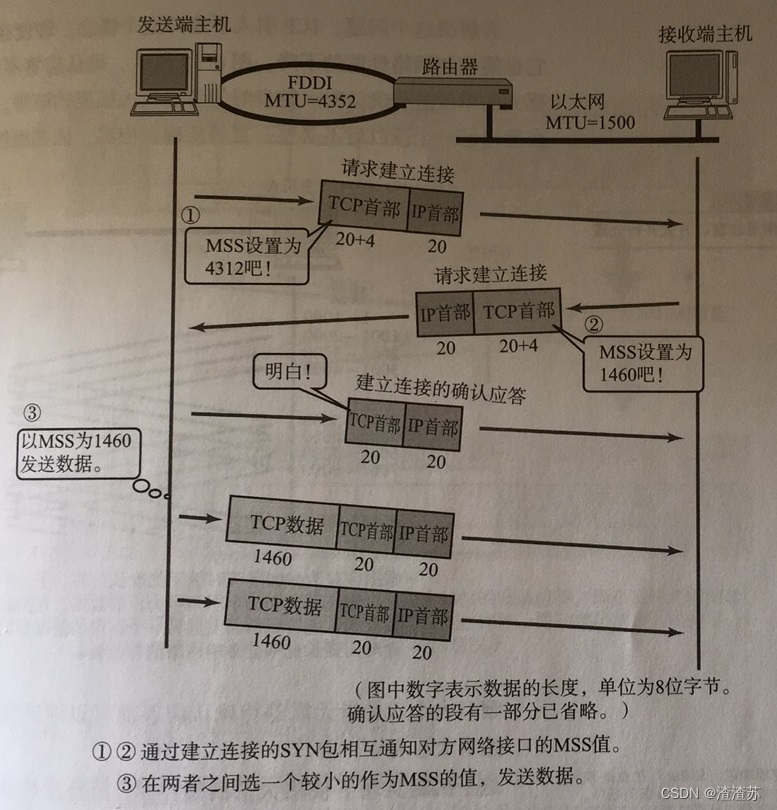
Nagle 算法
- 即使发送一个字节,也需要加入 tcp 头和 ip 头,也就是总字节数会使用 41 bytes,非常不经济。因此为了提高网络利用率,tcp 希望尽可能发送足够大的数据,这就是 Nagle 算法产生的缘由
- 该算法是指发送端即使还有应该发送的数据,但如果这部分数据很少的话,则进行延迟发送
- 如果 SO_SNDBUF 的数据达到 MSS,则需要发送
- 如果 SO_SNDBUF 中含有 FIN(表示需要连接关闭)这时将剩余数据发送,再关闭
- 如果 TCP_NODELAY = true,则需要发送
- 已发送的数据都收到 ack 时,则需要发送
- 上述条件不满足,但发生超时(一般为 200ms)则需要发送
- 除上述情况,延迟发送
3.1.4、解决方案
- 短链接,发一个包建立一次连接,这样连接建立到连接断开之间就是消息的边界,缺点效率太低
- 每一条消息采用固定长度,缺点浪费空间
- 每一条消息采用分隔符,例如 \n,缺点需要转义
- 每一条消息分为 head 和 body,head 中包含 body 的长度
短链接
以解决粘包为例
public class HelloWorldClient {static final Logger log = LoggerFactory.getLogger(HelloWorldClient.class);public static void main(String[] args) {// 分 10 次发送for (int i = 0; i < 10; i++) {send();}}private static void send() {NioEventLoopGroup worker = new NioEventLoopGroup();try {Bootstrap bootstrap = new Bootstrap();bootstrap.channel(NioSocketChannel.class);bootstrap.group(worker);bootstrap.handler(new ChannelInitializer() {@Overrideprotected void initChannel(SocketChannel ch) throws Exception {log.debug("conneted...");ch.pipeline().addLast(new LoggingHandler(LogLevel.DEBUG));ch.pipeline().addLast(new ChannelInboundHandlerAdapter() {@Overridepublic void channelActive(ChannelHandlerContext ctx) throws Exception {log.debug("sending...");ByteBuf buffer = ctx.alloc().buffer();buffer.writeBytes(new byte[]{0, 1, 2, 3, 4, 5, 6, 7, 8, 9, 10, 11, 12, 13, 14, 15});ctx.writeAndFlush(buffer);// 发完即关ctx.close();}});}});ChannelFuture channelFuture = bootstrap.connect("localhost", 8080).sync();channelFuture.channel().closeFuture().sync();} catch (InterruptedException e) {log.error("client error", e);} finally {worker.shutdownGracefully();}}
}
输出,略
半包用这种办法还是不好解决,因为接收方的缓冲区大小是有限的
固定长度
让所有数据包长度固定(假设长度为 8 字节),服务器端加入
ch.pipeline().addLast(new FixedLengthFrameDecoder(8));
客户端测试代码,注意, 采用这种方法后,客户端什么时候 flush 都可以
public class HelloWorldClient {static final Logger log = LoggerFactory.getLogger(HelloWorldClient.class);public static void main(String[] args) {NioEventLoopGroup worker = new NioEventLoopGroup();try {Bootstrap bootstrap = new Bootstrap();bootstrap.channel(NioSocketChannel.class);bootstrap.group(worker);bootstrap.handler(new ChannelInitializer() {@Overrideprotected void initChannel(SocketChannel ch) throws Exception {log.debug("connetted...");ch.pipeline().addLast(new LoggingHandler(LogLevel.DEBUG));ch.pipeline().addLast(new ChannelInboundHandlerAdapter() {@Overridepublic void channelActive(ChannelHandlerContext ctx) throws Exception {log.debug("sending...");// 发送内容随机的数据包Random r = new Random();char c = 'a';ByteBuf buffer = ctx.alloc().buffer();for (int i = 0; i < 10; i++) {byte[] bytes = new byte[8];for (int j = 0; j < r.nextInt(8); j++) {bytes[j] = (byte) c;}c++;buffer.writeBytes(bytes);}ctx.writeAndFlush(buffer);}});}});ChannelFuture channelFuture = bootstrap.connect("192.168.0.103", 9090).sync();channelFuture.channel().closeFuture().sync();} catch (InterruptedException e) {log.error("client error", e);} finally {worker.shutdownGracefully();}}
}
客户端输出
12:07:00 [DEBUG] [nioEventLoopGroup-2-1] c.i.n.HelloWorldClient - connetted...
12:07:00 [DEBUG] [nioEventLoopGroup-2-1] i.n.h.l.LoggingHandler - [id: 0x3c2ef3c2] REGISTERED
12:07:00 [DEBUG] [nioEventLoopGroup-2-1] i.n.h.l.LoggingHandler - [id: 0x3c2ef3c2] CONNECT: /192.168.0.103:9090
12:07:00 [DEBUG] [nioEventLoopGroup-2-1] i.n.h.l.LoggingHandler - [id: 0x3c2ef3c2, L:/192.168.0.103:53155 - R:/192.168.0.103:9090] ACTIVE
12:07:00 [DEBUG] [nioEventLoopGroup-2-1] c.i.n.HelloWorldClient - sending...
12:07:00 [DEBUG] [nioEventLoopGroup-2-1] i.n.h.l.LoggingHandler - [id: 0x3c2ef3c2, L:/192.168.0.103:53155 - R:/192.168.0.103:9090] WRITE: 80B+-------------------------------------------------+|  0  1  2  3  4  5  6  7  8  9  a  b  c  d  e  f |
+--------+-------------------------------------------------+----------------+
|00000000| 61 61 61 61 00 00 00 00 62 00 00 00 00 00 00 00 |aaaa....b.......|
|00000010| 63 63 00 00 00 00 00 00 64 00 00 00 00 00 00 00 |cc......d.......|
|00000020| 00 00 00 00 00 00 00 00 66 66 66 66 00 00 00 00 |........ffff....|
|00000030| 67 67 67 00 00 00 00 00 68 00 00 00 00 00 00 00 |ggg.....h.......|
|00000040| 69 69 69 69 69 00 00 00 6a 6a 6a 6a 00 00 00 00 |iiiii...jjjj....|
+--------+-------------------------------------------------+----------------+
12:07:00 [DEBUG] [nioEventLoopGroup-2-1] i.n.h.l.LoggingHandler - [id: 0x3c2ef3c2, L:/192.168.0.103:53155 - R:/192.168.0.103:9090] FLUSH
服务端输出
12:06:51 [DEBUG] [main] c.i.n.HelloWorldServer - [id: 0xe3d9713f] binding...
12:06:51 [DEBUG] [main] c.i.n.HelloWorldServer - [id: 0xe3d9713f, L:/192.168.0.103:9090] bound...
12:07:00 [DEBUG] [nioEventLoopGroup-3-1] i.n.h.l.LoggingHandler - [id: 0xd739f137, L:/192.168.0.103:9090 - R:/192.168.0.103:53155] REGISTERED
12:07:00 [DEBUG] [nioEventLoopGroup-3-1] i.n.h.l.LoggingHandler - [id: 0xd739f137, L:/192.168.0.103:9090 - R:/192.168.0.103:53155] ACTIVE
12:07:00 [DEBUG] [nioEventLoopGroup-3-1] c.i.n.HelloWorldServer - connected [id: 0xd739f137, L:/192.168.0.103:9090 - R:/192.168.0.103:53155]
12:07:00 [DEBUG] [nioEventLoopGroup-3-1] i.n.h.l.LoggingHandler - [id: 0xd739f137, L:/192.168.0.103:9090 - R:/192.168.0.103:53155] READ: 8B+-------------------------------------------------+|  0  1  2  3  4  5  6  7  8  9  a  b  c  d  e  f |
+--------+-------------------------------------------------+----------------+
|00000000| 61 61 61 61 00 00 00 00                         |aaaa....        |
+--------+-------------------------------------------------+----------------+
12:07:00 [DEBUG] [nioEventLoopGroup-3-1] i.n.h.l.LoggingHandler - [id: 0xd739f137, L:/192.168.0.103:9090 - R:/192.168.0.103:53155] READ: 8B+-------------------------------------------------+|  0  1  2  3  4  5  6  7  8  9  a  b  c  d  e  f |
+--------+-------------------------------------------------+----------------+
|00000000| 62 00 00 00 00 00 00 00                         |b.......        |
+--------+-------------------------------------------------+----------------+
12:07:00 [DEBUG] [nioEventLoopGroup-3-1] i.n.h.l.LoggingHandler - [id: 0xd739f137, L:/192.168.0.103:9090 - R:/192.168.0.103:53155] READ: 8B+-------------------------------------------------+|  0  1  2  3  4  5  6  7  8  9  a  b  c  d  e  f |
+--------+-------------------------------------------------+----------------+
|00000000| 63 63 00 00 00 00 00 00                         |cc......        |
+--------+-------------------------------------------------+----------------+
12:07:00 [DEBUG] [nioEventLoopGroup-3-1] i.n.h.l.LoggingHandler - [id: 0xd739f137, L:/192.168.0.103:9090 - R:/192.168.0.103:53155] READ: 8B+-------------------------------------------------+|  0  1  2  3  4  5  6  7  8  9  a  b  c  d  e  f |
+--------+-------------------------------------------------+----------------+
|00000000| 64 00 00 00 00 00 00 00                         |d.......        |
+--------+-------------------------------------------------+----------------+
12:07:00 [DEBUG] [nioEventLoopGroup-3-1] i.n.h.l.LoggingHandler - [id: 0xd739f137, L:/192.168.0.103:9090 - R:/192.168.0.103:53155] READ: 8B+-------------------------------------------------+|  0  1  2  3  4  5  6  7  8  9  a  b  c  d  e  f |
+--------+-------------------------------------------------+----------------+
|00000000| 00 00 00 00 00 00 00 00                         |........        |
+--------+-------------------------------------------------+----------------+
12:07:00 [DEBUG] [nioEventLoopGroup-3-1] i.n.h.l.LoggingHandler - [id: 0xd739f137, L:/192.168.0.103:9090 - R:/192.168.0.103:53155] READ: 8B+-------------------------------------------------+|  0  1  2  3  4  5  6  7  8  9  a  b  c  d  e  f |
+--------+-------------------------------------------------+----------------+
|00000000| 66 66 66 66 00 00 00 00                         |ffff....        |
+--------+-------------------------------------------------+----------------+
12:07:00 [DEBUG] [nioEventLoopGroup-3-1] i.n.h.l.LoggingHandler - [id: 0xd739f137, L:/192.168.0.103:9090 - R:/192.168.0.103:53155] READ: 8B+-------------------------------------------------+|  0  1  2  3  4  5  6  7  8  9  a  b  c  d  e  f |
+--------+-------------------------------------------------+----------------+
|00000000| 67 67 67 00 00 00 00 00                         |ggg.....        |
+--------+-------------------------------------------------+----------------+
12:07:00 [DEBUG] [nioEventLoopGroup-3-1] i.n.h.l.LoggingHandler - [id: 0xd739f137, L:/192.168.0.103:9090 - R:/192.168.0.103:53155] READ: 8B+-------------------------------------------------+|  0  1  2  3  4  5  6  7  8  9  a  b  c  d  e  f |
+--------+-------------------------------------------------+----------------+
|00000000| 68 00 00 00 00 00 00 00                         |h.......        |
+--------+-------------------------------------------------+----------------+
12:07:00 [DEBUG] [nioEventLoopGroup-3-1] i.n.h.l.LoggingHandler - [id: 0xd739f137, L:/192.168.0.103:9090 - R:/192.168.0.103:53155] READ: 8B+-------------------------------------------------+|  0  1  2  3  4  5  6  7  8  9  a  b  c  d  e  f |
+--------+-------------------------------------------------+----------------+
|00000000| 69 69 69 69 69 00 00 00                         |iiiii...        |
+--------+-------------------------------------------------+----------------+
12:07:00 [DEBUG] [nioEventLoopGroup-3-1] i.n.h.l.LoggingHandler - [id: 0xd739f137, L:/192.168.0.103:9090 - R:/192.168.0.103:53155] READ: 8B+-------------------------------------------------+|  0  1  2  3  4  5  6  7  8  9  a  b  c  d  e  f |
+--------+-------------------------------------------------+----------------+
|00000000| 6a 6a 6a 6a 00 00 00 00                         |jjjj....        |
+--------+-------------------------------------------------+----------------+
12:07:00 [DEBUG] [nioEventLoopGroup-3-1] i.n.h.l.LoggingHandler - [id: 0xd739f137, L:/192.168.0.103:9090 - R:/192.168.0.103:53155] READ COMPLETE
缺点是,数据包的大小不好把握
- 长度定的太大,浪费
- 长度定的太小,对某些数据包又显得不够
固定分隔符
服务端加入,默认以 \n 或 \r\n 作为分隔符,如果超出指定长度仍未出现分隔符,则抛出异常
ch.pipeline().addLast(new LineBasedFrameDecoder(1024));
客户端在每条消息之后,加入 \n 分隔符
public class HelloWorldClient {static final Logger log = LoggerFactory.getLogger(HelloWorldClient.class);public static void main(String[] args) {NioEventLoopGroup worker = new NioEventLoopGroup();try {Bootstrap bootstrap = new Bootstrap();bootstrap.channel(NioSocketChannel.class);bootstrap.group(worker);bootstrap.handler(new ChannelInitializer() {@Overrideprotected void initChannel(SocketChannel ch) throws Exception {log.debug("connetted...");ch.pipeline().addLast(new LoggingHandler(LogLevel.DEBUG));ch.pipeline().addLast(new ChannelInboundHandlerAdapter() {@Overridepublic void channelActive(ChannelHandlerContext ctx) throws Exception {log.debug("sending...");Random r = new Random();char c = 'a';ByteBuf buffer = ctx.alloc().buffer();for (int i = 0; i < 10; i++) {for (int j = 1; j <= r.nextInt(16)+1; j++) {buffer.writeByte((byte) c);}buffer.writeByte(10);c++;}ctx.writeAndFlush(buffer);}});}});ChannelFuture channelFuture = bootstrap.connect("127.0.0.1", 9090).sync();channelFuture.channel().closeFuture().sync();} catch (InterruptedException e) {log.error("client error", e);} finally {worker.shutdownGracefully();}}
}
客户端输出
14:08:18 [DEBUG] [nioEventLoopGroup-2-1] c.i.n.HelloWorldClient - connetted...
14:08:18 [DEBUG] [nioEventLoopGroup-2-1] i.n.h.l.LoggingHandler - [id: 0x1282d755] REGISTERED
14:08:18 [DEBUG] [nioEventLoopGroup-2-1] i.n.h.l.LoggingHandler - [id: 0x1282d755] CONNECT: /192.168.0.103:9090
14:08:18 [DEBUG] [nioEventLoopGroup-2-1] i.n.h.l.LoggingHandler - [id: 0x1282d755, L:/192.168.0.103:63641 - R:/192.168.0.103:9090] ACTIVE
14:08:18 [DEBUG] [nioEventLoopGroup-2-1] c.i.n.HelloWorldClient - sending...
14:08:18 [DEBUG] [nioEventLoopGroup-2-1] i.n.h.l.LoggingHandler - [id: 0x1282d755, L:/192.168.0.103:63641 - R:/192.168.0.103:9090] WRITE: 60B+-------------------------------------------------+|  0  1  2  3  4  5  6  7  8  9  a  b  c  d  e  f |
+--------+-------------------------------------------------+----------------+
|00000000| 61 0a 62 62 62 0a 63 63 63 0a 64 64 0a 65 65 65 |a.bbb.ccc.dd.eee|
|00000010| 65 65 65 65 65 65 65 0a 66 66 0a 67 67 67 67 67 |eeeeeee.ff.ggggg|
|00000020| 67 67 0a 68 68 68 68 0a 69 69 69 69 69 69 69 0a |gg.hhhh.iiiiiii.|
|00000030| 6a 6a 6a 6a 6a 6a 6a 6a 6a 6a 6a 0a             |jjjjjjjjjjj.    |
+--------+-------------------------------------------------+----------------+
14:08:18 [DEBUG] [nioEventLoopGroup-2-1] i.n.h.l.LoggingHandler - [id: 0x1282d755, L:/192.168.0.103:63641 - R:/192.168.0.103:9090] FLUSH
服务端输出
14:08:18 [DEBUG] [nioEventLoopGroup-3-5] c.i.n.HelloWorldServer - connected [id: 0xa4b3be43, L:/192.168.0.103:9090 - R:/192.168.0.103:63641]
14:08:18 [DEBUG] [nioEventLoopGroup-3-5] i.n.h.l.LoggingHandler - [id: 0xa4b3be43, L:/192.168.0.103:9090 - R:/192.168.0.103:63641] READ: 1B+-------------------------------------------------+|  0  1  2  3  4  5  6  7  8  9  a  b  c  d  e  f |
+--------+-------------------------------------------------+----------------+
|00000000| 61                                              |a               |
+--------+-------------------------------------------------+----------------+
14:08:18 [DEBUG] [nioEventLoopGroup-3-5] i.n.h.l.LoggingHandler - [id: 0xa4b3be43, L:/192.168.0.103:9090 - R:/192.168.0.103:63641] READ: 3B+-------------------------------------------------+|  0  1  2  3  4  5  6  7  8  9  a  b  c  d  e  f |
+--------+-------------------------------------------------+----------------+
|00000000| 62 62 62                                        |bbb             |
+--------+-------------------------------------------------+----------------+
14:08:18 [DEBUG] [nioEventLoopGroup-3-5] i.n.h.l.LoggingHandler - [id: 0xa4b3be43, L:/192.168.0.103:9090 - R:/192.168.0.103:63641] READ: 3B+-------------------------------------------------+|  0  1  2  3  4  5  6  7  8  9  a  b  c  d  e  f |
+--------+-------------------------------------------------+----------------+
|00000000| 63 63 63                                        |ccc             |
+--------+-------------------------------------------------+----------------+
14:08:18 [DEBUG] [nioEventLoopGroup-3-5] i.n.h.l.LoggingHandler - [id: 0xa4b3be43, L:/192.168.0.103:9090 - R:/192.168.0.103:63641] READ: 2B+-------------------------------------------------+|  0  1  2  3  4  5  6  7  8  9  a  b  c  d  e  f |
+--------+-------------------------------------------------+----------------+
|00000000| 64 64                                           |dd              |
+--------+-------------------------------------------------+----------------+
14:08:18 [DEBUG] [nioEventLoopGroup-3-5] i.n.h.l.LoggingHandler - [id: 0xa4b3be43, L:/192.168.0.103:9090 - R:/192.168.0.103:63641] READ: 10B+-------------------------------------------------+|  0  1  2  3  4  5  6  7  8  9  a  b  c  d  e  f |
+--------+-------------------------------------------------+----------------+
|00000000| 65 65 65 65 65 65 65 65 65 65                   |eeeeeeeeee      |
+--------+-------------------------------------------------+----------------+
14:08:18 [DEBUG] [nioEventLoopGroup-3-5] i.n.h.l.LoggingHandler - [id: 0xa4b3be43, L:/192.168.0.103:9090 - R:/192.168.0.103:63641] READ: 2B+-------------------------------------------------+|  0  1  2  3  4  5  6  7  8  9  a  b  c  d  e  f |
+--------+-------------------------------------------------+----------------+
|00000000| 66 66                                           |ff              |
+--------+-------------------------------------------------+----------------+
14:08:18 [DEBUG] [nioEventLoopGroup-3-5] i.n.h.l.LoggingHandler - [id: 0xa4b3be43, L:/192.168.0.103:9090 - R:/192.168.0.103:63641] READ: 7B+-------------------------------------------------+|  0  1  2  3  4  5  6  7  8  9  a  b  c  d  e  f |
+--------+-------------------------------------------------+----------------+
|00000000| 67 67 67 67 67 67 67                            |ggggggg         |
+--------+-------------------------------------------------+----------------+
14:08:18 [DEBUG] [nioEventLoopGroup-3-5] i.n.h.l.LoggingHandler - [id: 0xa4b3be43, L:/192.168.0.103:9090 - R:/192.168.0.103:63641] READ: 4B+-------------------------------------------------+|  0  1  2  3  4  5  6  7  8  9  a  b  c  d  e  f |
+--------+-------------------------------------------------+----------------+
|00000000| 68 68 68 68                                     |hhhh            |
+--------+-------------------------------------------------+----------------+
14:08:18 [DEBUG] [nioEventLoopGroup-3-5] i.n.h.l.LoggingHandler - [id: 0xa4b3be43, L:/192.168.0.103:9090 - R:/192.168.0.103:63641] READ: 7B+-------------------------------------------------+|  0  1  2  3  4  5  6  7  8  9  a  b  c  d  e  f |
+--------+-------------------------------------------------+----------------+
|00000000| 69 69 69 69 69 69 69                            |iiiiiii         |
+--------+-------------------------------------------------+----------------+
14:08:18 [DEBUG] [nioEventLoopGroup-3-5] i.n.h.l.LoggingHandler - [id: 0xa4b3be43, L:/192.168.0.103:9090 - R:/192.168.0.103:63641] READ: 11B+-------------------------------------------------+|  0  1  2  3  4  5  6  7  8  9  a  b  c  d  e  f |
+--------+-------------------------------------------------+----------------+
|00000000| 6a 6a 6a 6a 6a 6a 6a 6a 6a 6a 6a                |jjjjjjjjjjj     |
+--------+-------------------------------------------------+----------------+
14:08:18 [DEBUG] [nioEventLoopGroup-3-5] i.n.h.l.LoggingHandler - [id: 0xa4b3be43, L:/192.168.0.103:9090 - R:/192.168.0.103:63641] READ COMPLETE
缺点,处理字符数据比较合适,但如果内容本身包含了分隔符(字节数据常常会有此情况),那么就会解析错误
预设长度
在发送消息前,先约定用定长字节表示接下来数据的长度
// 最大长度,长度偏移,长度占用字节,长度调整,剥离字节数
ch.pipeline().addLast(new LengthFieldBasedFrameDecoder(1024, 0, 1, 0, 1));/*maxFrameLengthlengthFieldOffset		- 长度字段偏移量lengthFieldLength		- 长度字段长度lengthAdjustment		- 长度字段为基准,还有几个字节是内容initialBytesToStrip		- 从头剥离几个字节
*/
客户端代码
public class HelloWorldClient {static final Logger log = LoggerFactory.getLogger(HelloWorldClient.class);public static void main(String[] args) {NioEventLoopGroup worker = new NioEventLoopGroup();try {Bootstrap bootstrap = new Bootstrap();bootstrap.channel(NioSocketChannel.class);bootstrap.group(worker);bootstrap.handler(new ChannelInitializer() {@Overrideprotected void initChannel(SocketChannel ch) throws Exception {log.debug("connetted...");ch.pipeline().addLast(new LoggingHandler(LogLevel.DEBUG));ch.pipeline().addLast(new ChannelInboundHandlerAdapter() {@Overridepublic void channelActive(ChannelHandlerContext ctx) throws Exception {log.debug("sending...");Random r = new Random();char c = 'a';ByteBuf buffer = ctx.alloc().buffer();for (int i = 0; i < 10; i++) {byte length = (byte) (r.nextInt(16) + 1);// 先写入长度buffer.writeByte(length);// 再for (int j = 1; j <= length; j++) {buffer.writeByte((byte) c);}c++;}ctx.writeAndFlush(buffer);}});}});ChannelFuture channelFuture = bootstrap.connect("192.168.0.103", 9090).sync();channelFuture.channel().closeFuture().sync();} catch (InterruptedException e) {log.error("client error", e);} finally {worker.shutdownGracefully();}}
}
客户端输出
14:37:10 [DEBUG] [nioEventLoopGroup-2-1] c.i.n.HelloWorldClient - connetted...
14:37:10 [DEBUG] [nioEventLoopGroup-2-1] i.n.h.l.LoggingHandler - [id: 0xf0f347b8] REGISTERED
14:37:10 [DEBUG] [nioEventLoopGroup-2-1] i.n.h.l.LoggingHandler - [id: 0xf0f347b8] CONNECT: /192.168.0.103:9090
14:37:10 [DEBUG] [nioEventLoopGroup-2-1] i.n.h.l.LoggingHandler - [id: 0xf0f347b8, L:/192.168.0.103:49979 - R:/192.168.0.103:9090] ACTIVE
14:37:10 [DEBUG] [nioEventLoopGroup-2-1] c.i.n.HelloWorldClient - sending...
14:37:10 [DEBUG] [nioEventLoopGroup-2-1] i.n.h.l.LoggingHandler - [id: 0xf0f347b8, L:/192.168.0.103:49979 - R:/192.168.0.103:9090] WRITE: 97B+-------------------------------------------------+|  0  1  2  3  4  5  6  7  8  9  a  b  c  d  e  f |
+--------+-------------------------------------------------+----------------+
|00000000| 09 61 61 61 61 61 61 61 61 61 09 62 62 62 62 62 |.aaaaaaaaa.bbbbb|
|00000010| 62 62 62 62 06 63 63 63 63 63 63 08 64 64 64 64 |bbbb.cccccc.dddd|
|00000020| 64 64 64 64 0f 65 65 65 65 65 65 65 65 65 65 65 |dddd.eeeeeeeeeee|
|00000030| 65 65 65 65 0d 66 66 66 66 66 66 66 66 66 66 66 |eeee.fffffffffff|
|00000040| 66 66 02 67 67 02 68 68 0e 69 69 69 69 69 69 69 |ff.gg.hh.iiiiiii|
|00000050| 69 69 69 69 69 69 69 09 6a 6a 6a 6a 6a 6a 6a 6a |iiiiiii.jjjjjjjj|
|00000060| 6a                                              |j               |
+--------+-------------------------------------------------+----------------+
14:37:10 [DEBUG] [nioEventLoopGroup-2-1] i.n.h.l.LoggingHandler - [id: 0xf0f347b8, L:/192.168.0.103:49979 - R:/192.168.0.103:9090] FLUSH
服务端输出
14:36:50 [DEBUG] [main] c.i.n.HelloWorldServer - [id: 0xdff439d3] binding...
14:36:51 [DEBUG] [main] c.i.n.HelloWorldServer - [id: 0xdff439d3, L:/192.168.0.103:9090] bound...
14:37:10 [DEBUG] [nioEventLoopGroup-3-1] i.n.h.l.LoggingHandler - [id: 0x744f2b47, L:/192.168.0.103:9090 - R:/192.168.0.103:49979] REGISTERED
14:37:10 [DEBUG] [nioEventLoopGroup-3-1] i.n.h.l.LoggingHandler - [id: 0x744f2b47, L:/192.168.0.103:9090 - R:/192.168.0.103:49979] ACTIVE
14:37:10 [DEBUG] [nioEventLoopGroup-3-1] c.i.n.HelloWorldServer - connected [id: 0x744f2b47, L:/192.168.0.103:9090 - R:/192.168.0.103:49979]
14:37:10 [DEBUG] [nioEventLoopGroup-3-1] i.n.h.l.LoggingHandler - [id: 0x744f2b47, L:/192.168.0.103:9090 - R:/192.168.0.103:49979] READ: 9B+-------------------------------------------------+|  0  1  2  3  4  5  6  7  8  9  a  b  c  d  e  f |
+--------+-------------------------------------------------+----------------+
|00000000| 61 61 61 61 61 61 61 61 61                      |aaaaaaaaa       |
+--------+-------------------------------------------------+----------------+
14:37:10 [DEBUG] [nioEventLoopGroup-3-1] i.n.h.l.LoggingHandler - [id: 0x744f2b47, L:/192.168.0.103:9090 - R:/192.168.0.103:49979] READ: 9B+-------------------------------------------------+|  0  1  2  3  4  5  6  7  8  9  a  b  c  d  e  f |
+--------+-------------------------------------------------+----------------+
|00000000| 62 62 62 62 62 62 62 62 62                      |bbbbbbbbb       |
+--------+-------------------------------------------------+----------------+
14:37:10 [DEBUG] [nioEventLoopGroup-3-1] i.n.h.l.LoggingHandler - [id: 0x744f2b47, L:/192.168.0.103:9090 - R:/192.168.0.103:49979] READ: 6B+-------------------------------------------------+|  0  1  2  3  4  5  6  7  8  9  a  b  c  d  e  f |
+--------+-------------------------------------------------+----------------+
|00000000| 63 63 63 63 63 63                               |cccccc          |
+--------+-------------------------------------------------+----------------+
14:37:10 [DEBUG] [nioEventLoopGroup-3-1] i.n.h.l.LoggingHandler - [id: 0x744f2b47, L:/192.168.0.103:9090 - R:/192.168.0.103:49979] READ: 8B+-------------------------------------------------+|  0  1  2  3  4  5  6  7  8  9  a  b  c  d  e  f |
+--------+-------------------------------------------------+----------------+
|00000000| 64 64 64 64 64 64 64 64                         |dddddddd        |
+--------+-------------------------------------------------+----------------+
14:37:10 [DEBUG] [nioEventLoopGroup-3-1] i.n.h.l.LoggingHandler - [id: 0x744f2b47, L:/192.168.0.103:9090 - R:/192.168.0.103:49979] READ: 15B+-------------------------------------------------+|  0  1  2  3  4  5  6  7  8  9  a  b  c  d  e  f |
+--------+-------------------------------------------------+----------------+
|00000000| 65 65 65 65 65 65 65 65 65 65 65 65 65 65 65    |eeeeeeeeeeeeeee |
+--------+-------------------------------------------------+----------------+
14:37:10 [DEBUG] [nioEventLoopGroup-3-1] i.n.h.l.LoggingHandler - [id: 0x744f2b47, L:/192.168.0.103:9090 - R:/192.168.0.103:49979] READ: 13B+-------------------------------------------------+|  0  1  2  3  4  5  6  7  8  9  a  b  c  d  e  f |
+--------+-------------------------------------------------+----------------+
|00000000| 66 66 66 66 66 66 66 66 66 66 66 66 66          |fffffffffffff   |
+--------+-------------------------------------------------+----------------+
14:37:10 [DEBUG] [nioEventLoopGroup-3-1] i.n.h.l.LoggingHandler - [id: 0x744f2b47, L:/192.168.0.103:9090 - R:/192.168.0.103:49979] READ: 2B+-------------------------------------------------+|  0  1  2  3  4  5  6  7  8  9  a  b  c  d  e  f |
+--------+-------------------------------------------------+----------------+
|00000000| 67 67                                           |gg              |
+--------+-------------------------------------------------+----------------+
14:37:10 [DEBUG] [nioEventLoopGroup-3-1] i.n.h.l.LoggingHandler - [id: 0x744f2b47, L:/192.168.0.103:9090 - R:/192.168.0.103:49979] READ: 2B+-------------------------------------------------+|  0  1  2  3  4  5  6  7  8  9  a  b  c  d  e  f |
+--------+-------------------------------------------------+----------------+
|00000000| 68 68                                           |hh              |
+--------+-------------------------------------------------+----------------+
14:37:10 [DEBUG] [nioEventLoopGroup-3-1] i.n.h.l.LoggingHandler - [id: 0x744f2b47, L:/192.168.0.103:9090 - R:/192.168.0.103:49979] READ: 14B+-------------------------------------------------+|  0  1  2  3  4  5  6  7  8  9  a  b  c  d  e  f |
+--------+-------------------------------------------------+----------------+
|00000000| 69 69 69 69 69 69 69 69 69 69 69 69 69 69       |iiiiiiiiiiiiii  |
+--------+-------------------------------------------------+----------------+
14:37:10 [DEBUG] [nioEventLoopGroup-3-1] i.n.h.l.LoggingHandler - [id: 0x744f2b47, L:/192.168.0.103:9090 - R:/192.168.0.103:49979] READ: 9B+-------------------------------------------------+|  0  1  2  3  4  5  6  7  8  9  a  b  c  d  e  f |
+--------+-------------------------------------------------+----------------+
|00000000| 6a 6a 6a 6a 6a 6a 6a 6a 6a                      |jjjjjjjjj       |
+--------+-------------------------------------------------+----------------+
14:37:10 [DEBUG] [nioEventLoopGroup-3-1] i.n.h.l.LoggingHandler - [id: 0x744f2b47, L:/192.168.0.103:9090 - R:/192.168.0.103:49979] READ COMPLETE
3.2、协议设计与解析
3.2.1、为什么需要协议?
TCP/IP 中消息传输基于流的方式,没有边界。
协议的目的就是划定消息的边界,制定通信双方要共同遵守的通信规则
例如:在网络上传输
下雨天留客天留我不留
是中文一句著名的无标点符号句子,在没有标点符号情况下,这句话有数种拆解方式,而意思却是完全不同,所以常被用作讲述标点符号的重要性
一种解读
下雨天留客,天留,我不留
另一种解读
下雨天,留客天,留我不?留
如何设计协议呢?其实就是给网络传输的信息加上“标点符号”。但通过分隔符来断句不是很好,因为分隔符本身如果用于传输,那么必须加以区分。因此,下面一种协议较为常用
定长字节表示内容长度 + 实际内容
例如,假设一个中文字符长度为 3,按照上述协议的规则,发送信息方式如下,就不会被接收方弄错意思了
0f下雨天留客06天留09我不留
小故事
很久很久以前,一位私塾先生到一家任教。双方签订了一纸协议:“无鸡鸭亦可无鱼肉亦可白菜豆腐不可少不得束修金”。此后,私塾先生虽然认真教课,但主人家则总是给私塾先生以白菜豆腐为菜,丝毫未见鸡鸭鱼肉的款待。私塾先生先是很不解,可是后来也就想通了:主人把鸡鸭鱼肉的钱都会换为束修金的,也罢。至此双方相安无事。
年关将至,一个学年段亦告结束。私塾先生临行时,也不见主人家为他交付束修金,遂与主家理论。然主家亦振振有词:“有协议为证——无鸡鸭亦可,无鱼肉亦可,白菜豆腐不可少,不得束修金。这白纸黑字明摆着的,你有什么要说的呢?”
私塾先生据理力争:“协议是这样的——无鸡,鸭亦可;无鱼,肉亦可;白菜豆腐不可,少不得束修金。”
双方唇枪舌战,你来我往,真个是不亦乐乎!
这里的束修金,也作“束脩”,应当是泛指教师应当得到的报酬
3.2.2、redis 协议举例
NioEventLoopGroup worker = new NioEventLoopGroup();
byte[] LINE = {13, 10};
try {Bootstrap bootstrap = new Bootstrap();bootstrap.channel(NioSocketChannel.class);bootstrap.group(worker);bootstrap.handler(new ChannelInitializer() {@Overrideprotected void initChannel(SocketChannel ch) {ch.pipeline().addLast(new LoggingHandler());ch.pipeline().addLast(new ChannelInboundHandlerAdapter() {// 会在连接 channel 建立成功后,会触发 active 事件@Overridepublic void channelActive(ChannelHandlerContext ctx) {set(ctx);get(ctx);}private void get(ChannelHandlerContext ctx) {ByteBuf buf = ctx.alloc().buffer();buf.writeBytes("*2".getBytes());buf.writeBytes(LINE);buf.writeBytes("$3".getBytes());buf.writeBytes(LINE);buf.writeBytes("get".getBytes());buf.writeBytes(LINE);buf.writeBytes("$4".getBytes());buf.writeBytes(LINE);buf.writeBytes("name".getBytes());buf.writeBytes(LINE);ctx.writeAndFlush(buf);}private void set(ChannelHandlerContext ctx) {ByteBuf buf = ctx.alloc().buffer();buf.writeBytes("*3".getBytes());buf.writeBytes(LINE);buf.writeBytes("$3".getBytes());buf.writeBytes(LINE);buf.writeBytes("set".getBytes());buf.writeBytes(LINE);buf.writeBytes("$4".getBytes());buf.writeBytes(LINE);buf.writeBytes("name".getBytes());buf.writeBytes(LINE);buf.writeBytes("$8".getBytes());buf.writeBytes(LINE);buf.writeBytes("zhangsan".getBytes());buf.writeBytes(LINE);ctx.writeAndFlush(buf);}@Overridepublic void channelRead(ChannelHandlerContext ctx, Object msg) throws Exception {ByteBuf buf = (ByteBuf) msg;System.out.println(buf.toString(Charset.defaultCharset()));}});}});ChannelFuture channelFuture = bootstrap.connect("localhost", 6379).sync();channelFuture.channel().closeFuture().sync();
} catch (InterruptedException e) {log.error("client error", e);
} finally {worker.shutdownGracefully();
}
3.2.3、http 协议举例
NioEventLoopGroup boss = new NioEventLoopGroup();
NioEventLoopGroup worker = new NioEventLoopGroup();
try {ServerBootstrap serverBootstrap = new ServerBootstrap();serverBootstrap.channel(NioServerSocketChannel.class);serverBootstrap.group(boss, worker);serverBootstrap.childHandler(new ChannelInitializer() {@Overrideprotected void initChannel(SocketChannel ch) throws Exception {ch.pipeline().addLast(new LoggingHandler(LogLevel.DEBUG));ch.pipeline().addLast(new HttpServerCodec());ch.pipeline().addLast(new SimpleChannelInboundHandler() {@Overrideprotected void channelRead0(ChannelHandlerContext ctx, HttpRequest msg) throws Exception {// 获取请求log.debug(msg.uri());// 返回响应DefaultFullHttpResponse response =new DefaultFullHttpResponse(msg.protocolVersion(), HttpResponseStatus.OK);byte[] bytes = "Hello, world!
".getBytes();response.headers().setInt(CONTENT_LENGTH, bytes.length);response.content().writeBytes(bytes);// 写回响应ctx.writeAndFlush(response);}});/*ch.pipeline().addLast(new ChannelInboundHandlerAdapter() {@Overridepublic void channelRead(ChannelHandlerContext ctx, Object msg) throws Exception {log.debug("{}", msg.getClass());if (msg instanceof HttpRequest) { // 请求行,请求头} else if (msg instanceof HttpContent) { //请求体}}});*/}});ChannelFuture channelFuture = serverBootstrap.bind(8080).sync();channelFuture.channel().closeFuture().sync();
} catch (InterruptedException e) {log.error("server error", e);
} finally {boss.shutdownGracefully();worker.shutdownGracefully();
}
3.2.4、自定义协议要素
- 魔数,用来在第一时间判定是否是无效数据包
- 版本号,可以支持协议的升级
- 序列化算法,消息正文到底采用哪种序列化反序列化方式,可以由此扩展,例如:json、protobuf、hessian、jdk
- 指令类型,是登录、注册、单聊、群聊… 跟业务相关
- 请求序号,为了双工通信,提供异步能力
- 正文长度
- 消息正文
编解码器
根据上面的要素,设计一个登录请求消息和登录响应消息,并使用 Netty 完成收发
@Slf4j
public class MessageCodec extends ByteToMessageCodec {@Overrideprotected void encode(ChannelHandlerContext ctx, Message msg, ByteBuf out) throws Exception {// 1. 4 字节的魔数out.writeBytes(new byte[]{1, 2, 3, 4});// 2. 1 字节的版本,out.writeByte(1);// 3. 1 字节的序列化方式 jdk 0 , json 1out.writeByte(0);// 4. 1 字节的指令类型out.writeByte(msg.getMessageType());// 5. 4 个字节out.writeInt(msg.getSequenceId());// 无意义,对齐填充out.writeByte(0xff);// 6. 获取内容的字节数组ByteArrayOutputStream bos = new ByteArrayOutputStream();ObjectOutputStream oos = new ObjectOutputStream(bos);oos.writeObject(msg);byte[] bytes = bos.toByteArray();// 7. 长度out.writeInt(bytes.length);// 8. 写入内容out.writeBytes(bytes);}@Overrideprotected void decode(ChannelHandlerContext ctx, ByteBuf in, List 测试
EmbeddedChannel channel = new EmbeddedChannel(new LoggingHandler(),new LengthFieldBasedFrameDecoder(1024, 12, 4, 0, 0),new MessageCodec()
);
// encode
LoginRequestMessage message = new LoginRequestMessage("zhangsan", "123", "张三");
//        channel.writeOutbound(message);
// decode
ByteBuf buf = ByteBufAllocator.DEFAULT.buffer();
new MessageCodec().encode(null, message, buf);ByteBuf s1 = buf.slice(0, 100);
ByteBuf s2 = buf.slice(100, buf.readableBytes() - 100);
s1.retain(); // 引用计数 2
channel.writeInbound(s1); // release 1
channel.writeInbound(s2);
解读
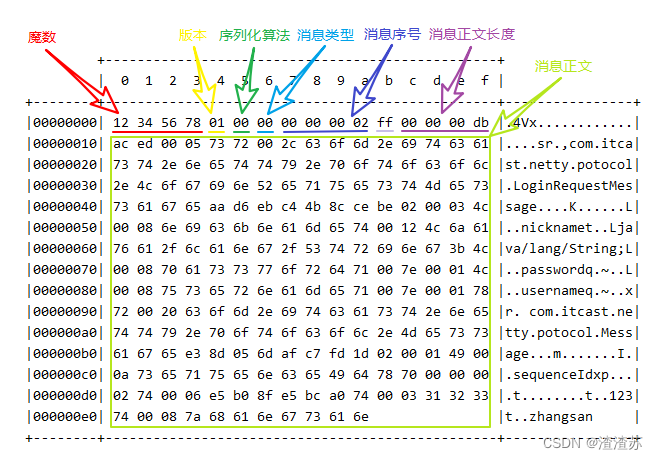
💡 什么时候可以加 @Sharable
- 当 handler 不保存状态时,就可以安全地在多线程下被共享
- 但要注意对于编解码器类,不能继承 ByteToMessageCodec 或 CombinedChannelDuplexHandler 父类,他们的构造方法对 @Sharable 有限制
- 如果能确保编解码器不会保存状态,可以继承 MessageToMessageCodec 父类
@Slf4j
@ChannelHandler.Sharable
/*** 必须和 LengthFieldBasedFrameDecoder 一起使用,确保接到的 ByteBuf 消息是完整的*/
public class MessageCodecSharable extends MessageToMessageCodec {@Overrideprotected void encode(ChannelHandlerContext ctx, Message msg, List 3.3、聊天室案例
3.3.1、聊天室业务介绍
/*** 用户管理接口*/
public interface UserService {/*** 登录* @param username 用户名* @param password 密码* @return 登录成功返回 true, 否则返回 false*/boolean login(String username, String password);
}
/*** 会话管理接口*/
public interface Session {/*** 绑定会话* @param channel 哪个 channel 要绑定会话* @param username 会话绑定用户*/void bind(Channel channel, String username);/*** 解绑会话* @param channel 哪个 channel 要解绑会话*/void unbind(Channel channel);/*** 获取属性* @param channel 哪个 channel* @param name 属性名* @return 属性值*/Object getAttribute(Channel channel, String name);/*** 设置属性* @param channel 哪个 channel* @param name 属性名* @param value 属性值*/void setAttribute(Channel channel, String name, Object value);/*** 根据用户名获取 channel* @param username 用户名* @return channel*/Channel getChannel(String username);
}
/*** 聊天组会话管理接口*/
public interface GroupSession {/*** 创建一个聊天组, 如果不存在才能创建成功, 否则返回 null* @param name 组名* @param members 成员* @return 成功时返回组对象, 失败返回 null*/Group createGroup(String name, Set members);/*** 加入聊天组* @param name 组名* @param member 成员名* @return 如果组不存在返回 null, 否则返回组对象*/Group joinMember(String name, String member);/*** 移除组成员* @param name 组名* @param member 成员名* @return 如果组不存在返回 null, 否则返回组对象*/Group removeMember(String name, String member);/*** 移除聊天组* @param name 组名* @return 如果组不存在返回 null, 否则返回组对象*/Group removeGroup(String name);/*** 获取组成员* @param name 组名* @return 成员集合, 没有成员会返回 empty set*/Set getMembers(String name);/*** 获取组成员的 channel 集合, 只有在线的 channel 才会返回* @param name 组名* @return 成员 channel 集合*/List getMembersChannel(String name);
}
3.3.2、聊天室业务-登录
@Slf4j
public class ChatServer {public static void main(String[] args) {NioEventLoopGroup boss = new NioEventLoopGroup();NioEventLoopGroup worker = new NioEventLoopGroup();LoggingHandler LOGGING_HANDLER = new LoggingHandler(LogLevel.DEBUG);MessageCodecSharable MESSAGE_CODEC = new MessageCodecSharable();try {ServerBootstrap serverBootstrap = new ServerBootstrap();serverBootstrap.channel(NioServerSocketChannel.class);serverBootstrap.group(boss, worker);serverBootstrap.childHandler(new ChannelInitializer() {@Overrideprotected void initChannel(SocketChannel ch) throws Exception {ch.pipeline().addLast(new ProcotolFrameDecoder());ch.pipeline().addLast(LOGGING_HANDLER);ch.pipeline().addLast(MESSAGE_CODEC);ch.pipeline().addLast(new SimpleChannelInboundHandler() {@Overrideprotected void channelRead0(ChannelHandlerContext ctx, LoginRequestMessage msg) throws Exception {String username = msg.getUsername();String password = msg.getPassword();boolean login = UserServiceFactory.getUserService().login(username, password);LoginResponseMessage message;if(login) {message = new LoginResponseMessage(true, "登录成功");} else {message = new LoginResponseMessage(false, "用户名或密码不正确");}ctx.writeAndFlush(message);}});}});Channel channel = serverBootstrap.bind(8080).sync().channel();channel.closeFuture().sync();} catch (InterruptedException e) {log.error("server error", e);} finally {boss.shutdownGracefully();worker.shutdownGracefully();}}
}
@Slf4j
public class ChatClient {public static void main(String[] args) {NioEventLoopGroup group = new NioEventLoopGroup();LoggingHandler LOGGING_HANDLER = new LoggingHandler(LogLevel.DEBUG);MessageCodecSharable MESSAGE_CODEC = new MessageCodecSharable();CountDownLatch WAIT_FOR_LOGIN = new CountDownLatch(1);AtomicBoolean LOGIN = new AtomicBoolean(false);try {Bootstrap bootstrap = new Bootstrap();bootstrap.channel(NioSocketChannel.class);bootstrap.group(group);bootstrap.handler(new ChannelInitializer() {@Overrideprotected void initChannel(SocketChannel ch) throws Exception {ch.pipeline().addLast(new ProcotolFrameDecoder());
//                    ch.pipeline().addLast(LOGGING_HANDLER);ch.pipeline().addLast(MESSAGE_CODEC);ch.pipeline().addLast("client handler", new ChannelInboundHandlerAdapter() {// 接收响应消息@Overridepublic void channelRead(ChannelHandlerContext ctx, Object msg) throws Exception {log.debug("msg: {}", msg);if ((msg instanceof LoginResponseMessage)) {LoginResponseMessage response = (LoginResponseMessage) msg;if (response.isSuccess()) {// 如果登录成功LOGIN.set(true);}// 唤醒 system in 线程WAIT_FOR_LOGIN.countDown();}}// 在连接建立后触发 active 事件@Overridepublic void channelActive(ChannelHandlerContext ctx) throws Exception {// 负责接收用户在控制台的输入,负责向服务器发送各种消息new Thread(() -> {Scanner scanner = new Scanner(System.in);System.out.println("请输入用户名:");String username = scanner.nextLine();System.out.println("请输入密码:");String password = scanner.nextLine();// 构造消息对象LoginRequestMessage message = new LoginRequestMessage(username, password);// 发送消息ctx.writeAndFlush(message);System.out.println("等待后续操作...");try {WAIT_FOR_LOGIN.await();} catch (InterruptedException e) {e.printStackTrace();}// 如果登录失败if (!LOGIN.get()) {ctx.channel().close();return;}while (true) {System.out.println("==================================");System.out.println("send [username] [content]");System.out.println("gsend [group name] [content]");System.out.println("gcreate [group name] [m1,m2,m3...]");System.out.println("gmembers [group name]");System.out.println("gjoin [group name]");System.out.println("gquit [group name]");System.out.println("quit");System.out.println("==================================");String command = scanner.nextLine();String[] s = command.split(" ");switch (s[0]){case "send":ctx.writeAndFlush(new ChatRequestMessage(username, s[1], s[2]));break;case "gsend":ctx.writeAndFlush(new GroupChatRequestMessage(username, s[1], s[2]));break;case "gcreate":Set set = new HashSet<>(Arrays.asList(s[2].split(",")));set.add(username); // 加入自己ctx.writeAndFlush(new GroupCreateRequestMessage(s[1], set));break;case "gmembers":ctx.writeAndFlush(new GroupMembersRequestMessage(s[1]));break;case "gjoin":ctx.writeAndFlush(new GroupJoinRequestMessage(username, s[1]));break;case "gquit":ctx.writeAndFlush(new GroupQuitRequestMessage(username, s[1]));break;case "quit":ctx.channel().close();return;}}}, "system in").start();}});}});Channel channel = bootstrap.connect("localhost", 8080).sync().channel();channel.closeFuture().sync();} catch (Exception e) {log.error("client error", e);} finally {group.shutdownGracefully();}}
}
3.3.3、聊天室业务-单聊
服务器端将 handler 独立出来
登录 handler
@ChannelHandler.Sharable
public class LoginRequestMessageHandler extends SimpleChannelInboundHandler {@Overrideprotected void channelRead0(ChannelHandlerContext ctx, LoginRequestMessage msg) throws Exception {String username = msg.getUsername();String password = msg.getPassword();boolean login = UserServiceFactory.getUserService().login(username, password);LoginResponseMessage message;if(login) {SessionFactory.getSession().bind(ctx.channel(), username);message = new LoginResponseMessage(true, "登录成功");} else {message = new LoginResponseMessage(false, "用户名或密码不正确");}ctx.writeAndFlush(message);}
}
单聊 handler
@ChannelHandler.Sharable
public class ChatRequestMessageHandler extends SimpleChannelInboundHandler {@Overrideprotected void channelRead0(ChannelHandlerContext ctx, ChatRequestMessage msg) throws Exception {String to = msg.getTo();Channel channel = SessionFactory.getSession().getChannel(to);// 在线if(channel != null) {channel.writeAndFlush(new ChatResponseMessage(msg.getFrom(), msg.getContent()));}// 不在线else {ctx.writeAndFlush(new ChatResponseMessage(false, "对方用户不存在或者不在线"));}}
}
3.3.4、聊天室业务-群聊
创建群聊
@ChannelHandler.Sharable
public class GroupCreateRequestMessageHandler extends SimpleChannelInboundHandler {@Overrideprotected void channelRead0(ChannelHandlerContext ctx, GroupCreateRequestMessage msg) throws Exception {String groupName = msg.getGroupName();Set members = msg.getMembers();// 群管理器GroupSession groupSession = GroupSessionFactory.getGroupSession();Group group = groupSession.createGroup(groupName, members);if (group == null) {// 发生成功消息ctx.writeAndFlush(new GroupCreateResponseMessage(true, groupName + "创建成功"));// 发送拉群消息List channels = groupSession.getMembersChannel(groupName);for (Channel channel : channels) {channel.writeAndFlush(new GroupCreateResponseMessage(true, "您已被拉入" + groupName));}} else {ctx.writeAndFlush(new GroupCreateResponseMessage(false, groupName + "已经存在"));}}
}
群聊
@ChannelHandler.Sharable
public class GroupChatRequestMessageHandler extends SimpleChannelInboundHandler {@Overrideprotected void channelRead0(ChannelHandlerContext ctx, GroupChatRequestMessage msg) throws Exception {List channels = GroupSessionFactory.getGroupSession().getMembersChannel(msg.getGroupName());for (Channel channel : channels) {channel.writeAndFlush(new GroupChatResponseMessage(msg.getFrom(), msg.getContent()));}}
}
加入群聊
@ChannelHandler.Sharable
public class GroupJoinRequestMessageHandler extends SimpleChannelInboundHandler {@Overrideprotected void channelRead0(ChannelHandlerContext ctx, GroupJoinRequestMessage msg) throws Exception {Group group = GroupSessionFactory.getGroupSession().joinMember(msg.getGroupName(), msg.getUsername());if (group != null) {ctx.writeAndFlush(new GroupJoinResponseMessage(true, msg.getGroupName() + "群加入成功"));} else {ctx.writeAndFlush(new GroupJoinResponseMessage(true, msg.getGroupName() + "群不存在"));}}
}
退出群聊
@ChannelHandler.Sharable
public class GroupQuitRequestMessageHandler extends SimpleChannelInboundHandler {@Overrideprotected void channelRead0(ChannelHandlerContext ctx, GroupQuitRequestMessage msg) throws Exception {Group group = GroupSessionFactory.getGroupSession().removeMember(msg.getGroupName(), msg.getUsername());if (group != null) {ctx.writeAndFlush(new GroupJoinResponseMessage(true, "已退出群" + msg.getGroupName()));} else {ctx.writeAndFlush(new GroupJoinResponseMessage(true, msg.getGroupName() + "群不存在"));}}
}
查看成员
@ChannelHandler.Sharable
public class GroupMembersRequestMessageHandler extends SimpleChannelInboundHandler {@Overrideprotected void channelRead0(ChannelHandlerContext ctx, GroupMembersRequestMessage msg) throws Exception {Set members = GroupSessionFactory.getGroupSession().getMembers(msg.getGroupName());ctx.writeAndFlush(new GroupMembersResponseMessage(members));}
}
3.3.5、聊天室业务-退出
@Slf4j
@ChannelHandler.Sharable
public class QuitHandler extends ChannelInboundHandlerAdapter {// 当连接断开时触发 inactive 事件@Overridepublic void channelInactive(ChannelHandlerContext ctx) throws Exception {SessionFactory.getSession().unbind(ctx.channel());log.debug("{} 已经断开", ctx.channel());}// 当出现异常时触发@Overridepublic void exceptionCaught(ChannelHandlerContext ctx, Throwable cause) throws Exception {SessionFactory.getSession().unbind(ctx.channel());log.debug("{} 已经异常断开 异常是{}", ctx.channel(), cause.getMessage());}
}
3.3.6、聊天室业务-空闲检测
连接假死
原因
- 网络设备出现故障,例如网卡,机房等,底层的 TCP 连接已经断开了,但应用程序没有感知到,仍然占用着资源。
- 公网网络不稳定,出现丢包。如果连续出现丢包,这时现象就是客户端数据发不出去,服务端也一直收不到数据,就这么一直耗着
- 应用程序线程阻塞,无法进行数据读写
问题
- 假死的连接占用的资源不能自动释放
- 向假死的连接发送数据,得到的反馈是发送超时
服务器端解决
- 怎么判断客户端连接是否假死呢?如果能收到客户端数据,说明没有假死。因此策略就可以定为,每隔一段时间就检查这段时间内是否接收到客户端数据,没有就可以判定为连接假死
// 用来判断是不是 读空闲时间过长,或 写空闲时间过长
// 5s 内如果没有收到 channel 的数据,会触发一个 IdleState#READER_IDLE 事件
ch.pipeline().addLast(new IdleStateHandler(5, 0, 0));
// ChannelDuplexHandler 可以同时作为入站和出站处理器
ch.pipeline().addLast(new ChannelDuplexHandler() {// 用来触发特殊事件@Overridepublic void userEventTriggered(ChannelHandlerContext ctx, Object evt) throws Exception{IdleStateEvent event = (IdleStateEvent) evt;// 触发了读空闲事件if (event.state() == IdleState.READER_IDLE) {log.debug("已经 5s 没有读到数据了");ctx.channel().close();}}
});
客户端定时心跳
- 客户端可以定时向服务器端发送数据,只要这个时间间隔小于服务器定义的空闲检测的时间间隔,那么就能防止前面提到的误判,客户端可以定义如下心跳处理器
// 用来判断是不是 读空闲时间过长,或 写空闲时间过长
// 3s 内如果没有向服务器写数据,会触发一个 IdleState#WRITER_IDLE 事件
ch.pipeline().addLast(new IdleStateHandler(0, 3, 0));
// ChannelDuplexHandler 可以同时作为入站和出站处理器
ch.pipeline().addLast(new ChannelDuplexHandler() {// 用来触发特殊事件@Overridepublic void userEventTriggered(ChannelHandlerContext ctx, Object evt) throws Exception{IdleStateEvent event = (IdleStateEvent) evt;// 触发了写空闲事件if (event.state() == IdleState.WRITER_IDLE) {//                                log.debug("3s 没有写数据了,发送一个心跳包");ctx.writeAndFlush(new PingMessage());}}
});