【Linux】基础指令(三) —— 收尾篇
文章目录
- 前言
- zip 和 unzip 指令
- tar 指令
- bc 指令
- uname 指令
- history
- 关机
- 热键补充
- ctrl + c
- ↑ && ↓
- ctrl + r
- ctrl + d
- 指令拓展
- 结语
前言
今天为大家带来的是最后一部分基础指令讲解。主要内容为 7个指令讲解、热键补充、简单提一下指令的拓展 。内容相对之前较少,更简单。话不多说,我们这就开始。
zip 和 unzip 指令
语法: zip 压缩文件.zip 目录或文件
功能: 将目录或文件压缩成zip格式
常用选项:
- -r 递归处理,将指定目录下的所有文件和子目录一并处理
zip -r 压缩文件.zip 目录或文件名:压缩一个文件,生成压缩包
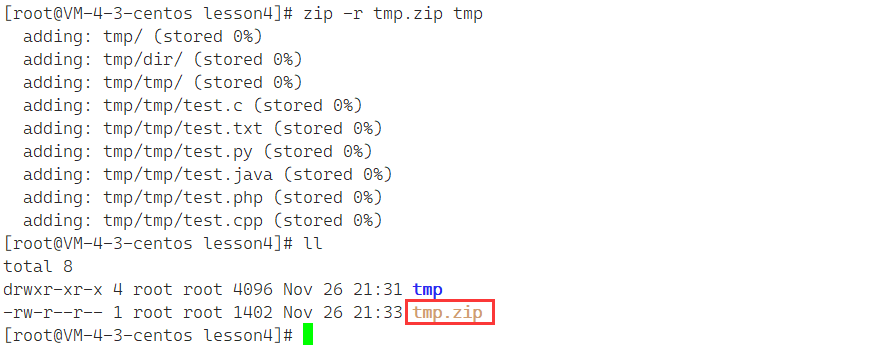
unzip 压缩文件:解包到当前路径
解压会形成同名目录,先删除掉原先目录 tmp :
[root@VM-4-3-centos lesson4]# ll
total 8
drwxr-xr-x 4 root root 4096 Nov 26 21:31 tmp
-rw-r--r-- 1 root root 1402 Nov 26 21:33 tmp.zip
[root@VM-4-3-centos lesson4]# rm -rf tmp
[root@VM-4-3-centos lesson4]# ll
total 4
-rw-r--r-- 1 root root 1402 Nov 26 21:33 tmp.zip
此刻进行解压:
[root@VM-4-3-centos lesson4]# ll
total 4
-rw-r--r-- 1 root root 1402 Nov 26 21:33 tmp.zip // 此刻并没有 tmp目录
[root@VM-4-3-centos lesson4]# unzip tmp.zip
Archive:  tmp.zipcreating: tmp/creating: tmp/dir/creating: tmp/tmp/extracting: tmp/tmp/test.c          extracting: tmp/tmp/test.txt        extracting: tmp/tmp/test.py         extracting: tmp/tmp/test.java       extracting: tmp/tmp/test.php        extracting: tmp/tmp/test.cpp
[root@VM-4-3-centos lesson4]# tree ./tmp // tree 当前目录下的 tmp 解压完成了
./tmp
|-- dir
`-- tmp|-- test.c|-- test.cpp|-- test.java|-- test.php|-- test.py`-- test.txt2 directories, 6 files
那么如何解压到指定目录?其实只要在 在解压命令后加上 -d 就可以指定路径解压。
unzip 压缩文件 -d 路径:解压到指定目录
我们在当前目录下再创建一个目录 mydir:
[root@VM-4-3-centos lesson4]# mkdir mydir
[root@VM-4-3-centos lesson4]# ll
total 12
drwxr-xr-x 2 root root 4096 Nov 26 21:43 mydir
drwxr-xr-x 4 root root 4096 Nov 26 21:31 tmp
-rw-r--r-- 1 root root 1402 Nov 26 21:33 tmp.zip
然后将 tmp.zip 解压到 mydir 中,并使用 tree 命令查看是否解压成功:
[root@VM-4-3-centos lesson4]# unzip tmp.zip -d ./mydir
Archive:  tmp.zipcreating: ./mydir/tmp/creating: ./mydir/tmp/dir/creating: ./mydir/tmp/tmp/extracting: ./mydir/tmp/tmp/test.c  extracting: ./mydir/tmp/tmp/test.txt  extracting: ./mydir/tmp/tmp/test.py  extracting: ./mydir/tmp/tmp/test.java  extracting: ./mydir/tmp/tmp/test.php  extracting: ./mydir/tmp/tmp/test.cpp
[root@VM-4-3-centos lesson4]# tree ./mydir
./mydir
`-- tmp|-- dir`-- tmp|-- test.c|-- test.cpp|-- test.java|-- test.php|-- test.py`-- test.txt3 directories, 6 files
tar 指令
语法:tar [-cxtzjvf] 文件与目录 … 参数:
常用选项:
- -c :建立一个压缩文件的参数指令(create 的意思);
- -x :解开一个压缩文件的参数指令!
- -t :查看 tarfile 里面的文件!
- -z :是否同时具有 gzip 的属性?亦即是否需要用 gzip 压缩?
- -j :是否同时具有 bzip2 的属性?亦即是否需要用 bzip2 压缩?
- -v :压缩的过程中显示文件!这个常用,但不建议用在背景执行过程!
- -f :使用档名,请留意,在 f 之后要立即接档名喔!不要再加参数!
- -C : 解压到指定目录
tar 是一个神奇的指令,它既可以 压缩,又可以 解压 。
tar 打包后文件的后缀为 tgz
tar -czf dst src:将 src 中的内容压缩到 dst 中。tar 命令默认可以文件(包括目录)中的文件全部打包。
tar -czf 的
-可以省略,但是建议不要省略。
[root@VM-4-3-centos lesson4]# ll
total 4
drwxr-xr-x 4 root root 4096 Nov 26 21:31 tmp
[root@VM-4-3-centos lesson4]# tar -czf tmp.tgz tmp
[root@VM-4-3-centos lesson4]# ll
total 8
drwxr-xr-x 4 root root 4096 Nov 26 21:31 tmp
-rw-r--r-- 1 root root  253 Nov 26 21:59 tmp.tgz
tar -xzf dst:将压缩文件 dst 指定到当前路径tar -xzf 的
-可以省略,但是建议不要省略。
在使用这条指令之前,先把 tmp 删除。因为 tmp 和 解压后的文件重名,虽然解压后 tmp 会被解压后的内容覆盖,但是不够直观,我们还是选择删除 tmp 再解压:
[root@VM-4-3-centos lesson4]# ll
total 8
drwxr-xr-x 4 root root 4096 Nov 26 21:31 tmp
-rw-r--r-- 1 root root  253 Nov 26 21:59 tmp.tgz
[root@VM-4-3-centos lesson4]# rm -rf tmp
[root@VM-4-3-centos lesson4]# ll
total 4
-rw-r--r-- 1 root root 253 Nov 26 21:59 tmp.tgz
解压:
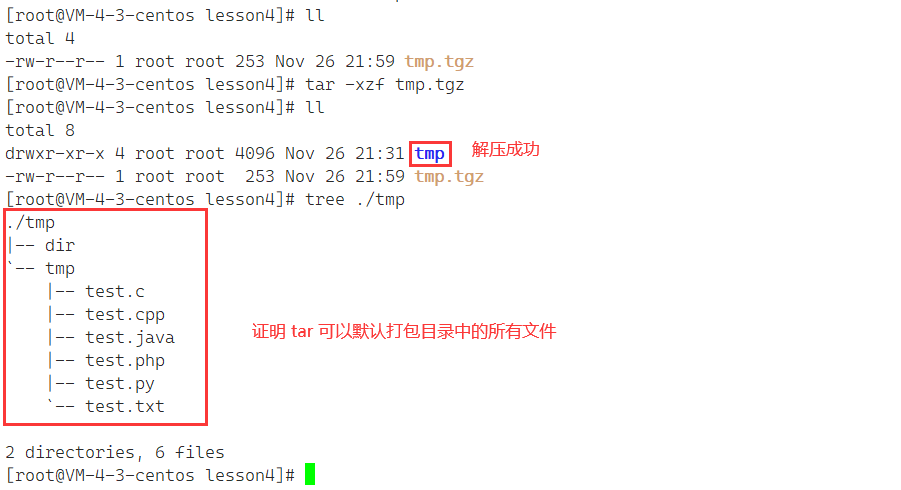
tar -ztvf dst:不解压文件,查看压缩包 dst 内有什么。
[root@VM-4-3-centos lesson4]# tar -ztvf tmp.tgz
drwxr-xr-x root/root         0 2022-11-26 21:31 tmp/
drwxr-xr-x root/root         0 2022-11-26 21:31 tmp/dir/
drwxr-xr-x root/root         0 2022-11-26 21:28 tmp/tmp/
-rw-r--r-- root/root         0 2022-11-26 21:27 tmp/tmp/test.c
-rw-r--r-- root/root         0 2022-11-26 21:28 tmp/tmp/test.txt
-rw-r--r-- root/root         0 2022-11-26 21:28 tmp/tmp/test.py
-rw-r--r-- root/root         0 2022-11-26 21:28 tmp/tmp/test.java
-rw-r--r-- root/root         0 2022-11-26 21:28 tmp/tmp/test.php
-rw-r--r-- root/root         0 2022-11-26 21:28 tmp/tmp/test.cpp
tar xzf dst -C 路径:将 压缩文件 dst 解压到指定路径
[root@VM-4-3-centos lesson4]# ll
total 12
drwxr-xr-x 2 root root 4096 Nov 26 22:47 mydir
drwxr-xr-x 4 root root 4096 Nov 26 21:31 tmp
-rw-r--r-- 1 root root  253 Nov 26 22:20 tmp.tgz
[root@VM-4-3-centos lesson4]# tar -xzf tmp.tgz -C ./mydir // 解压到 mydir 中
[root@VM-4-3-centos lesson4]# tree ./mydir
./mydir
`-- tmp|-- dir`-- tmp|-- test.c|-- test.cpp|-- test.java|-- test.php|-- test.py`-- test.txt3 directories, 6 files
bc 指令
bc命令可以很方便的进行浮点运算。
在平时,按下 bc 后会阻塞:

此时就可以进行计算,bc 相当于 Linux 中的计算器:
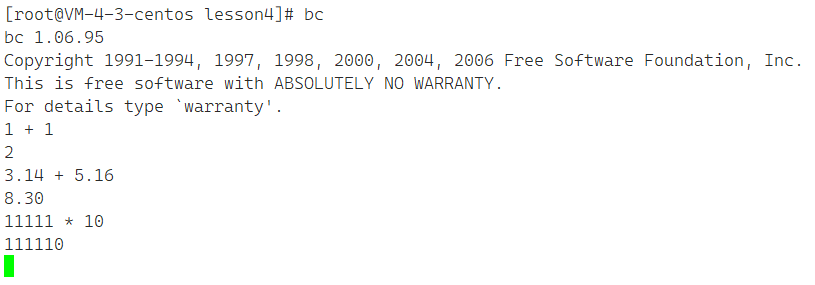
而我们平常也可以通过这种方式,进行 数据计算 :
[root@VM-4-3-centos lesson4]# echo " 1 + 2 + 3 + 4" | bc
10
echo 将 1+2+3+4 输送到管道中,bc 直接取管道中的值进行计算。
uname 指令
语法:uname [选项]
功能: uname用来获取电脑和操作系统的相关信息。
补充说明:uname可显示linux主机所用的操作系统的版本、硬件的名称等基本信息。
常用选项:
- a或–all 详细输出所有信息,依次为内核名称,主机名,内核版本号,内核版本,硬件名,处理器类型,硬件平台类型,操作系统名称
uname 可以查看软硬件体系结构。
uname:直接打印 Linux
[root@VM-4-3-centos lesson4]# uname
Linux
uname -a:显示当前使用的服务器的相关信息
[root@VM-4-3-centos lesson4]# uname -a
Linux VM-4-3-centos 3.10.0-1160.62.1.el7.x86_64 #1 SMP Tue Apr 5 16:57:59 UTC 2022 x86_64 x86_64 x86_64 GNU/Linux
- VM-4-3-centos:主机名
- 3.10.0-1160.62.1:版本号,3为主版本号;10为次版本号;0为修正次数
- el7:el是centos的代称,7为centos7
- x86_64:代表是64位的体系结构。
uname -r:仅查看体系结构
[root@VM-4-3-centos lesson4]# uname -r
3.10.0-1160.62.1.el7.x86_64
- 3.10.0-1160.62 为 软件体系结构
- el7 为 使用的商业发行版本
- x86_64 为 硬件体系结构
cat /etc/redhat-release:查看Linux系统的商业化发行版
[root@VM-4-3-centos lesson4]# cat /etc/redhat-release
CentOS Linux release 7.6.1810 (Core)
注:centos 就是 redhat,centos 是 redhat 系列中免费的一个版本。
history
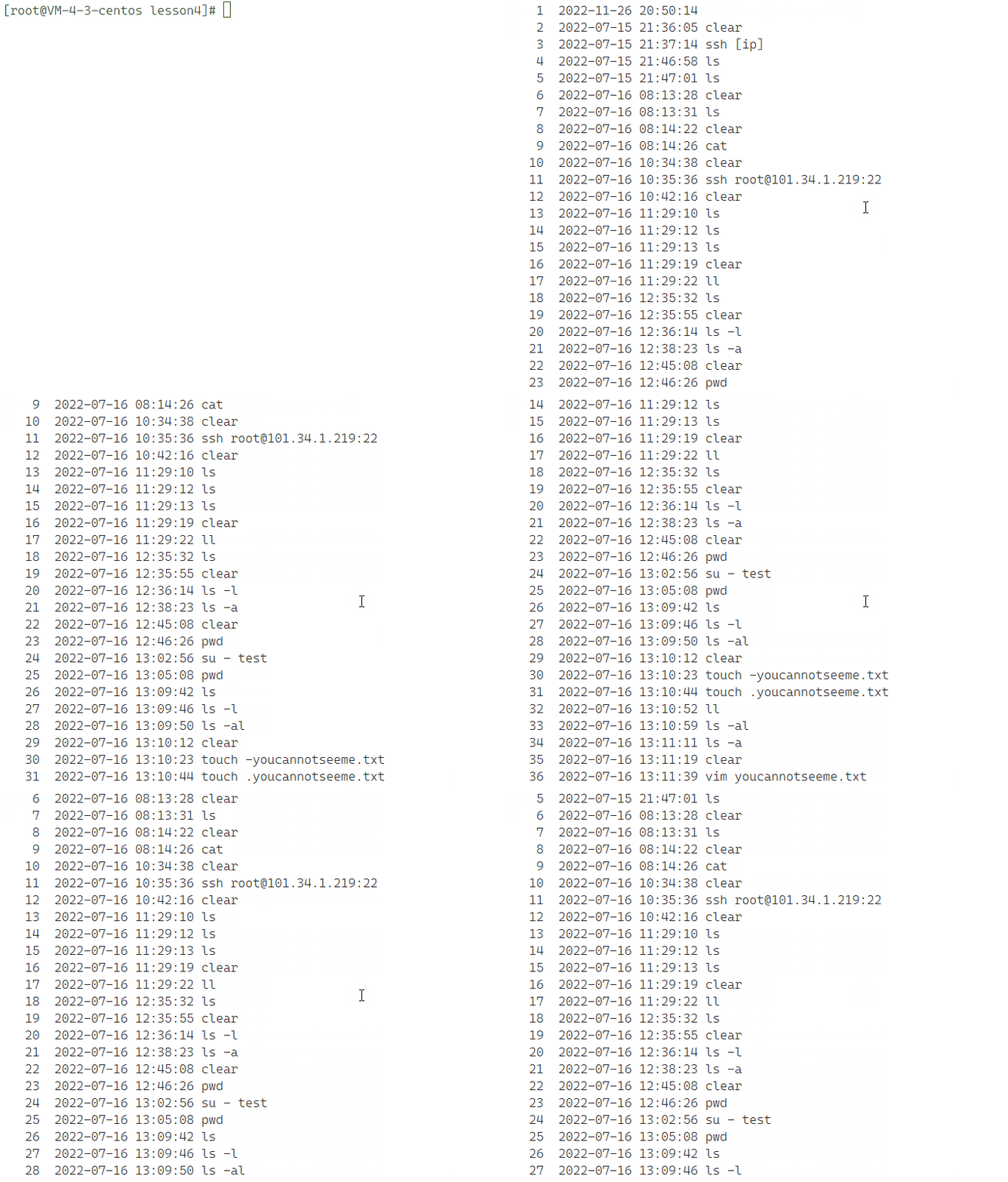
history 保存历史上输入的所有指令。
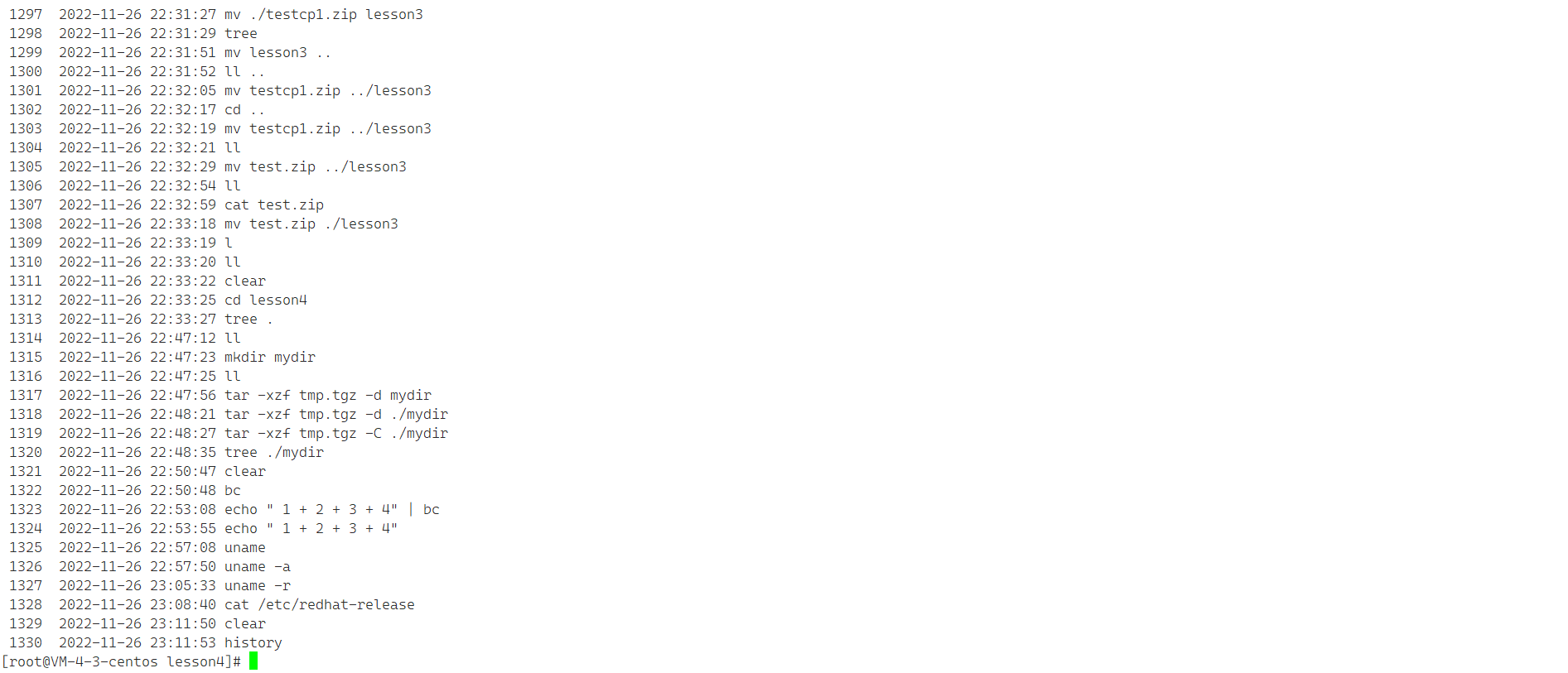
我们可以把 历史指令 通过 history 重定向到文件中,将历史指令保存起来:
[root@VM-4-3-centos lesson4]# history > history.txt
再使用 less 来查看文件:
关机
语法:shutdown [选项] 常见选项:
- -h : 将系统的服务停掉后,立即关机。
- -r : 在将系统的服务停掉之后就重新启动
- -t sec : -t 后面加秒数,亦即『过几秒后关机』的意思
使用 reboot(需要超级用户权限) 可以重启 Linux。
这里只介绍一下,一般对于云服务器上搭建的 Linux 来说是不关机的。
热键补充
再补充一些热键~
ctrl + c
之前简单提了一下ctrl + c 可以处理疯狂刷屏的情况,而今天,将详细介绍一下:
Linux 是支持多行输入的,比如多行输入 ls -a -l -n -i:
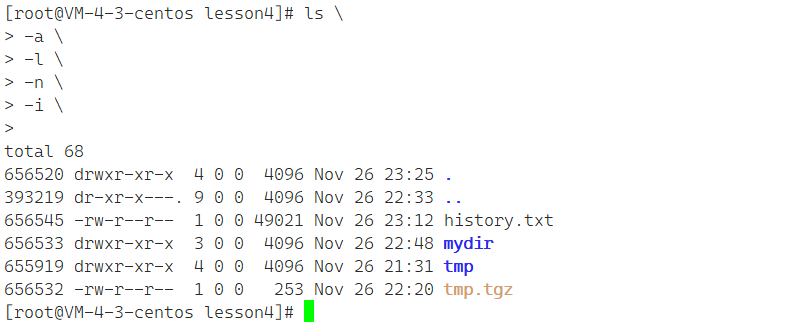
对比原指令:
[root@VM-4-3-centos lesson4]# ls -a -l -n -i
total 68
656520 drwxr-xr-x  4 0 0  4096 Nov 26 23:12 .
393219 dr-xr-x---. 9 0 0  4096 Nov 26 22:33 ..
656545 -rw-r--r--  1 0 0 49021 Nov 26 23:12 history.txt
656533 drwxr-xr-x  3 0 0  4096 Nov 26 22:48 mydir
655919 drwxr-xr-x  4 0 0  4096 Nov 26 21:31 tmp
656532 -rw-r--r--  1 0 0   253 Nov 26 22:20 tmp.tgz
而如果我们不知道 多行输入这个机制 ,不小心在终端写了个
ls ‘,导致出不来了,就像这样,怎么办?

这时就可以使用 ctrl + c 退出命令行,终止前台影响输入指令的程序。

这样就可以退出了。
↑ && ↓
上下键可以翻阅历史命令:

ctrl + r
在历史命令中搜索:
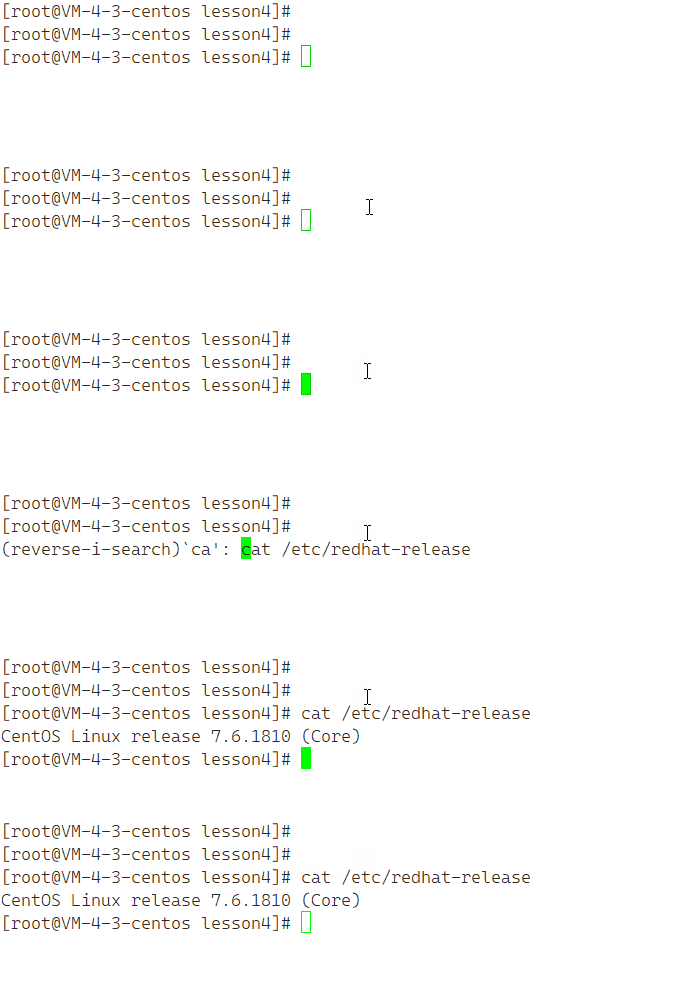
输入关键字 后会 自动匹配 之前的内容,匹配完成后按 ← 或 → 就可以匹配,使用搜索到的指令。
ctrl + d
通常代表着键盘输入结束。
最常用的情景就是 退出 xshell 时 使用 exit 或者 不断 ctrl + d 退出。
指令拓展
拓展一些指令,有兴趣可以去了解一下:
- 安装和登录命令:login、shutdown、halt、reboot、install、mount、umount、chsh、exit、last;
- 文件处理命令:file、mkdir、grep、dd、find、mv、ls、diff、cat、ln;
- 系统管理相关命令:df、top、free、quota、at、lp、adduser、groupadd、kill、crontab;
- 网络操作命令:ifconfig、ip、ping、netstat、telnet、ftp、route、rlogin、rcp、finger、mail、 nslookup;
- 系统安全相关命令:passwd、su、umask、chgrp、chmod、chown、chattr、sudo ps、who;
- 其它命令:tar、unzip、gunzip、unarj、mtools、man、unendcode、uudecode。
结语
到这里本篇博客就到此结束了,Linux 基本指令就介绍到这里了。今天的内容相对较少,也比较好理解。在之后我会继续讲解 Linux 的其他知识,我们敬请期待~
如果觉得anduin写的还不错的话,还请一键三连!如有错误,还请指正!
我是anduin,一名C语言初学者,我们下期见!