

Jest API使用方法
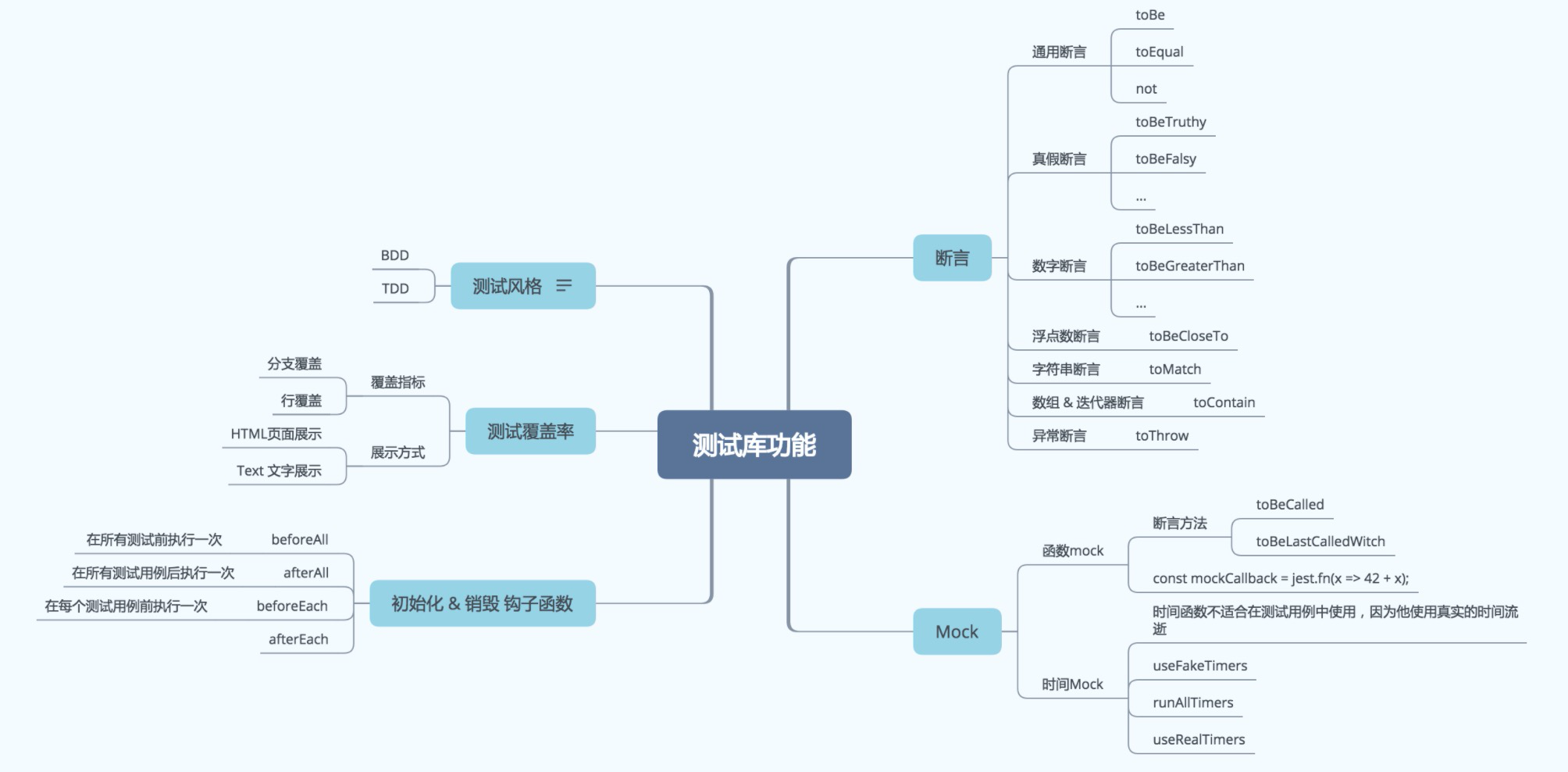
如上面的知识图谱所示,一个常见的测试框架通常需要实现这些功能:
● before/after 钩子函数: 如beforeEach,afterEach,
● Mock方法: 函数Mock,时间mock等。
● 断言: 判断一个描述是否正确,在Jest中常为 expect(xxx).toBe(xxx) 的形式
● 测试覆盖率:提供多种形式的测试报告,如HTML,文本等形式
这些基本的测试功能是每一个测试框架都需要考虑实现的,各个测试框架除了Api的设计方式可能有所不同之外,其核心功能是一致的,在使用新的测试框架的时候你仍然可以通过上面的脑图按图索骥,抛开Api的表象,快速上手使用。
在本文中我们会介绍这些功能在Jest中的使用方式,让大家熟悉Jest的Api。
before/after钩子函数
beforeAll(() => { // 在所有测试用例前执行一次return initializeCityDatabase();
});afterAll(() => { // 在所有测试用例后执行一次return clearCityDatabase();
});beforeEach(() => { // 在每个测试用例前执行一次initializeCityDatabase();
});afterEach(() => { // 在每个测试用例后执行一次clearCityDatabase();
});
函数Mock
函数Mock可以解耦要调用的函数,测试对函数的调用是否正确,比如调用函数传入的参数是否正确,是否被调用等。详细看文档
mock函数实现
const mockCallback = jest.fn(x => 42 + x);
forEach([0, 1], mockCallback);
// The mock function is called twice
expect(mockCallback.mock.calls.length).toBe(2);
// mock的函数有特殊的mock属性包含了这个函数被调用的相关信息
mock返回值
const myMock = jest.fn();
console.log(myMock());
// > undefinedmyMock.mockReturnValueOnce(10).mockReturnValueOnce('x').mockReturnValue(true);console.log(myMock(), myMock(), myMock(), myMock());
// > 10, 'x', true, true
Mock函数断言
// The mock function was called at least once
expect(mockFunc).toBeCalled();// The mock function was called at least once with the specified args
expect(mockFunc).toBeCalledWith(arg1, arg2);// The last call to the mock function was called with the specified args
expect(mockFunc).lastCalledWith(arg1, arg2);// All calls and the name of the mock is written as a snapshot
expect(mockFunc).toMatchSnapshot();
时间Mock
模拟时间流逝useFakeTimers
通常一些本地的时间方法比如setTimeout等不太适合测试环境,因为这些方法会依赖真实的时间流逝。jest可以交换这些时间函数,控制时间的推移,比方说:
beforeAll(() => {jest.useFakeTimers();
});// 或者有多个测试用例使用在每个测试用例执行之前执行
beforeEach(() => {jest.useFakeTimers();
});
控制时间运行 runAllTimers
还有一些测试用例用于测试某个回调一秒后会被调用:
test('calls the callback after 1 second', () => {const timerGame = require('../timerGame');const callback = jest.fn();timerGame(callback);// 这个时间点还没有被调用expect(callback).not.toBeCalled();// 快进,让所有时间回调都执行jest.runAllTimers();// 现在回调被调用expect(callback).toBeCalled();expect(callback).toHaveBeenCalledTimes(1);
});
使用真实的时间useRealTimers
在测试过程中可能想要恢复时间正常流逝,可以使用useRealTimers()方法恢复
断言方法
通用断言ToBe
Object.js 判断
test('two plus two is four', () => {expect(2 + 2).toBe(4);
});
通用断言ToEqual
深比对
test('object assignment', () => {const data = {one: 1};data['two'] = 2;expect(data).toEqual({one: 1, two: 2});
});
翻转判断Not
test('adding positive numbers is not zero', () => {for (let a = 1; a < 10; a++) {for (let b = 1; b < 10; b++) {expect(a + b).not.toBe(0);}}
});
真假断言
● toBeNull matches only null
● toBeUndefined matches only undefined
● toBeDefined is the opposite of toBeUndefined
● toBeTruthy matches anything that an if statement treats as true
● toBeFalsy matches anything that an if statement treats as false
test('zero', () => {const z = 0;expect(z).not.toBeNull();expect(z).toBeDefined();expect(z).not.toBeUndefined();expect(z).not.toBeTruthy();expect(z).toBeFalsy();
});
数字断言
test('two plus two', () => {const value = 2 + 2;expect(value).toBeGreaterThan(3);expect(value).toBeGreaterThanOrEqual(3.5);expect(value).toBeLessThan(5);expect(value).toBeLessThanOrEqual(4.5);// toBe and toEqual are equivalent for numbersexpect(value).toBe(4);expect(value).toEqual(4);
});
浮点数断言toBeCloseTo
test('adding floating point numbers', () => {const value = 0.1 + 0.2;//expect(value).toBe(0.3);           This won't work because of rounding errorexpect(value).toBeCloseTo(0.3); // This works.
});
字符串断言toMatch
test('there is no I in team', () => {expect('team').not.toMatch(/I/);
});test('but there is a "stop" in Christoph', () => {expect('Christoph').toMatch(/stop/);
});
数组 & 迭代器断言toContain
const shoppingList = ['diapers','kleenex','trash bags','paper towels','beer',
];test('the shopping list has beer on it', () => {expect(shoppingList).toContain('beer');expect(new Set(shoppingList)).toContain('beer');
});
异常断言toThrow
function compileAndroidCode() {throw new ConfigError('you are using the wrong JDK');
}test('compiling android goes as expected', () => {expect(compileAndroidCode).toThrow();expect(compileAndroidCode).toThrow(ConfigError);// You can also use the exact error message or a regexpexpect(compileAndroidCode).toThrow('you are using the wrong JDK');expect(compileAndroidCode).toThrow(/JDK/);
});