

java——电商购物平台
1.java编译环境的创建,与所需要用到的插件
(1) 选择的编译器为2022版本的intellij idea
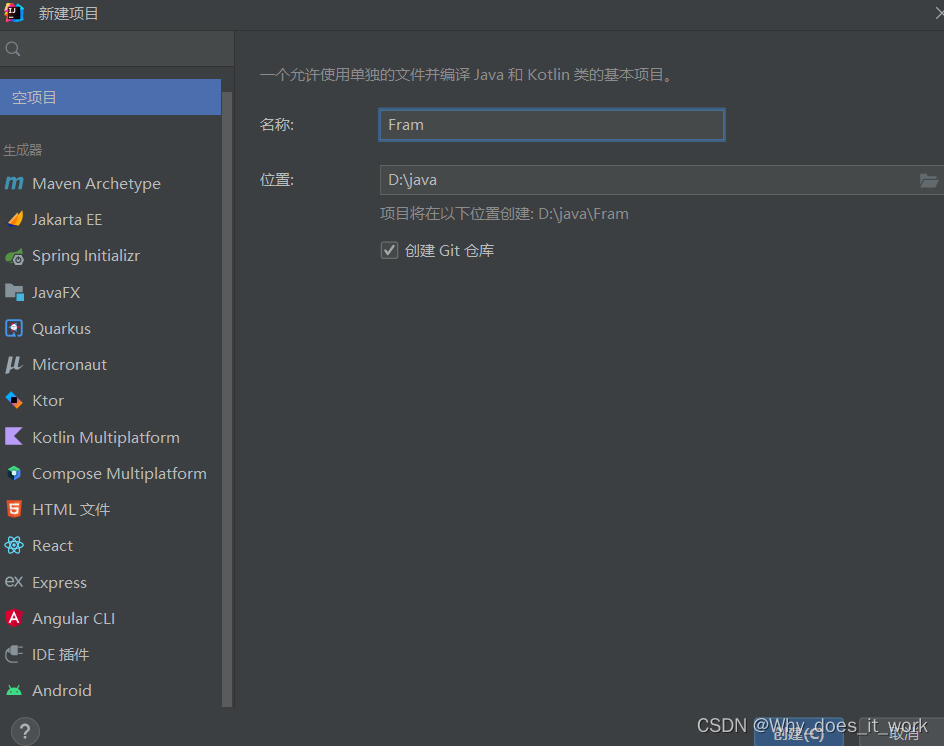
首先新建一个空项目
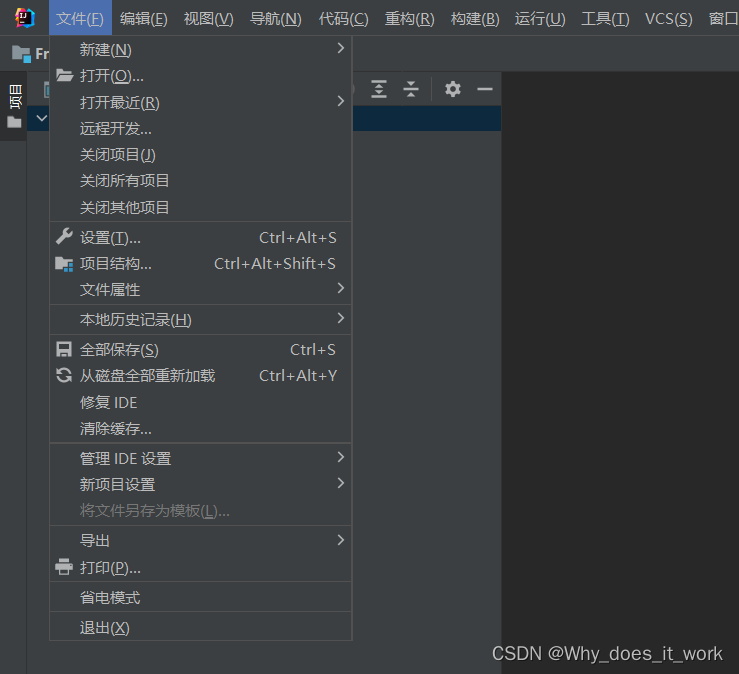
同时,创建完之后,我们点击 文件 -> 项目结构
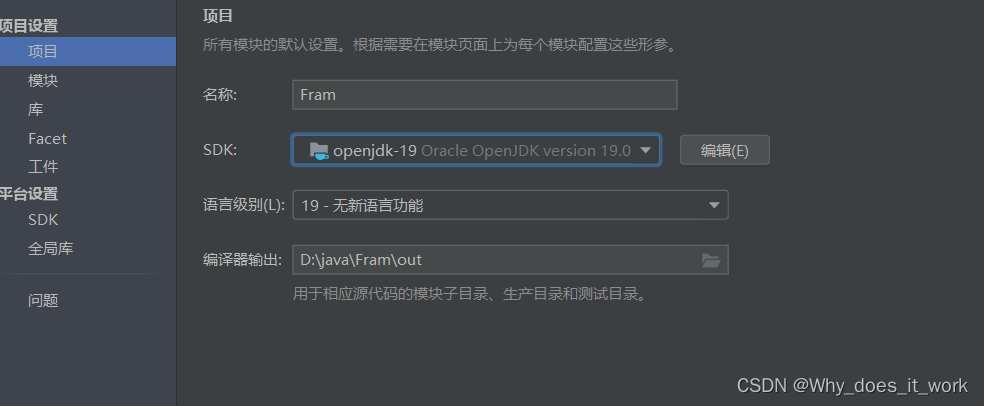
进入项目结构,点击项目,选择好你想要的jdk版本,若没有,可以在idea中下载,这里我使用openjdk-19,
点击模块,添加模块
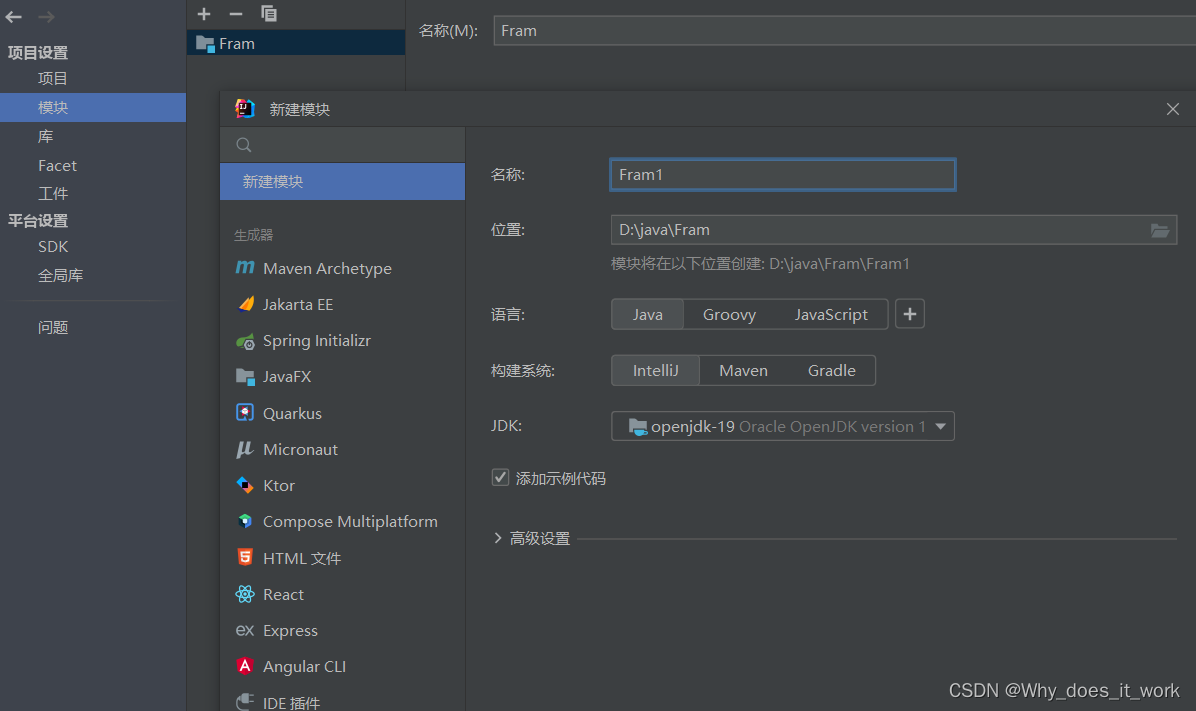
我们在Fram1中完成第一个电商平台,Fram2中完成第二个电商平台以此类推
(2) 所需要用到的插件为:JFormDesigner
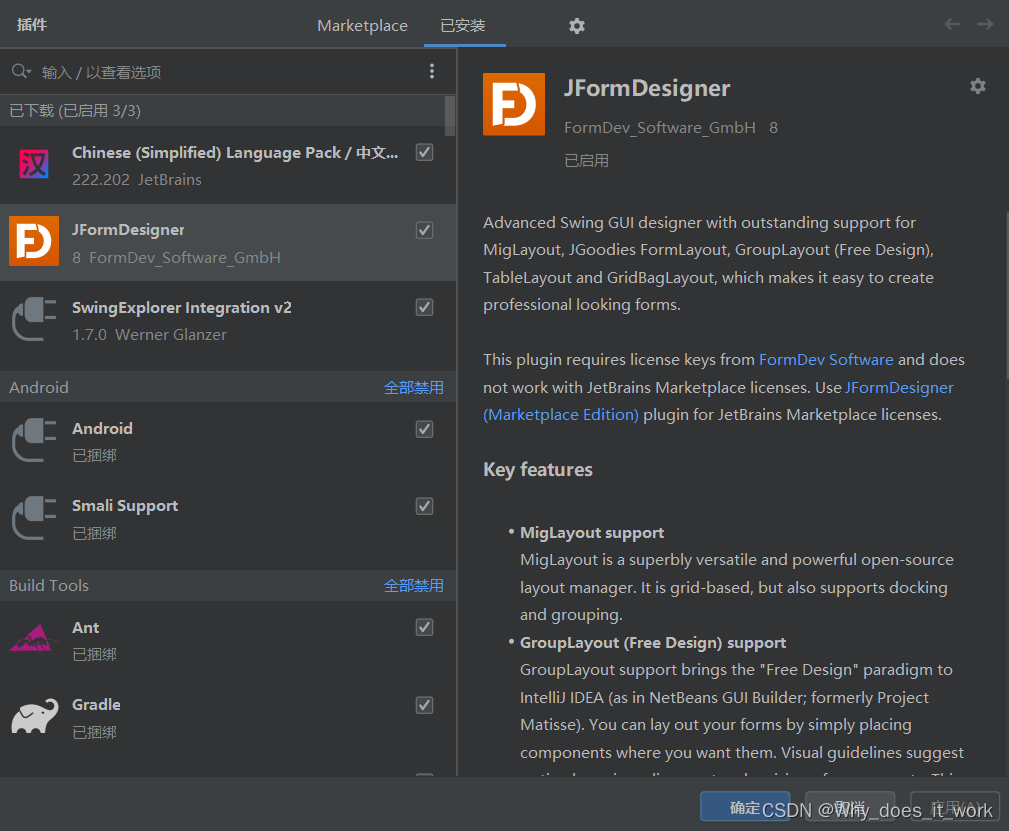
下载安装重启软件之后即可使用窗口——swing
第一个电商平台
1.初步思路:
完成一个电商购物平台的登录注册窗体,点击“点我注册”,显示注册窗体,用户输入用户信息,点击提交后到达显示用户信息的窗体,用户点击登录注册窗体的登录按钮,到达商品信息查询的窗体
分析
四个窗口:电商购物平台登录窗口,用户注册窗口,注册的人员名单,全部的商品名单
两个内容:人员信息,商品信息
2.确定java类
根据分析可以得到要完成6个java类,分别是电商购物平台登录窗口类,用户注册窗口类,注册人员名单类,全部的商品名单类,还有人员信息类和商品信息类
3.源码分析
(1) 人员信息类——user类
按照初步思路来说人员信息需要的属性有:id,type(管理员,普通人员),password,name,sex,city
每一次都要get属性并set
public String getId() {return this.id;}public void setId(String id) {this.id = id;}
再用tostring方法把所有的属性变为额字符串的形式
所以代码如下
public class user {private String id;private String type;private String password;private String name;private char sex;private String city;public String getId() {return this.id;}public void setId(String id) {this.id = id;}public String getName() {return this.name;}public void setName(String name) {this.name = name;}public String getType() {return this.type;}public void setType(String type) {this.type = type;}public String getPassword() {return this.password;}public void setPassword(String password) {this.password = password;}public char getSex() {return this.sex;}public void setSex(char sex) {this.sex = sex;}public String getCity() {return this.city;}public void setCity(String city) {this.city = city;}public user(String id, String type, String password, String name, char sex, String city) {this.id = id;this.type = type;this.password = password;this.name = name;this.sex = sex;this.city = city;}public String toString() {return this.id + ":" + this.type + ":" + this.password + ":" + this.name + ":" + this.sex + ":" + this.city;}
}
(2)书籍商品信息类——Category类
所需要的属性为:

与人员信息操作一致,代码如下
public class Category {private String id;private String name;private String author;private String firstlevel;private String secondlevel;private int number;public Category(String id, String name, String author, int number, String firstlevel, String secondlevel) {this.id = id;this.name = name;this.author = author;this.firstlevel = firstlevel;this.secondlevel = secondlevel;this.number = number;}public String getFirstlevel() {return this.firstlevel;}public void setFirstlevel(String firstlevel) {this.firstlevel = firstlevel;}public String getSecondlevel() {return this.secondlevel;}public void setSecondlevel(String secondlevel) {this.secondlevel = secondlevel;}public String getId() {return this.id;}public void setId(String id) {this.id = id;}public String getName() {return this.name;}public void setName(String name) {this.name = name;}public String getAuthor() {return this.author;}public void setAuthor(String author) {this.author = author;}public int getNumber() {return this.number;}public void setNumber(int number) {this.number = number;}
}
(3) 登录界面——LoginFrame类
首先确定登录界面的情况
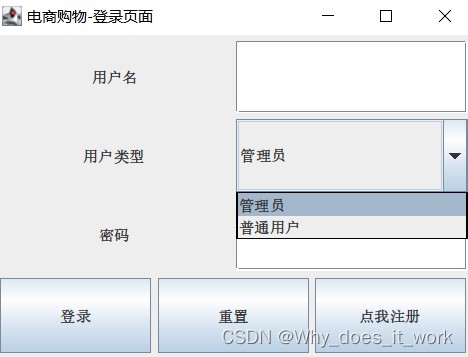
首先这些属性需要 JLabel(标签类):用户名,用户类型,密码
JTextField(文本框)JPasswordField(文本框)
JComboBox
JButton(按钮)
定义主函数,跳出一个登录页面窗口
public static void main(String[] args) {new LoginFrame();}构造登录页面窗口
public LoginFrame() {this.setSize(400, 300);this.setTitle("电商购物-登录页面");this.setLocation(300, 200);}
初始化窗口的大小和标题还有位置还要初始化属性和可见度
this.init();this.setVisible(true);在初始化方法中,先对于每一个属性赋予初始值,对于文本框进行new+构造方法空值,注册按钮则选择跳转,最后则进行网格布局,p.add在网格中全部添加之后,再确定网格边界的位置,则代码如下:
import java.awt.GridLayout;
import java.awt.LayoutManager;
import javax.swing.JButton;
import javax.swing.JComboBox;
import javax.swing.JFrame;
import javax.swing.JLabel;
import javax.swing.JPanel;
import javax.swing.JPasswordField;
import javax.swing.JTextField;public class LoginFrame extends JFrame {private JLabel l_name;private JLabel l_type;private JLabel l_password;private JTextField t_name;private JComboBox c_type;private JPasswordField p_password;private JButton b_login;private JButton b_reset;private JButton b_register;public static void main(String[] args) {new LoginFrame();}public LoginFrame() {this.setSize(400, 300);this.setTitle("电商购物-登录页面");this.setLocation(300, 200);this.init();this.setVisible(true);}public void init() {this.l_name = new JLabel("用户名", 0);this.l_type = new JLabel("用户类型", 0);this.l_password = new JLabel("密码", 0);this.t_name = new JTextField();this.c_type = new JComboBox();this.c_type.addItem("管理员");this.c_type.addItem("普通用户");this.p_password = new JPasswordField();this.b_login = new JButton("登录");this.b_reset = new JButton("重置");this.b_register = new JButton("点我注册");this.b_register.addActionListener((e) -> {new RegisterFrame();});this.setLayout((LayoutManager)null);JPanel p = new JPanel();p.setLayout(new GridLayout(3, 2, 5, 5));p.add(this.l_name);p.add(this.t_name);p.add(this.l_type);p.add(this.c_type);p.add(this.l_password);p.add(this.p_password);p.setBounds(5, 5, 375, 185);this.add(p);p = new JPanel();p.setLayout(new GridLayout(1, 3, 5, 5));p.add(this.b_login);p.add(this.b_reset);p.add(this.b_register);p.setBounds(5, 195, 375, 60);this.add(p);}
}
剩余三个窗口类都与之类似,分别是:
注册窗口
import java.awt.GridLayout;
import javax.swing.JButton;
import javax.swing.JComboBox;
import javax.swing.JFrame;
import javax.swing.JLabel;
import javax.swing.JOptionPane;
import javax.swing.JPanel;
import javax.swing.JPasswordField;
import javax.swing.JRadioButton;
import javax.swing.JTextField;public class RegisterFrame extends JFrame {private JLabel account;private JLabel name;private JLabel password;private JLabel confirmpass;private JLabel sex;private JLabel city;private JLabel type;private JTextField t_account;private JTextField t_name;private JButton regedit;private JButton reset;private JPasswordField t_password;private JPasswordField t_confirmspass;private JRadioButton t_sex1;private JRadioButton t_sex2;private JComboBox t_city;private JComboBox c_type;public RegisterFrame() {this.setTitle("电商注册平台");this.setSize(300, 450);this.setLocation(300, 300);this.init();this.setVisible(true);}public void init() {this.setLayout(new GridLayout(8, 2, 5, 5));this.account = new JLabel("账号", 0);this.add(this.account);this.t_account = new JTextField();this.add(this.t_account);this.name = new JLabel("姓名", 0);this.add(this.name);this.t_name = new JTextField();this.add(this.t_name);this.password = new JLabel("密码", 0);this.t_password = new JPasswordField();this.add(this.password);this.add(this.t_password);this.confirmpass = new JLabel("确认密码", 0);this.t_confirmspass = new JPasswordField();this.add(this.confirmpass);this.add(this.t_confirmspass);this.type = new JLabel("用户类型", 0);this.add(this.type);this.c_type = new JComboBox();this.c_type.addItem("管理员");this.c_type.addItem("普通用户");this.add(this.c_type);this.sex = new JLabel("性别", 0);this.add(this.sex);JPanel J = new JPanel();this.t_sex1 = new JRadioButton("男");this.t_sex2 = new JRadioButton("女");J.add(this.t_sex1);J.add(this.t_sex2);this.add(J);this.city = new JLabel("城市", 0);this.add(this.city);this.t_city = new JComboBox();this.t_city.addItem("长治");this.t_city.addItem("太原");this.t_city.addItem("运城");this.t_city.addItem("大同");this.add(this.t_city);this.regedit = new JButton("注册");this.add(this.regedit);this.regedit.addActionListener((e) -> {this.initdata();});this.reset = new JButton("重置");this.add(this.reset);}public void initdata() {String id = this.t_account.getText().trim();String name = this.t_name.getText().trim();String type = (String)this.c_type.getSelectedItem();char sex;if (this.t_sex1.isSelected()) {sex = 30007;} else {sex = 22899;}String city = (String)this.t_city.getSelectedItem();String password = null;if ((new String(this.t_password.getPassword())).equals(new String(this.t_confirmspass.getPassword()))) {password = new String(this.t_password.getPassword());user u = new user(id, type, password, name, sex, city);new UserInfoFrame(u);} else {JOptionPane.showMessageDialog(this, "前后输入密码不一致!请重新输入。", "警告对话框", 2);this.t_password.setText("");this.t_confirmspass.setText("");}}
}
书籍商品窗口
import java.awt.GridLayout;
import java.awt.LayoutManager;
import javax.swing.JButton;
import javax.swing.JComboBox;
import javax.swing.JFrame;
import javax.swing.JLabel;
import javax.swing.JOptionPane;
import javax.swing.JPanel;
import javax.swing.JScrollPane;
import javax.swing.JTable;
import javax.swing.JTextField;public class BookInfoFrame extends JFrame {private JTable t_book;private JLabel welcomecontent1;private JLabel welcomecontent2;private JLabel bookname;private JLabel bookkind;private JTextField t_name;private JComboBox t_kind;private JButton query;private JPanel J1;private JPanel J2;private JPanel J3;private JPanel J4;public BookInfoFrame(Category[] C, user u) {this.setLayout(new GridLayout(7, 3));this.setTitle("电商购物平台-商品查询页面");this.setSize(500, 500);this.setLocation(500, 200);String temp = null;if (u.getSex() == 30007) {temp = "先生";} else if (u.getSex() == 22899) {temp = "女士";}this.setLayout((LayoutManager)null);this.J1 = new JPanel();this.J1.setLayout(new GridLayout(1, 2));String var10003 = u.getName();this.welcomecontent1 = new JLabel("您好," + var10003 + temp);this.welcomecontent2 = new JLabel("来自:" + u.getCity());this.J1.add(this.welcomecontent1);this.J1.add(this.welcomecontent2);this.J1.setBounds(15, 5, 800, 20);this.add(this.J1);this.bookname = new JLabel("书籍名称:", 0);this.t_name = new JTextField();this.bookkind = new JLabel("书籍种类:", 0);this.t_kind = new JComboBox();this.t_kind.addItem("小说类");this.t_kind.addItem("工具类");this.query = new JButton("查询");this.query.addActionListener((e) -> {this.showmessage();});this.J2 = new JPanel();this.J2.setLayout(new GridLayout(1, 5, 5, 5));this.J2.add(this.bookname);this.J2.add(this.t_name);this.J2.add(this.bookkind);this.J2.add(this.t_kind);this.J2.add(this.query);this.J2.setBounds(5, 45, 450, 30);this.add(this.J2);this.init(C);this.setVisible(true);}public void init(Category[] C) {this.J3 = new JPanel();Object[] t_title = new Object[]{"书籍编号", "书籍名称", "书籍作者", "库存", "书籍分类"};Object[][] books = new Object[C.length][5];for(int i = 0; i < C.length; ++i) {books[i][0] = C[i].getId();books[i][1] = C[i].getName();books[i][2] = C[i].getAuthor();books[i][3] = C[i].getNumber();Object[] var10000 = books[i];String var10002 = C[i].getFirstlevel();var10000[4] = var10002 + "->" + C[i].getSecondlevel();}this.t_book = new JTable(books, t_title);this.J3.add(new JScrollPane(this.t_book));this.J3.setBounds(6, 100, 480, 300);this.add(this.J3);JButton buy = new JButton("购买");buy.addActionListener((e) -> {this.warn();});buy.setBounds(370, 420, 80, 30);this.add(buy);}public void showmessage() {JOptionPane.showMessageDialog(this, "表格已经做出来了,别不识好歹(doge),请使用SQL server去处理哦亲(^_^)!", "警告对话框", 2);}public void warn() {JOptionPane.showMessageDialog(this, "你没有钱!", "警告对话框", 2);}
}
管理者窗口
import javax.swing.JFrame;
import javax.swing.JScrollPane;
import javax.swing.JTable;public class UserInfoFrame extends JFrame {private JTable t_user;public UserInfoFrame(user u) {this.setTitle("电商购物-注册用户信息");this.setSize(500, 400);this.setLocation(1000, 200);this.init(u);this.setVisible(true);}public void init(user u) {Object[] t_title = new Object[]{"用户名", "姓名", "密码", "性别", "城市"};Object[][] users = new Object[][]{{u.getId(), u.getName(), u.getPassword(), u.getSex(), u.getCity()}};this.t_user = new JTable(users, t_title);this.add(new JScrollPane(this.t_user));Category[] c = new Category[]{new Category("b01", "Java核心技术", "霍斯特曼", 50, "工具类", "软件编程"), new Category("b02", "名著-三国演义", "罗贯中", 40, "小说类", "历史"), new Category("b03", "名著-水浒传", "施耐庵", 30, "小说类", "历史"), new Category("b04", "名著-红楼梦", "曹雪芹", 20, "小说类", "历史")};new BookInfoFrame(c, u);}
}
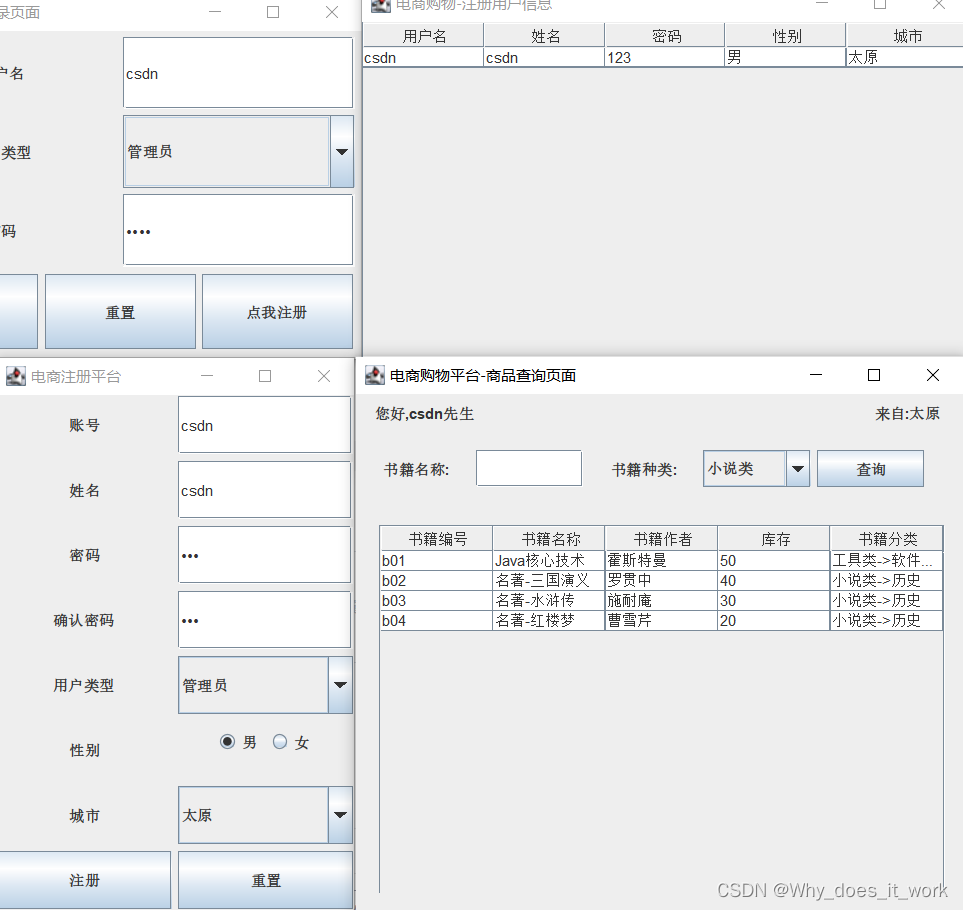
成果:
上一篇:形容喝酒喝的很高兴的成语