

k8s上部署Harbor通过Nginx-Ingress域名访问
创始人
2024-02-26 16:33:38
目录
1、k8s集群环境,通过kubesphere安装部署。
1.1 集群基本信息
1.2 集群节点信息
2、安装Harbor
2.1、使用Helm添加Harbor仓库
2.2 、通过openssl生成证书
2.3、 创建secret
2.4、 创建nfs存储目录
2.5、 创建pv
2.6、创建pvc
2.7、values.yaml配置文件
2.8、部署执行命令
2.9、编辑ingress文件,类型vim操作
2.9.1、部署nginx-ingress-controller
2.9.2、查看配置Ingress的配置结果
3、访问
3.1、window配置hosts
3.2、访问地址
1、k8s集群环境,通过kubesphere安装部署。
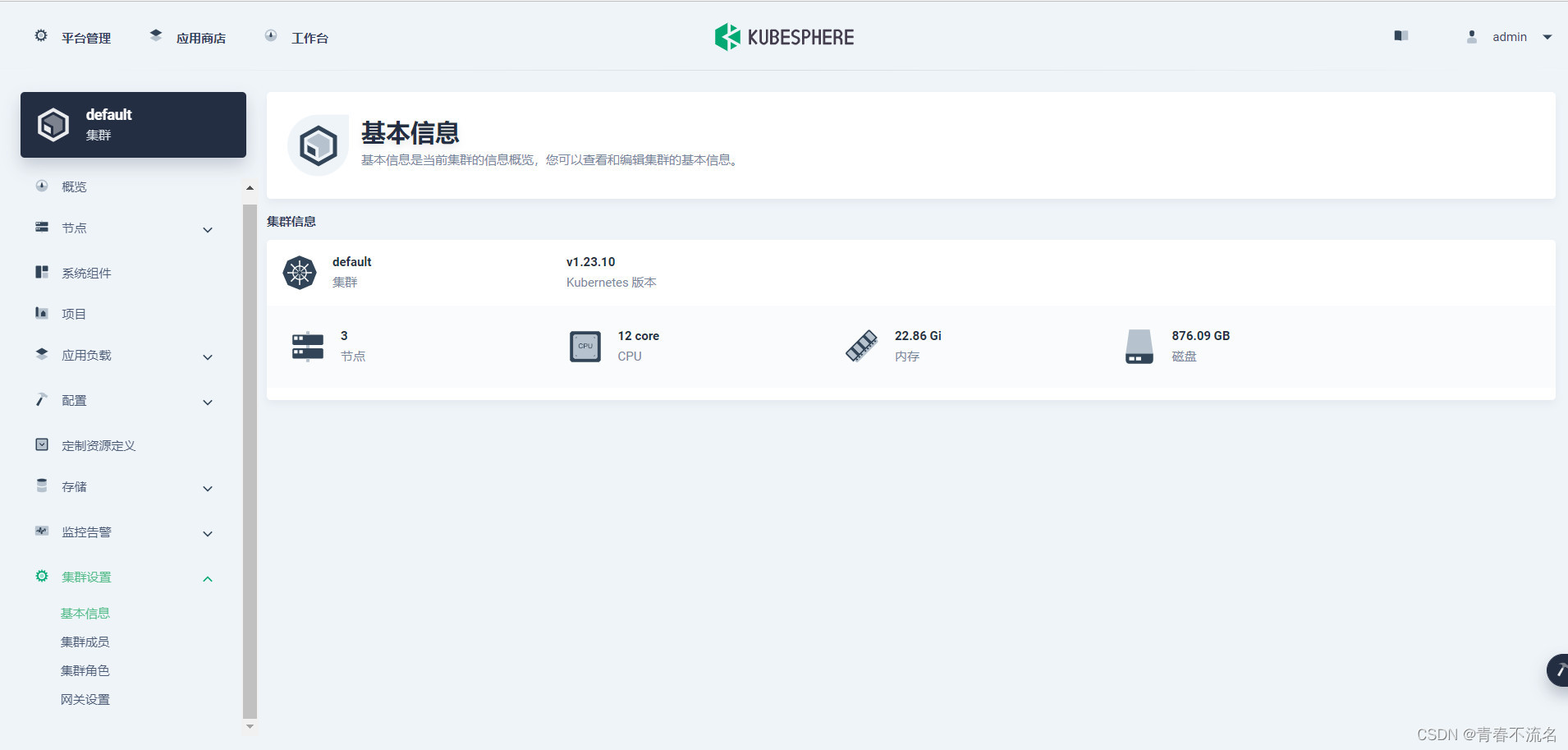
1.1 集群基本信息
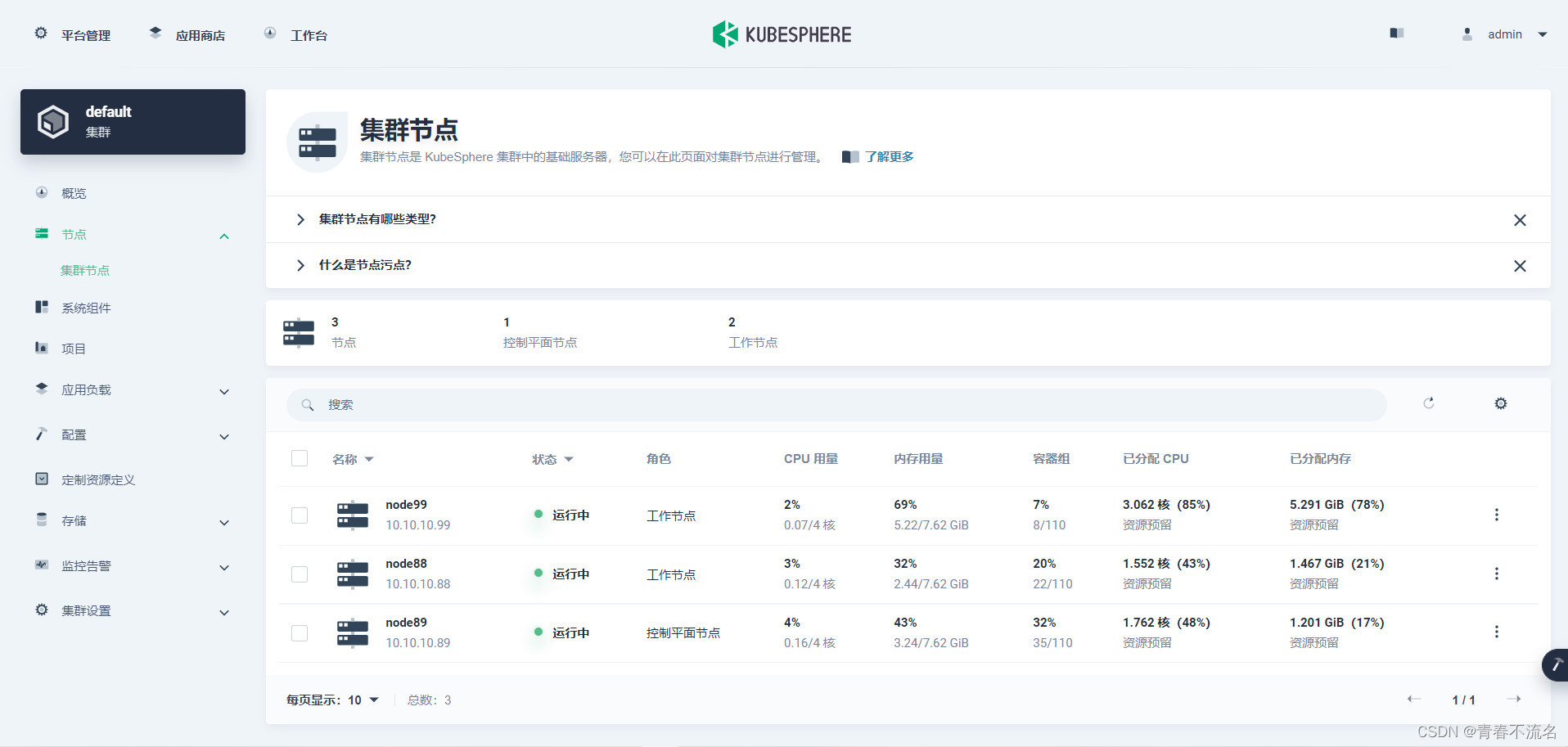
1.2 集群节点信息
2、安装Harbor
2.1、使用Helm添加Harbor仓库
helm repo add harbor https://helm.goharbor.io
helm pull harbor/harbor
运行上面命令,得到文件harbor-1.10.2.tgz,将文件解压,并重命名为harbor。

2.2 、通过openssl生成证书
harbor目录下存在cert,执行cp -r cert bak,对默认的cert文件进行备份。
cd certopenssl genrsa -des3 -passout pass:over4chars -out tls.pass.key 2048
...
openssl rsa -passin pass:over4chars -in tls.pass.key -out tls.key
# Writing RSA keyrm -rf tls.pass.keyopenssl req -new -key tls.key -out tls.csr
...
If you enter '.', the field will be left blank.
-----
Country Name (2 letter code) [XX]:CN
State or Province Name (full name) []:Beijing
Locality Name (eg, city) [Default City]:Beijing
Organization Name (eg, company) [Default Company Ltd]:liebe
Organizational Unit Name (eg, section) []:liebe
Common Name (eg, your name or your server's hostname) []:harbon.liebe.com.cn
Email Address []:你的邮箱地址Please enter the following 'extra' attributes
to be sent with your certificate request
A challenge password []:talent
An optional company name []:liebe生成 SSL 证书
自签名 SSL 证书是从私钥和文件生成的。tls.keytls.csr
openssl x509 -req -sha256 -days 365 -in tls.csr -signkey tls.key -out tls.crt
2.3、 创建secret
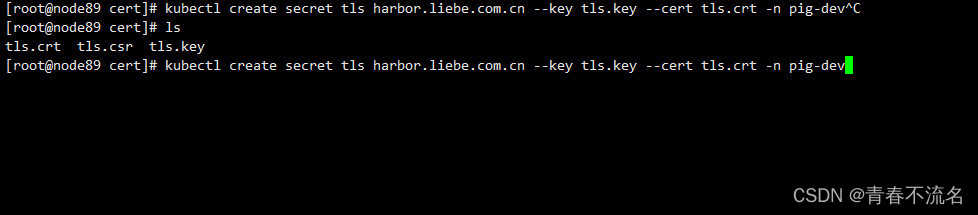
执行命令
kubectl create secret tls harbor.liebe.com.cn --key tls.key --cert tls.crt -n pig-dev
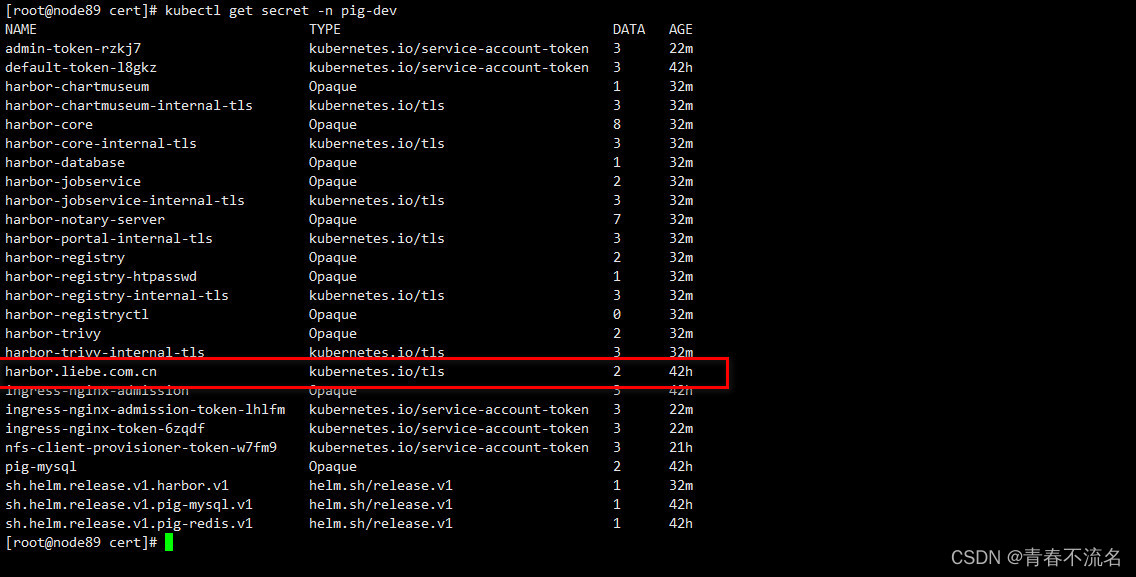
查看创建结果
kubectl get secret -n pig-dev
2.4、 创建nfs存储目录
mkdir -p /home/data/nfs-share/harbor/registrymkdir -p /home/data/nfs-share/harbor/chartmuseummkdir -p /home/data/nfs-share/harbor/jobservicemkdir -p /home/data/nfs-share/harbor/databasemkdir -p /home/data/nfs-share/harbor/redismkdir -p /home/data/nfs-share/harbor/trivy mkdir -p /home/data/nfs-share/harbor/jobservicedatamkdir -p /home/data/nfs-share/harbor/jobservicelogchmod 777 /home/data/nfs-share/harbor/*2.5、 创建pv
#第1个
apiVersion: v1
kind: PersistentVolume
metadata:name: harbor-registrynamespace: pig-devlabels:app: harbor-registry
spec:capacity:storage: 150GiaccessModes:- ReadWriteOncepersistentVolumeReclaimPolicy: RetainstorageClassName: "managed-nfs-storage"mountOptions:- hardnfs:path: /home/data/nfs-share/harbor/registryserver: 10.10.10.89
---
#第2个
apiVersion: v1
kind: PersistentVolume
metadata:name: harbor-chartmuseumnamespace: pig-devlabels:app: harbor-chartmuseum
spec:capacity:storage: 10GaccessModes:- ReadWriteOncepersistentVolumeReclaimPolicy: RetainstorageClassName: "managed-nfs-storage"mountOptions:- hardnfs:path: /home/data/nfs-share/harbor/chartmuseumserver: 10.10.10.89
---
#第3个
apiVersion: v1
kind: PersistentVolume
metadata:name: harbor-jobservicelognamespace: pig-devlabels:app: harbor-jobservicelog
spec:capacity:storage: 10GaccessModes:- ReadWriteOncepersistentVolumeReclaimPolicy: RetainstorageClassName: "managed-nfs-storage"mountOptions:- hardnfs:path: /home/data/nfs-share/harbor/jobservicelogserver: 10.10.10.89
---
apiVersion: v1
kind: PersistentVolume
metadata:name: harbor-jobservicedatanamespace: pig-devlabels:app: harbor-jobservicedata
spec:capacity:storage: 10GaccessModes:- ReadWriteOncepersistentVolumeReclaimPolicy: RetainstorageClassName: "managed-nfs-storage"mountOptions:- hardnfs:path: /home/data/nfs-share/harbor/jobservicedataserver: 10.10.10.89
---
#第4个
apiVersion: v1
kind: PersistentVolume
metadata:name: harbor-databasenamespace: pig-devlabels:app: harbor-database
spec:capacity:storage: 10GaccessModes:- ReadWriteOncepersistentVolumeReclaimPolicy: RetainstorageClassName: "managed-nfs-storage"mountOptions:- hardnfs:path: /home/data/nfs-share/harbor/databaseserver: 10.10.10.89
---
#第5个
apiVersion: v1
kind: PersistentVolume
metadata:name: harbor-redisnamespace: pig-devlabels:app: harbor-redis
spec:capacity:storage: 10GaccessModes:- ReadWriteOncepersistentVolumeReclaimPolicy: RetainstorageClassName: "managed-nfs-storage"mountOptions:- hardnfs:path: /home/data/nfs-share/harbor/redisserver: 10.10.10.89
---
#第6个
apiVersion: v1
kind: PersistentVolume
metadata:name: harbor-trivynamespace: pig-devlabels:app: harbor-trivy
spec:capacity:storage: 10GaccessModes:- ReadWriteOncepersistentVolumeReclaimPolicy: RetainstorageClassName: "managed-nfs-storage"mountOptions:- hardnfs:path: /home/data/nfs-share/harbor/trivyserver: 10.10.10.89
2.6、创建pvc
#第1个
kind: PersistentVolumeClaim
apiVersion: v1
metadata:name: harbor-registrynamespace: pig-dev
spec:accessModes:- ReadWriteOncestorageClassName: "managed-nfs-storage"resources:requests:storage: 150Gi
---
#第2个
kind: PersistentVolumeClaim
apiVersion: v1
metadata:name: harbor-chartmuseumnamespace: pig-dev
spec:accessModes:- ReadWriteOncestorageClassName: "managed-nfs-storage"resources:requests:storage: 10Gi
---
#第3个
kind: PersistentVolumeClaim
apiVersion: v1
metadata:name: harbor-jobservicelognamespace: pig-dev
spec:accessModes:- ReadWriteOncestorageClassName: "managed-nfs-storage"resources:requests:storage: 5Gi
---
kind: PersistentVolumeClaim
apiVersion: v1
metadata:name: harbor-jobservicedatanamespace: pig-dev
spec:accessModes:- ReadWriteOncestorageClassName: "managed-nfs-storage"resources:requests:storage: 5Gi
---
#第4个
kind: PersistentVolumeClaim
apiVersion: v1
metadata:name: harbor-databasenamespace: pig-dev
spec:accessModes:- ReadWriteOncestorageClassName: "managed-nfs-storage"resources:requests:storage: 10Gi
---
#第5个
kind: PersistentVolumeClaim
apiVersion: v1
metadata:name: harbor-redisnamespace: pig-dev
spec:accessModes:- ReadWriteOncestorageClassName: "managed-nfs-storage"resources:requests:storage: 10Gi
---
#第6个
kind: PersistentVolumeClaim
apiVersion: v1
metadata:name: harbor-trivynamespace: pig-dev
spec:accessModes:- ReadWriteOncestorageClassName: "managed-nfs-storage"resources:requests:storage: 10Gi
2.7、values.yaml配置文件
expose:# Set how to expose the service. Set the type as "ingress", "clusterIP", "nodePort" or "loadBalancer"# and fill the information in the corresponding sectiontype: ingresstls:# Enable TLS or not.# Delete the "ssl-redirect" annotations in "expose.ingress.annotations" when TLS is disabled and "expose.type" is "ingress"# Note: if the "expose.type" is "ingress" and TLS is disabled,# the port must be included in the command when pulling/pushing images.# Refer to https://github.com/goharbor/harbor/issues/5291 for details.enabled: true# The source of the tls certificate. Set as "auto", "secret"# or "none" and fill the information in the corresponding section# 1) auto: generate the tls certificate automatically# 2) secret: read the tls certificate from the specified secret.# The tls certificate can be generated manually or by cert manager# 3) none: configure no tls certificate for the ingress. If the default# tls certificate is configured in the ingress controller, choose this optioncertSource: "secret"auto:# The common name used to generate the certificate, it's necessary# when the type isn't "ingress"commonName: ""secret:# The name of secret which contains keys named:# "tls.crt" - the certificate# "tls.key" - the private keysecretName: "harbor.liebe.com.cn"# The name of secret which contains keys named:# "tls.crt" - the certificate# "tls.key" - the private key# Only needed when the "expose.type" is "ingress".notarySecretName: "harbor.liebe.com.cn"ingress:hosts:core: harbor.liebe.com.cnnotary: notary-harbor.liebe.com.cn# set to the type of ingress controller if it has specific requirements.# leave as `default` for most ingress controllers.# set to `gce` if using the GCE ingress controller# set to `ncp` if using the NCP (NSX-T Container Plugin) ingress controller# set to `alb` if using the ALB ingress controllercontroller: default## Allow .Capabilities.KubeVersion.Version to be overridden while creating ingresskubeVersionOverride: ""className: ""annotations:# note different ingress controllers may require a different ssl-redirect annotation# for Envoy, use ingress.kubernetes.io/force-ssl-redirect: "true" and remove the nginx lines belowingress.kubernetes.io/ssl-redirect: "true"ingress.kubernetes.io/proxy-body-size: "1024m"#### 如果是 traefik ingress,则按下面配置:
#      kubernetes.io/ingress.class: "traefik"
#      traefik.ingress.kubernetes.io/router.tls: 'true'
#      traefik.ingress.kubernetes.io/router.entrypoints: websecure#### 如果是 nginx ingress,则按下面配置:nginx.ingress.kubernetes.io/ssl-redirect: "true"nginx.ingress.kubernetes.io/proxy-body-size: "1024m"nginx.org/client-max-body-size: "1024m"notary:# notary ingress-specific annotationsannotations: {}# notary ingress-specific labelslabels: {}harbor:# harbor ingress-specific annotationsannotations: {}# harbor ingress-specific labelslabels: {}clusterIP:# The name of ClusterIP servicename: harbor# Annotations on the ClusterIP serviceannotations: {}ports:# The service port Harbor listens on when serving HTTPhttpPort: 80# The service port Harbor listens on when serving HTTPShttpsPort: 443# The service port Notary listens on. Only needed when notary.enabled# is set to truenotaryPort: 4443nodePort:# The name of NodePort servicename: harborports:http:# The service port Harbor listens on when serving HTTPport: 80# The node port Harbor listens on when serving HTTPnodePort: 30102https:# The service port Harbor listens on when serving HTTPSport: 443# The node port Harbor listens on when serving HTTPSnodePort: 30103# Only needed when notary.enabled is set to truenotary:# The service port Notary listens onport: 4443# The node port Notary listens onnodePort: 30104loadBalancer:# The name of LoadBalancer servicename: harbor# Set the IP if the LoadBalancer supports assigning IPIP: ""ports:# The service port Harbor listens on when serving HTTPhttpPort: 80# The service port Harbor listens on when serving HTTPShttpsPort: 443# The service port Notary listens on. Only needed when notary.enabled# is set to truenotaryPort: 4443annotations: {}sourceRanges: []# The external URL for Harbor core service. It is used to
# 1) populate the docker/helm commands showed on portal
# 2) populate the token service URL returned to docker/notary client
#
# Format: protocol://domain[:port]. Usually:
# 1) if "expose.type" is "ingress", the "domain" should be
# the value of "expose.ingress.hosts.core"
# 2) if "expose.type" is "clusterIP", the "domain" should be
# the value of "expose.clusterIP.name"
# 3) if "expose.type" is "nodePort", the "domain" should be
# the IP address of k8s node
#
# If Harbor is deployed behind the proxy, set it as the URL of proxy
externalURL: https://harbor.liebe.com.cn# The internal TLS used for harbor components secure communicating. In order to enable https
# in each components tls cert files need to provided in advance.
internalTLS:# If internal TLS enabledenabled: true# There are three ways to provide tls# 1) "auto" will generate cert automatically# 2) "manual" need provide cert file manually in following value# 3) "secret" internal certificates from secretcertSource: "auto"# The content of trust ca, only available when `certSource` is "manual"trustCa: ""# core related cert configurationcore:# secret name for core's tls certssecretName: ""# Content of core's TLS cert file, only available when `certSource` is "manual"crt: ""# Content of core's TLS key file, only available when `certSource` is "manual"key: ""# jobservice related cert configurationjobservice:# secret name for jobservice's tls certssecretName: ""# Content of jobservice's TLS key file, only available when `certSource` is "manual"crt: ""# Content of jobservice's TLS key file, only available when `certSource` is "manual"key: ""# registry related cert configurationregistry:# secret name for registry's tls certssecretName: ""# Content of registry's TLS key file, only available when `certSource` is "manual"crt: ""# Content of registry's TLS key file, only available when `certSource` is "manual"key: ""# portal related cert configurationportal:# secret name for portal's tls certssecretName: ""# Content of portal's TLS key file, only available when `certSource` is "manual"crt: ""# Content of portal's TLS key file, only available when `certSource` is "manual"key: ""# chartmuseum related cert configurationchartmuseum:# secret name for chartmuseum's tls certssecretName: ""# Content of chartmuseum's TLS key file, only available when `certSource` is "manual"crt: ""# Content of chartmuseum's TLS key file, only available when `certSource` is "manual"key: ""# trivy related cert configurationtrivy:# secret name for trivy's tls certssecretName: ""# Content of trivy's TLS key file, only available when `certSource` is "manual"crt: ""# Content of trivy's TLS key file, only available when `certSource` is "manual"key: ""ipFamily:# ipv6Enabled set to true if ipv6 is enabled in cluster, currently it affected the nginx related componentipv6:enabled: true# ipv4Enabled set to true if ipv4 is enabled in cluster, currently it affected the nginx related componentipv4:enabled: true# The persistence is enabled by default and a default StorageClass
# is needed in the k8s cluster to provision volumes dynamically.
# Specify another StorageClass in the "storageClass" or set "existingClaim"
# if you already have existing persistent volumes to use
#
# For storing images and charts, you can also use "azure", "gcs", "s3",
# "swift" or "oss". Set it in the "imageChartStorage" section
persistence:enabled: true# Setting it to "keep" to avoid removing PVCs during a helm delete# operation. Leaving it empty will delete PVCs after the chart deleted# (this does not apply for PVCs that are created for internal database# and redis components, i.e. they are never deleted automatically)resourcePolicy: "keep"persistentVolumeClaim:registry:# Use the existing PVC which must be created manually before bound,# and specify the "subPath" if the PVC is shared with other componentsexistingClaim: "harbor-registry"# Specify the "storageClass" used to provision the volume. Or the default# StorageClass will be used (the default).# Set it to "-" to disable dynamic provisioningstorageClass: "managed-nfs-storage"subPath: ""accessMode: ReadWriteOncesize: 150Giannotations: {}chartmuseum:existingClaim: "harbor-chartmuseum"storageClass: "managed-nfs-storage"subPath: ""accessMode: ReadWriteOncesize: 10Giannotations: {}jobservice:jobLog:existingClaim: "harbor-jobservicelog"storageClass: "managed-nfs-storage"subPath: ""accessMode: ReadWriteOncesize: 5Giannotations: {}scanDataExports:existingClaim: "harbor-jobservicedata"storageClass: "managed-nfs-storage"subPath: ""accessMode: ReadWriteOncesize: 5Giannotations: {}# If external database is used, the following settings for database will# be ignoreddatabase:existingClaim: "harbor-database"storageClass: "managed-nfs-storage"subPath: ""accessMode: ReadWriteOncesize: 10Giannotations: {}# If external Redis is used, the following settings for Redis will# be ignoredredis:existingClaim: "harbor-redis"storageClass: "managed-nfs-storage"subPath: ""accessMode: ReadWriteOncesize: 10Giannotations: {}trivy:existingClaim: "harbor-trivy"storageClass: "managed-nfs-storage"subPath: ""accessMode: ReadWriteOncesize: 10Giannotations: {}# Define which storage backend is used for registry and chartmuseum to store# images and charts. Refer to# https://github.com/docker/distribution/blob/master/docs/configuration.md#storage# for the detail.imageChartStorage:# Specify whether to disable `redirect` for images and chart storage, for# backends which not supported it (such as using minio for `s3` storage type), please disable# it. To disable redirects, simply set `disableredirect` to `true` instead.# Refer to# https://github.com/docker/distribution/blob/master/docs/configuration.md#redirect# for the detail.disableredirect: false# Specify the "caBundleSecretName" if the storage service uses a self-signed certificate.# The secret must contain keys named "ca.crt" which will be injected into the trust store# of registry's and chartmuseum's containers.# caBundleSecretName:# Specify the type of storage: "filesystem", "azure", "gcs", "s3", "swift",# "oss" and fill the information needed in the corresponding section. The type# must be "filesystem" if you want to use persistent volumes for registry# and chartmuseumtype: filesystemfilesystem:rootdirectory: /storage#maxthreads: 100azure:accountname: accountnameaccountkey: base64encodedaccountkeycontainer: containername#realm: core.windows.net# To use existing secret, the key must be AZURE_STORAGE_ACCESS_KEYexistingSecret: ""gcs:bucket: bucketname# The base64 encoded json file which contains the keyencodedkey: base64-encoded-json-key-file#rootdirectory: /gcs/object/name/prefix#chunksize: "5242880"# To use existing secret, the key must be gcs-key.jsonexistingSecret: ""useWorkloadIdentity: falses3:# Set an existing secret for S3 accesskey and secretkey# keys in the secret should be AWS_ACCESS_KEY_ID and AWS_SECRET_ACCESS_KEY for chartmuseum# keys in the secret should be REGISTRY_STORAGE_S3_ACCESSKEY and REGISTRY_STORAGE_S3_SECRETKEY for registry#existingSecret: ""region: us-west-1bucket: bucketname#accesskey: awsaccesskey#secretkey: awssecretkey#regionendpoint: http://myobjects.local#encrypt: false#keyid: mykeyid#secure: true#skipverify: false#v4auth: true#chunksize: "5242880"#rootdirectory: /s3/object/name/prefix#storageclass: STANDARD#multipartcopychunksize: "33554432"#multipartcopymaxconcurrency: 100#multipartcopythresholdsize: "33554432"swift:authurl: https://storage.myprovider.com/v3/authusername: usernamepassword: passwordcontainer: containername#region: fr#tenant: tenantname#tenantid: tenantid#domain: domainname#domainid: domainid#trustid: trustid#insecureskipverify: false#chunksize: 5M#prefix:#secretkey: secretkey#accesskey: accesskey#authversion: 3#endpointtype: public#tempurlcontainerkey: false#tempurlmethods:oss:accesskeyid: accesskeyidaccesskeysecret: accesskeysecretregion: regionnamebucket: bucketname#endpoint: endpoint#internal: false#encrypt: false#secure: true#chunksize: 10M#rootdirectory: rootdirectoryimagePullPolicy: IfNotPresent# Use this set to assign a list of default pullSecrets
imagePullSecrets:
#  - name: docker-registry-secret
#  - name: internal-registry-secret# The update strategy for deployments with persistent volumes(jobservice, registry
# and chartmuseum): "RollingUpdate" or "Recreate"
# Set it as "Recreate" when "RWM" for volumes isn't supported
updateStrategy:type: RollingUpdate# debug, info, warning, error or fatal
logLevel: info# The initial password of Harbor admin. Change it from portal after launching Harbor
harborAdminPassword: "Harbor12345"# The name of the secret which contains key named "ca.crt". Setting this enables the
# download link on portal to download the CA certificate when the certificate isn't
# generated automatically
caSecretName: ""# The secret key used for encryption. Must be a string of 16 chars.
secretKey: "not-a-secure-key"
# If using existingSecretSecretKey, the key must be sercretKey
existingSecretSecretKey: ""# The proxy settings for updating trivy vulnerabilities from the Internet and replicating
# artifacts from/to the registries that cannot be reached directly
proxy:httpProxy:httpsProxy:noProxy: 127.0.0.1,localhost,.local,.internalcomponents:- core- jobservice- trivy# Run the migration job via helm hook
enableMigrateHelmHook: false# The custom ca bundle secret, the secret must contain key named "ca.crt"
# which will be injected into the trust store for chartmuseum, core, jobservice, registry, trivy components
# caBundleSecretName: ""## UAA Authentication Options
# If you're using UAA for authentication behind a self-signed
# certificate you will need to provide the CA Cert.
# Set uaaSecretName below to provide a pre-created secret that
# contains a base64 encoded CA Certificate named `ca.crt`.
# uaaSecretName:# If service exposed via "ingress", the Nginx will not be used
nginx:image:repository: goharbor/nginx-photontag: v2.6.2# set the service account to be used, default if left emptyserviceAccountName: ""# mount the service account tokenautomountServiceAccountToken: falsereplicas: 1revisionHistoryLimit: 10# resources:#  requests:#    memory: 256Mi#    cpu: 100mnodeSelector: {}tolerations: []affinity: {}## Additional deployment annotationspodAnnotations: {}## The priority class to run the pod aspriorityClassName:portal:image:repository: goharbor/harbor-portaltag: v2.6.2# set the service account to be used, default if left emptyserviceAccountName: ""# mount the service account tokenautomountServiceAccountToken: falsereplicas: 1revisionHistoryLimit: 10# resources:#  requests:#    memory: 256Mi#    cpu: 100mnodeSelector: {}tolerations: []affinity: {}## Additional deployment annotationspodAnnotations: {}## The priority class to run the pod aspriorityClassName:core:image:repository: goharbor/harbor-coretag: v2.6.2# set the service account to be used, default if left emptyserviceAccountName: ""# mount the service account tokenautomountServiceAccountToken: falsereplicas: 1revisionHistoryLimit: 10## Startup probe valuesstartupProbe:enabled: trueinitialDelaySeconds: 10# resources:#  requests:#    memory: 256Mi#    cpu: 100mnodeSelector: {}tolerations: []affinity: {}## Additional deployment annotationspodAnnotations: {}# Secret is used when core server communicates with other components.# If a secret key is not specified, Helm will generate one.# Must be a string of 16 chars.secret: ""# Fill the name of a kubernetes secret if you want to use your own# TLS certificate and private key for token encryption/decryption.# The secret must contain keys named:# "tls.crt" - the certificate# "tls.key" - the private key# The default key pair will be used if it isn't setsecretName: ""# The XSRF key. Will be generated automatically if it isn't specifiedxsrfKey: ""## The priority class to run the pod aspriorityClassName:# The time duration for async update artifact pull_time and repository# pull_count, the unit is second. Will be 10 seconds if it isn't set.# eg. artifactPullAsyncFlushDuration: 10artifactPullAsyncFlushDuration:gdpr:deleteUser: falsejobservice:image:repository: goharbor/harbor-jobservicetag: v2.6.2replicas: 1revisionHistoryLimit: 10# set the service account to be used, default if left emptyserviceAccountName: ""# mount the service account tokenautomountServiceAccountToken: falsemaxJobWorkers: 10# The logger for jobs: "file", "database" or "stdout"jobLoggers:- file# - database# - stdout# The jobLogger sweeper duration (ignored if `jobLogger` is `stdout`)loggerSweeperDuration: 14 #days# resources:#   requests:#     memory: 256Mi#     cpu: 100mnodeSelector: {}tolerations: []affinity: {}## Additional deployment annotationspodAnnotations: {}# Secret is used when job service communicates with other components.# If a secret key is not specified, Helm will generate one.# Must be a string of 16 chars.secret: ""## The priority class to run the pod aspriorityClassName:registry:# set the service account to be used, default if left emptyserviceAccountName: ""# mount the service account tokenautomountServiceAccountToken: falseregistry:image:repository: goharbor/registry-photontag: v2.6.2# resources:#  requests:#    memory: 256Mi#    cpu: 100mcontroller:image:repository: goharbor/harbor-registryctltag: v2.6.2# resources:#  requests:#    memory: 256Mi#    cpu: 100mreplicas: 1revisionHistoryLimit: 10nodeSelector: {}tolerations: []affinity: {}## Additional deployment annotationspodAnnotations: {}## The priority class to run the pod aspriorityClassName:# Secret is used to secure the upload state from client# and registry storage backend.# See: https://github.com/docker/distribution/blob/master/docs/configuration.md#http# If a secret key is not specified, Helm will generate one.# Must be a string of 16 chars.secret: ""# If true, the registry returns relative URLs in Location headers. The client is responsible for resolving the correct URL.relativeurls: falsecredentials:username: "harbor_registry_user"password: "harbor_registry_password"# If using existingSecret, the key must be REGISTRY_PASSWD and REGISTRY_HTPASSWDexistingSecret: ""# Login and password in htpasswd string format. Excludes `registry.credentials.username`  and `registry.credentials.password`. May come in handy when integrating with tools like argocd or flux. This allows the same line to be generated each time the template is rendered, instead of the `htpasswd` function from helm, which generates different lines each time because of the salt.# htpasswdString: $apr1$XLefHzeG$Xl4.s00sMSCCcMyJljSZb0 # example stringmiddleware:enabled: falsetype: cloudFrontcloudFront:baseurl: example.cloudfront.netkeypairid: KEYPAIRIDduration: 3000sipfilteredby: none# The secret key that should be present is CLOUDFRONT_KEY_DATA, which should be the encoded private key# that allows access to CloudFrontprivateKeySecret: "my-secret"# enable purge _upload directoriesupload_purging:enabled: true# remove files in _upload directories which exist for a period of time, default is one week.age: 168h# the interval of the purge operationsinterval: 24hdryrun: falsechartmuseum:enabled: true# set the service account to be used, default if left emptyserviceAccountName: ""# mount the service account tokenautomountServiceAccountToken: false# Harbor defaults ChartMuseum to returning relative urls, if you want using absolute url you should enable it by change the following value to 'true'absoluteUrl: falseimage:repository: goharbor/chartmuseum-photontag: v2.6.2replicas: 1revisionHistoryLimit: 10# resources:#  requests:#    memory: 256Mi#    cpu: 100mnodeSelector: {}tolerations: []affinity: {}## Additional deployment annotationspodAnnotations: {}## The priority class to run the pod aspriorityClassName:## limit the number of parallel indexersindexLimit: 0trivy:# enabled the flag to enable Trivy scannerenabled: trueimage:# repository the repository for Trivy adapter imagerepository: goharbor/trivy-adapter-photon# tag the tag for Trivy adapter imagetag: v2.6.2# set the service account to be used, default if left emptyserviceAccountName: ""# mount the service account tokenautomountServiceAccountToken: false# replicas the number of Pod replicasreplicas: 1# debugMode the flag to enable Trivy debug mode with more verbose scanning logdebugMode: false# vulnType a comma-separated list of vulnerability types. Possible values are `os` and `library`.vulnType: "os,library"# severity a comma-separated list of severities to be checkedseverity: "UNKNOWN,LOW,MEDIUM,HIGH,CRITICAL"# ignoreUnfixed the flag to display only fixed vulnerabilitiesignoreUnfixed: false# insecure the flag to skip verifying registry certificateinsecure: false# gitHubToken the GitHub access token to download Trivy DB## Trivy DB contains vulnerability information from NVD, Red Hat, and many other upstream vulnerability databases.# It is downloaded by Trivy from the GitHub release page https://github.com/aquasecurity/trivy-db/releases and cached# in the local file system (`/home/scanner/.cache/trivy/db/trivy.db`). In addition, the database contains the update# timestamp so Trivy can detect whether it should download a newer version from the Internet or use the cached one.# Currently, the database is updated every 12 hours and published as a new release to GitHub.## Anonymous downloads from GitHub are subject to the limit of 60 requests per hour. Normally such rate limit is enough# for production operations. If, for any reason, it's not enough, you could increase the rate limit to 5000# requests per hour by specifying the GitHub access token. For more details on GitHub rate limiting please consult# https://developer.github.com/v3/#rate-limiting## You can create a GitHub token by following the instructions in# https://help.github.com/en/github/authenticating-to-github/creating-a-personal-access-token-for-the-command-linegitHubToken: ""# skipUpdate the flag to disable Trivy DB downloads from GitHub## You might want to set the value of this flag to `true` in test or CI/CD environments to avoid GitHub rate limiting issues.# If the value is set to `true` you have to manually download the `trivy.db` file and mount it in the# `/home/scanner/.cache/trivy/db/trivy.db` path.skipUpdate: false# The offlineScan option prevents Trivy from sending API requests to identify dependencies.## Scanning JAR files and pom.xml may require Internet access for better detection, but this option tries to avoid it.# For example, the offline mode will not try to resolve transitive dependencies in pom.xml when the dependency doesn't# exist in the local repositories. It means a number of detected vulnerabilities might be fewer in offline mode.# It would work if all the dependencies are in local.# This option doesn’t affect DB download. You need to specify skipUpdate as well as offlineScan in an air-gapped environment.offlineScan: false# Comma-separated list of what security issues to detect. Possible values are `vuln`, `config` and `secret`. Defaults to `vuln`.securityCheck: "vuln"# The duration to wait for scan completiontimeout: 5m0sresources:requests:cpu: 200mmemory: 512Milimits:cpu: 1memory: 1GinodeSelector: {}tolerations: []affinity: {}## Additional deployment annotationspodAnnotations: {}## The priority class to run the pod aspriorityClassName:notary:enabled: trueserver:# set the service account to be used, default if left emptyserviceAccountName: ""# mount the service account tokenautomountServiceAccountToken: falseimage:repository: goharbor/notary-server-photontag: v2.6.2replicas: 1# resources:#  requests:#    memory: 256Mi#    cpu: 100mnodeSelector: {}tolerations: []affinity: {}## Additional deployment annotationspodAnnotations: {}## The priority class to run the pod aspriorityClassName:signer:# set the service account to be used, default if left emptyserviceAccountName: ""# mount the service account tokenautomountServiceAccountToken: falseimage:repository: goharbor/notary-signer-photontag: v2.6.2replicas: 1# resources:#  requests:#    memory: 256Mi#    cpu: 100mnodeSelector: {}tolerations: []affinity: {}## Additional deployment annotationspodAnnotations: {}## The priority class to run the pod aspriorityClassName:# Fill the name of a kubernetes secret if you want to use your own# TLS certificate authority, certificate and private key for notary# communications.# The secret must contain keys named ca.crt, tls.crt and tls.key that# contain the CA, certificate and private key.# They will be generated if not set.secretName: ""database:# if external database is used, set "type" to "external"# and fill the connection informations in "external" sectiontype: internalinternal:# set the service account to be used, default if left emptyserviceAccountName: ""# mount the service account tokenautomountServiceAccountToken: falseimage:repository: goharbor/harbor-dbtag: v2.6.2# The initial superuser password for internal databasepassword: "changeit"# The size limit for Shared memory, pgSQL use it for shared_buffer# More details see:# https://github.com/goharbor/harbor/issues/15034shmSizeLimit: 512Mi# resources:#  requests:#    memory: 256Mi#    cpu: 100mnodeSelector: {}tolerations: []affinity: {}## The priority class to run the pod aspriorityClassName:initContainer:migrator: {}# resources:#  requests:#    memory: 128Mi#    cpu: 100mpermissions: {}# resources:#  requests:#    memory: 128Mi#    cpu: 100mexternal:host: "postgresql"port: "5432"username: "gitlab"password: "passw0rd"coreDatabase: "registry"notaryServerDatabase: "notary_server"notarySignerDatabase: "notary_signer"# if using existing secret, the key must be "password"existingSecret: ""# "disable" - No SSL# "require" - Always SSL (skip verification)# "verify-ca" - Always SSL (verify that the certificate presented by the# server was signed by a trusted CA)# "verify-full" - Always SSL (verify that the certification presented by the# server was signed by a trusted CA and the server host name matches the one# in the certificate)sslmode: "disable"# The maximum number of connections in the idle connection pool per pod (core+exporter).# If it <=0, no idle connections are retained.maxIdleConns: 100# The maximum number of open connections to the database per pod (core+exporter).# If it <= 0, then there is no limit on the number of open connections.# Note: the default number of connections is 1024 for postgre of harbor.maxOpenConns: 900## Additional deployment annotationspodAnnotations: {}redis:# if external Redis is used, set "type" to "external"# and fill the connection informations in "external" sectiontype: internalinternal:# set the service account to be used, default if left emptyserviceAccountName: ""# mount the service account tokenautomountServiceAccountToken: falseimage:repository: goharbor/redis-photontag: v2.6.2# resources:#  requests:#    memory: 256Mi#    cpu: 100mnodeSelector: {}tolerations: []affinity: {}## The priority class to run the pod aspriorityClassName:external:# support redis, redis+sentinel# addr for redis: :# addr for redis+sentinel: :,:,:addr: "192.168.0.2:6379"# The name of the set of Redis instances to monitor, it must be set to support redis+sentinelsentinelMasterSet: ""# The "coreDatabaseIndex" must be "0" as the library Harbor# used doesn't support configuring itcoreDatabaseIndex: "0"jobserviceDatabaseIndex: "1"registryDatabaseIndex: "2"chartmuseumDatabaseIndex: "3"trivyAdapterIndex: "5"password: ""# If using existingSecret, the key must be REDIS_PASSWORDexistingSecret: ""## Additional deployment annotationspodAnnotations: {}exporter:replicas: 1revisionHistoryLimit: 10# resources:#  requests:#    memory: 256Mi#    cpu: 100mpodAnnotations: {}serviceAccountName: ""# mount the service account tokenautomountServiceAccountToken: falseimage:repository: goharbor/harbor-exportertag: v2.6.2nodeSelector: {}tolerations: []affinity: {}cacheDuration: 23cacheCleanInterval: 14400## The priority class to run the pod aspriorityClassName:metrics:enabled: falsecore:path: /metricsport: 8001registry:path: /metricsport: 8001jobservice:path: /metricsport: 8001exporter:path: /metricsport: 8001## Create prometheus serviceMonitor to scrape harbor metrics.## This requires the monitoring.coreos.com/v1 CRD. Please see## https://github.com/prometheus-operator/prometheus-operator/blob/master/Documentation/user-guides/getting-started.md##serviceMonitor:enabled: falseadditionalLabels: {}# Scrape interval. If not set, the Prometheus default scrape interval is used.interval: ""# Metric relabel configs to apply to samples before ingestion.metricRelabelings:[]# - action: keep#   regex: 'kube_(daemonset|deployment|pod|namespace|node|statefulset).+'#   sourceLabels: [__name__]# Relabel configs to apply to samples before ingestion.relabelings:[]# - sourceLabels: [__meta_kubernetes_pod_node_name]#   separator: ;#   regex: ^(.*)$#   targetLabel: nodename#   replacement: $1#   action: replacetrace:enabled: false# trace provider: jaeger or otel# jaeger should be 1.26+provider: jaeger# set sample_rate to 1 if you wanna sampling 100% of trace data; set 0.5 if you wanna sampling 50% of trace data, and so forthsample_rate: 1# namespace used to differentiate different harbor services# namespace:# attributes is a key value dict contains user defined attributes used to initialize trace provider# attributes:#   application: harborjaeger:# jaeger supports two modes:#   collector mode(uncomment endpoint and uncomment username, password if needed)#   agent mode(uncomment agent_host and agent_port)endpoint: http://hostname:14268/api/traces# username:# password:# agent_host: hostname# export trace data by jaeger.thrift in compact mode# agent_port: 6831otel:endpoint: hostname:4318url_path: /v1/tracescompression: falseinsecure: truetimeout: 10s# cache layer configurations
# if this feature enabled, harbor will cache the resource
# `project/project_metadata/repository/artifact/manifest` in the redis
# which help to improve the performance of high concurrent pulling manifest.
cache:# default is not enabled.enabled: false# default keep cache for one day.expireHours: 24
2.8、部署执行命令
kubectl apply -f harbor-pv.yaml kubectl apply -f harbor-pvc.yaml helm install harbor ./ -f values.yaml -n pig-devkubectl get pv,pvc -A删除的命令
helm list -Ahelm uninstall harbor -n pig-dev
kubectl delete -f harbor-pvc.yaml
kubectl delete -f harbor-pv.yaml
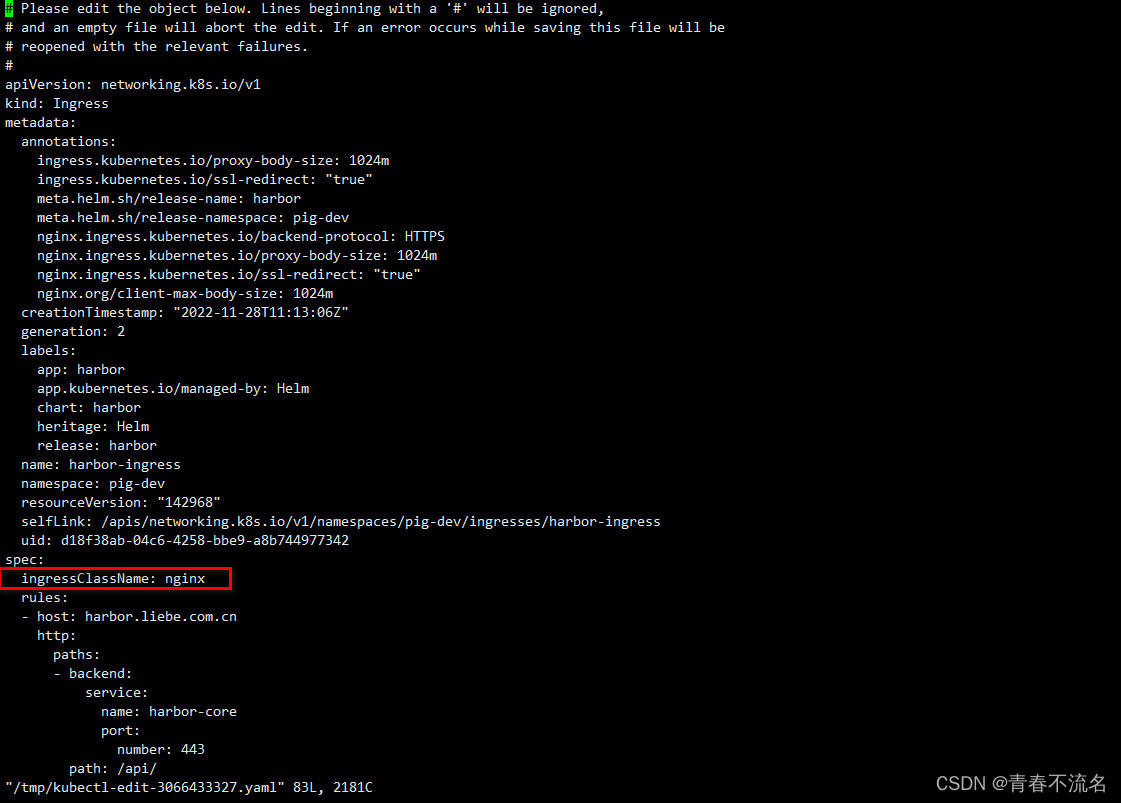
2.9、编辑ingress文件,类型vim操作
kubectl edit ingress -n pig-dev harbor-ingress
kubectl edit ingress -n pig-dev harbor-ingress-notary
增减内容:ingressClassName: nginx
两个文件都要增加ingressClassName: nginx
2.9.1、部署nginx-ingress-controller
apiVersion: v1
kind: Namespace
metadata:labels:app.kubernetes.io/instance: ingress-nginxapp.kubernetes.io/name: ingress-nginxname: ingress-nginx
---
apiVersion: v1
automountServiceAccountToken: true
kind: ServiceAccount
metadata:labels:app.kubernetes.io/component: controllerapp.kubernetes.io/instance: ingress-nginxapp.kubernetes.io/name: ingress-nginxapp.kubernetes.io/part-of: ingress-nginxapp.kubernetes.io/version: 1.2.1name: ingress-nginxnamespace: pig-dev
---
apiVersion: v1
kind: ServiceAccount
metadata:labels:app.kubernetes.io/component: admission-webhookapp.kubernetes.io/instance: ingress-nginxapp.kubernetes.io/name: ingress-nginxapp.kubernetes.io/part-of: ingress-nginxapp.kubernetes.io/version: 1.2.1name: ingress-nginx-admissionnamespace: pig-dev
---
apiVersion: rbac.authorization.k8s.io/v1
kind: Role
metadata:labels:app.kubernetes.io/component: controllerapp.kubernetes.io/instance: ingress-nginxapp.kubernetes.io/name: ingress-nginxapp.kubernetes.io/part-of: ingress-nginxapp.kubernetes.io/version: 1.2.1name: ingress-nginxnamespace: pig-dev
rules:
- apiGroups:- ""resources:- namespacesverbs:- get
- apiGroups:- ""resources:- configmaps- pods- secrets- endpointsverbs:- get- list- watch
- apiGroups:- ""resources:- servicesverbs:- get- list- watch
- apiGroups:- networking.k8s.ioresources:- ingressesverbs:- get- list- watch
- apiGroups:- networking.k8s.ioresources:- ingresses/statusverbs:- update
- apiGroups:- networking.k8s.ioresources:- ingressclassesverbs:- get- list- watch
- apiGroups:- ""resourceNames:- ingress-controller-leaderresources:- configmapsverbs:- get- update
- apiGroups:- ""resources:- configmapsverbs:- create
- apiGroups:- ""resources:- eventsverbs:- create- patch
---
apiVersion: rbac.authorization.k8s.io/v1
kind: Role
metadata:labels:app.kubernetes.io/component: admission-webhookapp.kubernetes.io/instance: ingress-nginxapp.kubernetes.io/name: ingress-nginxapp.kubernetes.io/part-of: ingress-nginxapp.kubernetes.io/version: 1.2.1name: ingress-nginx-admissionnamespace: pig-dev
rules:
- apiGroups:- ""resources:- secretsverbs:- get- create
---
apiVersion: rbac.authorization.k8s.io/v1
kind: ClusterRole
metadata:labels:app.kubernetes.io/instance: ingress-nginxapp.kubernetes.io/name: ingress-nginxapp.kubernetes.io/part-of: ingress-nginxapp.kubernetes.io/version: 1.2.1name: ingress-nginx
rules:
- apiGroups:- ""resources:- configmaps- endpoints- nodes- pods- secrets- namespacesverbs:- list- watch
- apiGroups:- ""resources:- nodesverbs:- get
- apiGroups:- ""resources:- servicesverbs:- get- list- watch
- apiGroups:- networking.k8s.ioresources:- ingressesverbs:- get- list- watch
- apiGroups:- ""resources:- eventsverbs:- create- patch
- apiGroups:- networking.k8s.ioresources:- ingresses/statusverbs:- update
- apiGroups:- networking.k8s.ioresources:- ingressclassesverbs:- get- list- watch
---
apiVersion: rbac.authorization.k8s.io/v1
kind: ClusterRole
metadata:labels:app.kubernetes.io/component: admission-webhookapp.kubernetes.io/instance: ingress-nginxapp.kubernetes.io/name: ingress-nginxapp.kubernetes.io/part-of: ingress-nginxapp.kubernetes.io/version: 1.2.1name: ingress-nginx-admission
rules:
- apiGroups:- admissionregistration.k8s.ioresources:- validatingwebhookconfigurationsverbs:- get- update
---
apiVersion: rbac.authorization.k8s.io/v1
kind: RoleBinding
metadata:labels:app.kubernetes.io/component: controllerapp.kubernetes.io/instance: ingress-nginxapp.kubernetes.io/name: ingress-nginxapp.kubernetes.io/part-of: ingress-nginxapp.kubernetes.io/version: 1.2.1name: ingress-nginxnamespace: pig-dev
roleRef:apiGroup: rbac.authorization.k8s.iokind: Rolename: ingress-nginx
subjects:
- kind: ServiceAccountname: ingress-nginxnamespace: pig-dev
---
apiVersion: rbac.authorization.k8s.io/v1
kind: RoleBinding
metadata:labels:app.kubernetes.io/component: admission-webhookapp.kubernetes.io/instance: ingress-nginxapp.kubernetes.io/name: ingress-nginxapp.kubernetes.io/part-of: ingress-nginxapp.kubernetes.io/version: 1.2.1name: ingress-nginx-admissionnamespace: pig-dev
roleRef:apiGroup: rbac.authorization.k8s.iokind: Rolename: ingress-nginx-admission
subjects:
- kind: ServiceAccountname: ingress-nginx-admissionnamespace: pig-dev
---
apiVersion: rbac.authorization.k8s.io/v1
kind: ClusterRoleBinding
metadata:labels:app.kubernetes.io/instance: ingress-nginxapp.kubernetes.io/name: ingress-nginxapp.kubernetes.io/part-of: ingress-nginxapp.kubernetes.io/version: 1.2.1name: ingress-nginx
roleRef:apiGroup: rbac.authorization.k8s.iokind: ClusterRolename: ingress-nginx
subjects:
- kind: ServiceAccountname: ingress-nginxnamespace: pig-dev
---
apiVersion: rbac.authorization.k8s.io/v1
kind: ClusterRoleBinding
metadata:labels:app.kubernetes.io/component: admission-webhookapp.kubernetes.io/instance: ingress-nginxapp.kubernetes.io/name: ingress-nginxapp.kubernetes.io/part-of: ingress-nginxapp.kubernetes.io/version: 1.2.1name: ingress-nginx-admission
roleRef:apiGroup: rbac.authorization.k8s.iokind: ClusterRolename: ingress-nginx-admission
subjects:
- kind: ServiceAccountname: ingress-nginx-admissionnamespace: pig-dev
---
apiVersion: v1
data:allow-snippet-annotations: "true"
kind: ConfigMap
metadata:labels:app.kubernetes.io/component: controllerapp.kubernetes.io/instance: ingress-nginxapp.kubernetes.io/name: ingress-nginxapp.kubernetes.io/part-of: ingress-nginxapp.kubernetes.io/version: 1.2.1name: ingress-nginx-controllernamespace: pig-dev
---
apiVersion: v1
kind: Service
metadata:labels:app.kubernetes.io/component: controllerapp.kubernetes.io/instance: ingress-nginxapp.kubernetes.io/name: ingress-nginxapp.kubernetes.io/part-of: ingress-nginxapp.kubernetes.io/version: 1.2.1name: ingress-nginx-controllernamespace: pig-dev
spec:externalTrafficPolicy: Localports:- appProtocol: httpname: httpport: 80protocol: TCPtargetPort: http- appProtocol: httpsname: httpsport: 443protocol: TCPtargetPort: httpsselector:app.kubernetes.io/component: controllerapp.kubernetes.io/instance: ingress-nginxapp.kubernetes.io/name: ingress-nginxtype: LoadBalancer
---
apiVersion: v1
kind: Service
metadata:labels:app.kubernetes.io/component: controllerapp.kubernetes.io/instance: ingress-nginxapp.kubernetes.io/name: ingress-nginxapp.kubernetes.io/part-of: ingress-nginxapp.kubernetes.io/version: 1.2.1name: ingress-nginx-controller-admissionnamespace: pig-dev
spec:ports:- appProtocol: httpsname: https-webhookport: 443targetPort: webhookselector:app.kubernetes.io/component: controllerapp.kubernetes.io/instance: ingress-nginxapp.kubernetes.io/name: ingress-nginxtype: ClusterIP
---
apiVersion: apps/v1
#kind: Deployment
kind: DaemonSet
metadata:labels:app.kubernetes.io/component: controllerapp.kubernetes.io/instance: ingress-nginxapp.kubernetes.io/name: ingress-nginxapp.kubernetes.io/part-of: ingress-nginxapp.kubernetes.io/version: 1.2.1name: ingress-nginx-controllernamespace: pig-dev
spec:minReadySeconds: 0revisionHistoryLimit: 10selector:matchLabels:app.kubernetes.io/component: controllerapp.kubernetes.io/instance: ingress-nginxapp.kubernetes.io/name: ingress-nginxtemplate:metadata:labels:app.kubernetes.io/component: controllerapp.kubernetes.io/instance: ingress-nginxapp.kubernetes.io/name: ingress-nginxspec:hostNetwork: truecontainers:- args:- /nginx-ingress-controller- --publish-service=$(POD_NAMESPACE)/ingress-nginx-controller- --election-id=ingress-controller-leader- --controller-class=k8s.io/ingress-nginx- --ingress-class=nginx- --configmap=$(POD_NAMESPACE)/ingress-nginx-controller- --validating-webhook=:8443- --validating-webhook-certificate=/usr/local/certificates/cert- --validating-webhook-key=/usr/local/certificates/keyenv:- name: POD_NAMEvalueFrom:fieldRef:fieldPath: metadata.name- name: POD_NAMESPACEvalueFrom:fieldRef:fieldPath: metadata.namespace- name: LD_PRELOADvalue: /usr/local/lib/libmimalloc.soimage: zhxl1989/ingress-nginx-controller:v1.2.1imagePullPolicy: IfNotPresentlifecycle:preStop:exec:command:- /wait-shutdownlivenessProbe:failureThreshold: 5httpGet:path: /healthzport: 10254scheme: HTTPinitialDelaySeconds: 10periodSeconds: 10successThreshold: 1timeoutSeconds: 1name: controllerports:- containerPort: 80name: httpprotocol: TCP- containerPort: 443name: httpsprotocol: TCP- containerPort: 8443name: webhookprotocol: TCPreadinessProbe:failureThreshold: 3httpGet:path: /healthzport: 10254scheme: HTTPinitialDelaySeconds: 10periodSeconds: 10successThreshold: 1timeoutSeconds: 1resources:requests:cpu: 100mmemory: 90MisecurityContext:allowPrivilegeEscalation: truecapabilities:add:- NET_BIND_SERVICEdrop:- ALLrunAsUser: 101volumeMounts:- mountPath: /usr/local/certificates/name: webhook-certreadOnly: truednsPolicy: ClusterFirstWithHostNetnodeSelector:kubernetes.io/os: linuxserviceAccountName: ingress-nginxterminationGracePeriodSeconds: 300volumes:- name: webhook-certsecret:secretName: ingress-nginx-admission
---
apiVersion: batch/v1
kind: Job
metadata:labels:app.kubernetes.io/component: admission-webhookapp.kubernetes.io/instance: ingress-nginxapp.kubernetes.io/name: ingress-nginxapp.kubernetes.io/part-of: ingress-nginxapp.kubernetes.io/version: 1.2.1name: ingress-nginx-admission-createnamespace: pig-dev
spec:template:metadata:labels:app.kubernetes.io/component: admission-webhookapp.kubernetes.io/instance: ingress-nginxapp.kubernetes.io/name: ingress-nginxapp.kubernetes.io/part-of: ingress-nginxapp.kubernetes.io/version: 1.2.1name: ingress-nginx-admission-createspec:containers:- args:- create- --host=ingress-nginx-controller-admission,ingress-nginx-controller-admission.$(POD_NAMESPACE).svc- --namespace=$(POD_NAMESPACE)- --secret-name=ingress-nginx-admissionenv:- name: POD_NAMESPACEvalueFrom:fieldRef:fieldPath: metadata.namespaceimage: zhxl1989/ingress-nginx-kube-webhook-certgen:v1.1.1imagePullPolicy: IfNotPresentname: createsecurityContext:allowPrivilegeEscalation: falsenodeSelector:kubernetes.io/os: linuxrestartPolicy: OnFailuresecurityContext:fsGroup: 2000runAsNonRoot: truerunAsUser: 2000serviceAccountName: ingress-nginx-admission
---
apiVersion: batch/v1
kind: Job
metadata:labels:app.kubernetes.io/component: admission-webhookapp.kubernetes.io/instance: ingress-nginxapp.kubernetes.io/name: ingress-nginxapp.kubernetes.io/part-of: ingress-nginxapp.kubernetes.io/version: 1.2.1name: ingress-nginx-admission-patchnamespace: pig-dev
spec:template:metadata:labels:app.kubernetes.io/component: admission-webhookapp.kubernetes.io/instance: ingress-nginxapp.kubernetes.io/name: ingress-nginxapp.kubernetes.io/part-of: ingress-nginxapp.kubernetes.io/version: 1.2.1name: ingress-nginx-admission-patchspec:containers:- args:- patch- --webhook-name=ingress-nginx-admission- --namespace=$(POD_NAMESPACE)- --patch-mutating=false- --secret-name=ingress-nginx-admission- --patch-failure-policy=Failenv:- name: POD_NAMESPACEvalueFrom:fieldRef:fieldPath: metadata.namespaceimage: zhxl1989/ingress-nginx-kube-webhook-certgen:v1.1.1imagePullPolicy: IfNotPresentname: patchsecurityContext:allowPrivilegeEscalation: falsenodeSelector:kubernetes.io/os: linuxrestartPolicy: OnFailuresecurityContext:fsGroup: 2000runAsNonRoot: truerunAsUser: 2000serviceAccountName: ingress-nginx-admission
---
apiVersion: networking.k8s.io/v1
kind: IngressClass
metadata:labels:app.kubernetes.io/component: controllerapp.kubernetes.io/instance: ingress-nginxapp.kubernetes.io/name: ingress-nginxapp.kubernetes.io/part-of: ingress-nginxapp.kubernetes.io/version: 1.2.1name: nginx
spec:controller: k8s.io/ingress-nginx
---
apiVersion: admissionregistration.k8s.io/v1
kind: ValidatingWebhookConfiguration
metadata:labels:app.kubernetes.io/component: admission-webhookapp.kubernetes.io/instance: ingress-nginxapp.kubernetes.io/name: ingress-nginxapp.kubernetes.io/part-of: ingress-nginxapp.kubernetes.io/version: 1.2.1name: ingress-nginx-admission
webhooks:
- admissionReviewVersions:- v1clientConfig:service:name: ingress-nginx-controller-admissionnamespace: pig-devpath: /networking/v1/ingressesfailurePolicy: FailmatchPolicy: Equivalentname: validate.nginx.ingress.kubernetes.iorules:- apiGroups:- networking.k8s.ioapiVersions:- v1operations:- CREATE- UPDATEresources:- ingressessideEffects: None
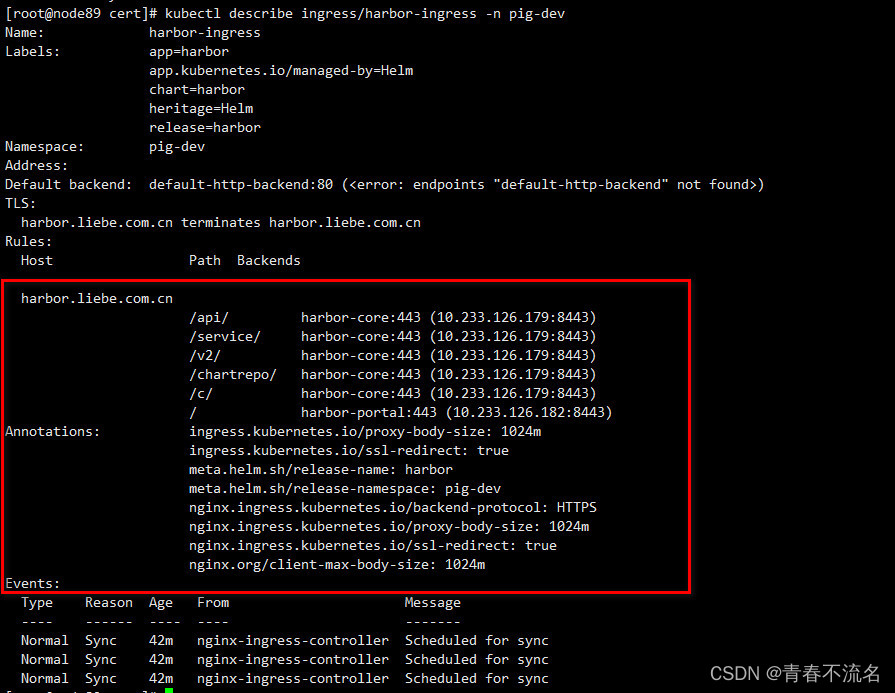
2.9.2、查看配置Ingress的配置结果
kubectl describe ingress/harbor-ingress -n pig-dev
3、访问
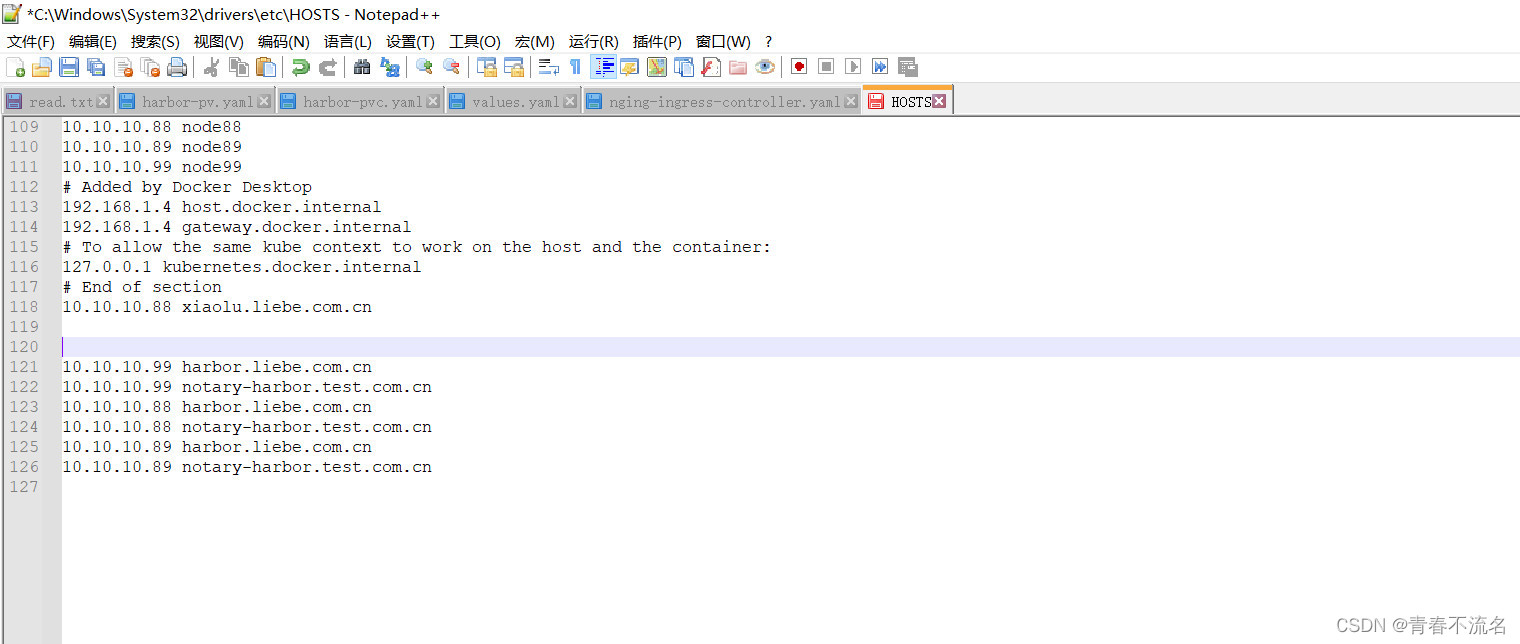
3.1、window配置hosts
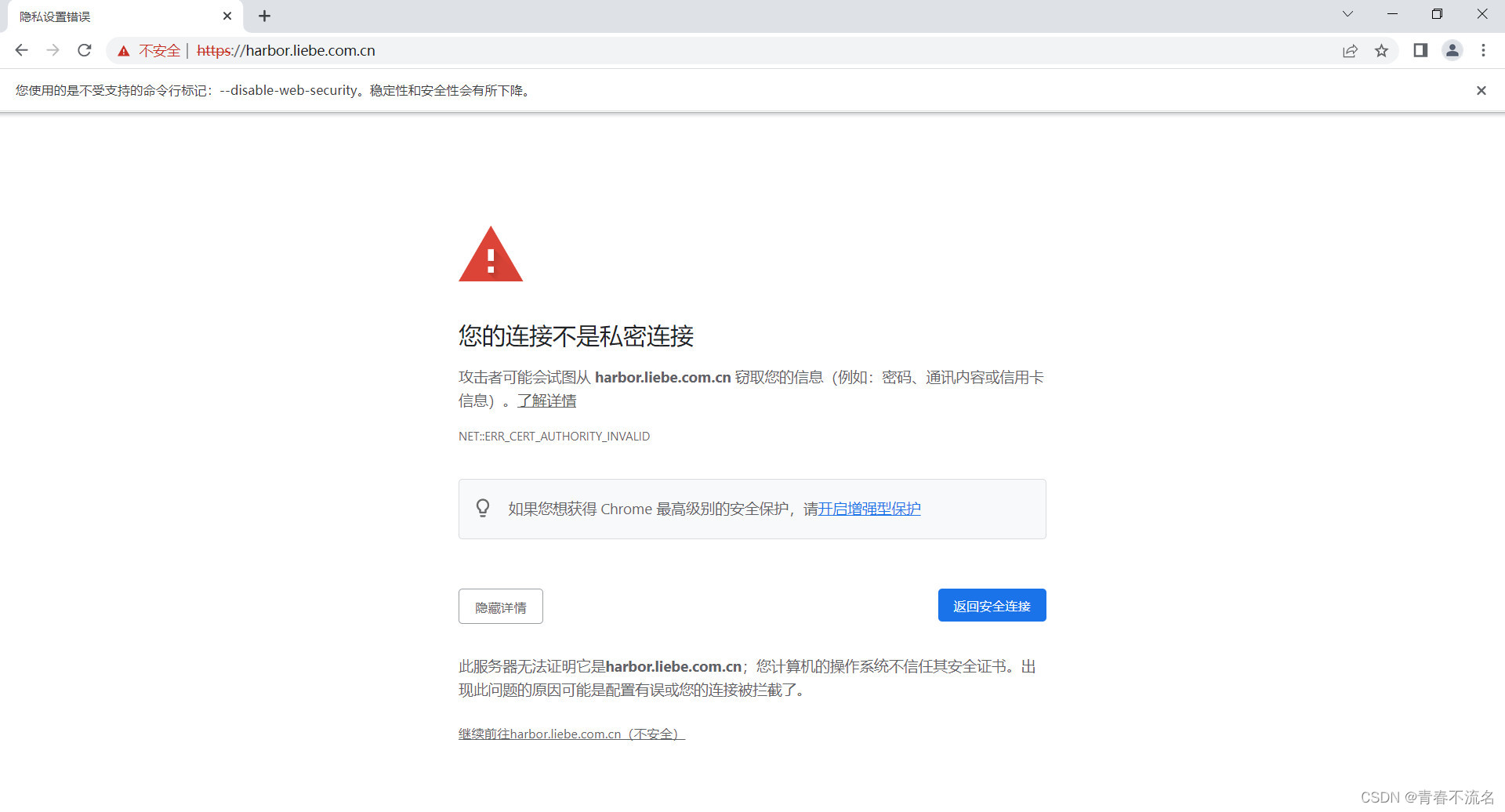
3.2、访问地址
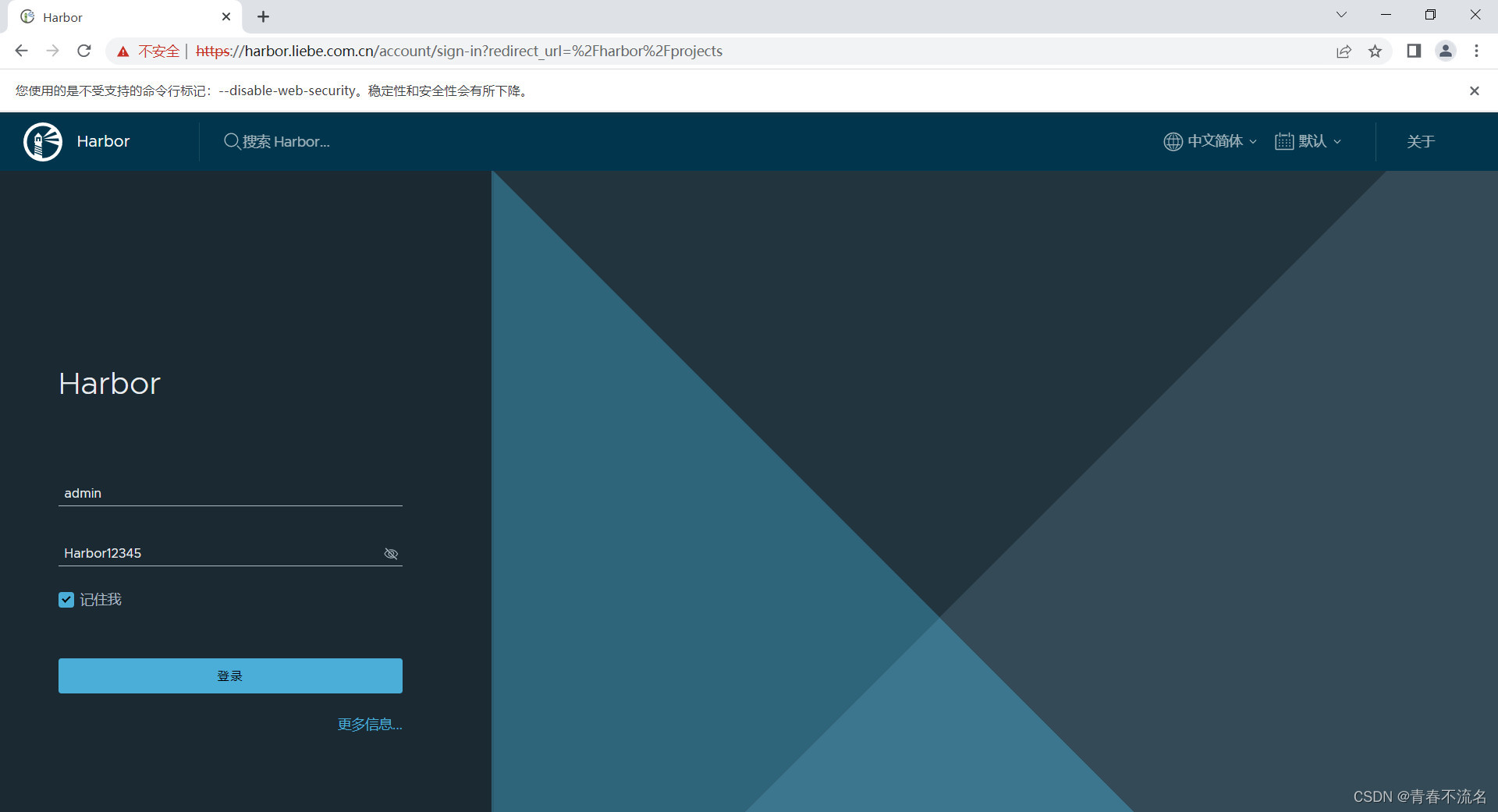
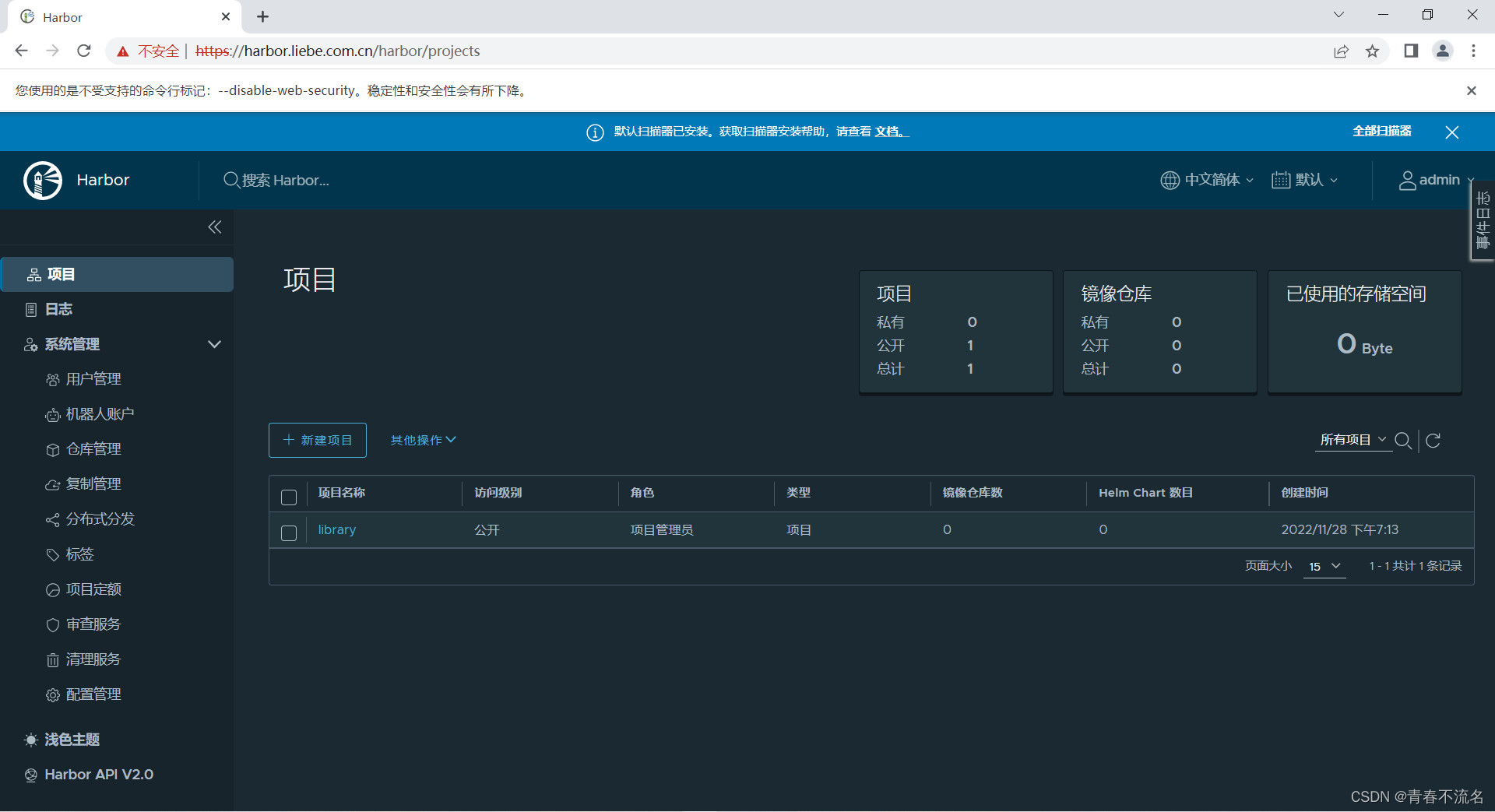
https://harbor.liebe.com.cn/harbor/projects
用户名:admin
密码:Harbor12345
相关内容
热门资讯
应用未安装解决办法 平板应用未...
---IT小技术,每天Get一个小技能!一、前言描述苹果IPad2居然不能安装怎么办?与此IPad不...
脚上的穴位图 脚面经络图对应的...
人体穴位作用图解大全更清晰直观的标注了各个人体穴位的作用,包括头部穴位图、胸部穴位图、背部穴位图、胳...
demo什么意思 demo版本...
618快到了,各位的小金库大概也在准备开闸放水了吧。没有小金库的,也该向老婆撒娇卖萌服个软了,一切只...
猫咪吃了塑料袋怎么办 猫咪误食...
你知道吗?塑料袋放久了会长猫哦!要说猫咪对塑料袋的喜爱程度完完全全可以媲美纸箱家里只要一有塑料袋的响...
世界上最漂亮的人 世界上最漂亮...
此前在某网上,选出了全球265万颜值姣好的女性。从这些数量庞大的女性群体中,人们投票选出了心目中最美...
埃菲尔铁塔在哪 中国仿建埃菲尔...
2019年4月26日,广西南宁市,街头惊现一座巨型山寨版埃菲尔铁塔,高约20米,白色塔身,造型逼真,...
苗族的传统节日 贵州苗族节日有...
【岜沙苗族芦笙节】岜沙,苗语叫“分送”,距从江县城7.5公里,是世界上最崇拜树木并以树为神的枪手部落...
北京的名胜古迹 北京最著名的景...
北京从元代开始,逐渐走上帝国首都的道路,先是成为大辽朝五大首都之一的南京城,随着金灭辽,金代从海陵王...
应用未安装解决办法 平板应用未...
---IT小技术,每天Get一个小技能!一、前言描述苹果IPad2居然不能安装怎么办?与此IPad不...
脚上的穴位图 脚面经络图对应的...
人体穴位作用图解大全更清晰直观的标注了各个人体穴位的作用,包括头部穴位图、胸部穴位图、背部穴位图、胳...
长白山自助游攻略 吉林长白山游...
昨天介绍了西坡的景点详细请看链接:一个人的旅行,据说能看到长白山天池全凭运气,您的运气如何?今日介绍...
demo什么意思 demo版本...
618快到了,各位的小金库大概也在准备开闸放水了吧。没有小金库的,也该向老婆撒娇卖萌服个软了,一切只...
猫咪吃了塑料袋怎么办 猫咪误食...
你知道吗?塑料袋放久了会长猫哦!要说猫咪对塑料袋的喜爱程度完完全全可以媲美纸箱家里只要一有塑料袋的响...
世界上最漂亮的人 世界上最漂亮...
此前在某网上,选出了全球265万颜值姣好的女性。从这些数量庞大的女性群体中,人们投票选出了心目中最美...