

osgEarth示例分析——osgearth_manip
创始人
2024-02-27 12:57:56
前言
本示例主要演示osgEarth的事件处理的用法,内容比较多,这部分功能也很重要。
输入命令依然采用china-simple.earth的示例,加上了模型,但是模型并没有看到,可能是因为模型没有放大太小的原因。在代码中设置了不加载模型的话,会绘制两个半圆。
// 加载模型,但是看不到,估计是模型太小,需要放大
osgearth_manipd.exe earth_image/china-simple.earth --model axes.osgt// 并没有加载模型
osgearth_manipd.exe earth_image/china-simple.earth --model modelToLoad// 不加载模型,会默认创建一个半球,距离太远的话,半球也看不到
osgearth_manipd.exe earth_image/china-simple.earth
执行效果
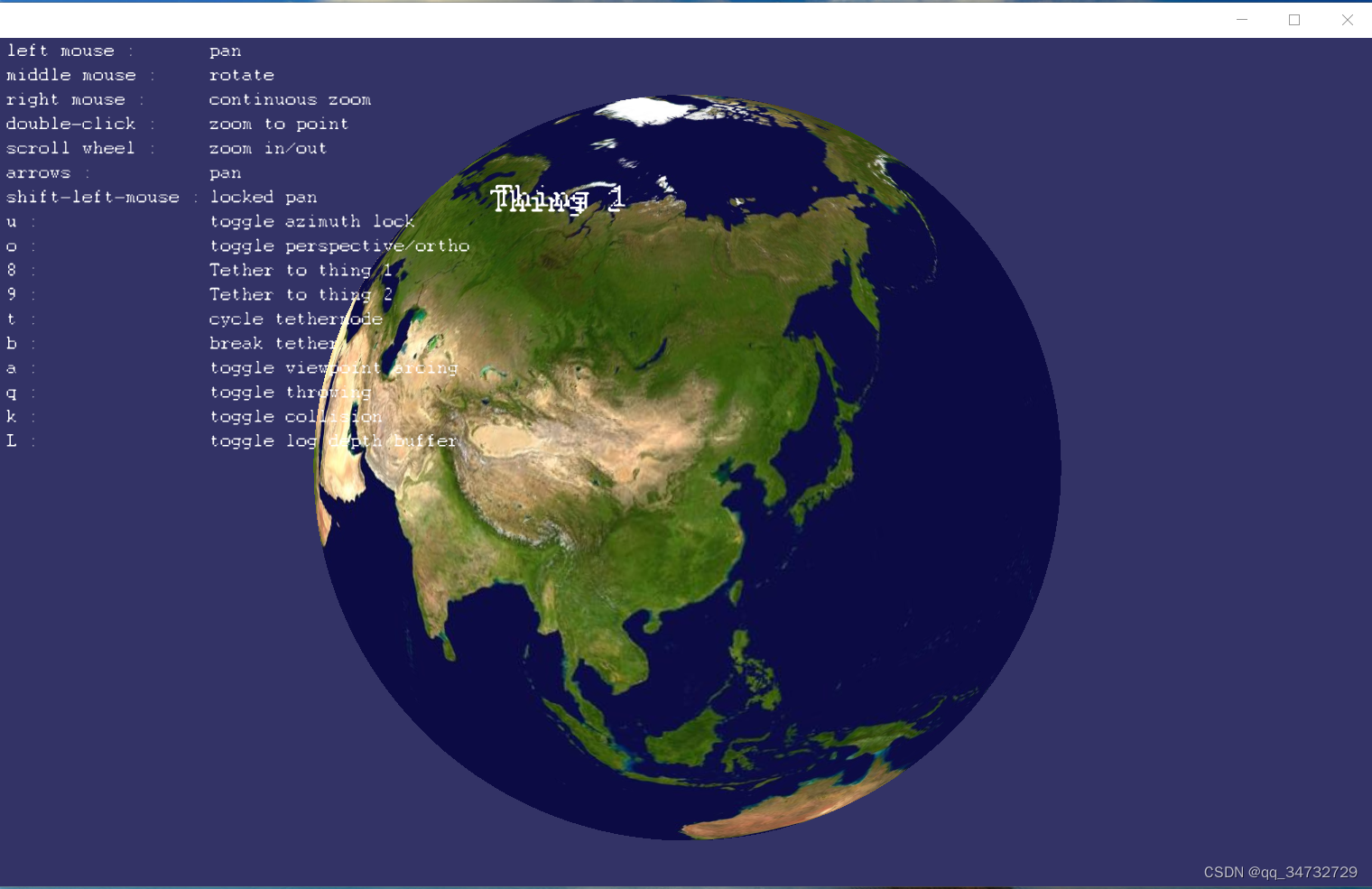
按下W键,开启坐标,也就是黄色的两条线,交点始终跟随 Thing 1 节点。
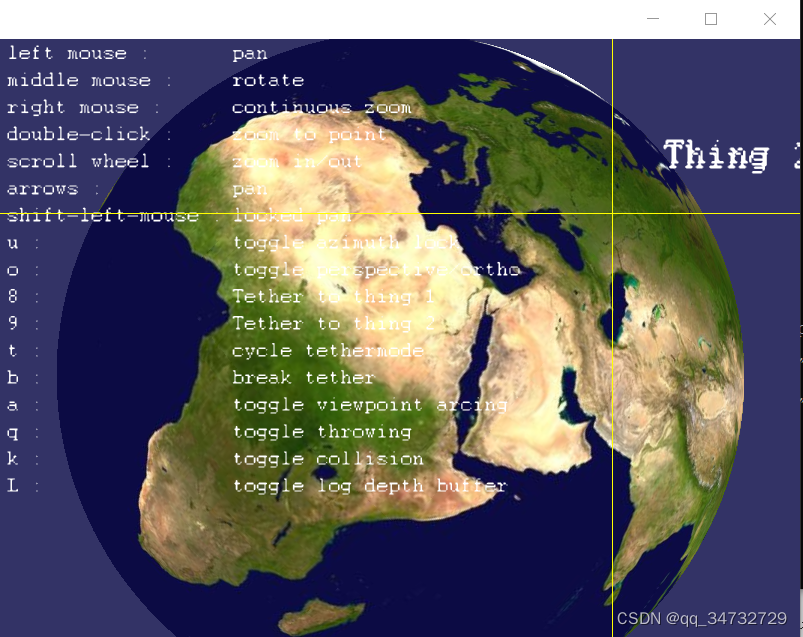
按键说明
| * | 左键 | 按住左键拖动地球 | * | u | 看不出来,没啥变化 |
| * | 中键 | 按住中键可以旋转地球 | * | o | 切换操作器,地球会有大小变化 |
| * | 右键 | 按住右键前后移动,缩放地球 | * | 8 | 视角绑定thing 1,也可以说跟踪 |
| * | 右键/左键 双击 | 越来越远/越来越近 | * | 9 | 视角绑定thing 2,也可以说跟踪 |
| * | 滚轮滚动 | 视角远近控制 | * | t | 地球三种转动状态的切换 |
| * | arrows | shift+上/下/左/右键, 好像没啥作用 | * | b | 解除绑定 '8' ‘9’,,或者说解除跟踪 |
| * | shift+左键 | 看不出来,没啥变化 | * | a | 看不出来,没啥变化 |
| * | q | 看不出来,没啥变化 | |||
| * | k | 看不出来,没啥变化 | |||
| * | L | 看不出来,没啥变化 | |||
| * | j | 定位到可以看见一组点的视点 | |||
| * | W | 绘制两条线,交点始终定位在thing 1上,屏幕坐标系 |
[注] 必须在英文下输入,如果没有注意,在中文状态下输入字符,地球会被卡住。此时只能退出重新运行程序。
thing1 thing 2,这两个文本是移动的。
代码分析
#include #include
#include
#include
#include
#include
#include
#include
#include
#include
#include
#include
#include
#include
#include
#include
#include
#include
#include
#include
#include
#include
#include
#include using namespace osgEarth::Util;
using namespace osgEarth::Util::Controls;
using namespace osgEarth::Annotation;#define D2R (osg::PI/180.0)
#define R2D (180.0/osg::PI)namespace
{/*** Tether callback test.是否绑定*/struct TetherCB : public EarthManipulator::TetherCallback{void operator()(osg::Node* node){if ( node ) {OE_WARN << "Tether on\n";}else {OE_WARN << "Tether off\n";}}};/*** Builds our help menu UI.创建左上角的说明文档*/Container* createHelp( osgViewer::View* view ){const char* text[] ={"left mouse :",        "pan","middle mouse :",      "rotate","right mouse :",       "continuous zoom","double-click :",      "zoom to point","scroll wheel :",      "zoom in/out","arrows :",            "pan",//"1-6 :",               "fly to preset viewpoints","shift-left-mouse :",  "locked pan","u :",                 "toggle azimuth lock","o :",                 "toggle perspective/ortho","8 :",                 "Tether to thing 1","9 :",                 "Tether to thing 2","t :",                 "cycle tethermode","b :",                 "break tether","a :",                 "toggle viewpoint arcing","q :",                 "toggle throwing","k :",                 "toggle collision","L :",                 "toggle log depth buffer"//"W :",				   "坐标系",		// 源代码并没有这两个提示//"j :",				   "定位到指定点组的视点",};Grid* g = new Grid();// 创建网格unsigned i, c, r;std::cout << sizeof(text) << std::endl;		// 存储所有指针占位多少std::cout << sizeof(text[0]) << std::endl;	// 每个指针占位多少for( i=0; isetControl( c, r, new LabelControl(text[i]) );// 两列c,i行r,显示label控件}VBox* v = new VBox();v->addControl( g );// 将网格控件放入VBox控件中return v;}/*** Some preset viewpoints to show off the setViewpoint function.*/static Viewpoint VPs[] = {Viewpoint( "Africa",            0.0,   0.0, 0.0, 0.0, -90.0, 10e6 ),Viewpoint( "California",     -121.0,  34.0, 0.0, 0.0, -90.0, 6e6 ),Viewpoint( "Europe",            0.0,  45.0, 0.0, 0.0, -90.0, 4e6 ),Viewpoint( "Washington DC",   -77.0,  38.0, 0.0, 0.0, -90.0, 1e6 ),Viewpoint( "Australia",       135.0, -20.0, 0.0, 0.0, -90.0, 2e6 ),Viewpoint( "Boston",         -71.096936, 42.332771, 0, 0.0, -90, 1e5 )};/*** Handler that demonstrates the "viewpoint" functionality in *  osgEarthUtil::EarthManipulator. Press a number key to fly to a viewpoint.*/struct FlyToViewpointHandler : public osgGA::GUIEventHandler {FlyToViewpointHandler( EarthManipulator* manip ) : _manip(manip) { }bool handle( const osgGA::GUIEventAdapter& ea, osgGA::GUIActionAdapter& aa ){if ( ea.getEventType() == ea.KEYDOWN && ea.getKey() >= '1' && ea.getKey() <= '6' ){_manip->setViewpoint( VPs[ea.getKey()-'1'], 4.0 );// 根据设置好的位置,123456定位不同的地点aa.requestRedraw();}return false;}osg::observer_ptr _manip;};/*** Toggles the logarithmic depth buffer切换对数深度缓冲区*/struct ToggleLDB : public osgGA::GUIEventHandler{ToggleLDB(char key) : _key(key), _installed(false) { }// key=Lbool handle(const osgGA::GUIEventAdapter& ea, osgGA::GUIActionAdapter& aa){if (ea.getEventType() == ea.KEYDOWN && ea.getKey() == _key){if ( !_installed ){_nfratio = aa.asView()->getCamera()->getNearFarRatio();// 获取到近/远率_ldb.install(aa.asView()->getCamera());aa.asView()->getCamera()->setNearFarRatio(0.00001);}else{_ldb.uninstall(aa.asView()->getCamera());aa.asView()->getCamera()->setNearFarRatio(_nfratio);}_installed = !_installed;// 每次切换return true;}return false;}void getUsage(osg::ApplicationUsage& usage) const{using namespace std;usage.addKeyboardMouseBinding(string(1, _key), string("Toggle LDB"));}char _key;float _nfratio;bool _installed;osgEarth::Util::LogarithmicDepthBuffer _ldb;};/*** Toggles screen space layout on the sismulated objects 切换模拟对象的屏幕空间布局*/struct ToggleSSL : public osgGA::GUIEventHandler{ToggleSSL(osg::Group* g, char key) : _group(g), _key(key), _installed(false) { }// key=)bool handle(const osgGA::GUIEventAdapter& ea, osgGA::GUIActionAdapter& aa){if (ea.getEventType() == ea.KEYDOWN && ea.getKey() == _key){_installed = !_installed;ScreenSpaceLayout::setDeclutteringEnabled(_installed);// 启动或禁用清理return true;}return false;}void getUsage(osg::ApplicationUsage& usage) const{using namespace std;usage.addKeyboardMouseBinding(string(1, _key), string("Toggle SSL"));}char _key;osg::Group* _group;bool _installed;};/*** Handler to toggle "azimuth locking", which locks the camera's relative Azimuth* while panning. For example, it can maintain "north-up" as you pan around. The* caveat is that when azimuth is locked you cannot cross the poles.*/struct LockAzimuthHandler : public osgGA::GUIEventHandler // 锁定/解锁 方位角{LockAzimuthHandler(char key, EarthManipulator* manip) // 传入key = u: _key(key), _manip(manip) { }bool handle(const osgGA::GUIEventAdapter& ea, osgGA::GUIActionAdapter& aa){if (ea.getEventType() == ea.KEYDOWN && ea.getKey() == _key){bool lockAzimuth = _manip->getSettings()->getLockAzimuthWhilePanning();std::cout << "按下 u" << std::endl;// 确实收到消息,但是在操作上并没有看到所定方位角_manip->getSettings()->setLockAzimuthWhilePanning(!lockAzimuth);// 设置为当前状态相反的状态aa.requestRedraw();return true;}return false;}void getUsage(osg::ApplicationUsage& usage) const{using namespace std;usage.addKeyboardMouseBinding(string(1, _key), string("Toggle azimuth locking"));}char _key;osg::ref_ptr _manip;};/*** Handler to toggle "viewpoint transition arcing", which causes the camera to "arc"* as it travels from one viewpoint to another.*/struct ToggleArcViewpointTransitionsHandler : public osgGA::GUIEventHandler{ToggleArcViewpointTransitionsHandler(char key, EarthManipulator* manip): _key(key), _manip(manip) { }// key=abool handle(const osgGA::GUIEventAdapter& ea, osgGA::GUIActionAdapter& aa){if (ea.getEventType() == ea.KEYDOWN && ea.getKey() == _key){bool arc = _manip->getSettings()->getArcViewpointTransitions();std::cout << "按下 a" << std::endl;// 确实收到消息,但是没看出什么变化_manip->getSettings()->setArcViewpointTransitions(!arc);aa.requestRedraw();return true;}return false;}void getUsage(osg::ApplicationUsage& usage) const{using namespace std;usage.addKeyboardMouseBinding(string(1, _key), string("Arc viewpoint transitions"));}char _key;osg::ref_ptr _manip;};/*** Toggles the throwing feature.切换投掷功能。*/struct ToggleThrowingHandler : public osgGA::GUIEventHandler{ToggleThrowingHandler(char key, EarthManipulator* manip): _key(key), _manip(manip)// key=q{}bool handle(const osgGA::GUIEventAdapter& ea, osgGA::GUIActionAdapter& aa){if (ea.getEventType() == ea.KEYDOWN && ea.getKey() == _key){bool throwing = _manip->getSettings()->getThrowingEnabled();std::cout << "按下 q" << std::endl;// 确实收到消息,但是没看出什么变化_manip->getSettings()->setThrowingEnabled( !throwing );aa.requestRedraw();return true;}return false;}void getUsage(osg::ApplicationUsage& usage) const{using namespace std;usage.addKeyboardMouseBinding(string(1, _key), string("Toggle throwing"));}char _key;osg::ref_ptr _manip;};/*** Toggles the collision feature.切换碰撞功能。*/struct ToggleCollisionHandler : public osgGA::GUIEventHandler{ToggleCollisionHandler(char key, EarthManipulator* manip): _key(key), _manip(manip)// key=k{}bool handle(const osgGA::GUIEventAdapter& ea, osgGA::GUIActionAdapter& aa){if (ea.getEventType() == ea.KEYDOWN && ea.getKey() == _key){bool value = _manip->getSettings()->getTerrainAvoidanceEnabled();std::cout << "按下 k" << std::endl;// 确实收到消息,但是没看出什么变化_manip->getSettings()->setTerrainAvoidanceEnabled( !value );aa.requestRedraw();return true;}return false;}void getUsage(osg::ApplicationUsage& usage) const{using namespace std;usage.addKeyboardMouseBinding(string(1, _key), string("Toggle terrain avoidance"));}char _key;osg::ref_ptr _manip;};/*** Breaks a tether.三种状态的切换*/struct CycleTetherMode : public osgGA::GUIEventHandler{CycleTetherMode(char key, EarthManipulator* manip): _key(key), _manip(manip) { }// key=tbool handle(const osgGA::GUIEventAdapter& ea, osgGA::GUIActionAdapter& aa){if (ea.getEventType() == ea.KEYDOWN && ea.getKey() == _key){EarthManipulator::TetherMode mode = _manip->getSettings()->getTetherMode();if ( mode == _manip->TETHER_CENTER ) { _manip->getSettings()->setTetherMode( _manip->TETHER_CENTER_AND_HEADING );// 相机将跟随节点,仅跟随方向旋转OE_NOTICE << "Tether mode = TETHER_CENTER_AND_HEADING\n";}else if ( mode == _manip->TETHER_CENTER_AND_HEADING ) {_manip->getSettings()->setTetherMode( _manip->TETHER_CENTER_AND_ROTATION ); // 摄影机将跟随节点和节点所做的所有旋转OE_NOTICE << "Tether mode = TETHER_CENTER_AND_ROTATION\n";}else {_manip->getSettings()->setTetherMode( _manip->TETHER_CENTER );// 摄影机将跟随节点的中心。OE_NOTICE << "Tether mode = CENTER\n";}aa.requestRedraw();return true;}return false;}void getUsage(osg::ApplicationUsage& usage) const{using namespace std;usage.addKeyboardMouseBinding(string(1, _key), string("Cycle Tether Mode"));}char _key;osg::ref_ptr _manip;};/*** Breaks a tether.解绑*/struct BreakTetherHandler : public osgGA::GUIEventHandler{BreakTetherHandler(char key, EarthManipulator* manip): _key(key), _manip(manip) { }//key=bbool handle(const osgGA::GUIEventAdapter& ea, osgGA::GUIActionAdapter& aa){if (ea.getEventType() == ea.KEYDOWN && ea.getKey() == _key){_manip->clearViewpoint();// 解除所有操作器绑定,恢复自由状态。thing1和 thing2 的状态改变明显aa.requestRedraw();return true;}return false;}void getUsage(osg::ApplicationUsage& usage) const{using namespace std;usage.addKeyboardMouseBinding(string(1, _key), string("Break a tether"));}char _key;osg::ref_ptr _manip;};/*** Adjusts the position offset.调整位置偏移。*/struct SetPositionOffset : public osgGA::GUIEventHandler{SetPositionOffset(EarthManipulator* manip): _manip(manip) { }bool handle(const osgGA::GUIEventAdapter& ea, osgGA::GUIActionAdapter& aa){if (ea.getEventType() == ea.KEYDOWN && (ea.getModKeyMask() & ea.MODKEY_SHIFT) ){Viewpoint oldvp = _manip->getViewpoint();double seconds = 0.5; // 时间秒。每次切换都需要0.5秒if ( ea.getKey() == ea.KEY_Left )// 左键{Viewpoint vp;vp.positionOffset() = oldvp.positionOffset().get() + osg::Vec3f(-1000,0,0);_manip->setViewpoint( vp, seconds );}else if ( ea.getKey() == ea.KEY_Right )// 右键{Viewpoint vp;vp.positionOffset() = oldvp.positionOffset().get() + osg::Vec3f(1000,0,0);_manip->setViewpoint( vp, seconds );}else if ( ea.getKey() == ea.KEY_Up )// 上键{Viewpoint vp;vp.positionOffset() = oldvp.positionOffset().get() + osg::Vec3f(0,0,1000);_manip->setViewpoint( vp, seconds );}else if ( ea.getKey() == ea.KEY_Down )// 下键{Viewpoint vp;vp.positionOffset() = oldvp.positionOffset().get() + osg::Vec3f(0,0,-1000);_manip->setViewpoint( vp, seconds );}aa.requestRedraw();return true;}return false;}osg::ref_ptr _manip;};/*** Toggles perspective/ortho projection matrix. 切换投影矩阵,透视投影矩阵和正射投影矩阵*/struct ToggleProjMatrix : public osgGA::GUIEventHandler{ToggleProjMatrix(char key, EarthManipulator* manip): _key(key), _manip(manip)// ley=o{}bool handle(const osgGA::GUIEventAdapter& ea, osgGA::GUIActionAdapter& aa){if (ea.getEventType() == ea.KEYDOWN && ea.getKey() == _key){osg::Matrix proj = aa.asView()->getCamera()->getProjectionMatrix();if ( proj(3,3) == 0 ){OE_NOTICE << "Switching to orthographc.\n";proj.getPerspective(_vfov, _ar, _zn, _zf); // 获取值aa.asView()->getCamera()->setProjectionMatrixAsOrtho(-1, 1, -1, 1, _zn, _zf);// 正射投影矩阵}else{OE_NOTICE << "Switching to perspective.\n";aa.asView()->getCamera()->setProjectionMatrixAsPerspective(_vfov, _ar, _zn, _zf);// 透视矩阵}aa.requestRedraw();return true;}return false;}void getUsage(osg::ApplicationUsage& usage) const{using namespace std;usage.addKeyboardMouseBinding(string(1, _key), string("Toggle projection matrix type"));}char _key;osg::ref_ptr _manip;double _vfov, _ar, _zn, _zf;};// 定位到某组点的视点,一组点都可以看到struct FitViewToPoints : public osgGA::GUIEventHandler{std::vector _points;const SpatialReference* _mapSRS;FitViewToPoints(char key, EarthManipulator* manip, const SpatialReference* mapSRS): _key(key), _manip(manip), _mapSRS(mapSRS)// key=j{// Set up a list of control pointsconst SpatialReference* srs = SpatialReference::get("wgs84");_points.push_back(GeoPoint(srs, -120, 30, 0));_points.push_back(GeoPoint(srs, -100, 45, 0));}bool handle(const osgGA::GUIEventAdapter& ea, osgGA::GUIActionAdapter& aa){if (ea.getEventType() == ea.KEYDOWN && ea.getKey() == _key){// fitter 创建适合摄影机视图平截头体的视点,以尽可能紧密地包围一组地理空间点。ViewFitter fitter(_mapSRS, aa.asView()->getCamera());fitter.setBuffer( 100000.0 );Viewpoint vp;if (fitter.createViewpoint(_points, vp))// 根据_points重新生成一个vp视点{_manip->setViewpoint(vp);// 定位到vp视点aa.requestRedraw();}return true;}return false;}void getUsage(osg::ApplicationUsage& usage) const{using namespace std;usage.addKeyboardMouseBinding(string(1, _key), string("FitViewToPoints"));}char _key;osg::ref_ptr _manip;};/*** A simple simulator that moves an object around the Earth. We use this to* demonstrate/test tethering.*/// 一个简单的模拟器,可以使物体绕地球运动。用来演示跟踪thingstruct Simulator : public osgGA::GUIEventHandler{Simulator( osg::Group* root, EarthManipulator* manip, MapNode* mapnode, osg::Node* model, const char* name, char key): _manip(manip), _mapnode(mapnode), _model(model), _name(name), _key(key) // key=8 或 9{if ( !model ){ // 模型不存在,则创建一个半球,半径和颜色_model = AnnotationUtils::createHemisphere(250.0, osg::Vec4(1,.7,.4,1));std::cout << "no model" << std::endl;}_geo = new GeoPositionNode();_geo->getPositionAttitudeTransform()->addChild(_model);Style style;TextSymbol* text = style.getOrCreate();text->size() = 32.0f;text->declutter() = false;text->pixelOffset()->set(50, 50);// 文本偏移像素点_label = new LabelNode(_name, style);// _name 即要显示的名称_label->setDynamic( true );// 因为文本移动,所以此处设置为true_label->setHorizonCulling(false);// 不需要裁剪_geo->getPositionAttitudeTransform()->addChild(_label);mapnode->addChild(_geo.get());}bool handle(const osgGA::GUIEventAdapter& ea, osgGA::GUIActionAdapter& aa){if ( ea.getEventType() == ea.FRAME )// 此语段为标签添加了动画{double t0 = osg::Timer::instance()->time_s();// 儒略日时间double t = fmod( t0, 6000.0 ) / 6000.0;// t0%6000/6000, 将数字控制在[0,1)范围内GeoPoint p = _start.interpolate(_end, t);// 差值,在_end和t之间// GeoMath::bearing 以弧度计算从一个点到下一个点的初始方位double bearing = GeoMath::bearing(_start.y(), _start.x(), p.y(), p.x());float a = sin(t0*0.2);// a值没有被用float pitch = 0.0;_geo->setPosition(p);_geo->setLocalRotation(osg::Quat(pitch, osg::Vec3d(1, 0, 0)) *osg::Quat(bearing, osg::Vec3d(0, 0, -1)));}else if ( ea.getEventType() == ea.KEYDOWN ){if ( ea.getKey() == _key )// 8 或 9{                                Viewpoint vp = _manip->getViewpoint();//vp.setNode( _pat.get() );vp.setNode(_model);vp.range() = 25000.0;vp.pitch() = -45.0;_manip->setViewpoint(vp, 2.0);// 2秒内飞到指定位置}return true;}return false;}std::string                        _name;char                               _key;MapNode*                           _mapnode;EarthManipulator*                  _manip;GeoPoint                           _start, _end;LabelNode*                         _label;osg::Node*                         _model;float                              _heading;float                              _pitch;osg::ref_ptr      _geo;};/*** Place an X at the sim entity position, in screen space.* The point of this is to test the EarthManipulator::UpdateCameraCallback* which provides a frame-synched camera matrix (post-update traversal)*/// 创建一个十字坐标struct CalculateWindowCoords : public osgGA::GUIEventHandler{CalculateWindowCoords(char key, EarthManipulator* manip, Simulator* sim): _key(key), _active(false), _sim(sim), _xform(0L){//nop}void onUpdateCamera(const osg::Camera* cam){if (_active){if (!_xform){osg::Geometry* geom = new osg::Geometry();osg::Vec3Array* verts = new osg::Vec3Array();verts->push_back(osg::Vec3(-10000, 0, 0));verts->push_back(osg::Vec3( 10000, 0, 0));verts->push_back(osg::Vec3( 0, -10000, 0));verts->push_back(osg::Vec3( 0,  10000, 0));verts->push_back(osg::Vec3( 0, 0, -10000));verts->push_back(osg::Vec3( 0, 0,  10000));geom->setVertexArray(verts);osg::Vec4Array* colors = new osg::Vec4Array();colors->push_back(osg::Vec4(1, 1, 0, 1));// 黄色线colors->setBinding(colors->BIND_OVERALL);geom->setColorArray(colors);geom->addPrimitiveSet(new osg::DrawArrays(GL_LINES, 0, 6));// 6个点,绘制3条线,但屏幕上仅能看出2条线,水平和垂直geom->setCullingActive(false);// 不裁剪geom->getOrCreateStateSet()->setAttributeAndModes(new osg::Depth(osg::Depth::ALWAYS, 0, 1, true), 1);//深度设置_xform = new osg::MatrixTransform();_xform->addChild(geom);osg::View* view = const_cast(cam->getView());ControlCanvas::getOrCreate(view)->addChild(_xform);}/// 坐标变换 V_clip=M_projection⋅M_view⋅M_model⋅V_local  裁剪坐标=透视矩阵*观察矩阵*模型矩阵*本地坐标——来自OpenGLGeoPoint p = _sim->_geo->getPosition();// 获取thing1的坐标点osg::Vec3d world;p.toWorld(world);// 转化为世界坐标osg::Matrix worldToWindow =cam->getViewMatrix() *cam->getProjectionMatrix() *cam->getViewport()->computeWindowMatrix();// 世界坐标转到窗口坐标osg::Vec3d win = world * worldToWindow;// 得到窗口坐标_xform->setMatrix(osg::Matrix::translate(win));}}bool handle(const osgGA::GUIEventAdapter& ea, osgGA::GUIActionAdapter& aa){if (ea.getEventType() == ea.KEYDOWN && ea.getKey() == _key){_active = !_active;aa.requestRedraw();return true;}return false;}void getUsage(osg::ApplicationUsage& usage) const{using namespace std;usage.addKeyboardMouseBinding(string(1, _key), string("Show Window Coords"));}osg::MatrixTransform* _xform;Simulator* _sim;bool _active;char _key;};// 更新相机回调struct CameraUpdater : public EarthManipulator::UpdateCameraCallback{CalculateWindowCoords* _calc;CameraUpdater(CalculateWindowCoords* calc) : _calc(calc) { }void onUpdateCamera(const osg::Camera* cam){_calc->onUpdateCamera(cam);// 当物体运动时,需要让十字线跟随物体运动}};
}int main(int argc, char** argv)
{osg::ArgumentParser arguments(&argc,argv);if (arguments.read("--help") || argc==1){OE_WARN << "Usage: " << argv[0] << " [earthFile] [--model modelToLoad]"<< std::endl;return 0;}osgViewer::Viewer viewer(arguments);// install the programmable manipulator.安装操作器EarthManipulator* manip = new EarthManipulator();viewer.setCameraManipulator( manip );// UI: 创建帮助说明控件,在左上角的位置。当鼠标移动到控件上之后,是无法点击到地球上的,没有鼠标穿透功能。Container* help = createHelp(&viewer);// MapNodeHelper 显示帮助// load() 加载earth映射文件并处理所有内置示例命令行参数和XML外部变量(help)。osg::Node* earthNode = MapNodeHelper().load( arguments, &viewer, help );if (!earthNode){OE_WARN << "Unable to load earth model." << std::endl;return -1;}osg::Group* root = new osg::Group();root->addChild( earthNode );// 获取mapNodeosgEarth::MapNode* mapNode = osgEarth::MapNode::findMapNode( earthNode );// user model?// 加载模型,这里传入osg osgt格式的模型,并没有显示osg::ref_ptr model;std::string modelFile;if (arguments.read("--model", modelFile))model = osgDB::readRefNodeFile(modelFile + ".osgearth_shadergen");osg::Group* sims = new osg::Group();root->addChild( sims );const SpatialReference* wgs84 = SpatialReference::get("wgs84");// 坐标系// Simulator for tethering: 系留模拟器// thing 1 和 thing 2 会随着时间移动Simulator* sim1 = new Simulator(sims, manip, mapNode, model.get(), "Thing 1", '8');// 8:绑住第一个物体sim1->_name = "Thing 1";sim1->_start = GeoPoint(wgs84, 45.0, 55.0, 10000);// 开始坐标点sim1->_end = GeoPoint(wgs84, -45, -55.0, 10000);  // 结束坐标点viewer.addEventHandler(sim1);	// 加入到操作器Simulator* sim2 = new Simulator(sims, manip, mapNode, model.get(), "Thing 2", '9');// 9:绑住第二个物体sim2->_name = "Thing 2";sim2->_start = GeoPoint(wgs84, 45.0, 54.0, 10000);sim2->_end = GeoPoint(wgs84, -44.0, -54.0, 10000);viewer.addEventHandler(sim2);manip->getSettings()->getBreakTetherActions().push_back( EarthManipulator::ACTION_GOTO );  // 操作器动作,直接过去  // Set the minimum distance to something larger than the default// 距离物体小于最小距离时,物体会变大manip->getSettings()->setMinMaxDistance(10.0, manip->getSettings()->getMaxDistance());// Sets the maximum focal point offsets (usually for tethering)manip->getSettings()->setMaxOffset(5000.0, 5000.0);// Pitch limits. 俯仰角范围manip->getSettings()->setMinMaxPitch(-90, 90);viewer.setSceneData( root );//为 鼠标左键按下、修改键、拖动鼠标的动作指定行为。manip->getSettings()->bindMouse(EarthManipulator::ACTION_EARTH_DRAG,osgGA::GUIEventAdapter::LEFT_MOUSE_BUTTON,osgGA::GUIEventAdapter::MODKEY_SHIFT );manip->getSettings()->bindMouseClick(EarthManipulator::ACTION_GOTO,osgGA::GUIEventAdapter::LEFT_MOUSE_BUTTON,osgGA::GUIEventAdapter::MODKEY_SHIFT);manip->getSettings()->setArcViewpointTransitions( true );    // 设置tether连接和断裂时的动作回调manip->setTetherCallback( new TetherCB() );//viewer.addEventHandler(new FlyToViewpointHandler( manip ));// 添加 自定义的各个事件处理viewer.addEventHandler(new LockAzimuthHandler('u', manip));viewer.addEventHandler(new ToggleArcViewpointTransitionsHandler('a', manip));viewer.addEventHandler(new ToggleThrowingHandler('q', manip));viewer.addEventHandler(new ToggleCollisionHandler('k', manip));viewer.addEventHandler(new ToggleProjMatrix('o', manip));viewer.addEventHandler(new BreakTetherHandler('b', manip));viewer.addEventHandler(new CycleTetherMode('t', manip));viewer.addEventHandler(new SetPositionOffset(manip));// 设置偏移viewer.addEventHandler(new ToggleLDB('L'));viewer.addEventHandler(new ToggleSSL(sims, ')'));viewer.addEventHandler(new FitViewToPoints('j', manip, mapNode->getMapSRS()));// 根据 thing 1 的位置,更新相机CalculateWindowCoords* calc = new CalculateWindowCoords('W', manip, sim1);// 根据thing 1计算窗口坐标viewer.addEventHandler(calc);manip->setUpdateCameraCallback(new CameraUpdater(calc));// 相机回调viewer.getCamera()->setSmallFeatureCullingPixelSize(-1.0f);while(!viewer.done()){viewer.frame();// simulate slow frame rate//OpenThreads::Thread::microSleep(1000*1000);}return 0;
} 相关内容
热门资讯
埃菲尔铁塔在哪 中国仿建埃菲尔...
2019年4月26日,广西南宁市,街头惊现一座巨型山寨版埃菲尔铁塔,高约20米,白色塔身,造型逼真,...
苗族的传统节日 贵州苗族节日有...
【岜沙苗族芦笙节】岜沙,苗语叫“分送”,距从江县城7.5公里,是世界上最崇拜树木并以树为神的枪手部落...
北京的名胜古迹 北京最著名的景...
北京从元代开始,逐渐走上帝国首都的道路,先是成为大辽朝五大首都之一的南京城,随着金灭辽,金代从海陵王...
应用未安装解决办法 平板应用未...
---IT小技术,每天Get一个小技能!一、前言描述苹果IPad2居然不能安装怎么办?与此IPad不...
脚上的穴位图 脚面经络图对应的...
人体穴位作用图解大全更清晰直观的标注了各个人体穴位的作用,包括头部穴位图、胸部穴位图、背部穴位图、胳...
长白山自助游攻略 吉林长白山游...
昨天介绍了西坡的景点详细请看链接:一个人的旅行,据说能看到长白山天池全凭运气,您的运气如何?今日介绍...
demo什么意思 demo版本...
618快到了,各位的小金库大概也在准备开闸放水了吧。没有小金库的,也该向老婆撒娇卖萌服个软了,一切只...
猫咪吃了塑料袋怎么办 猫咪误食...
你知道吗?塑料袋放久了会长猫哦!要说猫咪对塑料袋的喜爱程度完完全全可以媲美纸箱家里只要一有塑料袋的响...
世界上最漂亮的人 世界上最漂亮...
此前在某网上,选出了全球265万颜值姣好的女性。从这些数量庞大的女性群体中,人们投票选出了心目中最美...
埃菲尔铁塔在哪 中国仿建埃菲尔...
2019年4月26日,广西南宁市,街头惊现一座巨型山寨版埃菲尔铁塔,高约20米,白色塔身,造型逼真,...
苗族的传统节日 贵州苗族节日有...
【岜沙苗族芦笙节】岜沙,苗语叫“分送”,距从江县城7.5公里,是世界上最崇拜树木并以树为神的枪手部落...
北京的名胜古迹 北京最著名的景...
北京从元代开始,逐渐走上帝国首都的道路,先是成为大辽朝五大首都之一的南京城,随着金灭辽,金代从海陵王...
应用未安装解决办法 平板应用未...
---IT小技术,每天Get一个小技能!一、前言描述苹果IPad2居然不能安装怎么办?与此IPad不...