

nginx连接前后端分离项目 或 负载均衡映射多个服务器
nginx的两种用法:
-
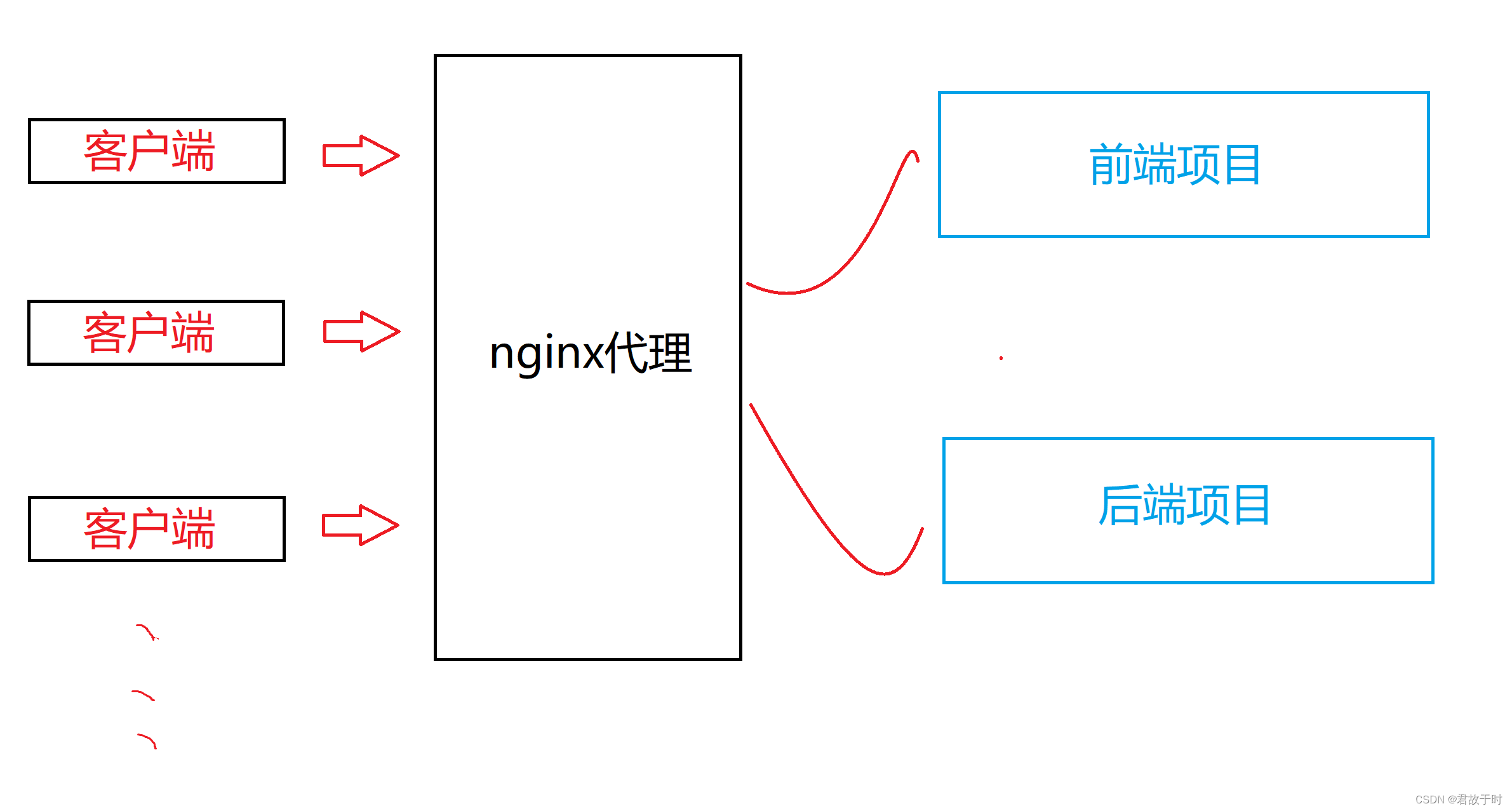
打通前后端项目,前后端分离的项目,通过nginx建立连接
-
负载均衡,一台机器请求转发至多个服务器
1. 前后端分离项目,打通前后端项目
前端项目中的配置:
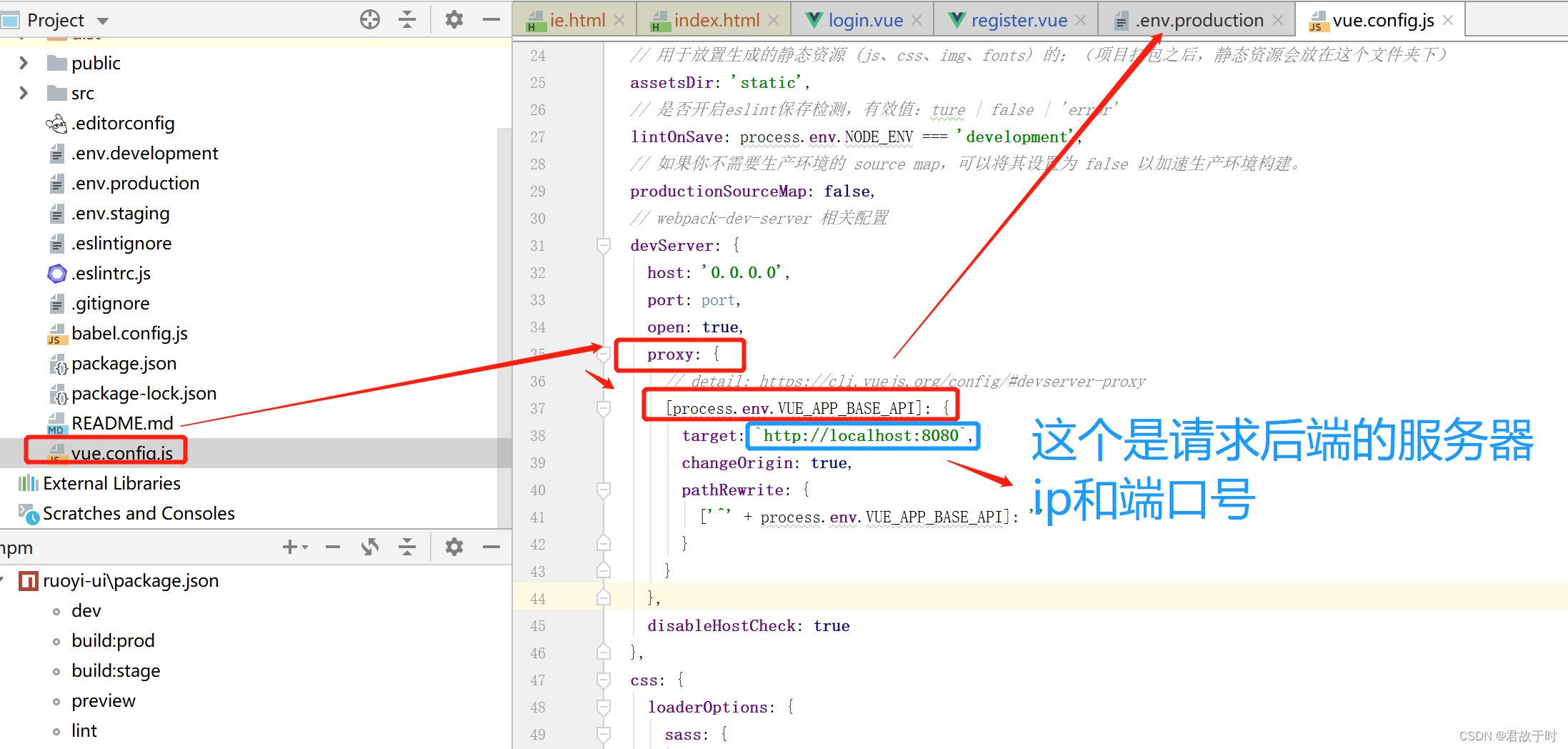
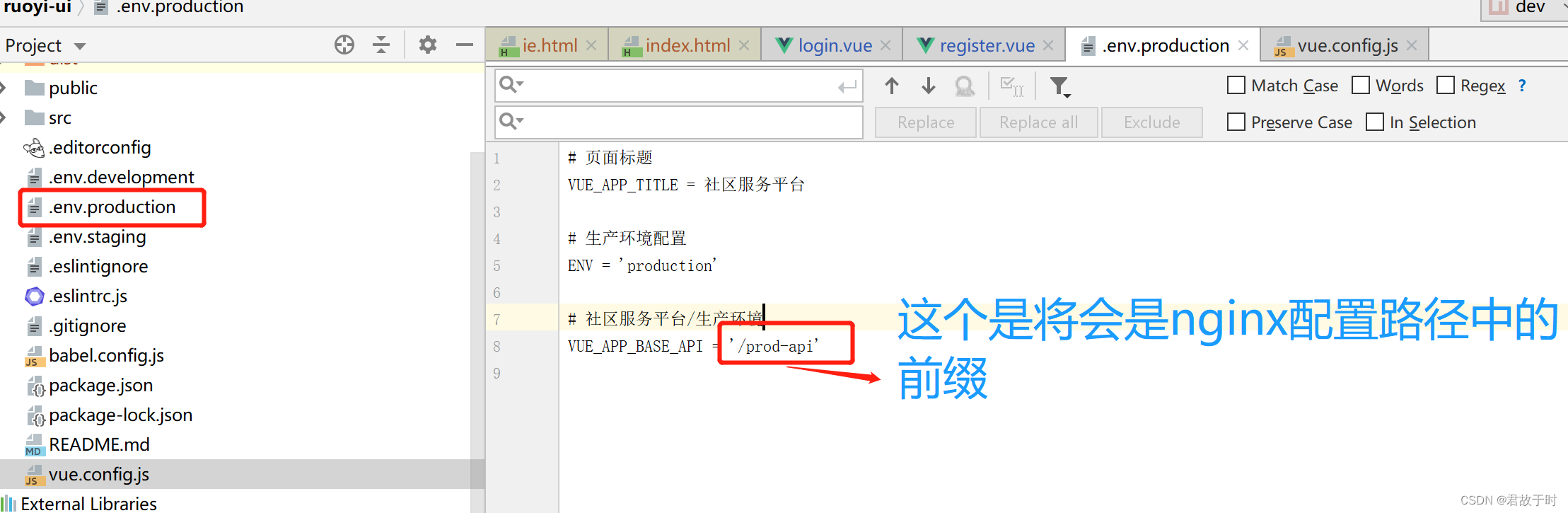
后端项目的ip和端口号就是正常的
下面看看nginx的配置文件:
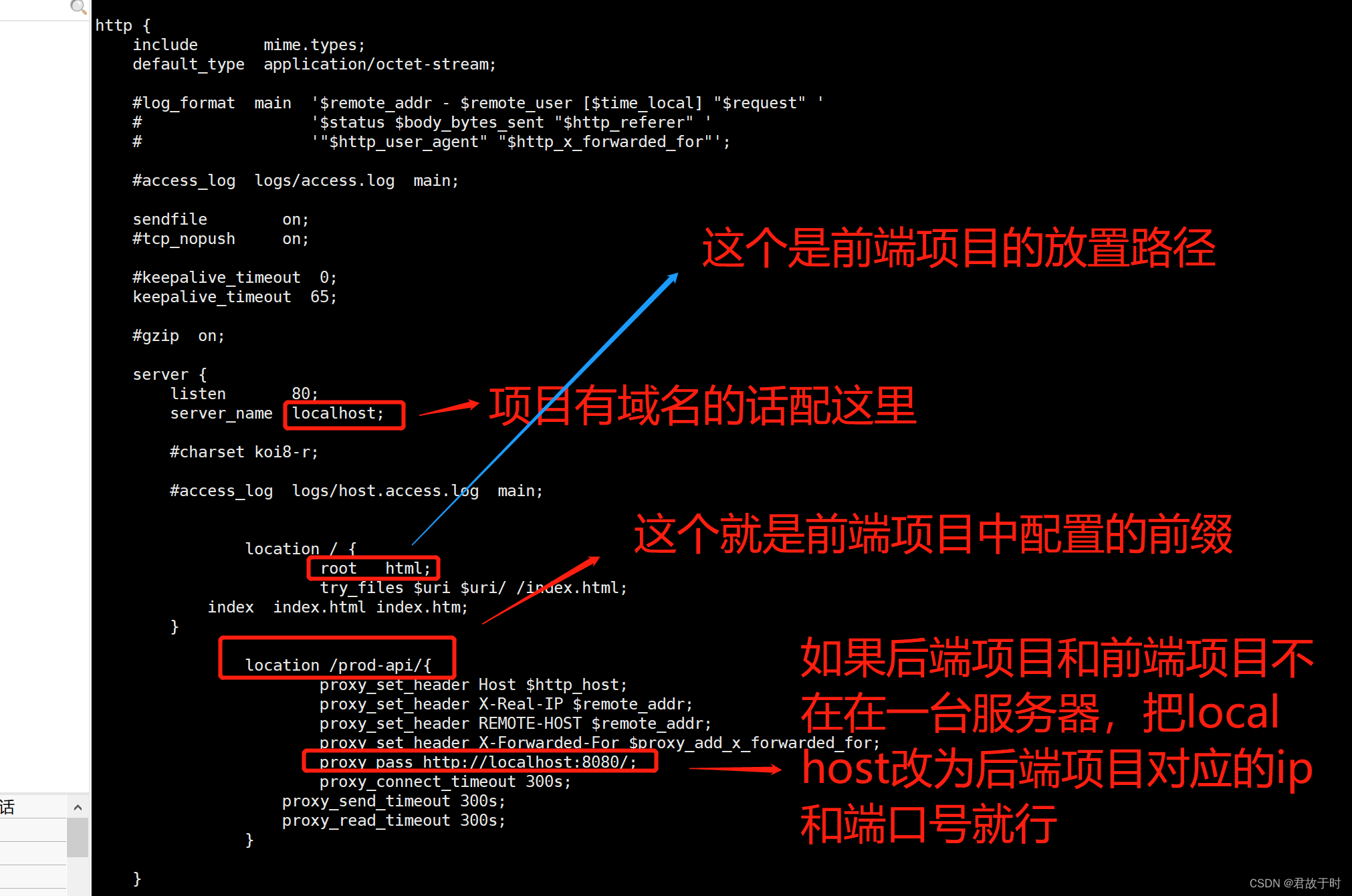
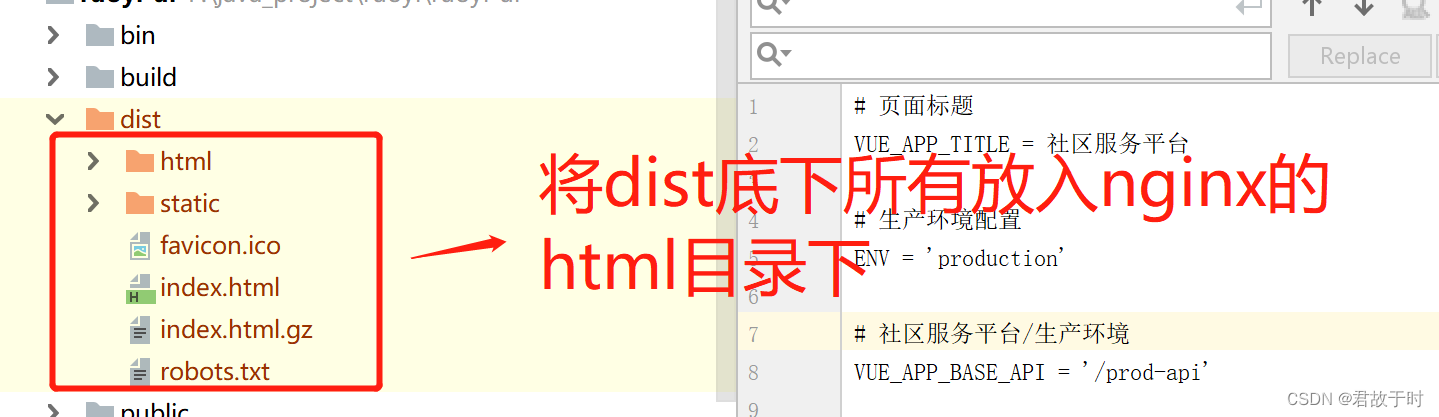
将打包后的前端项目放这里:
vue项目打包后会生成一个dist文件夹
放在服务器上:
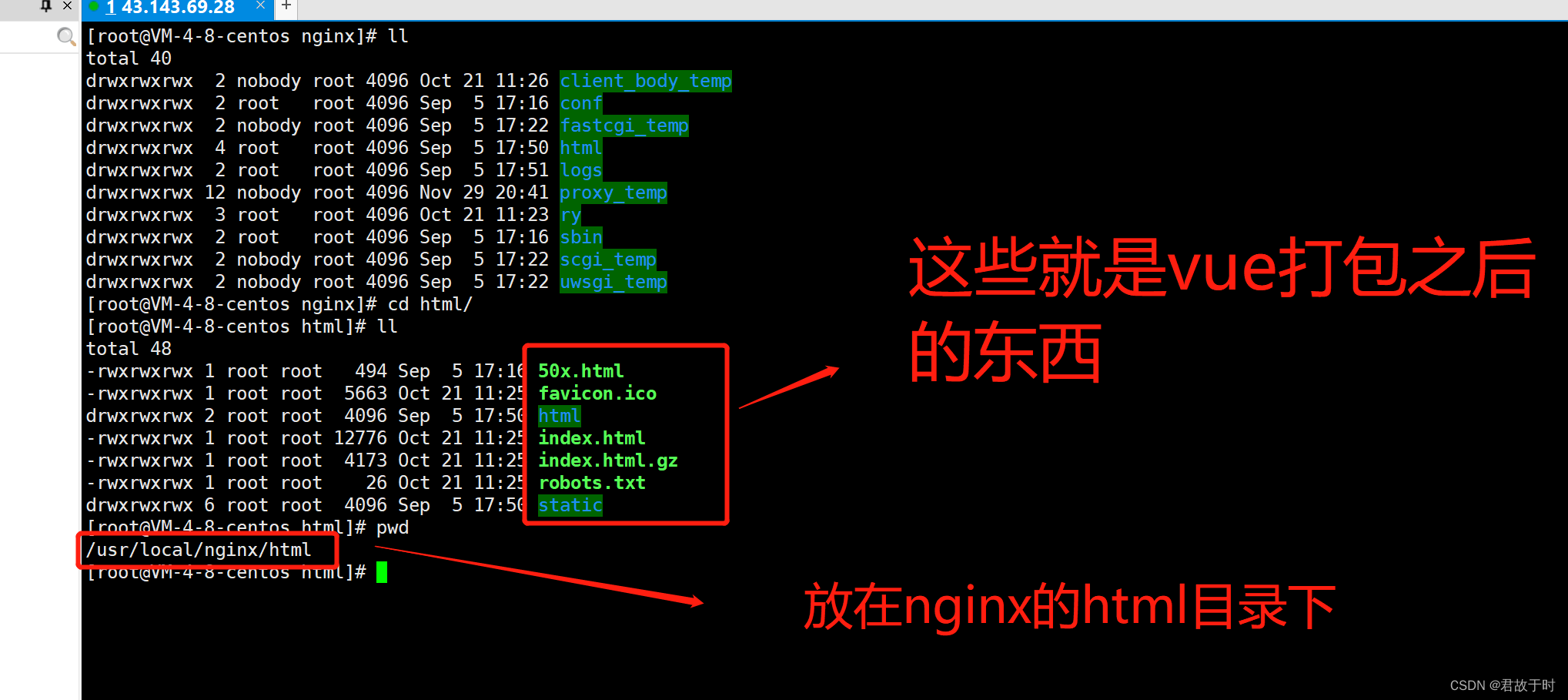
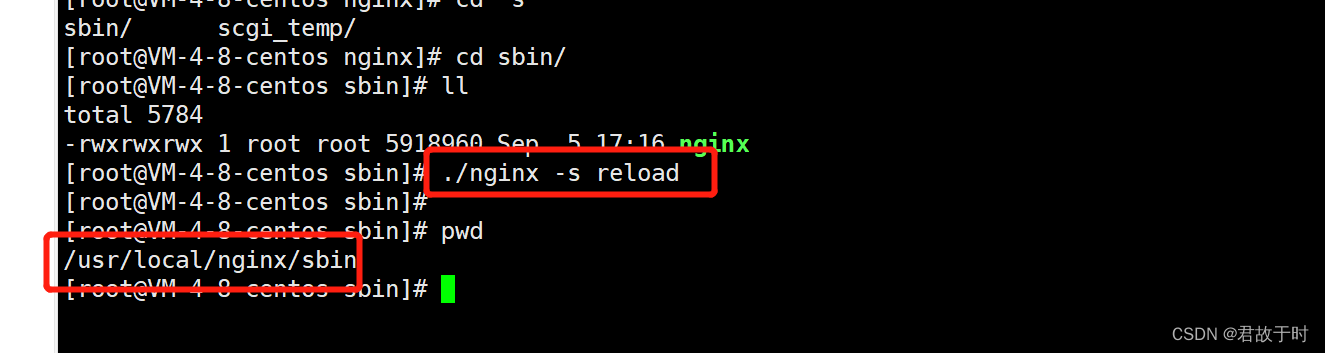
如果说前端的项目有改动,或者nginx.conf有改动,则重启nginx
cd /usr/local/nginx/sbin
./nginx -s reload
nginx.conf
#user  nobody;
worker_processes  1;#error_log  logs/error.log;
#error_log  logs/error.log  notice;
#error_log  logs/error.log  info;#pid        logs/nginx.pid;events {worker_connections  1024;
}http {include       mime.types;default_type  application/octet-stream;#log_format  main  '$remote_addr - $remote_user [$time_local] "$request" '#                  '$status $body_bytes_sent "$http_referer" '#                  '"$http_user_agent" "$http_x_forwarded_for"';#access_log  logs/access.log  main;sendfile        on;#tcp_nopush     on;#keepalive_timeout  0;keepalive_timeout  65;#gzip  on;server {listen       80;server_name  localhost;#charset koi8-r;#access_log  logs/host.access.log  main;location / {root   html;try_files $uri $uri/ /index.html;index  index.html index.htm;}location /prod-api/{proxy_set_header Host $http_host;proxy_set_header X-Real-IP $remote_addr;proxy_set_header REMOTE-HOST $remote_addr;proxy_set_header X-Forwarded-For $proxy_add_x_forwarded_for;proxy_pass http://localhost:8080/;proxy_connect_timeout 300s;proxy_send_timeout 300s;proxy_read_timeout 300s;}}# another virtual host using mix of IP-, name-, and port-based configuration##server {#    listen       8000;#    listen       somename:8080;#    server_name  somename  alias  another.alias;#    location / {#        root   html;#        index  index.html index.htm;#    }#}# HTTPS server##server {#    listen       443 ssl;#    server_name  localhost;#    ssl_certificate      cert.pem;#    ssl_certificate_key  cert.key;#    ssl_session_cache    shared:SSL:1m;#    ssl_session_timeout  5m;#    ssl_ciphers  HIGH:!aNULL:!MD5;#    ssl_prefer_server_ciphers  on;#    location / {#        root   html;#        index  index.html index.htm;#    }#}}
2. 负载均衡,一台机器请求转发至多个服务器
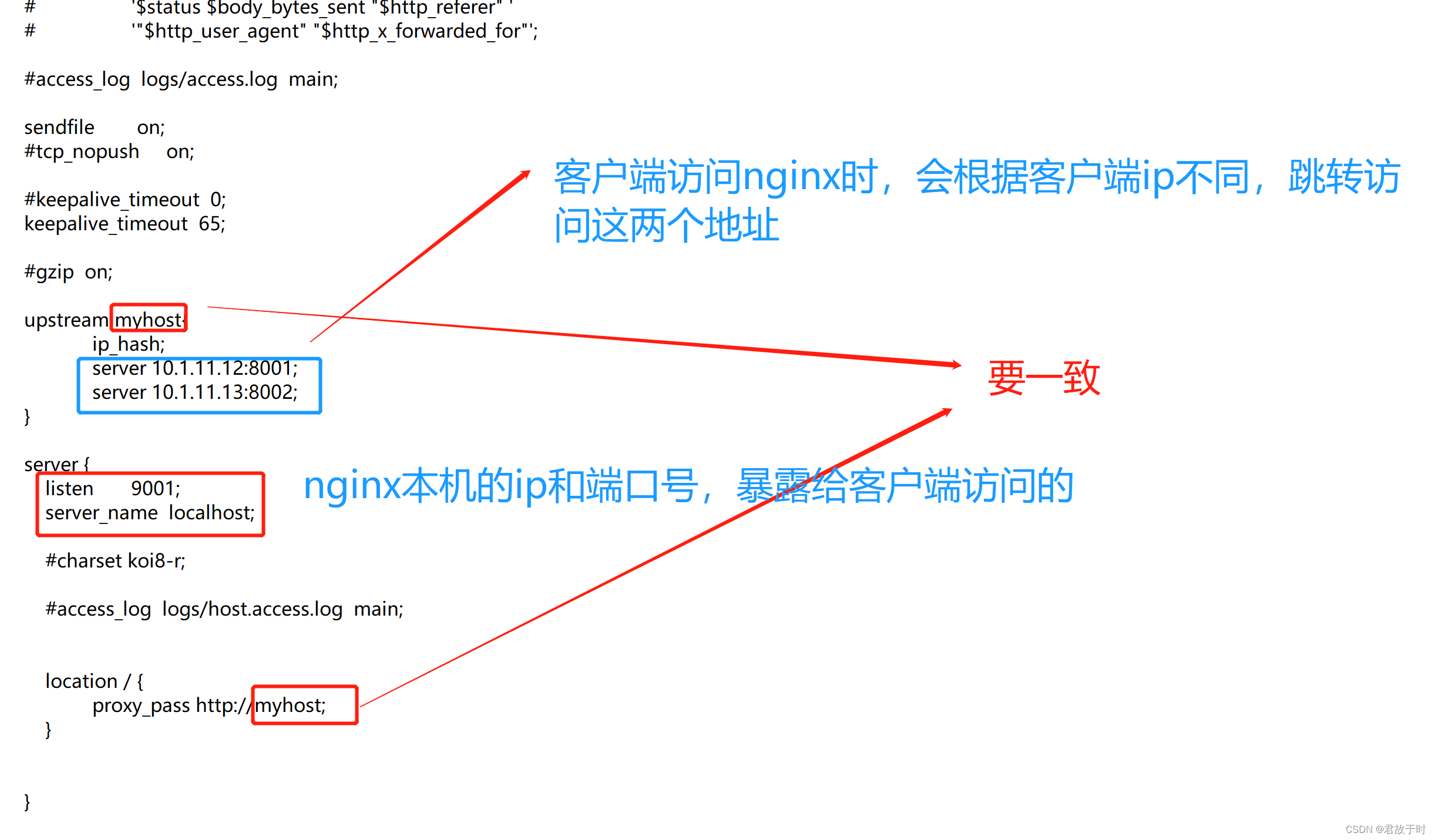
例如
nginx服务器ip为10.1.11.10,则图示中,
张三的电脑不论何时访问10.1.11.10:9001时,跳转的地址一直是10.1.11.12:8001,
李四的电脑不论何时访问10.1.11.10:9001时,跳转的地址一直是10.1.11.13:8002
因为张三李四的电脑不是同一台,IP不一样导致的
nginx.conf
#user  nobody;
worker_processes  1;#error_log  logs/error.log;
#error_log  logs/error.log  notice;
#error_log  logs/error.log  info;#pid        logs/nginx.pid;events {worker_connections  1024;
}http {include       mime.types;default_type  application/octet-stream;#log_format  main  '$remote_addr - $remote_user [$time_local] "$request" '#                  '$status $body_bytes_sent "$http_referer" '#                  '"$http_user_agent" "$http_x_forwarded_for"';#access_log  logs/access.log  main;sendfile        on;#tcp_nopush     on;#keepalive_timeout  0;keepalive_timeout  65;#gzip  on;upstream myhost{ip_hash;server 10.1.11.12:8001;server 10.1.11.13:8002;}server {listen       9001;server_name  localhost;#charset koi8-r;#access_log  logs/host.access.log  main;location / {proxy_pass http://myhost;}}# another virtual host using mix of IP-, name-, and port-based configuration##server {#    listen       8000;#    listen       somename:8080;#    server_name  somename  alias  another.alias;#    location / {#        root   html;#        index  index.html index.htm;#    }#}# HTTPS server##server {#    listen       443 ssl;#    server_name  localhost;#    ssl_certificate      cert.pem;#    ssl_certificate_key  cert.key;#    ssl_session_cache    shared:SSL:1m;#    ssl_session_timeout  5m;#    ssl_ciphers  HIGH:!aNULL:!MD5;#    ssl_prefer_server_ciphers  on;#    location / {#        root   html;#        index  index.html index.htm;#    }#}}
2.2 轮询
就是将上一个配置文件中的ip_hash去掉即可
用途:
该方式是默认方式,轮询适合服务器配置相当,无状态且短平快的服务使用。另外在轮询中,如果服务器挂掉,会自动剔除该服务器
例如:
nginx服务器ip为10.1.11.10,则这种方式中,
张三的电脑不论何时访问10.1.11.10:9001时,跳转的地址有时是10.1.11.12:8001,有时是10.1.11.13:8002
李四的电脑不论何时访问10.1.11.10:9001时,跳转的地址有时是10.1.11.12:8001,有时是10.1.11.13:8002
因为访问跳转是随机的
nginx.conf
#user  nobody;
worker_processes  1;#error_log  logs/error.log;
#error_log  logs/error.log  notice;
#error_log  logs/error.log  info;#pid        logs/nginx.pid;events {worker_connections  1024;
}http {include       mime.types;default_type  application/octet-stream;#log_format  main  '$remote_addr - $remote_user [$time_local] "$request" '#                  '$status $body_bytes_sent "$http_referer" '#                  '"$http_user_agent" "$http_x_forwarded_for"';#access_log  logs/access.log  main;sendfile        on;#tcp_nopush     on;#keepalive_timeout  0;keepalive_timeout  65;#gzip  on;upstream myhost{server 10.1.11.12:8001;server 10.1.11.13:8002;}server {listen       9001;server_name  localhost;#charset koi8-r;#access_log  logs/host.access.log  main;location / {proxy_pass http://myhost;}}# another virtual host using mix of IP-, name-, and port-based configuration##server {#    listen       8000;#    listen       somename:8080;#    server_name  somename  alias  another.alias;#    location / {#        root   html;#        index  index.html index.htm;#    }#}# HTTPS server##server {#    listen       443 ssl;#    server_name  localhost;#    ssl_certificate      cert.pem;#    ssl_certificate_key  cert.key;#    ssl_session_cache    shared:SSL:1m;#    ssl_session_timeout  5m;#    ssl_ciphers  HIGH:!aNULL:!MD5;#    ssl_prefer_server_ciphers  on;#    location / {#        root   html;#        index  index.html index.htm;#    }#}}
2.3 权重轮询
用途:
nginx服务器根据配置的权重进行请求分发,适合服务器的硬件配置差别比较大的情况
例如:
nginx服务器ip为10.1.11.10,则这种方式中,
张三的电脑访问10.1.11.10:9001时,访问了4次,有一次跳转的地址是10.1.11.12:8001,有三次跳转的地址是10.1.11.13:8002
因为访问跳转是有权重的,10.1.11.12:8001的权重是1,10.1.11.13:8002的权重是3
nginx.conf
#user  nobody;
worker_processes  1;#error_log  logs/error.log;
#error_log  logs/error.log  notice;
#error_log  logs/error.log  info;#pid        logs/nginx.pid;events {worker_connections  1024;
}http {include       mime.types;default_type  application/octet-stream;#log_format  main  '$remote_addr - $remote_user [$time_local] "$request" '#                  '$status $body_bytes_sent "$http_referer" '#                  '"$http_user_agent" "$http_x_forwarded_for"';#access_log  logs/access.log  main;sendfile        on;#tcp_nopush     on;#keepalive_timeout  0;keepalive_timeout  65;#gzip  on;upstream myhost{server 10.1.11.12:8001 weight=1;  #该台服务器接受1/4的请求量server 10.1.11.13:8002 weight=3;  #该台服务器接受3/4的请求量}server {listen       9001;server_name  localhost;#charset koi8-r;#access_log  logs/host.access.log  main;location / {proxy_pass http://myhost;}}# another virtual host using mix of IP-, name-, and port-based configuration##server {#    listen       8000;#    listen       somename:8080;#    server_name  somename  alias  another.alias;#    location / {#        root   html;#        index  index.html index.htm;#    }#}# HTTPS server##server {#    listen       443 ssl;#    server_name  localhost;#    ssl_certificate      cert.pem;#    ssl_certificate_key  cert.key;#    ssl_session_cache    shared:SSL:1m;#    ssl_session_timeout  5m;#    ssl_ciphers  HIGH:!aNULL:!MD5;#    ssl_prefer_server_ciphers  on;#    location / {#        root   html;#        index  index.html index.htm;#    }#}}
2.4 最少连接
用途:
轮询算法是把请求平均的转发给各个后端,使它们的负载大致相同;但是,有些请求占用的时间很长,会导致其所在的后端负载较高。这种情况下,least_conn这种方式就可以达到更好的负载均衡效果,适合请求处理时间长短不一造成服务器过载的情况
例如:
nginx服务器ip为10.1.11.10,则这种方式中,
之前有10个人访问10.1.11.10:9001,有3次访问跳转到了10.1.11.12:8001,
有7次访问跳转到了10.1.11.13:8002
那么张三再次访问时,会跳转到10.1.11.12:8001
因为10.1.11.12:8001连接的次数最少
nginx.conf
#user  nobody;
worker_processes  1;#error_log  logs/error.log;
#error_log  logs/error.log  notice;
#error_log  logs/error.log  info;#pid        logs/nginx.pid;events {worker_connections  1024;
}http {include       mime.types;default_type  application/octet-stream;#log_format  main  '$remote_addr - $remote_user [$time_local] "$request" '#                  '$status $body_bytes_sent "$http_referer" '#                  '"$http_user_agent" "$http_x_forwarded_for"';#access_log  logs/access.log  main;sendfile        on;#tcp_nopush     on;#keepalive_timeout  0;keepalive_timeout  65;#gzip  on;upstream myhost{least_conn; # 把请求分派给连接数最少的服务器server 10.1.11.12:8001 ;  server 10.1.11.13:8002 ;  }server {listen       9001;server_name  localhost;#charset koi8-r;#access_log  logs/host.access.log  main;location / {proxy_pass http://myhost;}}# another virtual host using mix of IP-, name-, and port-based configuration##server {#    listen       8000;#    listen       somename:8080;#    server_name  somename  alias  another.alias;#    location / {#        root   html;#        index  index.html index.htm;#    }#}# HTTPS server##server {#    listen       443 ssl;#    server_name  localhost;#    ssl_certificate      cert.pem;#    ssl_certificate_key  cert.key;#    ssl_session_cache    shared:SSL:1m;#    ssl_session_timeout  5m;#    ssl_ciphers  HIGH:!aNULL:!MD5;#    ssl_prefer_server_ciphers  on;#    location / {#        root   html;#        index  index.html index.htm;#    }#}}
上一篇:剑指Offer专项突破版(76)—— 数组中的第 k 大的数字
下一篇:强化学习泛化性 综述论文阅读 A SURVEY OF GENERALISATION IN DEEP REINFORCEMENT LEARNING