

『Java课设』JavaSwing+MySQL实现学生成绩管理系统
创始人
2024-03-03 20:56:33
👨🎓作者简介:一位喜欢写作,计科专业大三菜鸟
🏡个人主页:starry陆离
如果文章有帮到你的话记得点赞👍+收藏💗支持一下哦
『Java课设』JavaSwing+MySQL实现学生成绩管理系统
- 前言
- 1.开发工具
- 2.项目包结构
- 3.数据库表
- 4.JDBC数据库连接类
- 5.管理员登录界面(部分)
- 6.管理员增删改查页面(部分)
- 8.项目演示
- 8.1登录
- 8.2查询学生
- 8.3增加数据
- 8.4修改数据
- 8.5删除数据
前言
不久前整理资料,看到了自己大二刚学完Java为了写的课设项目敲的一个课设雏形(后来课设没有用这个),因为是个半成品一共就一个界面而且很烂,但不舍得删,发出来留作纪念吧。
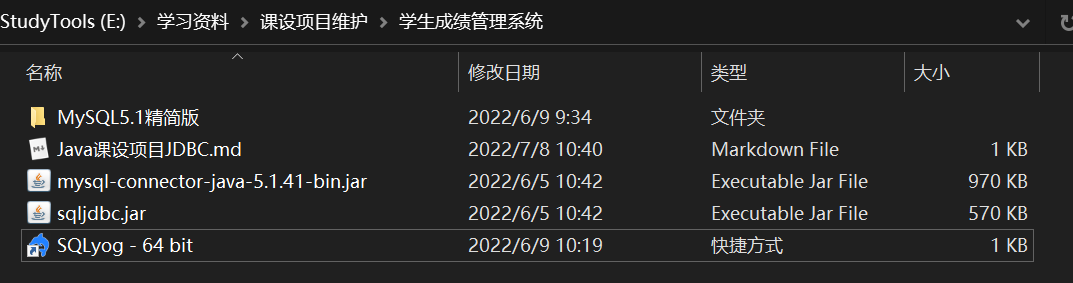
1.开发工具
Eclipse
Java JDK1.8
MySQL精简版
SQLyog
mysql-connector-java-5.1.41 MySQL :: Download Connector/J
sqljdbc
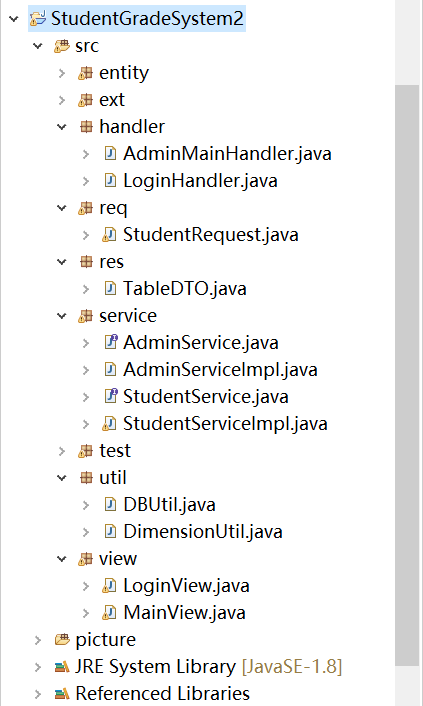
2.项目包结构
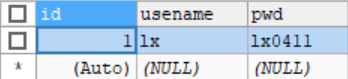
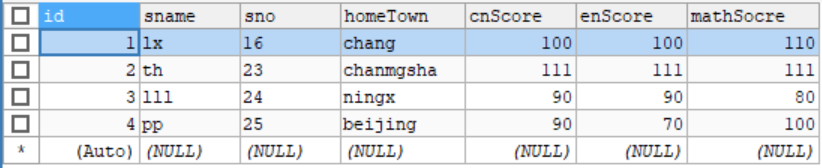
3.数据库表
数据库名:studentgrade
数据库表:manager、student
4.JDBC数据库连接类
连接mysql和sqlserver的方法有一点点不一样,这里笔者的机器没有sqlserver就不维护sqlserver的了,读者有需要可自行解决
//连接mysql5.7private static final String USER = "***";//数据库用户名,一般是rootprivate static final String PWD = "******";//数据库密码
//	private static final String URL="jdbc:mysql://localhost:3306/studentgrade";
//	private static final String DRIVER="com.mysql.jdbc.Driver"; //mysql5.7//如果用的是mysql8.0,private static final String DRIVER="com.mysql.cj.jdbc.Driver";private static final String URL= "jdbc:mysql://localhost:3306/studentgrade?serverTimezone=UTC&useUnicode=true&characterEncoding=utf-8&useSSL=false&allowPublicKeyRetrieval=true";
5.管理员登录界面(部分)
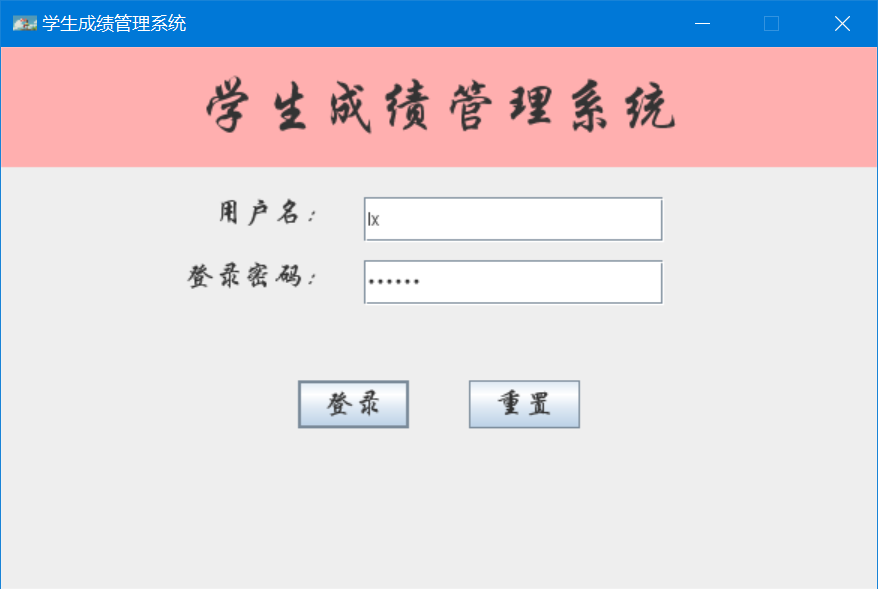
package view;import handler.LoginHandler;import javax.swing.*;
import java.awt.*;
import java.awt.event.MouseAdapter;
import java.awt.event.MouseEvent;
import java.awt.event.WindowAdapter;
import java.awt.event.WindowEvent;
import java.net.URL;
/*** 管理员登录界面* 也是项目运行的起始界面* @author starry* 测试用户名:lx* 密码:lx0411*/
public class LoginView extends JFrame {JLabel titleNameLabel=new JLabel("学生成绩管理系统",JLabel.CENTER);SpringLayout spLayout=new SpringLayout();JPanel centerPanel=new JPanel(spLayout);JLabel userNameLabel=new JLabel("用户名:");JLabel userPwdLabel=new JLabel("登录密码:");JTextField nameTxd=new JTextField();JPasswordField pwdFiled=new  JPasswordField();JButton loginBtn=new JButton("登录");JButton resetBtn=new JButton("重置");//声明桌面系统托盘SystemTraySystemTray systemTray;TrayIcon trayIcon;LoginHandler loginHandler;public LoginView(){super("学生成绩管理系统");loginHandler=new LoginHandler(this);//获取内容面板Container contentPane =getContentPane();//设置标题的字体,格式,大小titleNameLabel.setFont(new Font("华文行楷",Font.PLAIN,40));titleNameLabel.setPreferredSize(new Dimension(0,80));//设置中间各个组件的字体,大小,格式Font centerFont=new Font("华文行楷",Font.PLAIN,20);userNameLabel.setFont(centerFont);nameTxd.setPreferredSize(new Dimension(200,30));userPwdLabel.setFont(centerFont);pwdFiled.setPreferredSize(new Dimension(200,30));loginBtn.setFont(centerFont);resetBtn.setFont(centerFont);contentPane.setBackground(Color.pink);//把组件加入到面板上centerPanel.add(userNameLabel);centerPanel.add(userPwdLabel);centerPanel.add(nameTxd);centerPanel.add(pwdFiled);centerPanel.add(loginBtn);centerPanel.add(resetBtn);loginBtn.addActionListener(loginHandler);//增加登录按键的事件监听loginBtn.addKeyListener(loginHandler);//增加键盘按键监听事件resetBtn.addActionListener(loginHandler);//增加重置按键的事件监听contentPane.add(titleNameLabel,BorderLayout.NORTH);contentPane.add(centerPanel,BorderLayout.CENTER);//设置中间组件的位置,弹簧布局layoutCenter();//判断当前系统是否支持系统托盘if(SystemTray.isSupported()){systemTray=SystemTray.getSystemTray();//初始化系统托盘URL imgUrl = LoginView.class.getClassLoader().getResource("LoginView.jpg");trayIcon=new TrayIcon(new ImageIcon(imgUrl).getImage());//初始化托盘图标trayIcon.setImageAutoSize(true);//托盘图标可以自动缩放大小try {systemTray.add(trayIcon);//将托盘图标加入到系统托盘组件中,并抛出异常} catch (AWTException e) {e.printStackTrace();}//创建一个事件响应,最小化时销毁资源this.addWindowListener(new WindowAdapter() {@Overridepublic void windowIconified(WindowEvent e) {LoginView.this.dispose();}});//托盘事件监听(鼠标单击一次托盘,窗口将会正常显示)trayIcon.addMouseListener(new MouseAdapter() {@Overridepublic void mouseClicked(MouseEvent e) {int clickCont=e.getClickCount();if(clickCont==1){LoginView.this.setExtendedState(JFrame.NORMAL);}LoginView.this.setVisible(true);}});}//设置loginBtn为默认按钮,按下回车键时默认响应loginBtn的键盘响应getRootPane().setDefaultButton(loginBtn);//设置窗口图片URL imgUrl=LoginView.class.getClassLoader().getResource("LoginView.jpg");setIconImage(new ImageIcon(imgUrl).getImage());//设置窗口基本参数setSize(600,400);setDefaultCloseOperation(EXIT_ON_CLOSE);setLocationRelativeTo(null);setResizable(false);setVisible(true);}private void layoutCenter() {//获取组件的宽度Spring.width(组件名)用户名和用户名文本框组件Spring titleLabelWidth=Spring.width(userNameLabel);Spring titleTextWidth=Spring.width(nameTxd);Spring spaceWidth=Spring.constant(20);//userNameLabel和nameTxd的间距Spring totalWidth=Spring.sum(Spring.sum(titleLabelWidth,titleTextWidth),spaceWidth);int offSetX=totalWidth.getValue()/2;/*SpringLayout:布局管理器SpringLayout.Constraints:使用弹簧布局的容器里面的组件的布局约束,每个组件对应一个Spring:能够进行四则运算的整数*//*窗口相当于一个左顶角为原点的第四象限的坐标轴*///1.设置好用户名标签的位置(约束)SpringLayout.Constraints titleLabelCon=spLayout.getConstraints(userNameLabel);//用户名标签userNameLabel的西边参考centerPanel组件水平中心点方向左偏移offSetX的距离spLayout.putConstraint(SpringLayout.WEST,userNameLabel,-offSetX,SpringLayout.HORIZONTAL_CENTER,centerPanel);//设置用户名标签的垂直标签spLayout.putConstraint(SpringLayout.NORTH,userNameLabel,20,SpringLayout.NORTH,centerPanel);//or使用setY()设置垂直偏移量// titleLabelCon.setY(Spring.constant(50));//垂直偏移量//2.设置用户名文本框nameTxd的位置(约束)spLayout.putConstraint(SpringLayout.WEST,nameTxd,20,SpringLayout.EAST,userNameLabel);spLayout.putConstraint(SpringLayout.NORTH,nameTxd,0,SpringLayout.NORTH,userNameLabel);//3.设置密码标签userPwdLabel的位置spLayout.putConstraint(SpringLayout.NORTH,userPwdLabel,20,SpringLayout.SOUTH,userNameLabel);spLayout.putConstraint(SpringLayout.EAST,userPwdLabel,0,SpringLayout.EAST,userNameLabel);//4.设置密码文本框pwdFiled的位置(约束)spLayout.putConstraint(SpringLayout.WEST,pwdFiled,20,SpringLayout.EAST,userPwdLabel);spLayout.putConstraint(SpringLayout.NORTH,pwdFiled,0,SpringLayout.NORTH,userPwdLabel);//5.设置登录按钮loginBtn的位置spLayout.putConstraint(SpringLayout.EAST,loginBtn,-20,SpringLayout.HORIZONTAL_CENTER,centerPanel);spLayout.putConstraint(SpringLayout.NORTH,loginBtn,50,SpringLayout.SOUTH,pwdFiled);//6.设置重置按钮resetBtn的位置spLayout.putConstraint(SpringLayout.WEST,resetBtn,20,SpringLayout.HORIZONTAL_CENTER,centerPanel);spLayout.putConstraint(SpringLayout.NORTH,resetBtn,50,SpringLayout.SOUTH,pwdFiled);}public static void main(String[] args){new LoginView();}public JTextField getNameTxd() {return nameTxd;}public JPasswordField getPwdFiled() {return pwdFiled;}
}
6.管理员增删改查页面(部分)
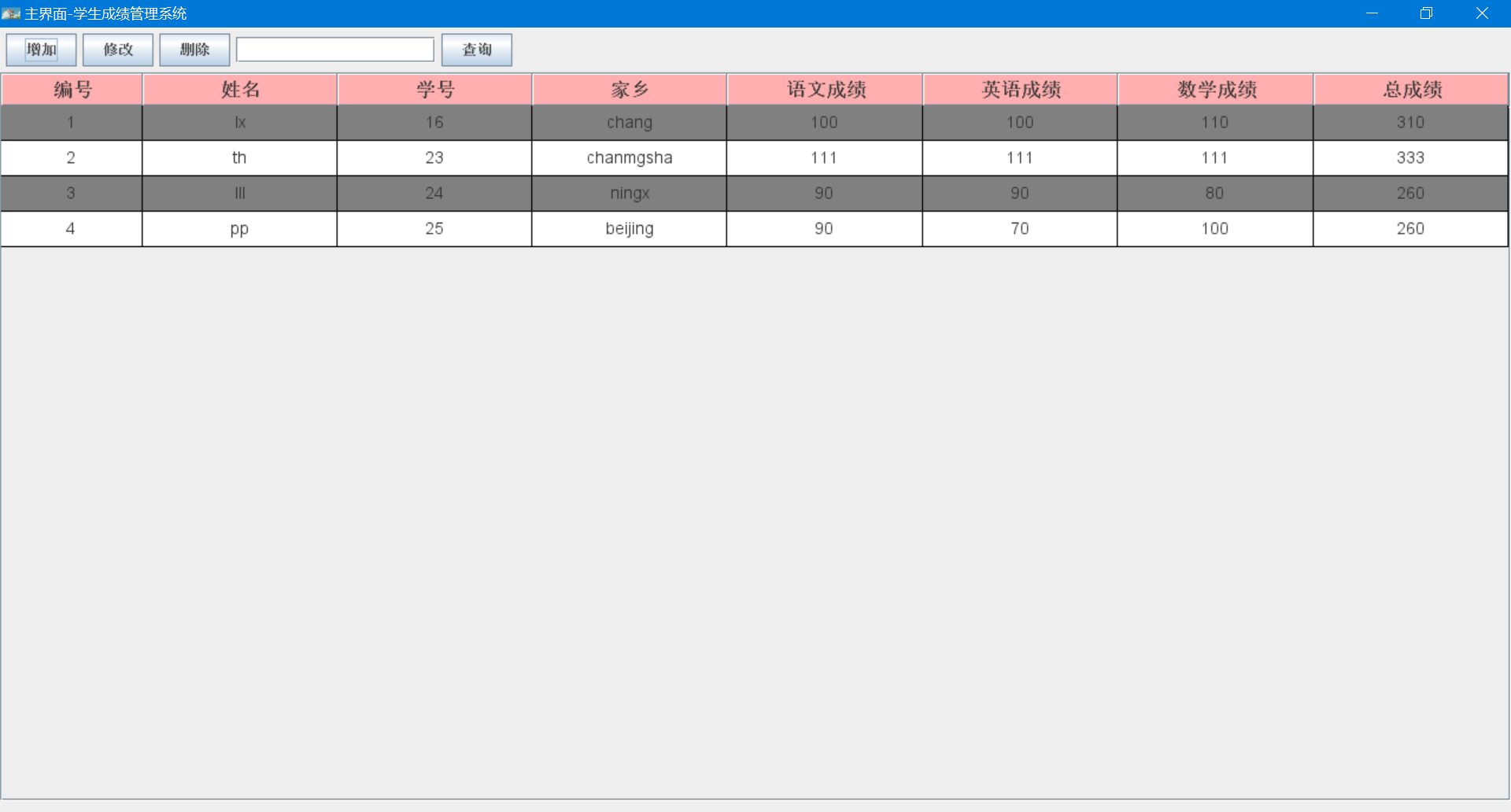
package view;import java.awt.BorderLayout;
import java.awt.Container;
import java.awt.FlowLayout;
import java.net.URL;
import java.util.Vector;import javax.swing.ImageIcon;
import javax.swing.JButton;
import javax.swing.JFrame;
import javax.swing.JPanel;
import javax.swing.JScrollPane;
import javax.swing.JTextField;import ext.MainViewTable;
import ext.MainViewTableModel;
import handler.AdminMainHandler;
import req.StudentRequest;
import res.TableDTO;
import service.StudentService;
import service.StudentServiceImpl;
import util.DimensionUtil;
/*** 管理员管理学生的主界面* 可在此实现增删改查* @author starry**/
public class MainView extends JFrame{public String lastPressKey;JPanel northPanel=new JPanel(new FlowLayout(FlowLayout.LEFT));//JPanel默认流布局,组件居左public JButton btnAdd=new JButton("增加");public JButton updataBtn=new JButton("修改");public JButton delBtn=new JButton("删除");public JButton btnSave = new JButton("保存");JTextField searchTxt=new JTextField(15);JButton searchBtn=new JButton("查询");//搜索框与搜索按钮public JTextField searchField = new JTextField();JPanel southPanel=new JPanel(new FlowLayout(FlowLayout.RIGHT));//组件居右JButton preBtn=new JButton("上一页");JButton nextBtn =new JButton("下一页");//创建一个MainViewTable对象public MainViewTable mianViewTable=new MainViewTable();public MainViewTableModel mainViewTableModel;//声明一个MainHandler对象AdminMainHandler adminMainHandler;//private int pageNow=1;//默认显示第一页private int pageSize=10;//默认每页显示十条记录//构造方法public MainView() {super("主界面-学生成绩管理系统");Container contentPane=getContentPane();//创建一个MainHandler对象adminMainHandler = new AdminMainHandler(this);//放置北边的组件layoutNorth(contentPane);//放置中间的组件layoutCenter(contentPane);//放置南边的组件layoutSouth(contentPane);//基础设置init();}private void layoutCenter(Container contentPane) {//调用数据库数据,创建一个StudentService和StudentRequest实例//获取从数据库中查询到的data与totalCountStudentService studentService=new StudentServiceImpl();StudentRequest request=new StudentRequest();request.setPageNow(pageNow);request.setPageSize(pageSize);request.setSearchKey(searchTxt.getText().trim());TableDTO tableDTO = studentService.retrieveStudents(request);Vector> data = tableDTO.getData();showPreNext(tableDTO.getTotalCount());//自定义的MainViewTableModelmainViewTableModel=MainViewTableModel.assembleModel(data);//将Table与TableModel关联mianViewTable.setModel(mainViewTableModel);//设置渲染方式mianViewTable.renderRule();JScrollPane jScrollPane = new JScrollPane(mianViewTable);contentPane.add(jScrollPane,BorderLayout.CENTER);}private void layoutSouth(Container contentPane) {//增加按钮事件监听preBtn.addActionListener(adminMainHandler);nextBtn.addActionListener(adminMainHandler);southPanel.add(preBtn);southPanel.add(nextBtn);contentPane.add(southPanel,BorderLayout.SOUTH);}/** 设置上一页与下一页按钮是否可见*/private void showPreNext(int totalCount) {if(pageNow==1) {preBtn.setVisible(false);}else {preBtn.setVisible(true);}//总共的页数int pageCount=0;if(totalCount%pageSize==0) {pageCount=totalCount/pageSize;}else {pageCount=totalCount/pageSize+1;}if(pageCount==pageNow) {nextBtn.setVisible(false);}else {nextBtn.setVisible(true);}}private void layoutNorth(Container contentPane) {//增加按钮事件监听btnAdd.addActionListener(adminMainHandler);btnSave.addActionListener(adminMainHandler);updataBtn.addActionListener(adminMainHandler);delBtn.addActionListener(adminMainHandler);searchBtn.addActionListener(adminMainHandler);northPanel.add(btnAdd);northPanel.add(btnSave);northPanel.add(updataBtn);northPanel.add(delBtn);northPanel.add(searchTxt);northPanel.add(searchBtn);btnAdd.setVisible(true);btnSave.setVisible(false);contentPane.add(northPanel,BorderLayout.NORTH);}private void init() {//设置窗口图片URL imgUrl=LoginView.class.getClassLoader().getResource("LoginView.jpg");setIconImage(new ImageIcon(imgUrl).getImage());//设置窗口基本参数setBounds(DimensionUtil.getBounds());//设置窗体完全充满整个屏幕setExtendedState(JFrame.MAXIMIZED_BOTH);setDefaultCloseOperation(EXIT_ON_CLOSE);setLocationRelativeTo(null);setResizable(true);setVisible(true);}public static void main(String[] args) {// TODO Auto-generated method stub}public void setPageNow(int pageNow) {this.pageNow = pageNow;}public int getPageSize() {return pageSize;}public void setPageSize(int pageSize) {this.pageSize = pageSize;}public int getPageNow() {return pageNow;}public void reloadTable() {/**调用数据库数据,创建一个StudentService和StudentRequest实例*获取从数据库中查询到的data与totalCount*查询完后要更新Model的数据*/StudentService studentService=new StudentServiceImpl();StudentRequest request=new StudentRequest();request.setPageNow(pageNow);request.setPageSize(pageSize);request.setSearchKey(searchTxt.getText().trim());TableDTO tableDTO = studentService.retrieveStudents(request);Vector> data = tableDTO.getData();// 更新调用updataModel实现更新ModelMainViewTableModel.uptadaModel(data);// 设置渲染方式mianViewTable.renderRule();// 调用上一页与下一页按钮是否可见showPreNext(tableDTO.getTotalCount());}}
8.项目演示
8.1登录
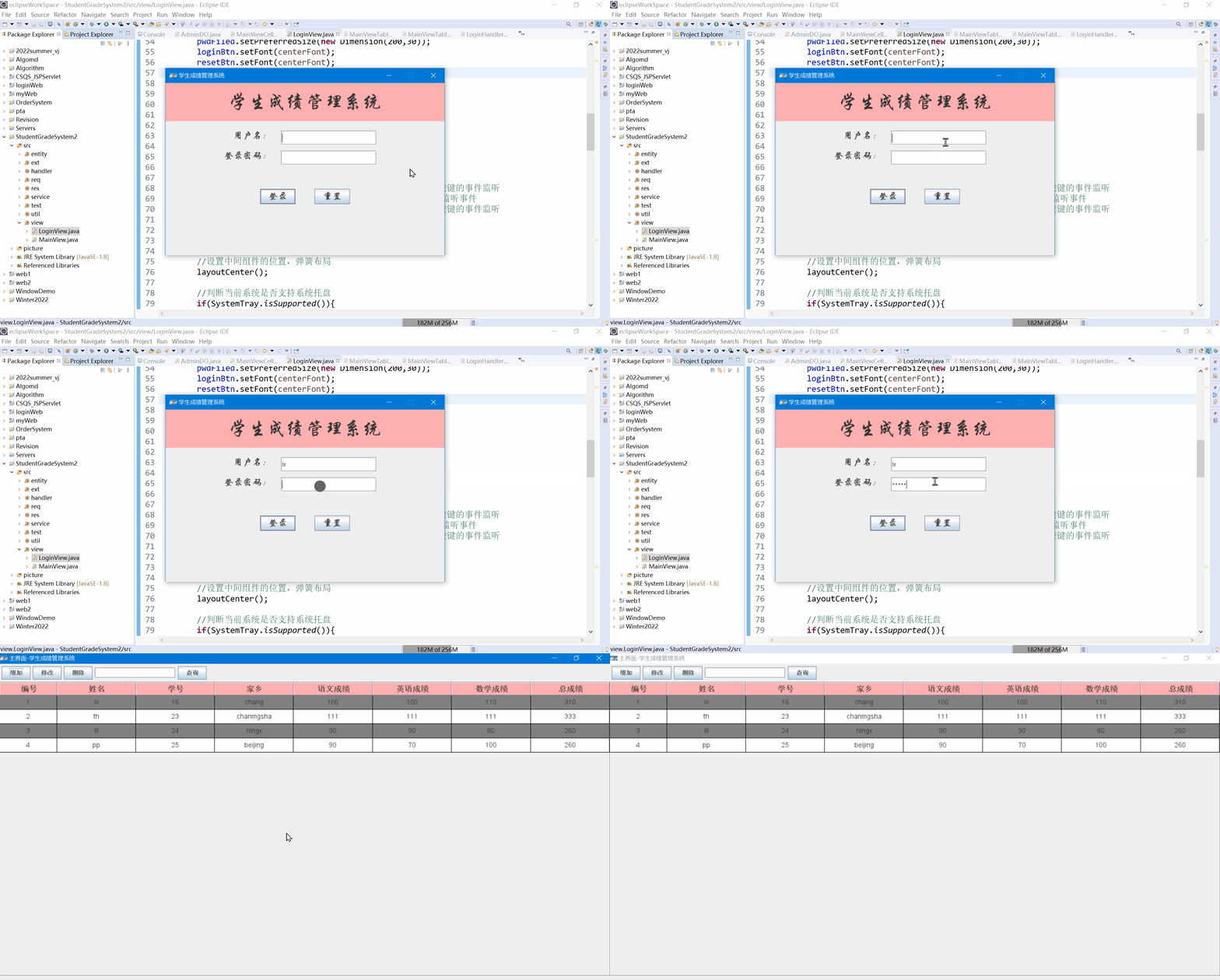
8.2查询学生
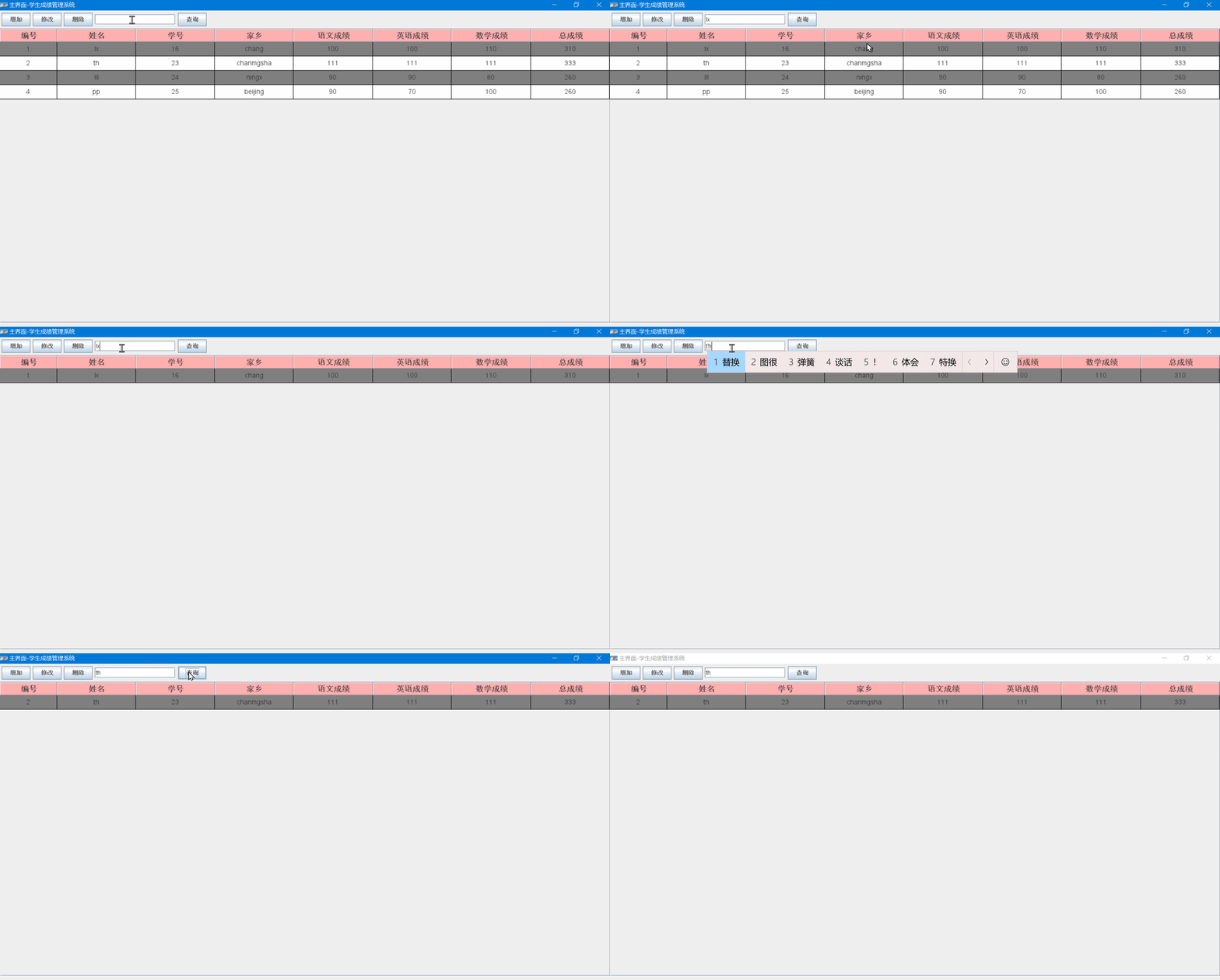
8.3增加数据
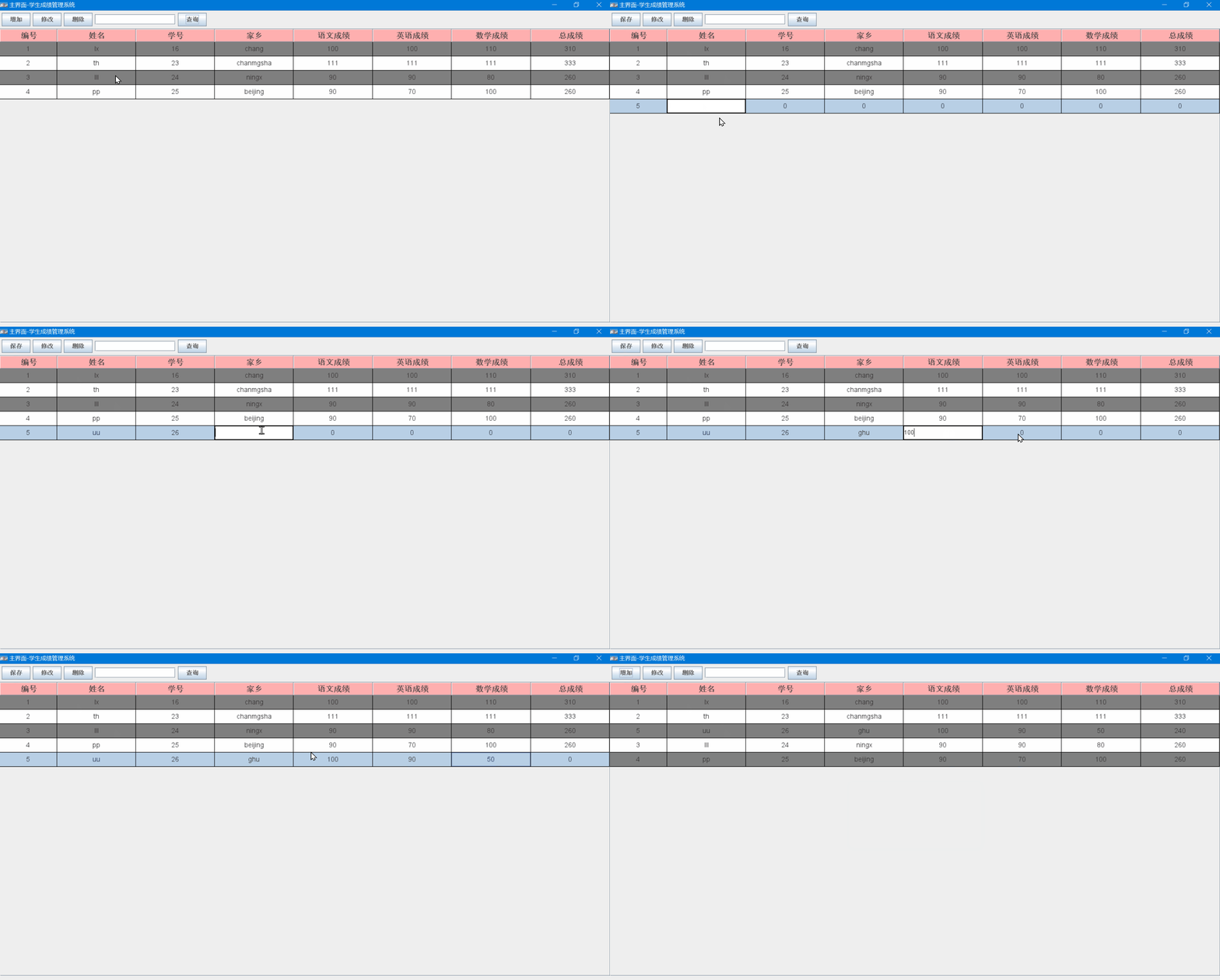
8.4修改数据
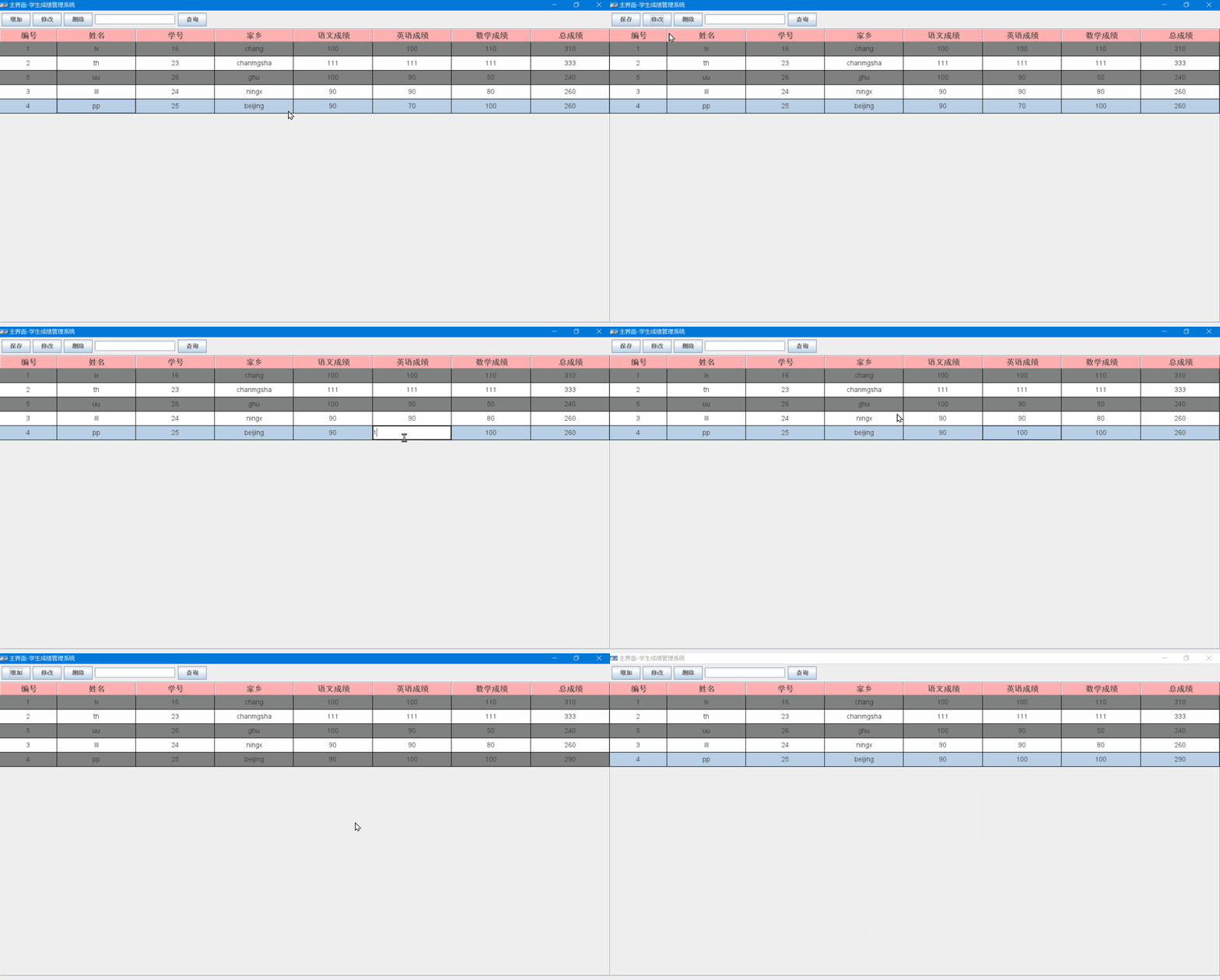
8.5删除数据
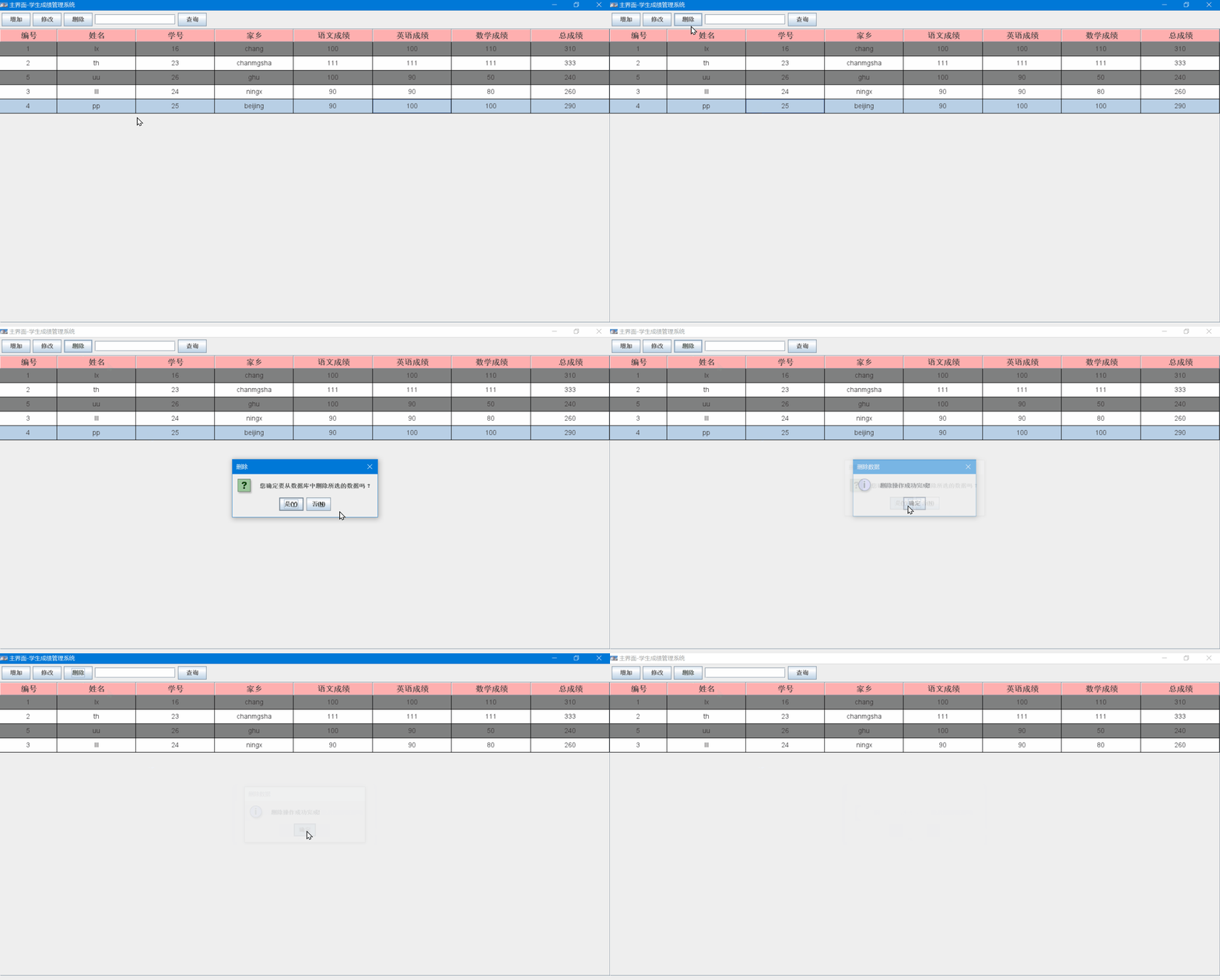
下一篇:【Linux】-- 初识操作系统
相关内容
热门资讯
demo什么意思 demo版本...
618快到了,各位的小金库大概也在准备开闸放水了吧。没有小金库的,也该向老婆撒娇卖萌服个软了,一切只...
猫咪吃了塑料袋怎么办 猫咪误食...
你知道吗?塑料袋放久了会长猫哦!要说猫咪对塑料袋的喜爱程度完完全全可以媲美纸箱家里只要一有塑料袋的响...
猫咪吃了塑料袋怎么办 猫咪误食...
你知道吗?塑料袋放久了会长猫哦!要说猫咪对塑料袋的喜爱程度完完全全可以媲美纸箱家里只要一有塑料袋的响...
埃菲尔铁塔在哪 中国仿建埃菲尔...
2019年4月26日,广西南宁市,街头惊现一座巨型山寨版埃菲尔铁塔,高约20米,白色塔身,造型逼真,...
苗族的传统节日 贵州苗族节日有...
【岜沙苗族芦笙节】岜沙,苗语叫“分送”,距从江县城7.5公里,是世界上最崇拜树木并以树为神的枪手部落...
北京的名胜古迹 北京最著名的景...
北京从元代开始,逐渐走上帝国首都的道路,先是成为大辽朝五大首都之一的南京城,随着金灭辽,金代从海陵王...
世界上最漂亮的人 世界上最漂亮...
此前在某网上,选出了全球265万颜值姣好的女性。从这些数量庞大的女性群体中,人们投票选出了心目中最美...
应用未安装解决办法 平板应用未...
---IT小技术,每天Get一个小技能!一、前言描述苹果IPad2居然不能安装怎么办?与此IPad不...
长白山自助游攻略 吉林长白山游...
昨天介绍了西坡的景点详细请看链接:一个人的旅行,据说能看到长白山天池全凭运气,您的运气如何?今日介绍...
脚上的穴位图 脚面经络图对应的...
人体穴位作用图解大全更清晰直观的标注了各个人体穴位的作用,包括头部穴位图、胸部穴位图、背部穴位图、胳...
demo什么意思 demo版本...
618快到了,各位的小金库大概也在准备开闸放水了吧。没有小金库的,也该向老婆撒娇卖萌服个软了,一切只...
埃菲尔铁塔在哪 中国仿建埃菲尔...
2019年4月26日,广西南宁市,街头惊现一座巨型山寨版埃菲尔铁塔,高约20米,白色塔身,造型逼真,...
苗族的传统节日 贵州苗族节日有...
【岜沙苗族芦笙节】岜沙,苗语叫“分送”,距从江县城7.5公里,是世界上最崇拜树木并以树为神的枪手部落...