

基于rsync daemon 实现 sersync——sersync实现实时数据同步
创始人
2024-03-04 09:12:25
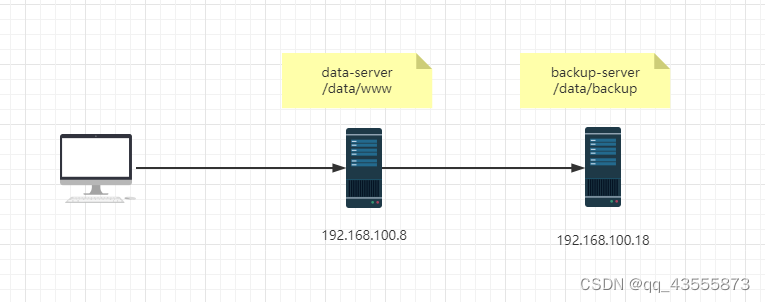
1 sersync 介绍
sersync类似于inotify,同样用于监控,但它克服了inotify的缺点.
inotify最大的不足是会产生重复事件,或者同一个目录下多个文件的操作会产生多个事件,例如,当监控目录中有5个文件时,删除目录时会产生6个监控事件,从而导致重复调用rsync命令。另外比如:vim文件时,inotify会监控到临时文件的事件,但这些事件相对于rsync来说是不应该被监控的
sersync 优点:
- sersync是使用c++编写,而且对linux系统文件系统产生的临时文件和重复的文件操作进行过滤,所以在结合rsync同步的时候,节省了运行时耗和网络资源。因此更快。
- sersync配置很简单,其中提供了静态编译好的二进制文件和xml配置文件,直接使用即可
- sersync使用多线程进行同步,尤其在同步较大文件时,能够保证多个服务器实时保持同步状态
- sersync有出错处理机制,通过失败队列对出错的文件重新同步,如果仍旧失败,则按设定时长对
同步失败的文件重新同步 - sersync不仅可以实现实时同步,另外还自带crontab功能,只需在xml配置文件中开启,即也可以按要求隔一段时间整体同步一次,而无需再额外配置crontab功能
- sersync 可以二次开发
sersync项目地址:
https://code.google.com/archive/p/sersync/
sersync下载地址:
https://code.google.com/archive/p/sersync/downloads
2 环境配置
2.1 备份主机配置
- 安装 rsync-daemon rsync
[root@backup-server ~]#dnf -y install rsync-daemon rsync
- 创建rsync服务器的配置文件
[root@backup-server ~]#vi /etc/rsyncd.conf
uid = root   #提定以哪个用户来访问共享目录,将之指定为生成的文件所有者,默认为nobody
gid = root   #默认为nobody
#port = 874 可指定非标准端口,默认873/tcp
#use chroot = no
max connections = 0
ignore errors
exclude = lost+found/
log file = /var/log/rsyncd.log
pid file = /var/run/rsyncd.pid
lock file = /var/run/rsyncd.lock
reverse lookup = no
[backup]  #每个模块名对应一个不同的path目录,如果同名后面模块生效
path = /data/backup/
comment = backup dir
read only = no     #默认是yes,即只读
auth users = rsyncuser  #默认anonymous可以访问rsync服务器
secrets file = /etc/rsync.pas
- 服务器端准备目录
[root@backup-server ~]#mkdir -pv /data/backup
- 服务器端生成验证文件
[root@backup-server ~]#echo "rsyncuser:123456" > /etc/rsync.pas
[root@backup-server ~]#chmod 600 /etc/rsync.pas
- 服务器端启动rsync服务
[root@backup-server ~]#rsync --daemon
[root@backup-server ~]#systemctl start rsyncd
2.2 数据主机配置
- 在数据服务器上下载sersync,并拷贝至相应的目录,设置PATH变量
[root@data-centos8 ~]#wget https://storage.googleapis.com/google-code-archive-downloads/v2/code.google.com/sersync/sersync2.5.4_64bit_binary_stable_final.tar.
gz
[root@data-centos8 ~]#tar xf sersync2.5.4_64bit_binary_stable_final.tar.gz
[root@data-centos8 ~]#cp -a GNU-Linux-x86 /usr/local/sersync
[root@data-centos8 ~]#echo 'PATH=/usr/local/sersync:$PATH' >
/etc/profile.d/sersync.sh
[root@data-centos8 ~]#source /etc/profile.d/sersync.sh
- 确认安装rsync客户端工具
[root@data-centos8 ~]#rpm -q rsync &> /dev/null || dnf -y install rsync
- 备份sersync配置文件
[root@data-centos8 ~]#cp /usr/local/sersync/confxml.xml{,.bak}
- 修改sersync配置文件
[root@data-centos8 ~]#vim /usr/local/sersync/confxml.xml
#不开启文件过滤功能,当为true时,以下类型的文件将不同
步 # 监控事件,默认监控
delete/close_write/moved_from/moved_to/create folder # rsync命令的配置段 #修改此行,需要同步的源目录或文件,建议同步目
录 #不开启crontab功能 #不开启crontab定时传输的筛选功能 #####################################以下行不需要修改
#################################### - 创建连接rsynd服务器的用户密码文件,并必须修改权限
[root@data-centos8 ~]#echo 123456 > /etc/rsync.pas[root@data-centos8 ~]#chmod 600 /etc/rsync.pas
- 以后台方式执行同步
 [root@data-centos8 ~]#sersync2 -dro /usr/local/sersync/confxml.xml
set the system param
execute:echo 50000000 > /proc/sys/fs/inotify/max_user_watches
execute:echo 327679 > /proc/sys/fs/inotify/max_queued_events
parse the command param
option: -d 	run as a daemon
option: -r 	rsync all the local files to the remote servers before the sersync work
option: -o 	config xml name:  /usr/local/sersync/confxml.xml
daemon thread num: 10
parse xml config file
host ip : localhost	host port: 8008
daemon start,sersync run behind the console
use rsync password-file :
user is	rsyncuser
passwordfile is 	/etc/rsync.pas
config xml parse success
please set /etc/rsyncd.conf max connections=0 Manually
sersync working thread 12  = 1(primary thread) + 1(fail retry thread) + 10(daemon sub threads)
Max threads numbers is: 22 = 12(Thread pool nums) + 10(Sub threads)
please according your cpu ,use -n param to adjust the cpu rate
------------------------------------------
rsync the directory recursivly to the remote servers once
working please wait...
execute command: cd /data/www && rsync -artuz -R --delete ./ rsyncuser@192.168.100.38::backup --password-file=/etc/rsync.pas >/dev/null 2>&1
run the sersync:
watch path is: /data/www
3 测试
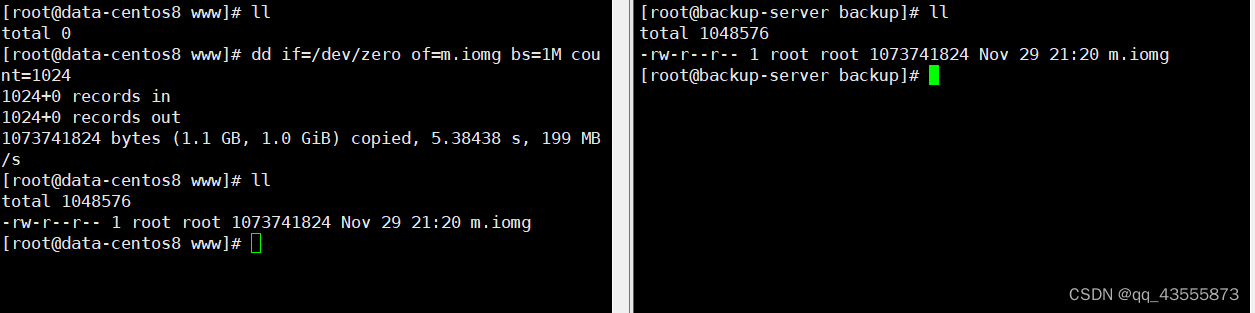
- 生成1G的测试文件进行测试
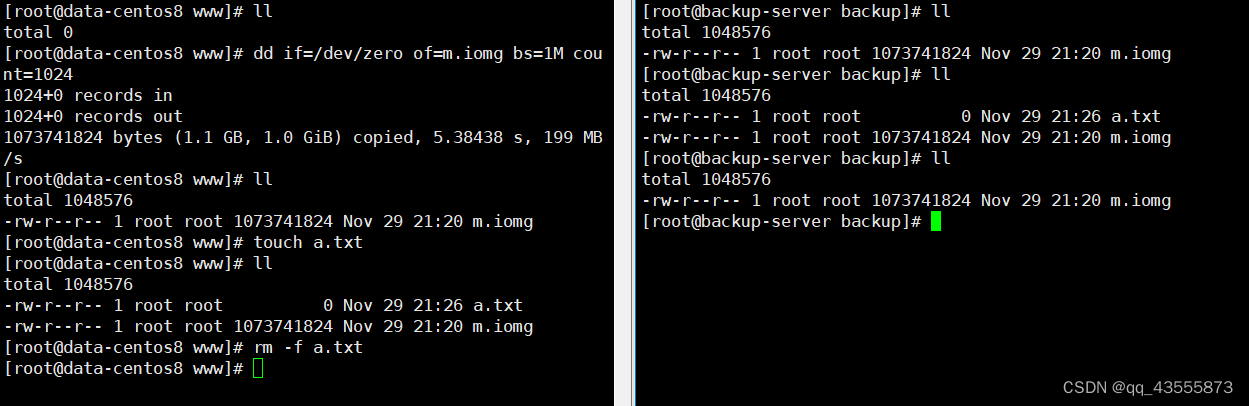
- 删除文件进行测试
相关内容
热门资讯
demo什么意思 demo版本...
618快到了,各位的小金库大概也在准备开闸放水了吧。没有小金库的,也该向老婆撒娇卖萌服个软了,一切只...
猫咪吃了塑料袋怎么办 猫咪误食...
你知道吗?塑料袋放久了会长猫哦!要说猫咪对塑料袋的喜爱程度完完全全可以媲美纸箱家里只要一有塑料袋的响...
猫咪吃了塑料袋怎么办 猫咪误食...
你知道吗?塑料袋放久了会长猫哦!要说猫咪对塑料袋的喜爱程度完完全全可以媲美纸箱家里只要一有塑料袋的响...
埃菲尔铁塔在哪 中国仿建埃菲尔...
2019年4月26日,广西南宁市,街头惊现一座巨型山寨版埃菲尔铁塔,高约20米,白色塔身,造型逼真,...
苗族的传统节日 贵州苗族节日有...
【岜沙苗族芦笙节】岜沙,苗语叫“分送”,距从江县城7.5公里,是世界上最崇拜树木并以树为神的枪手部落...
北京的名胜古迹 北京最著名的景...
北京从元代开始,逐渐走上帝国首都的道路,先是成为大辽朝五大首都之一的南京城,随着金灭辽,金代从海陵王...
世界上最漂亮的人 世界上最漂亮...
此前在某网上,选出了全球265万颜值姣好的女性。从这些数量庞大的女性群体中,人们投票选出了心目中最美...
应用未安装解决办法 平板应用未...
---IT小技术,每天Get一个小技能!一、前言描述苹果IPad2居然不能安装怎么办?与此IPad不...
长白山自助游攻略 吉林长白山游...
昨天介绍了西坡的景点详细请看链接:一个人的旅行,据说能看到长白山天池全凭运气,您的运气如何?今日介绍...
脚上的穴位图 脚面经络图对应的...
人体穴位作用图解大全更清晰直观的标注了各个人体穴位的作用,包括头部穴位图、胸部穴位图、背部穴位图、胳...
demo什么意思 demo版本...
618快到了,各位的小金库大概也在准备开闸放水了吧。没有小金库的,也该向老婆撒娇卖萌服个软了,一切只...
埃菲尔铁塔在哪 中国仿建埃菲尔...
2019年4月26日,广西南宁市,街头惊现一座巨型山寨版埃菲尔铁塔,高约20米,白色塔身,造型逼真,...
苗族的传统节日 贵州苗族节日有...
【岜沙苗族芦笙节】岜沙,苗语叫“分送”,距从江县城7.5公里,是世界上最崇拜树木并以树为神的枪手部落...