

最快最便捷的pytest使用allure测试报告
一、前言
最近通过群友了解到了allure这个报告,开始还不以为然,但还是逃不过真香定律。
经过试用之后,发现这个报告真的很好,很适合自动化测试结果的展示。下面说说我的探索历程吧。
- 选用的项目为
Selenium自动化测试Pytest框架实战,在这个项目的基础上说allure报告。
二、allure安装
- 首先安装python的allure-pytest包
pip install allure-pytest
- 然后安装allure的command命令行程序
MacOS直接使用homebrew工具执行 brew install allure 即可安装,不用配置下载包和配置环境
在GitHub下载安装程序https://github.com/allure-framework/allure2/releases
但是由于GitHub访问太慢,我已经下载好并放在了群文件里面
下载完成后解压放到一个文件夹。我的路径是D:\Program Files\allure-2.13.3
然后配置环境变量: 在系统变量path中添加D:\Program Files\allure-2.13.3\bin,然后确定保存。
打开cmd,输入allure,如果结果显示如下则表示成功了:
C:\Users\hoou>allure
Usage: allure [options] [command] [command options]Options:--helpPrint commandline help.-q, --quietSwitch on the quiet mode.Default: false-v, --verboseSwitch on the verbose mode.Default: false--versionPrint commandline version.Default: falseCommands:generate      Generate the reportUsage: generate [options] The directories with allure resultsOptions:-c, --cleanClean Allure report directory before generating a new one.Default: false--configAllure commandline config path. If specified overrides values from--profile and --configDirectory.--configDirectoryAllure commandline configurations directory. By default usesALLURE_HOME directory.--profileAllure commandline configuration profile.-o, --report-dir, --outputThe directory to generate Allure report into.Default: allure-reportserve      Serve the reportUsage: serve [options] The directories with allure resultsOptions:--configAllure commandline config path. If specified overrides values from--profile and --configDirectory.--configDirectoryAllure commandline configurations directory. By default usesALLURE_HOME directory.-h, --hostThis host will be used to start web server for the report.-p, --portThis port will be used to start web server for the report.Default: 0--profileAllure commandline configuration profile.open      Open generated reportUsage: open [options] The report directoryOptions:-h, --hostThis host will be used to start web server for the report.-p, --portThis port will be used to start web server for the report.Default: 0plugin      Generate the reportUsage: plugin [options]Options:--configAllure commandline config path. If specified overrides values from--profile and --configDirectory.--configDirectoryAllure commandline configurations directory. By default usesALLURE_HOME directory.--profileAllure commandline configuration profile.
三、allure初体验
改造一下之前的测试用例代码
#!/usr/bin/env python3
# -*- coding:utf-8 -*-
import re
import pytest
import allure
from utils.logger import log
from common.readconfig import ini
from page_object.searchpage import SearchPage@allure.feature("测试百度模块")
class TestSearch:
    @pytest.fixture(scope='function', autouse=True)def open_baidu(self, drivers):"""打开百度"""search = SearchPage(drivers)search.get_url(ini.url)    @allure.story("搜索selenium结果用例")def test_001(self, drivers):"""搜索"""search = SearchPage(drivers)search.input_search("selenium")search.click_search()result = re.search(r'selenium', search.get_source)log.info(result)assert result    @allure.story("测试搜索候选用例")def test_002(self, drivers):"""测试搜索候选"""search = SearchPage(drivers)search.input_search("selenium")log.info(list(search.imagine))assert all(["selenium" in i for i in search.imagine])if __name__ == '__main__':pytest.main(['TestCase/test_search.py', '--alluredir', './allure'])os.system('allure serve allure')
然后运行一下:
注意:如果你使用的是pycharm编辑器,请跳过该运行方式,直接使用.bat或.sh的方式运行
***------------------------------- generated html file: file://C:\Users\hoou\PycharmProjects\web-demotest\report.html -------------------------------- Results (12.97s):2 passed
Generating report to temp directory...
Report successfully generated to C:\Users\hoou\AppData\Local\Temp\112346119265936111\allure-report
Starting web server...
2020-06-18 22:52:44.500:INFO::main: Logging initialized @1958ms to org.eclipse.jetty.util.log.StdErrLog
Server started at to exit
命令行会出现如上提示,接着浏览器会自动打开:
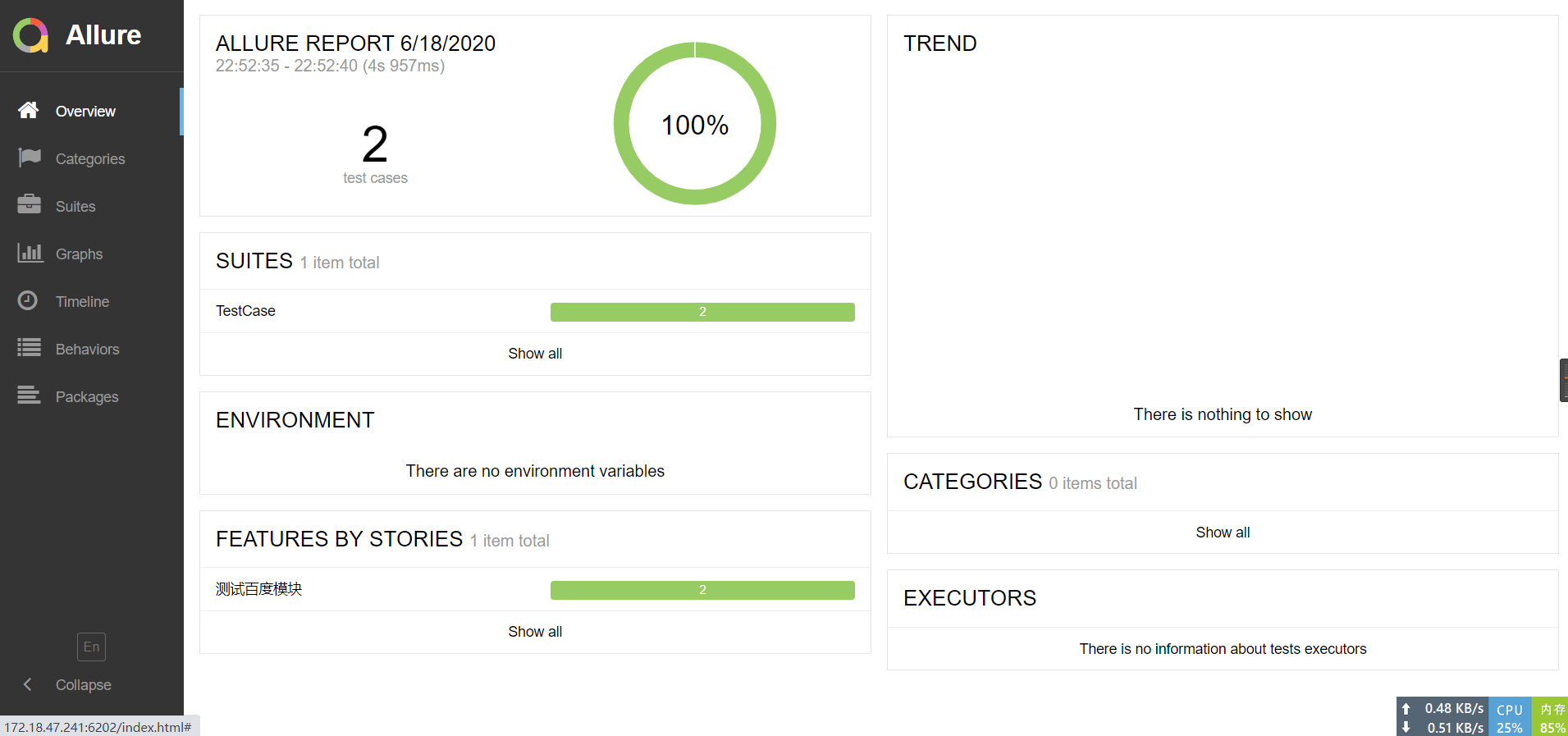
点击左下角En即可选择切换为中文。
是不是很清爽很友好,比pytest-html更舒服。
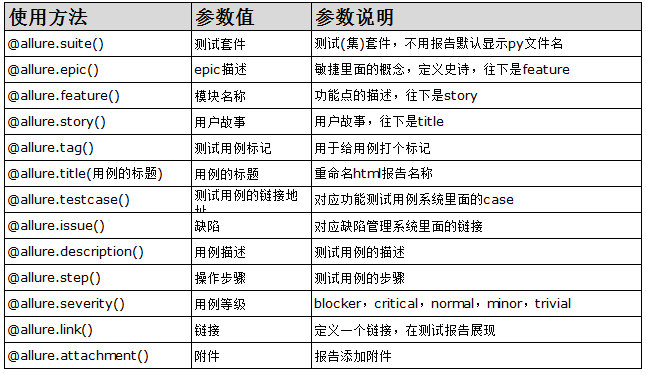
四、allure装饰器介绍
五、报告的生成和展示
刚才的两个命令:
- 生成allure原始报告到report/allure目录下,生成的全部为json或txt文件。
pytest TestCase/test_search.py --alluredir ./allure
- 在一个临时文件中生成报告并启动浏览器打开
allure serve allure
但是在关闭浏览器之后这个报告就再也打不开了。不建议使用这种。
所以我们必须使用其他的命令,让allure可以指定生成的报告目录。
我们在项目的根目录中创建run_case.py文件,内容如下:
#!/usr/bin/env python3
# -*- coding:utf-8 -*-
import sys
import subprocessWIN = sys.platform.startswith('win')def main():"""主函数"""steps = ["venv\\Script\\activate" if WIN else "source venv/bin/activate","pytest --alluredir allure-results --clean-alluredir","allure generate allure-results -c -o allure-report","allure open allure-report"]for step in steps:subprocess.run("call " + step if WIN else step, shell=True)if __name__ == "__main__":main()
命令释义:
1、使用pytest生成原始报告,里面大多数是一些原始的json数据,加入--clean-alluredir参数清除allure-results历史数据。
pytest --alluredir allure-results --clean-alluredir
- --clean-alluredir 清除allure-results历史数据
2、使用generate命令导出HTML报告到新的目录
allure generate allure-results -o allure-report
- -c 在生成报告之前先清理之前的报告目录
- -o 指定生成报告的文件夹
3、使用open命令在浏览器中打开HTML报告
allure open allure-report
好了我们运行一下该文件。
Results (12.85s):2 passed
Report successfully generated to c:\Users\hoou\PycharmProjects\web-demotest\allure-report
Starting web server...
2020-06-18 23:30:24.122:INFO::main: Logging initialized @260ms to org.eclipse.jetty.util.log.StdErrLog
Server started at 172.18 .47.241:7932/>. Press to exit
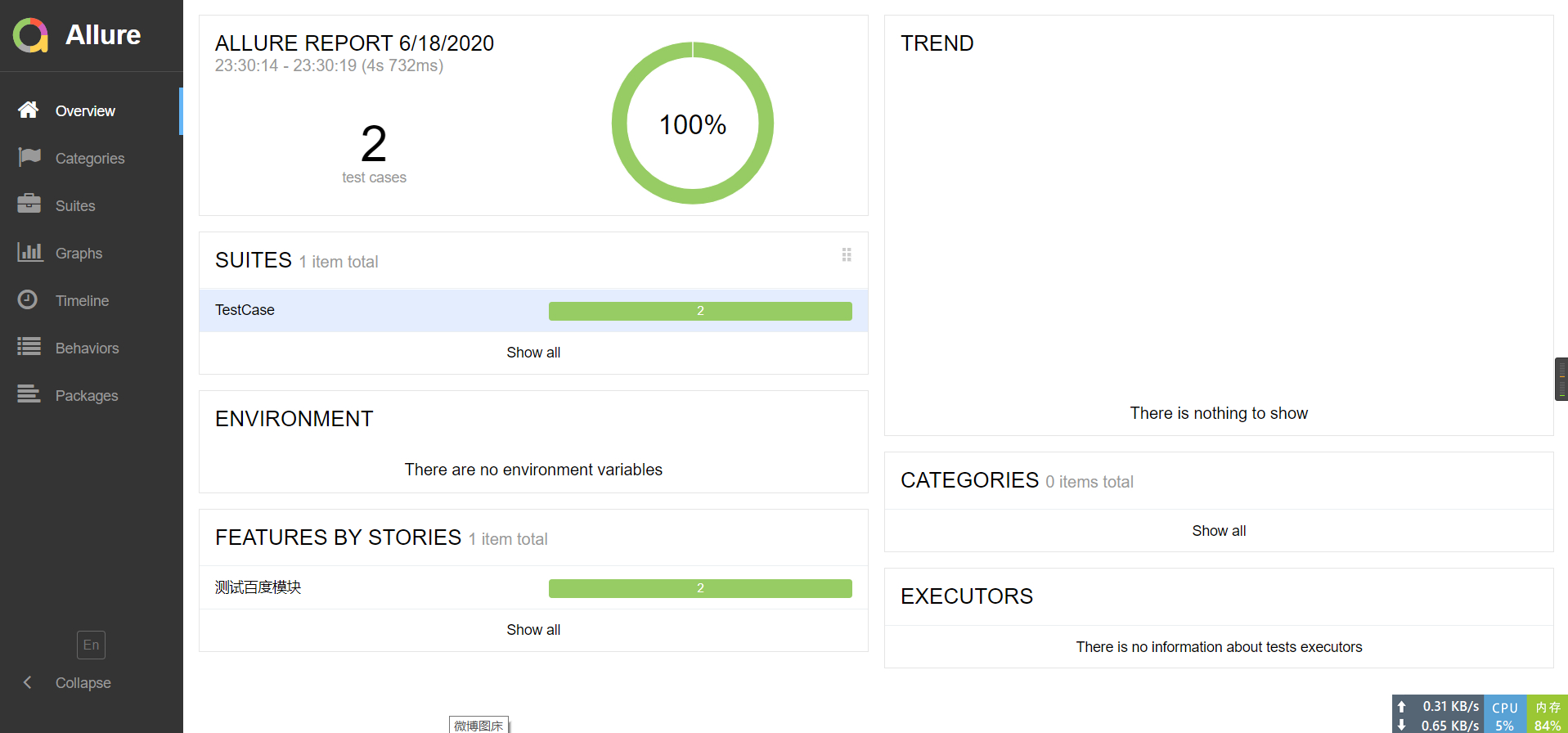
可以看到运行成功了。
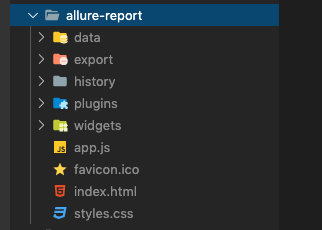
在项目中的allure-report文件夹也生成了相应的报告。
六、allure发生错误截图
上面的用例全是运行成功的,没有错误和失败的,那么发生了错误怎么样在allure报告中生成错误截图呢,我们一起来看看。
首先我们先在config/conf.py文件中添加一个截图目录和截图文件的配置。
+++class ConfigManager(object):...    @propertydef screen_path(self):"""截图目录"""screenshot_dir = os.path.join(self.BASE_DIR, 'screen_capture')if not os.path.exists(screenshot_dir):os.makedirs(screenshot_dir)now_time = dt_strftime("%Y%m%d%H%M%S")screen_file = os.path.join(screenshot_dir, "{}.png".format(now_time))return now_time, screen_file...
+++
然后我们修改项目目录中的conftest.py:
#!/usr/bin/env python3
# -*- coding:utf-8 -*-
import base64
import pytest
import allure
from py.xml import html
from selenium import webdriverfrom config.conf import cm
from common.readconfig import ini
from utils.times import timestamp
from utils.send_mail import send_reportdriver = None@pytest.fixture(scope='session', autouse=True)
def drivers(request):global driverif driver is None:driver = webdriver.Chrome()driver.maximize_window()def fn():driver.quit()request.addfinalizer(fn)return driver@pytest.hookimpl(hookwrapper=True)
def pytest_runtest_makereport(item):"""当测试失败的时候,自动截图,展示到html报告中:param item:"""pytest_html = item.config.pluginmanager.getplugin('html')outcome = yieldreport = outcome.get_result()report.description = str(item.function.__doc__)extra = getattr(report, 'extra', [])if report.when == 'call' or report.when == "setup":xfail = hasattr(report, 'wasxfail')if (report.skipped and xfail) or (report.failed and not xfail):screen_img = _capture_screenshot()if screen_img:html = '![]() \'onclick="window.open(this.src)" align="right"/>' % screen_imgextra.append(pytest_html.extras.html(html))report.extra = extradef pytest_html_results_table_header(cells):cells.insert(1, html.th('用例名称'))cells.insert(2, html.th('Test_nodeid'))cells.pop(2)def pytest_html_results_table_row(report, cells):cells.insert(1, html.td(report.description))cells.insert(2, html.td(report.nodeid))cells.pop(2)def pytest_html_results_table_html(report, data):if report.passed:del data[:]data.append(html.div('通过的用例未捕获日志输出.', class_='empty log'))def pytest_html_report_title(report):report.title = "pytest示例项目测试报告"def pytest_configure(config):config._metadata.clear()config._metadata['测试项目'] = "测试百度官网搜索"config._metadata['测试地址'] = ini.urldef pytest_html_results_summary(prefix, summary, postfix):# prefix.clear() # 清空summary中的内容prefix.extend([html.p("所属部门: XX公司测试部")])prefix.extend([html.p("测试执行人: 随风挥手")])def pytest_terminal_summary(terminalreporter, exitstatus, config):"""收集测试结果"""result = {"total": terminalreporter._numcollected,'passed': len(terminalreporter.stats.get('passed', [])),'failed': len(terminalreporter.stats.get('failed', [])),'error': len(terminalreporter.stats.get('error', [])),'skipped': len(terminalreporter.stats.get('skipped', [])),# terminalreporter._sessionstarttime 会话开始时间'total times': timestamp() - terminalreporter._sessionstarttime}print(result)if result['failed'] or result['error']:send_report()def _capture_screenshot():"""截图保存为base64"""now_time, screen_file = cm.screen_pathdriver.save_screenshot(screen_file)allure.attach.file(screen_file,"失败截图{}".format(now_time),allure.attachment_type.PNG)with open(screen_file, 'rb') as f:imagebase64 = base64.b64encode(f.read())return imagebase64.decode()
\'onclick="window.open(this.src)" align="right"/>' % screen_imgextra.append(pytest_html.extras.html(html))report.extra = extradef pytest_html_results_table_header(cells):cells.insert(1, html.th('用例名称'))cells.insert(2, html.th('Test_nodeid'))cells.pop(2)def pytest_html_results_table_row(report, cells):cells.insert(1, html.td(report.description))cells.insert(2, html.td(report.nodeid))cells.pop(2)def pytest_html_results_table_html(report, data):if report.passed:del data[:]data.append(html.div('通过的用例未捕获日志输出.', class_='empty log'))def pytest_html_report_title(report):report.title = "pytest示例项目测试报告"def pytest_configure(config):config._metadata.clear()config._metadata['测试项目'] = "测试百度官网搜索"config._metadata['测试地址'] = ini.urldef pytest_html_results_summary(prefix, summary, postfix):# prefix.clear() # 清空summary中的内容prefix.extend([html.p("所属部门: XX公司测试部")])prefix.extend([html.p("测试执行人: 随风挥手")])def pytest_terminal_summary(terminalreporter, exitstatus, config):"""收集测试结果"""result = {"total": terminalreporter._numcollected,'passed': len(terminalreporter.stats.get('passed', [])),'failed': len(terminalreporter.stats.get('failed', [])),'error': len(terminalreporter.stats.get('error', [])),'skipped': len(terminalreporter.stats.get('skipped', [])),# terminalreporter._sessionstarttime 会话开始时间'total times': timestamp() - terminalreporter._sessionstarttime}print(result)if result['failed'] or result['error']:send_report()def _capture_screenshot():"""截图保存为base64"""now_time, screen_file = cm.screen_pathdriver.save_screenshot(screen_file)allure.attach.file(screen_file,"失败截图{}".format(now_time),allure.attachment_type.PNG)with open(screen_file, 'rb') as f:imagebase64 = base64.b64encode(f.read())return imagebase64.decode()
来看看我们修改了什么:
- 我们修改了_capture_screenshot函数
在里面我们使用了webdriver截图生成文件,并使用allure.attach.file方法将文件添加到了allure测试报告中。
并且我们还返回了图片的base64编码,这样可以让pytest-html的错误截图和allure都能生效。
运行一次得到两份报告,一份是简单的一份是好看内容丰富的。
现在我们在测试用例中构建一个预期的错误测试一个我们的这个代码。
修改test_002测试用例
assert not all(["selenium" in i for i in search.imagine])
运行一下:
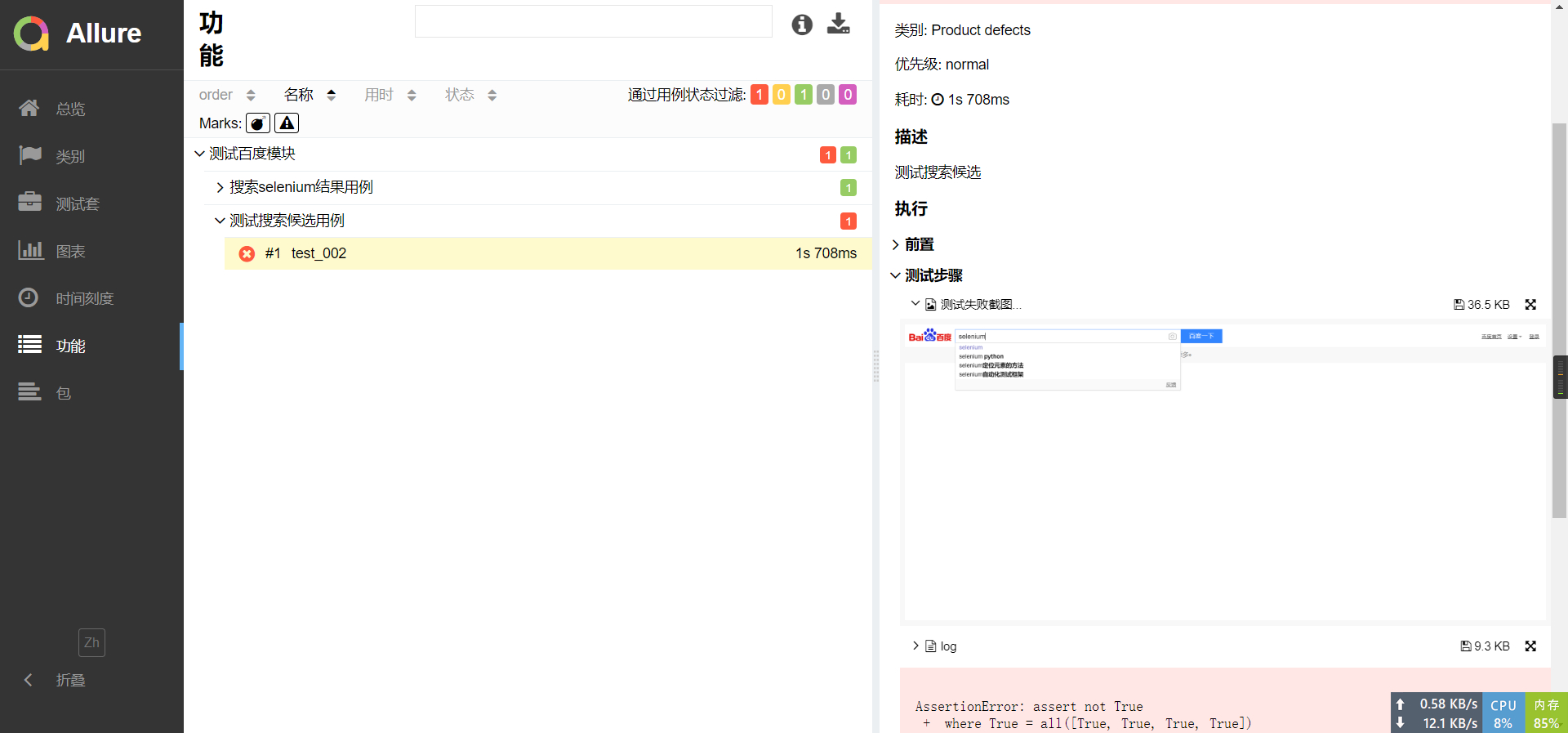
可以看到allure报告中已经有了这个错误的信息。
再来看看pytest-html中生成的报告:
可以看到两份生成的报告都附带了错误的截图,真是鱼和熊掌可以兼得呢。
好了,到这里可以说allure的报告就先到这里了,以后发现allure其他的精彩之处我再来分享。