

springboot实现excel数据导入导出
目录
1.一些关于excel的常识
2.使用Apache POI操作excel
3.使用easyexcel操作excel
4.结合mybatis-plus批量导入excel数据到数据库
1.一些关于excel的常识
首先关于excel的文件格式,分为xls和xlsx,分别对应03版本和07以后的版本。
03版本的excel最大行数限制为表格共有65536行,256列;而07版本的excel则无此限制。
关于excel中的单元格格式,一般为以下几类:
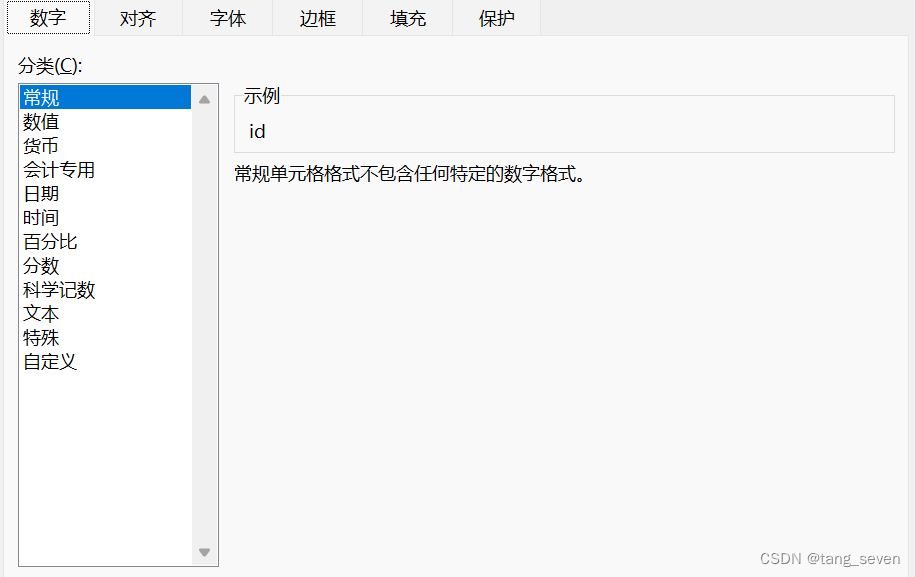
转为java代码时,可以初略地处理为:字符串、数值(普通数字、日期)、公式三类。由于不同的格式对应不同的java数据类型,所以读取时需要进行格式的转换。
2.使用Apache POI操作excel
Apache POI是创建和维护操作各种符合Office Open XML(OOXML)标准和微软的OLE 2复合文档格式(OLE2)的Java API。用它可以使用Java读取和创建,修改EXCEL文件。简单来说Apache POI 提供Java操作Excel进行读写的解决方案。
首先,我们需要知道的是,不同版本的excel对应POI不同版本下的依赖:
org.apache.poi poi 3.9 org.apache.poi poi-ooxml 3.9 操作excel对象时,也对应不同的类:
//创建工作蒲(03版)
Workbook workbook_03 = new HSSFWorkbook();
//创建工作蒲(07版)
Workbook workbook_07 = new XSSFWorkbook();(1)使用POI实现excel写:
import org.apache.poi.hssf.usermodel.HSSFWorkbook;
import org.apache.poi.ss.usermodel.Cell;
import org.apache.poi.ss.usermodel.Row;
import org.apache.poi.ss.usermodel.Sheet;
import org.apache.poi.ss.usermodel.Workbook;
import org.joda.time.DateTime;
import java.io.FileOutputStream;public class ExcelWriter {private static final String path = "C:/Users/14125/Desktop/";public static void main(String[] args) throws Exception {//创建工作蒲(03版)Workbook workbook = new HSSFWorkbook();//Workbook workbook_07 = new XSSFWorkbook();//创建工作表Sheet sheet = workbook.createSheet();//创建行/列Row row1 = sheet.createRow(0);Cell cell_11 = row1.createCell(0);cell_11.setCellValue("测试一下");Cell cell_12 = row1.createCell(1);cell_12.setCellValue("测试两下");Row row2 = sheet.createRow(1);Cell cell_21 = row2.createCell(0);cell_21.setCellValue(new DateTime().toString("yyyy-MM-dd"));//生成一张表(IO流)FileOutputStream fileOutputStream = new FileOutputStream(path+"java_excel.xls");workbook.write(fileOutputStream);fileOutputStream.close();}
}
逻辑上很简单,创建工作蒲——》创建表——》创建行——》创建列,从而确定一个单元格——》往单元格写入值——》生成表,使用文件流输出——》关闭流。
(1)使用POI实现excel读:
import org.apache.poi.ss.usermodel.*;
import org.apache.poi.xssf.usermodel.XSSFFormulaEvaluator;
import org.apache.poi.xssf.usermodel.XSSFWorkbook;
import org.joda.time.DateTime;import java.io.FileInputStream;
import java.io.IOException;
import java.util.Date;public class ExcelReader {private static final String path = "C:/Users/14125/Desktop/";public static void main(String[] args) throws IOException {//获取文件流FileInputStream fileInputStream = new FileInputStream(path+"test_read.xlsX");//获取工作蒲对象Workbook workbook = new XSSFWorkbook(fileInputStream);Sheet sheet = workbook.getSheetAt(1);//获取计算公式FormulaEvaluator formulaEvaluator = new XSSFFormulaEvaluator((XSSFWorkbook) workbook);Row rowTitle = sheet.getRow(0);if(rowTitle!=null) {//获取一行中数据数int cellCount = rowTitle.getPhysicalNumberOfCells();//获取标题行for (int i = 0; i < cellCount; i++) {Cell cell = rowTitle.getCell(i);if (cell != null) {//都为String,直接读取System.out.print(cell.getStringCellValue()+"| ");}}System.out.println();//获取行数int rowCount = sheet.getPhysicalNumberOfRows();//第二行非标题行开始遍历for (int i = 1; i < rowCount; i++) {Row rowData = sheet.getRow(i);if(rowData!=null){for (int j = 0; j < cellCount; j++) {Cell cell = rowData.getCell(j);if (cell != null) {//匹配单元格的数据类型int cellType = cell.getCellType();switch (cellType) {//字符串。直接读取case Cell.CELL_TYPE_STRING:String StringCellValue = cell.getStringCellValue();System.out.print(StringCellValue+"| ");break;//数字类型,转换case Cell.CELL_TYPE_NUMERIC:// 判断是否是日期if (DateUtil.isCellDateFormatted(cell)) {Date DateCellValue = cell.getDateCellValue();//转换日期格式System.out.print(new DateTime(DateCellValue).toString("yyyy-MM-dd hh:mm:ss")+"| ");}else {//重新设置单元格的数据类型cell.setCellType(Cell.CELL_TYPE_STRING);//转换成字符串获取,防止数字过长System.out.print(cell.toString()+"| ");}break;//boolean类型case Cell.CELL_TYPE_BOOLEAN:boolean booleanCellValue = cell.getBooleanCellValue();System.out.print(booleanCellValue+"| ");break;//公式类型case Cell.CELL_TYPE_FORMULA:
//                                    //计算
//                                    CellValue evaluate = formulaEvaluator.evaluate(cell);
//                                    //获取计算后的值
//                                    String cellValuate = evaluate.formatAsString();
//                                    System.out.println(cellValuate+"| ");//重新设置单元格的数据类型double value = cell.getNumericCellValue();//转换成字符串获取,防止数字过长System.out.print(value+"| ");break;//空白case Cell.CELL_TYPE_BLANK:break;// 匹配不能转换的错误case Cell.CELL_TYPE_ERROR:break;}}}}System.out.println();}}//关闭流fileInputStream.close();}
}
上述代码逻辑如上:创建文件流——》获取excel工作簿——》获取表头行——》 获取有内容单元格行数——》遍历所有行——》在每一行中获取有内容单元格列数——》遍历该行所有单元格——》判断单元格格式,并输出内容——》直到遍历所有单元格内容
上述代码中,核心代码为判断单元格格式,转为可处理的格式并进行输出:
//匹配单元格的数据类型switch (cellType) {//字符串。直接读取case Cell.CELL_TYPE_STRING:String StringCellValue = cell.getStringCellValue();System.out.print(StringCellValue+"| ");break;//数字类型,转换case Cell.CELL_TYPE_NUMERIC:// 判断是否是日期if (DateUtil.isCellDateFormatted(cell)) {Date DateCellValue = cell.getDateCellValue();//转换日期格式System.out.print(new DateTime(DateCellValue).toString("yyyy-MM-dd hh:mm:ss")+"| ");}else {//重新设置单元格的数据类型cell.setCellType(Cell.CELL_TYPE_STRING);//转换成字符串获取,防止数字过长System.out.print(cell.toString()+"| ");}break;//boolean类型case Cell.CELL_TYPE_BOOLEAN:boolean booleanCellValue = cell.getBooleanCellValue();System.out.print(booleanCellValue+"| ");break;//公式类型case Cell.CELL_TYPE_FORMULA://计算CellValue evaluate = formulaEvaluator.evaluate(cell);//获取计算后的值String cellValuate = evaluate.formatAsString();System.out.println(cellValuate+"| ");//重新设置单元格的数据类型double value = cell.getNumericCellValue();//转换成字符串获取,防止数字过长System.out.print(value+"| ");break;//空白case Cell.CELL_TYPE_BLANK:break;// 匹配不能转换的错误case Cell.CELL_TYPE_ERROR:break;}}实际开发中,我们可以将上述代码封装为一个工具类,传入一个excel文件流参数即可进行后续的调用。若在存储数据库,即在 Switch中转换格式后进行存储即可
3.使用easyexcel操作excel
EasyExcel是一个基于Java的、快速、简洁、解决大文件内存溢出的Excel处理工具。可以让你在不用考虑性能、内存的等因素的情况下,快速完成Excel的读、写等功能。
首先引入依赖,而easyexcel中已经包含了Apache poi相关依赖:
com.alibaba easyexcel 2.2.0-beta2 (1)使用easyexcel写:
首先,创建实体类,@ExcelProperty(value="列名称",index = 列坐标);若是包含子标题的复杂标题,使用方法为:@ExcelProperty({"主标题", "字符串标题"})。
@ExcelIgnore 标签可以让实体类写入时,忽略该字段,不进行写入
@Data
@AllArgsConstructor
@NoArgsConstructor
public class Student {@ExcelProperty(index = 0)private Integer id;@ExcelProperty(index = 1)private String age;@ExcelProperty(index = 2)private String name;@ExcelProperty(index = 3)private String gender;
}
easyexecl进行代码如下:
String fileName = TestFileUtil.getPath() + "complexHeadWrite" + System.currentTimeMillis() + ".xlsx";
// 这里 需要指定写用哪个class去写,然后写到第一个sheet,名字为模板 然后文件流会自动关闭
EasyExcel.write(fileName, ComplexHeadData.class).sheet("模板").doWrite(data());
4.结合mybatis-plus批量导入excel数据到数据库
(2)使用easyexcel读:
首先,创建实体类:
@Data
@AllArgsConstructor
@NoArgsConstructor
@TableName("student")
public class Student {@TableId(value = "id",type = IdType.AUTO)@ExcelProperty(index = 0)private Integer id;@ExcelProperty(index = 1)private String age;@ExcelProperty(index = 2)private String name;@ExcelProperty(index = 3)private String gender;
}
此处,为了简便mybatis-plus和easyexcel使用了同一个实体类,实际中应该为easyexcel封装一个dto,mybatis-plus单使用一个实体类,更为合理。
编写listener代码:
import com.alibaba.excel.context.AnalysisContext;
import com.alibaba.excel.event.AnalysisEventListener;
import com.alibaba.fastjson.JSON;
import com.seven.excel.dao.StudentDao;
import com.seven.excel.entities.Student;
import lombok.extern.slf4j.Slf4j;import java.util.ArrayList;
import java.util.List;@Slf4j
public class StudentDataListener extends AnalysisEventListener {/*** 每隔10条存储数据库,然后清理list ,方便内存回收*/private static final int BATCH_COUNT = 10;//缓存数据列表private List cachedDataList = new ArrayList<>(BATCH_COUNT);//不可以用spring管理,需用该方法实例化对象private StudentDao studentDao;public StudentDataListener(StudentDao studentDao) {this.studentDao = studentDao;}/*** 这个每一条数据解析都会来调用** @param data    one row value. Is is same as {@link AnalysisContext#readRowHolder()}* @param context*/@Overridepublic void invoke(Student data, AnalysisContext context) {log.info("解析到一条数据:{}", JSON.toJSONString(data));Student student = new Student();cachedDataList.add(student);// 达到BATCH_COUNT了,需要去存储一次数据库,防止数据几万条数据在内存,容易OOMif (cachedDataList.size() >= BATCH_COUNT) {saveData();// 存储完成清理 listcachedDataList = new ArrayList<>(BATCH_COUNT);}}/*** 所有数据解析完成了 都会来调用* @param context*/@Overridepublic void doAfterAllAnalysed(AnalysisContext context) {// 这里也要保存数据,确保最后遗留的数据也存储到数据库saveData();log.info("所有数据解析完成!");}/*** 加上存储数据库*/private void saveData() {if(cachedDataList.size()>0){log.info("{}条数据,开始存储数据库!", cachedDataList.size());studentDao.insertBatchSomeColumn(cachedDataList);log.info("存储数据库成功!");}}
}
此处,使用了mybatis-plus的批量插入,代码如下:
@Component
public class InsertBatchInjector extends DefaultSqlInjector {@Overridepublic List getMethodList(Class mapperClass, TableInfo tableInfo){List methodList = super.getMethodList(mapperClass,tableInfo);// 过滤Insert语句中的字段methodList.add(new InsertBatchSomeColumn(t -> !"weekend".equals(t.getColumn())&& !"position".equals(t.getColumn())&& !"date".equals(t.getColumn()))); // 添加InsertBatchSomeColumn方法return methodList;}
}
其次,在一个新的包下面创建一个EasyBaseMapper继承baseMapper:
public interface EasyBaseMapper extends BaseMapper {/*** 批量插入 仅适用于mysql** @param entityList 实体列表* @return 影响行数*/Integer insertBatchSomeColumn(Collection entityList);
}
然后,在另一个包下,创建自己的dao继承该 EasyBaseMapper:
@Mapper
public interface StudentDao extends EasyBaseMapper {
}
注意,二者代码不可放在同一个包下!
最后,编写控制类代码,读取excel文件,批量插入:
@RestController
public class StudentController {private static final String PATH = "C:/Users/14125/Desktop/";@Resourceprivate StudentDao studentDao;@GetMapping("/read")public void read(@RequestParam("filename") String fileName){fileName = PATH + fileName;// 这里 需要指定读用哪个class去读,然后读取第一个sheet 文件流会自动关闭EasyExcel.read(fileName, Student.class, new StudentDataListener(studentDao)).sheet().doRead();}
}