

【Android App】发送BLE广播及通过主从BLE实现聊天应用讲解及实战(附源码和演示 超详细)
需要源码请点赞关注收藏后评论区留言私信~~~
一、发送BLE广播
调用蓝牙适配器的getBluetoothLeAdvertiser方法,获得BluetoothLeAdvertiser广播器对象。 广播器的主要方法说明如下:
startAdvertising方法表示开始发送BLE广播,
stopAdvertising方法表示停止发送BLE广播。 在广播回调对象的onStartSuccess方法中,要给BLE服务端添加服务及其特征值,并开启GATT服务器等待客户端连接。
开启GATT服务器后的回调
openGattServer方法的第二个输入参数为BluetoothGattServerCallback类型,表示这里要传入事先定义的GATT服务器回调对象。 BluetoothGattServerCallback接口定义了许多方法,
常用方法有: onConnectionStateChange:BLE连接的状态发生变化时回调。此时判断如果已经连接,就从输入参数获取客户端的设备对象,并处理后续的连接逻辑。
onCharacteristicWriteRequest:收到BLE客户端写入请求时回调。该方法会收到客户端发来的消息。
同样此处需要两部手机上分别安装测试App,一台充当服务器端,另一台充当客户端
效果如下 填写名称则默认充当服务器端 另一台客户端进行搜索接听广播
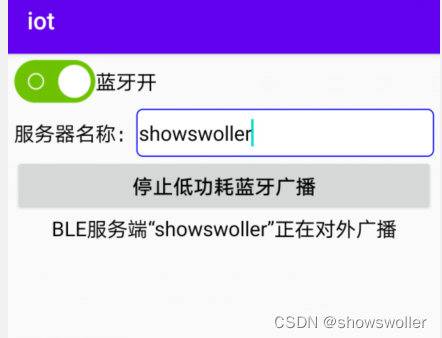
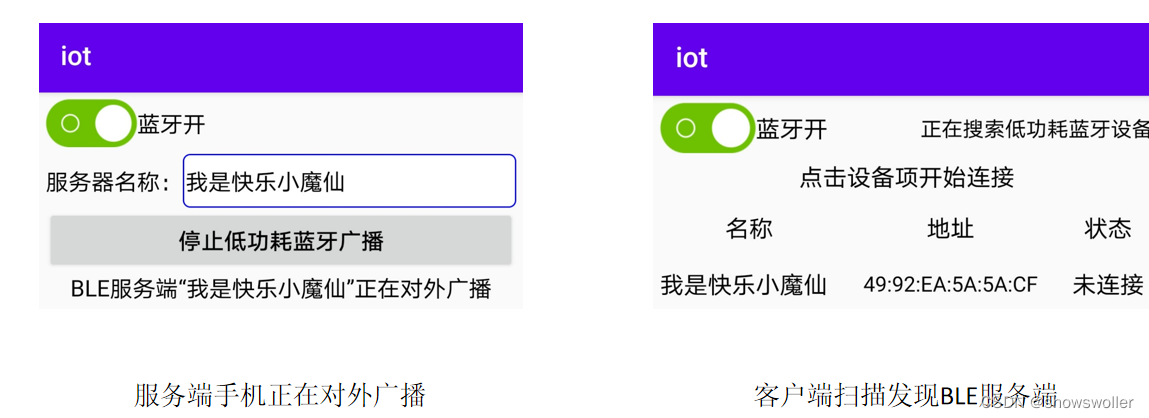
代码如下
package com.example.iot;import androidx.appcompat.app.AppCompatActivity;import android.bluetooth.BluetoothAdapter;
import android.bluetooth.BluetoothDevice;
import android.bluetooth.BluetoothGattCharacteristic;
import android.bluetooth.BluetoothGattServer;
import android.bluetooth.BluetoothGattServerCallback;
import android.bluetooth.BluetoothGattService;
import android.bluetooth.BluetoothManager;
import android.bluetooth.BluetoothProfile;
import android.bluetooth.le.AdvertiseCallback;
import android.bluetooth.le.AdvertiseData;
import android.bluetooth.le.AdvertiseSettings;
import android.bluetooth.le.BluetoothLeAdvertiser;
import android.content.Context;
import android.content.pm.PackageManager;
import android.os.Bundle;
import android.text.TextUtils;
import android.util.Log;
import android.widget.Button;
import android.widget.CheckBox;
import android.widget.EditText;
import android.widget.TextView;
import android.widget.Toast;import com.example.iot.constant.BleConstant;
import com.example.iot.util.BluetoothUtil;public class BleAdvertiseActivity extends AppCompatActivity {private static final String TAG = "BleAdvertiseActivity";private CheckBox ck_bluetooth; // 声明一个复选框对象private EditText et_name; // 声明一个编辑框对象private Button btn_advertise; // 声明一个按钮对象private TextView tv_hint; // 声明一个文本视图对象private BluetoothManager mBluetoothManager; // 声明一个蓝牙管理器对象private BluetoothAdapter mBluetoothAdapter; // 声明一个蓝牙适配器对象private BluetoothGattServer mGattServer; // 声明一个蓝牙GATT服务器对象private boolean isAdvertising = false; // 是否正在广播@Overrideprotected void onCreate(Bundle savedInstanceState) {super.onCreate(savedInstanceState);setContentView(R.layout.activity_ble_advertise);initView(); // 初始化视图initBluetooth(); // 初始化蓝牙适配器if (BluetoothUtil.getBlueToothStatus()) { // 已经打开蓝牙ck_bluetooth.setChecked(true);}}// 初始化视图private void initView() {ck_bluetooth = findViewById(R.id.ck_bluetooth);et_name = findViewById(R.id.et_name);btn_advertise = findViewById(R.id.btn_advertise);tv_hint = findViewById(R.id.tv_hint);ck_bluetooth.setOnCheckedChangeListener((buttonView, isChecked) -> {if (isChecked) { // 开启蓝牙功能ck_bluetooth.setText("蓝牙开");btn_advertise.setEnabled(true);btn_advertise.setText("发送低功耗蓝牙广播");if (!BluetoothUtil.getBlueToothStatus()) { // 还未打开蓝牙BluetoothUtil.setBlueToothStatus(true); // 开启蓝牙功能}} else { // 关闭蓝牙功能ck_bluetooth.setText("蓝牙关");btn_advertise.setEnabled(false);isAdvertising = false;BluetoothUtil.setBlueToothStatus(false); // 关闭蓝牙功能}});btn_advertise.setEnabled(false);btn_advertise.setOnClickListener(v -> {if (!BluetoothUtil.getBlueToothStatus()) { // 还未打开蓝牙Toast.makeText(this, "请先开启蓝牙再发送低功耗蓝牙广播", Toast.LENGTH_SHORT).show();return;}if (TextUtils.isEmpty(et_name.getText().toString())) {Toast.makeText(this, "请先输入服务器名称", Toast.LENGTH_SHORT).show();return;}if (isAdvertising) {stopAdvertise(); // 停止低功耗蓝牙广播} else {startAdvertise(et_name.getText().toString()); // 开始低功耗蓝牙广播}isAdvertising = !isAdvertising;btn_advertise.setText(isAdvertising?"停止低功耗蓝牙广播":"发送低功耗蓝牙广播");});}// 初始化蓝牙适配器private void initBluetooth() {if (!getPackageManager().hasSystemFeature(PackageManager.FEATURE_BLUETOOTH_LE)) {Toast.makeText(this, "当前设备不支持低功耗蓝牙", Toast.LENGTH_SHORT).show();finish(); // 关闭当前页面}// 获取蓝牙管理器,并从中得到蓝牙适配器mBluetoothManager =(BluetoothManager) getSystemService(Context.BLUETOOTH_SERVICE);mBluetoothAdapter = mBluetoothManager.getAdapter(); // 获取蓝牙适配器}// 开始低功耗蓝牙广播private void startAdvertise(String ble_name) {// 设置广播参数AdvertiseSettings settings = new AdvertiseSettings.Builder().setConnectable(true) // 是否允许连接.setTimeout(0) // 设置超时时间.setTxPowerLevel(AdvertiseSettings.ADVERTISE_TX_POWER_HIGH).setAdvertiseMode(AdvertiseSettings.ADVERTISE_MODE_LOW_LATENCY).build();// 设置广播内容AdvertiseData advertiseData = new AdvertiseData.Builder().setIncludeDeviceName(true) // 是否把设备名称也广播出去.setIncludeTxPowerLevel(true) // 是否把功率电平也广播出去.build();mBluetoothAdapter.setName(ble_name); // 设置BLE服务端的名称// 获取BLE广播器BluetoothLeAdvertiser advertiser = mBluetoothAdapter.getBluetoothLeAdvertiser();// BLE服务端开始广播,好让别人发现自己advertiser.startAdvertising(settings, advertiseData, mAdvertiseCallback);}// 停止低功耗蓝牙广播private void stopAdvertise() {if (mBluetoothAdapter != null) {// 获取BLE广播器BluetoothLeAdvertiser advertiser = mBluetoothAdapter.getBluetoothLeAdvertiser();if (advertiser != null) {advertiser.stopAdvertising(mAdvertiseCallback); // 停止低功耗蓝牙广播}}}// 创建一个低功耗蓝牙广播回调对象private AdvertiseCallback mAdvertiseCallback = new AdvertiseCallback() {@Overridepublic void onStartSuccess(AdvertiseSettings settings) {Log.d(TAG, "低功耗蓝牙广播成功:"+settings.toString());addService(); // 添加读写服务UUID,特征值等String desc = String.format("BLE服务端“%s”正在对外广播", et_name.getText().toString());tv_hint.setText(desc);}@Overridepublic void onStartFailure(int errorCode) {Log.d(TAG, "低功耗蓝牙广播失败,错误代码为"+errorCode);tv_hint.setText("低功耗蓝牙广播失败,错误代码为"+errorCode);}};// 添加读写服务UUID,特征值等private void addService() {BluetoothGattService gattService = new BluetoothGattService(BleConstant.UUID_SERVER, BluetoothGattService.SERVICE_TYPE_PRIMARY);// 只读的特征值BluetoothGattCharacteristic charaRead = new BluetoothGattCharacteristic(BleConstant.UUID_CHAR_READ,BluetoothGattCharacteristic.PROPERTY_READ | BluetoothGattCharacteristic.PROPERTY_NOTIFY,BluetoothGattCharacteristic.PERMISSION_READ);// 只写的特征值BluetoothGattCharacteristic charaWrite = new BluetoothGattCharacteristic(BleConstant.UUID_CHAR_WRITE,BluetoothGattCharacteristic.PROPERTY_WRITE | BluetoothGattCharacteristic.PROPERTY_NOTIFY,BluetoothGattCharacteristic.PERMISSION_WRITE);gattService.addCharacteristic(charaRead); // 将特征值添加到服务里面gattService.addCharacteristic(charaWrite); // 将特征值添加到服务里面// 开启GATT服务器等待客户端连接mGattServer = mBluetoothManager.openGattServer(this, mGattCallback);mGattServer.addService(gattService); // 向GATT服务器添加指定服务}// 创建一个GATT服务器回调对象private BluetoothGattServerCallback mGattCallback = new BluetoothGattServerCallback() {// BLE连接的状态发生变化时回调@Overridepublic void onConnectionStateChange(BluetoothDevice device, int status, int newState) {super.onConnectionStateChange(device, status, newState);Log.d(TAG, "onConnectionStateChange device=" + device.toString() + " status=" + status + " newState=" + newState);if (newState == BluetoothProfile.STATE_CONNECTED) {runOnUiThread(() -> {String desc = String.format("%s\n已连接BLE客户端,对方名称为%s,MAC地址为%s",tv_hint.getText().toString(), device.getName(), device.getAddress());tv_hint.setText(desc);});}}// 收到BLE客户端写入请求时回调@Overridepublic void onCharacteristicWriteRequest(BluetoothDevice device, int requestId, BluetoothGattCharacteristic chara, boolean preparedWrite, boolean responseNeeded, int offset, byte[] value) {super.onCharacteristicWriteRequest(device, requestId, chara, preparedWrite, responseNeeded, offset, value);String message = new String(value); // 把客户端发来的数据转成字符串Log.d(TAG, "收到了客户端发过来的数据 " + message);}};@Overrideprotected void onDestroy() {super.onDestroy();stopAdvertise(); // 停止低功耗蓝牙广播if (mGattServer != null) {mGattServer.close(); // 关闭GATT服务器}}}
二、通过主从BLE实现聊天应用
调用蓝牙管理器对象的openGattServer方法,会开启GATT服务器并返回BluetoothGattServer类型的服务端对象。
BluetoothGattServer的常用方法说明如下:
addService:向GATT服务器添加指定服务。
sendResponse:向GATT客户端发送应答,告诉它成功收到了数据。 notifyCharacteristicChanged:向GATT客户端发送本地特征值已更新的通知。
close:关闭GATT服务器。
BLE客户端的管理对象
调用设备对象的connectGatt方法,连接GATT服务器并获得BluetoothGatt类型的客户端对象。 BluetoothGatt的常用方法说明如下:
discoverServices:开始查找GATT服务器提供的服务。
getServices:获取GATT服务器提供的服务列表。
writeCharacteristic:往GATT服务器写入特征值。
setCharacteristicNotification:开启或关闭特征值的通知。
disconnect:断开GATT连接。
close:关闭GATT客户端。
GATT服务端与客户端的通信流程
(1)建立GATT连接 先开启服务器,然后客户端才能连上服务器。
(2)客户端向服务端发消息 GATT客户端调用writeCharacteristic方法,会往GATT服务器写入特征值。
(3)服务端向客户端发消息 GATT客户端开启了通知后,GATT服务端调用notifyCharacteristicChanged方法向客户端发送特征值变更通知。
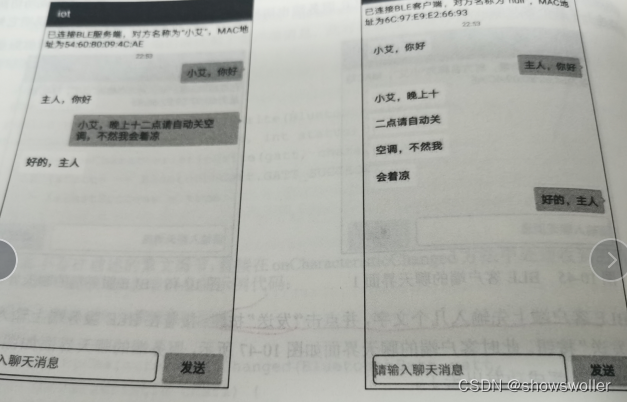
运行测试App效果如下
首先注册好服务器端 等待客户端连接
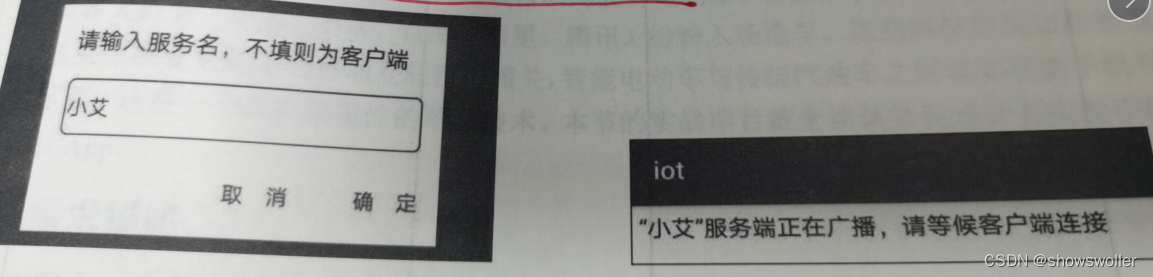
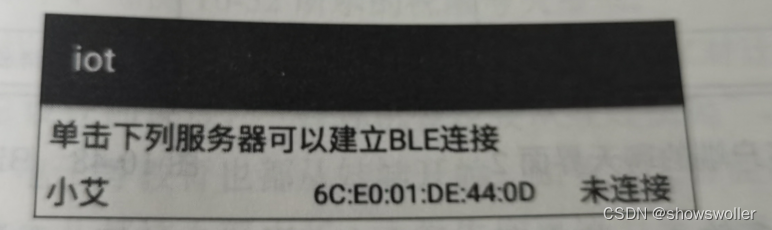
服务器端与客户端可以进行简单的通话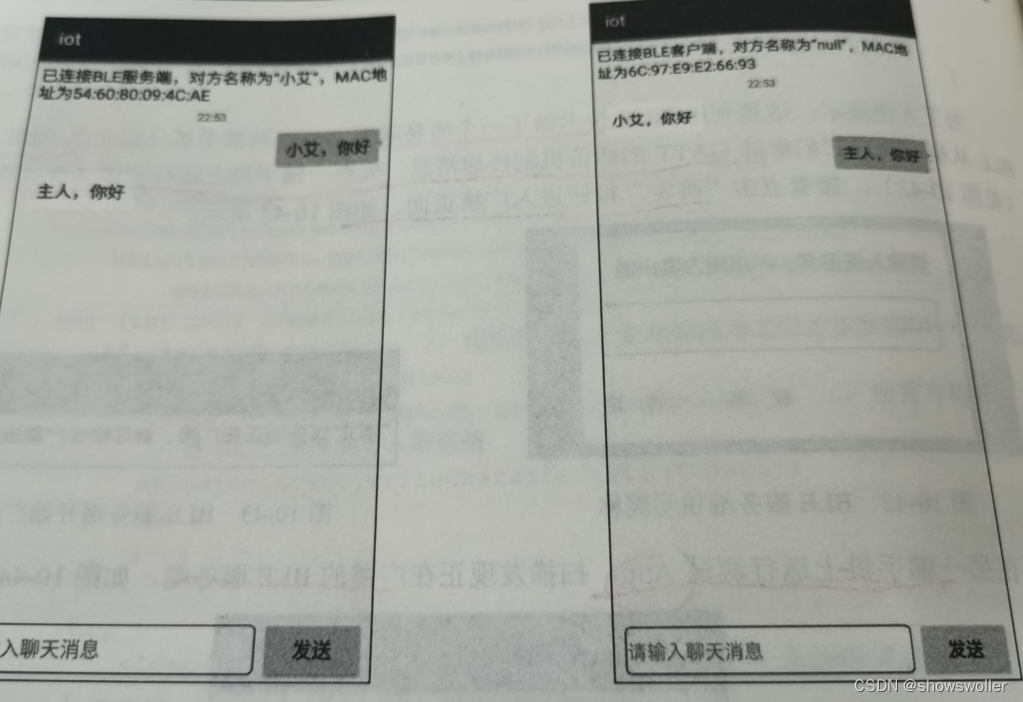
代码如下
package com.example.iot;import androidx.appcompat.app.AppCompatActivity;import android.bluetooth.BluetoothAdapter;
import android.bluetooth.BluetoothDevice;
import android.bluetooth.BluetoothGatt;
import android.bluetooth.BluetoothGattCallback;
import android.bluetooth.BluetoothGattCharacteristic;
import android.bluetooth.BluetoothGattService;
import android.bluetooth.BluetoothManager;
import android.bluetooth.BluetoothProfile;
import android.bluetooth.le.BluetoothLeScanner;
import android.bluetooth.le.ScanCallback;
import android.bluetooth.le.ScanResult;
import android.content.Context;
import android.content.pm.PackageManager;
import android.os.Bundle;
import android.os.Handler;
import android.os.Looper;
import android.text.TextUtils;
import android.util.Log;
import android.view.View;
import android.view.WindowManager;
import android.widget.EditText;
import android.widget.LinearLayout;
import android.widget.ScrollView;
import android.widget.TextView;
import android.widget.Toast;import com.example.iot.adapter.BlueListAdapter;
import com.example.iot.bean.BlueDevice;
import com.example.iot.constant.BleConstant;
import com.example.iot.util.BluetoothUtil;
import com.example.iot.util.ChatUtil;
import com.example.iot.util.DateUtil;
import com.example.iot.util.Utils;
import com.example.iot.util.ViewUtil;
import com.example.iot.widget.NoScrollListView;import java.util.ArrayList;
import java.util.HashMap;
import java.util.List;
import java.util.Map;
import java.util.UUID;public class BleClientActivity extends AppCompatActivity {private static final String TAG = "BleClientActivity";private TextView tv_hint; // 声明一个文本视图对象private ScrollView sv_chat; // 声明一个滚动视图对象private LinearLayout ll_show; // 声明一个线性视图对象private LinearLayout ll_input; // 声明一个线性视图对象private EditText et_input; // 声明一个编辑框对象private Handler mHandler = new Handler(Looper.myLooper()); // 声明一个处理器对象private int dip_margin; // 每条聊天记录的四周空白距离private String mMinute = "00:00";private NoScrollListView nslv_device; // 声明一个不滚动列表视图对象private BlueListAdapter mListAdapter; // 声明一个蓝牙设备的列表适配器对象private Map mDeviceMap = new HashMap<>(); // 蓝牙设备映射private List mDeviceList = new ArrayList<>(); // 蓝牙设备列表private BluetoothAdapter mBluetoothAdapter; // 声明一个蓝牙适配器对象private BluetoothDevice mRemoteDevice; // 声明一个蓝牙设备对象private BluetoothGatt mBluetoothGatt; // 声明一个蓝牙GATT客户端对象@Overrideprotected void onCreate(Bundle savedInstanceState) {super.onCreate(savedInstanceState);setContentView(R.layout.activity_ble_client);getWindow().addFlags(WindowManager.LayoutParams.FLAG_KEEP_SCREEN_ON); // 保持屏幕常亮initView(); // 初始化视图initBluetooth(); // 初始化蓝牙适配器mHandler.postDelayed(mScanStart, 200);}// 初始化视图private void initView() {dip_margin = Utils.dip2px(this, 5);nslv_device = findViewById(R.id.nslv_device);tv_hint = findViewById(R.id.tv_hint);sv_chat = findViewById(R.id.sv_chat);ll_show = findViewById(R.id.ll_show);ll_input = findViewById(R.id.ll_input);et_input = findViewById(R.id.et_input);findViewById(R.id.btn_send).setOnClickListener(v -> sendMesssage());nslv_device = findViewById(R.id.nslv_device);mListAdapter = new BlueListAdapter(this, mDeviceList);nslv_device.setAdapter(mListAdapter);nslv_device.setOnItemClickListener((parent, view, position, id) -> {BlueDevice item = mDeviceList.get(position);// 根据设备地址获得远端的蓝牙设备对象mRemoteDevice = mBluetoothAdapter.getRemoteDevice(item.address);Log.d(TAG, "onItemClick address="+mRemoteDevice.getAddress()+", name="+mRemoteDevice.getName());// 连接GATT服务器mBluetoothGatt = mRemoteDevice.connectGatt(this, false, mGattCallback);});}// 初始化蓝牙适配器private void initBluetooth() {if (!getPackageManager().hasSystemFeature(PackageManager.FEATURE_BLUETOOTH_LE)) {Toast.makeText(this, "当前设备不支持低功耗蓝牙", Toast.LENGTH_SHORT).show();finish(); // 关闭当前页面}// 获取蓝牙管理器,并从中得到蓝牙适配器BluetoothManager bm = (BluetoothManager) getSystemService(Context.BLUETOOTH_SERVICE);mBluetoothAdapter = bm.getAdapter(); // 获取蓝牙适配器if (!BluetoothUtil.getBlueToothStatus()) { // 还未打开蓝牙BluetoothUtil.setBlueToothStatus(true); // 开启蓝牙功能}}// 创建一个开启BLE扫描的任务private Runnable mScanStart = new Runnable() {@Overridepublic void run() {if (BluetoothUtil.getBlueToothStatus()) { // 已经打开蓝牙// 获取BLE设备扫描器BluetoothLeScanner scanner = mBluetoothAdapter.getBluetoothLeScanner();scanner.startScan(mScanCallback); // 开始扫描BLE设备} else {mHandler.postDelayed(this, 2000);}}};// 创建一个扫描回调对象private ScanCallback mScanCallback = new ScanCallback() {@Overridepublic void onScanResult(int callbackType, ScanResult result) {super.onScanResult(callbackType, result);if (TextUtils.isEmpty(result.getDevice().getName())) {return;}Log.d(TAG, "callbackType="+callbackType+", result="+result.toString());// 下面把找到的蓝牙设备添加到设备映射和设备列表BlueDevice device = new BlueDevice(result.getDevice().getName(), result.getDevice().getAddress(), 0);mDeviceMap.put(device.address, device);mDeviceList.clear();mDeviceList.addAll(mDeviceMap.values());runOnUiThread(() -> mListAdapter.notifyDataSetChanged());}@Overridepublic void onBatchScanResults(List results) {super.onBatchScanResults(results);}@Overridepublic void onScanFailed(int errorCode) {super.onScanFailed(errorCode);}};private UUID read_UUID_chara; // 读的特征编号private UUID read_UUID_service; // 读的服务编号private UUID write_UUID_chara; // 写的特征编号private UUID write_UUID_service; // 写的服务编号private UUID notify_UUID_chara; // 通知的特征编号private UUID notify_UUID_service; // 通知的服务编号private UUID indicate_UUID_chara; // 指示的特征编号private UUID indicate_UUID_service; // 指示的服务编号// 创建一个GATT客户端回调对象private BluetoothGattCallback mGattCallback = new BluetoothGattCallback() {// BLE连接的状态发生变化时回调@Overridepublic void onConnectionStateChange(BluetoothGatt gatt, int status, int newState) {super.onConnectionStateChange(gatt, status, newState);Log.d(TAG, "onConnectionStateChange status="+status+", newState="+newState);if (newState == BluetoothProfile.STATE_CONNECTED) { // 连接成功gatt.discoverServices(); // 开始查找GATT服务器提供的服务// 获取BLE设备扫描器BluetoothLeScanner scanner = mBluetoothAdapter.getBluetoothLeScanner();scanner.stopScan(mScanCallback); // 停止扫描BLE设备runOnUiThread(() -> {String desc = String.format("已连接BLE服务端,对方名称为“%s”,MAC地址为%s",mRemoteDevice.getName(), mRemoteDevice.getAddress());tv_hint.setText(desc);ll_input.setVisibility(View.VISIBLE);nslv_device.setVisibility(View.GONE);});} else if (newState == BluetoothProfile.STATE_DISCONNECTED) { // 连接断开mBluetoothGatt.close(); // 关闭GATT客户端}}// 发现BLE服务端的服务列表及其特征值时回调@Overridepublic void onServicesDiscovered(final BluetoothGatt gatt, int status) {super.onServicesDiscovered(gatt, status);Log.d(TAG, "onServicesDiscovered status"+status);if (status == BluetoothGatt.GATT_SUCCESS) {// 获得特征值的第一种办法:直接问硬件厂商,然后把特征值写在代码中
//                BluetoothGattService service = mBluetoothGatt.getService(BleConstant.UUID_SERVER);
//                if (service == null) {
//                    Log.d(TAG, "onServicesDiscovered service is null");
//                    return;
//                }
//                BluetoothGattCharacteristic chara1 = service.getCharacteristic(BleConstant.UUID_CHAR_READ);
//                boolean b = mBluetoothGatt.setCharacteristicNotification(chara1, true);
//                Log.d(TAG, "onServicesDiscovered 设置通知 " + b);// 获得特征值的第二种办法:通过特征属性的匹配关系,寻找对应的各路特征值List gattServiceList= mBluetoothGatt.getServices();for (BluetoothGattService gattService : gattServiceList) {List charaList = gattService.getCharacteristics();for (BluetoothGattCharacteristic chara : charaList) {int charaProp = chara.getProperties(); // 获取该特征的属性if ((charaProp & BluetoothGattCharacteristic.PROPERTY_READ) > 0) {read_UUID_chara = chara.getUuid();read_UUID_service = gattService.getUuid();Log.d(TAG, "read_chara=" + read_UUID_chara + ", read_service=" + read_UUID_service);}if ((charaProp & BluetoothGattCharacteristic.PROPERTY_WRITE) > 0) {write_UUID_chara = chara.getUuid();write_UUID_service = gattService.getUuid();Log.d(TAG,"write_chara="+write_UUID_chara+", write_service="+write_UUID_service);}if ((charaProp & BluetoothGattCharacteristic.PROPERTY_WRITE_NO_RESPONSE) > 0) {write_UUID_chara = chara.getUuid();write_UUID_service = gattService.getUuid();Log.d(TAG,"no_response write_chara="+write_UUID_chara+", write_service="+write_UUID_service);}if ((charaProp & BluetoothGattCharacteristic.PROPERTY_NOTIFY) > 0) {notify_UUID_chara = chara.getUuid();notify_UUID_service = gattService.getUuid();Log.d(TAG,"notify_chara="+notify_UUID_chara+", notify_service="+notify_UUID_service);}if ((charaProp & BluetoothGattCharacteristic.PROPERTY_INDICATE) > 0) {indicate_UUID_chara = chara.getUuid();indicate_UUID_service = gattService.getUuid();Log.d(TAG,"indicate_chara="+indicate_UUID_chara+", indicate_service="+indicate_UUID_service);}}BluetoothGattService service = mBluetoothGatt.getService(read_UUID_service);if (read_UUID_service != null) {BluetoothGattCharacteristic chara = service.getCharacteristic(read_UUID_chara);// 开启或关闭特征值的通知(第二个参数为true表示开启)boolean b = mBluetoothGatt.setCharacteristicNotification(chara, true);Log.d(TAG, "onServicesDiscovered 设置通知 " + b);}}} else {Log.d(TAG, "onServicesDiscovered fail-->" + status);}}// 收到BLE服务端的数据变更时回调@Overridepublic void onCharacteristicChanged(BluetoothGatt gatt, BluetoothGattCharacteristic chara) {super.onCharacteristicChanged(gatt, chara);String message = new String(chara.getValue()); // 把服务端返回的数据转成字符串Log.d(TAG, "onCharacteristicChanged "+message);runOnUiThread(() ->appendChatMsg(message, false)); // 往聊天窗口添加聊天消息}// 收到BLE服务端的数据写入时回调@Overridepublic void onCharacteristicWrite(BluetoothGatt gatt, BluetoothGattCharacteristic chara, int status) {super.onCharacteristicWrite(gatt, chara, status);Log.d(TAG, "onCharacteristicWrite status="+status);if (status == BluetoothGatt.GATT_SUCCESS) {isLastSuccess = true;} else {Log.d(TAG, "write fail->" + status);}}};@Overrideprotected void onDestroy() {super.onDestroy();if (mBluetoothGatt != null) {mBluetoothGatt.disconnect(); // 断开GATT连接}}private boolean isLastSuccess = true; // 上一条消息是否发送成功// 发送聊天消息private void sendMesssage() {String message = et_input.getText().toString();if (TextUtils.isEmpty(message)) {Toast.makeText(this, "请先输入聊天消息", Toast.LENGTH_SHORT).show();return;}et_input.setText("");ViewUtil.hideOneInputMethod(this, et_input); // 隐藏软键盘new MessageThread(message).start(); // 启动消息发送线程appendChatMsg(message, true); // 往聊天窗口添加聊天消息}// 定义一个消息发送线程private class MessageThread extends Thread {private List msgList; // 消息列表public MessageThread(String message) {msgList = ChatUtil.splitString(message, 20);}@Overridepublic void run() {// 拿到写的特征值BluetoothGattCharacteristic chara = mBluetoothGatt.getService(BleConstant.UUID_SERVER).getCharacteristic(BleConstant.UUID_CHAR_WRITE);for (int i=0; i {sv_chat.fullScroll(ScrollView.FOCUS_DOWN); // 滚动到底部}, 100);}// 往聊天窗口添加当前时间private void appendNowMinute() {String nowMinute = DateUtil.getNowMinute();if (!mMinute.substring(0, 4).equals(nowMinute.substring(0, 4))) {mMinute = nowMinute;ll_show.addView(ChatUtil.getHintView(this, nowMinute, dip_margin));}}}
创作不易 觉得有帮助请点赞关注收藏~~~