

Three.js初识:渲染立方体、3d字体、修改渲染背景颜色
创始人
2024-03-12 02:42:37
用场景对three.js进行渲染:场景、相机、渲染器
const scene = new THREE.Scene();
const camera = new THREE.PerspectiveCamera( 75, window.innerWidth / window.innerHeight, 0.1, 1000 );const renderer = new THREE.WebGLRenderer();
renderer.setSize( window.innerWidth, window.innerHeight );
document.body.appendChild( renderer.domElement );
场景
function Scene() {Object3D.call( this );this.type = 'Scene';this.background = null;this.fog = null;this.overrideMaterial = null;this.autoUpdate = true; // checked by the renderer}
透视摄影机
参数解析:
- fov: 视野角度(FOV)。视野角度就是无论在什么时候,你所能在显示器上看到的场景的范围,它的单位是角度(与弧度区分开)。
- aspect: 长宽比(aspect ratio)。 也就是你用一个物体的宽除以它的高的值。比如说,当你在一个宽屏电视上播放老电影时,可以看到图像仿佛是被压扁的。
- near: 近截面(near)
- far: 远截面(far)
function PerspectiveCamera( fov, aspect, near, far ) {Camera.call( this );this.type = 'PerspectiveCamera';this.fov = fov !== undefined ? fov : 50;this.zoom = 1;this.near = near !== undefined ? near : 0.1;this.far = far !== undefined ? far : 2000;this.focus = 10;this.aspect = aspect !== undefined ? aspect : 1;this.view = null;this.filmGauge = 35; // width of the film (default in millimeters)this.filmOffset = 0; // horizontal film offset (same unit as gauge)this.updateProjectionMatrix();}
渲染器
function WebGLRenderer( parameters ) {console.log( 'THREE.WebGLRenderer', REVISION );parameters = parameters || {};//...
}
浅试
创建一个渲染场景,没有物体
Document
创建一个物体
const geometry = new THREE.BoxGeometry( 1, 1, 1 );
const material = new THREE.MeshBasicMaterial( { color: 0x00ff00 } );
const cube = new THREE.Mesh( geometry, material );
scene.add( cube );camera.position.z = 5;
立方体(BoxGeometry)
参数解析
- width :X轴上面的宽度,默认值为1。
- height :Y轴上面的高度,默认值为1。
- depth :Z轴上面的深度,默认值为1。
- widthSegments :可选)宽度的分段数,默认值是1。
- heightSegments :(可选)高度的分段数,默认值是1。
- depthSegments :可选)深度的分段数,默认值是1
function BoxGeometry( width, height, depth, widthSegments, heightSegments, depthSegments ) {Geometry.call( this );this.type = 'BoxGeometry';this.parameters = {width: width,height: height,depth: depth,widthSegments: widthSegments,heightSegments: heightSegments,depthSegments: depthSegments};this.fromBufferGeometry( new BoxBufferGeometry( width, height, depth, widthSegments, heightSegments, depthSegments ) );this.mergeVertices();}材质
function MeshBasicMaterial( parameters ) {Material.call( this );this.type = 'MeshBasicMaterial';this.color = new Color( 0xffffff ); // emissivethis.map = null;this.lightMap = null;this.lightMapIntensity = 1.0;this.aoMap = null;this.aoMapIntensity = 1.0;this.specularMap = null;this.alphaMap = null;this.envMap = null;this.combine = MultiplyOperation;this.reflectivity = 1;this.refractionRatio = 0.98;this.wireframe = false;this.wireframeLinewidth = 1;this.wireframeLinecap = 'round';this.wireframeLinejoin = 'round';this.skinning = false;this.morphTargets = false;this.lights = false;this.setValues( parameters );}网格
function Mesh( geometry, material ) {Object3D.call( this );this.type = 'Mesh';this.geometry = geometry !== undefined ? geometry : new BufferGeometry();this.material = material !== undefined ? material : new MeshBasicMaterial( { color: Math.random() * 0xffffff } );this.drawMode = TrianglesDrawMode;this.updateMorphTargets();}物品渲染在场景上
// 创建场景
const scene = new THREE.Scene();// 创建相机
const camera = new THREE.PerspectiveCamera(75, window.innerWidth / window.innerHeight, 1, 1000);// 渲染
const renderer = new THREE.WebGLRenderer();
// 设置渲染场景大小
renderer.setSize(window.innerWidth, window.innerHeight);
// 将渲染加到body
document.body.appendChild(renderer.domElement);// 创建物体
const geometry = new THREE.BoxGeometry(1, 1, 1, 2,2,3);
const material = new THREE.MeshBasicMaterial({color: '#30b2f4'});
const cube = new THREE.Mesh(geometry, material);// 场景中添加物体
scene.add(cube);// 设置相机位置
camera.position.z = 3;
camera.position.x = 2;
camera.position.y = 1;// 渲染
renderer.render(scene, camera);
浅加一个动画
window.requestAnimationFrame() 告诉浏览器——你希望执行一个动画,并且要求浏览器在下次重绘之前调用指定的回调函数更新动画。该方法需要传入一个回调函数作为参数,该回调函数会在浏览器下一次重绘之前执行
window.requestAnimationFrame(callback);
// 创建场景
const scene = new THREE.Scene();// 创建相机
const camera = new THREE.PerspectiveCamera(75, window.innerWidth / window.innerHeight, 1, 1000);// 渲染
const renderer = new THREE.WebGLRenderer();
// 设置渲染场景大小
renderer.setSize(window.innerWidth, window.innerHeight);
// 将渲染加到body
document.body.appendChild(renderer.domElement);// 创建物体
const geometry = new THREE.BoxGeometry(1, 1, 1, 2, 2, 3);
const material = new THREE.MeshBasicMaterial({ color: '#30b2f4' });
const cube = new THREE.Mesh(geometry, material);// 场景中添加物体
scene.add(cube);// 设置相机位置
camera.position.z = 3;
camera.position.x = 2;
camera.position.y = 1;// 添加动画效果
function animation() {window.requestAnimationFrame(animation);// cube.rotation.x += 0.01;// cube.rotation.y += 0.01;camera.position.z += 0.01camera.position.y += 0.01// 渲染renderer.render(scene, camera);
}animation()
添加曲线
参数解析
- points – Vector3点数组
- closed – 该曲线是否闭合,默认值为false。
- curveType – 曲线的类型,默认值为centripetal。
- tension – 曲线的张力,默认为0.5。
function CatmullRomCurve3( points, closed, curveType, tension ) {Curve.call( this );this.type = 'CatmullRomCurve3';this.points = points || [];this.closed = closed || false;this.curveType = curveType || 'centripetal';this.tension = tension || 0.5;}
function Vector3( x, y, z ) {this.x = x || 0;this.y = y || 0;this.z = z || 0;}
function BufferGeometry() {Object.defineProperty( this, 'id', { value: bufferGeometryId += 2 } );this.uuid = _Math.generateUUID();this.name = '';this.type = 'BufferGeometry';this.index = null;this.attributes = {};this.morphAttributes = {};this.groups = [];this.boundingBox = null;this.boundingSphere = null;this.drawRange = { start: 0, count: Infinity };}
function LineBasicMaterial( parameters ) {Material.call( this );this.type = 'LineBasicMaterial';this.color = new Color( 0xffffff );this.linewidth = 1;this.linecap = 'round';this.linejoin = 'round';this.lights = false;this.setValues( parameters );}
function Line( geometry, material, mode ) {if ( mode === 1 ) {console.warn( 'THREE.Line: parameter THREE.LinePieces no longer supported. Created THREE.LineSegments instead.' );return new LineSegments( geometry, material );}Object3D.call( this );this.type = 'Line';this.geometry = geometry !== undefined ? geometry : new BufferGeometry();this.material = material !== undefined ? material : new LineBasicMaterial( { color: Math.random() * 0xffffff } );}
//Create a closed wavey loop
const curve = new THREE.CatmullRomCurve3([new THREE.Vector3(-10, 0, 10),new THREE.Vector3(-5, 5, 5),new THREE.Vector3(0, 0, 0),new THREE.Vector3(5, -5, 5),new THREE.Vector3(10, 0, 10)
]);const points = curve.getPoints(50);
const geometryCurve = new THREE.BufferGeometry().setFromPoints(points);
const materialCurve = new THREE.LineBasicMaterial({ color: 0xff0000 });// Create the final object to add to the scene
const curveObject = new THREE.Line(geometryCurve, materialCurve);// 场景中添加物体
scene.add(curveObject);
添加灯光
function AmbientLight( color, intensity ) {Light.call( this, color, intensity );this.type = 'AmbientLight';this.castShadow = undefined;}
动画执行一段时间,移除物体
// 创建场景
const scene = new THREE.Scene();// 创建相机
const camera = new THREE.PerspectiveCamera(76, window.innerWidth / window.innerHeight, 1, 1000);// 渲染
const renderer = new THREE.WebGLRenderer();
// 设置渲染场景大小
renderer.setSize(window.innerWidth, window.innerHeight);
// 将渲染加到body
document.body.appendChild(renderer.domElement);// 创建物体
const geometry = new THREE.BoxGeometry(1, 1, 1, 2, 2, 3);
const material = new THREE.MeshBasicMaterial({ color: '#30b2f4' });
const cube = new THREE.Mesh(geometry, material);//Create a closed wavey loop
const curve = new THREE.CatmullRomCurve3([new THREE.Vector3(-10, 0, 10),new THREE.Vector3(-5, 5, 5),new THREE.Vector3(0, 0, 0),new THREE.Vector3(5, -5, 5),new THREE.Vector3(10, 0, 10)
]);const points = curve.getPoints(50);
const geometryCurve = new THREE.BufferGeometry().setFromPoints(points);
const materialCurve = new THREE.LineBasicMaterial({ color: 0xff0000 });// Create the final object to add to the scene
const curveObject = new THREE.Line(geometryCurve, materialCurve);// 添加灯光
const light = new THREE.AmbientLight('#52D59A'); // soft white light// 场景中添加物体
scene.add(light);scene.add(cube);
scene.add(curveObject);// 设置相机位置
camera.position.z = 3;
camera.position.x = 2;
camera.position.y = -2;let count = 0
// 添加动画效果
function animation() {if (count !== 110) {window.requestAnimationFrame(animation);renderer.render(scene, camera);}if (count >= 100) {scene.remove(cube)}// cube.rotation.x += 0.01;// cube.rotation.y += 0.01;camera.position.z += 0.01camera.position.y += 0.01count++;console.log('count', count);// 渲染
}animation()
function Object3D() {Object.defineProperty( this, 'id', { value: object3DId ++ } );this.uuid = _Math.generateUUID();this.name = '';this.type = 'Object3D';this.parent = null;this.children = [];this.up = Object3D.DefaultUp.clone();var position = new Vector3();var rotation = new Euler();var quaternion = new Quaternion();var scale = new Vector3( 1, 1, 1 );function onRotationChange() {quaternion.setFromEuler( rotation, false );}function onQuaternionChange() {rotation.setFromQuaternion( quaternion, undefined, false );}rotation.onChange( onRotationChange );quaternion.onChange( onQuaternionChange );Object.defineProperties( this, {position: {enumerable: true,value: position},rotation: {enumerable: true,value: rotation},quaternion: {enumerable: true,value: quaternion},scale: {enumerable: true,value: scale},modelViewMatrix: {value: new Matrix4()},normalMatrix: {value: new Matrix3()}} );this.matrix = new Matrix4();this.matrixWorld = new Matrix4();this.matrixAutoUpdate = Object3D.DefaultMatrixAutoUpdate;this.matrixWorldNeedsUpdate = false;this.layers = new Layers();this.visible = true;this.castShadow = false;this.receiveShadow = false;this.frustumCulled = true;this.renderOrder = 0;this.userData = {};}
修改渲染的背景颜色
// 渲染
const renderer = new THREE.WebGLRenderer();// 更改渲染背景色,默认为黑色
renderer.setClearColor('rgba(191, 115, 87, 0.95)', 1.0)
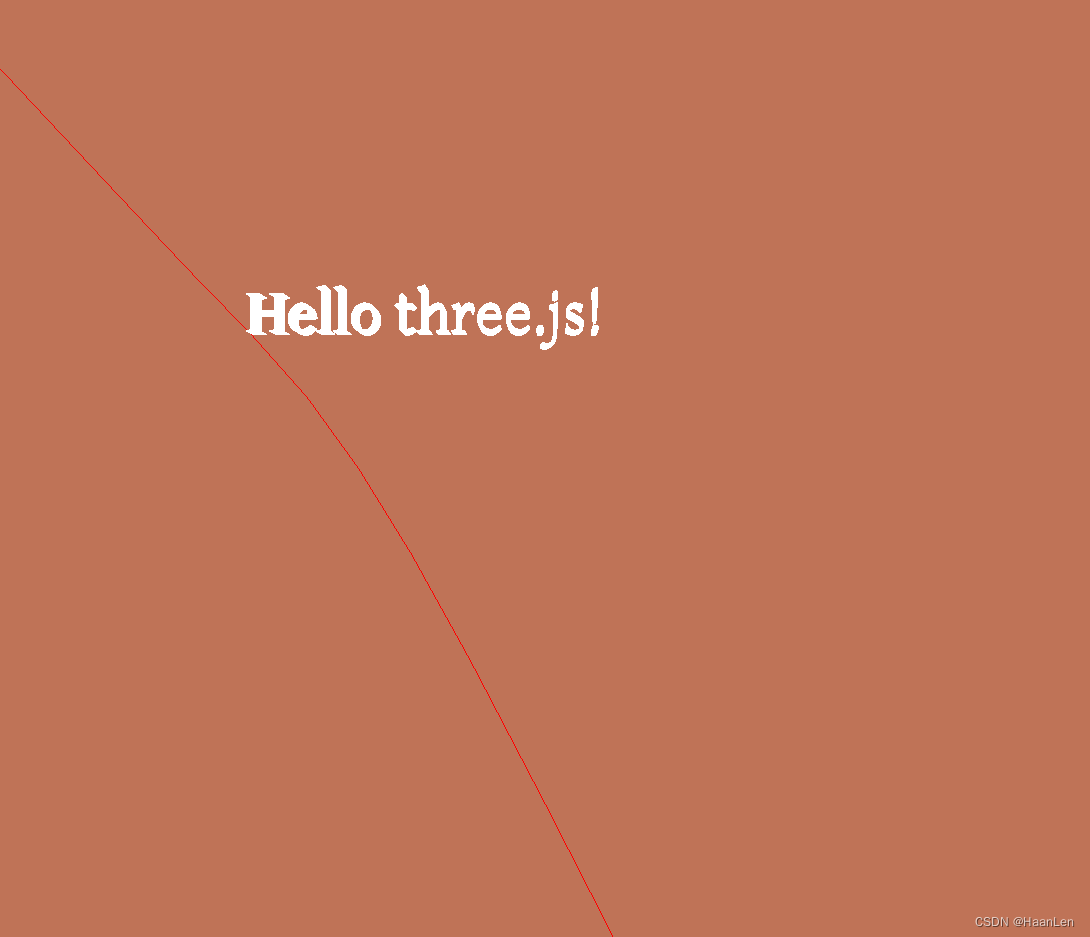
渲染3D文本
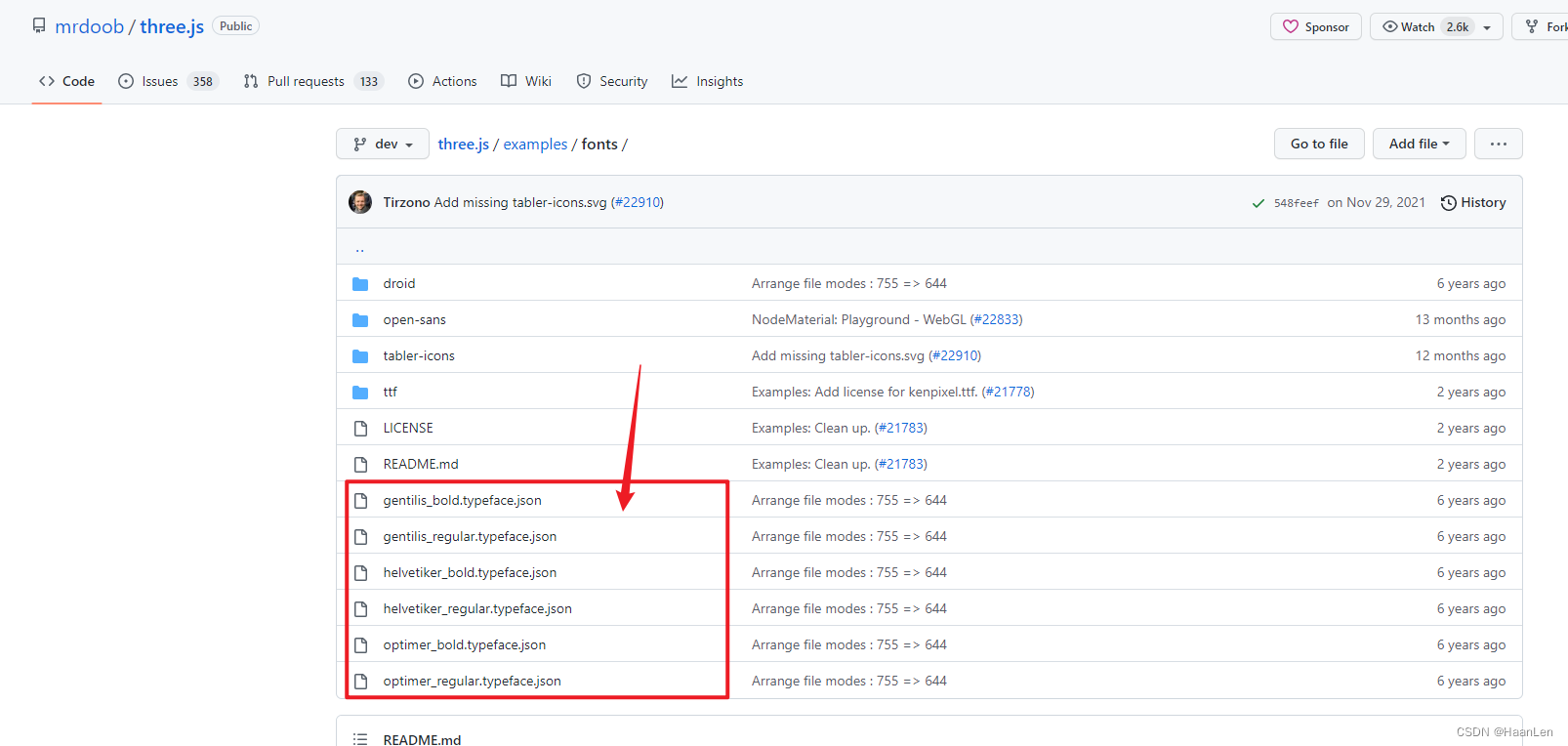
在官网可随意下载一个字体json文件放置本地使用
地址:https://github.com/mrdoob/three.js/tree/dev/examples/fonts
// 创建场景
const scene = new THREE.Scene();
const loader = new THREE.FontLoader();
loader.load('./gentilis_regular.json', function (font) {const geometryText = new THREE.TextGeometry('Hello three.js!', {font: font,size: 0.3,height: 0.1,// curveSegments: 12,//表示文本的)曲线上点的数量。默认值为12。// bevelEnabled: true,//是否开启斜角// bevelThickness: 10,//文本上斜角的深度,默认值为20。// bevelSize: 8,//斜角与原始文本轮廓之间的延伸距离。默认值为8。// bevelSegments: 5//斜角的分段数。默认值为3。});const m = new THREE.MeshBasicMaterial({color:'#ffffff'});const  mesh = new THREE.Mesh(geometryText,m);scene.add(mesh)
});
GitHub:https://github.com/mrdoob/three.js/blob/master/src/scenes/Scene.js
相关内容
热门资讯
埃菲尔铁塔在哪 中国仿建埃菲尔...
2019年4月26日,广西南宁市,街头惊现一座巨型山寨版埃菲尔铁塔,高约20米,白色塔身,造型逼真,...
苗族的传统节日 贵州苗族节日有...
【岜沙苗族芦笙节】岜沙,苗语叫“分送”,距从江县城7.5公里,是世界上最崇拜树木并以树为神的枪手部落...
长白山自助游攻略 吉林长白山游...
昨天介绍了西坡的景点详细请看链接:一个人的旅行,据说能看到长白山天池全凭运气,您的运气如何?今日介绍...
世界上最漂亮的人 世界上最漂亮...
此前在某网上,选出了全球265万颜值姣好的女性。从这些数量庞大的女性群体中,人们投票选出了心目中最美...
猫咪吃了塑料袋怎么办 猫咪误食...
你知道吗?塑料袋放久了会长猫哦!要说猫咪对塑料袋的喜爱程度完完全全可以媲美纸箱家里只要一有塑料袋的响...
应用未安装解决办法 平板应用未...
---IT小技术,每天Get一个小技能!一、前言描述苹果IPad2居然不能安装怎么办?与此IPad不...
脚上的穴位图 脚面经络图对应的...
人体穴位作用图解大全更清晰直观的标注了各个人体穴位的作用,包括头部穴位图、胸部穴位图、背部穴位图、胳...
埃菲尔铁塔在哪 中国仿建埃菲尔...
2019年4月26日,广西南宁市,街头惊现一座巨型山寨版埃菲尔铁塔,高约20米,白色塔身,造型逼真,...
苗族的传统节日 贵州苗族节日有...
【岜沙苗族芦笙节】岜沙,苗语叫“分送”,距从江县城7.5公里,是世界上最崇拜树木并以树为神的枪手部落...
北京的名胜古迹 北京最著名的景...
北京从元代开始,逐渐走上帝国首都的道路,先是成为大辽朝五大首都之一的南京城,随着金灭辽,金代从海陵王...
长白山自助游攻略 吉林长白山游...
昨天介绍了西坡的景点详细请看链接:一个人的旅行,据说能看到长白山天池全凭运气,您的运气如何?今日介绍...
猫咪吃了塑料袋怎么办 猫咪误食...
你知道吗?塑料袋放久了会长猫哦!要说猫咪对塑料袋的喜爱程度完完全全可以媲美纸箱家里只要一有塑料袋的响...
应用未安装解决办法 平板应用未...
---IT小技术,每天Get一个小技能!一、前言描述苹果IPad2居然不能安装怎么办?与此IPad不...
脚上的穴位图 脚面经络图对应的...
人体穴位作用图解大全更清晰直观的标注了各个人体穴位的作用,包括头部穴位图、胸部穴位图、背部穴位图、胳...