

python Threads and ThreadPools
在之前的文章解释了线程和锁的相关事项,这里准备三篇文章分别介绍下线程和线程池,进程和进程池,已经携程的概念
- python Threads and ThreadPools
- python Process and ProcessPolls
本文中重点介绍下线程和线程池的概念。每个python程序都是一个进程且对应了一个主线程用啦执行程序,有时需要再Python进程中创建额外的线程来并发执行任务。通过Thread类初始化一个线程对象来运行目标函数。使用线程创建的步骤:
- 通过Thread类创建创建线程实例并指定被调用的target函数/arg参数
- 通过start启动
- 通过join等待任务完成
1.线程中运行无参函数
thread = Thread(target=task)
线程对象被创建后,通过start()函数来启动线程
thread.start()
接着可以通过加入线程来等待任务完成
thread.join()
下面用一个完整的实例来验证上述介绍的步骤
from time import sleep
from threading import Thread# a simple task that blocks for a moment and prints a message
def task():# block for a momentsleep(1)# display a messageprint('This is coming from another thread')# create and configure a new thread to run a function
thread = Thread(target=task)
# start the task in a new thread
thread.start()
# display a message
print('Waiting for the new thread to finish...')
# wait for the task to complete
thread.join()
运行该示例将创建线程对象以运行task()函数。
线程启动,task()函数在另一个线程中执行。任务休眠片刻;同时,在主线程中,将打印一条消息,表示我们正在等待,主线程将加入新线程。
最后,新线程完成休眠,打印消息并关闭。然后,主线程继续运行,并在没有更多指令要执行时关闭。输出结果如下:
Waiting for the new thread to finish...
This is coming from another thread
2.线程中运行有参函数
接着上面的示例,在task中加入参数,如下所示:
from time import sleep
from threading import Thread# a custom function that blocks for a moment
def task(sleep_time, message):# block for a momentsleep(sleep_time)# display a messageprint(message)# create a thread
thread = Thread(target=task, args=(1.5, 'New message from another thread'))
# run the thread
thread.start()
# wait for the thread to finish
print('Waiting for the thread...')
thread.join()
输出结果如下所示:
Waiting for the thread...
New message from another thread
3.线程池
当然也可以重新Thread类的run函数来执行目标函数,参考Extend the Thread Class
有了线程的初步知识,下面介绍下线程池。有了上面的线程已经可以实现了并发为什么还需要线程池呢?
- 因为系统在启动一个新线程的成本比较高,因为设计和操作系统的交互,这种情况下使用线程
- 可以控制线程的数量,线程池控制创建线程的时间还能控制线程空闲态时的资源消耗
- 最直观的是使用线程池不需要手动启动、管理、释放线程等待诸多优点
引用如下一段文字
A thread pool is a programming pattern for automatically managing a pool of worker threads.
The pool is responsible for a fixed number of threads.It controls when the threads are created, such as just-in-time when they are needed
It also controls what threads should do when they are not being used,such as making them wait without consuming computational resources.
Each thread in the pool is called a worker or a worker thread. Each worker is agnostic to the type of tasks that are executed, along with
the user of the thread pool to execute a suite of similar (homogeneous) or dissimilar tasks (heterogeneous) in terms of the function called, function arguments, task duration, and more.Worker threads are designed to be re-used once the task is completedand provide protection against the unexpected failure of the task,
such as raising an exception, without impacting the worker thread itself.This is unlike a single thread that is configured for the single execution of one specific task.
The pool may provide some facility to configure the worker threads, such as running an initialization function and naming each worker
thread using a specific naming convention.Thread pools can provide a generic interface for executing ad hoc tasks with a variable number of arguments, but do not require that we
choose a thread to run the task, start the thread, or wait for the task to complete.It can be significantly more efficient to use a thread pool instead of manually starting, managing, and closing threads, especially with a
large number of tasks.
线程池的基类是 concurrent.futures 模块中的 Executor,其中Executor有两个子类,分别是ThreadPollExecutor和ProcessPoolExecutor,见名知意,分别对应的是线程池和进程池。concurrent.futures module模块中提供的ThreadPoolExecutor 类主要用于创建和管理线程池。concurrent.futures是在Python3.2之后提供的。
类ThreadPoolExecutor继承并丰富了Executor类,该类被调用时返回Future对象
- Executor 作为ThreadPoolExecutor父类,用于定义“资源”池的基本少女革命周期操作
- Future作为提交task到线程池的对象
因此使用线程池/进程池管理并发时,只需要将相应的 task 函数提交到线程池/进程池,剩下的事情有线程池/进程池的完成生命周期的管理。
Executor提供了三种方法来管理线程池:
- submit(fn, *args, **kwargs):将 fn 函数提交给线程池。*args 代表传给 fn 函数的参数,*kwargs 代表以关键字参数的形式为 fn 函数传入参数。
- map(func, *iterables, timeout=None, chunksize=1):该函数类似于全局函数 map(func, *iterables),只是该函数将会启动多个线程,以异步方式立即对 iterables 执行 map 处理。
- shutdown(wait=True):关闭线程池。
程序将 task 函数提交(submit)给线程池后,submit 方法会返回一个 Future 对象,Future 类主要用于获取线程任务函数的返回值。由于线程任务会在新线程中以异步方式执行,因此,线程执行的函数相当于一个“将来完成”的任务,所以 Python 使用 Future 来代表。Future提供了如下函数:
- cancel():取消该 Future 代表的线程任务。如果该任务正在执行,不可取消,则该方法返回 False;否则,程序会取消该任务,并返回 True。
- cancelled():返回 Future 代表的线程任务是否被成功取消。
- running():如果该 Future 代表的线程任务正在执行、不可被取消,该方法返回 True。
- done():如果该 Funture 代表的线程任务被成功取消或执行完成,则该方法返回 True。
- result(timeout=None):获取该 Future 代表的线程任务最后返回的结果。如果 Future 代表的线程任务还未完成,该方法将会阻塞当前线程,其中 timeout 参数指定最多阻塞多少秒。
- exception(timeout=None):获取该 Future 代表的线程任务所引发的异常。如果该任务成功完成,没有异常,则该方法返回 None
- add_done_callback(fn):为该 Future 代表的线程任务注册一个“回调函数”,当该任务成功完成时,程序会自动触发该 fn 函数。
在用完一个线程池后,应该调用该线程池的 shutdown() 方法,该方法将启动线程池的关闭序列。调用 shutdown() 方法后的线程池不再接收新任务,但会将以前所有的已提交任务执行完成。当线程池中的所有任务都执行完成后,该线程池中的所有线程都会死亡。
一言以蔽之,使用线程池来执行线程任务的主要有4步:
- Create: 调用 ThreadPoolExecutor 类的constructor 创建一个线程池。
- Submit: 调用submit()或者map()函数提交tasks函数提交线程任务并得到futures对象。
- Wait: 等待线程任务结束并得到结果(该步骤可选)。
- Shut Down:当不想提交任何任务时,调用 ThreadPoolExecutor 对象的 shutdown() 方法来关闭线程池。
创建线程池时,系统中每个CPU有一个线程,额外再加4个,因此系统支持的线程数如下:
Default Total Threads = (Total CPUs) + 4
比如机器有4个CPU,每个CPU支持超线程,那么Python将看到有8个CPU,默认清康熙将为池分配(8 + 4 = 12)12个线程,以自己的机器为例,物理6核开了超线程共个CPU
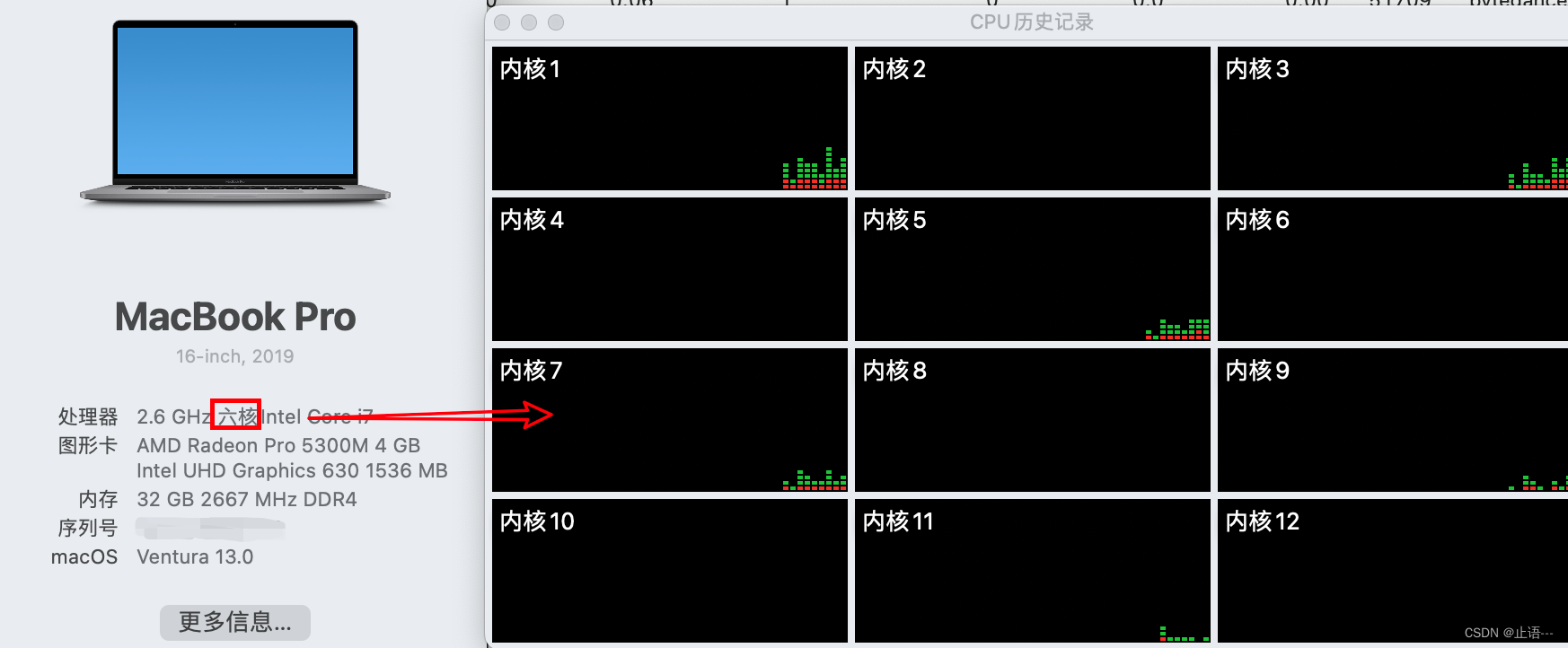
接着创建ThreadPoolExecutor()
executor = ThreadPoolExeutor()
当然一个比较好的建议是 测试应用程序以确定产生最佳性能的线程数为最好的选择。一次性创建几百上千的线程不一定是好主意,因为可能会影响可用的RAM,而且线程之间大量的切换也会导致性能较差。可以通过max_workers参数指定在池中创建的线程数
executor = ThreadPoolExecutor(max_workers=14)
创建好了线程池之后,提交目标函数tasks到池中。可以使用两种方式,分别是map和submit
3.1 map()函数
map()函数是内置map()函数的异步版本,用于将函数应用于可迭代(如列表)中的每个元素。在池中调用map()函数,并将函数的名称和可迭代函数传递给它。my_task是希望执行并发的函数,my_items是可迭代对象,每个对象都将由my_task函数执行。任务将在线程中排队,并在可用时由池中的工作线程执行。如上面指定的max_workers=14,机器只有12个线程,并发14个时候,有2个线程是等待被调度的状态。map()立即返回一个可迭代对象,该迭代项可用于访问目标任务函数的结果。
results = pool.map(my_task, my_items)
for result in executor.map(my_task, my_items):print(result)
如果希望在迭代时限内等待每个任务完成的时间,可以通过设置timeout参数,设置的时间单位为s
for result in executor.map(my_task, my_items, timeout=5):# wait for task to complete or timeout expiresprint(result)
3.2 submit()
submit()函数将一个任务提交到线程池去执行,该函数获取要调用函数的所有参数,然后立即返回Future对象,Future对象返回任务的结果。
future = executor.submit(my_task, arg1, arg2)
my_task是要执行的函数,arg*是传递要给my_task的参数,当然可以使用submit()提交不带任何参数的任务。
future = executor.submit(my_task)
可以通过Future对象调用result()函数获取任务执行结果,此种方式是阻塞的。
result = future.result()
result()函数也可以执行超时时间,单位s,超时之后引发超时报错。
result = future.result(timeout=5)
3.3 Wait等待任务完成
concurrent.futures 模块通过Future对象提供了两种应用程序。只有调用submit()将任务加入到池中时才会创建Future对象,在前面已经提过改Wait模块是可选的,可以在调用map()或者submit()后直接等待结果,或者等待线程池中所有任务完成。两个模块函数分别是:
- wait()
- as_completed
其中wait()函数用于等待Future对象完成,as_completed()用于在任务完成时获取Future对象。
wait():等待一个或多个Future对象,直到它们完成。
as_completed():在完成执行时从集合中返回Future对象。
可以将这两个函数与由一个或多个线程池创建的Future对象一起使用,它们不特定于应用程序中的任何给定线程池。如果希望在执行不同类型任务的多个线程池中执行等待操作,这将非常有用。
这两个函数都适用于通过列表压缩提交将多个任务分派到线程池的习惯用法如下所示
futures = [executor.submit(my_task, my_data) for my_data in my_datalist]
my_task是待并发的目标函数,my_data作为参数传递给my_task。
3.4 as_completed等待任务完成
wait()函数可以接受一个或多个Future对象,并在发生指定操作时返回,例如所有任务完成、一个任务完成或一个任务引发异常. as_completed通过return_when返回一组符合条件Future对象集合,另一个对象集合返回不满足条件的Future兑现。这个对于有大量请求时在我们得到一个符合条件的结果时停止任务比较有用,可以通过给return_when参数赋值FIRST_COMPLETED常量
done, not_done = wait(futures, return_when=concurrent.futures.FIRST_COMPLETED)
也可以使用all_COMPLETED等待所有任务完成。
done, not_done = wait(futures, return_when=concurrent.futures.ALL_COMPLETED)
对于上述的,可以指定任务第一次出现异常时就停止任务,可以通过FIRST_EXCEPTION常量来操作
done, not_done = wait(futures, return_when=concurrent.futures.FIRST_EXCEPTION)
并发执行任务的函数在于可以在任务可用时获取任务的结果,而不需要等到所有任务完成,as_completed()函数将任务在线程池中完成时返回任务的Futrue对象。可以调用该函数,并为其提供一个通过调用submit()创建的Future对象列表,当Future对象以任何顺序完成时,它都会返回Future对象。通常在调用submit时创建的Future对象列表上循环使用as_completed()函数;例如:
for future in as_completed(futures):# get the result for the next completed taskresult = future.result() # blocks
4. 关闭线程池
一旦完成了所有任务不在使用线程池,比较好的习惯是及时关闭线程池,释放线程堆栈空间。
executor.shutdown()
默认情况下shutdown()函数将等待线程池中的所有任务完成后返回,在调用shutdown()时,可以通过wait 参数设置为False来更改此行为,在这种情况下,函数立即返回,线程池使用的资源将在所有当前任务和排队任务完成之前释放。
executor.shutdown(wait=False)
经过上面的介绍发现用起来也很麻烦,又要启动,又要提交,又要关闭…,能不能像文件操作有个上下文管理器一样,只关注文件操作,不关注关闭这些东西,ThreadPoolExecutor也有上下文管理器。
5.ThreadPoolExecutor上下文管理器
上下文管理器,使用with创建一个模块,一旦完成,线程池将自动完成,在with内部,上下文管理器使用默认参数调用shutdown()函数,等待所有排队和正在执行的任务完成,然后返回。
...
# create a thread pool
with ThreadPoolExecutor(max_workers=10) as pool:# submit tasks and get results# ...# automatically shutdown the thread pool...
# the pool is shutdown at this point
6.并发请求示例
6.1 普通代码请求
#!/usr/bin/env python
# -*- coding: utf-8 -*-
# This module is ***
# @Time : 2022/12/3 14:52
# @Author : zhiyu
# @Site : # SuperFastPython.com
# download document files and save to local files serially
import time
from os import makedirs
from os.path import basename
from os.path import join
from urllib.request import urlopen# download a url and return the raw data, or None on error
def download_url(url):try:# open a connection to the serverwith urlopen(url, timeout=3) as connection:# read the contents of the html docreturn connection.read()except:# bad url, socket timeout, http forbidden, etc.return None# save data to a local file
def save_file(url, data, path):# get the name of the file from the urlfilename = basename(url)# construct a local path for saving the fileoutpath = join(path, filename)# save to filewith open(outpath, 'wb') as file:file.write(data)return outpath# download and save a url as a local file
def download_and_save(url, path):# download the urldata = download_url(url)# check for no dataif data is None:print(f'>Error downloading {url}')return# save the data to a local fileoutpath = save_file(url, data, path)# report progressprint(f'>Saved {url} to {outpath}')# download a list of URLs to local files
def download_docs(urls, path):# create the local directory, if neededmakedirs(path, exist_ok=True)# download each url and save as a local filefor url in urls:download_and_save(url, path)# python concurrency API docs
URLS = ['https://docs.python.org/3/library/concurrency.html','https://docs.python.org/3/library/concurrent.html','https://docs.python.org/3/library/concurrent.futures.html','https://docs.python.org/3/library/threading.html','https://docs.python.org/3/library/multiprocessing.html','https://docs.python.org/3/library/multiprocessing.shared_memory.html','https://docs.python.org/3/library/subprocess.html','https://docs.python.org/3/library/queue.html','https://docs.python.org/3/library/sched.html','https://docs.python.org/3/library/contextvars.html']
# local path for saving the files
PATH = 'docs'start = time.time()
# download all docs
download_docs(URLS, PATH)
end = time.time()
print(end-start)
输出结果如下所示:

6.2 使用submit并发请求
接着使用submit()方式并发下载
from os import makedirs
from os.path import basename
from os.path import join
from urllib.request import urlopen
from concurrent.futures import ThreadPoolExecutor
import time# download a url and return the raw data, or None on error
def download_url(url):try:# open a connection to the serverwith urlopen(url, timeout=3) as connection:# read the contents of the html docreturn connection.read()except:# bad url, socket timeout, http forbidden, etc.return None# save data to a local file
def save_file(url, data, path):# get the name of the file from the urlfilename = basename(url)# construct a local path for saving the fileoutpath = join(path, filename)# save to filewith open(outpath, 'wb') as file:file.write(data)return outpath# download and save a url as a local file
def download_and_save(url, path):# download the urldata = download_url(url)# check for no dataif data is None:print(f'>Error downloading {url}')return# save the data to a local fileoutpath = save_file(url, data, path)# report progressprint(f'>Saved {url} to {outpath}')# download a list of URLs to local files
def download_docs(urls, path):# create the local directory, if neededmakedirs(path, exist_ok=True)# create the thread pooln_threads = len(urls)with ThreadPoolExecutor(max_workers=n_threads) as executor:# download each url and save as a local file_ = [executor.submit(download_and_save, url, path) for url in urls]# python concurrency API docs
URLS = ['https://docs.python.org/3/library/concurrency.html','https://docs.python.org/3/library/concurrent.html','https://docs.python.org/3/library/concurrent.futures.html','https://docs.python.org/3/library/threading.html','https://docs.python.org/3/library/multiprocessing.html','https://docs.python.org/3/library/multiprocessing.shared_memory.html','https://docs.python.org/3/library/subprocess.html','https://docs.python.org/3/library/queue.html','https://docs.python.org/3/library/sched.html','https://docs.python.org/3/library/contextvars.html']
# local path for saving the files
PATH = 'docs'
start = time.time()
# download all docs
download_docs(URLS, PATH)
end = time.time()
print(end-start)
输出结果如下:

6.3 使用as_completed并发请求
from os import makedirs
import time
from os.path import basename
from os.path import join
from urllib.request import urlopen
from concurrent.futures import ThreadPoolExecutor
from concurrent.futures import as_completed# download a url and return the raw data, or None on error
def download_url(url):try:# open a connection to the serverwith urlopen(url, timeout=3) as connection:# read the contents of the html docreturn (connection.read(), url)except:# bad url, socket timeout, http forbidden, etc.return (None, url)# save data to a local file
def save_file(url, data, path):# get the name of the file from the urlfilename = basename(url)# construct a local path for saving the fileoutpath = join(path, filename)# save to filewith open(outpath, 'wb') as file:file.write(data)return outpath# download a list of URLs to local files
def download_docs(urls, path):# create the local directory, if neededmakedirs(path, exist_ok=True)# create the thread pooln_threads = len(urls)with ThreadPoolExecutor(n_threads) as executor:# download each url and save as a local filefutures = [executor.submit(download_url, url) for url in urls]# process each result as it is availablefor future in as_completed(futures):# get the downloaded url datadata, url = future.result()# check for no dataif data is None:print(f'>Error downloading {url}')continue# save the data to a local fileoutpath = save_file(url, data, path)# report progressprint(f'>Saved {url} to {outpath}')# python concurrency API docs
URLS = ['https://docs.python.org/3/library/concurrency.html','https://docs.python.org/3/library/concurrent.html','https://docs.python.org/3/library/concurrent.futures.html','https://docs.python.org/3/library/threading.html','https://docs.python.org/3/library/multiprocessing.html','https://docs.python.org/3/library/multiprocessing.shared_memory.html','https://docs.python.org/3/library/subprocess.html','https://docs.python.org/3/library/queue.html','https://docs.python.org/3/library/sched.html','https://docs.python.org/3/library/contextvars.html']
# local path for saving the files
PATH = 'docs'
start = time.time()
# download all docs
download_docs(URLS, PATH)
end = time.time()
print(end-start)
输出结果如下:

7.并发常用场景
上面这些内容并不是ThreadPoolExecutor的全部内容。这里再列举一下日常中使用频率比较高的场景,如下所示:
- Map and Wait Pattern
- Submit and Use as Completed Pattern
- Submit and Use Sequentially Pattern
- Submit and Use Callback Pattern
- Submit and Wait for All Pattern
- Submit and Wait for First Pattern
7.1 集合和wait
使用ThreadPoolExecutor时最常见的场景可能是对每个集合中的每项执行函数。通常使用for循环遍历
...
# apply a function to each element in a collection
for item in mylist:result = task(item)
更好的方式使用map函数
...
# apply the function to each element in the collection
results = map(task, mylist)
类比到线程池上可以如下使用:
for result in executor.map(task, mylist):print(result)
7.1.1 并发无参请求
# SuperFastPython.com
# example of the map and wait pattern for the ThreadPoolExecutor
from time import sleep
from random import random
from concurrent.futures import ThreadPoolExecutor# custom task that will sleep for a variable amount of time
def task(name):# sleep for less than a secondsleep(random())return name# start the thread pool
with ThreadPoolExecutor(10) as executor:# execute tasks concurrently and process results in orderfor result in executor.map(task, range(10)):# retrieve the resultprint(result)
输出结果如下所示,注意这个和chapter1进行对比
7.1.2 并发有参请求
from time import sleep
from random import random
from concurrent.futures import ThreadPoolExecutor# custom task that will sleep for a variable amount of time
def task(value1, value2):# sleep for less than a secondsleep(random())return (value1, value2)# start the thread pool
with ThreadPoolExecutor() as executor:# submit all tasksfor result in executor.map(task, ['1', '2', '3'], ['a', 'b', 'c']):print(result)
对map函数的调用将会立即向线程池提交所有任务,即使不处理任何或者遍历其结果,该函数是“惰性”的,每次迭代之前不会等待上一次的请求结果,通过下面的实例
from time import sleep
from random import random
from concurrent.futures import ThreadPoolExecutor# custom task that will sleep for a variable amount of time
def task(value):# sleep for less than a secondsleep(random())print(f'Done: {value}')return value# start the thread pool
with ThreadPoolExecutor() as executor:# submit all tasksexecutor.map(task, range(5))
print('All done!')
7.2 submit提交as_completed等待
有了上面的知识积累,这里直接使用as_completed的示例
from time import sleep
from random import random
from concurrent.futures import ThreadPoolExecutor
from concurrent.futures import as_completed# custom task that will sleep for a variable amount of time
def task(name):# sleep for less than a secondsleep(random())return name# start the thread pool
with ThreadPoolExecutor(10) as executor:# submit tasks and collect futuresfutures = [executor.submit(task, i) for i in range(10)]# process task results as they are availablefor future in as_completed(futures):# retrieve the resultprint(future.result())
执行该代码,可以看到打印输出结果的顺序是任务完成的顺序,而不是任务提交到线程池的顺序。
9
8
2
4
3
1
5
6
0
7