

Maven技术
目录
传统项目管理分析(导入jar包形式)
maven组成部分
maven项目构建命令
maven高级
项目的聚合与继承
maven子父工程
需求:使用maven子父工程完成登录并跳转到首页列表
创建父工程
在父工程中以module的形式创建子模块
在父工程中以module的形式创建web子模块
给每个模块添加依赖
a、在dao子模块的pom中添加domain子模块的引用关系
b、在service子模块的pom中添加dao子模块的引用关系
c、在controller子模块的pom中添加dao子模块的引用关系
编辑d、在父工程的pom中添加ssm所需坐标
解决jar包依赖冲突
依赖冲突
依赖调解原则
排除依赖
锁定版本
编写模块代码
a、编写domain模块代码
b、编写dao模块代码
c、编写service模块代码
d、编写controller模块代码
maven 私服
搭建maven私服环境
a、下载 nexus
b,启动nexus服务器,进入bin 目录
c、停止私服服务器
d、查找私服端口
e、访问私服
f、nexus仓库类型
在nexus 上建立两个宿主仓库
a,新建仓库
b,选中maven2(hosted)
c,填写maven仓库名称和类型
d,添加到maven仓库组
上传jar到私服
a,手动上传
下载私服jar
a,配置文件
b,配置权限
传统项目管理分析(导入jar包形式)
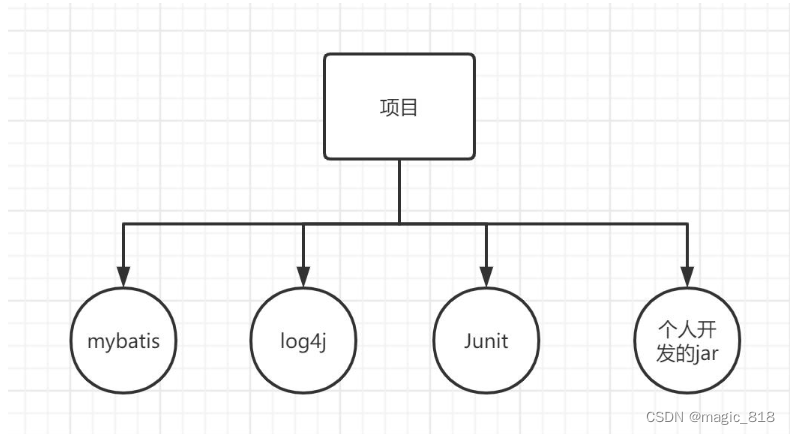
- jar包不统一,jar包不兼容
- 工程上线升级维护过程操作繁琐等
maven组成部分
- maven本身是一个项目管理工具,将项目开发和管理抽象成一个项目对象模型(POM)
- POM (project object model) : 项目对象模型
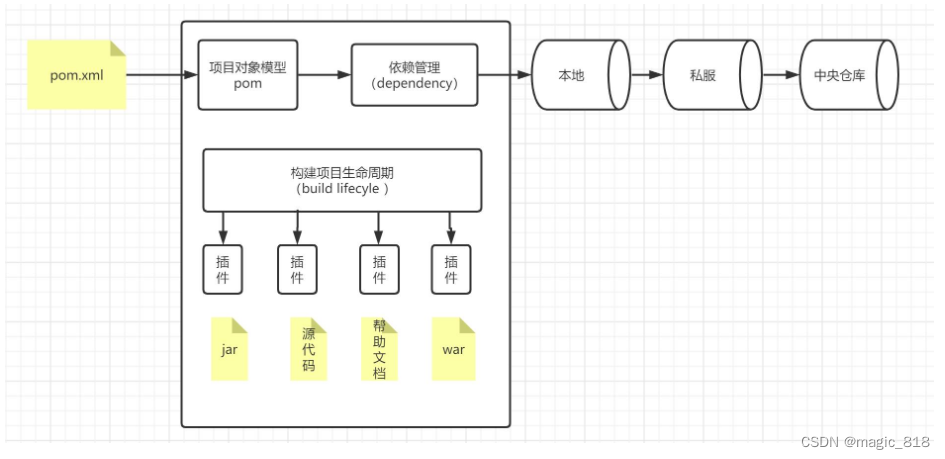
maven中央仓库地址:https://mvnrepository.com/
maven项目构建命令
-
mvn compile #编译
-
mvn clean #清理
-
mvn test #测试
-
mvn package #打包
-
mvn install #安装到本地仓库
maven高级
-
maven工程拆分与聚合思想
-
maven子父工程
-
maven 私服
项目的聚合与继承
通常一个项目中聚合和继承是同时使用
-
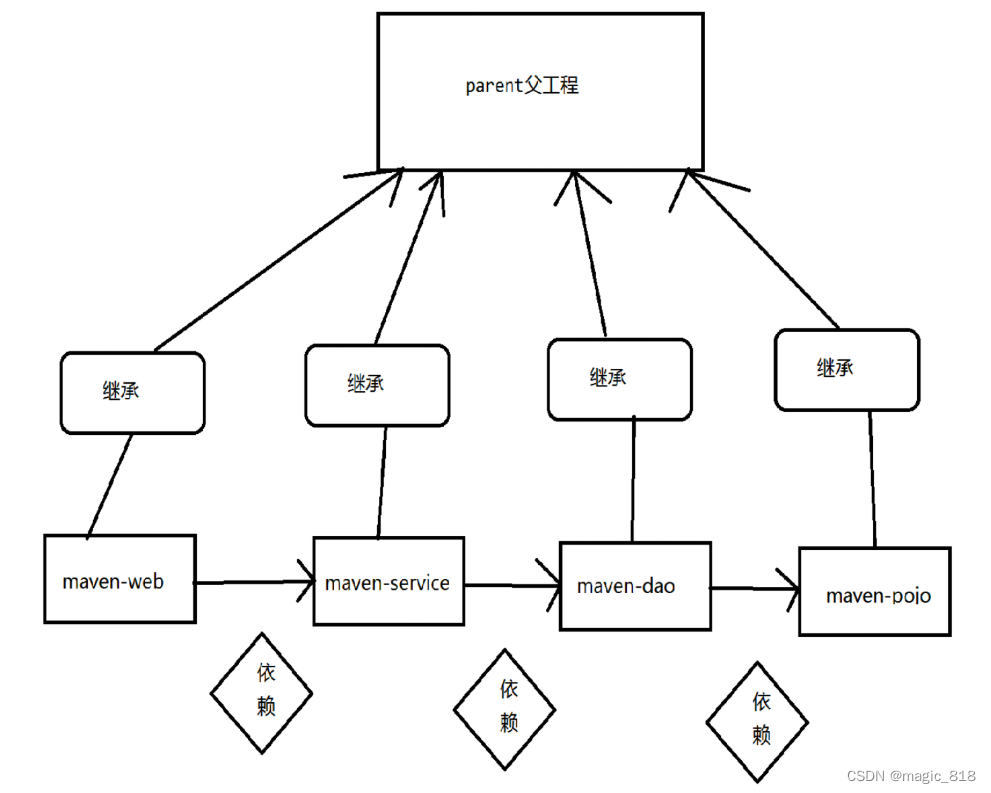
聚合:项目开发通常是分组分模块开发,每个模块开发完成要运行整个工程需要将每个模块聚合在一起运行,比如:dao、service、 web三个工程最终会打一个独立的war运行
聚合目的是:一次构件多个项目
-
继承:是为了消除重复,如果将dao、service、web分开创建独立的工程则每个工程的pom.xml文件中的内容存在重复,比如:设置 编译版本、锁定spring的版本的等,可以将这些重复的配置提取出来在父工程的pom.xml中定义需求
继承目的是:为了消除重复配置
maven子父工程
需求:使用maven子父工程完成登录并跳转到首页列表
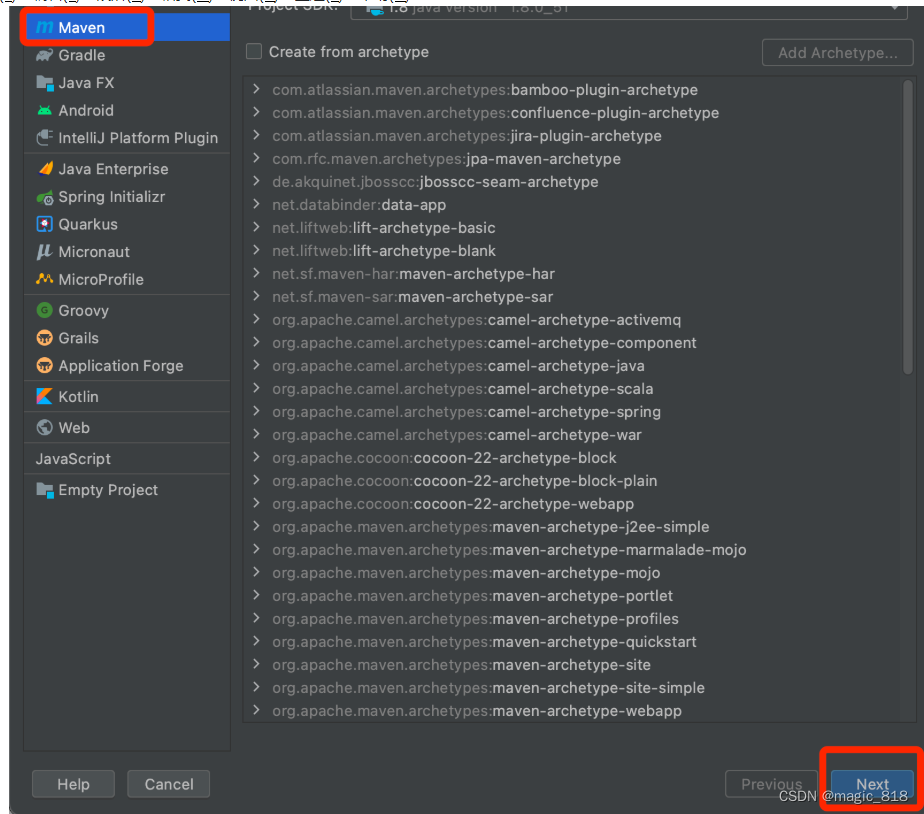
创建父工程
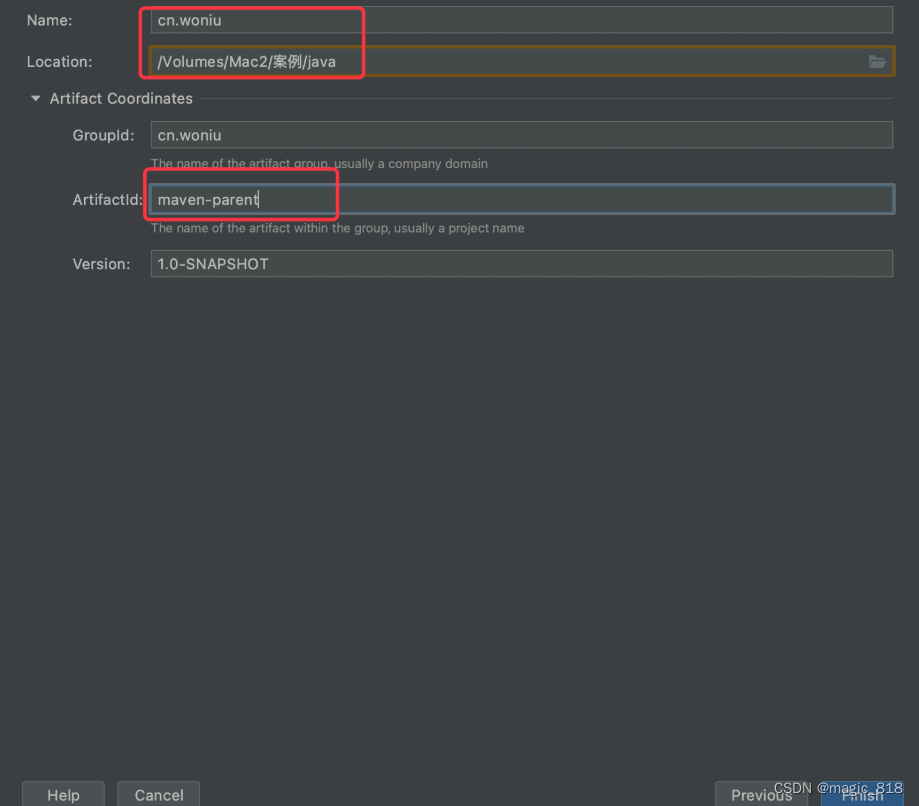
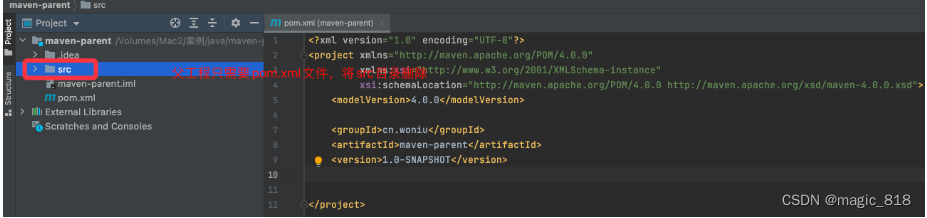
在父工程中以module的形式创建子模块
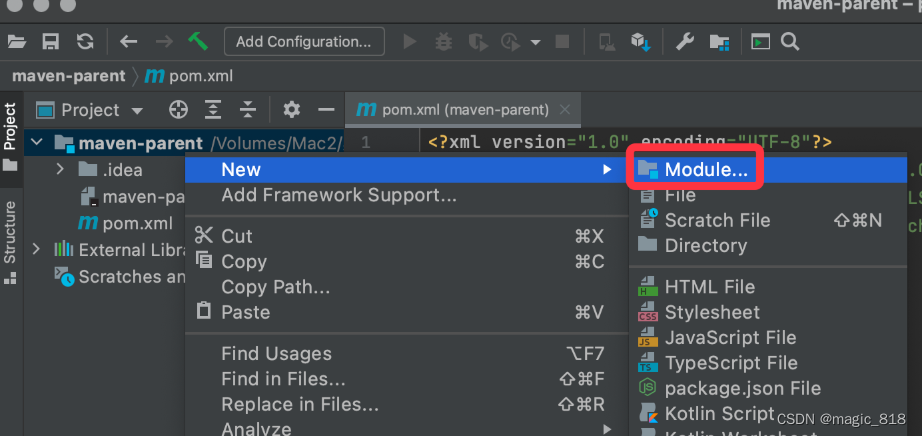
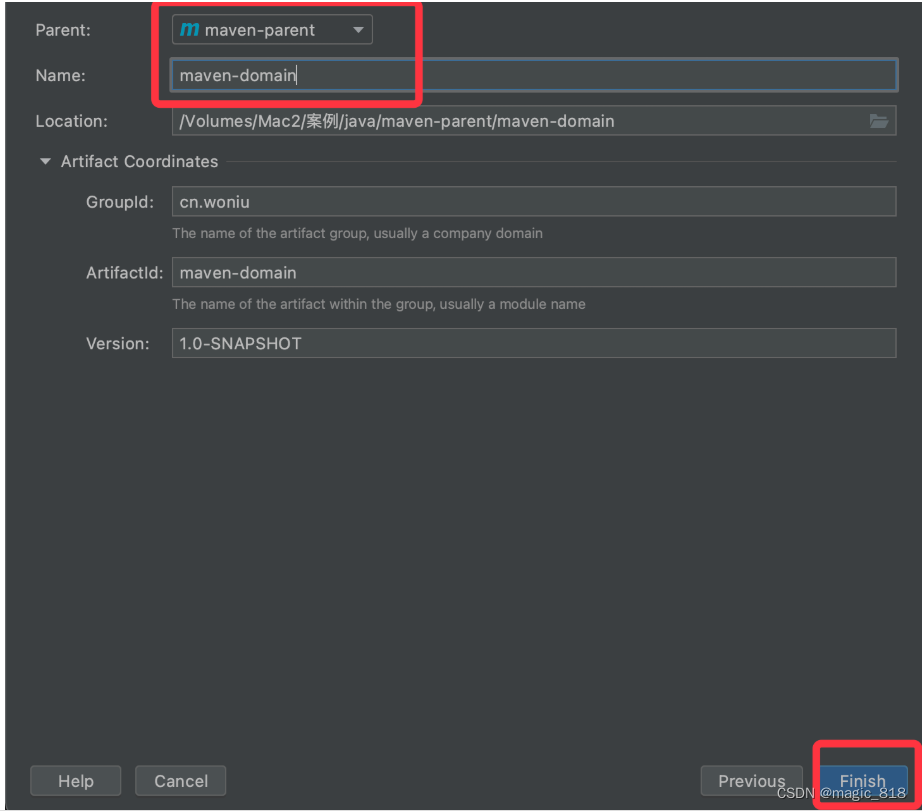
注意:以domain方式依次创建 maven-dao, maven-service 子模块
在父工程中以module的形式创建web子模块
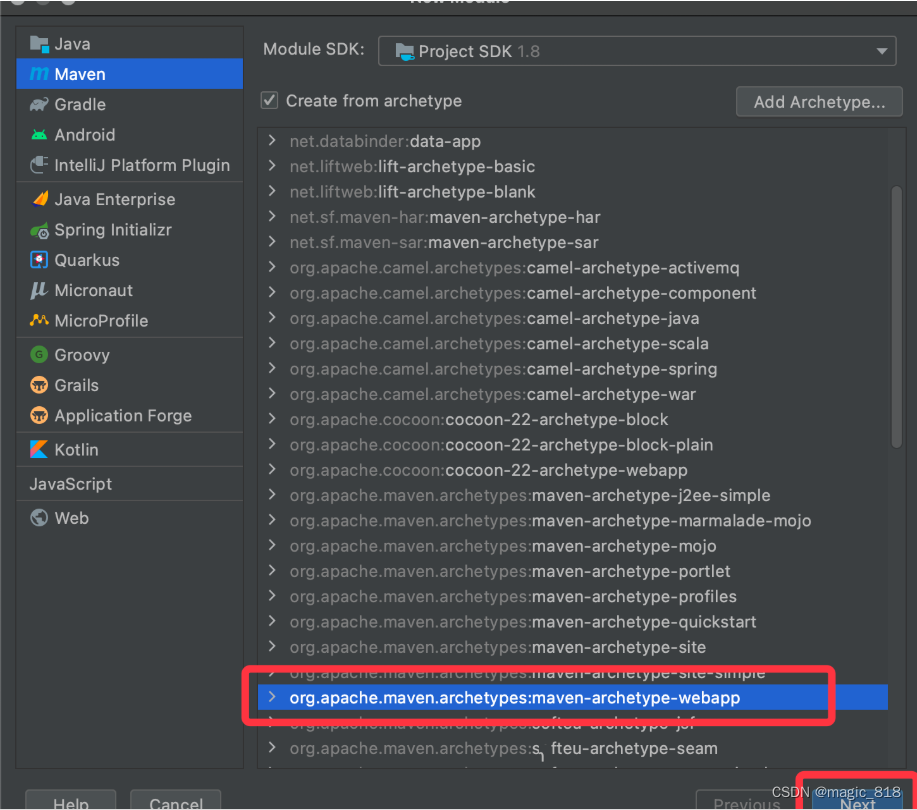
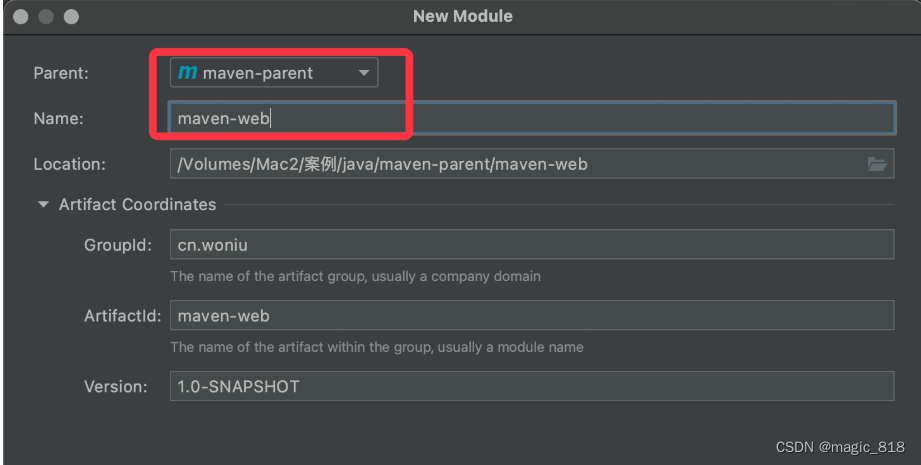
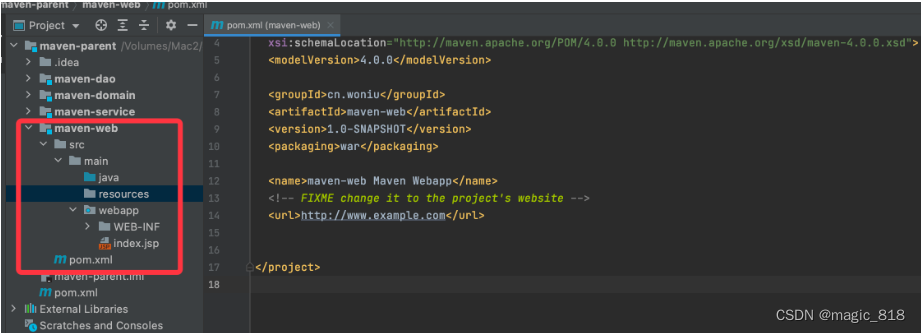
给每个模块添加依赖
在开发中,service要调用dao中的数据,而web又要调用service的数据,且domain又要被其他三层所调用,他们之间的调用关系如下:web->service->dao->domain
但是现在四个子工程相互是没有任何关系的,没有关系就不能调用。我们应该将他们之间关联起来
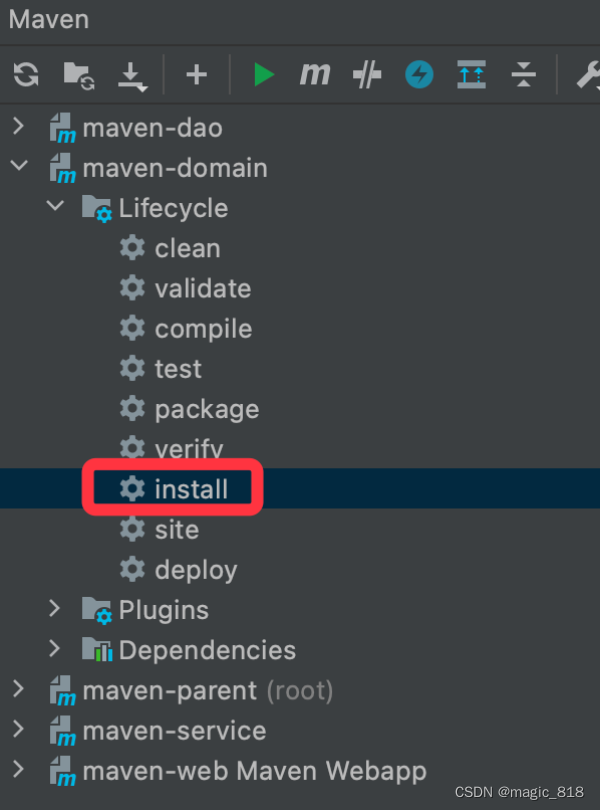
注意:maven项目之间的引用是通过本地仓库中的jar包进行引用,所以引用前要先将对应的模块打成jar包到本地仓库
a、在dao子模块的pom中添加domain子模块的引用关系
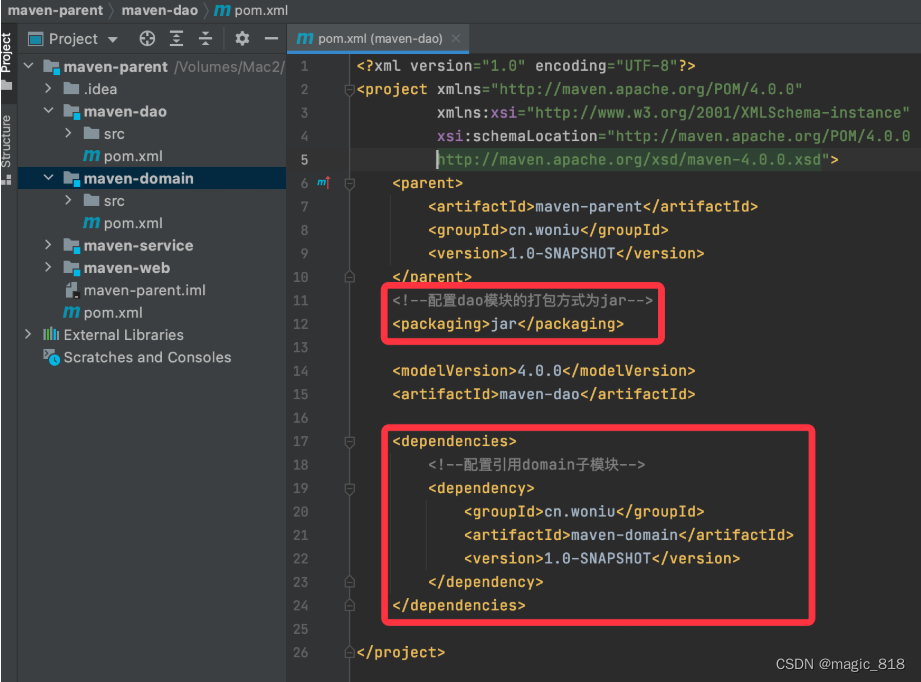
b、在service子模块的pom中添加dao子模块的引用关系
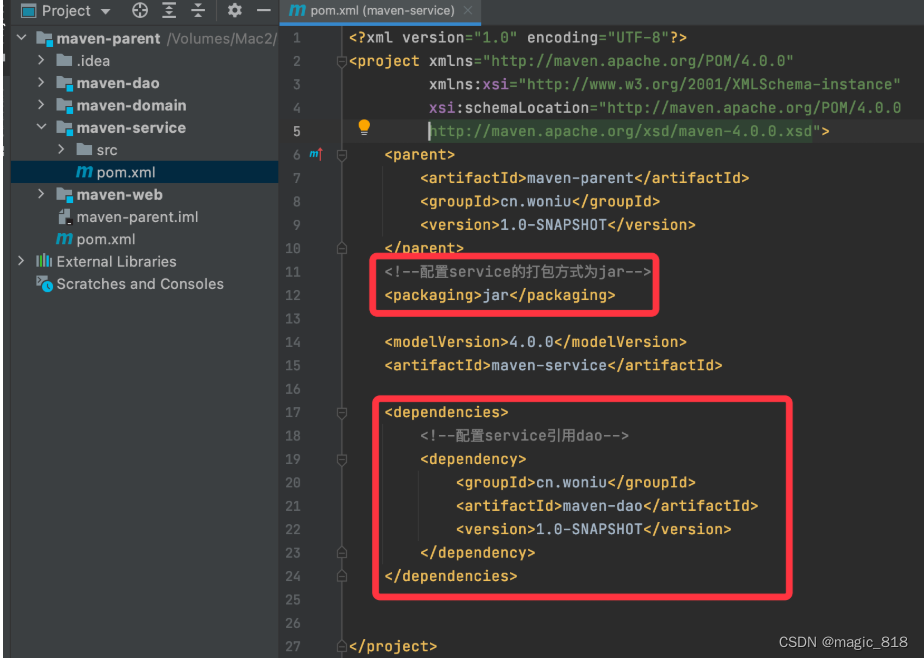
c、在controller子模块的pom中添加dao子模块的引用关系
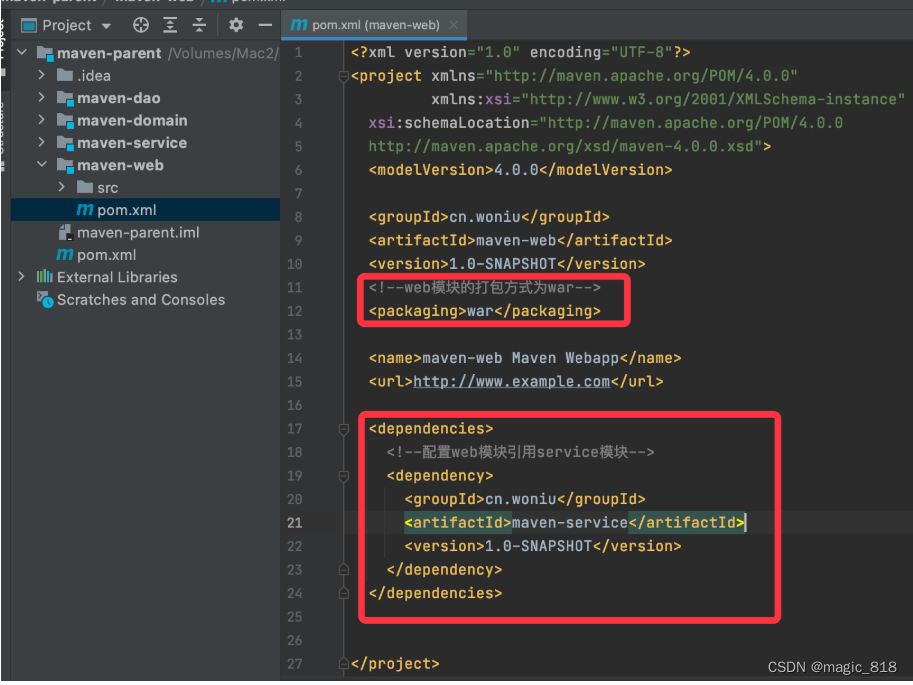
d、在父工程的pom中添加ssm所需坐标
4.0.0 cn.woniu maven-parent pom 1.0-SNAPSHOT maven-domain maven-dao maven-service maven-web 5.0.9.RELEASE 8.0.19 3.5.1 org.mybatis mybatis ${mybatis.version} mysql mysql-connector-java ${mysql.version} com.alibaba druid 1.2.3 junit junit 4.12 test ch.qos.logback logback-classic 1.2.3 ch.qos.logback logback-core 1.2.3 org.slf4j slf4j-api 1.7.30 org.springframework spring-context ${spring.version} org.mybatis mybatis-spring 2.0.1 org.springframework spring-jdbc ${spring.version} org.springframework spring-test ${spring.version} org.springframework spring-aspects ${spring.version} org.springframework spring-tx ${spring.version} org.springframework spring-web ${spring.version} org.apache.maven.plugins maven-compiler-plugin 3.5.1 1.8 1.8 UTF-8 ${basedir}/src/main/java **/*.xml ${basedir}/src/main/resources **/*.xml **/*.properties
解决jar包依赖冲突
依赖冲突
当我们在maven-dao模块添加了如下坐标
log4j log4j 1.2.14 然后在maven-service模块添加了如下坐标
log4j log4j 1.3.10 此时项目中使用的是哪个版本的log4j?此时就产生了依赖冲突,因为service模块要依赖dao模块,但是现在有两个不同版本的jar包
说明:是否会产生依赖,跟jar坐标的作用域有关
如果在maven-dao中 jar坐标的作用域设置成test或者provided,此时就不会传递依赖给maven-service了,只有作用域为runtime和默认的compile时会产生传递依赖
maven scope 取值范围及其作用
1,compile scope默认值,在工程环境的classpath(编译环境)和打包(如果是WAR包,会包含在WAR包中)时候都有效
2,provided:容器或JDK已提供范围,表示该依赖包已经由目标容器(如tomcat)和JDK提供,只在编译的classpath中加载和使用,打包的时候不会包含在目标包中。最常见的是j2ee规范相关的servlet-api和jsp-api等jar包,一般由servlet容器提供,无需在打包到war包中,如果不配置为provided,把这些包打包到工程war包中 3,runtime:一般是运行和测试环境使用,编译时候不用加入classpath,打包时候会打包到目标包中。例如JDBC驱动
4,test:测试范围,一般是单元测试场景使用,在编译环境加入classpath,但打包时不会加入,例如junit
依赖调解原则
maven 自动按照下边的原则调解:
1、第一声明者优先原则
在 pom 文件定义依赖,如果是同级的深度话,以先声明的依赖为准。
2、路径近者优先原则
例如:还是上述情况,maven-dao传递过来 log4j,那如果直接把 log4j 的依赖直接写service到 pom 文件中,那么项目就不会再使用其他依赖传递来的log4j,因为自己直接在 pom 中定义 log4j 要比其他依赖传递过来的路径要近。
排除依赖
上边的问题也可以通过排除依赖方法辅助依赖调解,如下:
com.woniu maven-dao 1.0-SNAPSHOT log4j log4j 锁定版本
面对众多的依赖,有一种方法不用考虑依赖路径、声明优化等因素可以采用直接锁定版本的方法确定依赖构件的版本,版本锁定后则不考虑依赖的声明顺序或依赖的路径,以锁定的版本的为准添加到工程中,此方法在企业开发中常用。
4.0.0 com.woniu com-woniu-dao 1.0-SNAPSHOT junit junit 4.11 test org.mybatis mybatis 3.5.6 com.alibaba druid 1.1.10 org.mybatis mybatis com.alibaba druid junit junit 4.11 test 还可以把版本号提取出来,使用
3.5.6 1.1.10 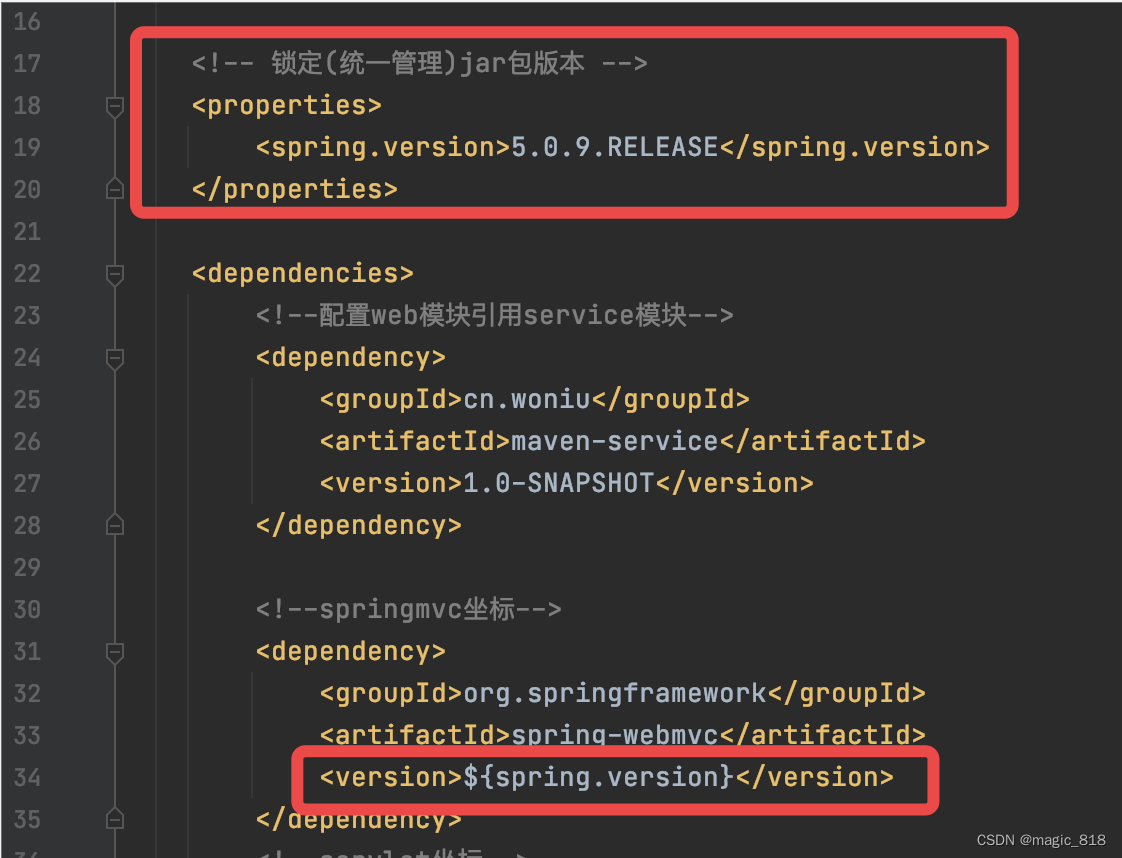
上边添加的依赖并没有指定版本,原因是已在
编写模块代码
a、编写domain模块代码
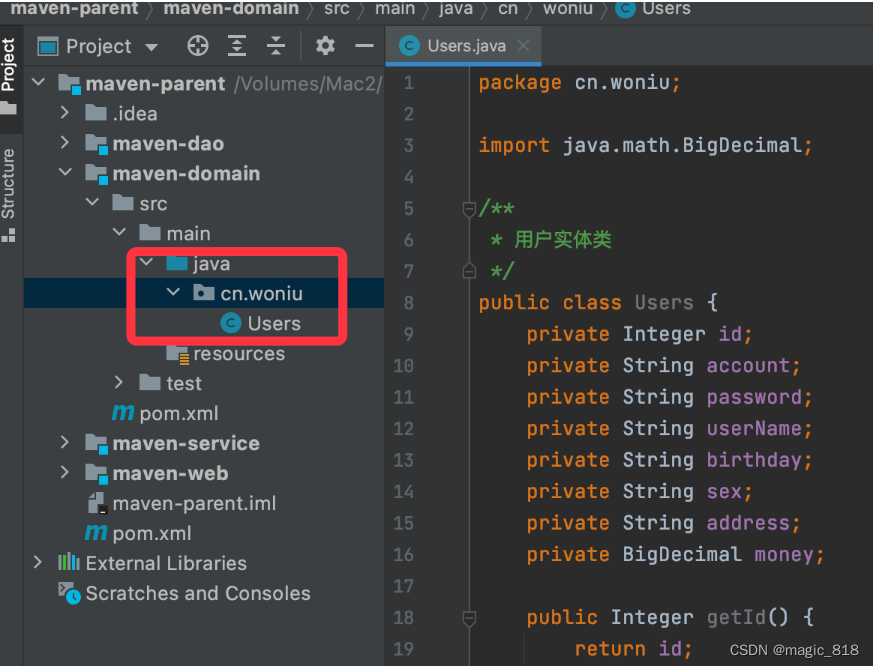
实体类编写完成后,由于需要被其他模块直接引用所以要将实体类发布到本地仓库中
b、编写dao模块代码

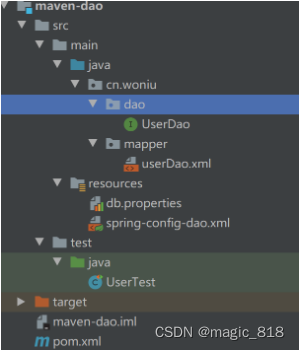
添加属性文件:db.properties
jdbc.driver=com.mysql.cj.jdbc.Driver
jdbc.url=jdbc:mysql://127.0.0.1:3306/test?useUnicode=true&characterEncoding=utf-8&useSSL=false&serverTimezone=GMT%2B8
jdbc.username=root
jdbc.password=123456
添加spring-config-dao.xml
编写userDao.xml 文件
c、编写service模块代码
添加spring-config-service.xml
d、编写controller模块代码
d1、配置pom.xml 文件
4.0.0 cn.woniu maven-web 1.0-SNAPSHOT war maven-web Maven Webapp http://www.example.com 5.0.9.RELEASE cn.woniu maven-service 1.0-SNAPSHOT org.springframework spring-webmvc ${spring.version} javax.servlet servlet-api 2.5 provided javax.servlet.jsp jsp-api 2.0 provided javax.servlet jstl 1.2 org.apache.tomcat.maven tomcat7-maven-plugin 2.2 / 8080 UTF-8
d2、配置logback.xml
%d{yyyy-MM-dd HH:mm:ss} %5p | %-40.40logger{39} : %m%n utf8 d3、配置spring-config.xml
d4、配置springmvc-config.xml
添加web.xml
Archetype Created Web Application characterEncodingFilter org.springframework.web.filter.CharacterEncodingFilter encoding UTF-8 characterEncodingFilter /* contextConfigLocation classpath*:spring-config-*.xml org.springframework.web.context.ContextLoaderListener dispatcherServlet org.springframework.web.servlet.DispatcherServlet contextConfigLocation classpath:springmvc-config.xml 1 dispatcherServlet / d5、创建login.jsp页面
<%@ page contentType="text/html;charset=UTF-8" language="java" %>
登录
d6、创建index.jsp页面
<%@ page contentType="text/html;charset=UTF-8" language="java" isELIgnored="false" %>
<%@ taglib prefix="c" uri="http://java.sun.com/jsp/jstl/core" %>
用户列表
编号 姓名 性别 生日 地址 余额 ${user.id} ${user.userName} ${user.sex} ${user.birthday} ${user.address} ${user.money}
d7、创建默认页面controller和登录请求controller
/*** 项目启动默认进入到login.jsp*/
@Controller
public class HelloController {@RequestMapping("/")public String hello(){return "login";}
}
/*** 处理登录请求*/
@Controller
public class LoginController {@Autowiredprivate UserService userService;/*** 接收登录请求* @param model* @param account* @param password* @return*/@RequestMapping("/login")public String getLogin(Model model, HttpServletRequest request,String account, String password){try{Users users=userService.getLogin(account, password);if(users!=null){//登录成功request.getSession().setAttribute("user", users);//重定向到加载主页数据controllerreturn "redirect:/user/index";}else{model.addAttribute("msg", "帐号或密码错误");}}catch (Exception e){e.printStackTrace();}return "loign";}
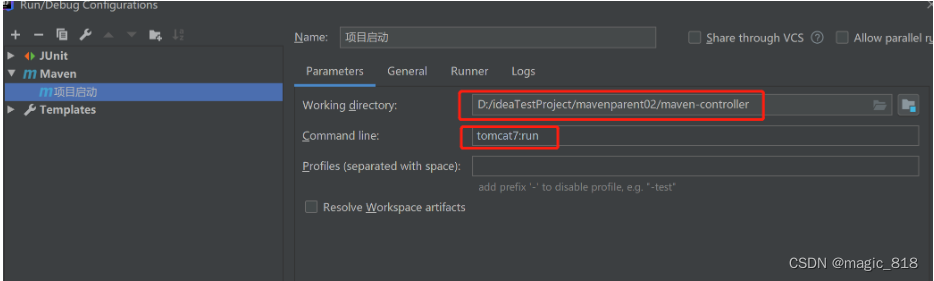
}添加maven 方式启动
maven 私服
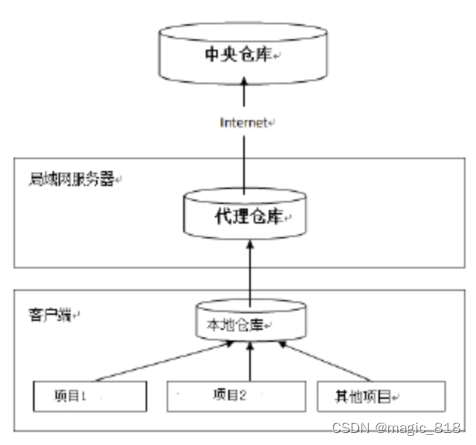
公司在自己的局域网内搭建自己的远程仓库服务器,称为私服,私服服务器即是公司内部的 maven 远程仓库,每个员工的电脑上安装 maven 软件并且连接私服服务器,员工将自己开发的项目打成 jar 并发布到私服服务器,其它项目组从私服服务器下载所依赖的构件(jar)。
私服还充当一个代理服务器,当私服上没有 jar 包会从互联网中央仓库自动下载,如下
搭建maven私服环境
a、下载 nexus
Nexus 是 Maven 仓库管理器,通过 nexus 可以搭建 maven 仓库,同时 nexus 还提供强大的仓库管理功能,构件搜索功能等。下载 Nexus, 下载地址Download Archives - Repository Manager 3 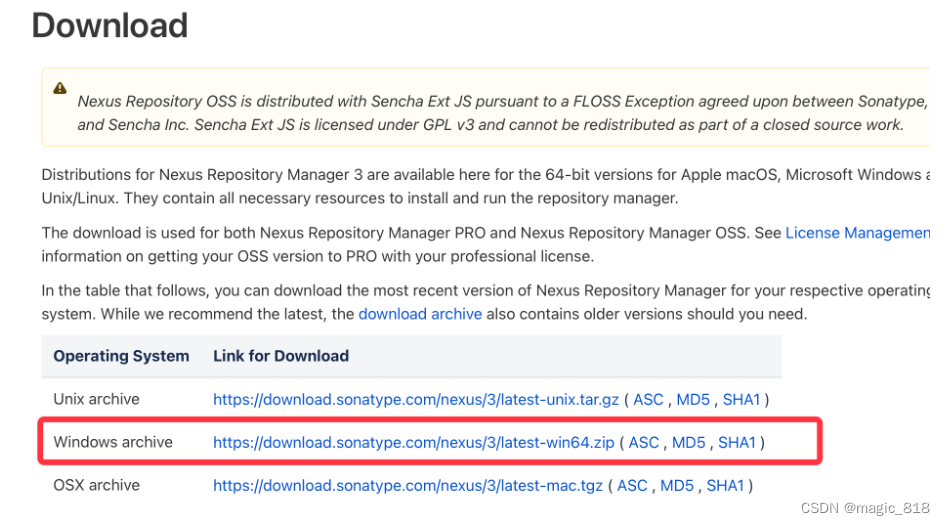
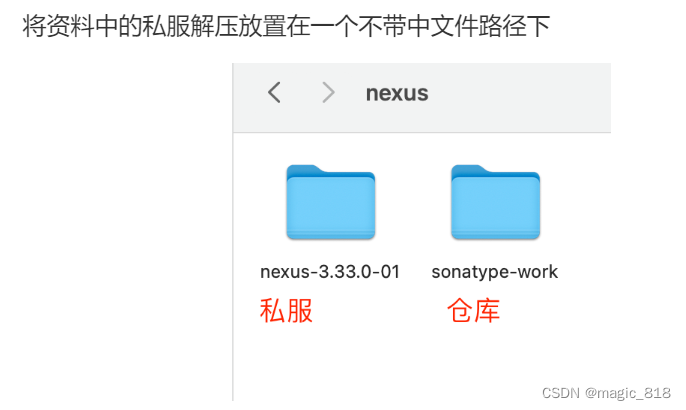
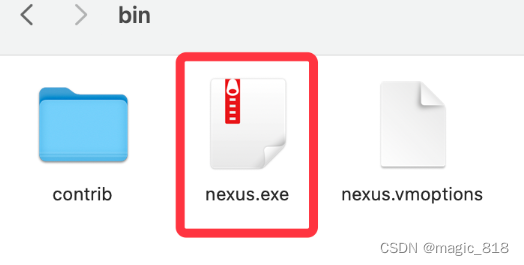
b,启动nexus服务器,进入bin 目录
nexus.exe \run nexus
c、停止私服服务器
以管理员身份运行命令提示符工具切换到刚解压的私服文件bin目录
输入停止命令:nexus.exe /stop

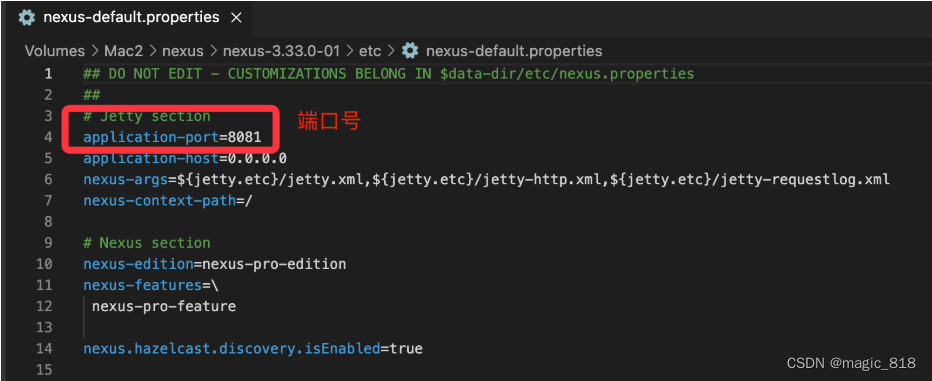
d、查找私服端口
找到解压目录下的nexus-3.33.0-01-win64\nexus-3.33.0-01\etc\nexus-default.properties
\# nexus访问端口
application-port=8081
\# nexus 主机监听配置(不用修改)
application-host=0.0.0.0\# nexus 工程目录
nexus-webapp=${bundleBasedir}/nexus
nexus-webapp-context-path=/nexus\# nexus 的 web 访问路径
nexus-work=${bundleBasedir}/../sonatype-work/nexus\# nexus 仓库目录
runtime=${bundleBasedir}/nexus/WEB-INF # nexus 运行程序目录
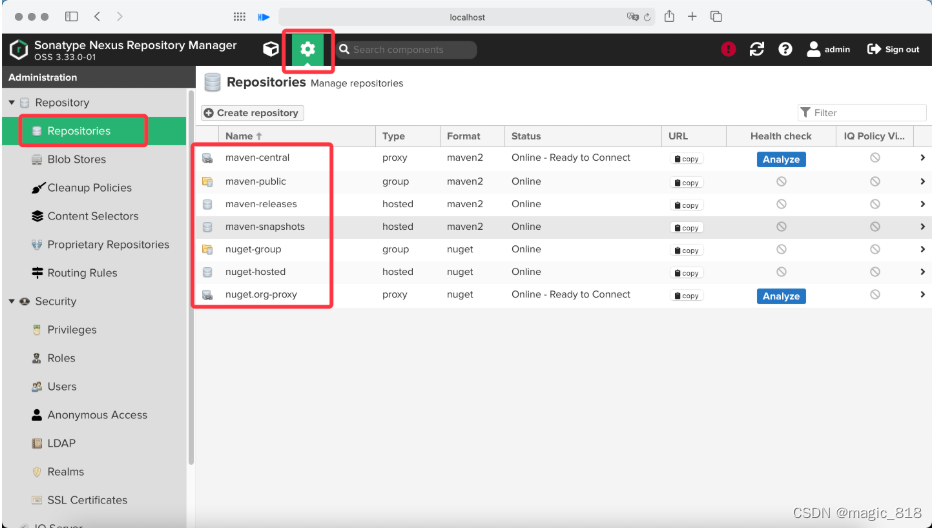
e、访问私服
在浏览器中使用url访问私服:http://localhost:8081/
f、nexus仓库类型
nexus 的仓库有 4 种类型:
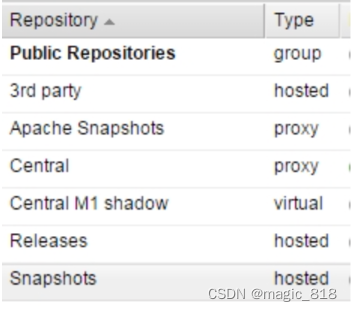
1、hosted,宿主仓库,部署自己的 jar 到这个类型的仓库,包括 releases 和 snapshot 两部分,Releases 公司内部发布版本仓库、 Snapshots 公司内部测试版本仓库,hosted仓库只面向公司内部局域网,3rd party为第三方仓库,意思是当局域网内需要网上(不是我们写的包)的第三方包时,先从网上maven官网下载下来,下载某个本地电脑,然后上传到3rd party这个仓库中
2、proxy,代理仓库,用于代理远程的公共仓库,如 maven 中央仓库,用户连接私服,私服自动去中央仓库下载 jar 包或者插件。当我们的私服没有jar时,去中央仓库下载,下载下来后,全部放到Central这个proxy仓库中,其中Apache Snapshots仓库专门用来存储从apache的中央仓库 中下载下来的
3、group,仓库组,用来合并多个 hosted/proxy 仓库,通常我们配置自己的 maven 连接仓库组。
4、virtual(虚拟):兼容 Maven1 版本的 jar 或者插件,基本上用不到了
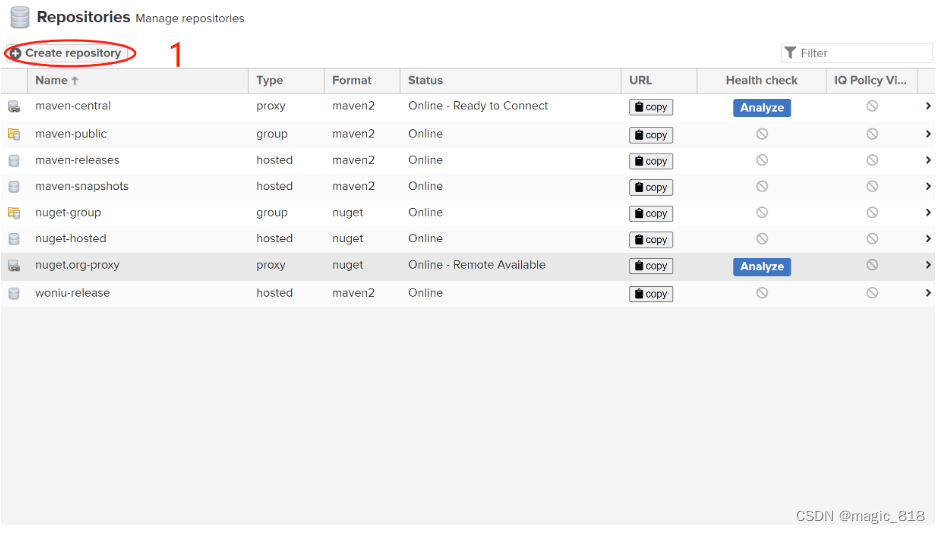
在nexus 上建立两个宿主仓库
a,新建仓库
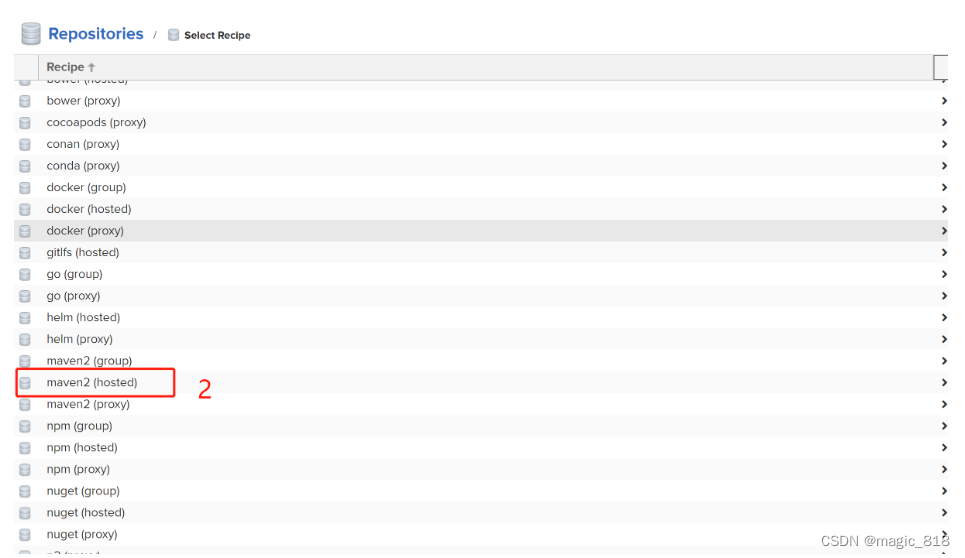
b,选中maven2(hosted)
c,填写maven仓库名称和类型
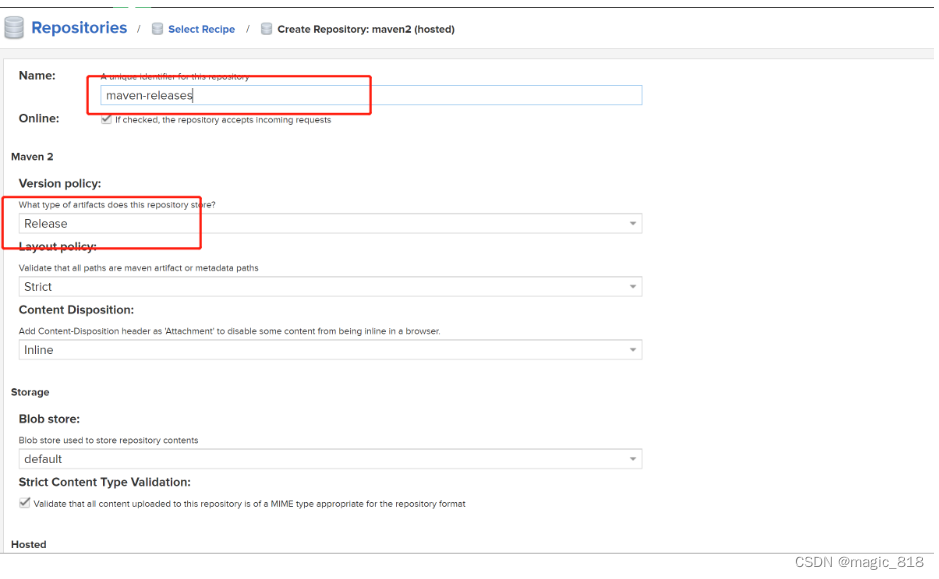
d,添加到maven仓库组
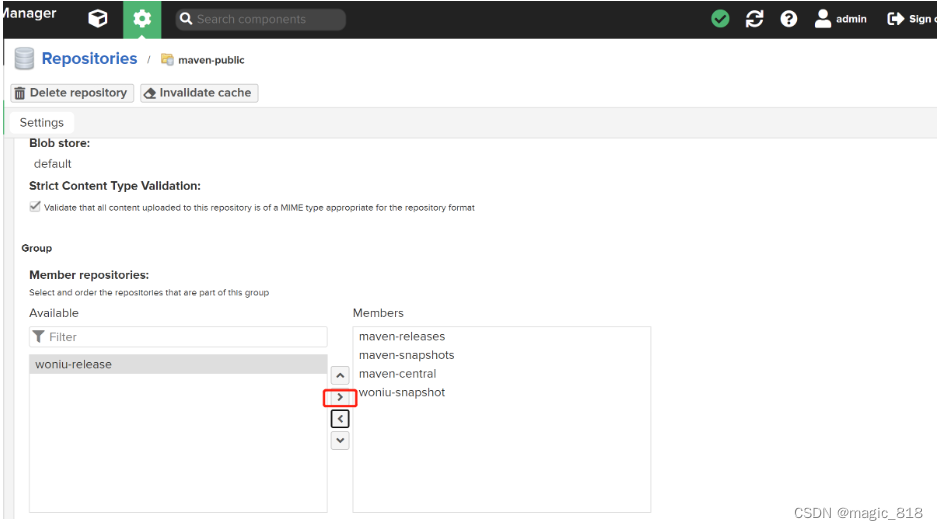
上传jar到私服
a,手动上传
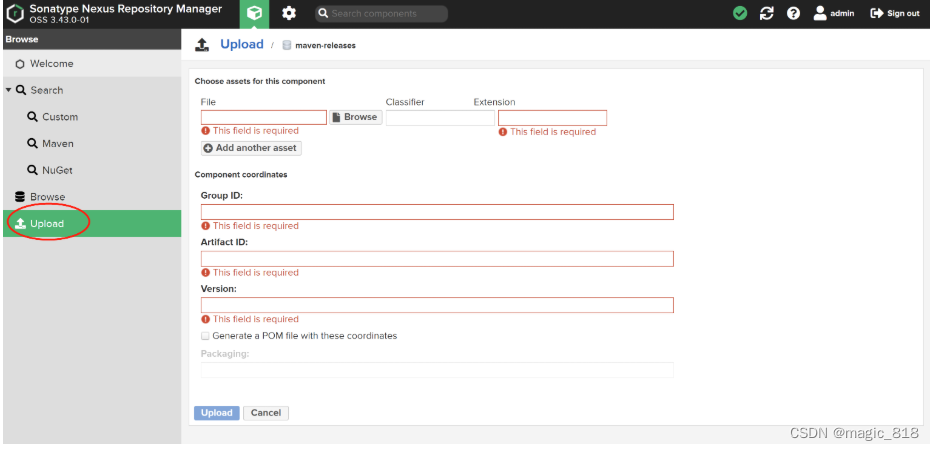
选中本地jar包,填写内容,勾选Generate a POM file with these coordinates :生成pom 文件
上传后效果:
b,mvn deploy 上传
企业中多个团队协作开发通常会将一些公用的组件、开发模块等发布到私服供其它团队或模块开发人员使用。本例子假设多团队分别开发 maven-domain,maven-dao,maven-service,maven-web,某个团队开发完在maven-dao 会将 maven-dao 发布到私服供 maven-service团队使用,本例子会将 maven-parent 工程打成jar 包发布到私服。 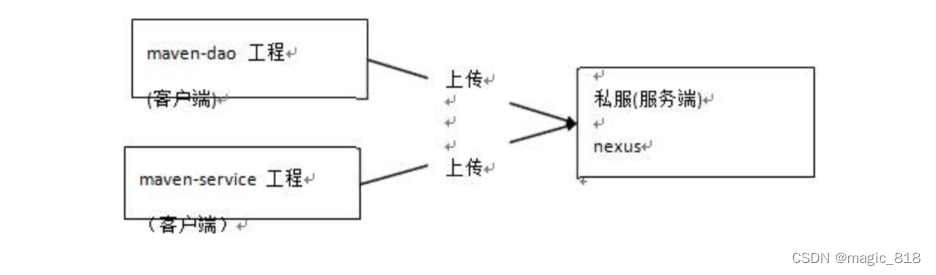
打开本地maven\conf\settings.xml在节点下添加私服登录帐号和密码
releases admin admin123 snapshots admin admin123 在要上传到私服中的项目上配置上传路径,在ssm项目的父工程pom.xml中添加如下配置
releases maven-releases http://localhost:8081/repository/maven-releases/ snapshots maven-snapshots http://localhost:8081/repository/maven-snapshots/ 注意:pom.xml这里id和settings.xml配置id对应!并且要配置在坐标上面否则会报错
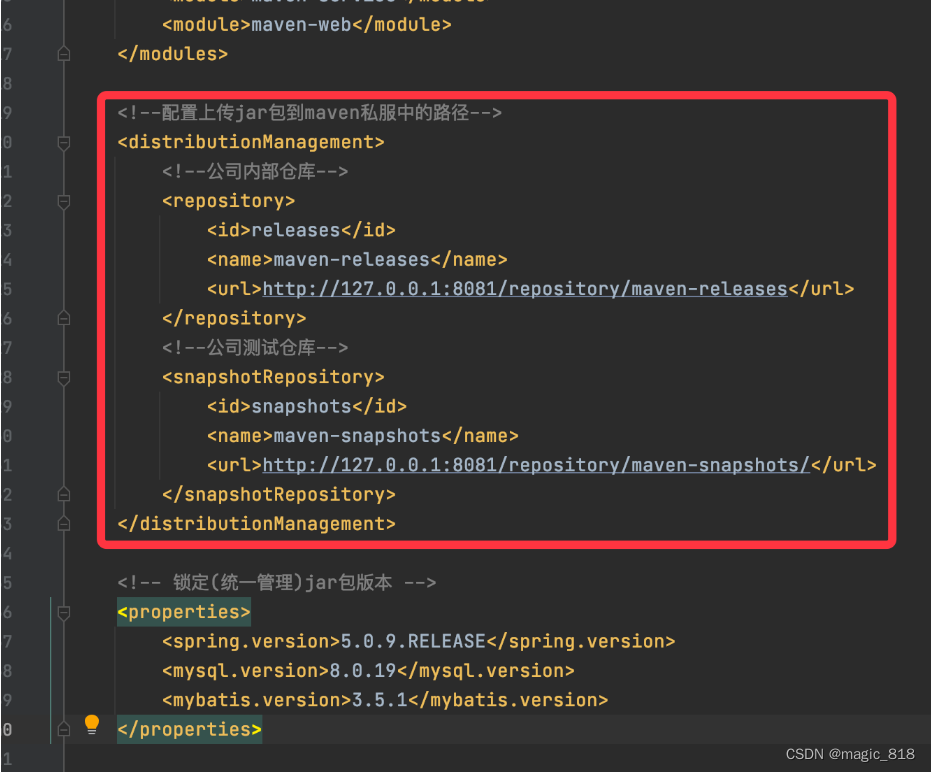
将项目中的jar包上传到私服
下载私服jar
没有配置 nexus 之前,如果本地仓库没有,去中央仓库下载,通常在企业中会在局域网内部署一台私服服务器,有了私服本地项目首先去本地仓库找 jar,如果没有找到则连接私服从私服下载 jar 包,如果私服没有 jar 包私服同时作为代理服务器从中央仓库下载 jar 包,
这样做的好处是一方面由私服对公司项目的依赖 jar 包统一管理,一方面提高下载速度项目连接私服下载 jar 包的速度要比项目连接中央仓库的速度快的多。
本例子测试从私服下载maven-dao包
dev nexus http://localhost:8081/repository/maven-public/ true true public Public Repositories http://localhost:8081/repository/maven-public/
找到maven本地仓库中项目的打包地址,将maven-dao删除 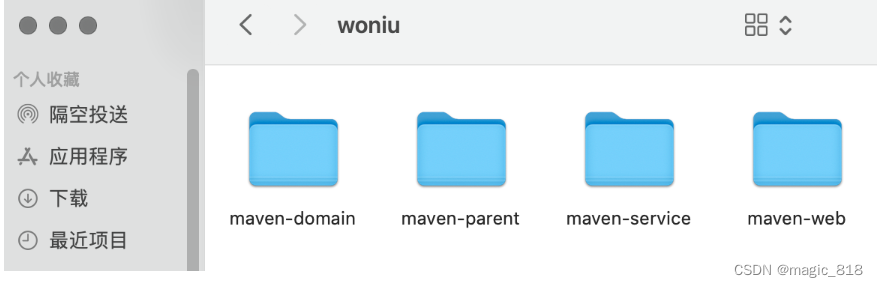
发布项目,发现提示找不到maven-dao.jar 
a,配置文件
配置本地maven的settings.xml,设置从私服下载jar
b,配置权限
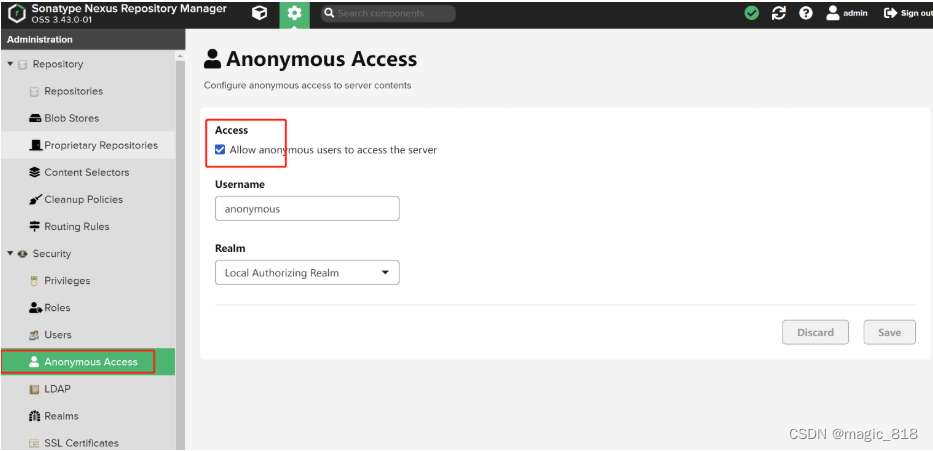
重新发布项目将会自动下载maven-dao包