

读取s3图片并保存至excel
创始人
2024-03-20 13:10:01
1. 构建Client类,实现图片读取
1.1 导包&config
client.py
import os
import numpy as np
import pandas as pd
import cv2
import boto3
# boto3安装: pip3 install opencv-python boto3config = {"region_name": "us-east-1","endpoint_url": "https://s3.rapidcompute.com",# "image_bucket": "prod-barwaqt-image","aws_access_key_id": "rcus_bd-prod","aws_secret_access_key": "OgRKm6h...2HdbKA6s",
}
1.2 类实现
class Client:def __init__(self):self.config = configself.client = boto3.client('s3', **config)def read_image(self, bucket_name, image_key):try:response = self.client.get_object(Bucket=bucket_name, Key=image_key)body = response.get('Body')tmp = np.frombuffer(body.read(), np.uint8)image = cv2.imdecode(tmp, cv2.IMREAD_COLOR)return 'OK', imageexcept Exception as e:return 'ERROR', 'READ_IMAGE_ERROR'
2. 图片下载至本地文件夹mydir
2.1 单图下载
def save_one_img(img_path, file_name='test.jpg'):client = Client()_, img = client.read_image('prod-barwaqt-image', img_path)print('res_status: ', _)cv2.imwrite(file_name, img)测试
img_path = 'prod/18/be56/18be564c36b05d730257dbbe87ede614.jpg'
save_one_img(img_path)
2.2 批量下载
def save_img(line):client = Client()status, img = client.read_image('prod-barwaqt-image', line)if status == 'OK':filename = os.path.join('mydir', line.split('/')[-1])# os.makedirs('./mydir', exist_ok=True)cv2.imwrite(filename, img)测试
df = pd.read_csv('img_path.csv')
df['s3_path'].apply(save_img)
img_path.csv 如下:
| user_account_id | s3_path |
| 210805010001565250 | prod/12/e122/12e122b5328e1b5007b3de5c76e0bf02.jpg |
| 210812010008799851 | prod/26/92b7/2692b7c55bb71581586a6392926c0a24.jpg |
3. 保存图片至excel
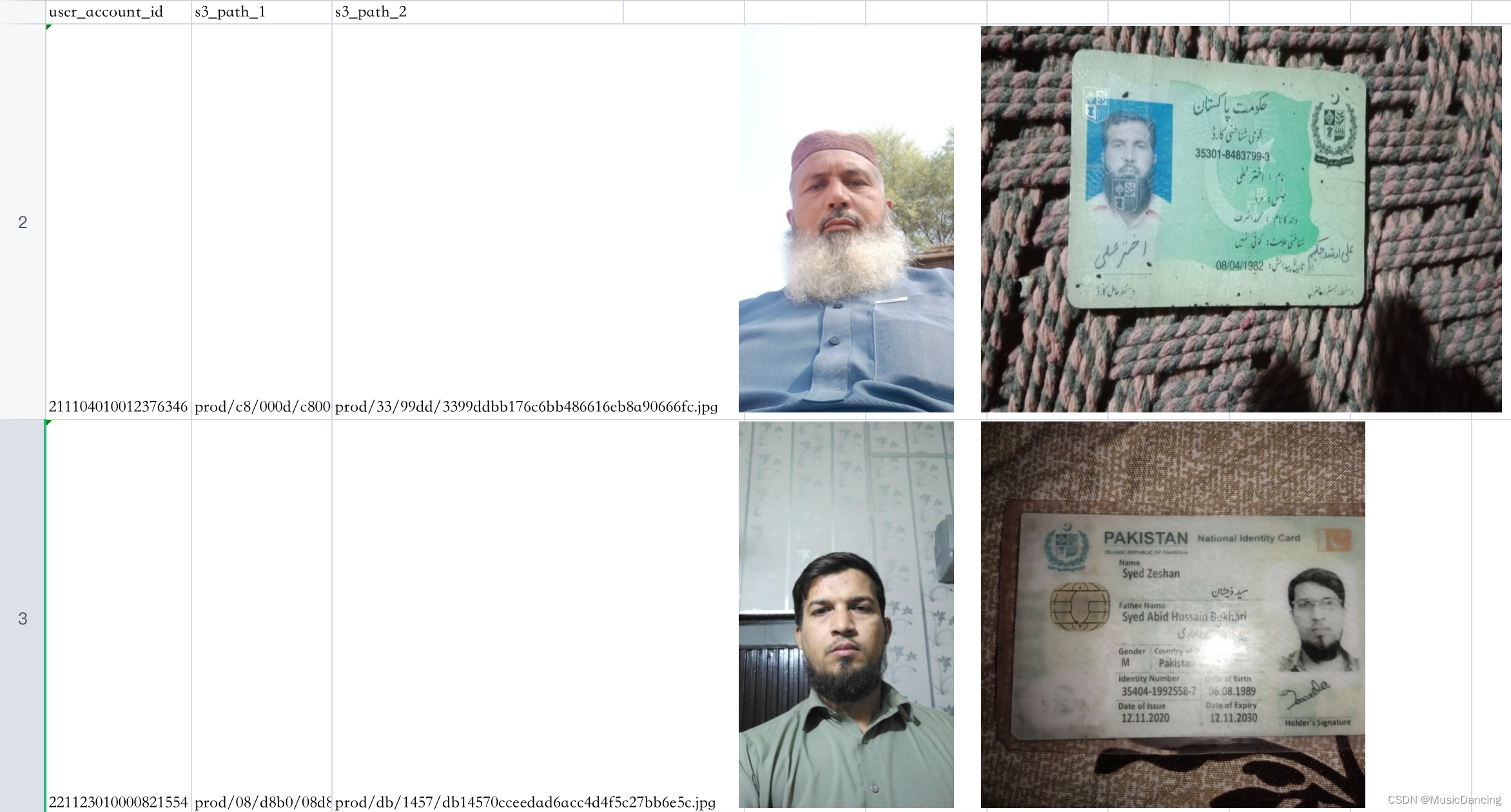
读取test_data.csv中的数据,将地址字段进行相应图片下载,追加至行末。
输入:test_data.csv

输出:res.xlsx
3.1 导包
# -*- coding: utf-8 -*-
import os
import pandas as pd
import cv2
import xlsxwriter
import tqdm# 定义一个excel文件,并添加一个sheet
BOOK = xlsxwriter.Workbook('res.xlsx')
SHEET = BOOK.add_worksheet('sheet1')
CEIL_HEIGHT = 256
SHEET.set_default_row(CEIL_HEIGHT)
SHEET.set_column(0, 18, CEIL_HEIGHT / 18)
3.2 插入图片内容
1. 在一个单元格插入一张图片
def inset_a_img(img_name, target_col): # target_col:插入的位置# 从本地文件夹读图片image_path = os.path.join("./mydir/", img_name)h, w, *_ = cv2.imread(image_path).shapescale = CEIL_HEIGHT * 1.3 / hSHEET.insert_image(line.Index + 1, target_col, image_path, # x_offset可调整x轴图片偏移{'x_offset': 100, 'y_offset': 2, 'x_scale': scale, 'y_scale': scale, 'positioning': 1})2. 处理一行数据
def insert_image(line):print('正在操作第几行: ', line.Index)print("该行有多少列: ", len(line))# 从第2列开始循环插入(第1列为索引)for i in range(1, len(line)):# print("正在操作第几列 col_no: ", i)if pd.isna(line[i]):SHEET.write(line.Index + 1, i-1, '') # 由于插入了表头,所以从第一行开始写else:SHEET.write(line.Index + 1, i-1, line[i])if i == 1 and not pd.isna(line.s3_path_1): # 当该列为s3_path_1,且其值不为空target_col = 3img_name = line.s3_path_1.split('/')[-1]print(img_name)inset_a_img(img_name, target_col)if i == 2 and not pd.isna(line.s3_path_2): # 为Nan的置空,不写入图片target_col = 5img_name = line.s3_path_2.split('/')[-1]inset_a_img(img_name, target_col)3.2 测试
df = pd.read_csv('test_data.csv', dtype=str)
col_list = ['user_account_id', 's3_path_1', 's3_path_2']
df.columns = col_list
# 为写入excel表头
for i in range(len(col_list)):SHEET.write(0, i, col_list[i]) # 第0行第i列插入字段for line in tqdm.tqdm(df.itertuples()): # tqdm: 显示进度条# print(line)# 算上index列,每行有len(col_list)+1 列# Pandas(Index=0, user_account_id='21...346', s3_path_1='e4.jpg',# s3_path_2='fc.jpg')insert_image(line)BOOK.close()相关内容
热门资讯
埃菲尔铁塔在哪 中国仿建埃菲尔...
2019年4月26日,广西南宁市,街头惊现一座巨型山寨版埃菲尔铁塔,高约20米,白色塔身,造型逼真,...
苗族的传统节日 贵州苗族节日有...
【岜沙苗族芦笙节】岜沙,苗语叫“分送”,距从江县城7.5公里,是世界上最崇拜树木并以树为神的枪手部落...
北京的名胜古迹 北京最著名的景...
北京从元代开始,逐渐走上帝国首都的道路,先是成为大辽朝五大首都之一的南京城,随着金灭辽,金代从海陵王...
长白山自助游攻略 吉林长白山游...
昨天介绍了西坡的景点详细请看链接:一个人的旅行,据说能看到长白山天池全凭运气,您的运气如何?今日介绍...
应用未安装解决办法 平板应用未...
---IT小技术,每天Get一个小技能!一、前言描述苹果IPad2居然不能安装怎么办?与此IPad不...
脚上的穴位图 脚面经络图对应的...
人体穴位作用图解大全更清晰直观的标注了各个人体穴位的作用,包括头部穴位图、胸部穴位图、背部穴位图、胳...
世界上最漂亮的人 世界上最漂亮...
此前在某网上,选出了全球265万颜值姣好的女性。从这些数量庞大的女性群体中,人们投票选出了心目中最美...
猫咪吃了塑料袋怎么办 猫咪误食...
你知道吗?塑料袋放久了会长猫哦!要说猫咪对塑料袋的喜爱程度完完全全可以媲美纸箱家里只要一有塑料袋的响...
demo什么意思 demo版本...
618快到了,各位的小金库大概也在准备开闸放水了吧。没有小金库的,也该向老婆撒娇卖萌服个软了,一切只...
埃菲尔铁塔在哪 中国仿建埃菲尔...
2019年4月26日,广西南宁市,街头惊现一座巨型山寨版埃菲尔铁塔,高约20米,白色塔身,造型逼真,...
苗族的传统节日 贵州苗族节日有...
【岜沙苗族芦笙节】岜沙,苗语叫“分送”,距从江县城7.5公里,是世界上最崇拜树木并以树为神的枪手部落...
北京的名胜古迹 北京最著名的景...
北京从元代开始,逐渐走上帝国首都的道路,先是成为大辽朝五大首都之一的南京城,随着金灭辽,金代从海陵王...
长白山自助游攻略 吉林长白山游...
昨天介绍了西坡的景点详细请看链接:一个人的旅行,据说能看到长白山天池全凭运气,您的运气如何?今日介绍...