

maven升级漏洞依赖jar包
最近在搞一些漏洞jar包升级,包括springboot、cloud等依赖,期间遇到了一些小坑,特此做这个记录一下。
目录
- 1. 打印/获取该项目的依赖树
- 2.判断依赖是否有漏洞
- 3.版本兼容性查询
- 4.常规依赖版本升级
- 5.依赖升级
- 5.1 jackson升级
- 5.2 spring相关依赖、springboot、webflux依赖升级(无cloud)
- 5.3 spring、springboot、springcloud相关依赖升级
- 5.4 elasticsearch升级
- 6.总结
1. 打印/获取该项目的依赖树
如果只是想打印当前项目的依赖树,最简单的方法就在在该项目(包含pom)的目录下执行maven命令mvn dependency:tree,要注意的点是:1.执行的目录下必须包含pom文件,且多模块的要在父pom所在目录下执行;2.需要在powershell下执行(idea里支持)
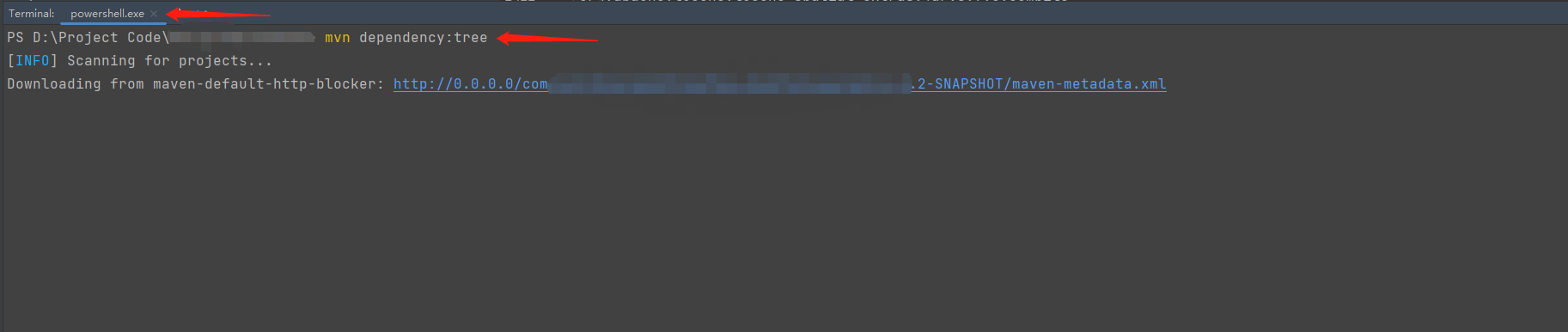
如果想打印出来并放到一个文件里,那么可以在项目目录下执行该命令
#mvn clean compile -q dependency:resolve -DoutputFile="文件存放目录地址\文件名字" -DappendOutput=true
mvn clean compile -q dependency:resolve -DoutputFile="D:\tree.dot" -DappendOutput=true
执行完上述命令后,就可以到对应目录下找到那个文件,里面就是你项目里的所有依赖。
//大概的样例就是这样子
// groupId:artifactId:依赖类型type:版本号version:依赖作用范围scope
com.fasterxml.jackson.core:jackson-databind:jar:2.13.4.2:compile
com.google.guava:failureaccess:jar:1.0.1:compile
org.springframework:spring-context:jar:5.3.20:compile
这里简单提供一个解析上面txt的文件并转成xml的代码
org.apache.poi poi 5.0.0 org.apache.poi poi-ooxml 5.0.0
import org.apache.poi.hssf.usermodel.HSSFWorkbook;
import org.apache.poi.ss.usermodel.*;import java.io.*;
import java.util.ArrayList;
import java.util.Collections;
import java.util.List;
import java.util.stream.Collectors;public class ExcelUtil {public static void main(String[] args) {// 前面获取的tree文件File file = new File("D:\\tree.dot");// 读取文件List results = readTxt(file);Collections.sort(results);List rowList = results.stream().sorted().map(result -> result.split(":")).collect(Collectors.toList());String[] headerArray = new String[]{"groupId", "artifact_id", "type", "version", "scope"};rowList.add(0, headerArray);// 将内容写到指定的文件路径writeToExcel(rowList,"D:\\tree.xls");}public static List readTxt(File file) {try (BufferedReader reader = new BufferedReader(new FileReader(file));) {//读文件List dataList = new ArrayList<>();String str;while ((str = reader.readLine()) != null) {String[] results = str.split(":", 5);if (results.length != 5) {continue;}dataList.add(str);}return dataList;} catch (IOException e) {e.printStackTrace();}return Collections.emptyList();}public static void writeToExcel(List rowList,String excelPath) {//1、创建Workbooktry (Workbook workbook = new HSSFWorkbook();FileOutputStream outputStream = new FileOutputStream(excelPath);) {Sheet sheet = workbook.createSheet();// 行号int lineNum = 0;for (String[] cells : rowList) {Row row = sheet.createRow(lineNum);int columnNum = 2;for (String cell : cells) {row.createCell(columnNum++).setCellValue(cell.trim());}lineNum++;}//向文件中写入数据,将文件持久化到磁盘workbook.write(outputStream);} catch (IOException e) {e.printStackTrace();}}
}
2.判断依赖是否有漏洞
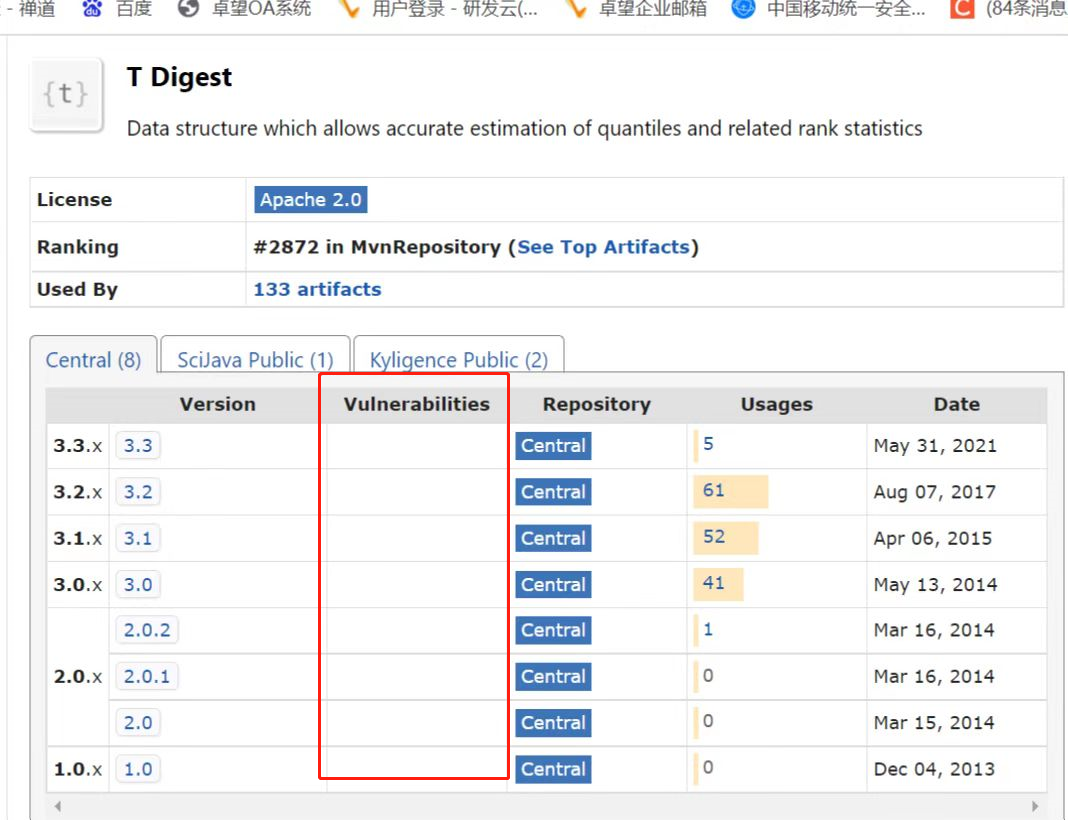
上maven仓库上搜索对应的artifactId,然后查看Vulnerabilities是否有红色字体,如果有,就表示有漏洞,需要升级到无漏洞的版本(尽可能不要跨大版本升级,否则可能会出现一些版本问题)
3.版本兼容性查询
很多时候有一些依赖是有版本兼容关系的,如果版本不兼容,则可能会导致一系列不可知的影响,造成编译异常或项目无法启动等问题,所以如何查看各个依赖之间对应版本是否兼容也是极为关键的。
这里提供的方法也只是用来简单的判断,用来做参考。
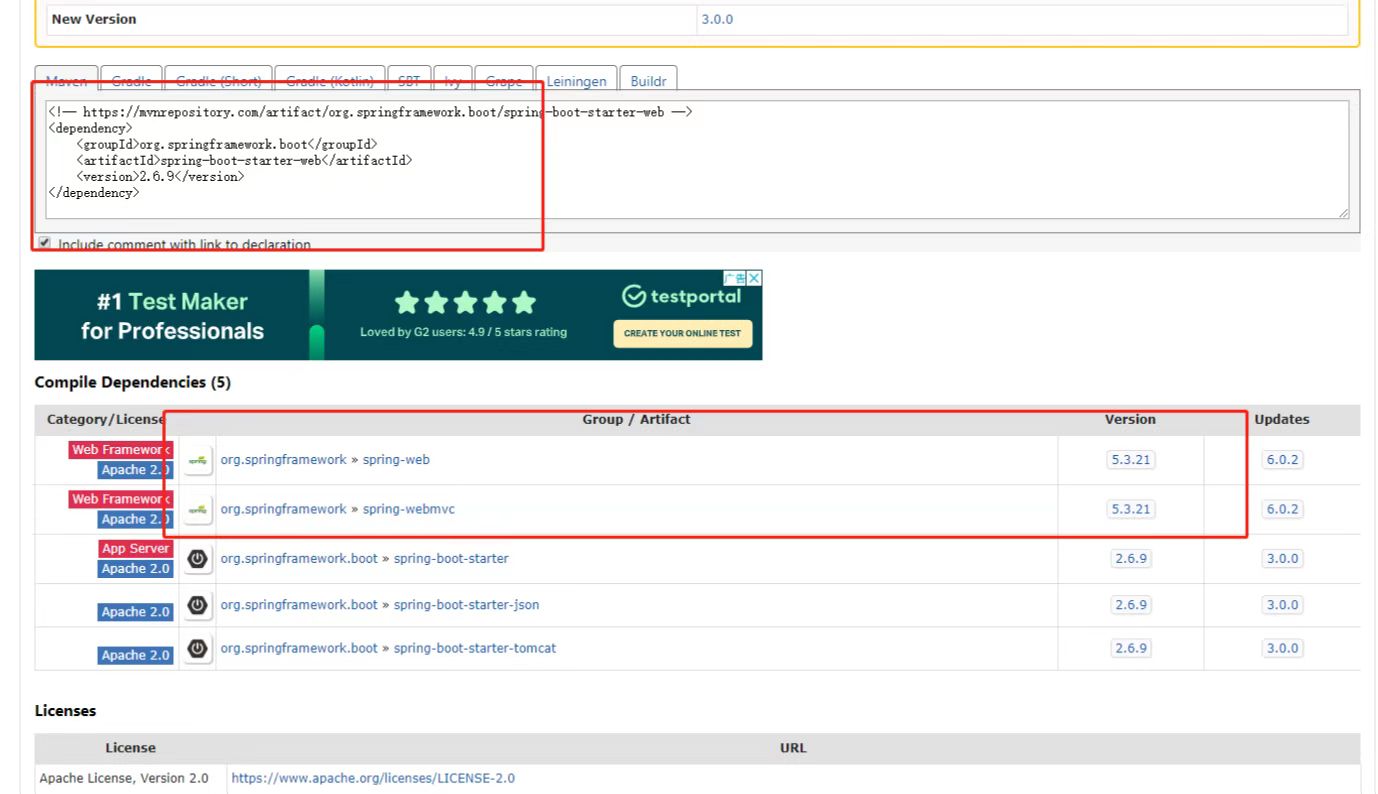
首先按照上面的方法找到对应的依赖,然后找到要升级的版本,点进去,往下拉,就可以看到一个Compile Dependencies,下面罗列的就有一些最基本的兼容性问题(当然,这个并不是罗列了所有)。以我的理解的话,这里面罗列的应该是一些底层的兼容性,例如spring boot是基于spring的,所以他会罗列一些spring相关的版本,但是不会罗列spring cloud的,因为cloud是基于boot的,所以如果要看cloud和boot的版本对应关系,就得反回来去查cloud的版本。(当然,这个是我自己理解的,不能完全保证正确,有了解的小伙伴也可以和我说一下或者一起讨论一下)
4.常规依赖版本升级
由于依赖的漏洞版本经常会变化,时不时就要去进行升级,这个时候一般都是在父pom里面对整个项目的依赖进行版本管理,然后在子pom里面只需要定义依赖而不去指定版本,这样子下次需要升级,直接在父pom那里改一下版本就可以完成了对应的依赖版本升级。
下面给一个父pom大概的样例:junit
4.0.0 org.springframework.boot spring-boot-starter-parent 2.3.12.RELEASE com.example projectName pom 1.0-SNAPSHOT 4.13.1 junit junit ${junit.version} test 5.依赖升级
5.1 jackson升级
漏洞依赖版本: com.fasterxml.jackson.core:jackson-databind:2.11.4
要升级的版本: com.fasterxml.jackson.core:jackson-databind:2.13.4.2
问题: 如果单独升级databind的话,就会类似Caused by:java.lang.ClassNotFoundException:com.fasterxml.jackson.core.util.JacksonFeature类找不到的问题导致启动报错。
问题原因: 由于jackson-databind与 jackson-annotation、jackson-core之间是有版本兼容关系,单独升级一个databind无法正常使用。(详细查看第3步版本兼容性查询)
解决方法: 将 jackson-annotation、jackson-core也一起升级到2.13.4版本对应jackson-databind的2.13.4.2版本
pom样例:
2.13.4 2.13.4.2
com.fasterxml.jackson.core jackson-databind ${jackson-databind.version} com.fasterxml.jackson.core jackson-core ${jackson.version} com.fasterxml.jackson.core jackson-annotations ${jackson.version} 5.2 spring相关依赖、springboot、webflux依赖升级(无cloud)
在升级漏洞版本的时候,个人建议先升级spring及springboot相关的依赖,因为很多漏洞依赖都是由spring引入的,所以当升级了spring底层依赖版本后,大部分的其它子依赖也会一起升级,就不需要再重新在父pom那里去定义一次版本了。
漏洞依赖版本: org.springframework:spring-beans、spring-core:5.2.9.RELEASE,spring-boot:2.2.10.RELEASE
要升级的版本: org.springframework:spring-beans、spring-core:5.3.20,spring-boot:2.6.8
问题: 由于spring底层的依赖是一系列的,如果只是单纯升级spring-beans或spring-core,可能会产生一系列问题,故最好一次性将spring相关依赖一起升级成同一个版本统一管理,并且必须与springboot版本不产生兼容性问题。
解决方法: 通过spring-boot-dependencies依赖来统一管理
pom样例:
2.6.8
org.springframework.boot spring-boot-starter-web ${spring.boot.version} org.springframework.boot spring-boot-starter-webflux ${spring.boot.version} org.springframework.boot spring-boot-dependencies ${spring.boot.version} pom import org.springframework.boot spring-boot-starter-test ${spring.boot.version} test 注:如果升级的springboot版本过高,可能会导致一些配置项读取失败,如spring.profiles.include和spring.profiles.active配置项在高版本也有了一定变化。之前简单的查了一下,在配置项中加
spring.config.use-legacy-processing=true,就可以让其用之前的配置来读取配置项。当然也可以改用最新版的配置方式,具体的可以自己查一下,这里就不详述了。
5.3 spring、springboot、springcloud相关依赖升级
漏洞依赖版本: org.springframework:spring-beans、spring-core:5.2.9.RELEASE,spring-boot:2.2.10.RELEASE、spring-cloud:2.2.2.RELEASE
要升级的版本: org.springframework:spring-beans、spring-core:5.3.20,spring-boot:2.6.8,spring-cloud:3.1.3
问题: 在按照上面的方式升级后,启动项目的时候发现了项目无法读取bootstrap.yml里的配置项,报了Caused by: java.lang.IllegalArgumentException: Could not resolve placeholder 'xxx' in value "${xxx}"。
解决方法: 在启动类对应的模块pom那里加上spring-cloud-starter-bootstrap依赖。参考SpringCloud项目无法读取bootstrap.yml配置文件的解决办法
问题原因: 对于spring cloud项目,必须要基于springcloud才会读取bootstrap.yml,因为bootstrap本身就是从cloud引进来的,而cloud又是基于boot,在cloud项目中,经常性会用到配置中心,故而有了bootstrap来替代application,但又不能完全替代,所以就把它的优先级设置成比application高。(个人理解)。
pom样例:
启动类pom文件添加下面的依赖(注意是添加依赖,而不是添加依赖管理!!)
org.springframework.cloud spring-cloud-starter-bootstrap
父pom文件:
2.6.8 2021.0.3 3.1.3
org.springframework.boot spring-boot-starter-web ${spring.boot.version} org.springframework.boot spring-boot-starter-webflux ${spring.boot.version} org.springframework.boot spring-boot-dependencies ${spring.boot.version} pom import org.springframework.boot spring-boot-starter-test ${spring.boot.version} test org.springframework.boot spring-boot-starter-actuator ${spring.boot.version} org.springframework.cloud spring-cloud-dependencies ${spring-cloud.version} pom import org.springframework.cloud spring-cloud-starter-bootstrap ${spring-cloud-starter-bootstrap.version}
5.4 elasticsearch升级
漏洞依赖版本: org.elasticsearch:elasticsearch:7.7.1
要升级的版本: org.elasticsearch:elasticsearch:7.14.0
问题: 由于项目里还引用了spring-data-elasticsearch,而springboot2.6.8对应其的版本过高,导致项目无法启动,其次升级成7.14.0后,找不到RestClientBuilderCustomizer类和RestClientProperties类
解决方法: 删除spring-data-elasticsearch依赖,并重新引入RestClientBuilderCustomizer类(新版本只是类位置更换了而已),RestClientProperties类替换为ElasticsearchProperties类,并将原来的es配置项从spring.elasticsearch.rest改为spring.elasticsearch(防止读取不到配置)
pom样例:
7.14.0
org.elasticsearch elasticsearch ${elasticsearch.version} org.elasticsearch.client elasticsearch-rest-client ${elasticsearch.version} org.elasticsearch.client elasticsearch-rest-high-level-client ${elasticsearch.version} 6.总结
以上就是本人在这次依赖升级的一个小总结啦,写这个的目的仅是用于记录,同时帮助一些有需要的人,当然可能我文笔并不是很好,且可能也会有一些问题,欢迎指正!不喜勿喷,谢谢。
上一篇:矩阵分析与计算学习记录-矩阵函数
下一篇:ArcGIS矢量化并进行拓扑检查