

ASP.NET Core 3.1系列(18)——EFCore中执行原生SQL语句
1、前言
前一篇博客介绍了EFCore中常见的一些查询操作,使用Linq或Lambda结合实体类的操作相当方便。但在某些特殊情况下,我们仍旧需要使用原生SQL来获取数据。好在EFCore中提供了完整的方法支持原生SQL,下面开始介绍。
2、构建测试数据库
与之前一样,还是使用Author和Book数据表,它们是一对多的关系,AuthorId为Book表中的外键。
Author表数据如下所示:
| Id | Name | Gender | Age | |
|---|---|---|---|---|
| 1 | 张三 | 男 | 35 | 11111111@qq.com |
| 2 | 李四 | 女 | 40 | 22222222@qq.com |
| 3 | 王五 | 男 | 37 | 33333333@qq.com |
Book表数据如下所示:
| Id | Title | Press | PublicationTime | Price | AuthorId |
|---|---|---|---|---|---|
| 1 | 《C程序设计》 | A出版社 | 2022-01-01 | 30 | 1 |
| 2 | 《C++程序设计》 | B出版社 | 2022-02-02 | 45 | 1 |
| 3 | 《Java程序设计》 | C出版社 | 2022-03-03 | 60 | 2 |
| 4 | 《C#程序设计》 | D出版社 | 2022-04-04 | 55 | 2 |
Author代码如下:
using System.Collections.Generic;
using System.ComponentModel.DataAnnotations;
using System.ComponentModel.DataAnnotations.Schema;// Code scaffolded by EF Core assumes nullable reference types (NRTs) are not used or disabled.
// If you have enabled NRTs for your project, then un-comment the following line:
// #nullable disablenamespace App.Models
{public partial class Author{public Author(){Book = new HashSet();}/// /// 主键/// [Key]public int Id { get; set; }/// /// 姓名/// [StringLength(20)]public string Name { get; set; }/// /// 性别/// [StringLength(2)]public string Gender { get; set; }/// /// 年龄/// public int? Age { get; set; }/// /// 邮箱/// [StringLength(30)]public string Email { get; set; }/// /// 导航属性/// [InverseProperty("Author")]public virtual ICollection Book { get; set; }}
}
Book代码如下:
using System;
using System.ComponentModel.DataAnnotations;
using System.ComponentModel.DataAnnotations.Schema;// Code scaffolded by EF Core assumes nullable reference types (NRTs) are not used or disabled.
// If you have enabled NRTs for your project, then un-comment the following line:
// #nullable disablenamespace App.Models
{public partial class Book{/// /// 主键/// [Key]public int Id { get; set; }/// /// 书名/// [StringLength(20)]public string Title { get; set; }/// /// 出版社/// [StringLength(20)]public string Press { get; set; }/// /// 出版时间/// [Column(TypeName = "datetime")]public DateTime? PublicationTime { get; set; }/// /// 价格/// [Column(TypeName = "money")]public decimal? Price { get; set; }/// /// 外键:AuthorId/// public int? AuthorId { get; set; }/// /// 导航属性/// [ForeignKey(nameof(AuthorId))][InverseProperty("Book")]public virtual Author Author { get; set; }}
}
DaoDbContext代码如下:
using App.Models;
using Microsoft.EntityFrameworkCore;// Code scaffolded by EF Core assumes nullable reference types (NRTs) are not used or disabled.
// If you have enabled NRTs for your project, then un-comment the following line:
// #nullable disablenamespace App.Context
{public partial class DaoDbContext : DbContext{public DaoDbContext(){}public DaoDbContext(DbContextOptions options): base(options){}public virtual DbSet Author { get; set; }public virtual DbSet Book { get; set; }protected override void OnConfiguring(DbContextOptionsBuilder optionsBuilder){if (!optionsBuilder.IsConfigured){optionsBuilder.UseSqlServer("Data Source=DSF-PC;Initial Catalog=Dao;User ID=sa;Password=123456;");}}protected override void OnModelCreating(ModelBuilder modelBuilder){modelBuilder.Entity(entity =>{entity.HasOne(d => d.Author).WithMany(p => p.Book).HasForeignKey(d => d.AuthorId).OnDelete(DeleteBehavior.Cascade).HasConstraintName("FK_Book_Author");});OnModelCreatingPartial(modelBuilder);}partial void OnModelCreatingPartial(ModelBuilder modelBuilder);}
}
3、执行原生SQL查询操作
3.1、FromSqlInterpolated
如果是针对单表的查询操作,可以使用FromSqlInterpolated方法,但是该方法有以下局限性:
- 只支持单表查询,不支持
Join - 必须返回全部列
- 结果集中的列名必须与数据库中的列名对应
下面将查询查询Author表中Name='张三'且Age>30的记录,代码如下:
using App.Context;
using App.Models;
using Microsoft.AspNetCore.Mvc;
using Microsoft.EntityFrameworkCore;
using System.Collections.Generic;
using System.Linq;namespace App.Controllers
{[Route("api/[controller]/[action]")][ApiController]public class AuthorController : ControllerBase{protected readonly DaoDbContext _dbContext;public AuthorController(DaoDbContext dbContext){_dbContext = dbContext;}[HttpGet]public ActionResult> Get(){return GetAuthors("张三", 30);}private List GetAuthors(string name, int age){return _dbContext.Set().FromSqlInterpolated(@$"select * from Author where Name={name} and Age>{age}").ToList();}}
}
运行结果如下所示:
[{"id":1,"name":"张三","gender":"男","age":35,"email":"11111111@qq.com","book":[]}]
如果希望查询出Author对应的Book,也可以通过Include实现,EFCore支持FromSqlInterpolated与Lambda一起使用,代码如下:
using App.Context;
using App.Models;
using Microsoft.AspNetCore.Mvc;
using Microsoft.EntityFrameworkCore;
using System.Collections.Generic;
using System.Linq;namespace App.Controllers
{[Route("api/[controller]/[action]")][ApiController]public class AuthorController : ControllerBase{protected readonly DaoDbContext _dbContext;public AuthorController(DaoDbContext dbContext){_dbContext = dbContext;}[HttpGet]public ActionResult> Get(){return GetAuthors("张三", 30);}private List GetAuthors(string name, int age){return _dbContext.Set().FromSqlInterpolated(@$"select * from Author where Name={name} and Age>{age}").Include(p => p.Book).ToList();}}
}
运行结果如下所示:
[{"id": 1,"name": "张三","gender": "男","age": 35,"email": "11111111@qq.com","book": [{"id": 1,"title": "《C程序设计》","press": "A出版社","publicationTime": "2021-01-01T00:00:00","price": 30.0000,"authorId": 1},{"id": 2,"title": "《C++程序设计》","press": "B出版社","publicationTime": "2021-02-02T00:00:00","price": 45.0000,"authorId": 1}]}
]
3.2、FromSqlRaw
针对单表的查询也可以使用FromSqlRaw方法,与FromSqlInterpolated类似,该方法也必须返回全部列,代码如下:
using App.Context;
using App.Models;
using Microsoft.AspNetCore.Mvc;
using Microsoft.Data.SqlClient;
using Microsoft.EntityFrameworkCore;
using System.Collections.Generic;
using System.Linq;namespace App.Controllers
{[Route("api/[controller]/[action]")][ApiController]public class AuthorController : ControllerBase{protected readonly DaoDbContext _dbContext;public AuthorController(DaoDbContext dbContext){_dbContext = dbContext;}[HttpGet]public ActionResult> Get(){return GetAuthors("张三", 30);}private List GetAuthors(string name, int age){SqlParameter[] parameters ={new SqlParameter(@"Name", name),new SqlParameter(@"Age", age)};return _dbContext.Set().FromSqlRaw("select * from Author where Name=@Name and Age>@Age", parameters).ToList();}}
}
运行结果如下所示:
[{"id":1,"name":"张三","gender":"男","age":35,"email":"11111111@qq.com","book":[]}]
FromSqlRaw方法也可以与Lambda一起使用,代码如下:
using App.Context;
using App.Models;
using Microsoft.AspNetCore.Mvc;
using Microsoft.Data.SqlClient;
using Microsoft.EntityFrameworkCore;
using System.Collections.Generic;
using System.Linq;namespace App.Controllers
{[Route("api/[controller]/[action]")][ApiController]public class AuthorController : ControllerBase{protected readonly DaoDbContext _dbContext;public AuthorController(DaoDbContext dbContext){_dbContext = dbContext;}[HttpGet]public ActionResult> Get(){return GetAuthors(1);}private List GetAuthors(int id){SqlParameter[] parameters ={new SqlParameter(@"Id", id),};return _dbContext.Set().FromSqlRaw("select * from Author where Id>@Id", parameters).OrderByDescending(p => p.Age).Include(p => p.Book).ToList();}}
}
运行结果如下所示:
[{"id": 2,"name": "李四","gender": "女","age": 40,"email": "22222222@qq.com","book": [{"id": 3,"title": "《Java程序设计》","press": "C出版社","publicationTime": "2021-03-03T00:00:00","price": 60.0000,"authorId": 2},{"id": 4,"title": "《C#程序设计》","press": "D出版社","publicationTime": "2021-04-04T00:00:00","price": 55.0000,"authorId": 2}]},{"id": 3,"name": "王五","gender": "男","age": 37,"email": "33333333@qq.com","book": []}
]
4、执行原生SQL非查询操作
4.1、ExecuteSqlInterpolated
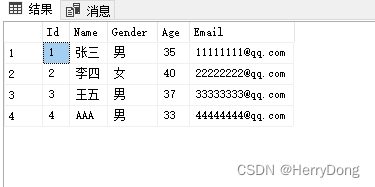
如果希望执行增删改等非查询操作,可以使用ExecuteSqlInterpolated方法,下面给Author表添加一条记录,代码如下:
using App.Context;
using App.Models;
using Microsoft.AspNetCore.Mvc;
using Microsoft.EntityFrameworkCore;namespace App.Controllers
{[Route("api/[controller]/[action]")][ApiController]public class AuthorController : ControllerBase{protected readonly DaoDbContext _dbContext;public AuthorController(DaoDbContext dbContext){_dbContext = dbContext;}[HttpGet]public ActionResult Get(){int result = AddAuthor(new Author{Name = "AAA",Gender = "男",Age = 33,Email = "44444444@qq.com"});return result > 0 ? "添加数据成功" : "添加数据失败";}private int AddAuthor(Author author){string name = author.Name;string gender = author.Gender;int age = author.Age.HasValue ? author.Age.Value : 0;string email = author.Email;return _dbContext.Database.ExecuteSqlInterpolated(@$"insert into Author(Name,Gender,Age,Email) values({name},{gender},{age},{email})");}}
}
运行结果如下所示:
添加数据成功
4.2、ExecuteSqlRaw
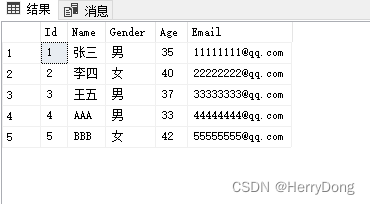
ExecuteSqlRaw方法也可以执行增删改等非查询操作,代码如下:
using App.Context;
using App.Models;
using Microsoft.AspNetCore.Mvc;
using Microsoft.Data.SqlClient;
using Microsoft.EntityFrameworkCore;namespace App.Controllers
{[Route("api/[controller]/[action]")][ApiController]public class AuthorController : ControllerBase{protected readonly DaoDbContext _dbContext;public AuthorController(DaoDbContext dbContext){_dbContext = dbContext;}[HttpGet]public ActionResult Get(){int result = AddAuthor(new Author{Name = "BBB",Gender = "女",Age = 42,Email = "55555555@qq.com"});return result > 0 ? "添加数据成功" : "添加数据失败";}private int AddAuthor(Author author){SqlParameter[] parameters ={new SqlParameter(@"Name", author.Name),new SqlParameter(@"Gender", author.Gender),new SqlParameter(@"Age", author.Age),new SqlParameter(@"Email", author.Email)};return _dbContext.Database.ExecuteSqlRaw("insert into Author(Name,Gender,Age,Email) values(@Name,@Gender,@Age,@Email)", parameters);}}
}
运行结果如下所示:
添加数据成功
5、执行数据库事务
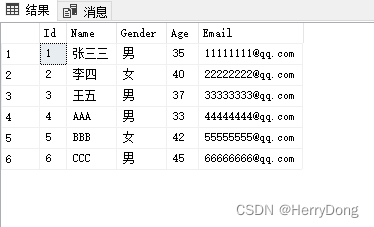
如果希望执行数据库事务,可以使用BeginTransaction方法,下面代码执行了一个包含Insert和Update的事务:
using App.Context;
using Microsoft.AspNetCore.Mvc;
using Microsoft.EntityFrameworkCore;namespace App.Controllers
{[Route("api/[controller]/[action]")][ApiController]public class AuthorController : ControllerBase{protected readonly DaoDbContext _dbContext;public AuthorController(DaoDbContext dbContext){_dbContext = dbContext;}[HttpGet]public ActionResult Get(){using (var transaction = _dbContext.Database.BeginTransaction()){try{_dbContext.Database.ExecuteSqlRaw("insert into Author(Name,Gender,Age,Email) values('CCC','男',45,'66666666@qq.com')");_dbContext.Database.ExecuteSqlRaw("update Author set Name='张三三' where Name='张三'");transaction.Commit();return "执行事务成功";}catch{transaction.Rollback();return "执行事务失败";}}}}
}
运行结果如下所示:
执行事务成功
6、封装SqlHelper
上面的查询方法都必须返回全部列,而在实际开发过程中往往是按需查询列,因此我们还是需要自行封装一个SqlHelper,代码如下:
SqlHelper.cs代码:
using Microsoft.Data.SqlClient;
using Microsoft.EntityFrameworkCore;
using System.Collections.Generic;
using System.Data;
using System.Data.Common;namespace App
{public class SqlHelper{/// /// 执行查询操作,返回DataTable/// /// 数据库上下文/// 命令语句/// 命令类型/// 格式化参数集合/// DataTable public static DataTable ExecuteQuery(DbContext dbContext, string commandText, CommandType commandType, params SqlParameter[] parameters){DbConnection connection = dbContext.Database.GetDbConnection();if (connection.State != ConnectionState.Open){connection.Open();}// 设置Commandusing DbCommand command = connection.CreateCommand();command.CommandText = commandText;command.CommandType = commandType;if (parameters != null && parameters.Length > 0){command.Parameters.AddRange(parameters);}// 查询数据using SqlDataAdapter adapter = new SqlDataAdapter(command as SqlCommand);try{DataTable dataTable = new DataTable();adapter.Fill(dataTable);return dataTable;}catch{return null;}finally{command.Parameters.Clear();}}/// /// 执行查询操作,返回DbDataReader/// /// 数据库上下文/// 命令语句/// 命令类型/// 格式化参数集合/// DbDataReader public static DbDataReader ExecuteReader(DbContext dbContext, string commandText, CommandType commandType, params SqlParameter[] parameters){DbConnection connection = dbContext.Database.GetDbConnection();if (connection.State != ConnectionState.Open){connection.Open();}// 设置Commandusing DbCommand command = connection.CreateCommand();command.CommandText = commandText;command.CommandType = commandType;if (parameters != null && parameters.Length > 0){command.Parameters.AddRange(parameters);}// 返回DataReadertry{return command.ExecuteReader();}catch{return null;}finally{command.Parameters.Clear();}}/// /// 执行查询操作,返回第一行第一列/// /// 数据库上下文/// 命令语句/// 命令类型/// 格式化参数集合/// 第一行第一列 public static object ExecuteScalar(DbContext dbContext, string commandText, CommandType commandType, params SqlParameter[] parameters){DbConnection connection = dbContext.Database.GetDbConnection();if (connection.State != ConnectionState.Open){connection.Open();}// 设置Commandusing DbCommand command = connection.CreateCommand();command.CommandText = commandText;command.CommandType = commandType;if (parameters != null && parameters.Length > 0){command.Parameters.AddRange(parameters);}// 返回第一行第一列try{return command.ExecuteScalar();}catch{return null;}finally{command.Parameters.Clear();}}/// /// 执行非查询操作,返回受影响的行数/// /// 数据库上下文/// 命令语句/// 命令类型/// 格式化参数集合/// 受影响的行数 public static int ExecuteNonQuery(DbContext dbContext, string commandText, CommandType commandType, params SqlParameter[] parameters){DbConnection connection = dbContext.Database.GetDbConnection();if (connection.State != ConnectionState.Open){connection.Open();}// 设置Commandusing DbCommand command = connection.CreateCommand();command.CommandText = commandText;command.CommandType = commandType;if (parameters != null && parameters.Length > 0){command.Parameters.AddRange(parameters);}// 返回受影响的行数try{return command.ExecuteNonQuery();}catch{return 0;}finally{command.Parameters.Clear();}}/// /// 执行数据库事务,返回受影响的行数/// /// 数据库上下文/// 命令集合/// 受影响的行数 public static int ExecuteTransaction(DbContext dbContext, List commands){DbConnection connection = dbContext.Database.GetDbConnection();if (connection.State != ConnectionState.Open){connection.Open();}// 开启事务using DbTransaction transaction = connection.BeginTransaction();try{foreach (var item in commands){DbCommand command = connection.CreateCommand();command.CommandText = item.CommandText;command.CommandType = CommandType.Text;command.Transaction = transaction;if (item.Parameters.Count > 0){command.Parameters.AddRange(item.Parameters.ToArray());}command.ExecuteNonQuery();}// 提交事务transaction.Commit();return 1;}catch{// 回滚事务transaction.Rollback();return 0;}}}
}
SingleCommand.cs代码:
using Microsoft.Data.SqlClient;
using System.Collections.Generic;namespace App
{public class SingleCommand{/// /// 命令语句/// public string CommandText { get; set; }/// /// 格式化参数集合/// public List Parameters { get; set; }}
}
最后在Controller调用即可,代码如下:
using App.Context;
using App.Models;
using Microsoft.AspNetCore.Mvc;
using Microsoft.Data.SqlClient;
using System;
using System.Collections.Generic;
using System.Data;
using System.Data.Common;namespace App.Controllers
{[Route("api/[controller]/[action]")][ApiController]public class AuthorController : ControllerBase{protected readonly DaoDbContext _dbContext;public AuthorController(DaoDbContext dbContext){_dbContext = dbContext;}[HttpGet]public ActionResult GetAuthorsById(){SqlParameter parameter = new SqlParameter(@"Id", 1);return SqlHelper.ExecuteQuery(_dbContext, "select Id,Name,Age from Author where Id>@Id", CommandType.Text, parameter);}[HttpGet]public ActionResult> GetAuthorsByAge(){List list = new List();SqlParameter parameter = new SqlParameter(@"Age", 35);DbDataReader reader = SqlHelper.ExecuteReader(_dbContext, "select Id,Name,Age from Author where Age>@Age", CommandType.Text, parameter);while (reader.Read()){list.Add(new Author{Id = Convert.ToInt32(reader["Id"]),Name = reader["Name"] == DBNull.Value ? null : Convert.ToString(reader["Name"]),Age = reader["Id"] == DBNull.Value ? new Nullable() : Convert.ToInt32(reader["Age"])});}return list;}[HttpGet]public ActionResult GetAuthorsCount(){object obj = SqlHelper.ExecuteScalar(_dbContext, "select count(*) from Author", CommandType.Text);return Convert.ToInt32(obj);}[HttpGet]public ActionResult UpdateAuthorById(){SqlParameter[] parameters ={new SqlParameter(@"Id", 1),new SqlParameter(@"Email", "12345678@163.com")};int result = SqlHelper.ExecuteNonQuery(_dbContext, "update Author set Email=@Email where Id=@Id", CommandType.Text, parameters);return result > 0 ? "修改邮箱成功" : "修改邮箱失败";}[HttpGet]public ActionResult GetTransactionResult(){List commands = new List{new SingleCommand(){CommandText = "insert into Author values(@Name,@Gender,@Age,@Email)",Parameters = new List{new SqlParameter(@"Name", "赵六"),new SqlParameter(@"Gender", "女"),new SqlParameter(@"Age", 39),new SqlParameter(@"Email", "12345678@163.com")}},new SingleCommand(){CommandText = "update Author set Age=@Age where Name=@Name",Parameters = new List{new SqlParameter(@"Name", "张三"),new SqlParameter(@"Age", 59)}},};int result = SqlHelper.ExecuteTransaction(_dbContext, commands);return result > 0 ? "事务执行成功" : "事务执行失败";}}
}
GetAuthorsById结果如下:
[{"id":2,"name":"李四","age":40},{"id":3,"name":"王五","age":37}
]
GetAuthorsByAge结果如下:
[{"id":2,"name":"李四","gender":null,"age":40,"email":null,"book":[]},{"id":3,"name":"王五","gender":null,"age":37,"email":null,"book":[]}
]
GetAuthorsCount结果如下:
3
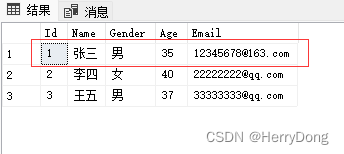
UpdateAuthorById结果如下:
修改邮箱成功
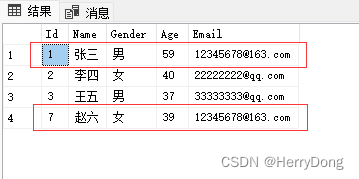
GetTransactionResult结果如下:
事务执行成功
7、结语
本文主要介绍了如何在EFCore中执行原生SQL的方法。在某些特殊情况下,直接执行原生语句往往会更方便且更高效,因此EFCore虽好,也别忘了SQL。